tamnd/amz-cli
GitHub: tamnd/amz-cli
一款无需 API key 即可通过命令行抓取并结构化 Amazon 产品、评论、排行榜等公开数据的 Go 工具。
Stars: 1 | Forks: 0
# amz
[](https://github.com/tamnd/amz-cli/actions/workflows/ci.yml)
[](https://github.com/tamnd/amz-cli/releases/latest)
[](https://pkg.go.dev/github.com/tamnd/amz-cli)
[](https://goreportcard.com/report/github.com/tamnd/amz-cli)
[](./LICENSE)
Amazon 的命令行工具。`amz` 读取每一个公开的 Amazon 页面——产品、
搜索、评论、问答、报价、榜单、分类、品牌、卖家、作者以及
促销——并将它们转化为干净、可通过管道传递的记录。单一纯 Go 二进制程序,
无需 API key。
[安装](#install) • [命令](#commands) • [用法](#usage) • [访问层级](#access-tiers)
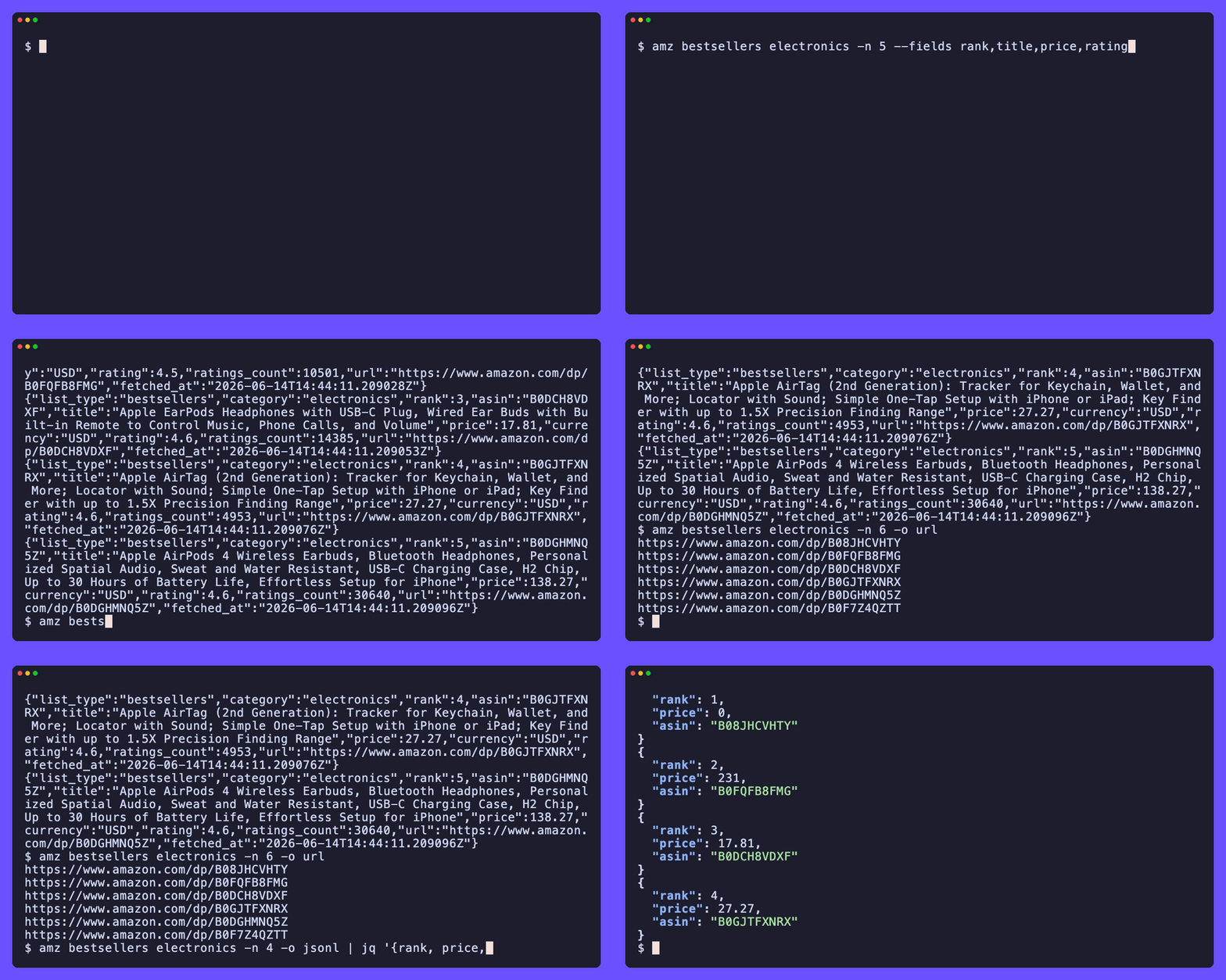
它通过普通的 HTTPS 读取 `amazon.com` 上的公开页面,提取 Amazon 为机器标记的
JSON-LD,并回退到精确的 HTML 选择器,从而确保在页面提供了相关数据的情况下,
每条记录都是丰富的且没有缺失字段。每个请求都会进行限速、在遇到临时故障时重试,
并在磁盘上进行缓存。当 Amazon 返回机器人验证页面而不是实际内容时,`amz` 会
检测到这一情况,并以一个特定的退出代码退出,而不是向您返回无效数据。
`amz` 是一个独立的工具。它不隶属于 Amazon,也未获得 Amazon 的认可。
## 安装
```
go install github.com/tamnd/amz-cli/cmd/amz@latest
```
或者从 [发布页面](https://github.com/tamnd/amz-cli/releases) 获取预编译的二进制文件,
或者运行容器镜像:
```
docker run --rm ghcr.io/tamnd/amz:latest bestsellers electronics -n 10
```
内置了 Shell 自动补全:`amz completion bash|zsh|fish|powershell`。
## 命令
| 命令 | 读取内容 |
| --- | --- |
| `amz product ...` | 一个或多个产品详情页,完全标准化 |
| `amz price ...` | 仅当前价格 |
| `amz related ` | 产品页上的推荐卡片 |
| `amz search ` | 目录搜索结果卡片 |
| `amz reviews ` | 完整的评论语料库;支持 `--stars`, `--sort` |
| `amz qa ` | 客户问答对 |
| `amz offers ` | 所有购买选项(卖家、成色、价格) |
| `amz bestsellers [category]` | 实时前 100 名榜单 |
| `amz new-releases [category]` | 分类中的最新发布 |
| `amz movers [category]` | 24 小时内排名变化最大者 |
| `amz wished [category]` | 最想要的产品 |
| `amz gifted [category]` | 最受赠的产品 |
| `amz category ` | 浏览节点:名称、面包屑导航、子节点、热门 ASIN |
| `amz brand ` | 品牌 Storefront |
| `amz seller ` | 第三方卖家资料及评分明细 |
| `amz author ` | Author Central 页面 |
| `amz deals` | 今日促销网格 |
| `amz seed` | 将 ASIN 或 URL 加入抓取队列 |
| `amz crawl` | 将抓取队列消化并存入本地存储 |
| `amz db query ` | 查询可选的本地 DuckDB 存储 |
| `amz asin ...` | 从任意 Amazon URL 提取 ASIN |
| `amz open ` | 在浏览器中打开相关的 Amazon 页面 |
| `amz info` | 显示访问层级、市场及配置摘要 |
| `amz config` | 查看和管理配置及 PA-API 凭证 |
| `amz cache path\|info\|clear` | 检查或清除磁盘页面缓存 |
完整的参考文档和指南位于 [amz-cli.tamnd.com](https://amz-cli.tamnd.com)。
## 用法
```
amz product B084DWG2VQ # one product, fully normalized
amz search "mechanical keyboard" -n 20 # catalog search results
amz reviews B084DWG2VQ --stars 1 # the one-star reviews
amz offers B084DWG2VQ # every buying option
amz bestsellers electronics # the live top-100 chart
amz category 172282 # the Electronics browse node
amz product B084DWG2VQ -m uk # any of 16 marketplaces
```
记录输出格式可以为表格(在终端下的默认格式)、JSON、JSONL、CSV、TSV、
url 或 raw:
```
amz bestsellers electronics --fields rank,title,price,rating -o table
amz bestsellers electronics -n 20 --fields asin,title,price -o csv
amz bestsellers electronics -n 10 -o url
amz product B084DWG2VQ -o json
amz reviews B084DWG2VQ -o jsonl | jq 'select(.stars <= 2)'
```
将搜索结果转换为完整的产品记录:
```
amz search "mechanical keyboard" -n 25 -o url \
| sed 's#.*/dp/##; s#/.*##' \
| xargs -I{} amz product {} -o jsonl > keyboards.jsonl
```
收集某个分类的畅销品并查询本地存储:
```
amz bestsellers electronics -n 100 -o url | amz seed --file -
amz crawl
amz db query "select data->>'brand' brand, count(*) n from products group by brand order by n desc"
```
### 全局 flags
```
-o, --output table|json|jsonl|csv|tsv|url|raw (auto: table on a TTY, jsonl when piped)
--fields comma-separated columns to include
--no-header omit the header row in table/csv/tsv
--template Go text/template applied per record
-n, --limit max records (0 = unlimited)
-m, --marketplace marketplace slug: us|uk|de|fr|jp|ca|in|it|es|... (default us)
-q, --quiet suppress progress output
--color auto|always|never
--rate min spacing between requests (default 3s)
--timeout per-request timeout (default 30s)
--retries retry attempts on 429/503 (default 3)
-j, --workers concurrency for multi-ASIN and bulk commands (default 2)
--no-cache bypass the on-disk cache
--dry-run print the URL(s) that would be fetched, then stop
```
## 访问层级
`amz` 读取三个层级,每次运行可选择其一:
**公开 HTML**(默认)读取未登录浏览器所能看到的内容。无需设置。
大多数命令在此层级下均可工作;不过,当来自高流量数据中心 IP 段的
住宅 IP 访问时,产品页面和搜索可能会受到限制。
**Cookies 模式**(`--cookies `)借助已登录的浏览器会话。传入一个从您的
浏览器导出的 Netscape 格式 cookie 文件,即可访问需要登录上下文的页面。
**PA-API**(`--api`)调用官方的 Amazon Product Advertising API 5.0,
通过 SigV4 在本地进行签名。需要凭证(`amz config set-api`)。返回
与其他层级相同的输出 schema,因此脚本可以无缝运行,无需修改。
## 退出代码
```
0 success, at least one record
1 error
2 usage error
3 no results
4 partial results
5 blocked (bot-check or CAPTCHA; try --cookies, --rate, or --api)
```
## 开发
```
cmd/amz/ thin main entry point
cli/ cobra commands and output rendering
amz/ HTTP client, parsers, models, and marketplace table
docs/ documentation site (Hugo, tago-doks theme)
```
```
make build # ./bin/amz
make test # go test ./...
make vet # go vet ./...
```
需要 Go 1.26+。
## 发布
推送版本 tag,GitHub Actions 将运行 GoReleaser:
```
git tag -a v0.2.0 -m "v0.2.0"
git push --tags
```
镜像 tag 不包含 `v` 前缀(`ghcr.io/tamnd/amz:0.2.0`)。
## 许可证
Apache-2.0。详见 [LICENSE](LICENSE)。
标签:Amazon, BeEF, EVTX分析, Go, Ruby工具, 命令控制, 数据采集, 日志审计, 爬虫, 电商工具, 请求拦截