platinum2high/ioc-hunter
GitHub: platinum2high/ioc-hunter
一款异步威胁情报关联引擎,能从文本、文件和日志中自动提取 IOC 并在多个情报源间并行富化、关联分析及导出标准检测规则。
Stars: 3 | Forks: 1
# IOC Hunter
[](https://github.com/platinum2high/ioc-hunter/actions/workflows/ci.yml)



## 🌐 在浏览器中尝试 — 无需安装
公共 Render 部署中提供了一个粘贴并检查的 Web 演示。
粘贴任意文本,实时获取判定结果。无需注册,不留存数据,渲染出来的代码与你本地运行的引擎是同一个。
**两键点击即可部署你自己的实例**:参见下方的[`自托管 Web 演示`](#self-host-the-web-demo)。
## ⚡ 开箱即用,无需密钥
你无需任何 API key 即可试用。克隆、安装、运行 —— **两个数据源立即可用**,且无需注册:
- **Tor exit** — 标记来自 Tor 中继的流量
- **NetMeta** — 用于 bogon / private / CGNAT / reserved IP 范围(RFC 1918, RFC 5737, RFC 6598, RFC 6890)的离线分类器。在生产日志中出现 `test-net` 或 `240/4` IP 意味着配置错误或伪造流量。
```
git clone https://github.com/platinum2high/ioc-hunter
cd ioc-hunter
python -m venv .venv && source .venv/bin/activate
pip install -e .
ioc-hunter check "185[.]220[.]101[.]42" # ← works right now, no key needed
```
对于**其他五个数据源**(URLhaus, ThreatFox, AbuseIPDB, OTX, VirusTotal),你需要免费的 API key —— 它们的注册时间都不超过一分钟,并且该工具会通过 `ioc-hunter configure` 引导你完成配置。如果没有配置,这些数据源将返回 `UNKNOWN` 并附带明确的“缺少 API key”消息 —— 它们不会崩溃,只会优雅地跳过。
## 其他 IOC 工具做不到,但本工具能做到的事
| 功能 | 大多数 IOC 检查器 | IOC Hunter |
| --- | --- | --- |
| 输入 | 每次一个 IOC | 拖入整份报告,粘贴 `.eml`,或 tail 实时日志 |
| 感知 Defang | 通常不支持 | 完全理解 `evil[.]com`, `hxxp://`, `[at]` |
| 数据源 | 1 个(通常是 VT) | 7 个并行:VT, AbuseIPDB, OTX, URLhaus, ThreatFox, Tor exit, NetMeta |
| 钓鱼分类 | 无 | `.eml` 解析器:From/Reply-To 不匹配,Received 链,附件 hash |
| 实时监控 | 无 | `watch` 模式 —— tail 日志,实时对可疑 IOC 发出警报 |
| 评分 | 好/坏 | 带有各数据源贡献度的透明加权模型 |
| 输出 | 终端文本 | JSON, Markdown, **STIX 2.1**, **MISP**, **Sigma**, **Suricata** |
| 关联分析 | 无 | 批量处理中的共享子网 + 共享标签 pivot |
| 解码 | 无 | base64 / hex / URL / JWT / gzip / zlib + 魔数自动检测 |
| 缓存 | 无 | 带 TTL 的 SQLite —— 跨运行保留,不消耗 API 配额 |
| 二进制取证 | 无 | 静态 PE / ELF / Mach-O 分析器:ImpHash, Authenticode, entitlements, 嵌入 payload, ATT&CK 技术 |
## 安装
### 1. 克隆并创建 virtualenv
```
git clone https://github.com/platinum2high/ioc-hunter
cd ioc-hunter
python -m venv .venv
source .venv/bin/activate # Windows: .venv\Scripts\activate
```
### 2. 安装包
```
pip install -e .
```
这会拉取 4 个运行时依赖(`httpx`, `typer`, `rich`, `python-dotenv`),并在你的 shell 中提供 `ioc-hunter` 命令。
### 3. (可选) 添加 API key
你可以跳过此步骤,工具仍然可用 —— 只是 Tor-exit 源会运行。要解锁其他 5 个免费源:
| Source | 注册 | 增加对以下内容的支持 |
| --- | --- | --- |
| **abuse.ch Auth-Key** (URLhaus + ThreatFox) | | IPv4/IPv6 reputation |
| **AlienVault OTX** | single IOC verdict
ioc-hunter scan-file extract + enrich every IOC in a file
ioc-hunter parse-eml phishing .eml — headers, body, attachments
ioc-hunter analyze static analysis of PE / ELF / Mach-O binaries
ioc-hunter watch tail a log file and alert on suspicious IOCs
ioc-hunter correlate shared-infra and shared-tag pivots
ioc-hunter report --format json | md | stix | misp | sigma | suricata
ioc-hunter decode [--op ] base64 / hex / URL / JWT / gzip / ... (magic by default)
ioc-hunter sources list configured sources
ioc-hunter configure interactive .env wizard
```
全局 flag:`--version`, `--help`。各命令专用 flag:用于全新查询的 `--no-cache`。
## 真实输出演示
### 单个 IOC —— defang 输入,defang 输出
```
ioc-hunter check "185[.]220[.]101[.]42" --no-cache
```
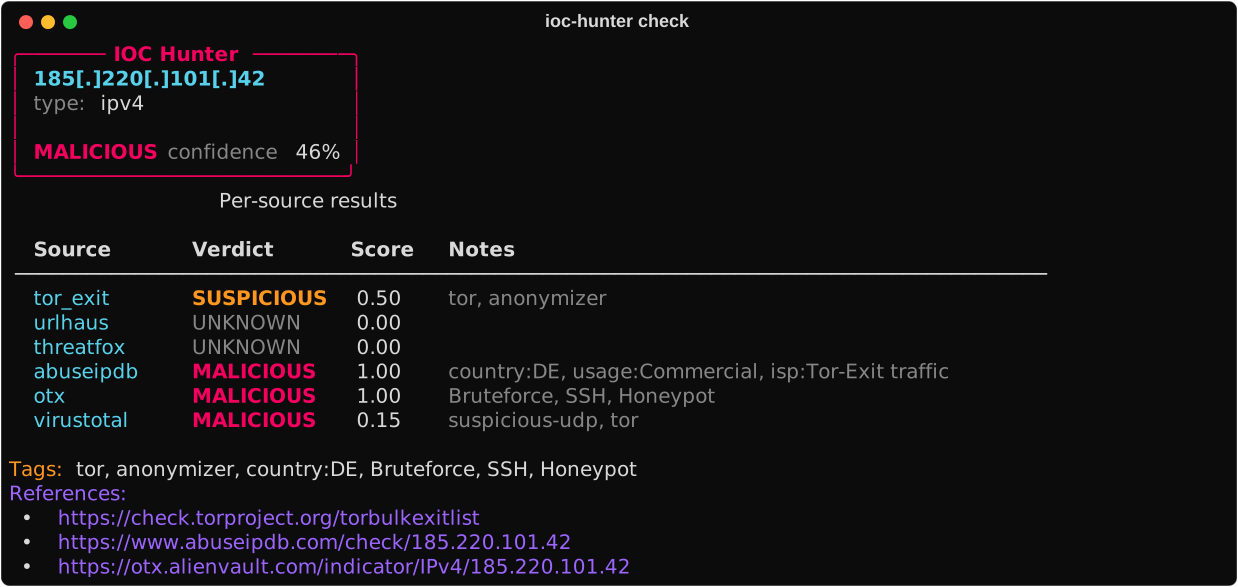
这是一个真实的 Tor exit 中继 —— 被 6 个源中的 4 个标记,并附带国家、ISP 和攻击模式标签。置信度已明确显示,以便你能在工单中为该判定提供依据。
### 扫描整份报告
`examples/sample-incident.txt` 已包含在 repo 中:
```
ioc-hunter scan-file examples/sample-incident.txt --no-cache
```
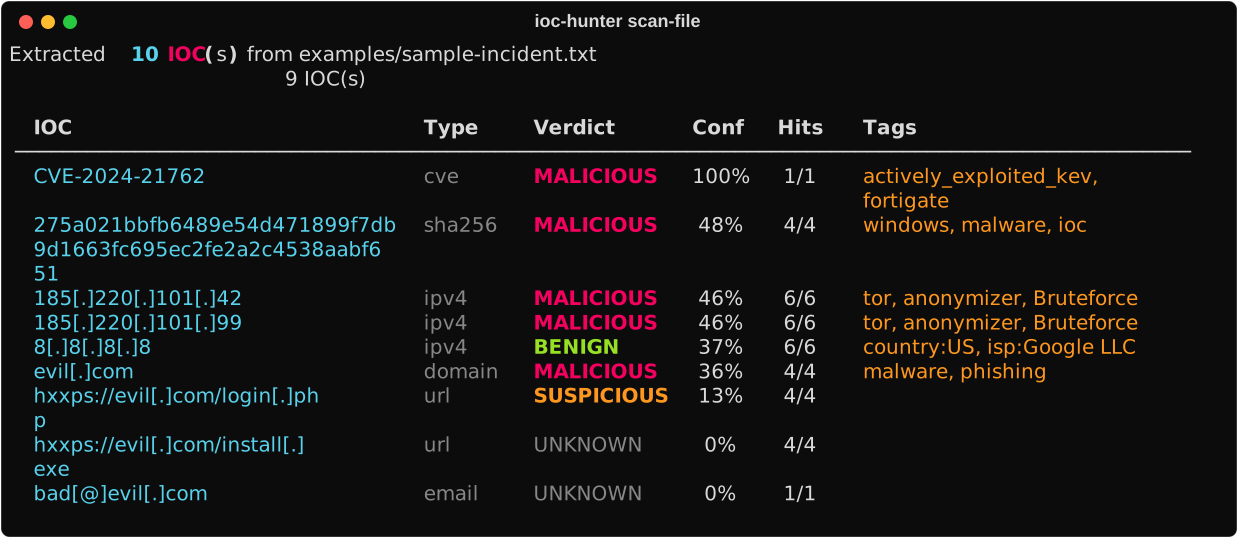
注意:每个 IOC 在输出时都被 **defang**,因此你不会从终端意外点击 `evil.com`。它们在输入时也被 defang(`185[.]220[.]101[.]42`, `hxxps://`, `bad[at]evil[.]com`)—— refang 是自动完成的。
### 对钓鱼 `.eml` 进行分类
```
ioc-hunter parse-eml suspicious.eml
```
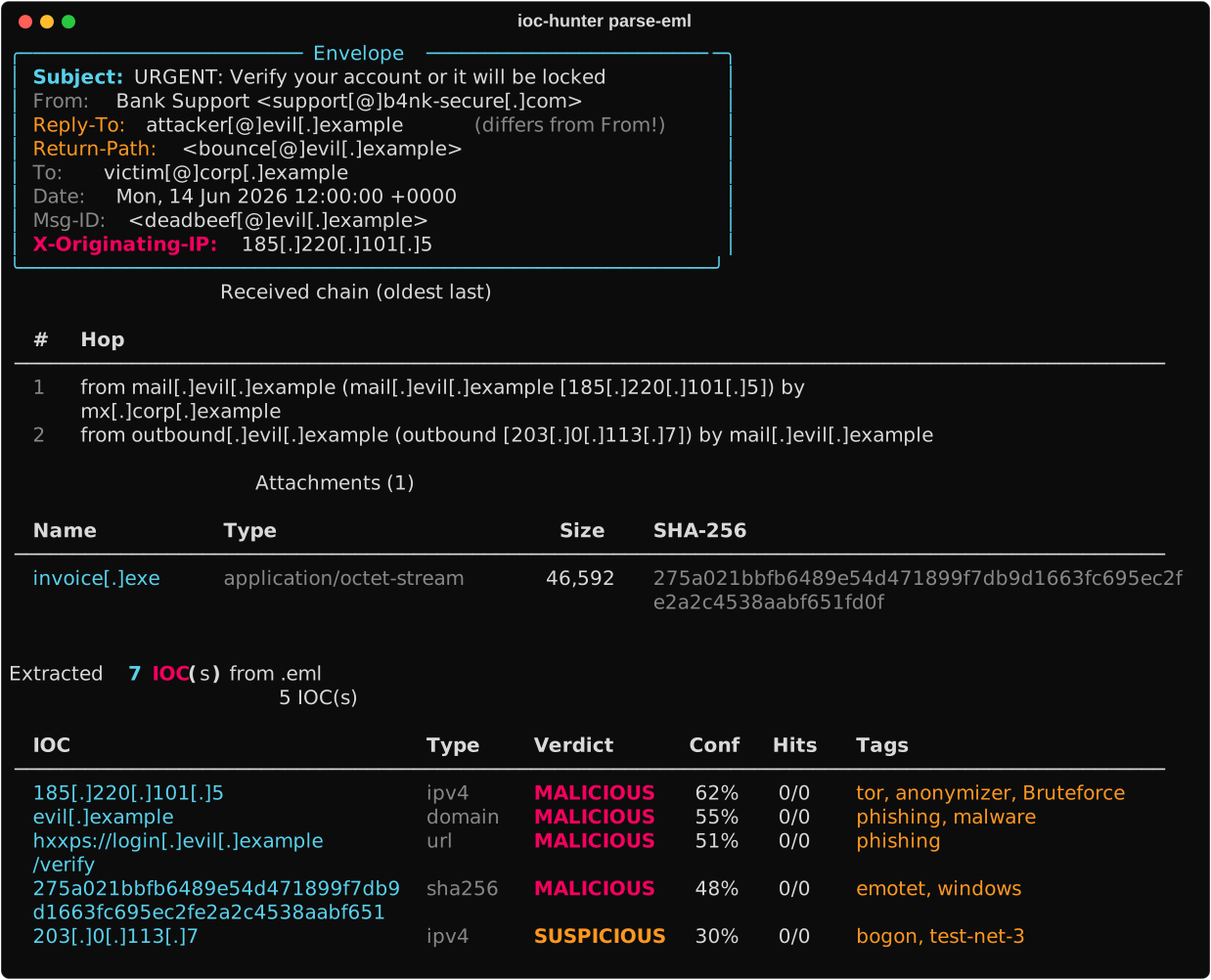
信封面板会标记 **Reply-To ≠ From**,并明确提取 **X-Originating-IP** —— 这两者都是经典的钓鱼特征。
Received 链揭示了真实的 MTA 跳跃。附件会被计算 hash(SHA-256 + MD5),并且它们的 hash 会连同 body URL、header IP 和引用的 domain 一起直接进入 TI 查找。
添加 `--no-enrich` 可进行仅离线的解析(无 TI 调用)。
### 分析可疑二进制文件
```
ioc-hunter analyze ./sample.exe
```
一个纯 Python 的静态分析器,用于 **PE / ELF / Mach-O** —— 无需 `pefile`,无需 `lief`,无需外部服务。一个头部,一个判定,接着是映射到 **MITRE ATT&CK** 技术的发现列表。
单次扫描即可提取的内容:
- **PE**:区段 + 熵,导入 + **ImpHash**(Mandiant pivot),Authenticode 签名者/颁发者 CN,VERSIONINFO,manifest(`requestedExecutionLevel`, `autoElevate`, `uiAccess`),资源中的嵌入式 PE,入口点合理性,PE 校验和重算,时间戳异常
- **ELF**:程序头,动态导入,`.note.gnu.build-id`,`.note.go.buildid`,ABI tag,RWX 段,stripped 检测
- **Mach-O**:fat-slice 遍历器,load commands,CodeDirectory(identifier + team-id + flags),解析的 XML **entitlements** 并带有风险能力分类
- **跨格式**:嵌套 PE / ELF / Mach-O / ZIP / 7z / RAR / gz 扫描,msfvenom + egghunter + Donut + Cobalt Strike beacon 检测(包括 XOR-0x69 / 0x2E 变体),Go 标记,packer 指纹识别(UPX, MPRESS, ASPack, …)
启发式规则会触发可疑 API 组合警报(`VirtualAllocEx` + `WriteProcessMemory` + `CreateRemoteThread` → **T1055**),RWX 区段,调试字符串,不匹配的扩展名。每项发现都包含严重程度、一行理由以及(适用的)ATT&CK 技术 ID。
Flags:
- `--json` — 完整的结构化报告(适配 Jira / SIEM)
- `--md` — 用于工单和 Slack 的 Markdown 摘要
- `--strings` — 预览提取的可打印字符串
- `--no-enrich` — 跳过对嵌入式 IOC 的 TI 查找
### 实时监控日志文件
```
ioc-hunter watch /var/log/auth.log --threshold suspicious
```
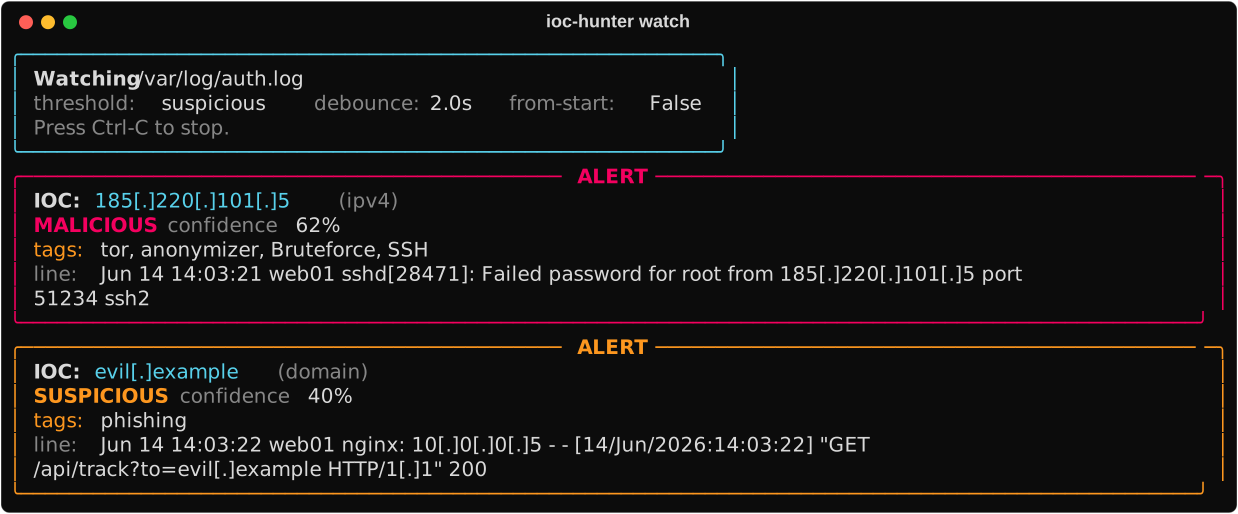
带有日志轮转处理的 Tail 式轮询(inode 改变或截断时从头重新打开)。突发流量会被防抖处理 —— 一千行的激增会合并为一次批量 TI 查找,而不是一千次。仅当判定结果达到或超过配置的阈值时才会触发警报。
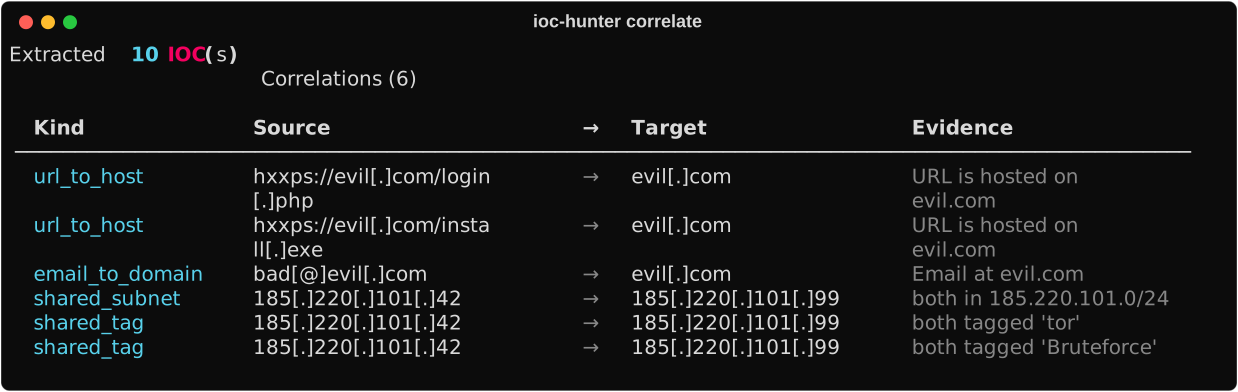
### 寻找跨 IOC 的 pivot
```
ioc-hunter correlate examples/sample-incident.txt --no-cache
```
### 生成检测规则
```
$ ioc-hunter report examples/sample-incident.txt --format sigma --no-cache
title: IOC Hunter - 1 malicious domain indicator(s)
id: 14ffc8c8-355c-402e-9920-69bab9d13546
status: experimental
description: Auto-generated from threat-intel verdicts on 2026/06/13.
date: 2026/06/13
references:
- https://otx.alienvault.com/indicator/domain/evil.com
- https://www.virustotal.com/gui/search/evil.com
author: ioc-hunter
logsource:
category: dns
detection:
selection:
QueryName:
- 'evil.com'
condition: selection
level: high
tags:
- malware
- phishing
---
title: IOC Hunter - 2 malicious ipv4 indicator(s)
...
```
相同的输入也可以导出为 `--format suricata`, `--format stix`, `--format misp`, `--format json`, `--format markdown`。
### 魔数解码
```
ioc-hunter decode "aHR0cHM6Ly9ldmlsLmNvbS9sb2dpbi5waHA="
```

base64 候选项排名第一,因为解码后的文本包含可提取的 IOC —— IOC 的存在是评分中的决胜因素。
强制指定特定操作:`--op base64`, `--op hex`, `--op url`, `--op jwt`, `--op gzip`, `--op zlib`, `--op rot13`, `--op html`, `--op base32`。
## 自托管 Web 演示
该 repo 内置了 FastAPI 前端(`src/ioc_hunter/web/`)和 Render `render.yaml` Blueprint。免费层足以用于作品集演示 —— dyno 在不活动 15 分钟后会休眠,并在下一次请求时唤醒(冷启动约 30 秒)。
### 在本地运行
```
pip install -e ".[web]"
uvicorn ioc_hunter.web:app --host 0.0.0.0 --port 8000
# → http://localhost:8000
```
### 5 次点击部署到 Render
1. 将此 repo 推送到你的 GitHub。
2.
标签:IOC分析, Python, 威胁情报, 开发者工具, 无后门, 请求拦截, 运行时操纵, 逆向工具