IvanAnishchuk/cuere
GitHub: IvanAnishchuk/cuere
cuere 是一个终端二维码渲染库,通过 Unicode 半块字符在终端中生成紧凑可扫描的二维码,并集成 Rich 框架和加密钱包支付 URI 辅助工具。
Stars: 0 | Forks: 1
# cuere
[](https://pypi.org/project/cuere/)
[](https://github.com/IvanAnishchuk/cuere/actions/workflows/test.yml)
[](https://github.com/IvanAnishchuk/cuere/actions/workflows/lint.yml)
[](https://github.com/IvanAnishchuk/cuere/actions/workflows/typecheck.yml)
[](https://scorecard.dev/viewer/?uri=github.com/IvanAnishchuk/cuere)
[](https://ivananishchuk.github.io/cuere/security/osps-baseline/)
[](https://ivananishchuk.github.io/cuere/)
在你的终端中生成 QR codes —— 就像 Claude Code CLI 绘制其远程连接代码那样:使用 Unicode 半块字符,采用低纠错等级以保持二维码小巧,并包含适当的静区。此外,还提供了一个 [Rich](https://github.com/Textualize/rich) 可渲染对象以及处理加密钱包 URI 的辅助工具。
```
█▀▀▀▀▀█ ▄▀ ▄▀ █▀▀▀▀▀█
█ ███ █ ▄▀ ▄ █ ███ █
█ ▀▀▀ █ ▄▄█▀█ █ ▀▀▀ █
▀▀▀▀▀▀▀ ▀ █▄█ ▀▀▀▀▀▀▀
█▀█▀▀▄▀▀▀▀ █▀ █ █▄█▄
▄▄▄▄▄▀▄▀▀█▀ ▀ ▄█▀ ▀
▀▀ ▀▀ ██▀█▄█▄ ▀▄▀▄▄
█▀▀▀▀▀█ ▀▄█▄█▄█▀ ▄▀ █
█ ███ █ █ ▄ █ █ █
█ ▀▀▀ █ █ ▄▀ ▀ ▄█ █ ▄
▀▀▀▀▀▀▀ ▀ ▀ ▀ ▀ ▀
```
## 演示
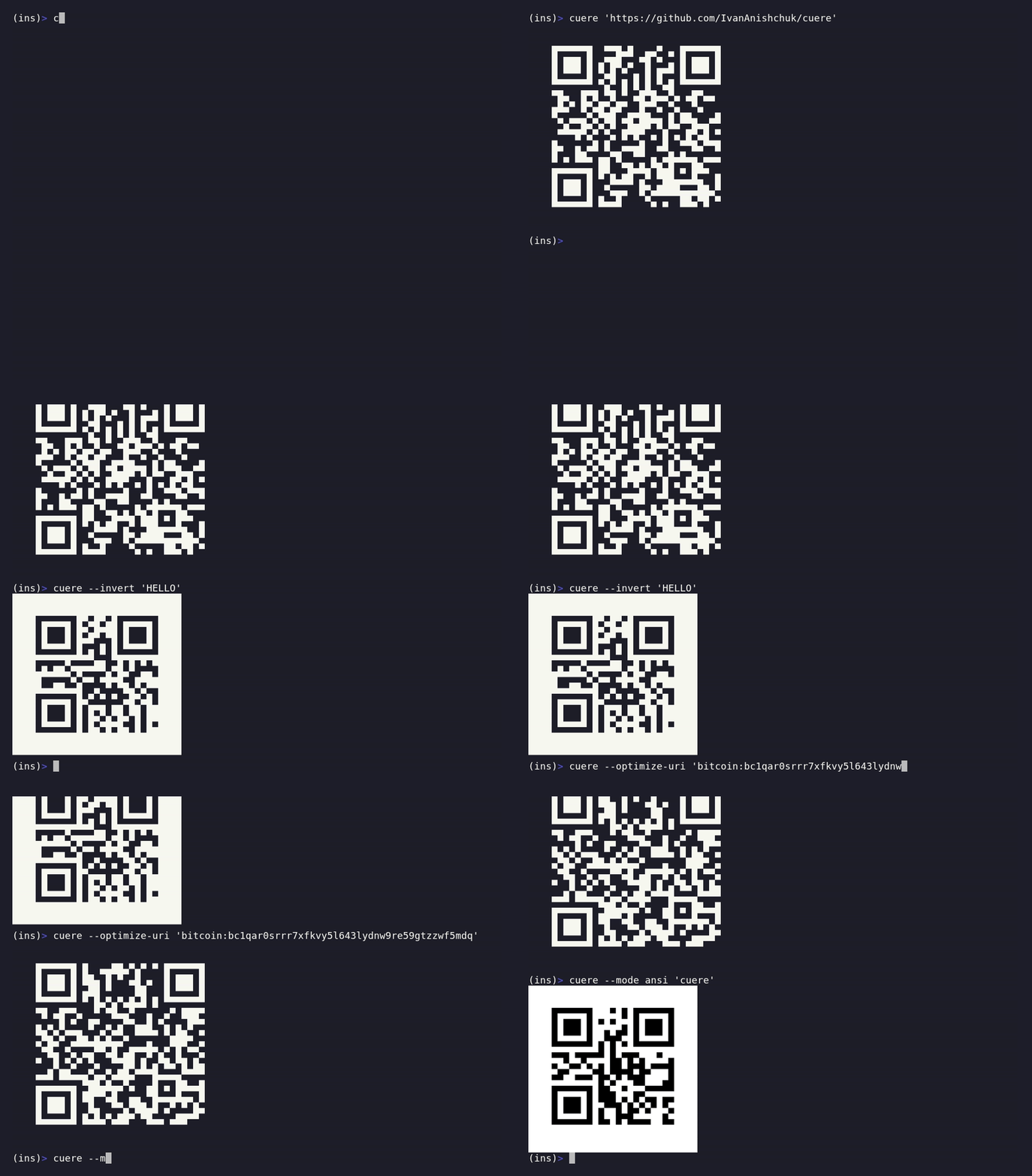
使用 [vhs](https://github.com/charmbracelet/vhs) 从
[`examples/demo.tape`](examples/demo.tape) 录制 —— 使用
`uv run python scripts/render_demo.py` 重新生成(需要 `vhs`、`ttyd` 和 `ffmpeg`):
```
cuere "https://github.com/IvanAnishchuk/cuere" # a first code
cuere --invert "HELLO" # light-on-dark
cuere --optimize-uri "bitcoin:bc1q..." # smaller wallet code
cuere --mode ansi "cuere" # theme-proof colors
```
📖 **完整文档:[ivananishchuk.github.io/cuere](https://ivananishchuk.github.io/cuere/)**
## 安装
```
uv add cuere # or: pip install cuere
uv add 'cuere[image]' # optional: adds PNG export (pulls in Pillow)
```
## 使用
```
from cuere import render, show, fits
payload = "wc:7f6e504b...@2?relay-protocol=irn&symKey=587d..."
show(payload) # prints to stdout
text = render("HELLO", mode="block", invert=True) # returns a str
if not fits(payload): # does it fit the terminal?
...
```
结合 Rich(居中、面板、布局)使用:
```
from rich.console import Console
from rich.panel import Panel
from cuere.rich import QRCode
Console().print(Panel(QRCode("bitcoin:BC1Q..."), title="scan to pay"), justify="center")
```
钱包 URI —— `bitcoin_uri()` 构建经验证的 [BIP-21](https://github.com/bitcoin/bips/blob/master/bip-0021.mediawiki)
`bitcoin:` 支付请求,`lightning_uri()` 将 bech32 Lightning 负载(BOLT11 invoice / LNURL / BOLT12 offer)包装在 `lightning:` URI 中,而
`optimize_uri()` 会将全小写的 `bitcoin:` 或 `lightning:` URI(根据 BIP-173,bech32 不区分大小写)转换为大写,以便在 QR 字母数字模式下编码,从而生成更小的二维码。`scheme_case()` 公开了决定此操作的类型化 `SchemeCase`:对于大小写敏感的协议(`ethereum:` EIP-55 校验和、`wc:`
WalletConnect)、混合大小写的 URI 以及包含非字母数字查询部分的 URI,将原样返回:
```
from decimal import Decimal
from cuere import bitcoin_uri, lightning_uri, optimize_uri, show
show(optimize_uri(bitcoin_uri("bc1q..."))) # smaller, scannable code
bitcoin_uri("bc1q...", amount=Decimal("0.01"), label="Tip") # -> "bitcoin:bc1q...?amount=0.01&label=Tip"
optimize_uri("bitcoin:bc1q...") # -> "BITCOIN:BC1Q..."
optimize_uri(lightning_uri("lnbc1...")) # -> "LIGHTNING:LNBC1..."
```
对于 Ethereum,`ethereum_uri()` 和 `erc20_transfer_uri()` 构建
[EIP-681](https://eips.ethereum.org/EIPS/eip-681) `ethereum:` 请求 —— 原生支付(以 wei 为单位的 `value`)或 ERC-20 `transfer`。它们的 EIP-55 校验和区分大小写,因此这些 URI 绝不会通过 `optimize_uri` 处理:
```
from cuere import erc20_transfer_uri, ethereum_uri
ethereum_uri("0xfb69...d359", value=10**16, chain_id=1) # -> "ethereum:0xfb69...d359@1?value=10000000000000000"
erc20_transfer_uri("0xA0b8...eB48", to="0x8e23...d052", amount=1_000_000) # -> "ethereum:0xA0b8...eB48/transfer?address=0x8e23...d052&uint256=1000000"
```
请参阅[钱包实用指南](docs/cookbook/wallet-uris.md)获取完整的支付请求方案,以及 [BIP-21](docs/bip-21.md) / [Lightning](docs/lightning-uri.md) /
[EIP-681](docs/eip-681.md) 摘要,了解格式和 `optimize_uri` 的协议模型。
需要原始的模块矩阵(以便自己渲染或检查)?将其编码为
`QRMatrix`:
```
from cuere import QRMatrix
m = QRMatrix.encode("HELLO", error="L", border=4)
m.modules # tuple[tuple[bool, ...], ...] — True is a dark module
m.size # side length, quiet zone included
```
导出到文件或字节 —— `save()` 会写入所选格式(未指定时根据路径后缀推断),`render_bytes()` 返回原始字节:
```
from cuere import save, render_bytes
save("HELLO", "code.svg") # vector SVG, format from suffix
save("bitcoin:BC1Q...", "pay.png", scale=8) # raster PNG (needs cuere[image])
png_bytes = render_bytes("HELLO", format="png") # -> bytes, no file
```
格式包括 `text`(终端渲染)、`svg` 和 `png`(需要
`cuere[image]` 额外依赖)。请参阅[导出方案](docs/cookbook/exporting.md)和
[输出格式](docs/output-formats.md)了解完整模型。
CLI:
```
cuere "wc:...your walletconnect uri..."
echo "some payload" | cuere
cuere --input payload.txt # read the payload from a file
cuere 12345 --micro # compact Micro QR for a tiny payload
cuere HELLO --mode ansi --invert --border 2 --error M
cuere HELLO --mode ansi --dark "#1a1a1a" --light "#fafafa" # custom ANSI colors
cuere HELLO --output svg:code.svg # write SVG to a file (default stays terminal)
cuere HELLO -o png:- --scale 8 > code.png # PNG to stdout (needs cuere[image])
```
### 渲染模式
| 模式 | 一个模块代表 | v2 二维码宽度 | 备注 |
|---|---|---|---|
| `half`(默认) | ½ 字符 (`▀▄█`) | 33 列 | 复制粘贴后依然可读;继承终端颜色 |
| `ansi` | ½ 字符,带颜色(默认黑底白字) | 33 列 | 不受主题影响;颜色可定制;当通过管道输出或设置了 `NO_COLOR` 时,`show()` 会将其降级为 `half` |
| `block` | 2 个字符 (`██`) | 66 列 | 对字体兼容性最好,宽度增加一倍 |
绘图字符 (`█▀▄`) 属于东亚*模糊*宽度:如果终端配置为以双倍宽度渲染这些字符,输出将会变宽,因此上表中的列数假设采用标准的单宽度渲染。
`ansi` 模式的颜色是可定制的:将 `dark` / `light` 传递给 `render` / `show`
(以及 `cuere.rich.QRCode`,和 CLI 的 `--dark` / `--light` 标志)来设置
暗模块和亮背景颜色 —— 可以是名称、256 色调色板索引,或真彩色
十六进制 / `(r, g, b)` 值。它们默认为符合规范的黑底白字。颜色仅
适用于 `ansi`(将它们传递给 `half` / `block` 会引发 `ColorError`)。请参阅
[终端颜色](docs/colors.md)了解可用形式以及扫描仪对比度注意事项。
### 扫描注意事项
- 在深色终端上,默认模式显示*反转*的二维码(浅色模块
位于深色背景上)。现代手机摄像头可以处理这种情况;如果遇到难以扫描的设备,请使用
`invert=True` / `--invert`,或者使用 `mode="ansi"` 以获得符合标准极性的显示。
- 纠错级别默认为 `L`:屏幕不会变脏或撕裂,并且
较低的纠错意味着二维码更小,更适合你的终端。
- 静区(4 个模块)是输出的一部分,这是有意为之的 —— 不要剥离
那些“空白”边距。
## 开发
```
uv sync # editable install via meson-python
uv run pytest # 100% branch coverage enforced
uv run ruff check && uv run mypy src/ tests/ && uv run ty check && uv run basedpyright
uv run pre-commit install --install-hooks
```
构建系统说明 (meson-python):
- 每个发布的文件都必须列在 `src/cuere/meson.build` 中 —— meson 不会
自动匹配文件 (glob)。如果列表不一致,`tests/test_packaging.py` 将会失败。
- 版本号仅存在于根目录的 `meson.build` 中。
- sdist 基于*已提交*的文件生成(`meson dist`);在执行
`uv build` 之前请先提交。
## 许可证
[CC0-1.0](LICENSE.md) —— 公共领域。
标签:Python, Rich, 二维码, 加密货币, 无后门, 终端UI, 逆向工具