Mazen2004212/cloudcart-kubernetes-devops-platform
GitHub: Mazen2004212/cloudcart-kubernetes-devops-platform
一个集成 React、Flask、PostgreSQL、Kubernetes、Terraform 和 GitHub Actions 的生产级三层 DevOps 平台,展示云原生应用从容器化到 CI/CD 自动化部署的完整生命周期。
Stars: 1 | Forks: 0
# CloudCart — 生产级三层 Kubernetes DevOps 平台











CloudCart 是一个生产级的三层 DevOps 平台,使用 React、Flask、PostgreSQL、Docker、Kubernetes、Terraform、Amazon ECR、Amazon EKS、GitHub Actions、AWS OIDC 和 Trivy 构建。
该项目展示了云原生应用程序的完整生命周期:容器化、使用 Docker Compose 进行本地编排、Kubernetes 部署、Ingress 路由、健康和就绪检查、指标暴露、基于 CPU 的自动伸缩、使用 Terraform 进行 AWS 基础设施配置、S3 远程状态管理、ECR 镜像发布、使用 GitHub Actions OIDC 的安全 CI/CD、容器镜像漏洞扫描,以及可选的部署到 Amazon EKS。
## 目录
* [项目亮点](#project-highlights)
* [架构](#architecture)
* [技术栈](#tech-stack)
* [工具和技术](#tools-and-technologies)
* [截图](#screenshots)
* [应用功能](#application-features)
* [API 端点](#api-endpoints)
* [本地 Docker 设置](#local-docker-setup)
* [本地 Kubernetes 部署](#local-kubernetes-deployment)
* [NGINX Ingress 设置](#nginx-ingress-setup)
* [Pod 水平自动伸缩](#horizontal-pod-autoscaling)
* [AWS EKS 部署](#aws-eks-deployment)
* [Terraform 基础设施](#terraform-infrastructure)
* [CI/CD 流水线](#cicd-pipeline)
* [项目结构](#project-structure)
* [本项目展示了什么](#what-this-project-demonstrates)
* [生产路线图](#production-roadmap)
* [安全说明](#security-notes)
* [成本控制](#cost-control)
* [简历摘要](#cv-summary)
## 项目亮点
* 构建了完整的三层应用:前端、后端和数据库。
* 使用 Docker 对所有服务进行容器化。
* 使用 Docker Compose 创建了本地全栈环境。
* 使用 Deployments 和 Services 在本地 Kubernetes 上部署平台。
* 使用 ConfigMaps 和 Secrets 进行基于环境的配置。
* 在本地 Kubernetes 设置中使用 PersistentVolumeClaim 添加 PostgreSQL 存储。
* 使用 NGINX Ingress 和本地域名暴露本地 Kubernetes 应用。
* 实现了存活探针和就绪探针。
* 添加了兼容 Prometheus 的后端指标。
* 安装了 Metrics Server 以获取资源指标。
* 为后端配置了 Pod 水平自动伸缩。
* 执行了负载测试,将后端副本从 2 个扩展到 6 个。
* 使用 Terraform 配置了 AWS 基础设施。
* 使用带有 S3 原生锁定的加密 S3 后端配置了 Terraform 远程状态。
* 为后端和前端容器镜像创建了 Amazon ECR 仓库。
* 标记并将 Docker 镜像推送到 Amazon ECR。
* 成功将 CloudCart 部署到 Amazon EKS。
* 使用 AWS LoadBalancer 服务对外暴露 EKS 部署。
* 验证了 EKS 上的 HPA 自动伸缩,后端副本从 2 个扩展到 6 个。
* 使用 AWS OIDC 构建 GitHub Actions CI 流水线,无需长期访问密钥。
* 自动化 Docker 镜像构建并推送到 Amazon ECR。
* 在 CI 中添加了 Terraform 格式化和验证检查。
* 为后端和前端容器镜像添加了 Trivy 漏洞扫描。
* 添加了可选的使用 GitHub Actions workflow dispatch 手动进行 CD 部署到 EKS 的功能。
* 添加了本地 Kubernetes、AWS EKS、HPA、ECR 发布、CI/CD 和 CI 安全扫描的证明截图。
## 架构
### 本地 Kubernetes 架构
```
User Browser
|
| http://cloudcart.local
v
NGINX Ingress Controller
|
|-- / --> cloudcart-frontend Service --> React + NGINX Pods
|
|-- /api/* --> cloudcart-backend Service --> Flask API Pods
|
v
PostgreSQL Service
|
v
PostgreSQL Pod + PVC
```
### AWS EKS 架构
```
User Browser
|
| HTTP
v
AWS LoadBalancer
|
v
cloudcart-frontend Service
|
v
React + NGINX Pods
|
| /api/*
v
cloudcart-backend Service
|
v
Flask API Pods
|
v
cloudcart-postgres Service
|
v
PostgreSQL Pod
```
### AWS 基础设施概览
```
Terraform
|
v
AWS VPC
|
|-- Public Subnet - AZ 1
| |
| v
| EKS Worker Node
|
|-- Public Subnet - AZ 2
|
v
EKS Worker Node
Amazon ECR
|
|-- cloudcart-backend:latest
|-- cloudcart-backend:
|-- cloudcart-frontend:latest
|-- cloudcart-frontend:
Amazon EKS
|
|-- Namespace
|-- Deployments
|-- Services
|-- ConfigMap
|-- Secret
|-- HPA
|-- Metrics Server
GitHub Actions
|
|-- OIDC authentication to AWS
|-- Terraform validation
|-- Docker build
|-- Trivy image scanning
|-- ECR push
|-- Optional EKS deployment
```
## 技术栈
| 层级 | 技术 |
| ---------------------- | ---------------------------------------------------------------------- |
| 前端 | React, Vite, NGINX |
| 后端 | Python, Flask, SQLAlchemy, Gunicorn |
| 数据库 | PostgreSQL |
| 容器化 | Docker, Docker Compose |
| 容器镜像仓库 | Amazon ECR |
| 编排 | Kubernetes, Amazon EKS |
| 基础设施即代码 | Terraform |
| Terraform 状态 | Amazon S3 远程后端,带有原生状态锁定 |
| CI/CD | GitHub Actions, Terraform 验证, Trivy 镜像扫描 |
| 云身份验证 | GitHub Actions OIDC, AWS IAM 角色 |
| 安全扫描 | Trivy |
| 路由 | NGINX Ingress Controller, AWS LoadBalancer |
| 配置 | ConfigMap, Secret |
| 存储 | 本地 Kubernetes 使用 PersistentVolumeClaim,EKS 演示模式使用 emptyDir |
| 可观测性 | 健康检查、就绪检查、兼容 Prometheus 的指标 |
| 自动伸缩 | Metrics Server, Horizontal Pod Autoscaler |
| 本地集群 | Docker Desktop Kubernetes |
| 云平台 | AWS |
## 工具和技术
| 类别 | 工具 |
| ---------------------- | ---------------------------------------------------- |
| 容器化 | Docker, Docker Compose |
| 编排 | Kubernetes, Amazon EKS |
| 基础设施即代码 | Terraform |
| 云平台 | AWS |
| 容器镜像仓库 | Amazon ECR |
| CI/CD | GitHub Actions |
| 身份验证 | GitHub Actions OIDC, AWS IAM |
| 安全扫描 | Trivy |
| 前端 | React, Vite, NGINX |
| 后端 | Python, Flask, SQLAlchemy, Gunicorn |
| 数据库 | PostgreSQL |
| 网络 | AWS LoadBalancer, NGINX Ingress, Kubernetes 服务 |
| 自动伸缩 | Metrics Server, Horizontal Pod Autoscaler |
| 状态管理 | Amazon S3 Terraform 远程后端 |
| CLI 工具 | AWS CLI, kubectl, Terraform CLI, Docker CLI, Git |
## 截图
### 本地 Kubernetes 部署
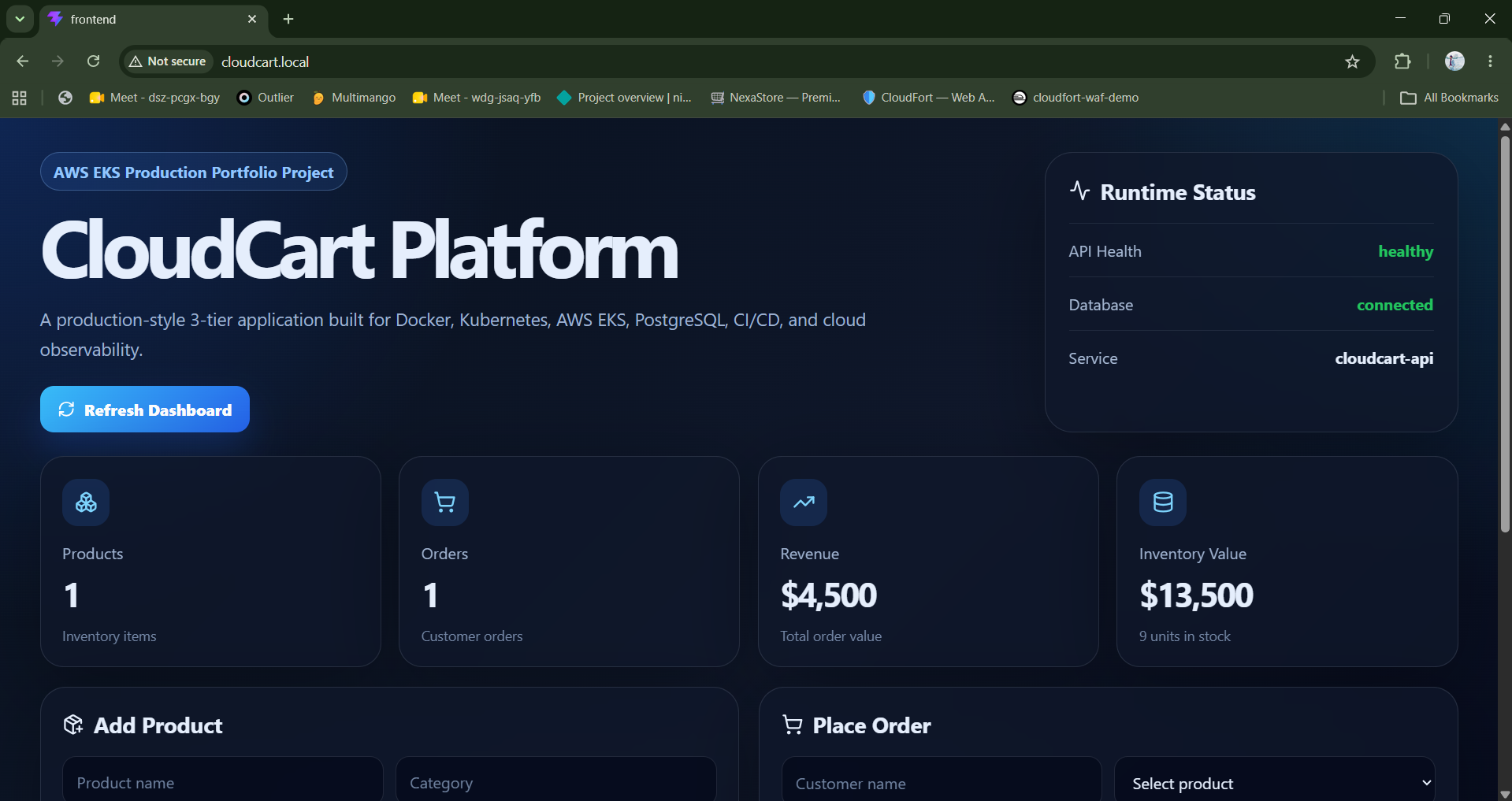
#### CloudCart 仪表板
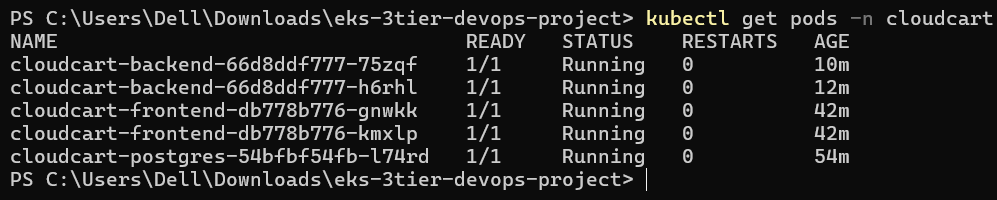
#### Kubernetes Pods 运行中
#### Kubernetes 服务

#### NGINX Ingress

#### API 健康和就绪检查

#### HPA 伸缩:后端副本从 2 个扩展到 6 个

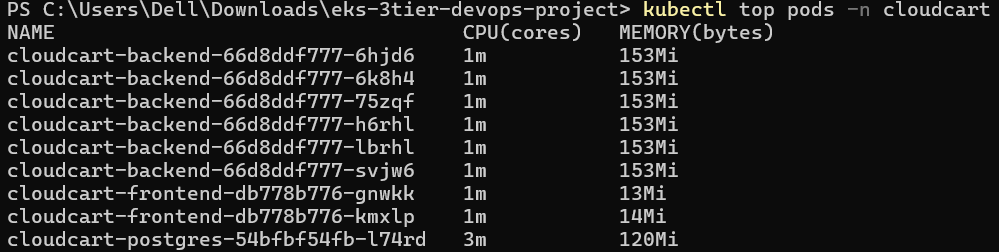
#### 负载测试期间的 Pod 资源使用情况
### AWS EKS 部署
#### EKS 工作节点就绪

#### 运行在 EKS 上的 CloudCart Pods

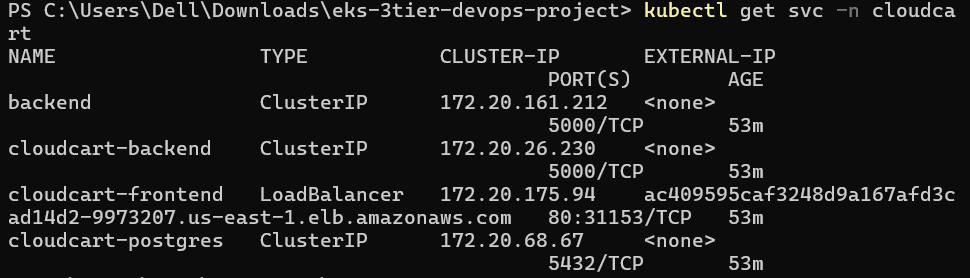
#### AWS LoadBalancer 服务
#### 来自 AWS LoadBalancer 的 API 健康和就绪检查

#### EKS 上的 HPA 自动伸缩
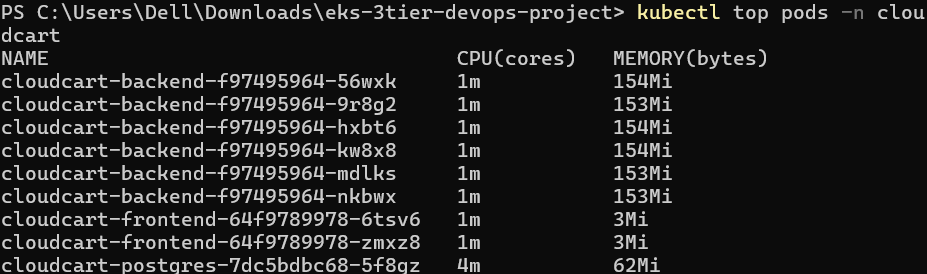
在负载下,后端 Deployment 被 Kubernetes HPA 从 2 个副本扩展到了 6 个副本。

#### EKS 上的 Pod 指标
### GitHub Actions CI/CD
#### GitHub Actions ECR 流水线成功
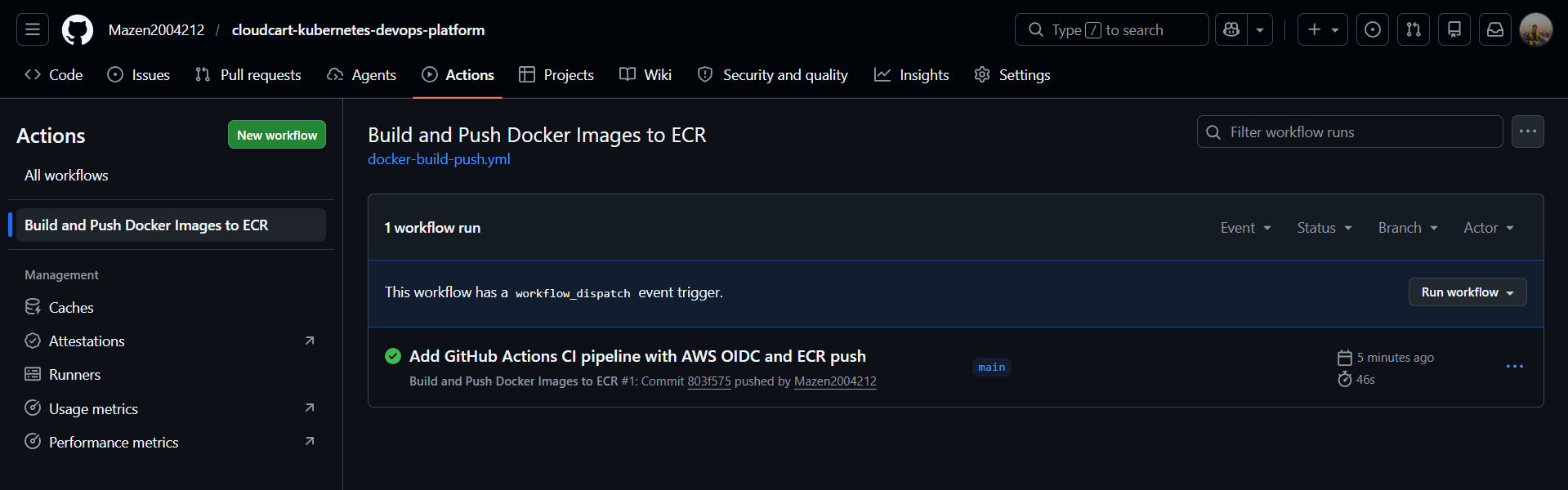
#### GitHub Actions CI/CD 工作流运行
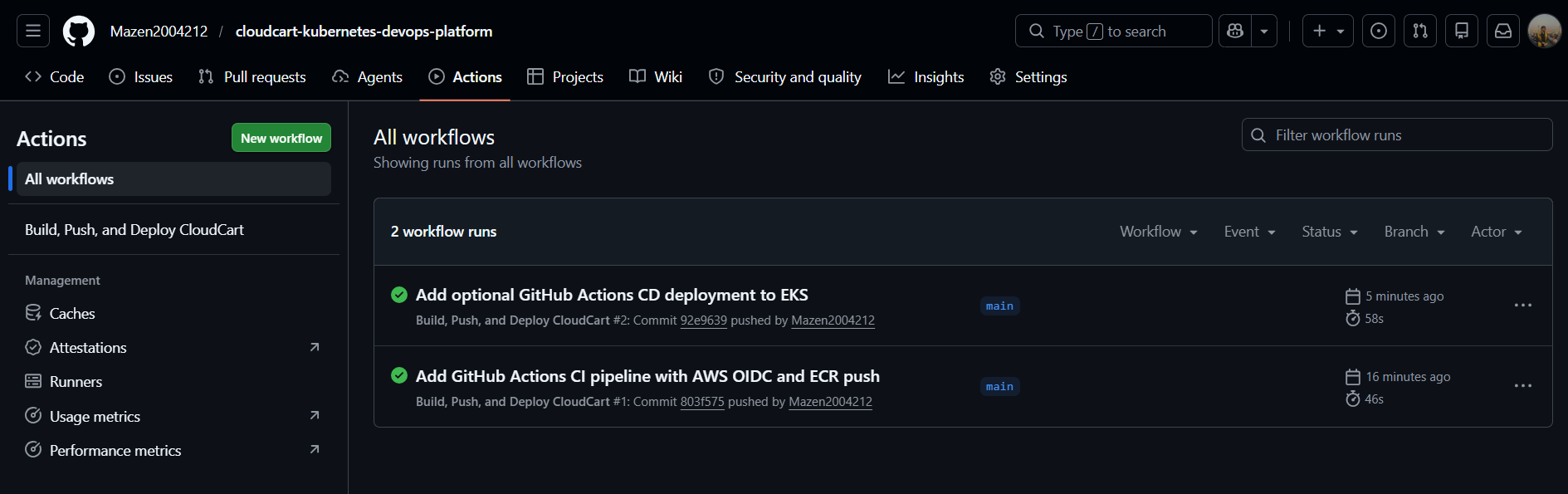
#### GitHub Actions 安全扫描和 Terraform 验证

## 应用功能
CloudCart 提供了一个用于管理产品和订单的仪表板。
| 功能 | 描述 |
| ------------------- | ----------------------------------------------------------- |
| 产品管理 | 添加和列出产品 |
| 订单管理 | 下达并列出客户订单 |
| 库存跟踪 | 创建订单后更新产品库存 |
| 分析仪表板 | 产品总数、订单、收入、库存和库存价值 |
| 健康端点 | 确认 API 可用性 |
| 就绪端点 | 确认数据库连接 |
| 指标端点 | 暴露兼容 Prometheus 的 HTTP 指标 |
| 压力端点 | 生成用于自动伸缩测试的 CPU 负载 |
## API 端点
| 端点 | 方法 | 描述 |
| ------------------------ | ------ | ----------------------------------- |
| `/api/health` | GET | API 健康检查 |
| `/api/ready` | GET | 数据库就绪检查 |
| `/api/products` | GET | 列出产品 |
| `/api/products` | POST | 创建产品 |
| `/api/orders` | GET | 列出订单 |
| `/api/orders` | POST | 创建订单 |
| `/api/analytics/summary` | GET | 仪表板分析摘要 |
| `/api/metrics` | GET | 兼容 Prometheus 的指标 |
| `/api/stress` | GET | 用于 HPA 测试的 CPU 压力端点 |
## 本地 Docker 设置
### 1. 启动全栈
```
docker compose up --build
```
### 2. 打开应用
```
http://localhost:3000
```
### 3. 通过前端 NGINX 代理测试 API
```
curl http://localhost:3000/api/health
curl http://localhost:3000/api/ready
```
## 本地 Kubernetes 部署
本项目使用 Docker Desktop Kubernetes 进行了本地部署和测试。
### 1. 验证 Kubernetes
```
kubectl get nodes
```
预期输出:
```
docker-desktop Ready
```
### 2. 构建本地镜像
```
docker build -t cloudcart-backend:local ./backend
docker build -t cloudcart-frontend:local --build-arg VITE_API_BASE_URL=/api ./frontend
```
### 3. 应用 Kubernetes 清单
```
kubectl apply -f k8s/00-namespace.yaml
kubectl apply -f k8s/01-configmap.yaml
kubectl apply -f k8s/02-secret.yaml
kubectl apply -f k8s/03-postgres.yaml
kubectl apply -f k8s/04-backend.yaml
kubectl apply -f k8s/04b-backend-alias.yaml
kubectl apply -f k8s/05-frontend.yaml
```
### 4. 验证工作负载
```
kubectl get pods -n cloudcart
kubectl get svc -n cloudcart
```
## NGINX Ingress 设置
### 1. 安装 NGINX Ingress Controller
```
kubectl apply -f https://raw.githubusercontent.com/kubernetes/ingress-nginx/controller-v1.15.1/deploy/static/provider/cloud/deploy.yaml
```
### 2. 等待 Controller 准备就绪
```
kubectl wait --namespace ingress-nginx \
--for=condition=ready pod \
--selector=app.kubernetes.io/component=controller \
--timeout=120s
```
### 3. 将本地域名添加到 hosts 文件
在 Windows 上,以管理员身份打开此文件:
`
* `cloudcart-frontend:latest`
* `cloudcart-frontend:`
使用 commit SHA 标签使得每个镜像都可以追溯到特定的 Git 提交。
### EKS Kubernetes 资源
AWS 部署使用单独的 `k8s-aws/` 清单目录,以避免更改本地 Kubernetes 清单。
EKS 部署包括:
* Namespace
* ConfigMap
* Secret
* PostgreSQL Deployment 和 Service
* 后端 Deployment 和 Service
* 前端 Deployment 和 AWS LoadBalancer Service
* Metrics Server
* Horizontal Pod Autoscaler
### 当前 AWS 数据库模式
对于 EKS 演示部署,PostgreSQL 在 Kubernetes 内部使用临时 `emptyDir` 存储运行,以保持对成本的控制并使部署简单。
这使得 AWS 演示保持轻量级,同时仍然证明应用程序、服务、容器镜像、网络、LoadBalancer 暴露、健康检查和自动伸缩在 EKS 上能够正常工作。
对于生产级的 AWS 部署,数据库层可以升级为:
* Amazon RDS PostgreSQL
* 使用 AWS EBS CSI Driver 的 EBS 持久卷
## Terraform 基础设施
Terraform 用于配置 EKS 部署所需的 AWS 基础设施。
### Terraform 组件
| 文件 | 用途 |
| -------------- | -------------------------------------------------------------------------- |
| `backend.tf` | 配置 S3 远程后端和原生状态锁定 |
| `versions.tf` | 定义 Terraform 和提供商版本 |
| `provider.tf` | 配置 AWS 提供商 |
| `variables.tf` | 存储可重用的输入变量 |
| `vpc.tf` | 创建 VPC、公共子网、Internet 网关和路由表 |
| `iam.tf` | 为 EKS 创建 IAM 角色和策略附件 |
| `eks.tf` | 创建 EKS 集群、托管节点组以及 GitHub Actions EKS 访问权限 |
| `outputs.tf` | 暴露有用的基础设施输出 |
### Terraform 工作流
```
cd terraform
terraform init
terraform validate
terraform plan -out=tfplan
terraform apply tfplan
```
### 远程 Terraform 状态
Terraform 被配置为使用 Amazon S3 远程后端进行集中状态管理。
后端包括:
* 用于 Terraform 状态存储的 S3 存储桶
* 启用状态加密
* 启用 S3 存储桶版本控制
* 使用 `use_lockfile = true` 的 S3 原生状态锁定
* 阻止对状态存储桶的公共访问
这使得基础设施工作流更接近生产标准,并避免仅依赖本地的 Terraform 状态文件。
### 为 EKS 配置 kubectl
```
aws eks update-kubeconfig --region us-east-1 --name cloudcart-eks
kubectl get nodes
```
### 手动将 CloudCart 部署到 EKS
```
kubectl apply -f k8s-aws/00-namespace.yaml
kubectl apply -f k8s-aws/01-configmap.yaml
kubectl apply -f k8s-aws/02-secret.yaml
kubectl apply -f k8s-aws/03-postgres.yaml
kubectl apply -f k8s-aws/04-backend.yaml
kubectl apply -f k8s-aws/04b-backend-alias.yaml
kubectl apply -f k8s-aws/05-frontend.yaml
kubectl apply -f k8s-aws/07-hpa.yaml
```
### 验证 EKS 部署
```
kubectl get nodes
kubectl get pods -n cloudcart
kubectl get svc -n cloudcart
kubectl get hpa -n cloudcart
kubectl top pods -n cloudcart
```
### 在 AWS 上访问应用
获取 AWS LoadBalancer DNS:
```
kubectl get svc cloudcart-frontend -n cloudcart
```
在浏览器中打开 LoadBalancer DNS:
```
http://
```
测试 API:
```
curl http:///api/health
curl http:///api/ready
curl http:///api/analytics/summary
```
## CI/CD 流水线
CloudCart 包含一个使用 OpenID Connect 与 AWS 集成的 GitHub Actions CI/CD 流水线。
该流水线验证 Terraform 配置、构建 Docker 镜像、使用 Trivy 扫描容器镜像、无需长期访问密钥即可安全地向 AWS 进行身份验证、将镜像推送到 Amazon ECR,并支持可选部署到 Amazon EKS。
### CI 流水线
每次推送到影响后端、前端、Terraform 文件、Kubernetes AWS 清单、Docker Compose 文件或工作流配置的 `main` 分支时,GitHub Actions 都会执行以下步骤:
* 检出代码库。
* 运行 Terraform 格式验证。
* 为 CI 验证初始化不带后端的 Terraform。
* 验证 Terraform 配置。
* 使用 GitHub Actions OIDC 向 AWS 进行身份验证。
* 担任 AWS 中的专用 IAM 角色。
* 登录到 Amazon ECR。
* 构建后端 Docker 镜像。
* 构建前端 Docker 镜像。
* 使用 Trivy 扫描后端和前端镜像。
* 用 `latest` 标记两个镜像。
* 用 Git commit SHA 标记两个镜像。
* 将两个镜像推送到 Amazon ECR。
### CI 质量门禁
流水线在将镜像发布到 Amazon ECR 之前包含一个质量门禁。
质量门禁执行:
* Terraform 格式验证。
* 为 CI 验证初始化不带后端的 Terraform。
* Terraform 配置验证。
* 后端 Docker 镜像构建。
* 前端 Docker 镜像构建。
* 针对后端和前端镜像的 Trivy 漏洞扫描。
* 仅在构建和扫描阶段成功后将镜像发布到 Amazon ECR。
### CD 流水线
该工作流还包含一个使用 `workflow_dispatch` 的可选手动部署作业。
当使用 `deploy_to_eks=true` 手动触发时,流水线将:
* 为 EKS 集群更新 kubeconfig。
* 应用来自 `k8s-aws/` 的 Kubernetes 清单。
* 更新后端和前端 Deployment 以使用 Git commit SHA 镜像标签。
* 等待 Kubernetes rollout 完成。
* 显示 pods、services 和 HPA 状态。
部署步骤是故意设为手动的,因为 EKS 集群仅在演示期间创建,以控制 AWS 成本。
### AWS 身份验证
流水线使用 GitHub Actions OIDC 身份验证,而不是长期的 AWS 访问密钥。
这通过允许 GitHub Actions 使用临时凭证担任专用 IAM 角色来提高安全性。
### ECR 镜像标签
每次成功的流水线运行都会为每个镜像推送两个标签:
* `latest`
* Git commit SHA
这使得每次部署都可以追溯到特定的源代码版本。
### GitHub Actions 证明



## 项目结构
```
cloudcart-kubernetes-devops-platform/
│
├── .github/
│ └── workflows/
│ └── docker-build-push.yml
│
├── backend/
│ ├── app/
│ ├── Dockerfile
│ ├── requirements.txt
│ └── wsgi.py
│
├── frontend/
│ ├── src/
│ ├── Dockerfile
│ ├── nginx.conf
│ └── package.json
│
├── k8s/
│ ├── 00-namespace.yaml
│ ├── 01-configmap.yaml
│ ├── 02-secret.yaml
│ ├── 03-postgres.yaml
│ ├── 04-backend.yaml
│ ├── 04b-backend-alias.yaml
│ ├── 05-frontend.yaml
│ ├── 06-ingress.yaml
│ └── 07-hpa.yaml
│
├── k8s-aws/
│ ├── 00-namespace.yaml
│ ├── 01-configmap.yaml
│ ├── 02-secret.yaml
│ ├── 03-postgres.yaml
│ ├── 04-backend.yaml
│ ├── 04b-backend-alias.yaml
│ ├── 05-frontend.yaml
│ ├── 06-ingress.yaml
│ └── 07-hpa.yaml
│
├── terraform/
│ ├── backend.tf
│ ├── versions.tf
│ ├── provider.tf
│ ├── variables.tf
│ ├── vpc.tf
│ ├── iam.tf
│ ├── eks.tf
│ ├── outputs.tf
│ ├── .terraform.lock.hcl
│ └── .gitignore
│
├── screenshots/
│ ├── api-health-ready-checks.png
│ ├── dashboard-cloudcart-local.png
│ ├── eks-api-health-ready.png
│ ├── eks-cloudcart-pods-running.png
│ ├── eks-hpa-scaled-to-6.png
│ ├── eks-loadbalancer-service.png
│ ├── eks-nodes-ready.png
│ ├── eks-top-pods.png
│ ├── github-actions-cicd-success.png
│ ├── github-actions-ecr-success.png
│ ├── github-actions-security-scan-success.png
│ ├── hpa-scaled-to-6-replicas.png
│ ├── ingress-cloudcart-local.png
│ ├── kubernetes-pods-running.png
│ ├── kubernetes-services.png
│ └── top-pods-load-test.png
│
├── docker-compose.yaml
├── README.md
└── .gitignore
```
## 本项目展示了什么
本项目展示实际的 DevOps、Kubernetes、AWS 和 CI/CD 技能,包括:
* 容器化多服务应用。
* 使用 Docker Compose 在本地运行全栈应用。
* 为前端、后端和数据库工作负载设计 Kubernetes 清单。
* 使用 ConfigMaps 和 Secrets 管理应用配置。
* 在本地 Kubernetes 中使用 PVC 持久化数据库数据。
* 为具备成本意识的 EKS 演示部署使用临时存储。
* 在本地通过 NGINX Ingress 暴露应用。
* 在 EKS 上通过 AWS LoadBalancer 暴露应用。
* 实现健康和就绪检查。
* 暴露应用级指标。
* 使用 Metrics Server 和 HPA 进行自动伸缩。
* 执行负载测试以验证伸缩行为。
* 使用 Terraform 创建 AWS 基础设施。
* 使用 Amazon S3 远程管理 Terraform 状态。
* 在部署前的 CI 中验证 Terraform 配置。
* 创建并使用 Amazon ECR 仓库。
* 将容器化工作负载部署到 Amazon EKS。
* 使用 OIDC 对 GitHub Actions 进行 AWS 身份验证。
* 使用 GitHub Actions 自动构建和推送 Docker 镜像。
* 在发布到 ECR 之前使用 Trivy 扫描容器镜像。
* 在镜像发布前添加 CI 质量门禁。
* 支持可选的手动 CD 部署到 Amazon EKS。
* 验证云中的 Kubernetes 工作负载、服务、指标和自动伸缩。
## 生产路线图
当前的 EKS 部署证明 CloudCart 可以使用 Terraform 管理的基础设施、ECR 托管的镜像、Kubernetes 工作负载、AWS LoadBalancer 暴露、GitHub Actions CI/CD、Trivy 安全扫描和 HPA 自动伸缩在 AWS 上成功运行。
未来的生产改进包括:
* 用 Amazon RDS PostgreSQL 替换集群内的 PostgreSQL。
* 添加 AWS EBS CSI Driver 以实现持久化 Kubernetes 存储。
* 部署 AWS Load Balancer Controller 以实现基于 ALB 的 Ingress。
* 添加 Route53 DNS 和 ACM 管理的 TLS 证书。
* 添加 Argo CD 以实现基于 GitOps 的 Kubernetes 交付。
* 使用 Prometheus 和 Grafana 添加集中式监控。
* 使用 CloudWatch、ELK、Loki 或 OpenSearch 添加日志聚合。
* 使用私有子网和最小权限安全组添加网络强化。
* 添加 SBOM 生成、镜像签名和策略执行,以确保容器供应链安全。
## 安全说明
* Kubernetes Secrets 用于保存数据库凭证。
* 任何 AWS 访问密钥或秘密密钥都不应提交到代码库中。
* GitHub Actions 使用 OIDC 而不是长期访问密钥向 AWS 进行身份验证。
* CI/CD 流水线担任具有范围权限的专用 IAM 角色。
* Terraform 远程状态配置了加密的 S3 后端、存储桶版本控制、公共访问阻止以及使用 `use_lockfile = true` 的 S3 原生状态锁定。
* Terraform 状态文件、Terraform plan 文件和 `.terraform/` 目录不应提交到代码库中。
* 容器镜像在发布到 Amazon ECR 之前会在 CI 期间使用 Trivy 进行扫描。
## 成本控制
诸如 EKS 集群、EC2 工作节点和 LoadBalancer 等 AWS 资源在运行期间可能会产生持续费用。
为了控制成本,应仅在演示期间创建 EKS 环境,并在验证后销毁。
创建基础设施:
```
cd terraform
terraform init
terraform plan -out=tfplan
terraform apply tfplan
```
演示结束后销毁基础设施:
```
cd terraform
terraform destroy
```
Amazon ECR 仓库和 S3 Terraform 后端可以保持可用,因为与 EKS 和 EC2 工作节点相比,它们的成本很低。
## 简历摘要
CloudCart 是一个生产级 DevOps 项目,展示了 Docker、Kubernetes、AWS EKS、Terraform、Amazon ECR、GitHub Actions CI/CD、GitHub OIDC、Trivy 安全扫描、PostgreSQL、LoadBalancer 暴露、健康检查、指标和基于 CPU 的自动伸缩。
该项目证明了在以下方面的实际经验:全栈容器化、K 工作负载、服务发现、配置管理、持久和临时存储策略、Ingress/负载均衡器暴露、基础设施即代码、远程 Terraform 状态管理、ECR 镜像发布、云部署、安全的 CI/CD 自动化、容器镜像漏洞扫描、CI 质量门禁和 HPA 自动伸缩。
标签:AWS, Docker, DPI, Flask, React, Syscalls, 子域名突变, 安全防御评估, 测试用例, 漏洞利用检测, 自定义脚本, 请求拦截, 负责任AI