RedSideSecurity/CVEAlertor
GitHub: RedSideSecurity/CVEAlertor
一个通过 Telegram 即时推送你所运行软件的新增 CVE 和公开 PoC 的漏洞监控告警工具。
Stars: 1 | Forks: 0
# CVEAlertor
**当你实际运行的软件发布了新的 CVE 时,立即获取 Telegram 告警。**
你只需告诉 CVEAlertor 你的技术栈中包含哪些产品(Zabbix, Roundcube, VMware
ESXi, …)。在首次运行时,它会将每个产品的**所有现有 CVE** 拉取到各自的
服务基线文件中。在此之后的每次运行中,它会重新获取数据,**与基线进行对比**,
并为每一个真正的新 CVE 触发 **Telegram 告警** —— 然后
更新基线,因此你绝不会收到重复的告警。
无需关注仪表盘,也无需浏览邮件列表。只需将对*你的*基础设施至关重要的 CVE,
直接推送到你的手机上。
/getUpdates
```
找到 `"chat":{"id": ...}`。那串数字就是你的 chat ID。
## 如何输入服务名称
CVEAlertor 内置了一个目录,可以将你输入的内容映射到精确的 CVE 搜索中,因此
结果既不会杂乱也不会为空。
| 规则 | 示例 |
|------|---------|
| 小写 | `zabbix` |
| **仅产品名称 — 无版本号** | `zabbix` *(而不是* `zabbix 6.4` — 版本号会被自动剔除) |
| 每行一个产品 | `zabbix` ↵ `roundcube` ↵ |
| 使用目录中的名称(接受部分别名) | `vmware esxi`→esxi, `ms exchange`→exchange, `postgres`→postgresql |
### 允许多词服务名称
你**并不仅限于**使用单个词。在*你输入它们时*以及在*实际的 NVD 搜索中*,
由两个(或三个)单词组成的产品名称都能完美运行:
- **输入多词名称** — `vmware esxi`, `ms exchange`, `proxmox ve` 等。
会被作为一个完整的短语保留(仅剔除版本号和多余的空格),
并通过别名录解析到正确的目录条目。
- **搜索关键词本身也可以是多词的** — 多个目录条目会为了精确度而使用短语查询
NVD:`apache` → `apache http server`,
`tomcat` → `apache tomcat`, `exchange` → `microsoft exchange server`,
`confluence` → `atlassian confluence`。
- **NVD 会将多词关键词视为 AND(与)操作** — 一个 CVE 必须在其描述中包含*所有*
词汇才能匹配,这正是过滤掉杂音的原理。更精确的短语 =
杂音更少;单个泛泛的词 = 召回率更高。该目录针对每个产品进行了调优,
以达到最佳的平衡。
因此,像 `vmware esxi` 这样的双词服务可以正确地对 NIST/NVD 进行搜索 —
完全没有必要将其缩减为一个词。
查看所有受支持的名称:
```
python cvealertor.py --list-services
```
不在目录中?你仍然可以添加它 —— 甚至是多词产品。向导会
要求你进行确认,而你输入的短语将成为 NVD 的搜索关键词。
## 运行模式
| 命令 | 功能说明 |
|---------|--------------|
| `python cvealertor.py --setup` | 交互式向导(推荐) |
| `python cvealertor.py --once` | 执行一次 CVE 检查周期后退出 — 非常适合 cron |
| `python cvealertor.py --check-pocs` | 执行一次 PoC 检查周期后退出 — 非常适合每日 cron |
| `python cvealertor.py --watch` | 无限循环 — 按设定间隔进行 CVE 检查,每日进行 PoC 检查 |
| `python cvealertor.py --watch --interval 30m` | 自定义间隔循环 (`30m`/`2h`/`1d`/秒) |
| `python cvealertor.py --list-services` | 打印受支持的产品名称 |
| `python cvealertor.py --init-config` | 写入 `config.json` 模板(用于手动设置) |
### 作为开机服务运行
```
sudo python cvealertor.py --install-service # systemd (Linux) / Task Scheduler (Windows)
sudo python cvealertor.py --uninstall-service # remove just the service
```
在 Linux 上,这会创建 `/etc/systemd/system/cvealertor.service` (`Restart=always`,
开机自启)。通过以下命令检查状态:
```
systemctl status cvealertor
journalctl -u cvealertor -f
```
## 配置说明 (`config.json`)
向导会为你生成此文件,你也可以直接对其进行编辑:
```
{
"telegram": { "bot_token": "123:ABC", "chat_id": "-1002468013579" },
"nvd_api_key": "",
"min_cvss": 0.0,
"interval_seconds": 3600,
"alert_on_first_run": false,
"poc_monitoring": true,
"poc_watch_recent": 20,
"poc_interval_seconds": 86400,
"services": [
{ "name": "Zabbix", "keyword": "zabbix" },
{ "name": "Roundcube", "keyword": "roundcube" },
{ "name": "VMware ESXi", "keyword": "esxi" }
]
}
```
| 键 | 含义 |
|-----|---------|
| `telegram.bot_token` / `chat_id` | 告警发送的目的地 |
| `nvd_api_key` | 可选的 [免费 NVD 密钥](https://nvd.nist.gov/developers/request-an-api-key) — 提高频率限制(50 次请求/30秒 对比 5 次请求/30秒) |
| `min_cvss` | 仅在达到或超过此 CVSS 分数时告警。`0.0` = 全部 · `7.0` = 高危+严重 · `9.0` = 严重 |
| `interval_seconds` | `--watch` 模式下的 CVE 检查频率 |
| `alert_on_first_run` | 如果为 `true`,在基线运行时发送一条“正在监控 X”的确认信息 |
| `poc_monitoring` | 在 GitHub 上监控属于你的 CVE 的公开 PoC/利用代码(默认为 `true`) |
| `poc_watch_recent` | 为每个服务检查多少个最近的 CVE 是否具有 PoC(默认为 `20`) |
| `poc_interval_seconds` | `--watch` 模式下运行 PoC 周期的频率(默认为 `86400` = 每天) |
| `services` | 要监控的产品(`name` = 标签,`keyword` = NVD 搜索词) |
## 检测原理
```
NVD fetch → current set of CVE IDs for the product
state/*.txt → baseline set (what we already knew)
new = current − baseline
• first run → save baseline, send NO alerts (avoids flooding you with old CVEs)
• later runs → Telegram-alert each new CVE, then add it to the baseline
```
`state/.txt` 文件是记忆存储。NVD 是事实来源;与该文件进行的对比
决定了一个 CVE 是否为“新”。发送失败的告警**不会**被
添加到基线中,因此它们会在下一个周期重试。
### 公开 PoC 检测
PoC 几乎总是在 CVE *之后*发布,因此 CVEAlertor 会持续
监控你的 CVE,以便在出现利用代码时及时察觉:
```
for each of the N most-recent CVEs per service (poc_watch_recent):
fetch nomi-sec/PoC-in-GitHub//.json (raw CDN, no API key, 404 = none)
new = PoC repos not in state/.pocs.json
• first run → record silently (so you aren't flooded with existing PoCs)
• later runs → Telegram-alert each new PoC repo, then record it
```
数据来自社区维护的
[nomi-sec/PoC-in-GitHub](https://github.com/nomi-sec/PoC-in-GitHub) 索引,直接通过
GitHub 的原始 CDN 提供 — 无需管理 API token,也没有频率限制。状态
保存在 `state/.pocs.json` 中,其对比方式与 CVE 基线完全一致,
包括发送失败重试机制。在 `--watch` 模式下,PoC 周期会根据
自身较慢的定时器运行(即 `poc_interval_seconds`,默认为每天)。
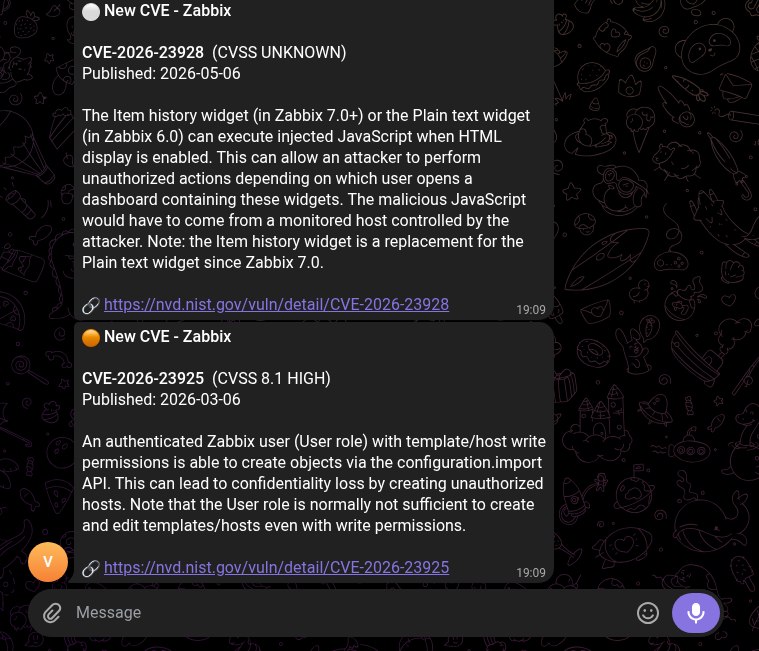
## 告警示例
```
🔴 New CVE - Zabbix
CVE-2024-22120 (CVSS 9.1 CRITICAL)
Published: 2024-08-09
Zabbix Server can perform command execution for configured scripts...
🔗 https://nvd.nist.gov/vuln/detail/CVE-2024-22120
```
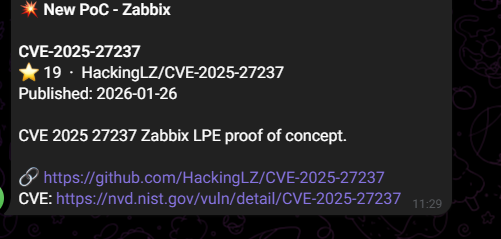
以及一条公开 PoC 的告警:
```
💥 New PoC - Apache Log4j
CVE-2021-44228
⭐ 89 · tangxiaofeng7/CVE-2021-44228-Apache-Log4j-Rce
Published: 2021-12-09
Apache Log4j remote code execution
🔗 https://github.com/tangxiaofeng7/CVE-2021-44228-Apache-Log4j-Rce
CVE: https://nvd.nist.gov/vuln/detail/CVE-2021-44228
```
……以及它在 Telegram 上的实际显示效果:
标签:CVE预警, PB级数据处理, PoC监控, Python, Telegram机器人, 安全运维, 无后门, 漏洞监控, 自动化通知