KKarishan/soc-splunk-threat-hunting
GitHub: KKarishan/soc-splunk-threat-hunting
基于 Splunk 和 Sysmon 的 SOC L1 威胁狩猎模拟实验室,涵盖三个攻击场景的检测查询、ATT&CK 映射与事件工单编写全流程。
Stars: 0 | Forks: 0
# SOC L1 分析师实验室 — Splunk 威胁狩猎模拟
## 目录
- [实验室环境](#lab-environment)
- [场景 1 — 可疑的 PowerShell 执行](#scenario-1--suspicious-powershell-execution)
- [场景 2 — 投递至 AppData/Temp 的可疑文件](#scenario-2--suspicious-file-dropped-in-appdata--temp)
- [场景 3 — 添加注册表持久化键](#scenario-3--registry-persistence-key-added)
- [噪音过滤](#-noise-filtering--real-soc-analyst-skill)
- [最终攻击链查询](#-final-query--complete-attack-chain-in-one-view)
- [展示技能](#-skills-demonstrated)
## 实验室概述
该项目在家庭实验室的 Windows 10 虚拟机上模拟了三个真实攻击场景,将 Sysmon 遥测数据转发至 Splunk Enterprise,并像 SOC L1 分析师一样对每个警报进行调查——包括噪音过滤、MITRE ATT&CK 映射以及事件工单编写。
**目标:** 使用行业标准工具展示在检测、分类和升级方面的实用 SOC L1 技能。
## 实验室环境
| 组件 | 详情 |
|---|---|
| **Hypervisor** | Proxmox |
| **目标虚拟机** | Windows 10 (主机名: `HL-WS01`) |
| **SIEM** | Splunk Enterprise |
| **遥测数据** | Sysmon + Universal Forwarder |
### Sysmon 事件覆盖范围
| EventCode | 描述 |
|---|---|
| 1 | 进程创建 |
| 2 | 文件时间戳更改 (Timestomping) |
| 3 | 网络连接 |
| 7 | 镜像加载 |
| 10 | 进程访问 |
| 11 | 文件创建 |
| 12 | 注册表键创建/删除 |
| 13 | 注册表值设置 |
| 22 | DNS 查询 |
## 场景 1 — 可疑的 PowerShell 执行
**MITRE ATT&CK:** [T1059.001 — PowerShell](https://attack.mitre.org/techniques/T1059/001/)
### 模拟内容
攻击者使用带有隐蔽参数的 PowerShell 执行本地用户枚举,并静默地将输出写入磁盘——一种经典的后渗透侦察技术。
```
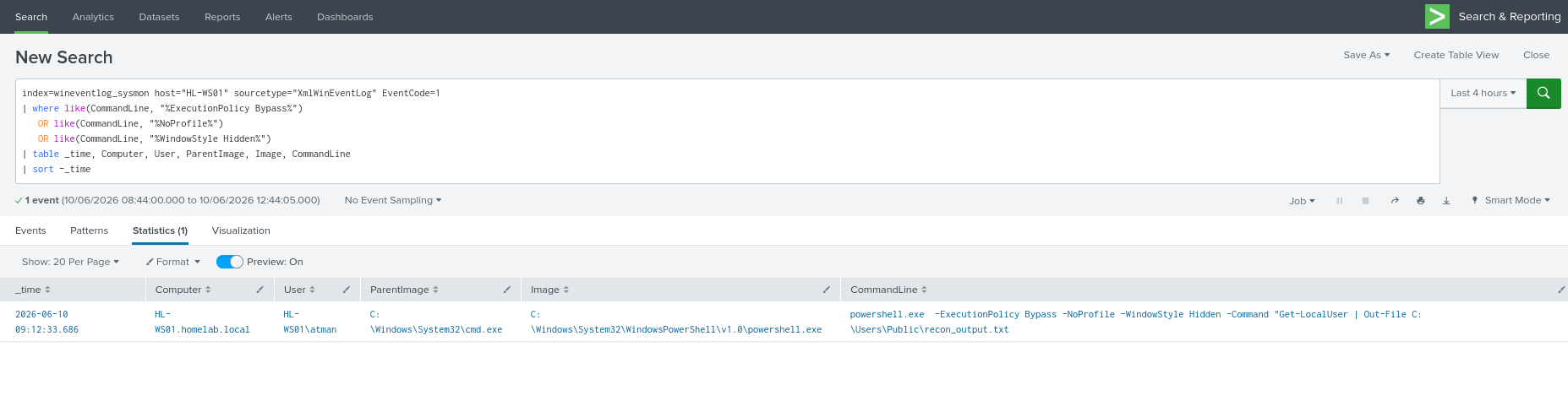
powershell.exe -ExecutionPolicy Bypass -NoProfile -WindowStyle Hidden -Command "Get-LocalUser | Out-File C:\Users\Public\recon_output.txt"
```
### Splunk 检测查询
```
index=wineventlog_sysmon host="HL-WS01" sourcetype="XmlWinEventLog" EventCode=1
| where like(CommandLine, "%ExecutionPolicy Bypass%")
OR like(CommandLine, "%NoProfile%")
OR like(CommandLine, "%WindowStyle Hidden%")
| table _time, Computer, User, ParentImage, Image, CommandLine
| sort -_time
```
### 关键失陷指标
| 字段 | 可疑值 | 意义 |
|---|---|---|
| `Image` | `powershell.exe` | 启动了 PowerShell 进程 |
| `ParentImage` | `cmd.exe` | 从 CMD 启动 PowerShell — 不同寻常 |
| `CommandLine` | `-ExecutionPolicy Bypass -NoProfile -WindowStyle Hidden` | 三重隐蔽参数组合 |
### 事件工单
```
==============================================
SOC INCIDENT TICKET — SCENARIO 1
==============================================
Ticket ID : SOC-2026-001
Date/Time : 2026-06-10 09:12:33.686
Analyst : KKarishan
Severity : Medium
Status : Under Investigation
----------------------------------------------
ALERT SUMMARY
Alert Name : Suspicious PowerShell Execution
Host : HL-WS01
User Account : HL-WS01\atman
----------------------------------------------
EVIDENCE FROM SPLUNK
EventCode : 1 (Process Creation)
Parent Process: cmd.exe
Child Process : powershell.exe
Command Line : powershell.exe -ExecutionPolicy Bypass -NoProfile -WindowStyle Hidden -Command "Get-LocalUser | Out-File C:\Users\Public\recon_output.txt
Time of Event : [paste _time value]
----------------------------------------------
ANALYSIS
Flags observed:
-ExecutionPolicy Bypass → bypasses script policy
-NoProfile → avoids loading user profile (stealth)
-WindowStyle Hidden → hides the window from user
MITRE ATT&CK : T1059.001 — PowerShell
----------------------------------------------
DISPOSITION
[X] Escalate to L2 — confirmed suspicious behavior
[ ] Close — confirmed legitimate (document reason)
Escalation Notes:
PowerShell spawned by cmd.exe with all three
stealth flags. Recommend L2 review of parent
process tree and whether recon_output.txt was
exfiltrated. Check EventCode 11 for file creation.
==============================================
```
## 场景 2 — 投递至 AppData / Temp 的可疑文件
**MITRE ATT&CK:** [T1547.001 — 启动文件夹](https://attack.mitre.org/techniques/T1547/001/) | [T1036.005 — 匹配合法名称](https://attack.mitre.org/techniques/T1036/005/)
### 模拟内容
两个独立的恶意文件创建事件:
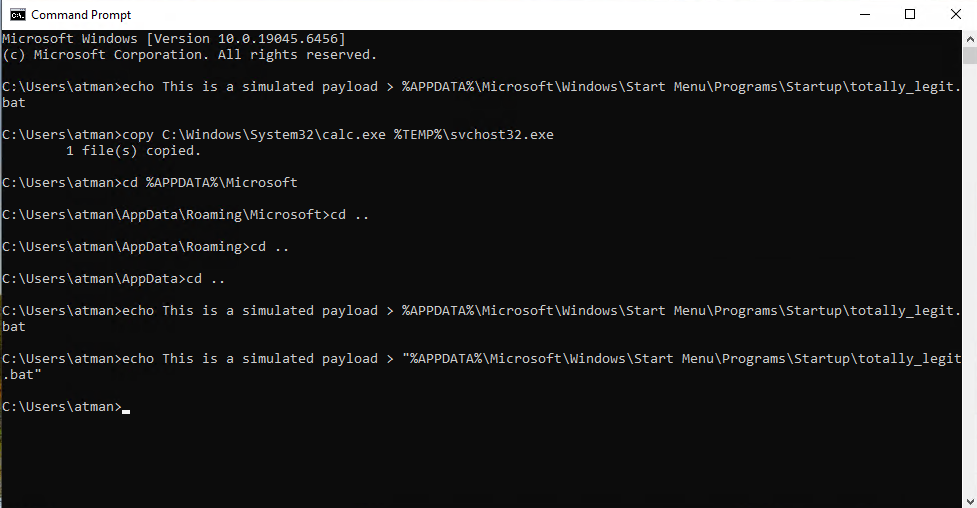
1. 一个 `.bat` payload 被投递到 Windows **启动文件夹**(持久化)
2. 一个合法的二进制文件被重命名,以伪装成系统进程
```
echo This is a simulated payload > "%APPDATA%\Microsoft\Windows\Start Menu\Programs\Startup\totally_legit.bat"
copy C:\Windows\System32\calc.exe %TEMP%\svchost32.exe
```
### Splunk 检测查询
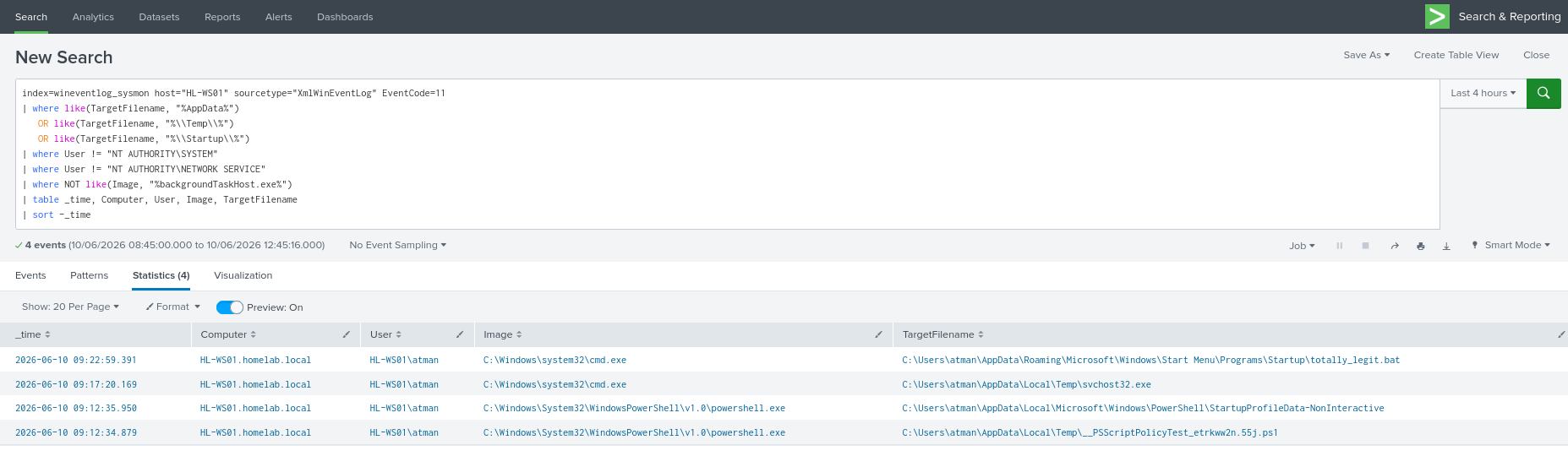
**查询 1 — 启动文件夹和 Temp 投递:**
```
index=wineventlog_sysmon host="HL-WS01" sourcetype="XmlWinEventLog" EventCode=11
| where like(TargetFilename, "%AppData%")
OR like(TargetFilename, "%\\Temp\\%")
OR like(TargetFilename, "%\\Startup\\%")
| where User != "NT AUTHORITY\SYSTEM"
| where User != "NT AUTHORITY\NETWORK SERVICE"
| where NOT like(Image, "%backgroundTaskHost.exe%")
| table _time, Computer, User, Image, TargetFilename
| sort -_time
```
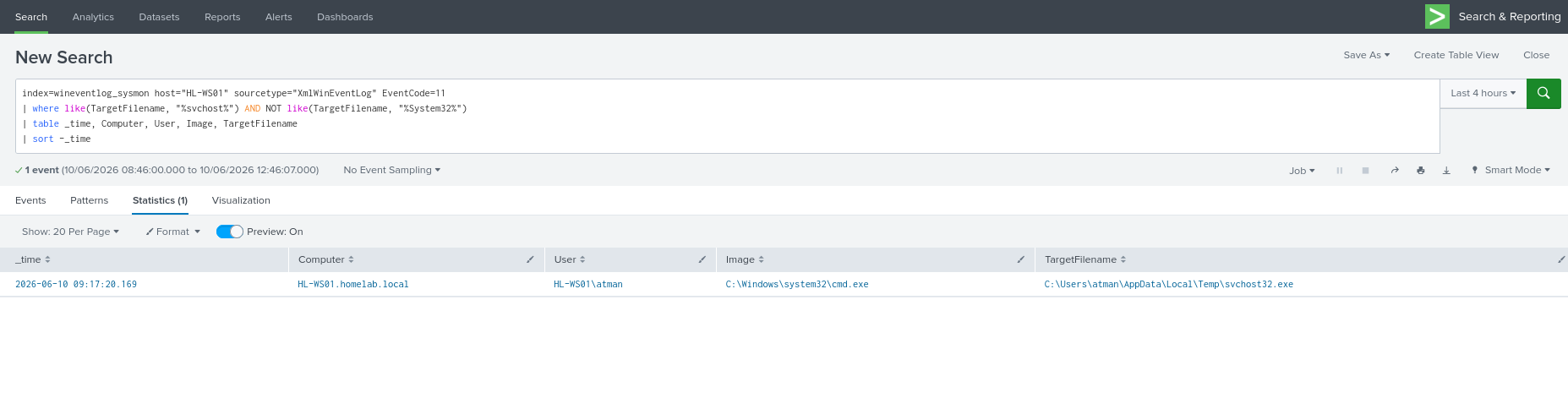
**查询 2 — 重命名的系统二进制文件检测:**
```
index=wineventlog_sysmon host="HL-WS01" sourcetype="XmlWinEventLog" EventCode=11
| where like(TargetFilename, "%svchost%") AND NOT like(TargetFilename, "%System32%")
| table _time, Computer, User, Image, TargetFilename
| sort -_time
```
### 关键失陷指标
| 字段 | 可疑值 | 意义 |
|---|---|---|
| `TargetFilename` | 路径包含 `\Startup\` | 在下次用户登录时自动执行 |
| `TargetFilename` | `svchost32.exe` 位于 `System32` 之外 | 真正的 svchost.exe 仅存在于 System32 中 |
| `Image` | `cmd.exe` | 文件通过命令行投递,而非安装程序 |
| 扩展名 | `.bat` 位于启动文件夹中 | 登录时静默执行批处理 |
### 事件工单
```
==============================================
SOC INCIDENT TICKET — SCENARIO 2
==============================================
Ticket ID : SOC-2026-002
Date/Time : 2026-06-10 09:17:20.169 (Temp) | 2026-06-10 09:22:59.391 (Startup)
Analyst : KKarishan
Severity : High
Status : Under Investigation
----------------------------------------------
ALERT SUMMARY
Alert Name : Suspicious File Drop — Startup & Temp
Host : HL-WS01
User Account : HL-WS01\atman
----------------------------------------------
EVIDENCE FROM SPLUNK
EventCode : 11 (File Created)
Creating Process : cmd.exe
Finding 1:
File Path : C:\Users\atman\AppData\Roaming\Microsoft\Windows\Start Menu\Programs\Startup\totally_legit.bat [Startup path]
Risk : Startup folder persistence
Finding 2:
File Path : C:\Users\atman\AppData\Local\Temp\svchost32.exe [svchost32.exe]
Risk : Masquerading as system process
----------------------------------------------
ANALYSIS
Two suspicious file creation events observed:
1. .bat file written to Startup folder
→ Will execute automatically on next user login
→ MITRE ATT&CK: T1547.001 — Startup Folder
2. svchost32.exe written to Temp directory
→ Legitimate svchost.exe lives only in System32
→ Name mimics system process to avoid suspicion
→ MITRE ATT&CK: T1036.005 — Match Legitimate Name
----------------------------------------------
DISPOSITION
[X] Escalate to L2 — confirmed suspicious behavior
[ ] Close — confirmed legitimate (document reason)
Escalation Notes:
Two independent indicators on same host within
same timeframe. Startup persistence + process
masquerading = elevated risk. Recommend L2
review file hashes and check EventCode 1 for
any execution of svchost32.exe.
==============================================
```
## 场景 3 — 添加注册表持久化键
**MITRE ATT&CK:** [T1547.001 — 注册表 Run 键](https://attack.mitre.org/techniques/T1547/001/)
### 模拟内容
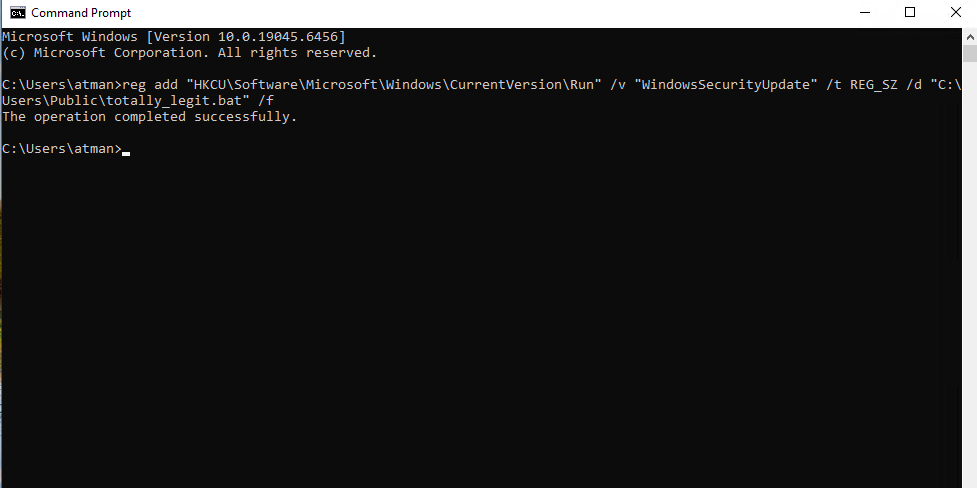
向 `HKCU\...\CurrentVersion\Run` 注册表键写入一个值——这是恶意软件最常用的持久化机制。该值的名称经过精心设计,使其看起来合法。
```
reg add "HKCU\Software\Microsoft\Windows\CurrentVersion\Run" /v "WindowsSecurityUpdate" /t REG_SZ /d "C:\Users\Public\totally_legit.bat" /f
```
### Splunk 检测查询
```
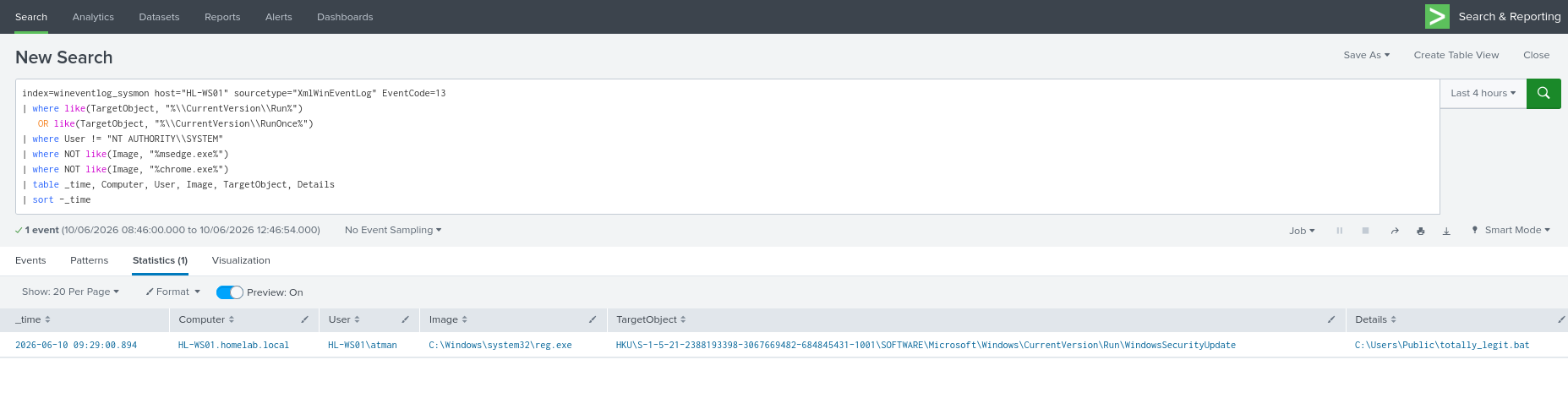
index=wineventlog_sysmon host="HL-WS01" sourcetype="XmlWinEventLog" EventCode=13
| where like(TargetObject, "%\\CurrentVersion\\Run%")
OR like(TargetObject, "%\\CurrentVersion\\RunOnce%")
| where User != "NT AUTHORITY\\SYSTEM"
| where NOT like(Image, "%msedge.exe%")
| where NOT like(Image, "%chrome.exe%")
| table _time, Computer, User, Image, TargetObject, Details
| sort -_time
```
### 关键失陷指标
| 字段 | 可疑值 | 意义 |
|---|---|---|
| `TargetObject` | `...\CurrentVersion\Run\WindowsSecurityUpdate` | 登录时自动运行 |
| `Details` | 指向 `C:\Users\Public\` | 合法软件会安装到 Program Files |
| `Image` | `reg.exe` | 注册表通过 CLI 写入,而非安装程序 |
| 值名称 | `WindowsSecurityUpdate` | 名称经过精心设计以模仿 Windows 更新 — 欺骗性 |
### 事件工单
```
==============================================
SOC INCIDENT TICKET — SCENARIO 3
==============================================
Ticket ID : SOC-2026-003
Date/Time : 2026-06-10 09:29:00.894
Analyst : KKarishan
Severity : High
Status : Under Investigation
----------------------------------------------
ALERT SUMMARY
Alert Name : Registry Run Key Persistence
Host : HL-WS01
User Account : HL-WS01\atman
----------------------------------------------
EVIDENCE FROM SPLUNK
EventCode : 13 (Registry Value Set)
Process : reg.exe (command-line registry edit)
Registry Key : HKU\S-1-5-21-2388193398-9834669482-675445431-1001\SOFTWARE\Microsoft\Windows\CurrentVersion\Run\WindowsSecurityUpdate
Value Data : C:\Users\Public\totally_legit.bat [the file path]
----------------------------------------------
ANALYSIS
A new auto-run registry entry was added via
command line (reg.exe).
Registry Location:
HKCU\Software\Microsoft\Windows\
CurrentVersion\Run\WindowsSecurityUpdate
Value points to: C:\Users\Public\totally_legit.bat
→ Public folder, not Program Files
→ .bat file, not a signed executable
→ Value name mimics Windows update process
MITRE ATT&CK : T1547.001 — Registry Run Keys
----------------------------------------------
CROSS-REFERENCE WITH SCENARIO 2
The file pointed to by this Run key
(totally_legit.bat) was also seen dropped in
the Startup folder in SOC-2026-002.
Same filename appearing in TWO persistence
locations = coordinated persistence attempt.
----------------------------------------------
DISPOSITION
[X] Escalate to L2 — confirmed suspicious behavior
[ ] Close — confirmed legitimate (document reason)
Escalation Notes:
Registry persistence key links directly to
artifact from SOC-2026-002. Single threat actor
establishing persistence via two methods on
same host. Correlate all three tickets.
Recommend L2 begin containment discussion.
==============================================
```
## 🔎 噪音过滤 — SOC 分析师的真实技能
L1 工作的重要组成部分是从**噪音中分辨信号**。在本实验中遇到并过滤了两个高容量的噪音源:
### NT AUTHORITY\SYSTEM
操作系统本身在服务启动、Windows Update 和组策略应用期间,会不断以 SYSTEM 身份写入注册表键。添加 `| where User != "NT AUTHORITY\\SYSTEM"` 会立即消除大部分误报。
### msedge.exe / 浏览器进程
Microsoft Edge 会不断写入注册表键,用于会话管理、自动更新和遥测。这是预期行为——通过 `Image` 过滤可将其完全清除。
**可重用的噪音过滤器代码块:**
```
| where User != "NT AUTHORITY\\SYSTEM"
| where User != "NT AUTHORITY\\LOCAL SERVICE"
| where User != "NT AUTHORITY\\NETWORK SERVICE"
| where NOT like(Image, "%msedge.exe%")
| where NOT like(Image, "%chrome.exe%")
| where NOT like(Image, "%MsMpEng.exe%")
```
## 🧩 最终查询 — 在一个视图中展示完整攻击链
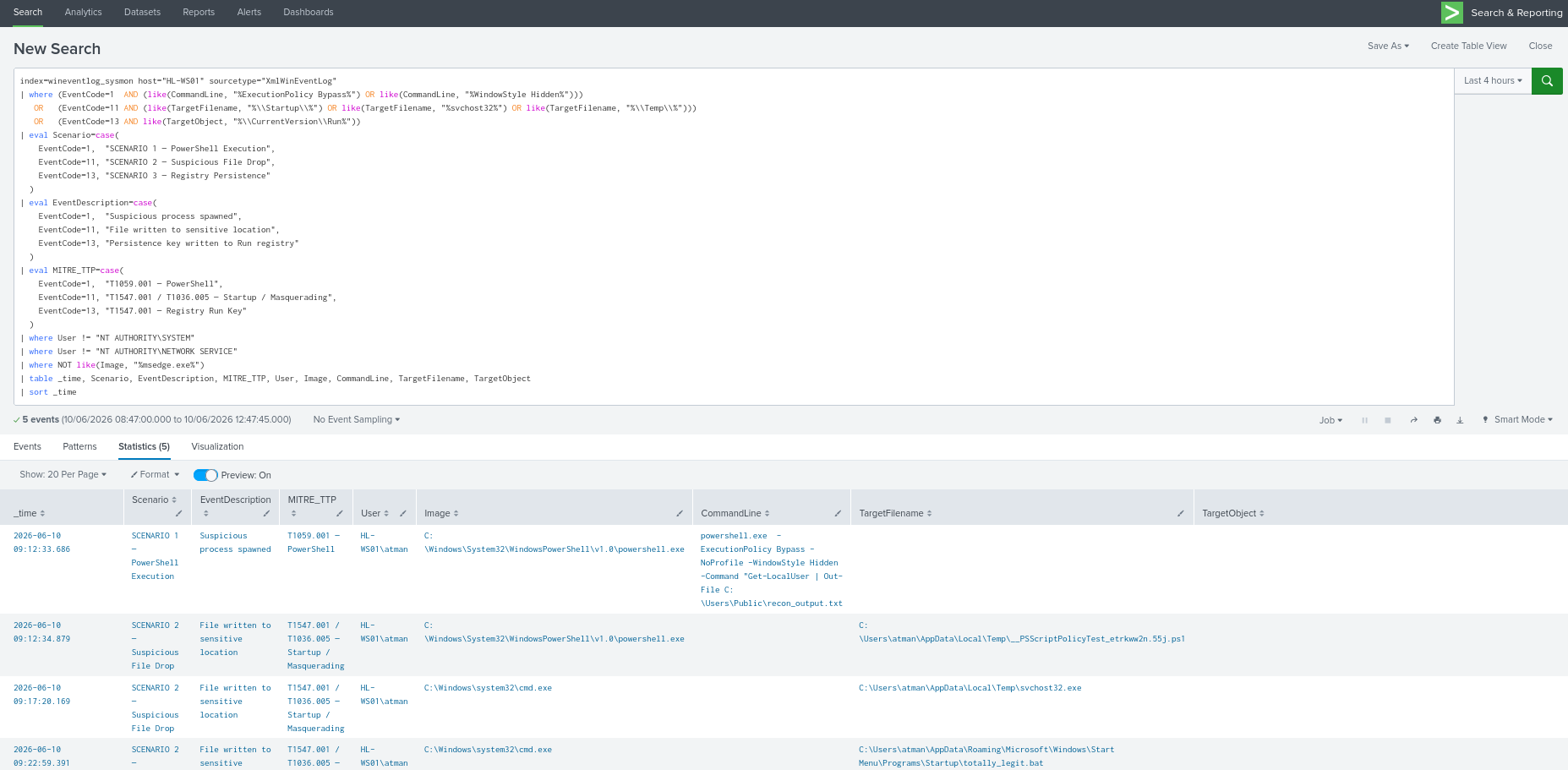
这个单一的 SPL 查询将所有三个场景关联到一个统一的时间线中,映射出完整的攻击链:**侦察 → 准备 → 持久化。**
```
index=wineventlog_sysmon host="HL-WS01" sourcetype="XmlWinEventLog"
| where (EventCode=1 AND (like(CommandLine, "%ExecutionPolicy Bypass%") OR like(CommandLine, "%WindowStyle Hidden%")))
OR (EventCode=11 AND (like(TargetFilename, "%\\Startup\\%") OR like(TargetFilename, "%svchost32%") OR like(TargetFilename, "%\\Temp\\%")))
OR (EventCode=13 AND like(TargetObject, "%\\CurrentVersion\\Run%"))
| eval Scenario=case(
EventCode=1, "SCENARIO 1 — PowerShell Execution",
EventCode=11, "SCENARIO 2 — Suspicious File Drop",
EventCode=13, "SCENARIO 3 — Registry Persistence"
)
| eval EventDescription=case(
EventCode=1, "Suspicious process spawned",
EventCode=11, "File written to sensitive location",
EventCode=13, "Persistence key written to Run registry"
)
| eval MITRE_TTP=case(
EventCode=1, "T1059.001 — PowerShell",
EventCode=11, "T1547.001 / T1036.005 — Startup / Masquerading",
EventCode=13, "T1547.001 — Registry Run Key"
)
| where User != "NT AUTHORITY\SYSTEM"
| where User != "NT AUTHORITY\NETWORK SERVICE"
| where NOT like(Image, "%msedge.exe%")
| table _time, Scenario, EventDescription, MITRE_TTP, User, Image, CommandLine, TargetFilename, TargetObject
| sort _time
```
### 攻击时间线
```
2026-06-10 09:12:33.686 → [T1059.001] PowerShell recon executed with stealth flags
2026-06-10 09:17:20.169 → [T1547.001/T1036.005] Payload dropped to Startup + renamed binary in Temp
2026-06-10 09:29:00.894 → [T1547.001] Registry Run key written pointing to Startup payload
```
这是一个 **侦察 → 准备 → 持久化** 链。在文件投递和注册表值中出现的相同文件名 (`totally_legit.bat`) 是关联锚点,它将所有三个事件紧密连接成一个单一事件。
## 🧹 实验室清理
```
del "%APPDATA%\Microsoft\Windows\Start Menu\Programs\Startup\totally_legit.bat"
del "%TEMP%\svchost32.exe"
del "C:\Users\Public\recon_output.txt"
reg delete "HKCU\Software\Microsoft\Windows\CurrentVersion\Run" /v "WindowsSecurityUpdate" /f
```
## 📚 展示技能
- **Splunk SPL** — 从零开始编写检测查询,使用 `where`、`like`、`eval`、`table`、`sort`
- **Sysmon 遥测分析** — 解读进程、文件和注册表事件的 EventCode 1、11、13
- **噪音过滤/查询调优** — 识别并排除已知良好的进程(SYSTEM、浏览器活动)
- **MITRE ATT&CK 映射** — T1059.001、T1547.001、T1036.005
- **SOC 工单编写** — 包含证据、分析和升级决策的结构化文档
- **跨警报关联** — 将三个独立的警报链接成一个事件叙述
- **家庭实验室设置** — Proxmox、Windows 10 VM、Sysmon 部署、Splunk Universal Forwarder
## 🔗 工具与参考
- [Splunk Enterprise](https://www.splunk.com/en_us/products/splunk-enterprise.html)
- [Sysmon — Microsoft Sysinternals](https://learn.microsoft.com/en-us/sysinternals/downloads/sysmon)
- [MITRE ATT&CK 框架](https://attack.mitre.org/)
- [Sysmon EventID 参考](https://www.ultimatewindowssecurity.com/securitylog/encyclopedia/default.aspx)
*作为 SOC L1 面试准备的一部分而构建。所有模拟均在隔离的家庭实验室环境中进行。*