FrankieBFG/evidence
GitHub: FrankieBFG/evidence
Evidence 是一个渗透测试证据管理工作区工具,帮助安全从业者在授权测试期间自动化收集、组织和追踪命令输出、截图、凭证及战利品等全部证据材料。
Stars: 0 | Forks: 0
# 证据
```
███████╗██╗ ██╗██╗██████╗ ███████╗███╗ ██╗ ██████╗███████╗
██╔════╝██║ ██║██║██╔══██╗██╔════╝████╗ ██║██╔════╝██╔════╝
█████╗ ██║ ██║██║██║ ██║█████╗ ██╔██╗ ██║██║ █████╗
██╔══╝ ╚██╗ ██╔╝██║██║ ██║██╔══╝ ██║╚██╗██║██║ ██╔══╝
███████╗ ╚████╔╝ ██║██████╔╝███████╗██║ ╚████║╚██████╗███████╗
╚══════╝ ╚═══╝ ╚═╝╚═════╝ ╚══════╝╚═╝ ╚═══╝ ╚═════╝╚══════╝
Collect. Organize. Report.
```
Evidence 是一个轻量级的命令行工具,旨在帮助进攻性安全专家、OSCP 考生、渗透测试人员和 CTF 选手在授权测试期间收集和整理证据。
无需在多个文件夹中来回处理截图、笔记、凭证、战利品文件和终端输出,Evidence 会自动捕获所有内容,并按时间顺序从头到尾将其整理到一个结构化的工作区中。
## 截图
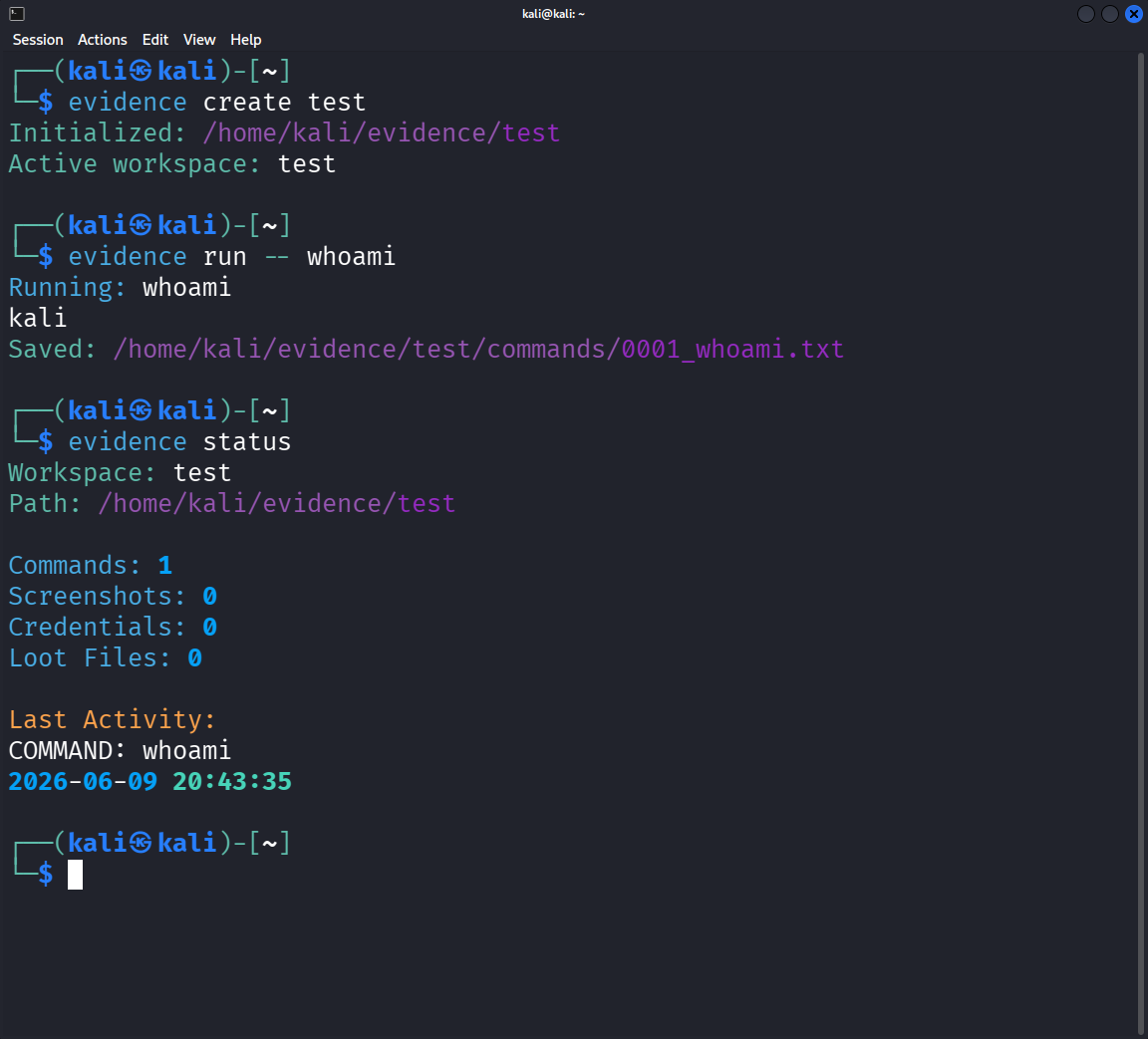
## 功能
* 工作区管理
* 实时命令执行(实时终端输出)
* 自动记录命令输出
* 截图收集
* 凭证追踪
* 战利品管理
* 授权测试笔记
* 活动历史
* 状态仪表板
## 为什么选择 Evidence?
评估过程中最常见的问题之一就是维护井然有序的证据。
很容易出现以下情况:
* 忘记截图
* 丢失命令输出
* 放错凭证
* 忘记发现 flag 的位置
* 花费数小时重新整理报告笔记
Evidence 会自动将所有内容整理到一个结构化的工作区中,
让操作员能够专注于评估本身,而不是繁琐的证据管理。
```
## 示例工作流
```bash
evidence create oscp
evidence run -- rustscan -a 10.10.10.5
evidence run -- nmap -sCV 10.10.10.5
evidence screenshot
evidence note "Anonymous FTP access discovered."
evidence credential add ftp anonymous
evidence loot add local.txt
evidence status
```
## 安装说明
### 克隆仓库
```
git clone https://github.com/YOUR_USERNAME/evidence.git
cd evidence
```
### 安装
```
pipx install -e .
```
如果您倾向于使用虚拟环境:
```
python3 -m venv venv
source venv/bin/activate
pip install -e .
Verify installation:
```bash
evidence --help
evidence --version
```
## 快速开始
创建工作区:
```
evidence create oscp
```
运行命令并保存输出:
```
evidence run -- nmap -sCV 10.10.10.5
```
添加笔记:
```
evidence note "Discovered SMB shares."
```
保存凭证:
```
evidence credential add administrator Password123
```
存储战利品:
```
evidence loot add local.txt
```
进行截图:
```
evidence screenshot
```
检查工作区状态:
```
evidence status
```
## 工作区结构
Evidence 会自动创建以下布局:
```
└── oscp/
├── commands/
│ ├── 0001_whoami.txt
│ ├── 0002_nmap.txt
│ └── 0003_netexec.txt
├── screenshots/
│ ├── 0001_user_shell.png
│ └── 0002_root_shell.png
├── loot/
├── engagement.md
├── credentials.md
└── .activity.log
```
### 版本
```
evidence --version
```
示例:
Evidence v0.1.0
### commands/
存储带有时间戳的命令输出。
示例:
0001_whoami.txt
0002_nmap.txt
0003_netexec.txt
每个输出文件内部都会保留完整的时间戳。
### screenshots/
存储在授权测试期间捕获的截图。
截图可以添加描述性标签,并使用连续的 ID 自动命名。
示例:
0001_user_shell.png
0002_root_shell.png
### loot/
存储收集到的文件,例如:
* local.txt
* root.txt
* BloodHound 归档文件
* 哈希
* 配置文件
### engagement.md
主要的笔记记录文档。
### credentials.md
存储捕获的凭证。
### .activity.log
用于工作区状态和历史记录的内部活动追踪。
## 命令
### 创建工作区
```
evidence create oscp
```
### 切换工作区
```
evidence use oscp
```
### 当前工作区
```
evidence current
```
### 运行命令
```
evidence run -- whoami
```
```
evidence run -- netexec smb 10.10.10.5
```
### 添加战利品
```
evidence loot add local.txt
```
### 添加凭证
```
evidence credential add administrator Password123
```
带有来源追踪:
```
evidence credential add administrator Password123 --source responder
```
### 添加笔记
```
evidence note "Anonymous FTP access discovered."
```
### 截图
```
evidence screenshot
```
### 状态
```
evidence status
```
示例:
```
Workspace: oscp
Commands: 17
Screenshots: 8
Credentials: 4
Loot Files: 2
Last Activity:
COMMAND: netexec smb 10.10.10.5
2026-06-09 15:42:01
```
### 6. 将状态命令添加到功能
`status` 实际上是目前最酷的功能之一。
```
* Workspace management
* Live command execution
* Command output logging
* Screenshot collection
* Credential tracking
* Loot management
* Engagement notes
* Activity history
* Status dashboard
* Workspace statistics
---
## 使用场景
### OSCP
Track:
* Enumeration
* Credentials
* Privilege escalation
* Screenshots
* Flags
### 渗透测试
Maintain organized evidence throughout assessments.
### Capture The Flag
Keep notes, loot, and command history organized during competitions.
### 红队行动
Document activity and findings throughout engagements.
---
## 路线图
Planned features:
* Exportable reports
* Markdown report generation
* Screenshot tagging
* Credential search
* Workspace history
* Activity timeline
* Evidence export bundles
* Report templates
---
## 贡献
Contributions, feature requests, and bug reports are welcome.
Please open an issue before submitting major changes.
---
## 路线图
Planned improvements:
- [ ] Cleaner report formatting with reduced timestamp noise
- [ ] Streaming command support for tools like `responder`, `nc`, and `python3 -m http.server`
- [ ] Background session tracking for long-running services
- [ ] Interactive shell/session tracking for WinRM, SSH, reverse shells, and cmd shells
- [ ] Built-in redaction workflow for flags, proof files, credentials, and screenshots
- [ ] Export modes for Markdown, HTML, and PDF reports
---
## 许可证
MIT License
---
## 免责声明
This project is intended for authorized security testing, education, and research purposes only.
Users are responsible for ensuring compliance with all applicable laws, regulations, and rules of engagement.
### 作者
Evan DeWeese (FrankieBFG)
Built while studying offensive security from the crossroads of The United States
GitHub: https://github.com/FrankieBFG
```
标签:Blue Team, ESC漏洞, 数据泄露, 笔记记录, 证据收集, 逆向工具