ranfysvalle02/m-gate
GitHub: ranfysvalle02/m-gate
一个基于 MongoDB Atlas 的多租户 MCP 网关,通过原生混合检索(向量+全文 RRF 融合)实现智能工具发现与路由,并内置认证、沙箱、加密和可观测性等企业级能力。
Stars: 1 | Forks: 0
# mdb-mcp-gateway
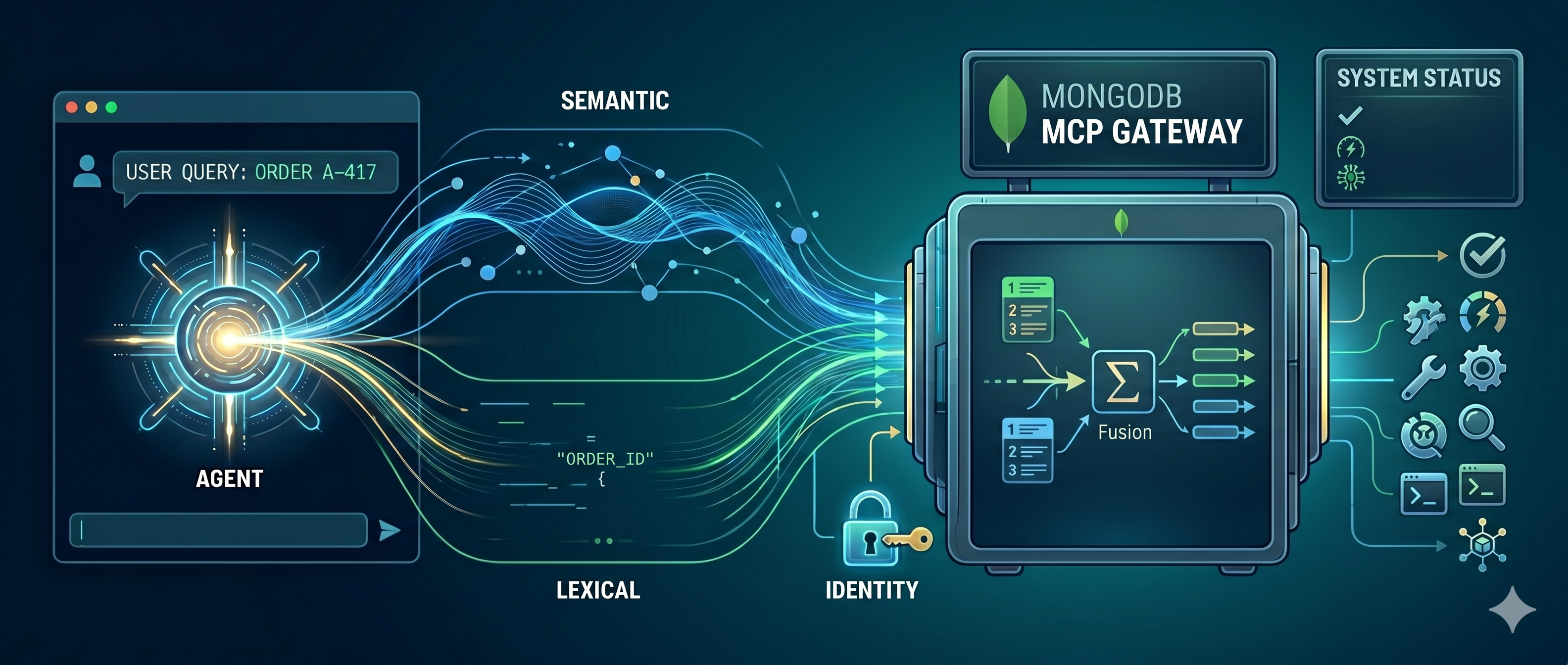
## The differentiator: Hybrid Search, in one place
Semantic (vector) routing — embed the catalog, hand back the tools a task needs —
is the well-trodden first step, and it works: it slashes the per-turn token bill.
But vector-only retrieval has a blind spot: it fumbles the **exact tokens** agents
constantly use (a tool name, an error code, an order ID), because cosine
similarity rewards meaning, not spelling.
This gateway's core is the upgrade past that: **hybrid search** — fusing semantic
(vector) and lexical (full-text/BM25) retrieval into one ranked result with
Reciprocal Rank Fusion, so an agent finds the right tool whether it asks in
keywords *or* in intent. The interesting part isn't that we do hybrid search;
it's **how little infrastructure it takes**, because MongoDB Atlas does all of it
in one `$rankFusion` query over one collection — no separate vector DB, search
engine, or sync pipeline to keep in lockstep.
### Why hybrid search is genuinely hard to operate
Neither retrieval method is sufficient alone:
- **Lexical (BM25)** nails exact tokens — tool names, error codes, SKUs — but is
blind to intent. Ask it for *"dangerous storm warnings"* and it happily ranks
an unrelated `list_customer_orders` first because of common words like "for"
and "my". (That's a real result from this repo — see below.)
- **Vector (semantic)** understands intent but can miss the exact identifier a
user typed verbatim.
The fix the industry settled on is **Reciprocal Rank Fusion (RRF)**: run both
retrievers, then merge by *rank position* (`1 / (60 + rank)`) so you never have
to normalize an unbounded BM25 score against a 0–1 cosine score. The pattern is
simple. **Operating it is not** — at least not the traditional way:
flowchart LR
A[Agent / Gateway] -->|keyword query| ES[(Search engine
Elasticsearch / Solr)] A -->|embed + vector query| VDB[(Vector DB
Pinecone / Milvus)] ES -->|ranked list A| F[Fusion + merge service
client-side RRF] VDB -->|ranked list B| F F --> A SYNC[[CDC / sync pipeline]] -. keep docs + _id consistent .-> ES SYNC -. keep docs + _id consistent .-> VDB classDef pain fill:#fde,stroke:#c33; class ES,VDB,F,SYNC pain; That's **four moving parts** to support one feature: a search engine, a vector DB, a fusion/merge service, and a sync pipeline keeping the two stores consistent by shared `_id`. Each has its own scaling, backup, and access model — and they drift out of sync the moment one write lands in one store but not the other. This is the "architectural sprawl" trap. ### How MongoDB Atlas collapses it to one query The same documents carry both a `$search` (Atlas Search / BM25) index and a `$vectorSearch` index. A single `$rankFusion` aggregation stage runs both arms and fuses them with RRF — natively, server-side, in one round trip: flowchart LR A[Agent / Gateway] -->|"one $rankFusion aggregate"| DB subgraph DB [MongoDB Atlas · tool_catalog · one collection] VEC[Vector Search index] TXT[Atlas Search index] end DB -->|RRF-fused, ranked result| A classDef good fill:#dfe,stroke:#393; class VEC,TXT good; No second store. No client-side merge. No sync pipeline. No `_id` reconciliation. The catalog, both indexes, and the fusion math live on **one engine**. That is the entire pitch of this project distilled to one stage. The pipeline this repo actually runs (`services/hybrid_search.py`): db.tool_catalog.aggregate([ { $rankFusion: { input: { pipelines: { vectorPipeline: [ { $vectorSearch: { index: "hybrid-vector-search", path: "embedding", queryVector: embed(query), numCandidates: 100, limit: 20 } } ], fullTextPipeline: [ { $search: { index: "hybrid-full-text-search", text: { query: query, path: ["name","description","server"] } } }, { $limit: 20 } ] } }, combination: { weights: { vectorPipeline: 0.5, fullTextPipeline: 0.5 } }, scoreDetails: true } }, { $project: { name: 1, description: 1, score: { $meta: "score" }, scoreDetails: { $meta: "scoreDetails" } } }, { $sort: { score: -1 } }, { $limit: 5 } ]) ### See it for yourself: one query, three modes The gateway exposes a `mode` so you can run the **same query** as `vector`, `text`, or `hybrid` and watch the arms disagree. Real output from this repo for `"look up a purchase by its id"`: | mode | top 3 results | | --- | --- | | `vector` | `find_order`, `update_order_status`, `list_customer_orders` | | `text` | `find_order`, **`severe_weather_alerts`** ← lexical noise, `list_customer_orders` | | `hybrid` | `find_order`, `list_customer_orders`, `severe_weather_alerts` | Lexical-only drags an irrelevant *weather* tool into the order results on common words; the semantic arm corrects it, so hybrid keeps both real order tools above the noise. The `scoreDetails` are the receipts that *both* arms ran and how the fusion was computed: { "value": 0.01639, "description": "value output by reciprocal rank fusion algorithm, computed as sum of (weight * (1 / (60 + rank))) across input pipelines from which this document is output, from:", "details": [ { "inputPipelineName": "fullTextPipeline", "rank": 1, "weight": 0.5, "value": "..." }, { "inputPipelineName": "vectorPipeline", "rank": 2, "weight": 0.5, "value": "..." } ] } ## Quick Start (Implemented) ### Demo in 60s -> production in 5 steps 1. **Start the stack** docker compose up --build 2. **Verify gateway health** curl http://localhost:8000/health 3. **Open the Admin Studio** - `http://localhost:8000/ui` (`demo@demo.com` / `demo`) 4. **Call seeded tools** - Code servers: `weather`, `orders`, `utilities`, `analytics` - Public server: `deepwiki` (requires outbound HTTPS to `mcp.deepwiki.com`) 5. **Graduate to production posture** - Use the hardening path in this README, then follow [DEPLOYMENT.md](DEPLOYMENT.md), [PRODUCTION.md](PRODUCTION.md), [SECURITY.md](SECURITY.md), and [NETWORK-SECURITY.md](NETWORK-SECURITY.md). Important first-run note: - Bootstrap now performs an **embedding preflight** and fails loudly if your embedding provider is unreachable. - With default Compose settings this means Ollama must be running on your host and `nomic-embed-text` must be pulled before bootstrap: ollama pull nomic-embed-text This repository now includes a working end-to-end MCP Gateway with: - FastAPI + FastMCP gateway mounted at `http://localhost:8000/mcp` - MongoDB Atlas Local (`mongod` + `mongot`) via Docker Compose - **Semantic `tools/list` discovery**: a task query (`X-MCP-Query` header) returns a curated, ranked shortlist instead of the full catalog — the "route by meaning" front door - **Identity-bound scope on both discovery and invocation**: scope filtering in search/list and explicit authorization checks in `tools/call`, including required `server:` scopes
- Hybrid tool search (`$rankFusion`: vector + full-text) over `tool_catalog`
- **GA-safe hybrid fallback**: application-side RRF keeps hybrid retrieval working when `$rankFusion` preview features are unavailable
- **Always-included tools**: flag a tool `metadata.always_included` in Admin Studio to pin it to the top of every search result regardless of relevance — still scope-filtered, and counted against the caller's `limit` (toggle with `HYBRID_PIN_ALWAYS_INCLUDED`)
- **Resiliency**: a hard downstream deadline (`DOWNSTREAM_TIMEOUT_MS`, default 2000ms) with protocol-safe JSON-RPC error frames
- **Active-active-safe registry watching**: each gateway replica persists its own change-stream resume token (`routing_registry::`) so pods do not overwrite each other's stream position
- **Downstream auth, kept minimal**: per-server `metadata.auth.scheme` is gateway-minted workload JWT (default) or `none` (the downstream/tenant owns its own auth); credentials rotate/reconnect through the existing warm-client cache path
- **Inbound MCP-client auth**: username/password via `POST /auth/token` (OAuth2 password grant) plus optional HTTP Basic on the MCP surface; full OAuth is bring-your-own-IdP via `AUTH_MODE=jwks` with RFC 9728 resource-metadata discovery
- **Queryable Encryption for downstream secrets**: `routing_registry.env` / `command` / `args` / `metadata` can be encrypted at rest with DEKs in `encryption.__keyVault`, backed by LocalStack AWS KMS (default Compose) or a local 96-byte master key
- **Embedding resiliency**: retries + circuit breaker + lexical fallback when embedding providers are unavailable
- **Pluggable, admin-configurable embeddings**: Ollama, OpenAI, Azure OpenAI, Voyage AI, and Google Gemini — switchable at runtime from the admin panel, with vector width auto-detected per provider (see [Embeddings](#embeddings))
- **Layered guardrails**: regex floor + optional semantic injection classifier over a versioned `guardrail_signatures` vector corpus, plus optional Presidio NER redaction
- **Semantic cache model provenance**: cache entries are stamped with `embedding_model` / `embedding_dim` / `embedding_version`, with version-aware lookups and migration tooling
- Default Ollama embeddings (`nomic-embed-text`) through `http://host.docker.internal:11434`
- Demo defaults: code-powered `weather`, `orders`, `utilities`, and `analytics` servers (wasm sandbox execution) plus a prewired public `deepwiki` server
- **Tenant-scoped virtual DB bridge** for code tools: `context.db[...]` queries
relay through the host process (no sandbox network access or DB credentials),
gated by each tool's `action_type` (`read` / `write` / `destructive`)
- **Per-server encrypted runtime env**: code tools read `context.env["KEY"]`; values are managed from Admin Studio Secrets and never returned after write
- **Explore Database authoring assistant** in Admin Studio: browse tenant
collections, sample documents, run read-only queries, and insert/copy
generated `context.db[...]` snippets directly into function source
- **Tenant soft-delete + retention**: `DELETE /admin/tenants/{id}` is a reversible soft-delete by default (`POST /admin/tenants/{id}/restore` undoes it within the retention window); a background reaper drops the physical DB before removing the control doc, and `?hard=true` keeps the immediate hard delete
- **Streaming usage/billing export**: `GET /admin/tenants/{id}/usage/export` (CSV) and `GET /admin/telemetry/export` (JSONL) stream over a cursor with `from`/`to` range filters — no load-all ceiling
- **Sandbox quota preflight**: code tools whose worst-case sandbox cost can't fit the remaining `sandbox_seconds` quota are rejected before execution (one shared check enforced identically on `/rpc` and `/mcp`), with a `gateway_quota_preflight_blocks_total` metric
- **Sandbox pool max-age + health sweep**: idle warm workers are proactively retired by age and ping-health, complementing the reactive `max_jobs` recycle
- **Observability**: request IDs, JSON logs, Prometheus `/metrics`, prebuilt Prometheus alert rules, a provisioned Grafana dashboard (`http://localhost:3000`), OpenTelemetry tracing (`ENABLE_TRACING=true`) with spans around RPC handling and downstream hops, and health split (`/health/live`, `/health/ready`)
- **Delivery artifacts**: k8s manifests, Helm chart, CI workflow (lint + format + types + 82% coverage gate), pre-commit, Ruff, and MyPy configuration
### Prerequisites
- Docker / Docker Compose
- Ollama running on your host machine
- Pulled embedding model:
ollama pull nomic-embed-text
Optional for ML NER redaction (`GUARDRAIL_PII_NER_ENABLED=true`):
pip install -e ".[guardrails-ml]"
python -m spacy download en_core_web_sm
### Run
docker compose up --build
By default, Compose now starts `localstack` + `kms-init` and runs the gateway
with Queryable Encryption enabled for `routing_registry` secret-bearing fields.
The KMS key ARN is written to a shared volume and loaded through
`AWS_KMS_KEY_ARN_FILE=/kms-config/kms_key_id`.
Compose also runs `secrets-init` once and writes stable file-backed secrets for
`EMBEDDING_SECRET_FILE` and `ADMIN_SESSION_SECRET_FILE` into the
`gateway_secrets` volume (instead of relying on fallback secrets).
The demo stack enables `CODE_TOOL_EXECUTION_ENABLED=true` and
`SANDBOX_DB_BRIDGE_ENABLED=true`, so seeded code tools (including the click-tracker
analytics demo) run immediately inside the wasm sandbox with `context.db`.
Queryable Encryption is still demonstrated through encrypted routing fields and
authored function source/secrets at rest — without the old non-functional
`secure-stdio` fixture server.
To use a local master key instead of LocalStack KMS:
# Generate a 96-byte QE local key (base64) and save it as a file.
python - <<'PY'
import base64, os
print(base64.b64encode(os.urandom(96)).decode())
PY
Set `KMS_PROVIDER=local` and `QE_LOCAL_MASTER_KEY_FILE=/kms-config/local-master-key.b64`
for `bootstrap` and `gateway` (see `docker-compose.yml` comments).
### Docker Compose hardening map (the "near-perfect" path)
Use this progression to move from demo convenience toward production posture:
1. **Keep file-backed secrets enabled** (default): `EMBEDDING_SECRET_FILE` and
`ADMIN_SESSION_SECRET_FILE` come from `gateway_secrets`.
2. **Use cloud embedding providers over HTTPS** for real workloads:
- set `EMBEDDING_PROVIDER=openai|azure_openai|voyage|gemini`
- mount `EMBEDDING_API_KEY_FILE` (never hardcode the key in compose).
3. **Harden auth for production**: auth is always on (`AUTH_MODE=hs256` by
default); for production move to `jwks`, set issuer/audience, and disable
wildcard CORS.
4. **Pin explicit origins and proxy trust**:
- `CORS_ALLOW_ORIGINS=https://your-app.example.com`
- `FORWARDED_ALLOW_IPS=`
5. **Graduate to production deployment docs**:
[`DEPLOYMENT.md`](DEPLOYMENT.md) + [`PRODUCTION.md`](PRODUCTION.md) +
[`SECURITY.md`](SECURITY.md) for full hardening, key rotation, and network policy.
The bootstrap service will:
1. Wait for MongoDB
2. Create Search + Vector Search indexes
3. Seed `routing_registry`, `session_context`, and a ready-to-use demo user
(`agent@demo.com`, role Demo/`tool:invoke`) — skipped when `ENVIRONMENT=production`
4. Sync downstream tools into `tool_catalog` with embeddings
### Verify
- Health:
curl http://localhost:8000/health
- Dashboards and alerts:
open http://localhost:3000 # Grafana (admin/admin)
open http://localhost:9090 # Prometheus + alert rules
- JSON-RPC hybrid search (default `mode` is `hybrid`):
curl -X POST http://localhost:8000/rpc \
-H "Content-Type: application/json" \
-d '{
"jsonrpc":"2.0",
"id":"search-1",
"method":"tools/search",
"params":{"query":"weather in montreal","limit":5}
}'
- Compare retrieval modes on the same query (`mode`: `hybrid` | `vector` |
`text`). Run all three to see the vector and lexical arms disagree, then watch
`$rankFusion` reconcile them:
for MODE in vector text hybrid; do
echo "== $MODE =="
curl -s -X POST http://localhost:8000/rpc \
-H "Content-Type: application/json" \
-d "{\"jsonrpc\":\"2.0\",\"id\":\"m\",\"method\":\"tools/search\",
\"params\":{\"query\":\"look up a purchase by its id\",\"limit\":3,\"mode\":\"$MODE\"}}"
done
- Semantic `tools/list` (route by meaning). With no query you get the full
catalog; with an `X-MCP-Query` header you get a curated shortlist:
curl -X POST http://localhost:8000/rpc \
-H "Content-Type: application/json" \
-H "X-MCP-Query: I need to check the weather forecast" \
-d '{"jsonrpc":"2.0","id":"list-1","method":"tools/list","params":{}}'
- Initialize handshake + capabilities:
curl -X POST http://localhost:8000/rpc \
-H "Content-Type: application/json" \
-d '{"jsonrpc":"2.0","id":"init-1","method":"initialize","params":{}}'
- Paginated `tools/list`:
curl -X POST http://localhost:8000/rpc \
-H "Content-Type: application/json" \
-d '{"jsonrpc":"2.0","id":"list-paged","method":"tools/list","params":{"limit":2,"cursor":"0"}}'
- Identity-bound scope. Caller groups/scopes come from the verified token claims
(`groups`/`scopes`); the catalog returned is filtered to what that identity is
allowed to see. Mint a token whose scopes exclude `orders:write` and
`update_order_status` is filtered out:
# token scoped to orders,readonly: update_order_status (orders:write) is filtered out
curl -X POST http://localhost:8000/rpc \
-H "Content-Type: application/json" \
-H "Authorization: Bearer $TOKEN" \
-d '{"jsonrpc":"2.0","id":"list-2","method":"tools/list","params":{}}'
- JSON-RPC tool call through gateway proxy:
curl -X POST http://localhost:8000/rpc \
-H "Content-Type: application/json" \
-d '{
"jsonrpc":"2.0",
"id":"call-1",
"method":"tools/call",
"params":{
"server":"weather",
"name":"get_current_weather",
"arguments":{"city":"Montreal","unit":"celsius"}
}
}'
- Cache migration status (admin route):
curl -X POST http://localhost:8000/admin/cache/migrate \
-H "Content-Type: application/json" \
-d '{"mode":"status"}'
- Cache migration via CLI (status / purge / reembed):
python -m scripts.migrate_cache --mode status
python -m scripts.migrate_cache --mode purge
python -m scripts.migrate_cache --mode reembed --batch-size 200
### Web admin console
The gateway serves a branded, dark-mode admin UI at `http://localhost:8000/ui` —
sign in, mint tokens, wire up servers, and connect an MCP client without ever
touching a terminal.
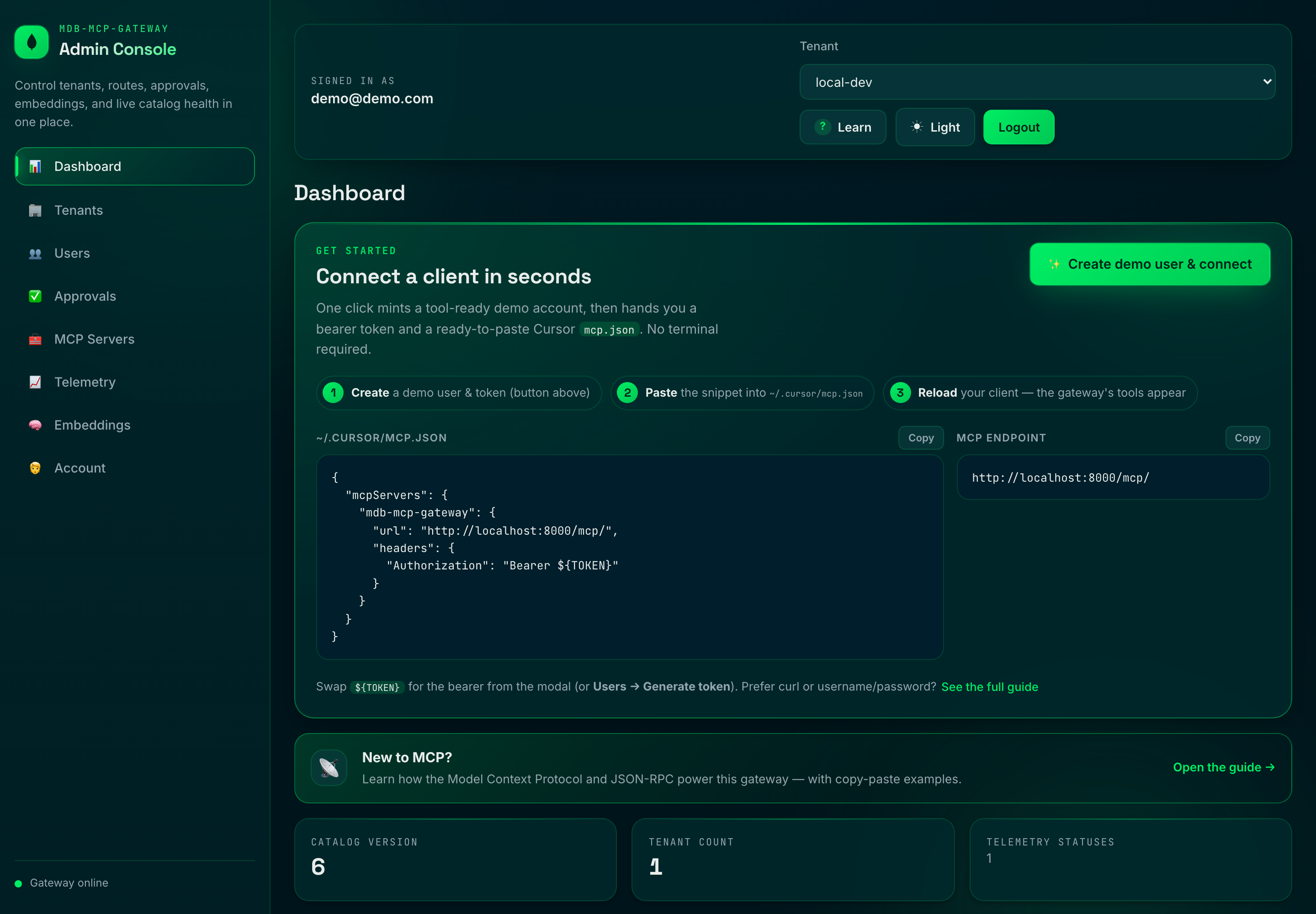
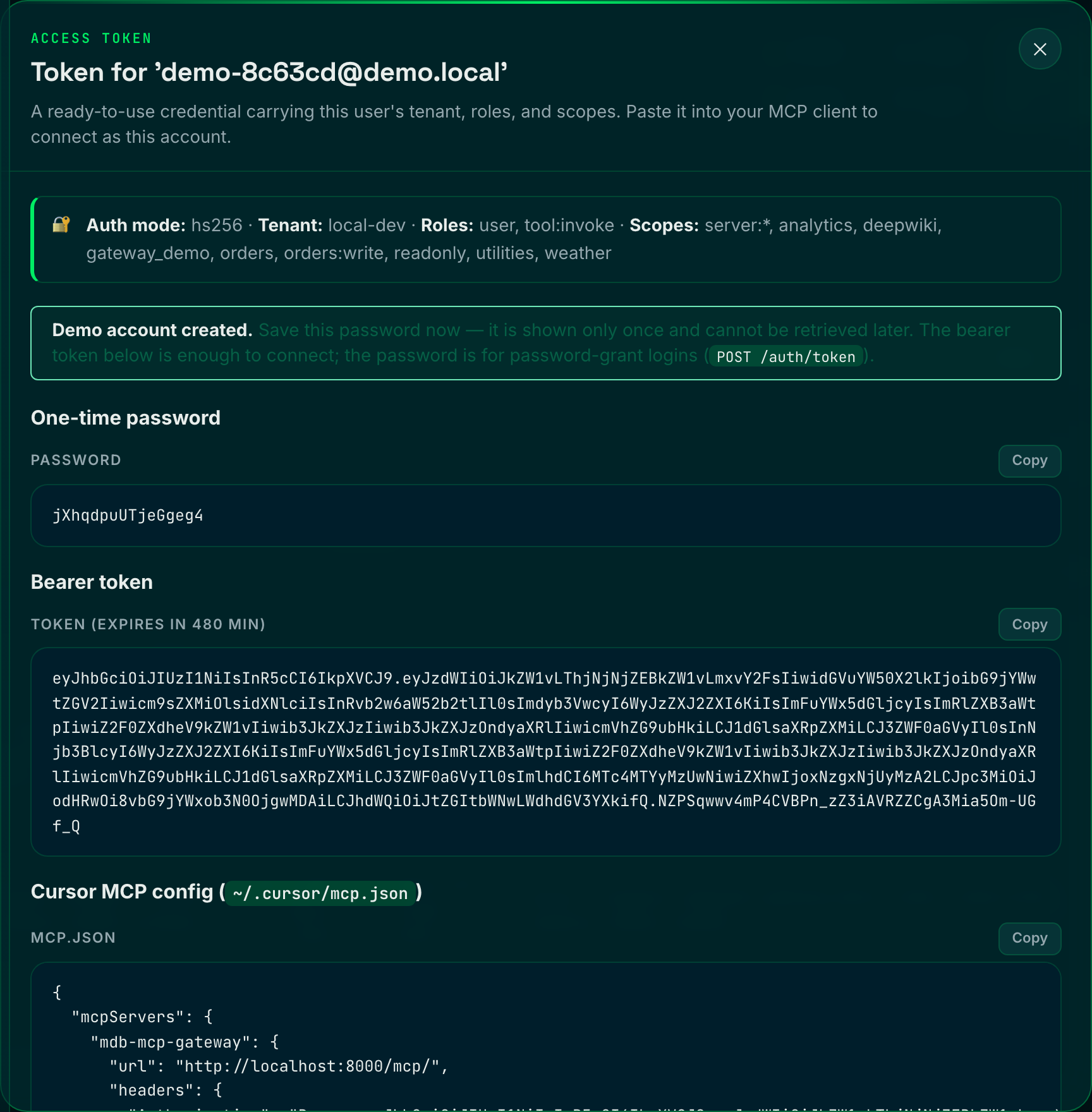
The **Connect Now** hero is the zero-to-connected fast path: one click mints a
tool-ready demo account and hands back a bearer token plus a ready-to-paste Cursor
`mcp.json` (the one-time password is shown once):
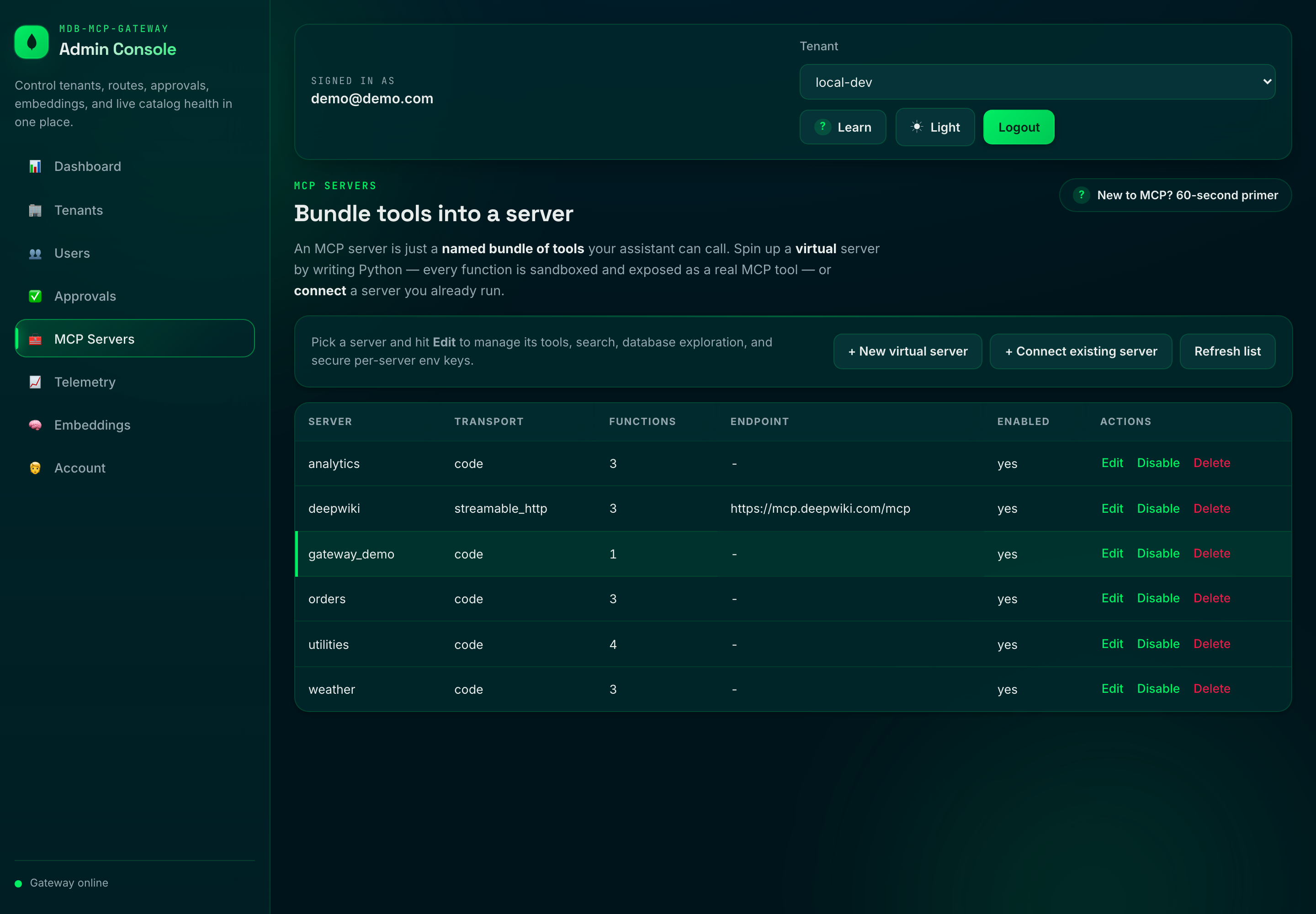
Author Python functions that run sandboxed in WebAssembly and surface as real MCP
tools, or connect servers you already run — all from the **MCP Servers** studio:
- In `docker-compose.yml`, demo credentials are preconfigured:
- `ADMIN_EMAIL=demo@demo.com`
- `ADMIN_PASSWORD=demo`
- Login is required for the admin surface (`/ui` and `/admin/*`) in **all** `AUTH_MODE`s.
- Browser sessions are cookie-based (HttpOnly); mutating admin API calls require a CSRF header.
You can still use the admin CLI under strict admin auth:
ADMIN_EMAIL=demo@demo.com ADMIN_PASSWORD=demo \
python -m scripts.admin --base-url http://localhost:8000 server list --tenant-id local-dev
Disable the UI with:
ADMIN_UI_ENABLED=false
### Embeddings
Embeddings power vector and hybrid search, the semantic cache, and the semantic
guardrail classifier. The provider is **pluggable** and can be configured two
ways, with the control DB taking precedence over the environment:
1. **Environment** (boot-time default).
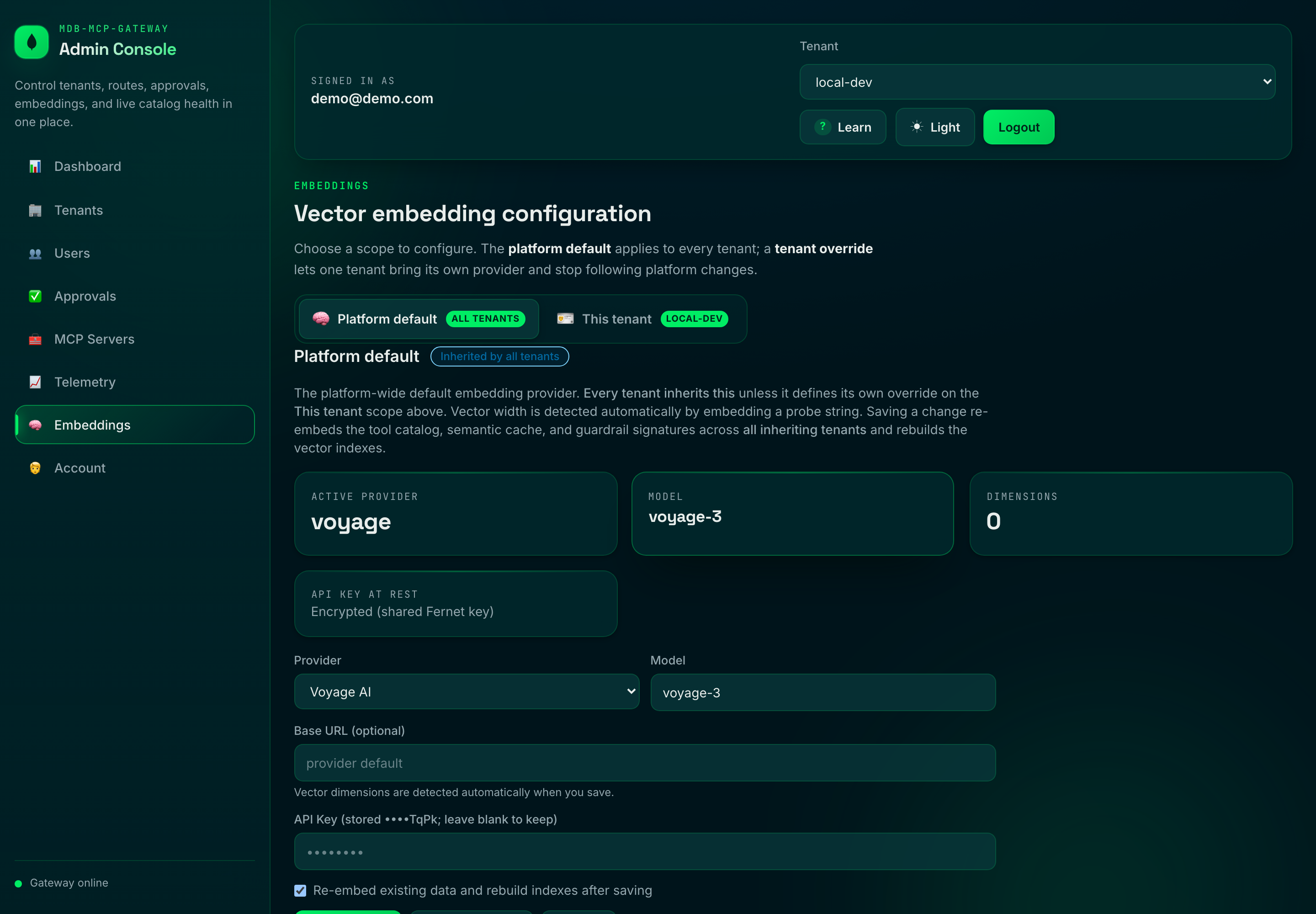
2. **Admin panel** at `/ui` → **Embeddings** (runtime, persisted, recommended).
Provider, model, and key are editable at runtime (control DB wins over env). The
screenshot below shows the panel running on **Voyage AI** — MongoDB's first-party
embedding stack, the recommended drop-in (see [VOYAGE-AI.md](VOYAGE-AI.md)):
Supported providers:
| Provider | `EMBEDDING_PROVIDER` | Auth | Default model |
| --- | --- | --- | --- |
| Ollama (local) | `ollama` | none | `nomic-embed-text` |
| OpenAI | `openai` | `EMBEDDING_API_KEY` | `text-embedding-3-small` |
| Azure OpenAI | `azure_openai` | `EMBEDDING_API_KEY` + endpoint/deployment | (deployment) |
| Voyage AI | `voyage` | `EMBEDDING_API_KEY` | `voyage-3` |
| Google Gemini | `gemini` | `EMBEDDING_API_KEY` | `text-embedding-004` |
Key behaviors:
- **Dimensions are auto-detected** by embedding a short probe string when a
config is applied — you never hand-configure vector widths, and the stored
width is always exactly what the provider returns (so Atlas vector indexes
can't drift out of sync with the data).
- **API keys are encrypted at rest** in the control DB (Fernet, keyed by
`EMBEDDING_SECRET`, falling back to `ADMIN_SESSION_SECRET` / `JWT_SECRET`) and
are always masked in API responses. Prefer a file mount via
`EMBEDDING_API_KEY_FILE` / `EMBEDDING_SECRET_FILE` in production.
- **Changing the provider/model/dimensions auto-reprovisions** everything that
depends on the embedding space: it re-embeds every tenant's `tool_catalog`,
drops and recreates the `hybrid-vector-search` indexes with the new
`numDimensions`, refreshes the semantic cache, and re-embeds the control-plane
guardrail signature corpus. Progress is tracked in `control_db.embedding_status`
and surfaced live in the panel.
- Configuration is **global** (gateway-wide), so all tenants stay on a single,
consistent embedding space.
Admin endpoints (platform-admin only):
GET /admin/embedding # current config (key masked) + reprovision status
PUT /admin/embedding # validate, persist, reload, and reprovision
POST /admin/embedding/test # dry-run: reachability + detected dimensions
GET /admin/embedding/status # reprovision progress
Example: switch to OpenAI from the CLI-style API (the gateway detects the width):
curl -X PUT http://localhost:8000/admin/embedding \
-H "Authorization: Bearer $TOKEN" -H "Content-Type: application/json" \
-d '{"provider":"openai","model":"text-embedding-3-small","api_key":"sk-..."}'
### Standalone gateway container
For single-container deployment, point the gateway at MongoDB and enable startup bootstrap:
docker build -t mdb-mcp-gateway .
docker run --rm -p 8000:8000 \
-e MONGODB_URI="mongodb://:27017/?replicaSet=rs0" \
-e MONGODB_DB_NAME="mcp_gateway" \
-e AUTO_BOOTSTRAP=true \
-e ADMIN_UI_ENABLED=true \
-e ADMIN_EMAIL="admin@example.com" \
-e ADMIN_PASSWORD="change-me-now" \
-e ADMIN_SESSION_SECRET="a-very-long-session-secret" \
mdb-mcp-gateway
Important: the gateway requires an **Atlas-capable MongoDB deployment** (Atlas Local or Atlas
cluster) with Search + Vector Search support and replica-set semantics (for the registry watcher's
change streams). A plain standalone `mongod` is not sufficient.
### Run tests
The suite has two tiers.
**Unit tier (fully offline)** — an in-memory async MongoDB fake and a
deterministic embedding stub (`tests/fakes.py`) stand in for Atlas and Ollama,
and downstream HTTP is mocked with `respx`. No external services required:
pip install -r requirements-dev.txt
pytest -q -m "not integration and not load"
To reproduce the CI quality gate locally:
ruff check . && ruff format --check . && mypy .
pytest -q -m "not integration and not load" --cov --cov-report=term-missing --cov-fail-under=82
**Integration tier (18 tests, real stack)** — runs the actual `$rankFusion` /
`$vectorSearch` / `$search` pipelines, the semantic cache, catalog sync, index
DDL, and a concurrency benchmark against a real MongoDB Atlas Local engine and a
real embedding provider.
The tier **owns its own engine**: it starts a pinned
`mongodb/mongodb-atlas-local` container via [testcontainers](https://testcontainers.com/),
verifies it is genuinely search-capable (not a plain `mongod`), bootstraps an
**isolated throwaway database**, and tears everything down afterwards — so it
never touches a shared cluster or leaves residue. All you need is Docker running
and the embedding model pulled:
ollama pull nomic-embed-text # embedding model (host Ollama)
pytest -q -m "integration or load" # testcontainers starts Atlas Local for you
To run against an existing Atlas Local instead of provisioning one (e.g. a CI
service container or `docker compose up -d mongodb`), point the tier at it — it
still verifies the engine and uses an isolated DB:
INTEGRATION_MONGODB_URI=mongodb://localhost:27017/?directConnection=true \
pytest -q -m "integration or load"
The pinned image tag is overridable via `INTEGRATION_ATLAS_IMAGE`, and Ollama
via `OLLAMA_BASE_URL`. If Docker is unavailable and no URI override is given, the
whole tier skips cleanly — a no-op on a bare laptop, a hard gate in CI.
### Local JWKS token flow (offline)
This is the **`AUTH_MODE=jwks`** path, for exercising asymmetric RS256 verification
offline. (The default setup is `hs256` — there, mint tokens from the admin console's
**Users → Generate token** button or `POST /auth/token`, not the script below.)
This repo ships a local dev RSA keypair + JWKS so the jwks path needs no external IdP:
python -m scripts.mint_token --groups orders readonly --roles tool:invoke
Then set:
AUTH_MODE=jwks
JWKS_LOCAL_PATH=./config/dev-jwks.json
JWT_ISSUER=http://localhost:8000
JWT_AUDIENCE=mdb-mcp-gateway
**Key rotation.** The JWKS is cached for `JWKS_CACHE_TTL_SECONDS`, but a token whose
`kid` is not in the cached set triggers an immediate out-of-band refresh rather than
waiting out the TTL — so a rotated-in signing key is honored on the next request. To
keep a flood of bogus `kid`s from hammering the IdP, that refresh is throttled to once
per `JWKS_MIN_REFRESH_SECONDS`.
### Tenancy: provisioning and isolation
A tenant's data lives in its own physical database (`tenant_db_name()` derives a
collision-safe name from the verified `tenant_id` claim). Tenant-scoped RPC methods
(`tools/call`, `tools/list`, `tools/search`) call `ensure_tenant_ready()` before
touching any tenant collection:
- **Unknown tenant + `AUTO_PROVISION_TENANTS=true` (default):** the tenant's database
and indexes are created on first use (cached per process; provisioning is
idempotent and does not block on Atlas index build).
- **Unknown tenant + `AUTO_PROVISION_TENANTS=false`:** the request returns a clear
JSON-RPC error (`INVALID_REQUEST`, `data.reason = "tenant_not_provisioned"`) instead
of silently running against a missing database and returning empty results. Use this
mode where tenant ids originate from untrusted callers and provisioning should be an
explicit operator step (`POST /admin/tenants` or `scripts/admin.py`).
### Rate limiting
The per-(tenant, client-ip) limiter counts requests per fixed sub-window but
estimates the rate over a rolling window by weighting the previous window by how much
of it still overlaps "now". This removes the fixed-window failure mode where a caller
spends a full quota at the end of one window and again at the start of the next (a 2x
boundary burst). Tune it with `RATE_LIMIT_WINDOW_SECONDS` and `RATE_LIMIT_MAX_REQUESTS`.
### Active-active watcher resume state
`services/registry_watcher.py` stores resume tokens per gateway instance in
`control_db.watcher_state` using `_id = routing_registry::` where
`instance_id` comes from `GATEWAY_INSTANCE_ID` (or host name fallback). This keeps
replicas from clobbering each other's stream position. Resume-token docs are TTL'd by
`WATCHER_RESUME_TTL_SECONDS`, so stale pod IDs self-clean.
### Downstream auth brokering
The gateway brokers only a **workload identity** to third-party downstream servers,
selected per server via `metadata.auth.scheme`:
- `jwt` (default): gateway-minted short-lived RS256 workload identity (`iss`, `aud`,
`sub=tenant::gateway`, `tenant_id`, `iat`, `exp`, `jti`)
- `none`: no injected transport credential — the **downstream service or the tenant**
presents its own authentication (vendor API key, basic auth, OAuth, mTLS, ...)
Third-party credentials (API keys, passwords, OAuth client secrets) are intentionally
**not** brokered per-server by the gateway; they belong to the downstream/tenant. When a
downstream needs its own credential, set `scheme=none` and terminate that auth downstream
(or in front of it). For a code (`transport=code`) server's own logic, per-server secrets
remain available via `context.env` (`PUT /admin/servers/{server}/env`).
The broker (`services/credential_broker.py`) caches credentials per `(tenant, server)`,
and the warm client pool reconnects only when a cached credential is near expiry. `jwt`
keeps TTL + refresh-skew rotation; `none` uses a long-lived cache entry.
Security defaults:
- Credential material is never logged.
- The `jwt` bearer is refused on plaintext `http://` downstream endpoints unless
`DOWNSTREAM_ALLOW_INSECURE_CREDENTIALS=true`.
- In production, the bundled dev JWT signing key remains rejected; configure your own
`DOWNSTREAM_JWT_PRIVATE_KEY(_FILE)`.
Quick metadata snippets:
- Gateway workload identity (default)
{ "auth": { "scheme": "jwt", "audience": "downstream-service" } }
- Downstream owns its own auth
{ "auth": { "scheme": "none" } }
### Inbound MCP-client auth (username/password + OAuth)
MCP clients connecting to the gateway's own surface (`/rpc`, `/mcp`) can authenticate with
a username/password in addition to the bearer/JWT flows (`AUTH_MODE=hs256|jwks`):
- `POST /auth/token` — OAuth2 password grant. Exchanges username + password (the same
managed users + bootstrap admin used by the console login) for a short-lived bearer:
curl -X POST http://localhost:8000/auth/token \
-H "Content-Type: application/x-www-form-urlencoded" \
-d 'grant_type=password&username=$EMAIL&password=$PASSWORD'
# -> {"access_token":"...","token_type":"bearer","expires_in":28800}
# then call /rpc or /mcp with: Authorization: Bearer
- Optional HTTP Basic directly on `/rpc`/`/mcp` via `MCP_BASIC_AUTH_ENABLED=true`.
- **OAuth is bring-your-own-IdP**: run the gateway as a resource server with
`AUTH_MODE=jwks`; spec-compliant MCP clients discover the issuer via
`GET /.well-known/oauth-protected-resource` (RFC 9728), advertised when `AUTH_MODE=jwks`
or `OAUTH_METADATA_ENABLED=true`.
Authorization: reaching `/rpc` requires `admin`, `tool:invoke`, or `tool:read`;
**calling** a tool additionally requires `admin` or `tool:invoke` (`tool:read` is
discover-only).
See [`AUTH.md`](AUTH.md) for the complete authentication & authorization reference
(inbound pipeline, RBAC, downstream credential brokering, settings, and recipes).
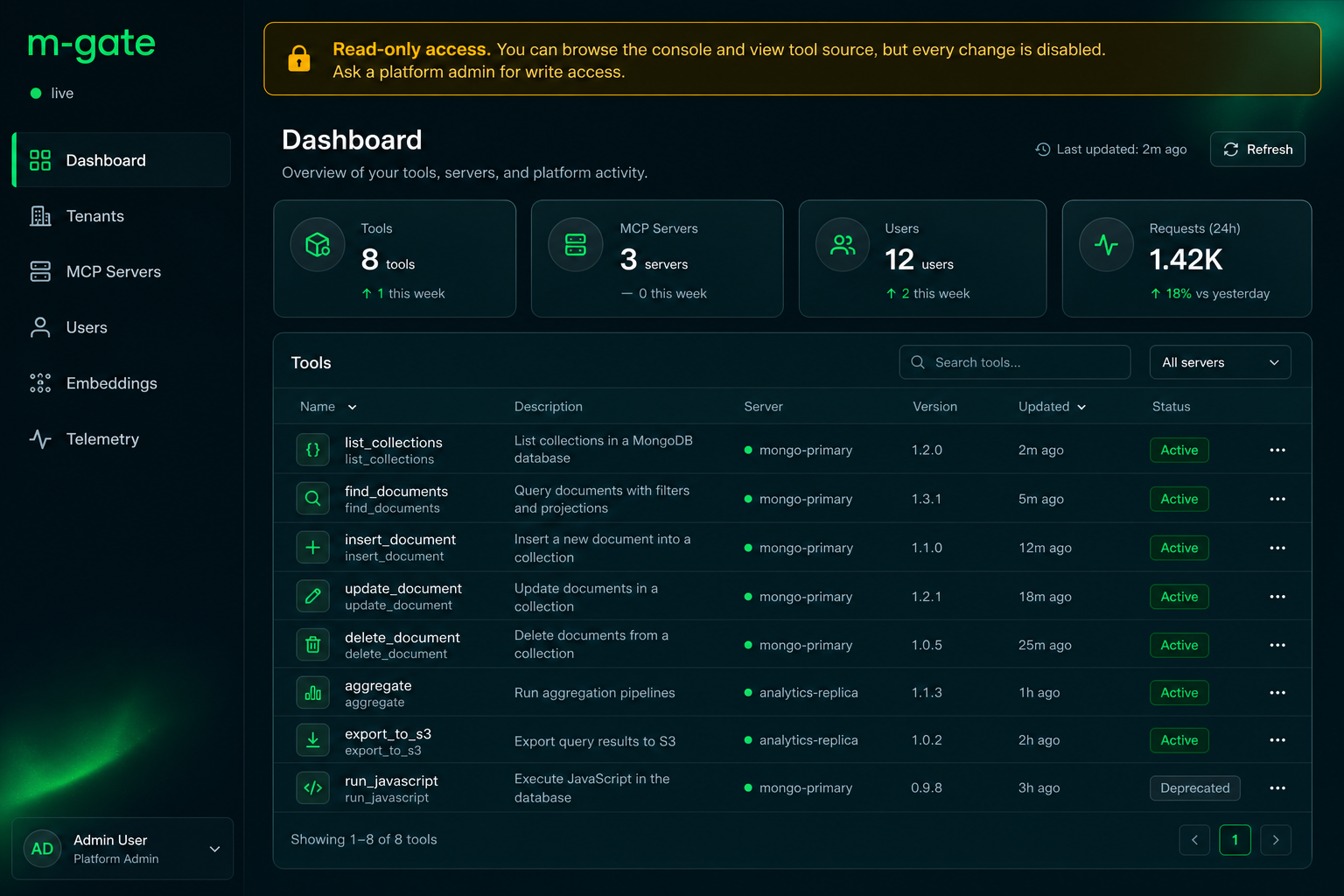
### Safely showcase: read-only tenants, viewers, and curated tools
For demos, audits, or sharing the platform without risk, the gateway adds
admin-controlled, least-privilege guardrails. **[`READONLY.md`](READONLY.md) is the
full walkthrough with screenshots**; the auth model lives in
[`AUTH.md`](AUTH.md) §3.2:
- **Read-only tenant** — freeze a tenant (`POST /admin/tenants/{id}/read-only`):
it stays `active` and discoverable, but `tools/call` and tenant config edits
return `403` (`tenant_read_only`). Platform-admin always bypasses.
- **`viewer` role** — a read-only **console** login: browse the UI + tool source,
every mutation `403`. One click via **Users → Create viewer user**.
- **`tool:read` role** — a discover-only **MCP** token: `tools/list` /
`tools/search` work, `tools/call` is refused (`invoke_not_permitted`). Minted by
the same Create-viewer-user button.
- **Per-tenant tool curation** — an `allowlist` (`server/name` / `server/*`) and a
`max_tools` cap (`GET`/`PUT /admin/tenants/{id}/tool-policy`), plus per-server
enable/disable and a per-tool kill-switch (`disabled_tools`) that blocks a tool
for everyone, including admins (`tool_disabled`). Curation filters both
discovery and invocation, so a showcase only ever surfaces the curated set.
Net effect: hand teammates a viewer login on a frozen, curated tenant and they can
explore everything and run nothing, while platform-admins retain full control.
### From the blog post to this repo
`blog.md` is the narrative; this table maps each idea to where it actually lives
in the code, so the post and the implementation stay honest with each other.
| Blog concept | Where it lives in this repo |
| --- | --- |
| Route by meaning (curated `tools/list`) | `tools/list` + `X-MCP-Query` in `gateway/routers/rpc.py` → `HybridSearchService.search_tools` |
| Identity-bound scope (`scopes` + server namespace filters on `$vectorSearch`) | `build_rank_fusion_pipeline(allowed_scopes=...)` in `services/hybrid_search.py`; `scopes` + `server` filter fields in `database/indexes.py` |
| Verified claim → search filter | `gateway/middleware/auth.py` (verified token claims `groups`/`scopes`) threaded into the RPC router |
| Hybrid search (lexical + vector fusion) | `$rankFusion` (RRF) is the **core** retrieval in `services/hybrid_search.py`; `mode=hybrid\|vector\|text` lets you compare the arms |
| One control plane on MongoDB | `tool_catalog`, `routing_registry`, `semantic_cache`, `audit_telemetry` on one engine |
| Resiliency: deadline + protocol-safe failure | `DOWNSTREAM_TIMEOUT_MS` + `DownstreamTimeout`/`DownstreamError` → `UPSTREAM_TIMEOUT`/`INTERNAL_ERROR` frames |
| Catalog freshness off the hot path | `scripts/bootstrap.py` + `services/registry_watcher.py` (Change Streams), embeddings computed on sync |
| Close the loop with the audit trail | `services/telemetry_logger.py` → time-series `audit_telemetry` |
# Architectural Blueprint: Building a High-Throughput, Reactive MCP Gateway with FastAPI and MongoDB Async
Most Model Context Protocol (MCP) implementations look great in a weekend demo but crumble under real enterprise demands. When you have hundreds of LLM agents running concurrent tasks, spinning up individual, static connections to a dozen isolated MCP servers creates a chaotic web of infrastructure.
To solve this, we need an intelligent, enterprise-grade **MCP Gateway**.
By pairing **FastAPI** (the king of async Python web frameworks) with **FastMCP** and the native **PyMongo Async API**, we can build a gateway that acts as a single, hardened entry point. It treats MongoDB not just as a cold storage database, but as the live, reactive brain of the entire orchestration layer.
Here is the comprehensive production architecture, design layout, and execution roadmap to build it.
## The High-Level Architecture
The gateway sits as an asynchronous reverse proxy between your upstream LLM orchestrators (like LangChain, LlamaIndex, or custom UIs) and your downstream, internal MCP tools.
### Core Architectural Pillars
1. **Asynchronous Edge to Core:** The entire stack relies on non-blocking I/O. FastAPI runs the ASGI event loop, FastMCP manages the asynchronous JSON-RPC protocol states, and PyMongo Async talks directly to MongoDB over native async sockets without thread-pool overhead.
2. **Reactive Configuration:** Zero restarts for tool discovery. We use MongoDB Change Streams to live-update the gateway's memory space the millisecond an internal microservice or tool mapping updates in the database.
3. **Decoupled Security & Observation:** Authentication, Role-Based Access Control (RBAC), PII scrubbing, and cost metrics are treated as global middleware layers rather than hardcoded logic inside the tool executions.
## Project Directory Layout
An enterprise-grade Python application needs strict separation of concerns. This layout isolates database management, network routing, and business logic to remain highly maintainable as your system grows.
mcp-gateway/
├── config/ # Deployment, env vars, and Pydantic global settings
├── database/ # Native PyMongo Async initialization and pool managers
├── gateway/ # FastAPI routing layers, SSE endpoints, WebSocket protocols
│ ├── middleware/ # Security, Rate-limiter, Guardrails, Tenant-isolation
│ └── routers/ # Dynamic JSON-RPC handlers mapping clients to downstream servers
├── services/ # Core business orchestration
│ ├── cache_manager.py # MongoDB Vector Search semantic cache interface
│ ├── registry_watcher.py # MongoDB Change Stream listener for live tool mounting
│ └── telemetry_logger.py # High-throughput writing to Mongo Time-Series collection
├── models/ # Pydantic schemas validating MCP and JSON-RPC 2.0 specs
├── tests/ # Integration and stress testing matrix
├── Dockerfile
└── README.md
## Architectural Breakdown & Core Logic
### 1. The Reactive Storage Layer (MongoDB Blueprint)
To optimize database read/write profiles, we partition our data models into highly specific MongoDB collection architectures:
| Collection Name | MongoDB Feature Used | Purpose |
| --- | --- | --- |
| `routing_registry` | **Change Streams & Partitions** | Holds metadata and URLs of active downstream MCP servers. |
| `session_context` | **TTL Indexes** | Keeps ephemeral token states and session contexts alive, auto-purging them after inactivity. |
| `semantic_cache` | **MongoDB Vector Search** | Caches expensive LLM responses based on embedding similarity of tool arguments. |
| `audit_telemetry` | **Time-Series Collections** | Highly compressed, high-frequency logging of every single tool execution token cost and response latency. |
### 2. High-Level Gateway Logic (Pseudocode)
Here is the high-level logic running inside the gateway's pipeline, illustrating how a request transitions from an incoming API call to an optimized, audited execution.
#### A. The Middleware Pipeline Loop
Every incoming request must pass through a strict validation chain before a tool is ever evaluated or invoked.
# Conceptual pseudocode for the FastAPI global request pipeline
ASYNC FUNCTION mcp_request_pipeline(client_request):
# 1. Tenant & Authenticity Check
tenant_id = extract_and_verify_jwt(client_request.headers)
IF NOT tenant_id:
RETURN ErrorResponse(STATUS=401, MESSAGE="Unauthorized Access")
# 2. Rate Limiting via Context Verification
allowed = CHECK_RATE_LIMIT_IN_MONGO(tenant_id, client_request.client_ip)
IF NOT allowed:
RETURN ErrorResponse(STATUS=429, MESSAGE="Rate Limit Exceeded")
# 3. RBAC Filtering
user_roles = FETCH_ROLES_FROM_SESSION_CONTEXT(tenant_id, client_request.user_id)
has_permission = EVALUATE_ABAC_MATRIX(user_roles, client_request.target_tool)
IF NOT has_permission:
RETURN ErrorResponse(STATUS=403, MESSAGE="Insufficient Permissions for Tool")
# 4. Content Guardrails (Inbound)
sanitized_args = RUN_PII_AND_PROMPT_INJECTION_SHIELD(client_request.arguments)
client_request.arguments = sanitized_args
# Proceed to Execution Router
RETURN AWAIT execute_mcp_routing_layer(client_request, tenant_id)
#### B. The Smart Routing & Caching Layer
Once validated, the gateway uses semantic optimization to determine if it can bypass downstream compute entirely before running the tool through the FastMCP engine.
# Conceptual pseudocode for semantic caching and routing execution
ASYNC FUNCTION execute_mcp_routing_layer(request, tenant_id):
# 1. Look for a semantic shortcut using MongoDB Vector Search
cached_payload = AWAIT check_vector_index_for_similar_execution(
tool_name=request.target_tool,
args=request.arguments,
threshold=0.95
)
IF cached_payload IS NOT NONE:
# Async log hit to telemetry and return immediately
START_BACKGROUND_TASK(log_telemetry, request, status="CACHE_HIT")
RETURN cached_payload
# 2. Fetch live client connection from memory-mapped FastMCP Registry
mcp_client = InMemoryFastMCPRegistry.get_client(request.target_server)
IF mcp_client IS NONE:
RETURN ErrorResponse(STATUS=503, MESSAGE="Target MCP Server Offline")
# 3. Execute downstream network call asynchronously
TRY:
raw_response = AWAIT mcp_client.call_tool(request.target_tool, request.arguments)
# 4. Outbound Content Guardrails
validated_response = AUDIT_OUTPUT_FOR_DATA_EXFILTRATION(raw_response)
# 5. Populate cache and telemetry concurrently
START_BACKGROUND_TASK(save_to_semantic_cache, request.target_tool, request.arguments, validated_response)
START_BACKGROUND_TASK(log_telemetry, request, status="LIVE_EXECUTION_SUCCESS")
RETURN validated_response
EXCEPT DownstreamTimeoutException:
START_BACKGROUND_TASK(log_telemetry, request, status="TIMEOUT_FAILURE")
# Protocol-safe JSON-RPC error frame (HTTP 200), not a transport-level 5xx,
# so MCP clients can parse the failure instead of choking on it.
RETURN JsonRpcErrorFrame(CODE=-32004, MESSAGE="UPSTREAM_TIMEOUT")
#### C. The Dynamic Self-Healing Engine
To achieve zero-downtime reconfiguration, the gateway runs a background loop listening for operational events directly out of MongoDB's replication log.
# Conceptual pseudocode for live cluster hot-reloading
ASYNC FUNCTION watch_mongodb_cluster_changes():
# Connect directly to the change stream of the configuration collection
ASYNC WITH db.routing_registry.watch() AS change_stream:
ASYNC FOR change IN change_stream:
server_id = change.document_key._id
IF change.operation_type IN ["insert", "update", "replace"]:
server_doc = AWAIT db.routing_registry.find_one({"_id": server_id})
IF server_doc.is_enabled:
# Dynamically construct a new FastMCP client connection string
# and hot-swap it inside the active gateway pool
AWAIT InMemoryFastMCPRegistry.mount_or_update(
name=server_doc.name,
url=server_doc.connection_url
)
ELSE:
AWAIT InMemoryFastMCPRegistry.unmount(server_doc.name)
ELIF change.operation_type == "delete":
AWAIT InMemoryFastMCPRegistry.unmount_by_id(server_id)
## Full Execution & Rollout Roadmap
Building this requires an organized, multi-phased implementation strategy to move securely from foundational scaffolding to an optimized, production-hardened platform.
### Phase 1: Core Scaffolding & Async Foundation
* **Objective:** Establish the asynchronous backbone of the web framework and connection pooling.
* **Tasks:**
* Initialize the FastAPI shell, integrating Pydantic settings for system-wide configuration.
* Set up the global `AsyncMongoClient` layer to manage connection pools without blocking.
* Build the standard JSON-RPC 2.0 base request/response schemas to align with core MCP specifications.
### Phase 2: Reactive Routing & Dynamic Service Discovery
* **Objective:** Connect external clients to multiple downstream endpoints through runtime lookups.
* **Tasks:**
* Implement the background execution loop utilizing PyMongo Change Streams to track additions or removals in `routing_registry`.
* Build the FastMCP client instantiation wrapper that accepts incoming payloads and maps them to dynamic server pools.
* Create the core FastAPI SSE (Server-Sent Events) and WebSocket transport hooks to handle bidirectional streaming safely.
### Phase 3: Enterprise Security, Guardrails & Tenancy
* **Objective:** Secure the perimeter against data leaks, unauthorized access, and request failures.
* **Tasks:**
* Embed authentication hooks into FastAPI dependencies to read incoming bearer tokens against user session tables.
* Implement standard circuit breakers and backoff loops so a failure in an isolated internal microservice doesn't bring down the main gateway.
* Write data validation interceptors inside the request loop to scrub outputs for sensitive records (e.g., matching PII regex structural patterns) before return delivery.
### Phase 4: Intelligence, Optimization & Scale
* **Objective:** Maximize performance, drive down token costs, and establish deep system observation.
* **Tasks:**
* Configure a MongoDB Atlas Vector Search index over the `semantic_cache` collection.
* Wire up a local embedding workflow to analyze incoming argument patterns and intercept repetitive downstream calls.
* Turn on the native MongoDB Time-Series collection engine for `audit_telemetry` to capture structural logs cleanly.
* Package the entire architecture into multi-stage Docker builds optimized for Kubernetes or cloud auto-scaling deployment.
Elasticsearch / Solr)] A -->|embed + vector query| VDB[(Vector DB
Pinecone / Milvus)] ES -->|ranked list A| F[Fusion + merge service
client-side RRF] VDB -->|ranked list B| F F --> A SYNC[[CDC / sync pipeline]] -. keep docs + _id consistent .-> ES SYNC -. keep docs + _id consistent .-> VDB classDef pain fill:#fde,stroke:#c33; class ES,VDB,F,SYNC pain; That's **four moving parts** to support one feature: a search engine, a vector DB, a fusion/merge service, and a sync pipeline keeping the two stores consistent by shared `_id`. Each has its own scaling, backup, and access model — and they drift out of sync the moment one write lands in one store but not the other. This is the "architectural sprawl" trap. ### How MongoDB Atlas collapses it to one query The same documents carry both a `$search` (Atlas Search / BM25) index and a `$vectorSearch` index. A single `$rankFusion` aggregation stage runs both arms and fuses them with RRF — natively, server-side, in one round trip: flowchart LR A[Agent / Gateway] -->|"one $rankFusion aggregate"| DB subgraph DB [MongoDB Atlas · tool_catalog · one collection] VEC[Vector Search index] TXT[Atlas Search index] end DB -->|RRF-fused, ranked result| A classDef good fill:#dfe,stroke:#393; class VEC,TXT good; No second store. No client-side merge. No sync pipeline. No `_id` reconciliation. The catalog, both indexes, and the fusion math live on **one engine**. That is the entire pitch of this project distilled to one stage. The pipeline this repo actually runs (`services/hybrid_search.py`): db.tool_catalog.aggregate([ { $rankFusion: { input: { pipelines: { vectorPipeline: [ { $vectorSearch: { index: "hybrid-vector-search", path: "embedding", queryVector: embed(query), numCandidates: 100, limit: 20 } } ], fullTextPipeline: [ { $search: { index: "hybrid-full-text-search", text: { query: query, path: ["name","description","server"] } } }, { $limit: 20 } ] } }, combination: { weights: { vectorPipeline: 0.5, fullTextPipeline: 0.5 } }, scoreDetails: true } }, { $project: { name: 1, description: 1, score: { $meta: "score" }, scoreDetails: { $meta: "scoreDetails" } } }, { $sort: { score: -1 } }, { $limit: 5 } ]) ### See it for yourself: one query, three modes The gateway exposes a `mode` so you can run the **same query** as `vector`, `text`, or `hybrid` and watch the arms disagree. Real output from this repo for `"look up a purchase by its id"`: | mode | top 3 results | | --- | --- | | `vector` | `find_order`, `update_order_status`, `list_customer_orders` | | `text` | `find_order`, **`severe_weather_alerts`** ← lexical noise, `list_customer_orders` | | `hybrid` | `find_order`, `list_customer_orders`, `severe_weather_alerts` | Lexical-only drags an irrelevant *weather* tool into the order results on common words; the semantic arm corrects it, so hybrid keeps both real order tools above the noise. The `scoreDetails` are the receipts that *both* arms ran and how the fusion was computed: { "value": 0.01639, "description": "value output by reciprocal rank fusion algorithm, computed as sum of (weight * (1 / (60 + rank))) across input pipelines from which this document is output, from:", "details": [ { "inputPipelineName": "fullTextPipeline", "rank": 1, "weight": 0.5, "value": "..." }, { "inputPipelineName": "vectorPipeline", "rank": 2, "weight": 0.5, "value": "..." } ] } ## Quick Start (Implemented) ### Demo in 60s -> production in 5 steps 1. **Start the stack** docker compose up --build 2. **Verify gateway health** curl http://localhost:8000/health 3. **Open the Admin Studio** - `http://localhost:8000/ui` (`demo@demo.com` / `demo`) 4. **Call seeded tools** - Code servers: `weather`, `orders`, `utilities`, `analytics` - Public server: `deepwiki` (requires outbound HTTPS to `mcp.deepwiki.com`) 5. **Graduate to production posture** - Use the hardening path in this README, then follow [DEPLOYMENT.md](DEPLOYMENT.md), [PRODUCTION.md](PRODUCTION.md), [SECURITY.md](SECURITY.md), and [NETWORK-SECURITY.md](NETWORK-SECURITY.md). Important first-run note: - Bootstrap now performs an **embedding preflight** and fails loudly if your embedding provider is unreachable. - With default Compose settings this means Ollama must be running on your host and `nomic-embed-text` must be pulled before bootstrap: ollama pull nomic-embed-text This repository now includes a working end-to-end MCP Gateway with: - FastAPI + FastMCP gateway mounted at `http://localhost:8000/mcp` - MongoDB Atlas Local (`mongod` + `mongot`) via Docker Compose - **Semantic `tools/list` discovery**: a task query (`X-MCP-Query` header) returns a curated, ranked shortlist instead of the full catalog — the "route by meaning" front door - **Identity-bound scope on both discovery and invocation**: scope filtering in search/list and explicit authorization checks in `tools/call`, including required `server:
标签:AI风险缓解, 子域名突变, 用户代理, 自定义请求头, 请求拦截, 逆向工具