IcebergAI/IcebergCTI
GitHub: IcebergAI/IcebergCTI
面向网络安全团队的网络威胁情报平台,支持从情报收集、结构化报告撰写到需求对齐分发的完整情报生命周期管理。
Stars: 0 | Forks: 0
# Iceberg 🧊
[](https://github.com/IcebergAI/IcebergCTI/actions/workflows/ci.yml)

[](https://github.com/astral-sh/ruff)
A cyber threat intelligence platform for **collecting** intelligence, **authoring**
finished intelligence products, and **disseminating** them to stakeholders.
Analysts work in topic **notebooks** — gathering sources, notes and uploaded
**attachments** (reference files), and applying structured analytic techniques (the
**Diamond Model** of Intrusion Analysis and **Analysis of Competing Hypotheses (ACH)**) —
and author **reports** (intelligence products) in markdown. Reports carry
an intelligence level (Strategic / Tactical / Operational) and a TLP marking, cite
sources and attachments, carry Admiralty/NATO-style **source reliability grading**,
**embed Diamond Model diagrams, ACH matrices and figures (images) inline**, are classified with **taxonomy tags** (threat
actor / campaign / malware / ATT&CK technique / sector / topic), move through a review
workflow, and can be rendered to branded PDF products.
Everything is **searchable** — full-text + faceted across the report library — and the
ATT&CK techniques tagged across reports drive a **coverage heatmap** and downloadable
**ATT&CK Navigator layers** (per report and per actor/malware/campaign entity). A writer-only
**program maturity dashboard** rolls the same data up into CTI-CMM-style program-health
indicators. Security-relevant events are captured to a **structured-JSON audit log** (OWASP
application-logging shape) and can be **forwarded to a SIEM** (stdout/file, syslog, or HTTP
event collector) — configurable in the admin console.
## Screenshots
The portal is a server-rendered "command-center" design system (Archivo /
JetBrains Mono / Spectral) — a persistent role-aware left rail + topbar + scrolling
canvas, a ⌘K command palette, and a full-height 3-pane report editor. The views below
use realistic sample data.
### The analyst workspace
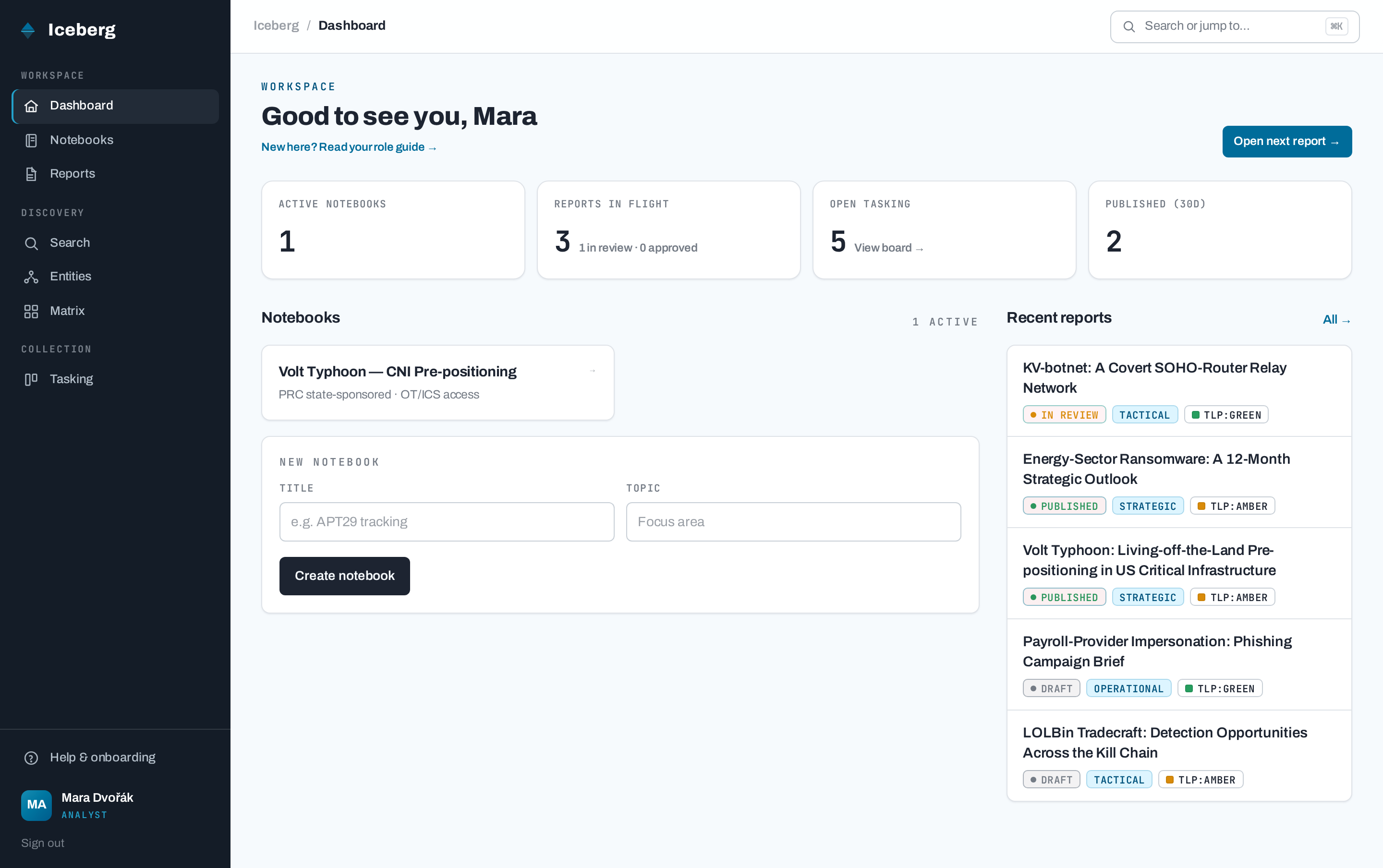
*Notebooks in collection, reports in flight, and the most recent products — all in one place.*
### The report library
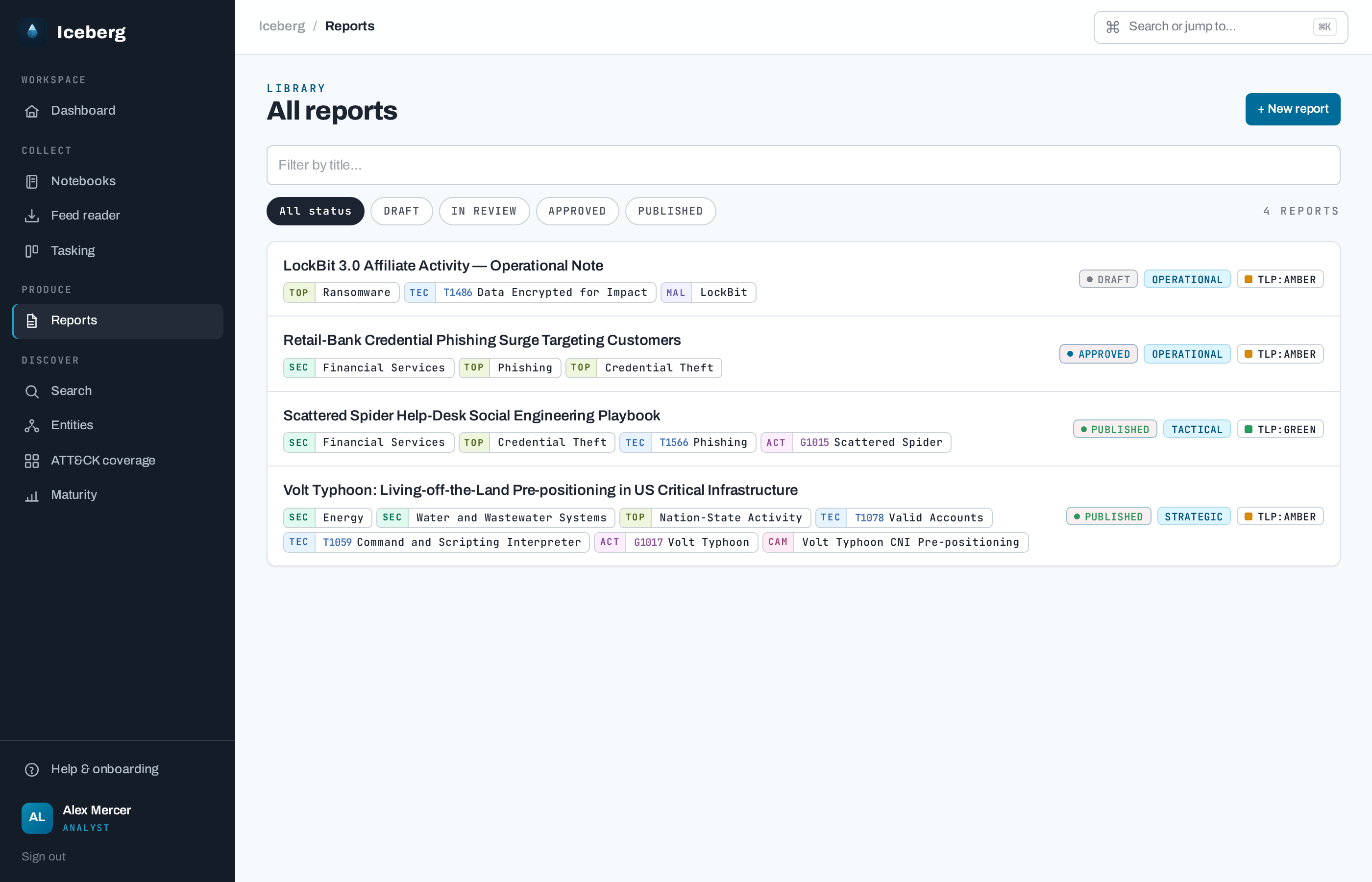
*Every intelligence product with its status, intelligence level, TLP marking and taxonomy chips.*
### Authoring with a live preview
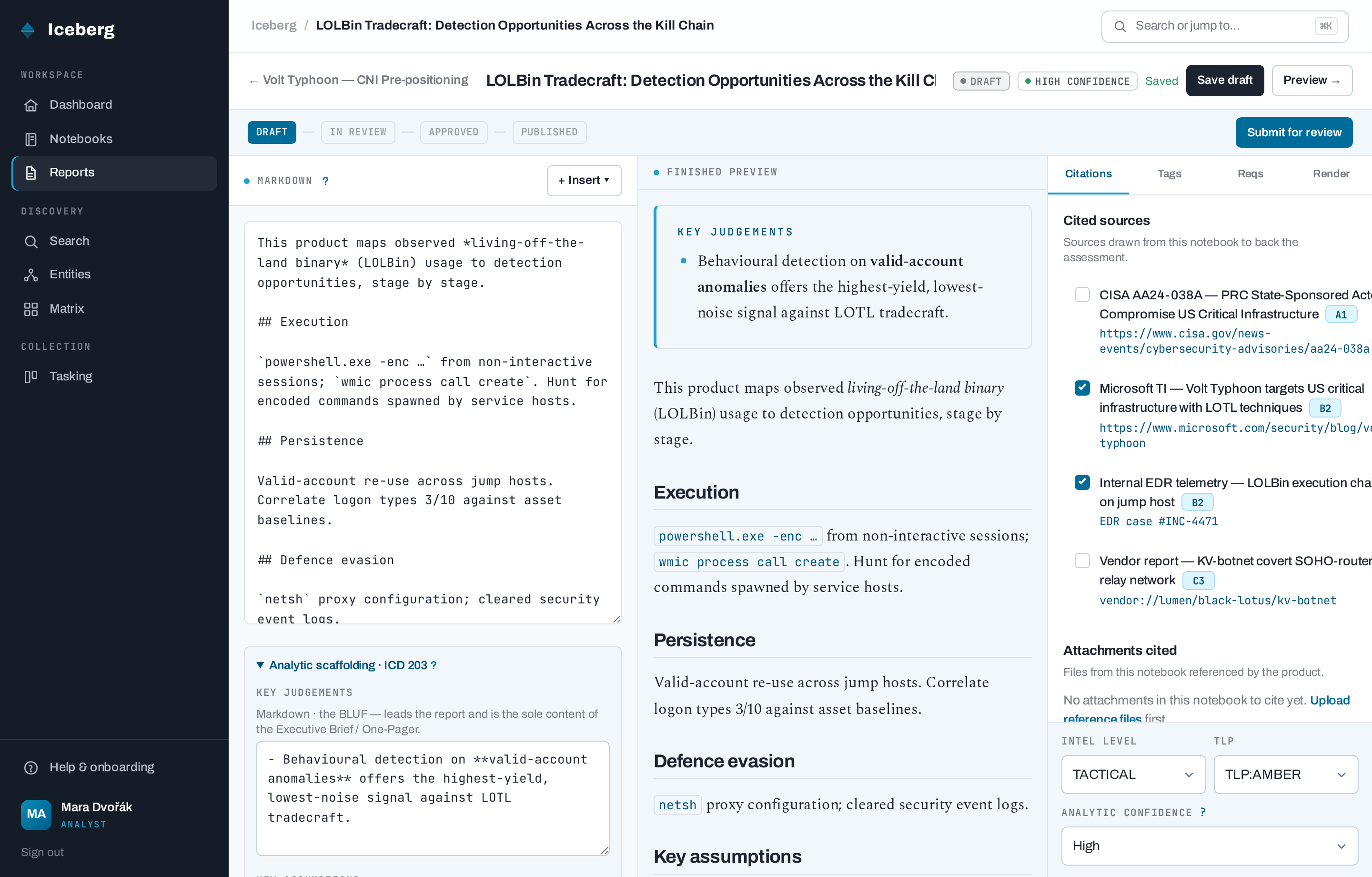
*The report editor: markdown with a side-by-side live preview, source/attachment citations,
requirement traceability, and taxonomy tagging — all on one screen.*
### The finished intelligence product
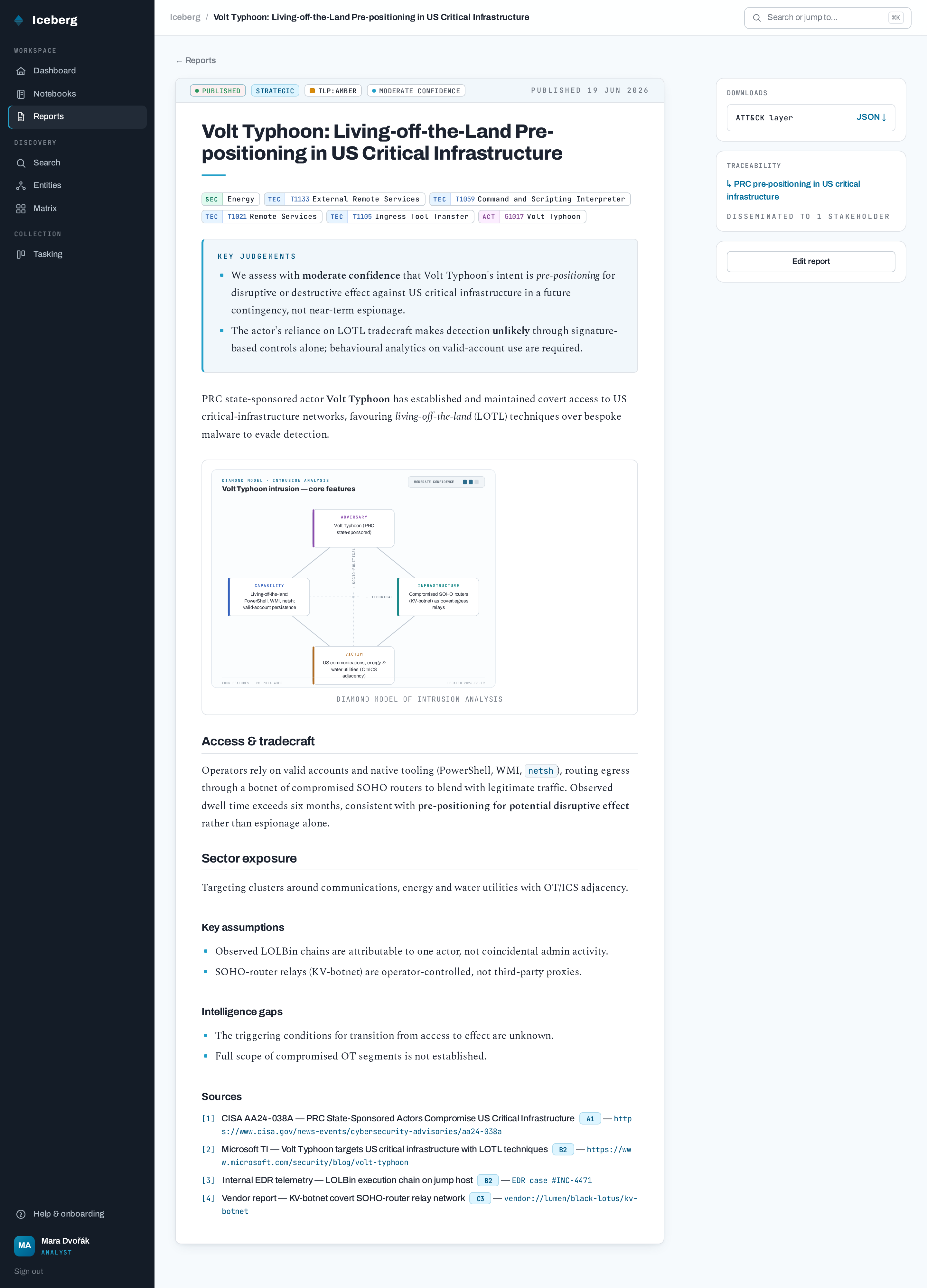
*A published report — TLP and intelligence-level markings, taxonomy chips, numbered sources,
cited attachments, and on-demand PDF products.*
### Typeset to a branded PDF (Typst)
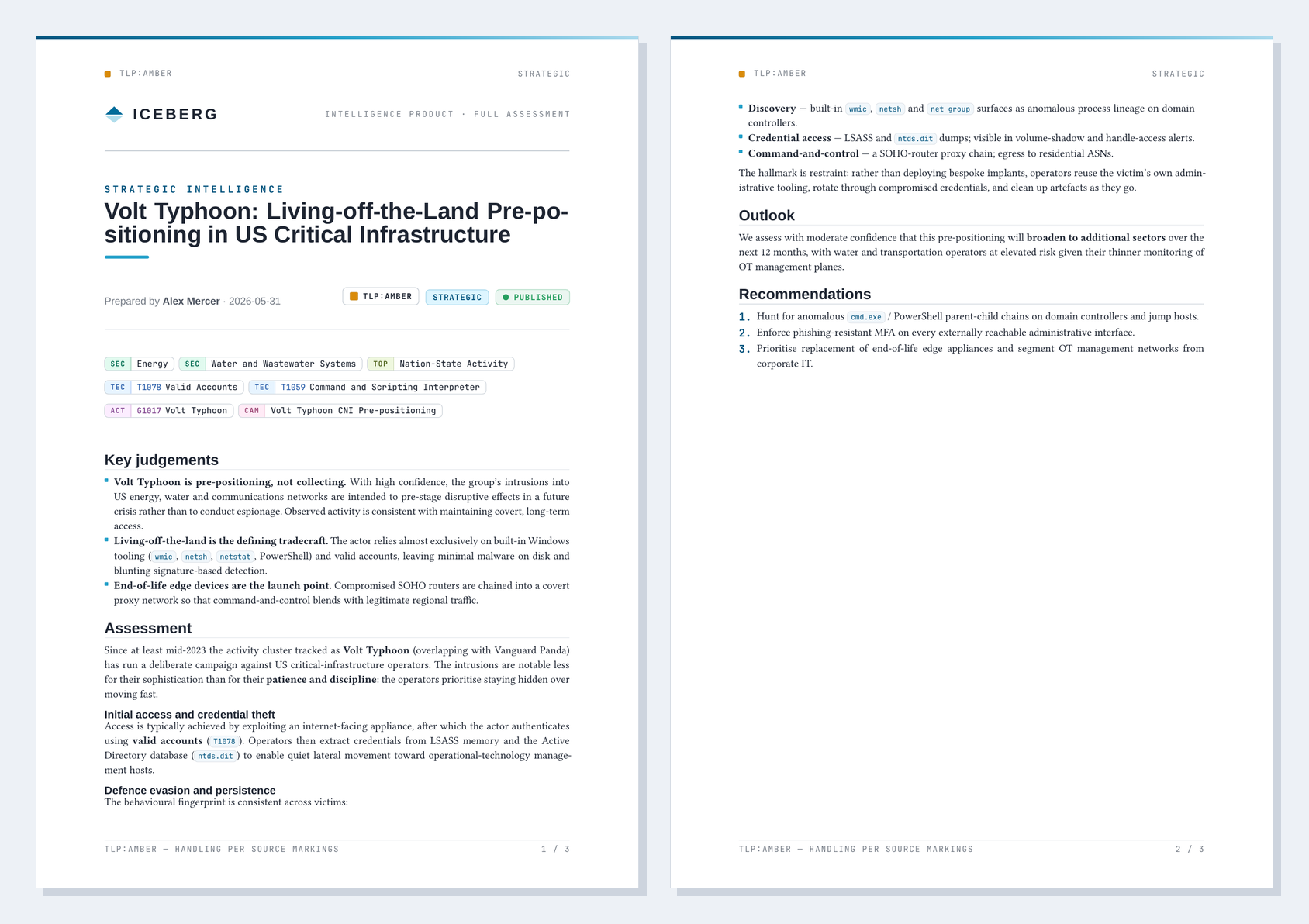
*The same report rendered to PDF via Typst — classification markings, masthead and the
taxonomy stamp carried through. [Download the full sample »](docs/sample-report-volt-typhoon.pdf)*
### Requirements → analyst tasking
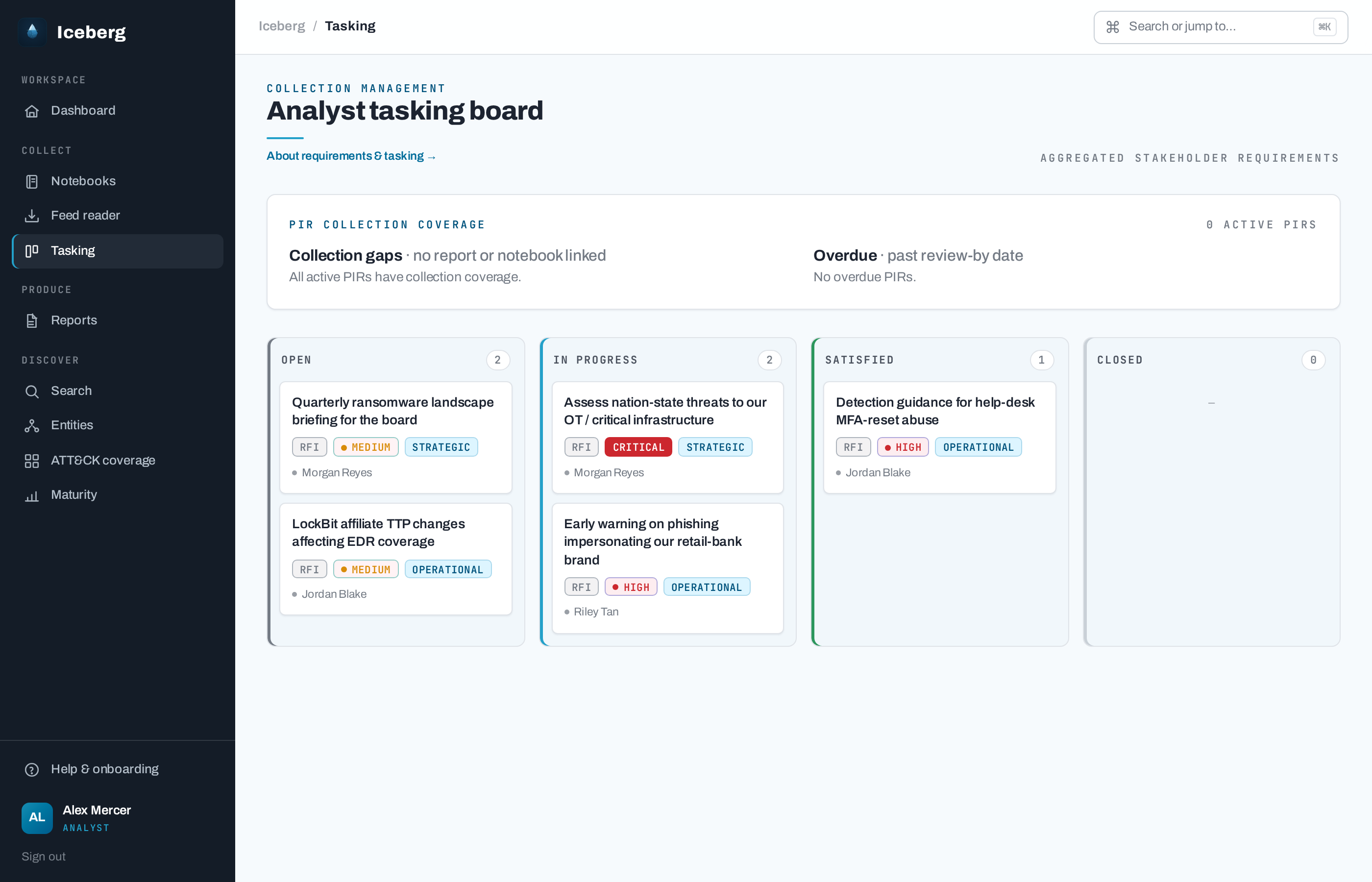
*Stakeholder requirements — typed as **PIR** (priority, decision-tied, time-bound), **GIR** (standing)
or **RFI** (ad-hoc) — aggregated into a tasking board grouped by status. Ordering blends urgency and
kind: a PIR is floored to at least High priority so it leads standing/ad-hoc work, but a genuine
Critical item still tops its column. A PIR coverage panel flags PIRs with no linked report/notebook
(collection gaps) or past their review-by date (overdue).*
### Dissemination to a stakeholder feed
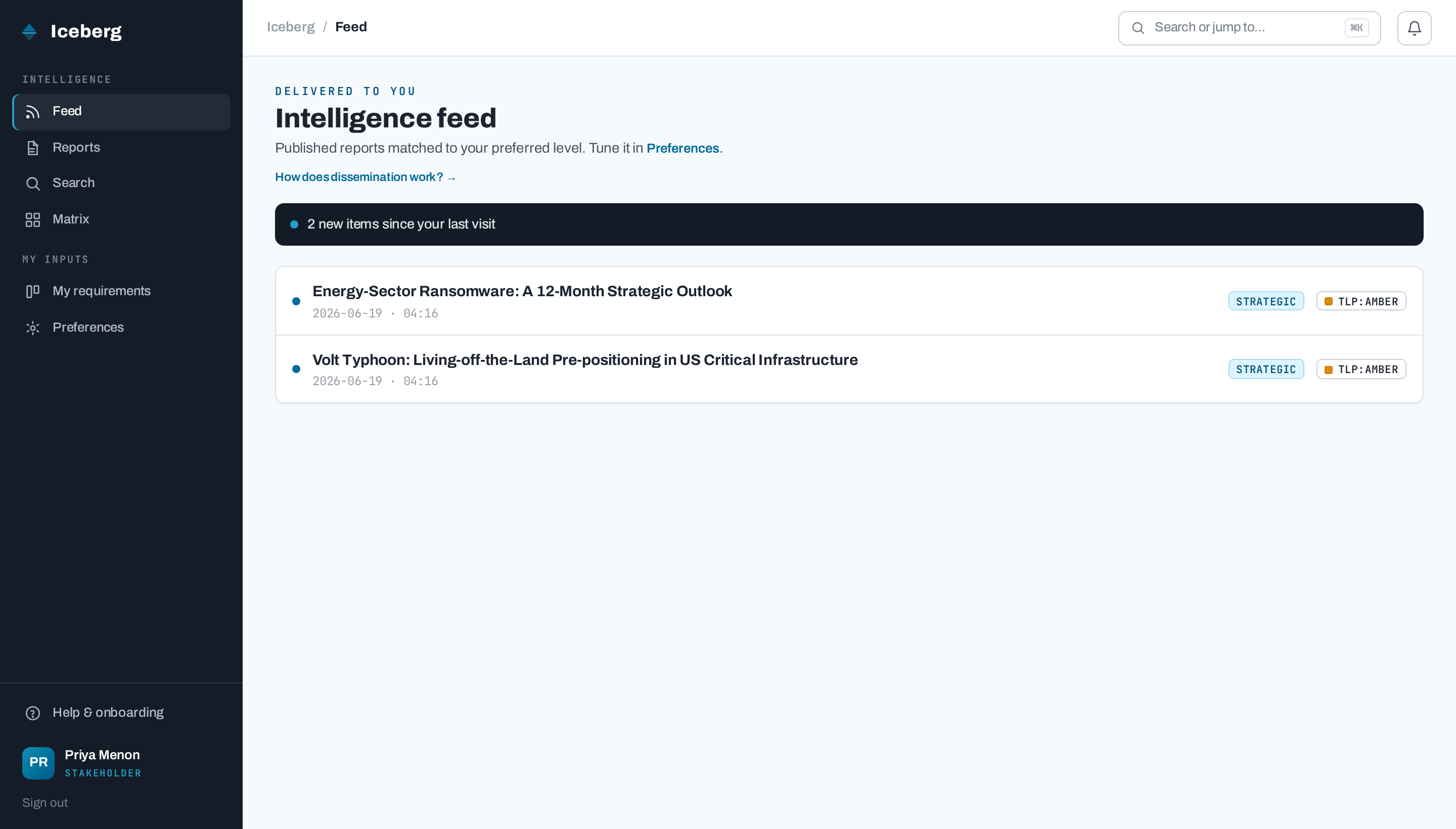
*On publish, a report is matched to stakeholders by preferred intel level + TLP and delivered
to their personal feed (with an email notification).*
### Intelligence-cycle feedback loop
*On a product delivered to them, a stakeholder leaves **feedback** — a usefulness rating, an optional
**RFI-satisfaction** verdict against one of their own requirements the report addressed, and a comment.
A **Met** verdict from the owning stakeholder auto-advances that requirement to **Satisfied**, closing
the cycle. Feedback surfaces on the report (for authors) and the requirement detail (for analysts), and
its response / satisfaction / useful rates roll up into the maturity dashboard.*
### Inbound collection — RSS feed ingestion
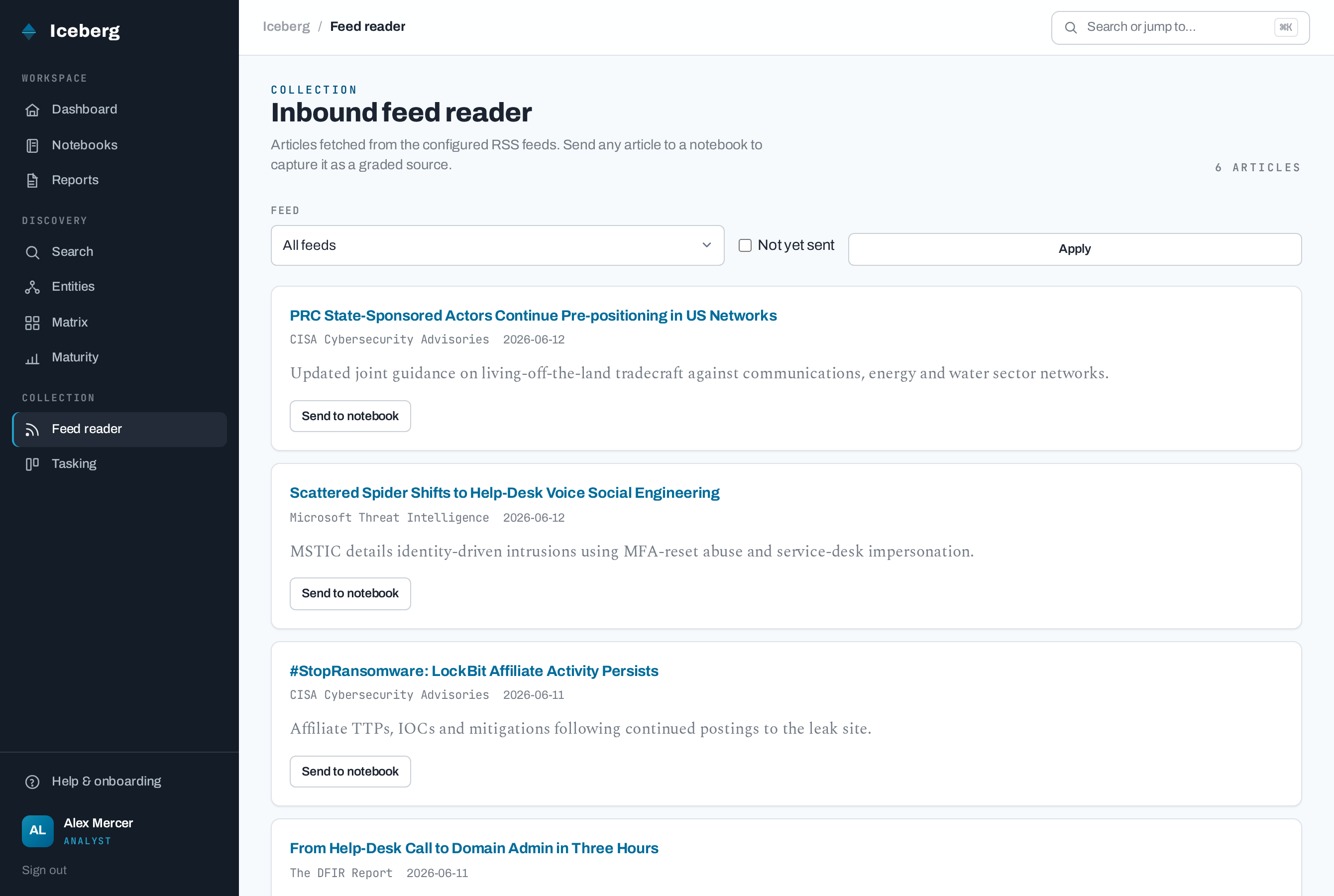
*An admin configures external **RSS/Atom feeds**; their articles are polled into a writer-only
**feed reader** where an analyst **sends an article to a notebook** (existing or new) — capturing it
as an auto-graded source. The fetcher is opt-in, timeout-bounded and failure-isolated, fetched
content is sanitised, and feed URLs are admin-only (the SSRF-containment boundary). Article bodies
are retained as the seam for future IOC extraction + summarisation.*
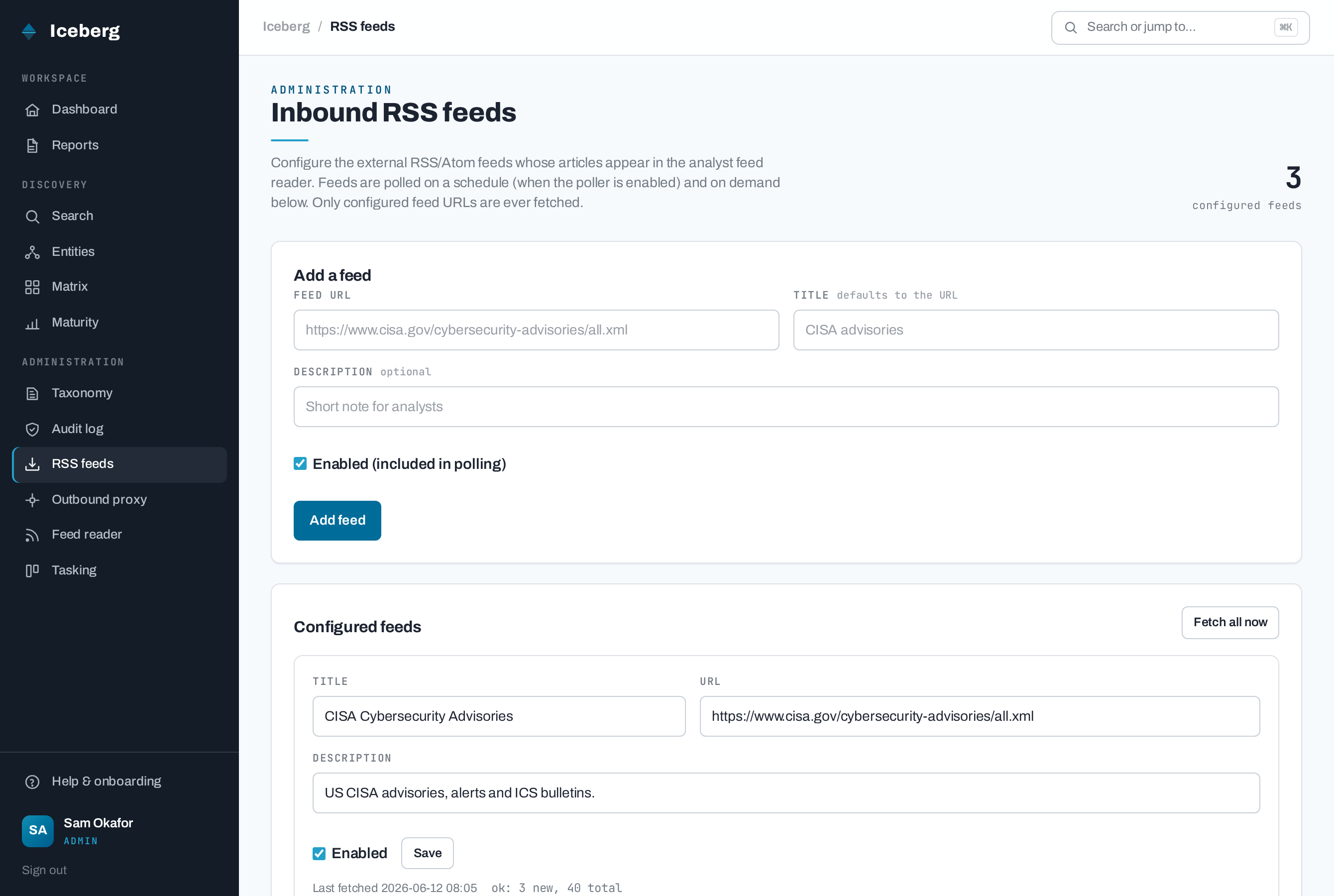
*Admins manage the feed list at `/admin/feeds` — add/enable feeds, see last-fetch status, and
trigger an on-demand fetch.*
### Light-touch IOCs → MISP push
*Iceberg is **not** an IOC store — the authoritative store stays external (**MISP**). An analyst
stages **indicators of compromise** as notebook entities (manual entry, or **AI-suggested** from a
source's text when the governed AI backend is enabled — see *Governed AI assist*), cites a subset
into a report's **Indicators appendix** (web view + PDF), and a
writer **pushes the cited indicators to MISP as one event** from the report. The push is
lifecycle-gated (only **approved or published** reports can egress; a published report pushes from
its frozen publication snapshot), idempotent
(re-push updates the same event), failure-isolated, proxy-aware, and authenticated with an
**env-only** API key (`ICEBERG_MISP_API_KEY`). Admins configure the connection at `/admin/misp`.
Sources and IOCs carry their own **TLP** marking (manual sources default to AMBER, RSS-ingested
sources to CLEAR, IOCs inherit their source's TLP); each indicator's TLP rides to MISP as a
per-attribute tag. Cited indicators above `ICEBERG_MISP_MAX_TLP` (default AMBER) don't block the
push — MISP honours the markings — but the writer is **prompted to confirm** before they leave the
org. The same source TLP gates AI egress of a source's content against `ICEBERG_AI_MAX_TLP`.*
### Outbound proxy connectivity
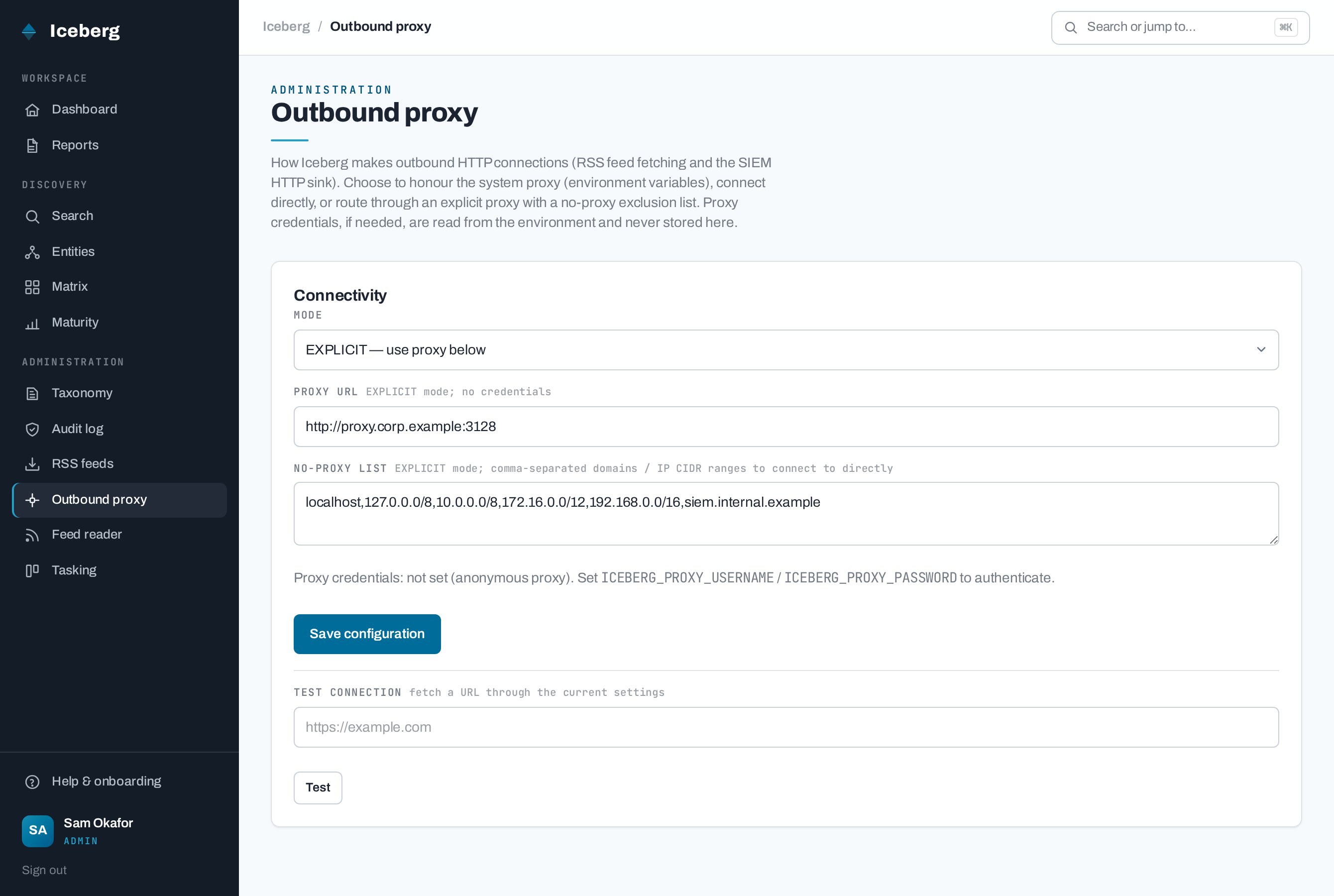
*All outbound HTTP (RSS fetching, the SIEM HTTP sink, and the MISP push) can be routed through a **global proxy**
configured at `/admin/proxy` — honour the **system** proxy (env vars), connect **directly**, or use
an **explicit** proxy with a no-proxy exclusion list (local domains / IP CIDR ranges). Proxy
credentials stay in the environment, never the DB.*
### Full-text + faceted search
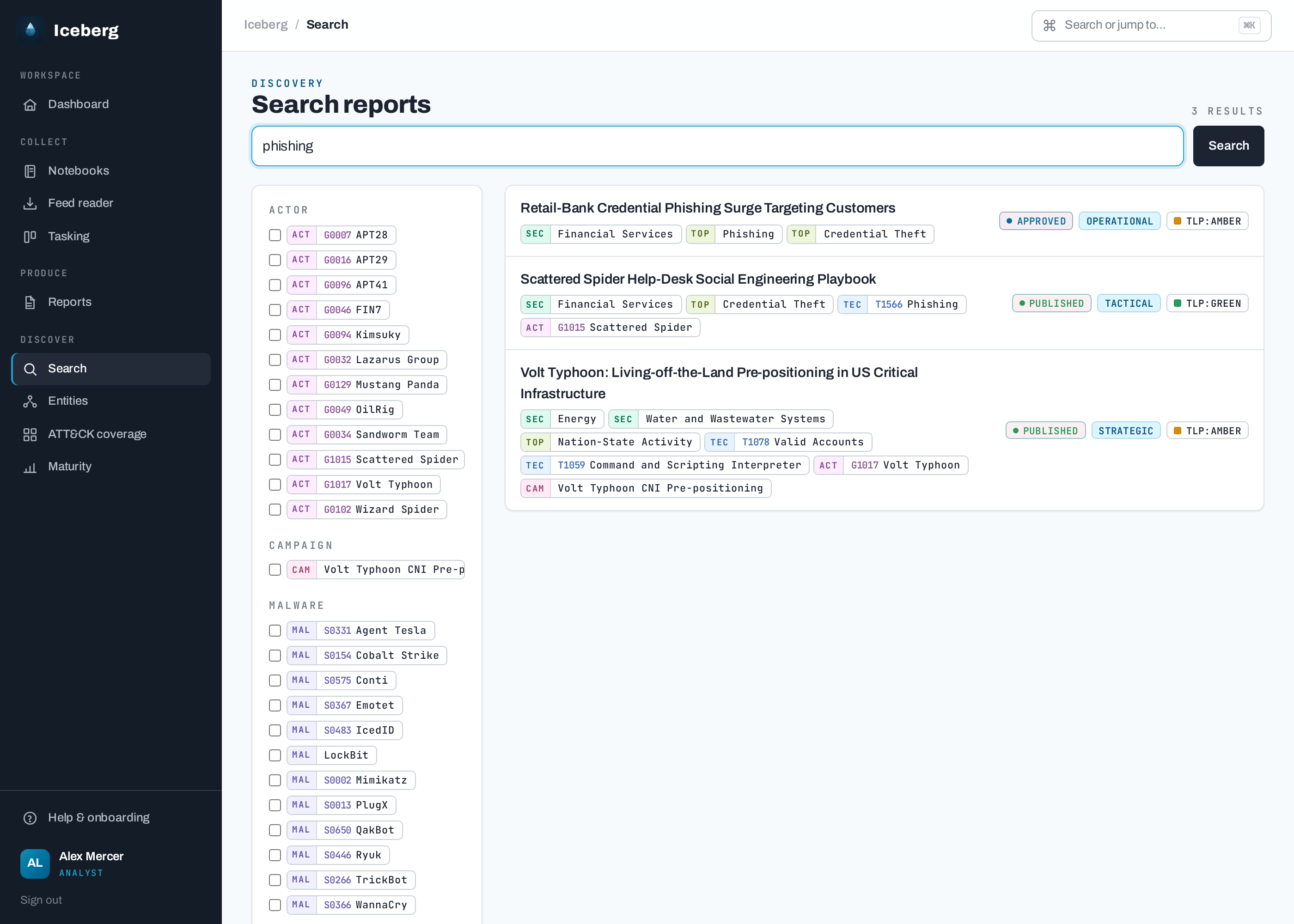
*Full-text search over the report library (SQLite FTS5, bm25), narrowed by tag / kind /
intel-level / TLP / status facets — access-scoped so stakeholders only ever match published reports.
**Alias-aware:** a search for "Fancy Bear" surfaces reports tagged **APT28** even when the body never names the alias.*
### Admin-curated tag taxonomy
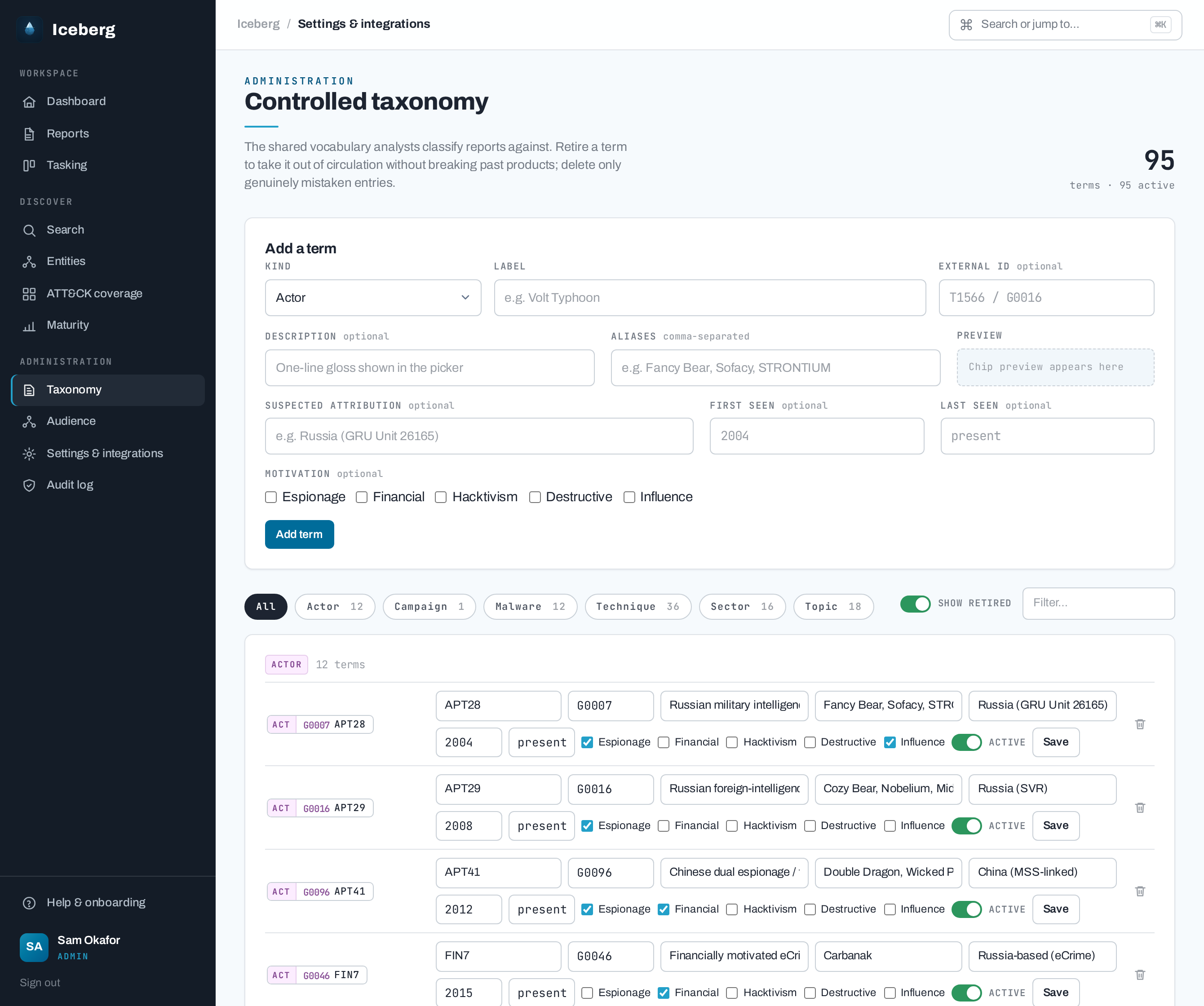
*The controlled vocabulary — threat actor / campaign / malware / ATT&CK technique / sector /
topic — that analysts classify reports against. Named-threat entities (actor / malware / campaign)
carry structured **aliases** so APT28 / Fancy Bear / Sofacy resolve to one entity, plus structured
**attribution** (suspected sponsor/country, motivation, first/last seen) — `/tags/{id}` is a proper
**entity profile page** for those kinds (attribution + aliases + ATT&CK coverage + the reports
tagged with it).*
## Stack
- **Python ≥ 3.14**, **FastAPI** (single app: JSON API `/api/*` + server-rendered portal `/*`)
- **SQLModel** on **SQLite** (dev/test default) or **PostgreSQL** (production option) — see *Production datastore*
- **Jinja2 + Alpine.js** portal with a "command-center" design system (left rail + ⌘K palette)
(`static/css/iceberg.css`; Archivo / JetBrains Mono / Spectral; a compiled **Tailwind v4** utility build)
— Tailwind, Alpine and the fonts are **self-hosted, version-pinned and SRI-protected** (no CDN);
regenerate with `python scripts/vendor_assets.py` (Tailwind's theme/sources live in `frontend/input.css`)
- **markdown-it-py + nh3** for the live markdown preview
- Full-text report search: **SQLite FTS5** (bm25) or **PostgreSQL `tsvector`** (GIN + `ts_rank`), chosen by dialect
- **feedparser + httpx** for inbound RSS/Atom feed ingestion (opt-in poller)
- **Typst** for PDF rendering
- **PyTest** for tests
- Auth: **OIDC (Microsoft Entra ID)** with a dev-login bypass for local use; role-based
access (notebook collection material is writer-only, stakeholders consume finished
products) with a same-origin CSRF guard on the cookie-authenticated portal
- **Security response headers** on every response — a **strict Content-Security-Policy**
(`script-src 'self'`, no `unsafe-inline`/`unsafe-eval`), HSTS (prod), `X-Frame-Options`,
`Referrer-Policy`, `Permissions-Policy`, etc. The portal carries **no inline JavaScript**:
Alpine runs from its **CSP build** with all components registered in `static/js/tags.js`
- **Rate limiting** on abuse-prone routes (auth, AI assist, PDF renders, outbound tests/pushes,
search) — token-bucket per user/IP, in-memory or **Redis**-backed for multi-worker deployments,
on by default in production
- **Durable job outbox** for external work — dissemination emails, publication webhooks and RSS
polls are queued in the database (same transaction as the state that caused them) and delivered
by an in-process pass or the `iceberg-worker` command, surviving process restarts
## Quick start
uv sync --extra dev
cp .env.example .env # tweak settings if you like
uv run uvicorn iceberg.main:app --reload
Open . With `ICEBERG_DEV_AUTH=true` (the default) you'll see a
**dev login** on the sign-in page — pick a role (e.g. `ANALYST`) and continue. The schema is
created automatically on first boot (`ICEBERG_AUTO_MIGRATE=true` runs migrations for you).
**Health probes.** Two unauthenticated endpoints back container liveness/readiness probes:
`GET /healthz` (liveness — process up, no DB touch, always `200`) and `GET /readyz` (readiness —
a cheap query against a core table, `200` when the database is reachable **and** migrated, else
`503`). In a prod deploy that runs migrations separately (`ICEBERG_AUTO_MIGRATE=false`),
`/readyz` only reports ready once the schema is in place.
**Get oriented:** open **Help** in the nav (`/help`) for a guide to your role's workflow,
a browsable look at what the other roles do, and a glossary of the intelligence concepts
(TLP, intel levels, source grading, the Diamond Model, ACH, ICD 203 judgements, dissemination).
### Try the authoring loop
1. Create a **notebook** from the dashboard.
2. Add a couple of **sources**, a **note**, and upload an **attachment** (e.g. a PDF).
Sources are auto-graded when Iceberg can infer enough signal; analysts can override
or clear the Admiralty/NATO reliability + credibility chip.
3. Create an **intelligence product**, write markdown in the editor and watch the
**live preview**; tick sources and attachments to cite them.
4. Fill the **analytic scaffolding** (ICD 203) — **Key Judgements** (the BLUF),
**Key Assumptions** and **Intelligence Gaps**. They render as discrete sections
on the report page. Optionally set the **analytic confidence** (LOW/MODERATE/HIGH),
stamped on the masthead; phrase event likelihood in prose using the editor's
**probability yardstick**.
5. **Submit for review**, then sign in again as a `REVIEWER` to **Approve** and
**Publish**. Publishing atomically freezes an **immutable snapshot** of the finished
product (the web view, PDF input and MISP payload all serve from it), so later edits
or deletions in the notebook can never rewrite a published report.
6. **Render** a PDF and download it: **FULL** (judgements + body + caveats +
appendix) or **EXEC_BRIEF / ONE_PAGER** (Key-Judgements-only briefs).
### Model an intrusion (Diamond Model)
1. In a notebook, open the **Diamond models** section and add one — adversary,
capability, infrastructure, victim and an analytic confidence. The **Edit** page
shows a live SVG preview of the diagram as you type.
2. In a report editor, click **Insert** next to the model (or type its
`[[diamond:ID]]` token) to embed the diagram **inline at that point** in the body.
3. The diagram renders in the live preview, the published report page, and the
Typst PDF — all from one server-generated SVG.
### Weigh competing hypotheses (ACH)
1. In a notebook, open the **ACH analyses** section and add one. On the **Edit** page,
pose the key intelligence question, add the competing **hypotheses** (columns) and
the **evidence** (rows), and rate each cell for consistency. A live SVG preview of
the matrix — with the **least-inconsistent (most tenable)** hypothesis flagged —
updates as you go.
2. In a report editor, click **Insert at cursor** next to the analysis (or type its
`[[ach:ID]]` token) to embed the matrix **inline at that point** in the body.
3. The matrix renders in the live preview, the published report page, and the Typst
PDF — all from one server-generated SVG.
### Embed an image (figure)
1. In a notebook, open the **Figures** section and upload an image (PNG/JPEG/GIF).
2. In a report editor, click **Insert at cursor** next to the figure (or type its
`[[figure:ID]]` token) to embed the image **inline at that point** in the body.
3. The image renders in the live preview, the published report page (as an inline
`data:` URI), and the Typst PDF — all from the one upload.
### Embed the report's ATT&CK coverage matrix
1. Tag the report with **ATT&CK technique** taxonomy terms (the report's coverage is
derived from its own tags).
2. In a report editor, open **Insert ▾ → ATT&CK coverage matrix** (or type the bare
`[[attack]]` token) to embed the technique-coverage heatmap **inline at that point**
in the body. Unlike the diamond/figure/ach tokens it takes no ID.
3. The matrix renders as a server-generated SVG in the live preview, the published
report page, and the Typst PDF; a report with no technique tags shows an
"unavailable" notice.
### Try requirements & tasking
1. Sign in as a `STAKEHOLDER` → **My Requirements** → submit an intelligence requirement
(title, **kind** — PIR / GIR / RFI, priority, intel level). Choosing **PIR** reveals a
decision-context note and a review-by date.
2. Sign in as an `ANALYST` → **Tasking** to see the aggregated board; PIRs lead standing/ad-hoc
work (but a Critical item of any kind still tops its column), and the **PIR coverage panel**
flags uncovered or overdue PIRs. Open a requirement and move its status
(OPEN → IN_PROGRESS → SATISFIED).
3. In a report editor, tick the **Requirements satisfied**; the link shows up on the
requirement's detail page (traceability) and clears the PIR's collection gap. Notebooks can be
linked the same way.
### Try dissemination
1. As a `STAKEHOLDER`, set your **Preferences** (preferred intel level, or "All levels").
2. As an `ANALYST`/`REVIEWER`, author and **publish** a report at that level (TLP AMBER or below).
3. Back as the stakeholder, your **Feed** shows the new report (with an unread badge on the
dashboard); a notification email is recorded by the `console` backend (in-memory outbox).
Reports marked TLP:RED or AMBER+STRICT are withheld from broadcast. Feed entries are written
synchronously in the publish transaction; the email/webhook notifications are queued as
**durable jobs** in that same transaction and delivered right after commit (with
`iceberg-worker` as the retry path if the process dies first), so a crash never loses a
notification silently.
4. Stakeholders can subscribe to taxonomy tags from **Preferences**; if they have any
subscriptions, publish-time matching requires at least one shared report tag. A publication
webhook (report metadata only) can be enabled/edited by an `ADMIN` at **Publication webhook**
(`/admin/webhook`) — with a "Send test event" check — or seeded via `ICEBERG_WEBHOOK_URL`.
Its stable generic JSON envelope is the default; Slack Block Kit and Microsoft Teams
MessageCard wrappers are opt-in. The bearer token stays env-only (`ICEBERG_WEBHOOK_TOKEN`).
### Need-to-know groups
`ADMIN`s can use **Audience** (`/admin/audience`) to create named groups, assign stakeholder
members, and scope reports to one or more groups from the report editor's **Audience** tab.
Stakeholders outside a scoped report's groups cannot see it in search, feeds, direct report
reads, or dissemination. Unscoped published reports remain visible to authenticated stakeholders.
### Governed AI assist
AI assist is off by default (`ICEBERG_AI_BACKEND=none`). Four backends are selectable:
`openai-compatible` (a generic chat endpoint, `ICEBERG_AI_BASE_URL` + `ICEBERG_AI_API_KEY`),
`claude` (Anthropic's first-party API — `pip install '.[anthropic]'`, key in `ICEBERG_AI_API_KEY`,
default model `claude-opus-4-8`), and `bedrock` (Amazon Bedrock — `pip install '.[bedrock]'`,
`ICEBERG_AI_AWS_REGION` plus the standard AWS credential chain, no API key). When configured,
writer-only API endpoints can draft judgement text, source summaries, tag suggestions, Diamond/ACH
starts, analytic challenge notes, and **candidate indicators extracted from a source** (the notebook
Indicators section shows a "Suggest indicators" review list — candidates are refanged and constrained
to the MISP-pushable `IOCType` set, and the analyst accepts, edits, or discards each before it
becomes a real IOC). Suggestions are advisory only; Iceberg records an audit event with metadata,
never prompt/response bodies, every backend honours the global outbound proxy, and report content is
blocked when its TLP exceeds `ICEBERG_AI_MAX_TLP`. In an editable report, the **AI review** dock
lets an analyst request judgement drafts, controlled-tag suggestions and analytic challenge notes;
they remain local until edited and explicitly applied through the normal report/tag save paths.
### Ingest external reporting
Admins configure RSS/Atom sources at `/admin/feeds`; writers browse the resulting
articles at `/feeds` and send selected items into an existing or new notebook as
`Source` rows. Feed URLs are admin-only, downloads are size/time bounded and
failure-isolated, article HTML is sanitised, and promotion uses the existing
source grading path.
Writers can also stage structured external material straight into a notebook:
`POST /api/notebooks/{id}/imports/taxii` pulls a public TAXII/STIX JSON URL
(through the same bounded, SSRF-guarded fetcher) and files each STIX object as a
reviewable source, and `POST /api/notebooks/{id}/imports/misp` pulls one event by
UUID from the **configured** MISP instance, staging it as a source plus one IOC
per attribute that maps into Iceberg's supported indicator types.
### Export and relate products
Published reports can be exported as STIX 2.1 bundles with `GET /api/reports/{id}/stix`.
The export maps the report plus controlled taxonomy tags into STIX report, threat-actor,
malware, campaign, attack-pattern and sector identity objects. The same published-report
objects are available through a read-only TAXII-shaped collection rooted at
`GET /api/taxii2/` (`published-reports`: collections, manifest and objects), access-scoped
like report reads and supporting incremental pull filters (`added_after`, `limit`, `next`,
`match[type]`, `match[id]`). `GET /api/reports/{id}/related`
returns access-scoped related products from a rebuildable local vector table; rebuild it with
`iceberg-rebuild-related`. The report view exposes both the STIX download and related-product
panel when related products exist.
Example TAXII pulls using `curl` for quick smoke tests; production integrations can use
any TAXII/HTTP client with a Bearer JWT:
# Pull visible published STIX objects.
curl -H "Authorization: Bearer $ICEBERG_TOKEN" \
"http://localhost:8000/api/taxii2/collections/published-reports/objects/"
# Incrementally pull report SDOs added after a timestamp.
curl -G -H "Authorization: Bearer $ICEBERG_TOKEN" \
--data-urlencode "added_after=2026-06-01T00:00:00Z" \
--data-urlencode "limit=100" \
--data-urlencode "match[type]=report" \
"http://localhost:8000/api/taxii2/collections/published-reports/objects/"
### Try the feedback loop
1. Before publishing, have the `ANALYST` tick the **Requirements satisfied** so the report addresses
one of the stakeholder's requirements; then publish so it disseminates to that stakeholder.
2. As the `STAKEHOLDER`, open the report from your **Feed** → the **Your feedback** card: rate its
usefulness, pick the requirement it satisfied, mark it **Met**, and send. The requirement jumps
straight to **Satisfied** — the cycle is closed.
3. As the `ANALYST`/`REVIEWER`, the report view shows a **Product feedback** panel and the
requirement detail shows the verdict; **Maturity** picks up the new response / satisfaction rates.
### Try inbound RSS collection
1. Sign in as an `ADMIN` → **RSS feeds** (`/admin/feeds`) and add a feed URL (e.g. a vendor or
CISA advisories RSS), then click **Fetch all now**. *(For a real schedule, set
`ICEBERG_RSS_POLL_ENABLED=true`.)*
2. Sign in as an `ANALYST` → **Feed reader** (`/feeds`) to browse the fetched articles; filter by
feed or "not yet sent".
3. On an article, open **Send to notebook**, pick an existing notebook (or create a new one), and
send — it's captured as an auto-graded **source** in that notebook.
### Try tagging & search
1. Sign in as an `ADMIN` → **Taxonomy** (`/admin/tags`). A starter taxonomy (~94 tags: CISA
sectors, intel topics, MITRE ATT&CK techniques, and example threat actors + malware) is
seeded on first run; add or retire entries, or add a **campaign**. For actor / malware /
campaign terms, list **aliases** (comma-separated) so alternate names resolve to one entity, and
record **attribution** (suspected sponsor/country, motivation, first/last seen).
2. As an `ANALYST`, open a report editor → **Tags** panel → tick tags to classify the product.
(Tags stay editable even after the report is published.)
3. Use **Search** (left rail, or ⌘K) — full-text query over title/body, narrowed by tag / kind / intel
level / TLP / status facets. Search is **alias-aware** — querying an alias (e.g. "Fancy Bear")
surfaces reports tagged with the canonical entity. Click a named-threat tag chip to open its
**entity profile** (attribution + aliases + ATT&CK coverage + the reports tagged with it).
Stakeholders' searches only ever return published reports.
### See ATT&CK coverage & export a Navigator layer
1. Tag reports with **TECHNIQUE** taxonomy terms (they carry MITRE ATT&CK T-codes).
2. Open **Matrix** (left rail, `/matrix`) for a technique-coverage heatmap across all visible
reports, grouped by ATT&CK tactic and shaded by how many reports exhibit each technique.
An entity profile shows the same heatmap scoped to that actor/malware/campaign.
3. Download an **ATT&CK Navigator layer** (`.json`) — per report (from the report's *Downloads*)
or aggregated per entity (from the entity profile) — and open it in
[ATT&CK Navigator](https://mitre-attack.github.io/attack-navigator/). Stakeholders' coverage
and exports only ever count published reports.
4. Embed a report's *own* coverage matrix inline with the bare `[[attack]]` token (see
*Embed the report's ATT&CK coverage matrix* above) so the heatmap appears in the finished
product itself.
5. Need more than the starter technique set? Import the **full MITRE Enterprise ATT&CK
catalogue** with `iceberg-import-attack --file enterprise-attack.json` (optionally
`--sha256 ` to verify the reviewed bundle and `--update` to refresh existing
tags). The importer is deliberately file-only — obtain the STIX bundle through your normal
supply-chain process; the server never downloads it for you.
### Gauge program maturity & effectiveness
1. Open **Maturity** (left rail, `/maturity`) — a writer-only, leadership-facing dashboard that
derives program-health indicators purely from existing data: production (publish velocity,
time-to-publish, reviewer engagement), requirement coverage across all kinds (PIR/GIR/RFI),
dissemination reach (stakeholders reached, feed read-rate, TLP-withheld, plus feedback-loop
response / satisfaction / useful rates), and tradecraft
adoption (share of published reports using source grading, structured judgements, analytic
confidence, embedded analytic models and ATT&CK tags).
2. The page tops it with an **indicative [CTI-CMM](https://cti-cmm.org/) maturity rollup** —
four capability dimensions scored CTI0 (Pre-foundational) → CTI3 (Leading) by thresholds.
It is evidence to inform a self-assessment, **not a substitute** for a formal one.
### Forward security events to your SIEM
1. Sign in as **ADMIN** and open **Audit log** (left rail, `/admin/audit`). Security-relevant
events — logins/logouts, authorization denials and CSRF blocks, report lifecycle transitions,
admin taxonomy edits, and sensitive-file access — are recorded to a local trail **and** emitted
as structured JSON (OWASP application-logging shape).
2. Choose one or more **emit methods** — `stdout`/file (for a sidecar shipper), **syslog** (RFC 5424
over UDP/TCP), or an **HTTP event collector** (Splunk HEC / Elastic / webhook) — set the endpoints
and a minimum severity, and **Save**. The HTTP/HEC token is read from `ICEBERG_AUDIT_HTTP_TOKEN`
and is never stored in the database.
3. Click **Send test event** to verify connectivity end-to-end, then watch the filterable event
trail on the same page. A failing/unreachable SIEM never blocks a request — events still persist
locally and forward off the response path.
General application logs are configured separately from the security-audit emit path:
`ICEBERG_LOG_FORMAT=auto` keeps local/dev output human-readable and switches production
(`ICEBERG_ENVIRONMENT=prod`) to JSON app logs with the request `correlation_id`. Set
`ICEBERG_LOG_FORMAT=text|json` to force either format and `ICEBERG_LOG_LEVEL` to tune verbosity.
The SIEM `stdout` method remains a raw OWASP-shaped JSON event line for compatibility with log
shippers.
The starter taxonomy is bundled as data (`src/iceberg/data/starter_tags.json`) and imported
automatically on first boot. To (re-)import explicitly — e.g. after enriching the catalog or
to load your own vocabulary — run the idempotent import step:
python -m iceberg.seed # or: iceberg-seed
python -m iceberg.seed --list # preview the catalog without writing
python -m iceberg.seed --file my_tags.json --update
## Configuration
All settings use the `ICEBERG_` env prefix and can live in `.env` (see
[.env.example](.env.example)). Highlights:
| Variable | Purpose |
| --- | --- |
| `ICEBERG_SECRET_KEY` | JWT + session signing key (use a random 32+ byte value in prod) |
| `ICEBERG_DATABASE_URL` | Datastore URL — SQLite (`sqlite:///./iceberg.db`, default) or PostgreSQL (`postgresql+psycopg://user:pass@host:5432/iceberg`); see *Production datastore* |
| `ICEBERG_LOG_LEVEL` / `ICEBERG_LOG_FORMAT` | App log level and format; `auto` uses text outside prod and JSON in prod |
| `ICEBERG_DEV_AUTH` | Enable the dev-login bypass (auto-off when `ICEBERG_ENVIRONMENT=prod`) |
| `ICEBERG_OIDC_ENABLED` + `ICEBERG_OIDC_*` | Microsoft Entra ID OIDC settings |
| `ICEBERG_OIDC_DEPARTMENT_CLAIM` / `ICEBERG_OIDC_TITLE_CLAIM` / `ICEBERG_OIDC_COMPANY_CLAIM` / `ICEBERG_OIDC_OFFICE_CLAIM` | Optional Entra profile claims persisted on users |
| `ICEBERG_TYPST_BIN` / `ICEBERG_RENDER_OUTPUT_DIR` | Typst binary + PDF output dir |
| `ICEBERG_RENDER_RETENTION_KEEP` / `ICEBERG_RENDER_RETENTION_DAYS` | Rendered-PDF retention policy; prune manually with `iceberg-prune-renders` |
| `ICEBERG_ATTACHMENTS_DIR` / `ICEBERG_ATTACHMENT_MAX_MB` | Notebook attachment storage dir + size cap (default 25 MB) |
| `ICEBERG_ATTACHMENT_ALLOWED_TYPES` | Comma-separated MIME whitelist for uploads (override the default set) |
| `ICEBERG_FIGURES_DIR` / `ICEBERG_FIGURE_MAX_MB` | Notebook figure (embeddable image) storage dir + size cap (default 10 MB) |
| `ICEBERG_DISSEMINATION_MAX_TLP` | Broadcast ceiling (default `AMBER`; RED/AMBER_STRICT withheld) |
| `ICEBERG_EMAIL_BACKEND` + `ICEBERG_SMTP_*` | `console` (dev) or `smtp`; SMTP server settings |
| `ICEBERG_WEBHOOK_URL` / `ICEBERG_WEBHOOK_TOKEN` / `ICEBERG_WEBHOOK_FORMAT` | Optional report-publication webhook (seeds the row; URL/enabled/timeout/format editable live at `/admin/webhook`). Generic JSON is the compatibility default; Slack/Teams envelopes are opt-in. Token is env-only |
| `ICEBERG_PORTAL_BASE_URL` | Base URL used in notification email links |
| `ICEBERG_JOBS_*` | Durable outbox tuning (lease seconds, max attempts, retry backoff base, worker poll interval) for email/webhook/RSS jobs processed by `iceberg-worker` |
| `ICEBERG_RATE_LIMIT_ENABLED` / `ICEBERG_RATE_LIMIT_STORE` / `ICEBERG_RATE_LIMIT_REDIS_URL` | Abuse protection for auth, AI, render, outbound tests/pushes, and search; enabled by default in prod, Redis-backed for shared worker state |
| `ICEBERG_RATE_LIMIT_*` | Per-surface rate-limit tunables (auth/dev-login, OIDC, AI, render, outbound actions, search) |
| `ICEBERG_AI_BACKEND` + `ICEBERG_AI_*` | Governed AI assist backend (`none`/`openai-compatible`/`claude`/`bedrock`), model, key/`ICEBERG_AI_AWS_REGION`, TLP egress ceiling and timeout (off by default) |
| `ICEBERG_RSS_POLL_ENABLED` / `ICEBERG_RSS_POLL_INTERVAL_MINUTES` | Opt-in RSS poller switch and interval |
| `ICEBERG_RSS_FETCH_TIMEOUT` / `ICEBERG_RSS_MAX_RESPONSE_BYTES` / `ICEBERG_RSS_MAX_ITEMS_PER_FEED` | RSS/Atom fetch timeout, response byte cap, and per-feed item cap |
| `ICEBERG_RSS_ALLOW_PRIVATE_HOSTS` | Allow private/internal feed hosts for trusted deployments |
| `ICEBERG_AUDIT_ENABLED` + `ICEBERG_AUDIT_METHODS` | Master switch + default SIEM emit methods (`stdout`/`syslog`/`http`); editable live at `/admin/audit` |
| `ICEBERG_AUDIT_SYSLOG_*` / `ICEBERG_AUDIT_HTTP_ENDPOINT` | syslog (RFC 5424) host/port/protocol + HTTP event-collector endpoint defaults |
| `ICEBERG_AUDIT_HTTP_TOKEN` | **Secret** HEC/bearer token for the HTTP SIEM method (env-only — never stored in the DB) |
### Production datastore (PostgreSQL)
SQLite is the zero-dependency default for **local dev/test only**. Every **container/production
deployment runs on PostgreSQL** — the app refuses to boot on a SQLite URL when
`ICEBERG_ENVIRONMENT=prod` (see `config._guard_production`), and the Docker image carries no
SQLite fallback. Point Iceberg at **PostgreSQL** (managed instance recommended):
1. Install the driver: `pip install "iceberg[postgres]"` (or `uv sync --extra postgres`) —
pulls `psycopg` v3.
2. Set `ICEBERG_DATABASE_URL=postgresql+psycopg://user:pass@host:5432/iceberg`.
3. Run migrations as a deploy step (keep `ICEBERG_AUTO_MIGRATE=false`): `iceberg-migrate`
(the in-code Alembic runner; the k8s migrate Job uses the same command). The same
migrations cover both backends — the SQLite FTS5 objects and the Postgres `search_vector`
(`tsvector` + GIN) index are each dialect-guarded.
Full-text search adapts automatically: SQLite uses FTS5 (bm25); PostgreSQL uses a generated
`tsvector` column queried with `websearch_to_tsquery` + `ts_rank`. **Caveat:** uploads and
rendered PDFs are still written to a local filesystem dir, so running more than one replica
needs shared storage (RWX volume or object store) — a follow-on to the datastore work. Container
+ Kubernetes manifests (including an optional self-hosted Postgres `StatefulSet`) are under
[`deploy/k8s/`](deploy/k8s/) and [`docker-compose.yml`](docker-compose.yml). Compose runs a
**single** app service always paired with its `postgres` database container. The default
Compose path also includes Redis for rate-limit buckets shared across uvicorn workers
(`ICEBERG_RATE_LIMIT_REDIS_URL=redis://redis:6379/0`) and exposes the app on loopback only:
docker compose up # app on http://localhost:8000 + PostgreSQL (no .env needed)
cp .env.example .env # optional: customise settings, then re-run
A fresh clone needs no pre-step — `.env` is optional (`env_file` is `required: false`) and is
merged in automatically when present. For production-style Compose, set
`ICEBERG_ENVIRONMENT=prod`, a real `ICEBERG_SECRET_KEY`, `ICEBERG_AUTO_MIGRATE=false`, and
non-default `POSTGRES_*` credentials.
### TLS / running behind a proxy
Iceberg always runs behind a **TLS-terminating reverse proxy** — a Kubernetes ingress, a cloud
load balancer, or (for a single-host Docker deployment) the opt-in **Caddy** profile:
ICEBERG_DOMAIN=intel.example.com docker compose --profile tls up # auto Let's Encrypt TLS
Caddy ([`deploy/Caddyfile`](deploy/Caddyfile)) terminates TLS and proxies to the app; pair it with
`ICEBERG_ENVIRONMENT=prod` for `Secure` cookies + HSTS. In this profile Caddy publishes
`:80`/`:443`, while the app's plain-HTTP `:8000` publish remains loopback-only. The container starts uvicorn with
`--proxy-headers` and trusts `X-Forwarded-*` only from `FORWARDED_ALLOW_IPS` (Compose scopes this
to its dedicated proxy network; Kubernetes requires the ingress pod CIDR) so the request scheme is correct and the **audit log records
the real client IP** rather than the proxy's. On **Kubernetes**, terminate TLS at an Ingress
instead — [`deploy/k8s/ingress.yaml`](deploy/k8s/ingress.yaml) is a commented ingress-nginx example
with a cert-manager note (edit the host + TLS secret and apply). An nginx sidecar isn't bundled —
the ingress / Caddy covers TLS, and the app sets its own security headers.
### Backup & restore
Persistent state lives in two places: **PostgreSQL** (all reports, requirements, tags, audit
events, settings) and a **local filesystem dir** (uploaded attachments/figures + rendered PDFs,
the `iceberg-data` volume in Compose / the `iceberg-data` PVC in k8s). Back up **both** while
application writers are stopped — the PDFs regenerate, but attachments/figures are original material. For Compose:
docker compose stop iceberg
docker compose exec postgres pg_dump -U iceberg -d iceberg -Fc > iceberg-$(date +%F).dump
docker run --rm -v iceberg_iceberg-data:/data -v "$PWD":/out busybox \
tar cf /out/iceberg-data-$(date +%F).tar -C /data .
docker compose start iceberg
Restore keeps the app stopped, restores PostgreSQL, clears the attachment, figure,
and rendered-product directories before extracting the archive, applies required
migrations, and runs `iceberg-verify-files` before restart. Do not restart if any
step fails; extraction over existing data is not a valid restore.
Full copy-pasteable k8s steps (`VolumeSnapshot` / `kubectl`-piped tar + `pg_dump`/`pg_restore`)
are in [`deploy/k8s/README.md`](deploy/k8s/README.md#backup--restore).
### Source reliability grading
Notebook sources carry Admiralty/NATO-style grades: source reliability (`A-F`) plus
information credibility (`1-6`), displayed as chips such as `B2` or `B6`. Grading is a
**fully offline local heuristic** applied inline when a source is added: reliability is
inferred from the source identity (recognised publisher domain or named authority) and
credibility from the analyst's summary and pasted source content. If only the source identity can be judged,
credibility is marked `6` ("cannot be judged"). There is no outbound network fetch and no
external LLM provider — analysts can always manually override, clear, or regrade a source.
### Entra ID (OIDC)
Set `ICEBERG_OIDC_ENABLED=true` and fill in `ICEBERG_OIDC_TENANT_ID`,
`ICEBERG_OIDC_CLIENT_ID`, `ICEBERG_OIDC_CLIENT_SECRET` and
`ICEBERG_OIDC_REDIRECT_URI`. Iceberg maps the app-role/group claim named by
`ICEBERG_OIDC_ROLE_CLAIM` to a role (`ADMIN`/`ANALYST`/`REVIEWER`/`STAKEHOLDER`),
defaulting unknown users to read-only `STAKEHOLDER`, and rejects callbacks with no
email claim. Logout increments the user's token version, invalidating existing Iceberg JWTs.
Optional department/title/company/office claims are persisted for audience grouping and
stakeholder administration.
## PDF rendering (Typst)
Install the [`typst`](https://github.com/typst/typst) binary and ensure it's on
`PATH` (or set `ICEBERG_TYPST_BIN`). The template `src/iceberg/typst/product.typ`
uses the `cmarker` package, fetched from the Typst registry on first render
(needs network once). If the pinned version is unavailable for your Typst
install, change it at the top of that file. Render endpoints return **503** when
Typst is not installed. A rendered example ships at
[docs/sample-report-volt-typhoon.pdf](docs/sample-report-volt-typhoon.pdf).
## Database migrations
Schema is managed by **Alembic** (`src/iceberg/migrations/`); SQLModel models are the source
of truth. By default `init_db()` runs `alembic upgrade head` on boot — set
`ICEBERG_AUTO_MIGRATE=false` in production and migrate explicitly in the deploy step.
alembic upgrade head # apply migrations to ICEBERG_DATABASE_URL
alembic revision --autogenerate -m "add x" # create a migration after changing a model
alembic downgrade -1 # roll back one revision
iceberg-prune-renders # apply rendered-PDF retention immediately
iceberg-rebuild-related # rebuild related-report vectors
iceberg-worker # process durable email/webhook/RSS jobs (one pass; --forever / --inspect)
iceberg-verify-files # check DB file references exist on disk (restore verification)
iceberg-import-attack --file bundle.json # import the full Enterprise ATT&CK technique set
The baseline migration also owns the SQLite FTS5 search objects (the `report_fts` virtual
table + sync triggers). A database created by an older `create_all` build has the right tables
but no version row — run **`alembic stamp head`** once to mark it current before upgrading.
## Tests
uv run pytest # run the suite (parallel by default via pytest-xdist)
uv run pytest --cov=iceberg --cov-report=term-missing # with coverage (CI gates on a floor)
uv run pytest -n0 tests/test_foo.py # disable parallelism (for pdb / -s output)
The suite runs **in parallel by default** (`-n auto`, set in `addopts`): it's per-test
setup-bound — each test rebuilds the app (migrations + taxonomy seed + FTS rebuild) — so it
scales near-linearly across cores (~107s → ~40s on 8). Tests run against in-memory SQLite using
the dev-login bypass; `tests/test_migrations.py`
additionally applies the real migrations to a temp database and checks the models haven't
drifted from them. The Typst render test skips automatically when the binary isn't present.
## Continuous integration
[CI](.github/workflows/ci.yml) runs on every push to `main` and on pull requests through `uv`
using the committed `uv.lock`: a **test** job (`pytest` + coverage, with Typst installed so
the PDF-render path is exercised; coverage is gated by `fail_under` in `pyproject.toml`) and
a **static** job — `ruff check` (lint),
`bandit -r src/iceberg` (security), `vulture` (dead code; configured under `[tool.vulture]`
with `vulture_whitelist.py` for framework false positives), `pip-audit --skip-editable`
(fails on a known CVE in any installed dependency), plus **frontend lint**:
`djlint src/iceberg/templates --lint` (Jinja/HTML
structure, configured under `[tool.djlint]`) and `biome lint src/iceberg/static` (the
hand-authored CSS + Alpine component JS, vendored assets excluded; configured in `biome.jsonc`).
A third **assets** job re-runs `scripts/vendor_assets.py` and fails on any drift, so the
self-hosted, SRI-protected Tailwind/Alpine/font assets always match their pinned versions.
Third-party actions are **pinned to commit SHAs** (with a tracking version comment), and
[Dependabot](.github/dependabot.yml) keeps the Python dependencies and those action pins current.
Reproduce the local gates with `uv sync --extra dev` then the commands above through `uv run`.
## Deployment
The repo includes a production-oriented `Dockerfile`, `docker-compose.yml`, and starter
Kubernetes manifests under `deploy/k8s/`. Deployments run on **PostgreSQL** (SQLite is local
dev/test only — the prod app refuses to boot on it). Production deployments should set
`ICEBERG_AUTO_MIGRATE=false`, run `alembic upgrade head` as a separate job, use persistent
volumes for `/data`, and provide a unique 32+ byte `ICEBERG_SECRET_KEY`. Outbound work
(dissemination emails, publication webhooks, RSS polls) lands in a durable database outbox and
is normally delivered by an in-process pass right after commit; schedule **`iceberg-worker`**
(a bounded single pass suitable for cron/a Kubernetes CronJob, or `--forever` under a process
manager) to retry anything a crashed process left behind, and use `iceberg-worker --inspect`
to review job state.
### Application layers
A single FastAPI process serves both the JSON API and the server-rendered portal; the same
service layer fronts the datastore, local file storage and (proxy-aware) outbound integrations.
flowchart TB
Client["Browser / API client"]
Client --> MW
subgraph app["FastAPI app — single process (uvicorn --proxy-headers)"]
direction TB
MW["Middleware (outer → inner)
SecurityHeaders · Audit · RateLimit · Session · CSRF"] Routers["Routers
/api/* (JSON) · /* (Jinja portal) · /healthz /readyz"] Services["Services
notebooks · reports · dissemination · search · audit/siem · misp · feeds · ai"] Render["Rendering
markdown → HTML (nh3) · Typst → PDF · SVG diagrams"] ORM["SQLModel ORM + Alembic migrations"] MW --> Routers --> Services --> ORM Services --> Render end Routers --> Static["Static assets
self-hosted Tailwind / Alpine / fonts (SRI)"] ORM --> DB[("Datastore
SQLite (dev) / PostgreSQL (prod)")] Render --> FS["File storage /data
attachments · figures · rendered PDFs"] Services -. "outbound via proxy.resolve" .-> Ext["External
Entra OIDC · SMTP · RSS · SIEM · MISP · webhook · AI"] ### Deployment topologies Four supported shapes, from a zero-dependency local run to Kubernetes. Cylinders are persistent storage; dashed links are config/credential injection. **1. Local development** — uvicorn with the SQLite default and on-disk working dirs. No external dependencies; intended for dev/test only. flowchart LR Dev["Developer browser
http://localhost:8000"] --> App["uvicorn --reload
FastAPI app · :8000
ICEBERG_ENVIRONMENT=dev"] App --> DB[("SQLite
./iceberg.db")] App --> FS["Local dirs
./attachments · ./figures · ./rendered"] **2. Docker Compose (default)** — one app service paired with its own PostgreSQL container on the compose network; only the app publishes a host port, bound to loopback (`localhost:8000`). Each service has its own named volume. flowchart TB Client["Browser / API client"] -->|"localhost:8000"| App subgraph net["docker compose — default bridge network"] App["iceberg service
FastAPI + uvicorn --proxy-headers
container :8000"] PG["postgres service
postgres:17 · :5432 (network-internal)"] App -->|"postgresql+psycopg://iceberg@postgres:5432"| PG end App --- V1[("iceberg-data volume
/data: attachments · figures · rendered")] PG --- V2[("iceberg-pg-data volume
/var/lib/postgresql/data")] **3. Docker Compose + TLS (`--profile tls`)** — adds a Caddy reverse proxy that terminates TLS and forwards `X-Forwarded-*`; the app trusts those headers (`--proxy-headers`) so the scheme and client IP are correct. Caddy publishes `:80`/`:443`; the app's plain-HTTP publish remains loopback-only. flowchart TB Client["Browser"] -->|"https :443 · http→https :80"| Caddy subgraph net["docker compose --profile tls"] Caddy["caddy service
TLS termination (Let's Encrypt / local CA)
:80 · :443"] App["iceberg service
uvicorn --proxy-headers · :8000
prod → Secure cookies + HSTS"] PG["postgres service · :5432"] Caddy -->|"reverse proxy + X-Forwarded-*"| App App -->|"psycopg"| PG end Caddy --- CV[("caddy-data · caddy-config
certificates")] App --- V1[("iceberg-data
/data")] PG --- V2[("iceberg-pg-data")] **4. Kubernetes** — an Ingress terminates TLS to a ClusterIP Service and the single-replica Deployment (`Recreate`, non-root, read-only rootfs). A migrate Job runs `alembic upgrade head` out of band; config comes from a ConfigMap (non-secret) and the `ICEBERG_DATABASE_URL`/secrets from a Secret. PostgreSQL is a managed instance or the optional StatefulSet; uploads/renders live on a `ReadWriteOnce` `/data` PVC (the reason replicas stays at 1 until shared storage lands). flowchart TB Client["Browser"] -->|"https"| Ingress["Ingress
TLS termination"] subgraph ns["Kubernetes namespace"] Ingress --> Svc["Service (ClusterIP)
iceberg · :8000"] Svc --> Pod["Deployment (replicas: 1 · Recreate)
iceberg pod · uvicorn --proxy-headers :8000
non-root · read-only rootfs · dropped caps"] Job["migrate Job
iceberg-migrate → alembic upgrade head"] CM["ConfigMap
iceberg-config (non-secret env)"] Sec["Secret
iceberg-secrets
ICEBERG_DATABASE_URL · SECRET_KEY · tokens"] PG[("PostgreSQL
managed service or StatefulSet")] Pod --- PVC[("/data PVC (RWO)
attachments · figures · rendered")] Pod -->|"psycopg"| PG Job -->|"psycopg"| PG CM -. "envFrom" .-> Pod Sec -. "envFrom" .-> Pod CM -. "envFrom" .-> Job Sec -. "envFrom" .-> Job end The static gates also run automatically on every commit via [pre-commit](.pre-commit-config.yaml) — `repo: local` hooks that invoke the same pinned dev tools, so local and CI results match. Activate them once per clone: uv sync --extra dev pre-commit install # wire the git pre-commit hook pre-commit run --all-files # optional: run them on demand [Biome](https://biomejs.dev) is the one gate not in the pip dev extra — it ships as a standalone binary (no Node toolchain). CI installs it via `biomejs/setup-biome`; for the local hook, drop the binary on your `PATH` (the pre-commit hook no-ops if it's absent): curl -fsSL -o ~/.local/bin/biome \ https://github.com/biomejs/biome/releases/download/@biomejs/biome@2.5.0/biome-linux-x64 chmod +x ~/.local/bin/biome ## Project layout See the structure diagram in [CLAUDE.md](CLAUDE.md). ## Contributing Contributions are welcome — see [CONTRIBUTING.md](CONTRIBUTING.md) for local setup, the test/lint gates, and PR expectations. All participants are expected to follow the [Code of Conduct](CODE_OF_CONDUCT.md). ## Security Found a vulnerability? Please report it privately — **do not open a public issue**. See [SECURITY.md](SECURITY.md) for the disclosure process. ## License Iceberg is licensed under the [Apache License 2.0](LICENSE). See [NOTICE](NOTICE) for attribution.
SecurityHeaders · Audit · RateLimit · Session · CSRF"] Routers["Routers
/api/* (JSON) · /* (Jinja portal) · /healthz /readyz"] Services["Services
notebooks · reports · dissemination · search · audit/siem · misp · feeds · ai"] Render["Rendering
markdown → HTML (nh3) · Typst → PDF · SVG diagrams"] ORM["SQLModel ORM + Alembic migrations"] MW --> Routers --> Services --> ORM Services --> Render end Routers --> Static["Static assets
self-hosted Tailwind / Alpine / fonts (SRI)"] ORM --> DB[("Datastore
SQLite (dev) / PostgreSQL (prod)")] Render --> FS["File storage /data
attachments · figures · rendered PDFs"] Services -. "outbound via proxy.resolve" .-> Ext["External
Entra OIDC · SMTP · RSS · SIEM · MISP · webhook · AI"] ### Deployment topologies Four supported shapes, from a zero-dependency local run to Kubernetes. Cylinders are persistent storage; dashed links are config/credential injection. **1. Local development** — uvicorn with the SQLite default and on-disk working dirs. No external dependencies; intended for dev/test only. flowchart LR Dev["Developer browser
http://localhost:8000"] --> App["uvicorn --reload
FastAPI app · :8000
ICEBERG_ENVIRONMENT=dev"] App --> DB[("SQLite
./iceberg.db")] App --> FS["Local dirs
./attachments · ./figures · ./rendered"] **2. Docker Compose (default)** — one app service paired with its own PostgreSQL container on the compose network; only the app publishes a host port, bound to loopback (`localhost:8000`). Each service has its own named volume. flowchart TB Client["Browser / API client"] -->|"localhost:8000"| App subgraph net["docker compose — default bridge network"] App["iceberg service
FastAPI + uvicorn --proxy-headers
container :8000"] PG["postgres service
postgres:17 · :5432 (network-internal)"] App -->|"postgresql+psycopg://iceberg@postgres:5432"| PG end App --- V1[("iceberg-data volume
/data: attachments · figures · rendered")] PG --- V2[("iceberg-pg-data volume
/var/lib/postgresql/data")] **3. Docker Compose + TLS (`--profile tls`)** — adds a Caddy reverse proxy that terminates TLS and forwards `X-Forwarded-*`; the app trusts those headers (`--proxy-headers`) so the scheme and client IP are correct. Caddy publishes `:80`/`:443`; the app's plain-HTTP publish remains loopback-only. flowchart TB Client["Browser"] -->|"https :443 · http→https :80"| Caddy subgraph net["docker compose --profile tls"] Caddy["caddy service
TLS termination (Let's Encrypt / local CA)
:80 · :443"] App["iceberg service
uvicorn --proxy-headers · :8000
prod → Secure cookies + HSTS"] PG["postgres service · :5432"] Caddy -->|"reverse proxy + X-Forwarded-*"| App App -->|"psycopg"| PG end Caddy --- CV[("caddy-data · caddy-config
certificates")] App --- V1[("iceberg-data
/data")] PG --- V2[("iceberg-pg-data")] **4. Kubernetes** — an Ingress terminates TLS to a ClusterIP Service and the single-replica Deployment (`Recreate`, non-root, read-only rootfs). A migrate Job runs `alembic upgrade head` out of band; config comes from a ConfigMap (non-secret) and the `ICEBERG_DATABASE_URL`/secrets from a Secret. PostgreSQL is a managed instance or the optional StatefulSet; uploads/renders live on a `ReadWriteOnce` `/data` PVC (the reason replicas stays at 1 until shared storage lands). flowchart TB Client["Browser"] -->|"https"| Ingress["Ingress
TLS termination"] subgraph ns["Kubernetes namespace"] Ingress --> Svc["Service (ClusterIP)
iceberg · :8000"] Svc --> Pod["Deployment (replicas: 1 · Recreate)
iceberg pod · uvicorn --proxy-headers :8000
non-root · read-only rootfs · dropped caps"] Job["migrate Job
iceberg-migrate → alembic upgrade head"] CM["ConfigMap
iceberg-config (non-secret env)"] Sec["Secret
iceberg-secrets
ICEBERG_DATABASE_URL · SECRET_KEY · tokens"] PG[("PostgreSQL
managed service or StatefulSet")] Pod --- PVC[("/data PVC (RWO)
attachments · figures · rendered")] Pod -->|"psycopg"| PG Job -->|"psycopg"| PG CM -. "envFrom" .-> Pod Sec -. "envFrom" .-> Pod CM -. "envFrom" .-> Job Sec -. "envFrom" .-> Job end The static gates also run automatically on every commit via [pre-commit](.pre-commit-config.yaml) — `repo: local` hooks that invoke the same pinned dev tools, so local and CI results match. Activate them once per clone: uv sync --extra dev pre-commit install # wire the git pre-commit hook pre-commit run --all-files # optional: run them on demand [Biome](https://biomejs.dev) is the one gate not in the pip dev extra — it ships as a standalone binary (no Node toolchain). CI installs it via `biomejs/setup-biome`; for the local hook, drop the binary on your `PATH` (the pre-commit hook no-ops if it's absent): curl -fsSL -o ~/.local/bin/biome \ https://github.com/biomejs/biome/releases/download/@biomejs/biome@2.5.0/biome-linux-x64 chmod +x ~/.local/bin/biome ## Project layout See the structure diagram in [CLAUDE.md](CLAUDE.md). ## Contributing Contributions are welcome — see [CONTRIBUTING.md](CONTRIBUTING.md) for local setup, the test/lint gates, and PR expectations. All participants are expected to follow the [Code of Conduct](CODE_OF_CONDUCT.md). ## Security Found a vulnerability? Please report it privately — **do not open a public issue**. See [SECURITY.md](SECURITY.md) for the disclosure process. ## License Iceberg is licensed under the [Apache License 2.0](LICENSE). See [NOTICE](NOTICE) for attribution.
标签:HTTP/HTTPS抓包, Python, Ruby, 威胁情报, 安全运营, 开发者工具, 态势感知, 扫描框架, 搜索引擎查询, 无后门, 测试用例, 知识库, 网络安全, 运行时操纵, 逆向工具, 隐私保护