BenjiTrapp/transportable-detonation-chamber
GitHub: BenjiTrapp/transportable-detonation-chamber
基于 Vagrant 与 Hyper-V 的预配置 Windows 11 恶意软件引爆实验室,集成多检测引擎与统一 Web UI 实现自动化样本分析。
Stars: 3 | Forks: 0

可移动引爆舱
一个预配置的 Windows 11 虚拟机,用于针对多种 EDR 解决方案的恶意软件引爆测试。










统一的深色主题 Web UI • 实时 Sigma/YARA/IOC 检测 • 内核 ETW 遥测 • PE/ELF 二进制分析
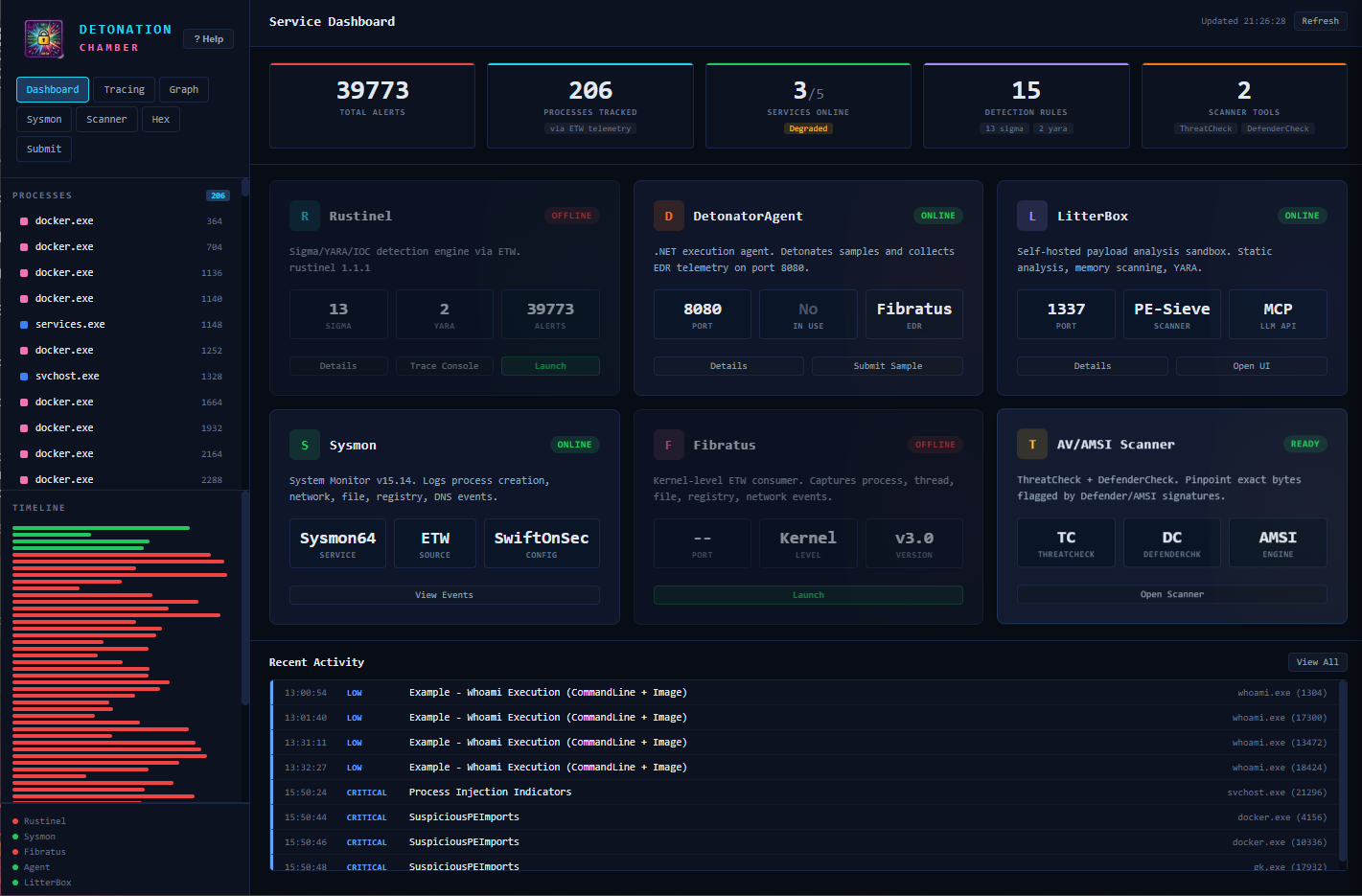
Service Dashboard — real-time health monitoring, alert feed, and detection metrics
## 目录
- [快速开始](#quick-start)
- [功能](#features)
- [架构](#architecture)
- [平台支持](#platform-support)
- [前置条件](#prerequisites)
- [安装说明](#installation)
- [用法](#usage)
- [演示](#demo)
- [API 参考](#api-reference)
- [配置](#configuration)
- [检测规则](#detection-rules)
- [文件结构](#file-structure)
- [故障排除](#troubleshooting)
- [安全提示](#security-notes)
- [鸣谢](#credits)
## 快速开始
### 选项 A:仅本地 UI(无虚拟机)
在本地运行 Web UI 进行开发或 UI 测试。后端服务将不可用,但所有标签页和功能均可正常渲染。
```
# macOS / Linux
make install # Creates venv, installs Flask + deps
make run # Starts on http://localhost:9000
# Windows (PowerShell)
.\make.ps1 install
.\make.ps1 run
```
### 选项 B:完整虚拟机(推荐用于分析)
```
# macOS / Linux
make up # Provisions the full Windows 11 VM
make open # Opens http://
:9000 in browser
# Windows (PowerShell,以管理员身份运行)
.\make.ps1 up
.\make.ps1 open
```
## 功能
### 检测引擎
| 引擎 | 技术 | 功能 |
|--------|-----------|--------------|
| **Rustinel** | Rust + ETW | 20 条 Sigma 规则,717 条 YARA 规则,IOC hash 匹配,实时 NDJSON 告警 |
| **Fibratus** | Go + 内核 ETW | 进程/文件/注册表/网络遥测,行为规则 |
| **Sysmon** | Sysinternals | 事件记录(进程创建、网络、文件、注册表、镜像加载) |
| **LitterBox** | Python | 静态(YARA、字符串)+ 动态(PE-Sieve、Moneta、HollowsHunter、RedEdr) |
### Web UI 标签页
| 标签页 | 描述 |
|-----|-------------|
| **Dashboard** | 统计条,6 个服务健康卡片,最近活动源,toast 通知 |
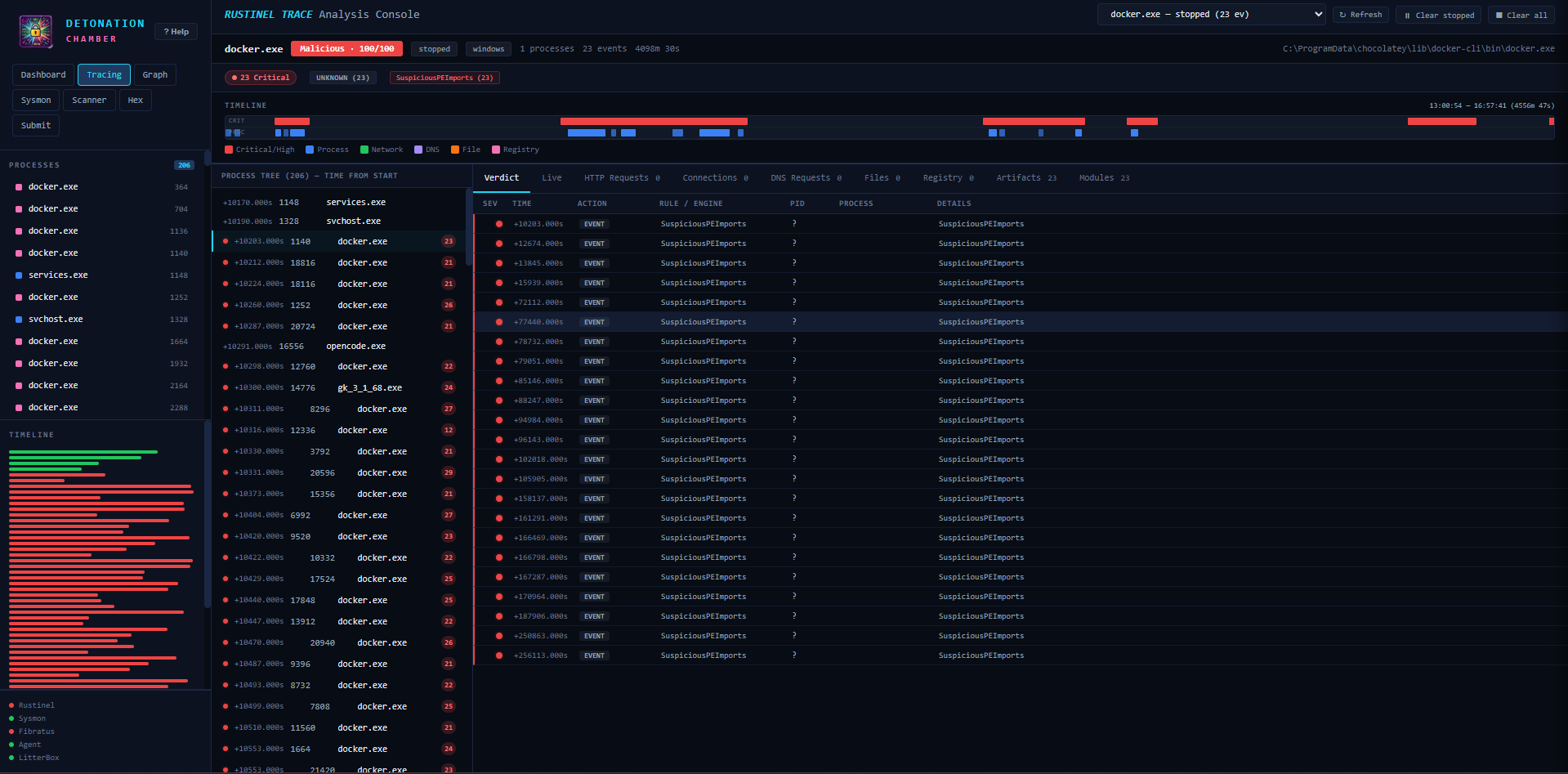
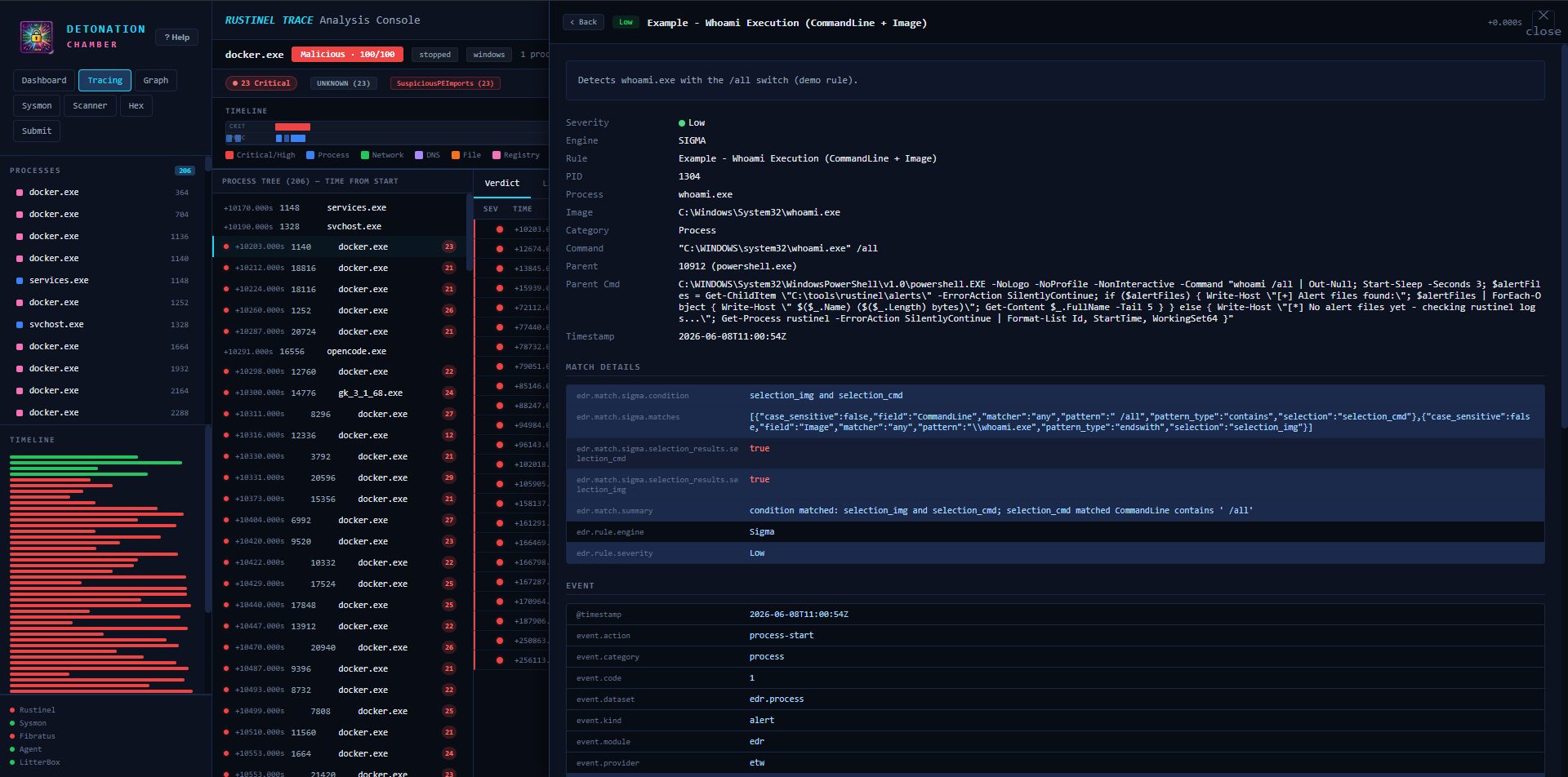
| **Tracing** | 实时 ETW 事件控制台,进程过滤,时间线可视化 |
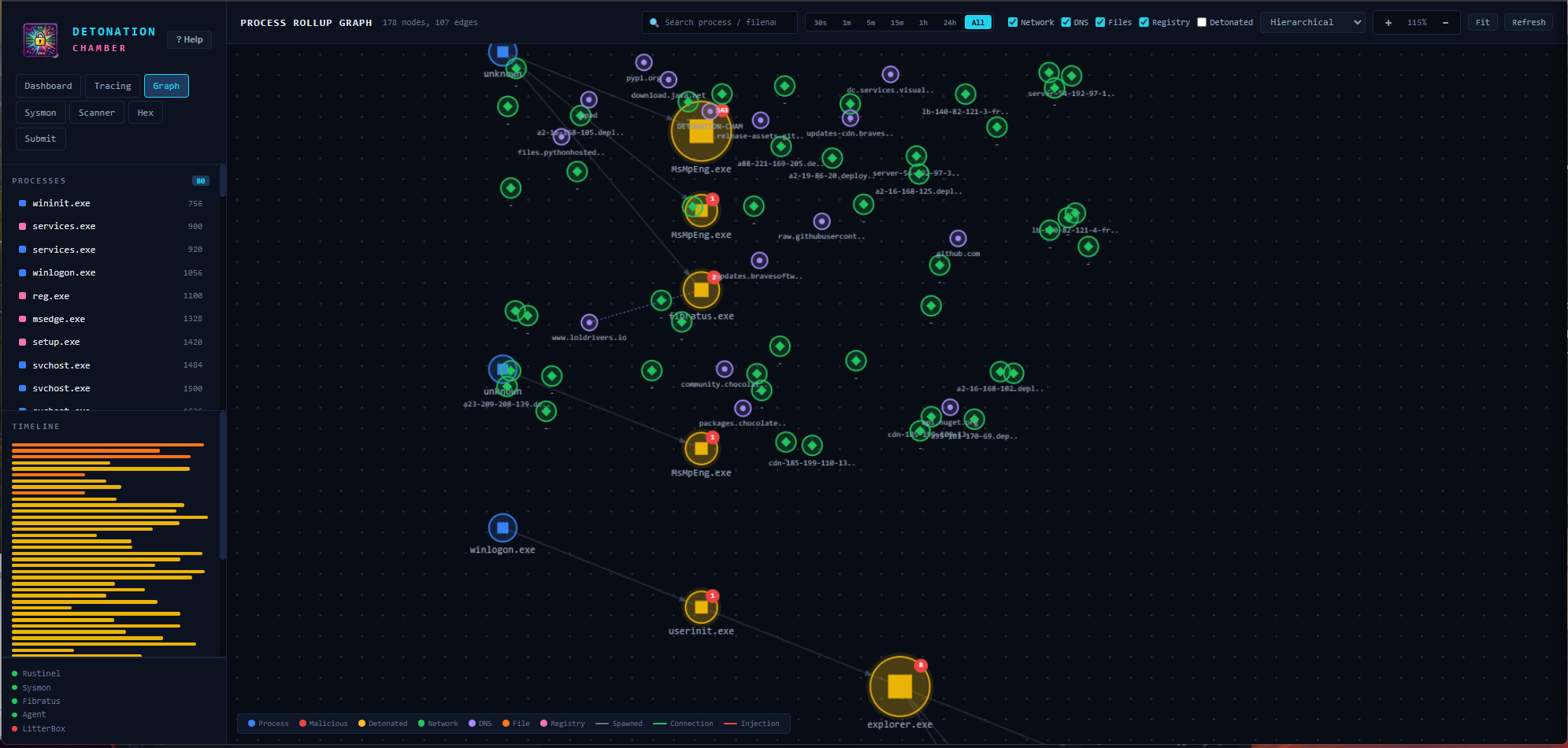
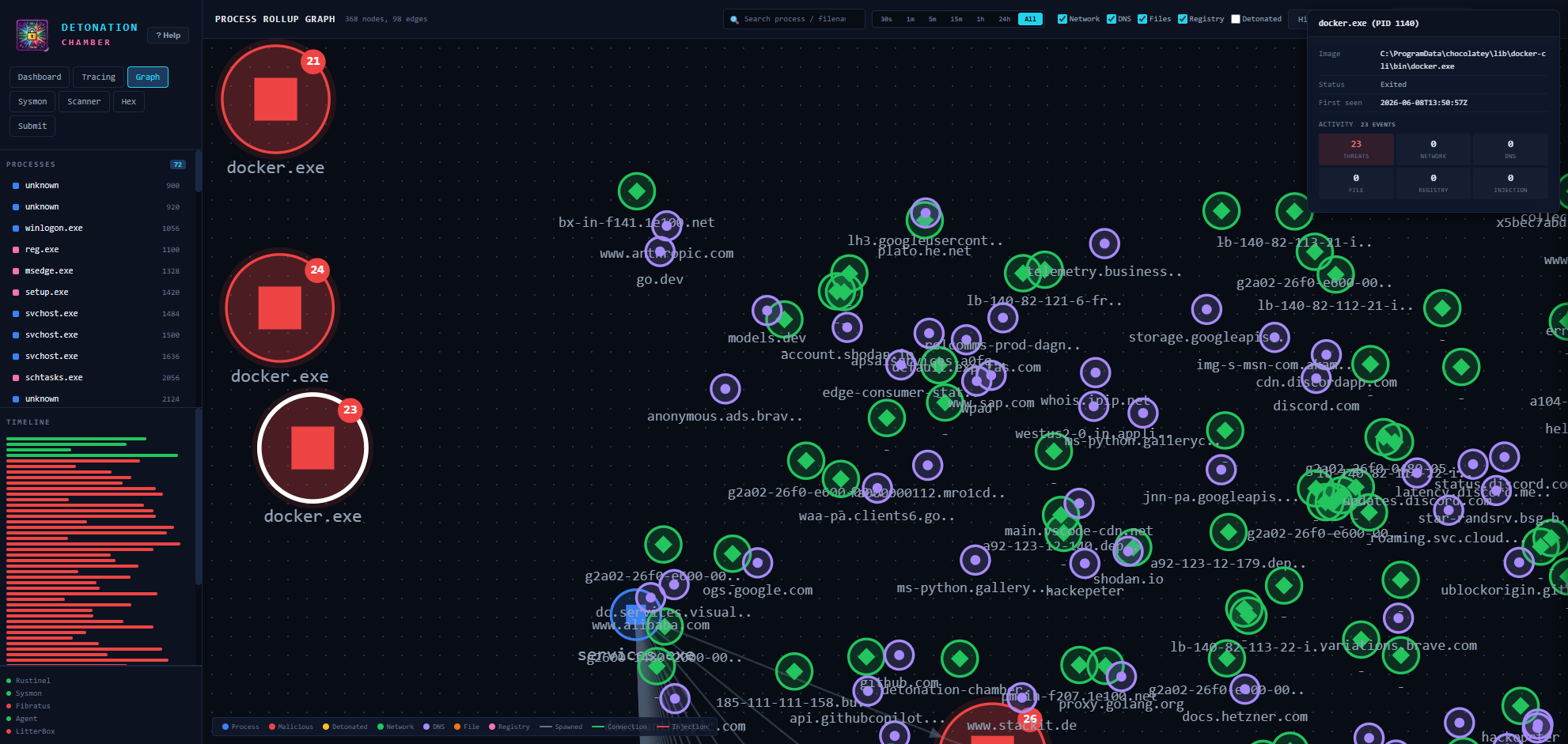
| **Graph** | 进程关系图(力导向/层级/放射/环形/网格布局) |
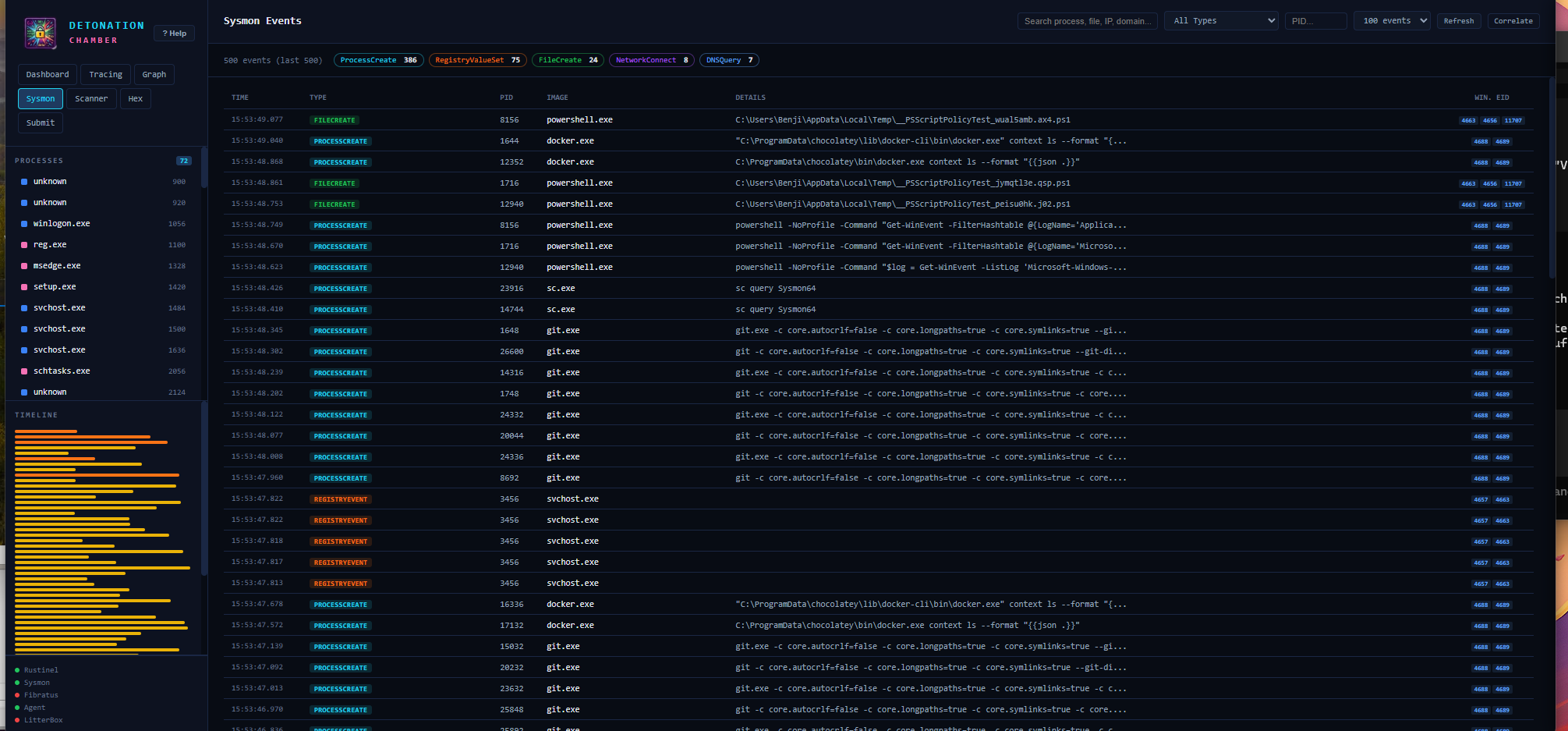
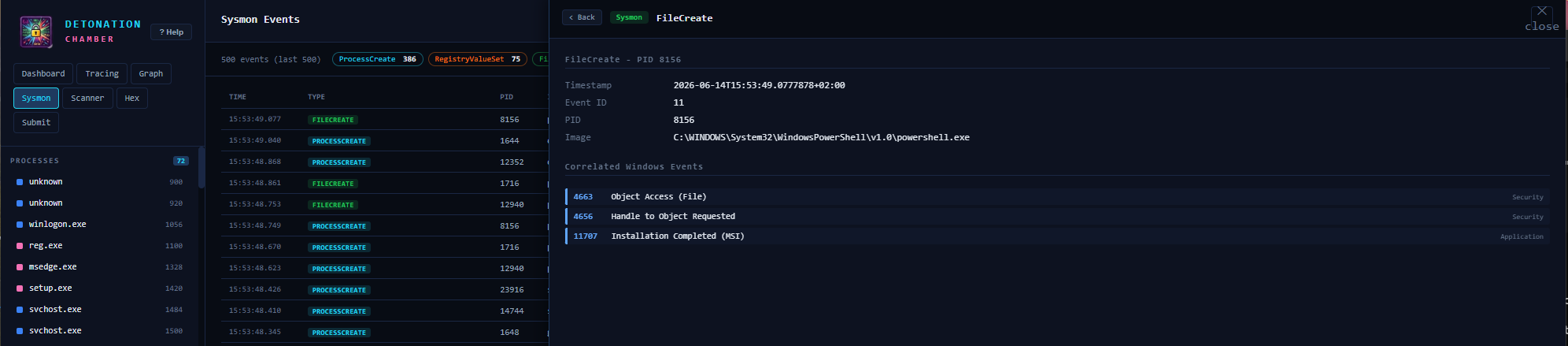
| **Sysmon** | Windows Sysmon 事件查看器,支持搜索、过滤和 Event ID 关联 |
| **Scanner** | ThreatCheck + DefenderCheck 集成,带有扫描历史 |
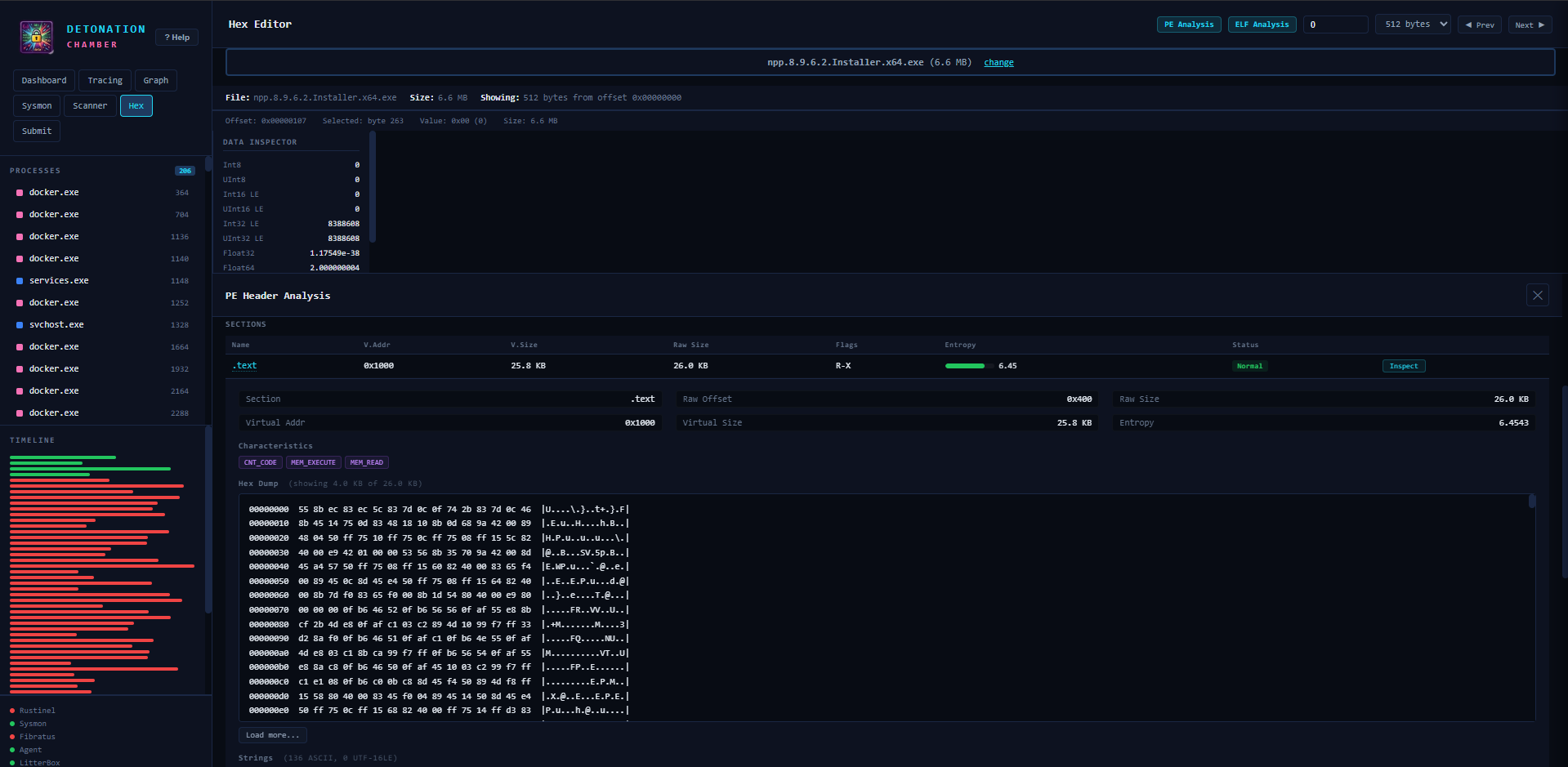
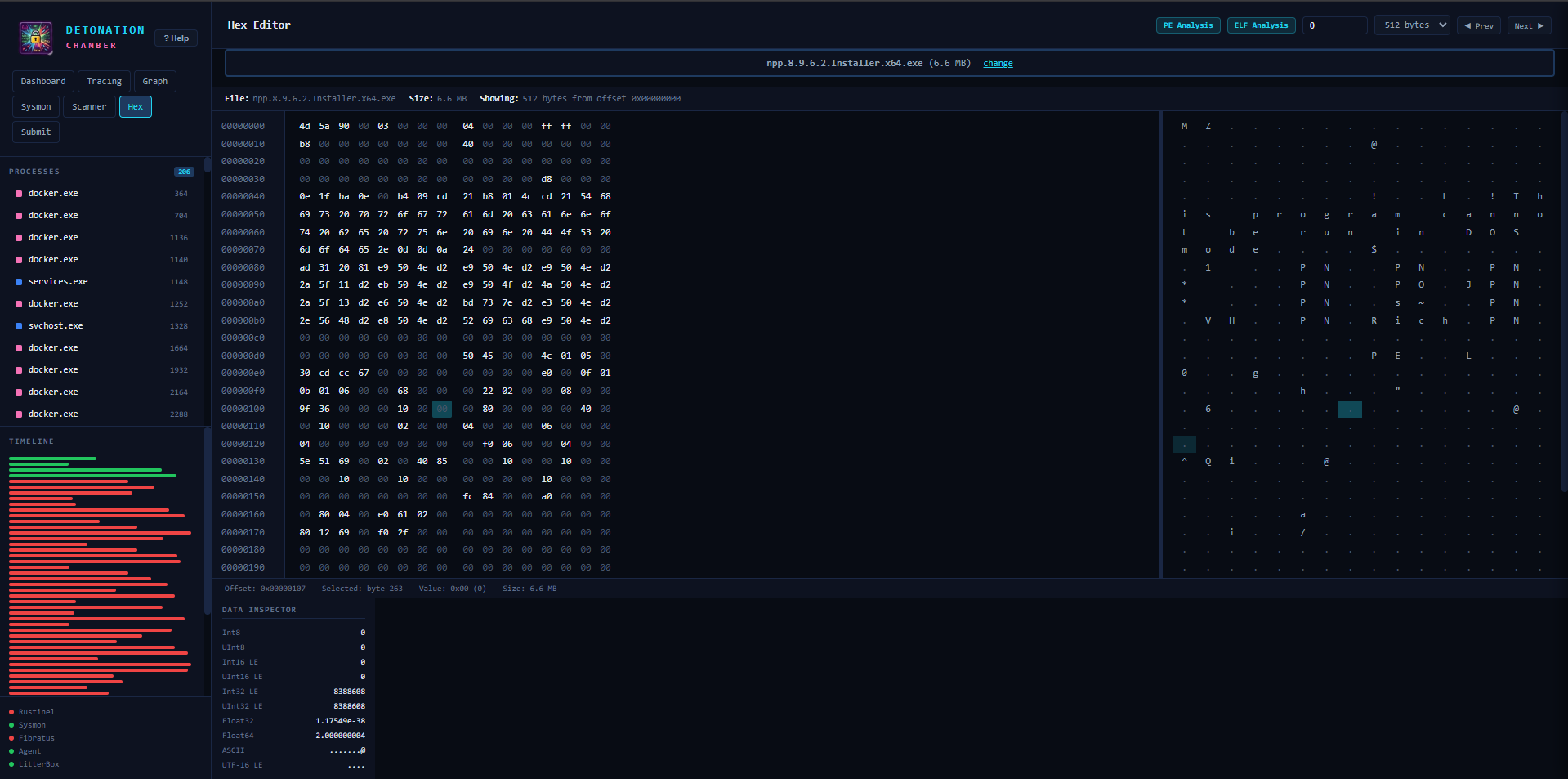
| **Hex Editor** | 二进制查看器,带有数据检查器、PE/ELF 分析、拖放支持 |
| **Submit** | 多目标引爆,带有分阶段的 pipeline 进度 |
### 二进制分析
| 功能 | 详情 |
|-----------|---------|
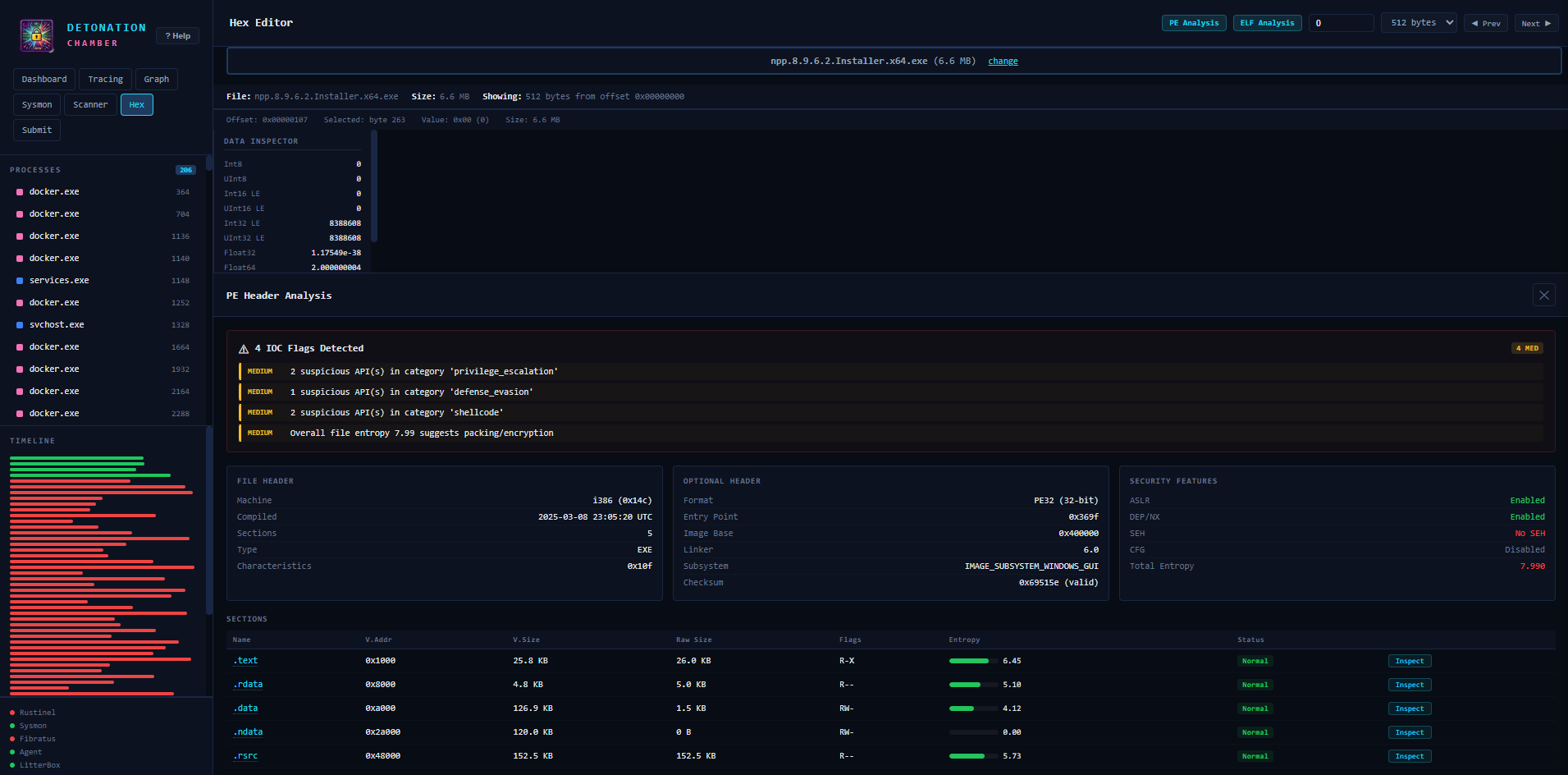
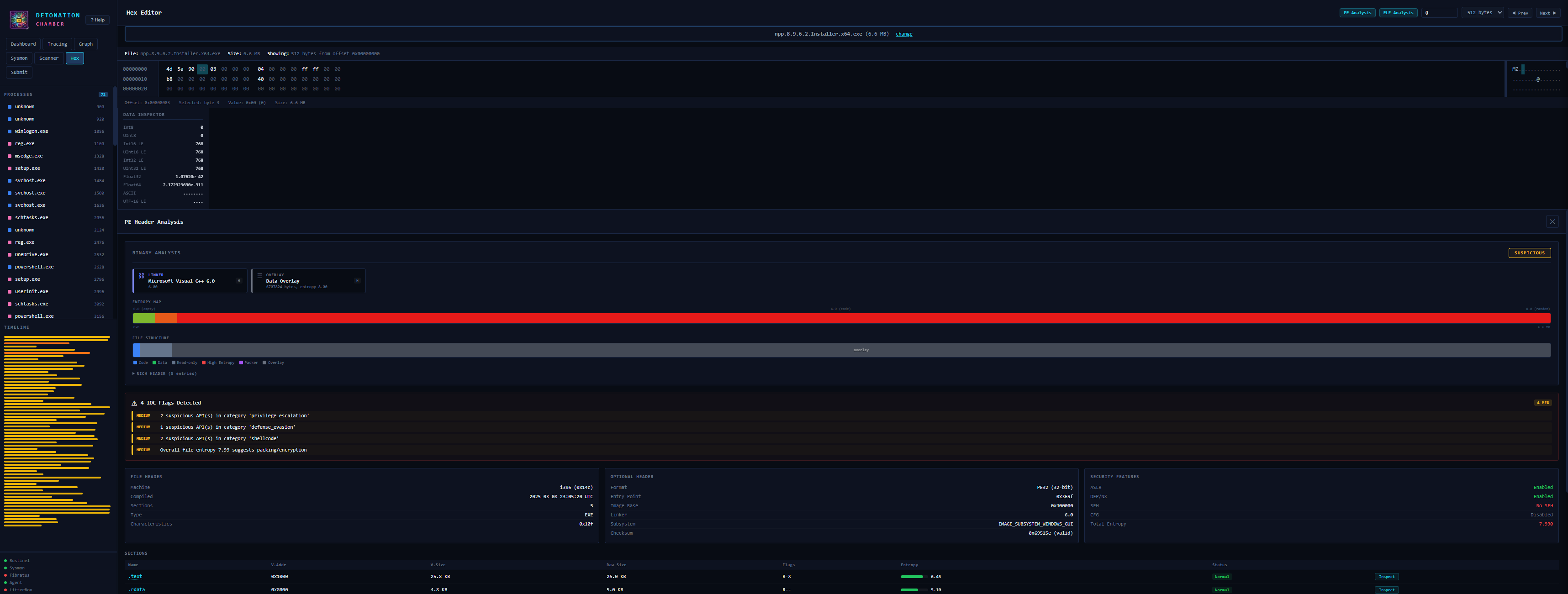
| **PE 头部分析** | DOS/COFF/Optional 头部,ASLR/DEP/SEH/CFG 检测 |
| **DiE 风格检测** | 编译器、加壳器、保护器、链接器识别及评估 |
| **熵热图** | 64 块 Shannon 熵可视化(红色 >= 7.0 = 已加壳) |
| **节区布局** | 带有 RWX 权限标记的可视化节区图 |
| **ELF 安全审计** | PIE、NX stack、RELRO、stack canary、Fortify、stripped 检测 |
| **可疑导入** | 分类:注入、规避、凭据访问、网络、加密 |
| **加壳检测** | 通过节区 + 启发式匹配检测 UPX、Themida、VMProtect、ASPack、MPRESS |
| **TLS Callbacks** | 反调试指示器检测 |
### 逆向工程工具
| 工具 | 用途 |
|------|---------|
| **Detect It Easy (DiE)** | PE/ELF/Mach-O 识别 — 加壳器、编译器、保护器 |
| **WinDbg (Preview)** | 内核/用户模式调试器 — 崩溃转储、实时调试、TTD |
| **Ghidra** | NSA RE 框架 — 反汇编、反编译、脚本编写 |
| **Hunt-Sleeping-Beacons** | 用于扫描休眠 C2 beacon 的调用栈扫描器 |
### 开发者体验
- **`make deploy-restart`**:本地编辑,推送到虚拟机,只需一条命令即可重启 Flask
- **`make run-debug`**:文件更改时 Flask 自动重新加载
- **Toast 通知**:节流的错误/警告/信息通知,带有 15 秒去重
- **帮助模态框**:内置文档(在侧边栏按 “? Help”)
- **提交历史**:持久化到 JSON,支持快速十六进制检查
## 架构
```
┌─────────────────────────────────────────────────────────────────┐
│ Windows 11 VM (Hyper-V / QEMU) │
│ │
│ ┌────────────┐ ┌────────────────┐ ┌────────────┐ │
│ │ Web UI │ │ DetonatorAgent │ │ LitterBox │ │
│ │ :9000 │──▶│ :8080 │ │ :1337 │ │
│ └────────────┘ └────────────────┘ └────────────┘ │
│ │ │ │ │
│ └──────────────────▼───────────────────┘ │
│ ┌────────────────┐ │
│ │ Fibratus │ │
│ │ Kernel ETW │ │
│ └────────────────┘ │
│ ┌────────────────┐ │
│ │ Rustinel │ │
│ │ Sigma+YARA+IOC │ │
│ └────────────────┘ │
│ ┌────────────────┐ │
│ │ Sysmon │ │
│ │ Event Log │ │
│ └────────────────┘ │
└─────────────────────────────────────────────────────────────────┘
```
### 数据流
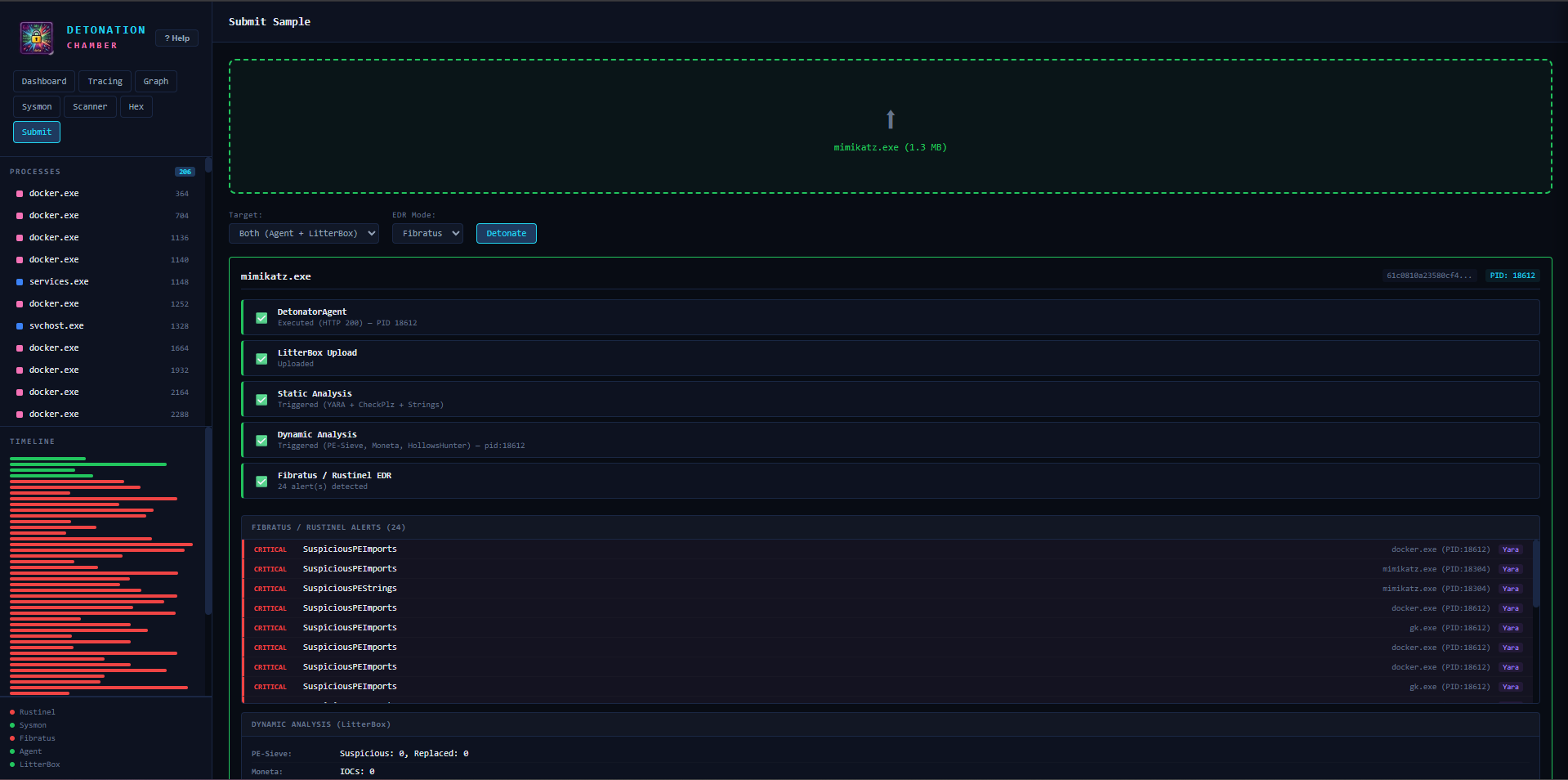
1. 通过 Web UI 提交样本 → 转发到 DetonatorAgent + LitterBox
2. DetonatorAgent 执行样本,返回 PID
3. LitterBox 运行静态(YARA、CheckPlz、Stringnalyzer)+ 动态(PE-Sieve、Moneta、HollowsHunter、RedEdr)分析
4. Fibratus 捕获该进程的内核级 ETW 事件
5. Rustinel 将事件与 Sigma + YARA 规则 + IOC hash 进行匹配
6. Web UI 将来自所有引擎的告警聚合到统一的时间线中
### 服务
| 服务 | 端口 | 用途 | 技术 |
|---------|------|---------|------------|
| **Web UI** | 9000 | 统一仪表板和 API 网关 | Python / Flask |
| **DetonatorAgent** | 8080 | 执行恶意软件样本,返回 PID | .NET 8.0 |
| **LitterBox** | 1337 | 静态 + 动态分析沙箱 | Python / Flask |
| **Fibratus** | 8180 | 内核 ETW 遥测和行为规则 | Go |
| **Rustinel** | — | Sigma/YARA/IOC 实时检测 | Rust |
| **Sysmon** | — | Windows 事件记录 | Sysinternals |
| **Hunt-Sleeping-Beacons** | — | 休眠 C2 beacon 调用栈扫描器 | C++ / MSVC |
| **theZoo-WebUI** | 8888 | 恶意软件样本浏览器 | PHP |
| **Detonator** | 5000/8000 | 编排 UI + REST API | Python |
## 平台支持
| 宿主机操作系统 | Hypervisor | 客户机架构 | Vagrantfile | 性能 |
|---------|-----------|------------|-------------|-------------|
| Windows 10/11 (x86_64) | Hyper-V | x86_64 | `Vagrantfile` | 原生 |
| macOS Apple Silicon (M1-M4) | 通过 vagrant-qemu 使用 QEMU | ARM64 | `Vagrantfile.utm` | 通过 hvf 接近原生 |
### ARM64 兼容性
| 组件 | ARM64 支持 | 备注 |
|-----------|--------------|-------|
| Sysmon | 原生 | `Sysmon64a.exe` (ARM64 二进制文件) |
| Fibratus | 模拟 (x86_64) | 无 ARM64 构建;约 10-20% 开销 |
| Rustinel | 模拟 (x86_64) | 无 ARM64 构建;ETW 在模拟下工作 |
| .NET 8 / Python 3.12 | 原生 | 完整的 ARM64 SDK 和 runtime |
| DetonatorAgent | 原生 | 通过 .NET 8 从源码编译 |
| Detonator / LitterBox | 原生 | 基于 Python |
## 前置条件
### Windows 宿主机
- 启用了 **Hyper-V** 的 Windows 10/11
- **Vagrant** >= 2.4 ([下载](https://www.vagrantup.com/downloads))
- **管理员** PowerShell(Hyper-V 需要)
- 约 30 GB 磁盘,约 8 GB RAM
```
# 启用 Hyper-V(需要重启)
Enable-WindowsOptionalFeature -Online -FeatureName Microsoft-Hyper-V -All
```
### macOS 宿主机 (Apple Silicon)
- Apple Silicon (M1/M2/M3/M4) 上的 macOS
- **QEMU**:`brew install qemu`
- **Vagrant**:`brew install --cask vagrant`
- **vagrant-qemu plugin**:`vagrant plugin install vagrant-qemu`
- **Windows 11 ARM64 Vagrant box**(设置说明请参阅 [Vagrantfile.utm](Vagrantfile.utm) 头部)
- 约 80 GB 磁盘,约 8 GB RAM
### 仅本地开发
- **Python 3.10+**(任何平台)
- **Make**(macOS:Xcode CLI 工具;Windows:不需要,使用 `make.ps1`)
## 安装说明
### 使用 make / make.ps1
该项目包含一个跨平台构建系统:
| 命令 | 描述 |
|---------|-------------|
| `install` | 创建 Python venv + 安装 Flask, requests, watchdog, pefile |
| `run` | 在本地 9000 端口启动 Web UI |
| `run-debug` | 启动并开启 Flask 自动重新加载(监视文件更改) |
| `up` | 配置并启动完整的虚拟机 |
| `halt` | 平滑停止虚拟机 |
| `destroy` | 删除虚拟机 |
| `deploy` | 将 webui 文件(HTML/CSS/JS)同步到运行中的虚拟机 |
| `deploy-app` | 将 Flask 后端(app.py)同步到虚拟机 |
| `restart` | 重启虚拟机上的 Web UI 服务 |
| `deploy-restart` | 一步完成部署 + 重启 |
| `open` | 在默认浏览器中打开 Web UI |
| `status` | 显示虚拟机 + 服务健康状况 |
| `services` | 列出所有服务状态 |
| `alerts` | 显示最近的检测告警 |
| `test` | 提交测试样本以验证 pipeline |
| `submit FILE=x` | 提交文件进行引爆 |
| `logs` | 从虚拟机提取 Web UI 日志 |
| `ssh` / `rdp` | 连接到虚拟机 |
| `clean` | 销毁虚拟机 + 移除 .vagrant |
| `clean-all` | 同时移除缓存的 Vagrant boxes |
| `uninstall` | 移除本地 Python venv |
**macOS / Linux:**
```
make install # Local venv setup
make run # Local server
make up # Full VM
make deploy-restart # Push changes to VM
```
**Windows (PowerShell):**
```
.\make.ps1 install
.\make.ps1 run
.\make.ps1 up # Run as Administrator
.\make.ps1 deploy-restart
```
### 手动安装
```
cd webui
python3 -m venv .venv
source .venv/bin/activate # Windows: .venv\Scripts\activate
pip install -r requirements.txt
python app.py # http://localhost:9000
```
## 用法
### 引爆工作流
1. 打开 `http://localhost:9000` 的 Web UI
2. 转到 **Submit** 标签页
3. 拖放(或浏览)恶意软件样本
4. 选择目标:**Agent**(执行)、**LitterBox**(分析)或 **Both**(两者)
5. 点击 Submit — 观察 pipeline 阶段进度
6. 切换到 **Tracing** 标签页查看实时 ETW 告警
7. 切换到 **Graph** 标签页查看进程关系
8. 检查 **Dashboard** 查看严重程度细分
### CLI 提交
```
# macOS / Linux
make submit FILE=./samples/mimikatz.exe TARGET=both
# Windows
.\make.ps1 submit -File .\samples\mimikatz.exe -Target2 both
```
### 扫描器工作流
1. 转到 **Scanner** 标签页
2. 上传文件(拖放)或输入虚拟机路径
3. 选择工具(ThreatCheck / DefenderCheck)和引擎(Defender / AMSI)
4. 点击 Scan — 结果显示检测状态和触发 offset
5. 点击 “View in Hex” 跳转到标记的字节
### PE 分析
1. 转到 **Hex Editor** 标签页
2. 上传 PE 文件
3. 点击 **PE Analysis** 按钮
4. 审查:头部、安全功能(ASLR/DEP/SEH/CFG)、节区熵、可疑导入、加壳指示器、DiE 风格检测概述
### ELF 分析
1. 转到 **Hex Editor** 标签页
2. 上传 ELF 二进制文件(Linux/BSD 可执行文件、共享对象)
3. 点击 **ELF Analysis** 按钮
4. 审查:ELF 头部、安全审计(PIE/NX/RELRO/canary/Fortify)、节区、段、动态库、可疑符号导入
### Hunt-Sleeping-Beacons
扫描正在运行的进程以查找休眠 C2 beacon(通过 RDP 或 SSH 连接到虚拟机)
```
# 扫描所有进程
Hunt-Sleeping-Beacons.exe
# 扫描特定 PID(例如,在触发后)
Hunt-Sleeping-Beacons.exe -p 1234
# 包含 .NET 进程(误报较多)
Hunt-Sleeping-Beacons.exe --dotnet
# 显示可疑进程的命令行
Hunt-Sleeping-Beacons.exe --commandline
# 快捷别名
hsb --commandline
```
检测内容包括:调用栈中的无后备内存、不可执行的内存页、模块踩踏(SharedOriginal 检查)、可疑的 APC 分发器、基于定时器的 sleepmask 回调、异常的模块间调用(模块代理)以及返回地址欺骗(jmp gadget 模式)。
## 演示
### 服务仪表板
### 样本引爆 (Mimikatz)
### Rustinel 追踪分析
|
|
|
### 进程关系图
|
|
|
### PE 二进制分析
|
|
|
### 节区检查与 Hex 编辑器
|
|
|
### Sysmon 事件监控
|
|
|
## API 参考
所有 endpoint 均在端口 `9000` 上提供服务。响应格式为 JSON。
### 核心
| 方法 | Endpoint | 描述 |
|--------|----------|-------------|
| GET | `/api/alerts` | 所有检测告警(Rustinel + Fibratus + LitterBox) |
| GET | `/api/processes` | 具有活动计数的受跟踪进程 |
| GET | `/api/status` | 服务健康状态(所有组件) |
| GET | `/api/rustinel` | Rustinel 引擎信息(规则、版本) |
| GET | `/api/submissions` | 提交历史(最近 200 条) |
### 提交与引爆
| 方法 | Endpoint | 描述 |
|--------|----------|-------------|
| POST | `/api/submit` | 提交样本(multipart)。参数:`file`,`target`(agent/litterbox/both) |
| GET | `/api/detonation/results` | 轮询结果。参数:`sha256`,`pid`,`litterbox_hash`,`filename` |
### Hex 编辑器与二进制分析
| 方法 | Endpoint | 描述 |
|--------|----------|-------------|
| GET | `/api/file/hex` | Hex 转储。参数:`path`,`offset`,`bytes` |
| POST | `/api/file/hex/upload` | 上传文件以进行 Hex 查看 |
| GET | `/api/file/pe` | PE 头部分析。参数:`path` |
| GET | `/api/file/elf` | ELF 二进制分析。参数:`path` |
### Sysmon
| 方法 | Endpoint | 描述 |
|--------|----------|-------------|
| GET | `/api/sysmon` | Sysmon 事件。参数:`max`,`event_id`,`pid` |
| GET | `/api/sysmon/stats` | Sysmon 统计信息和诊断 |
### 扫描器
| 方法 | Endpoint | 描述 |
|--------|----------|-------------|
| POST | `/api/scan/threatcheck` | ThreatCheck 扫描。参数:`file`/`path`,`engine`,`type` |
| POST | `/api/scan/defendercheck` | DefenderCheck 扫描。参数:`file`/`path` |
| GET | `/api/scan/status` | 扫描器工具可用性 |
### 代理 Endpoint
| 方法 | Endpoint | 描述 |
|--------|----------|-------------|
| GET/POST | `/api/litterbox/` | 代理到 LitterBox API (:1337) |
| GET | `/api/fibratus/` | 代理到 Fibratus API (:8180) |
## 配置
### 环境变量(Web UI)
| 变量 | 默认值 | 描述 |
|----------|---------|-------------|
| `RUSTINEL_ALERTS_DIR` | `C:\tools\rustinel\logs` | Rustinel NDJSON 告警目录 |
| `RUSTINEL_INSTALL_DIR` | `C:\tools\rustinel` | Rustinel 安装根目录 |
| `DETONATOR_API` | `http://127.0.0.1:8000` | Detonator REST API |
| `DETONATOR_AGENT_API` | `http://127.0.0.1:8080` | DetonatorAgent API |
| `LITTERBOX_API` | `http://127.0.0.1:1337` | LitterBox API |
| `WEBUI_PORT` | `9000` | Web UI 监听端口 |
### 自定义检测规则
**Sigma**(热重载):
```
C:\tools\detection-rules\rustinel-rules\dist\windows-advanced\rules\sigma\
```
**YARA**(热重载):
```
C:\tools\detection-rules\yara-combined\
```
**IOC hash**(热重载,每行添加一个 SHA-256):
```
C:\tools\detection-rules\rustinel-rules\dist\windows-advanced\rules\ioc\
```
### Defender 排除项
配置时会为引爆路径添加排除项。要在测试时完全禁用:
```
# 在 VM 内部,以管理员身份运行
Set-MpPreference -DisableRealtimeMonitoring $true
```
## 检测规则
| 类型 | 数量 | 来源 |
|------|-------|--------|
| **Sigma** | 20 条规则 | `Karib0u/rustinel-rules` windows-advanced pack |
| **YARA** | 717 条已编译 | Rustinel-rules + Elastic protections-artifacts |
| **IOC** | 动态 | SHA-256 hash 匹配,在样本提交时自动馈送 |
**Sigma 覆盖范围:**
- 14 条 process_creation(编码的 PowerShell、schtasks、LOLBins、凭据转储)
- 3 条 registry_event(Run 键持久化、Defender 篡改、WDigest)
- 1 条 task_creation(可疑的计划任务操作)
- 1 条 ps_script(PowerShell 脚本块记录)
- 1 条 service_creation
## 文件结构
```
transportable-detonation-chamber/
├── Makefile # Build system (macOS/Linux)
├── make.ps1 # Build system (Windows PowerShell)
├── Vagrantfile # VM definition (Hyper-V)
├── Vagrantfile.utm # VM definition (QEMU/UTM, Apple Silicon)
├── README.md
├── tdc-logo.png
│
├── static/ # Screenshots for documentation
│ ├── dashboard.png
│ ├── mimikatz_detonation.png
│ ├── rustinel_analysis.png
│ ├── rustinel_analysis_details.png
│ ├── process_rollup.png
│ ├── process_rollup_details_scan_correlation.png
│ ├── pe_header_analyzer.png
│ ├── PE_header_packing_analyzer.png
│ ├── pe_analyzer_text_header_section.png
│ ├── hex_editor.png
│ ├── sysmon_event_ids.png
│ └── sysmon_windows_event_id_correlation.png
│
├── webui/ # Unified Web UI
│ ├── app.py # Flask backend (APIs, proxying, PE/ELF analysis)
│ ├── dev_server.py # Dev server with live-reload
│ ├── requirements.txt # Python deps (flask, requests, watchdog, pefile)
│ ├── templates/
│ │ └── index.html # SPA with all tabs + Help modal
│ └── static/
│ ├── css/style.css # Dark theme (~5000 lines)
│ ├── js/app.js # Frontend logic (~5500 lines)
│ └── icon.png # Logo
│
├── config/
│ ├── rustinel-config.toml # Rustinel config (sigma/yara/ioc paths)
│ ├── fibratus.yml # Fibratus config (JSON eventlog output)
│ └── profiles_init.yaml # Detonator target profiles
│
├── rules/ # Detection rules (copied to VM)
│
├── scripts/ # Provisioning scripts
│ ├── install-prerequisites.ps1 # .NET 8, Python 3.12, Git, 7-Zip
│ ├── install-sysmon.ps1 # Sysmon (ARM64-aware)
│ ├── install-fibratus.ps1 # Fibratus v3.0.0
│ ├── install-rustinel.ps1 # Rustinel v1.1.1
│ ├── install-detection-rules.ps1 # Sigma + YARA rules
│ ├── install-detonator.ps1 # Detonator + DetonatorAgent
│ ├── install-litterbox.ps1 # LitterBox sandbox
│ ├── install-thezoo.ps1 # theZoo malware repository + WebUI
│ ├── install-hunt-sleeping-beacons.ps1 # Hunt-Sleeping-Beacons (VS Build Tools + compile)
│ ├── install-re-tools.ps1 # Detect It Easy, WinDbg, Ghidra
│ ├── install-webui.ps1 # Web UI deployment
│ └── configure-services.ps1 # Service registration (runs on every boot)
│
└── test_alerts/ # Test data for pipeline verification
```
### 虚拟机文件布局
```
C:\DetonationChamberUI\ Web UI (Flask)
C:\tools\rustinel\ Rustinel ETW engine + rules
C:\tools\fibratus\ Fibratus kernel tracer
C:\DetonatorAgent\ .NET 8 execution agent
C:\LitterBox\ Analysis sandbox
C:\tools\ThreatCheck\ AV signature scanner
C:\tools\DefenderCheck\ Defender evasion tester
C:\tools\Hunt-Sleeping-Beacons\ Sleeping beacon scanner
C:\tools\theZoo-WebUI\ theZoo malware sample browser (:8888)
C:\tools\detection-rules\ Sigma + YARA + IOC rules
C:\ProgramData\chocolatey\lib\die\ Detect It Easy (DiE 3.21)
C:\ProgramData\chocolatey\lib\ghidra\ Ghidra 12.1.2
WinDbgX.exe WinDbg Preview (via winget)
C:\Users\vagrant\Desktop\infected\ Malware samples (Defender-excluded)
```
## 故障排除
### 检查服务状态
```
# macOS / Linux
make services
# Windows
.\make.ps1 services
```
预期输出:
```
SERVICE STATE
------- -----
DetonationChamberUI Running
Rustinel Running
DetonatorAgent Running
LitterBox Running
Fibratus Running
Sysmon Running
theZoo-WebUI Running
```
### 服务未启动
```
# 通过 SSH/RDP 连接到 VM
vagrant ssh # or: vagrant rdp
# 检查并重启服务
Get-ScheduledTask -TaskName DetonationChamberUI | Start-ScheduledTask
Get-ScheduledTask -TaskName Rustinel | Start-ScheduledTask
Get-ScheduledTask -TaskName DetonatorAgent | Start-ScheduledTask
Get-ScheduledTask -TaskName LitterBox | Start-ScheduledTask
# 查看日志
Get-Content C:\tools\logs\DetonatorAgent.log -Tail 50
Get-Content C:\tools\logs\DetonationChamberUI.log -Tail 50
```
### 端口转发不起作用(Hyper-V)
Hyper-V 使用虚拟交换机。直接通过虚拟机的 IP 连接:
```
# 查找 VM IP
.\make.ps1 status
# 或者:vagrant ssh -c "ipconfig"
# 在 make.ps1 中覆盖
.\make.ps1 status -VMIp 172.17.x.x
```
### Web UI 未加载
```
# 检查 Flask 是否在运行
make status # or: .\make.ps1 status
# 重启它
make restart # or: .\make.ps1 restart
# 查看日志
make logs # or: .\make.ps1 logs
```
### Rustinel 未检测到事件
```
# 在 VM 内部:
Get-Process rustinel
Get-Content C:\tools\rustinel\logs\rustinel.log.* | Select-Object -Last 20
logman query -ets | findstr rustinel
# 如果卡死则重启
logman stop rustinel-etw-trace -ets 2>$null
Start-ScheduledTask -TaskName "Rustinel"
```
### macOS:QEMU 无法启动
```
qemu-system-aarch64 --accel help # Should show: hvf
ls /opt/homebrew/share/qemu/edk2-aarch64-code.fd
vagrant plugin list | grep qemu
```
### 本地安装失败
```
# 验证 Python 版本(需要 3.10+)
python3 --version
# 如果 venv 创建失败,请尝试:
make uninstall # or: .\make.ps1 uninstall
make install # or: .\make.ps1 install
```
## 安全提示
- 在每次引爆前使用**快照**(`vagrant snapshot save clean_state`)
- 建议**网络隔离**(Hyper-V 内部/私有交换机)
- 仅为引爆路径配置 Defender 排除项
- Rustinel 主动响应默认**禁用**
- Web UI 没有身份验证 — 绑定到 localhost 或仅在隔离的网络中使用
## 鸣谢
| 项目 | 作用 |
|---------|------|
| [dobin/detonator](https://github.com/dobin/detonator) | 编排框架 |
| [dobin/DetonatorAgent](https://github.com/dobin/DetonatorAgent) | 执行代理 |
| [rabbitstack/fibratus](https://github.com/rabbitstack/fibratus) | ETW 检测引擎 |
| [Karib0u/rustinel](https://github.com/Karib0u/rustinel) | Sigma/YARA EDR 代理 |
| [BlackSnufkin/LitterBox](https://github.com/BlackSnufkin/LitterBox) | Payload 分析沙箱 |
| [thefLink/Hunt-Sleeping-Beacons](https://github.com/thefLink/Hunt-Sleeping-Beacons) | 休眠 beacon 调用栈扫描器 |
| [ytisf/theZoo](https://github.com/ytisf/theZoo) | 恶意软件样本仓库 |
| [kawaiipantsu/theZoo-WebUI](https://github.com/kawaiipantsu/theZoo-WebUI) | theZoo Web 前端 |
| [horsicq/DIE-engine](https://github.com/horsicq/DIE-engine) | Detect It Easy |
| [NationalSecurityAgency/ghidra](https://github.com/NationalSecurityAgency/ghidra) | Ghidra RE 框架 |
| [Microsoft WinDbg](https://learn.microsoft.com/en-us/windows-hardware/drivers/debugger/) | Windows 调试器 |
为安全研究和 EDR 测试而构建。请负责任地使用。
标签:DAST, Hyper-V, Vagrant, Windows 11, YARA, 云资产可视化, 可视化界面, 恶意软件分析, 日志审计, 沙箱, 自定义脚本, 身份验证强制, 逆向工具, 配置修复