gotestyourself/gotestsum
GitHub: gotestyourself/gotestsum
gotestsum 是一个优化了人类可读输出并支持 JUnit XML 报告的 Go 语言测试运行器。
Stars: 2701 | Forks: 169
# gotestsum
`gotestsum` 使用 `go test -json` 运行测试,打印格式化的测试输出以及测试运行的摘要。
它旨在适用于本地开发以及 CI 等自动化场景。
`gotestsum` [被](#who-uses-gotestsum)一些最受欢迎的 Go 项目所使用。
## 安装
从 [releases](https://github.com/gotestyourself/gotestsum/releases) 下载二进制文件,或者使用
`go install gotest.tools/gotestsum@latest` 从源码构建。如果不想安装直接运行,请使用
`go run gotest.tools/gotestsum@latest`。
## 文档
**核心功能**
- 更改[测试输出格式](#output-format),从紧凑格式变为带有颜色高亮的详细格式。
- 运行完所有测试后,打印测试运行的[摘要](#summary)。
- 使用任何 [`go test` flag](#custom-go-test-command),
通过 [`--raw-command`](#custom-go-test-command) 运行脚本,
或者[运行已编译的测试二进制文件](#executing-a-compiled-test-binary)。
**CI 与自动化**
- [`--junitfile`](#junit-xml-output) - 写入 JUnit XML 文件,以便与 CI 系统集成。
- [`--jsonfile`](#json-file-output) - 将 `gotestsum` 接收到的所有 [test2json](https://pkg.go.dev/cmd/test2json) 输入写入文件。该文件
可用作 [`gotestsum tool slowest`](#finding-and-skipping-slow-tests) 的输入,或者
当使用紧凑的 [`--format`](#output-format) 向 stdout 打印较少详细输出时,作为
存储测试完整详细输出的方式。
- [`--rerun-fails`](#re-running-failed-tests) - 再次运行失败(可能是不稳定)的测试,以避免重新
运行整个测试套件。在处理不稳定的测试套件时,重新运行单个测试可以节省大量时间。
**本地开发**
- [`--watch`](#run-tests-when-a-file-is-saved) - 每次保存 `.go` 文件时,运行发生更改的 package 的测试。
- [`--post-run-command`](#post-run-command) - 在测试后运行命令,可用于桌面通知测试运行情况。
- [`gotestsum tool slowest`](#finding-and-skipping-slow-tests) - 找出最慢的测试,或自动更新最慢测试的源代码
以添加条件性的 `t.Skip` 语句。此语句允许你使用 `gotestsum -- -short ./...` 跳过最慢的测试。
### 输出格式
`--format` flag 或 `GOTESTSUM_FORMAT` 环境变量设置了
用于在测试运行时打印测试名称以及可能的测试输出的格式。大多数
输出使用颜色来高亮显示通过、失败或跳过。
`--format-icons` flag 更改了 `pkgname` 和 `testdox` 格式使用的图标。
你可以设置 `GOTESTSUM_FORMAT_ICONS` 环境变量,而不是使用该 flag。
nerdfonts 图标需要来自 [Nerd Fonts](https://www.nerdfonts.com/) 的字体。
常用格式(完整列表请参阅 `--help`):
* `dots` - 为每个测试打印一个字符。
* `pkgname`(默认)- 为每个 package 打印一行。
* `testname` - 为每个测试和 package 打印一行。
* `testdox` - 使用 [gotestdox](https://github.com/bitfield/gotestdox) 为每个测试打印一句话。
* `standard-quiet` - 标准 `go test` 格式。
* `standard-verbose` - 标准 `go test -v` 格式。
有新格式的想法吗?
请[在 github 上分享](https://github.com/gotestyourself/gotestsum/issues/new)!
#### 演示
三个 `--format` 选项的演示。
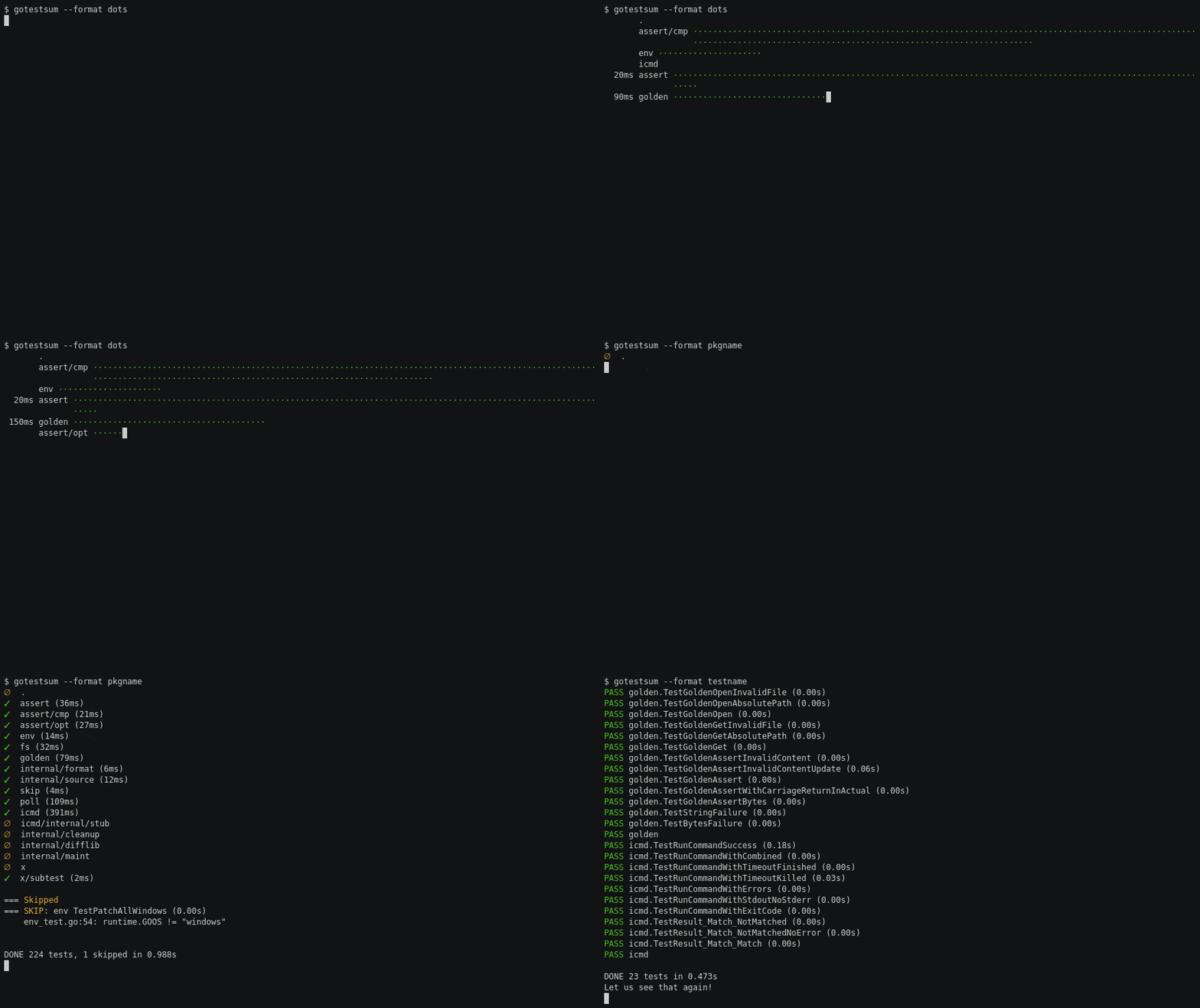
[来源](https://github.com/gotestyourself/gotestsum/tree/readme-demo/scripts) ### 摘要 格式化输出之后是测试运行的摘要。摘要包括: * 任何失败或被跳过的测试的测试输出和耗时。 * 任何构建失败的 package 的构建错误。 * 一行 `DONE`,包含已运行测试数、已跳过测试数、已失败测试数、package 构建错误数, 以及包含构建时间在内的总耗时。 DONE 101 tests[, 3 skipped][, 2 failures][, 1 error] in 0.103s 使用 `--hide-summary section` 隐藏摘要的某些部分。 **示例:在摘要中隐藏已跳过的测试** ``` gotestsum --hide-summary=skipped ``` **示例:隐藏除 DONE 行以外的所有内容** ``` gotestsum --hide-summary=skipped,failed,errors,output # 或 gotestsum --hide-summary=all ``` **示例:隐藏摘要中的测试输出,仅打印失败和已跳过测试的名称** 以及错误** ``` gotestsum --hide-summary=output ``` ### JUnit XML 输出 当 `--junitfile` flag 或 `GOTESTSUM_JUNITFILE` 环境变量被设置为 文件路径时,`gotestsum` 会以 JUnit XML 格式将测试报告写入该文件。 此文件可用于与 CI 系统集成。 ``` gotestsum --junitfile unit-tests.xml ``` 如果 `testsuite.name` 或 `testcase.classname` 字段中的 package 名称 不适用于你的 CI 系统,可以使用 `--junitfile-testsuite-name` 或 `--junitfile-testcase-classname` flag 自定义这些值。这些 flag 接受以下值: * `short` - package 的基础名称(由 package 语句指定的单个术语)。 * `relative` - 相对于仓库根目录的 package 路径 * `full` - 完整的 package 路径(默认) 注意:如果未安装 Go,或者 `go` 二进制文件不在 `PATH` 中,可以通过设置 `GOVERSION` 环境变量来移除“failed to lookup go version for junit xml”警告。 ### JSON 文件输出 当 `--jsonfile` flag 或 `GOTESTSUM_JSONFILE` 环境变量被设置为 文件路径时,`gotestsum` 会将 `go test -json` 写入的所有 [test2json](https://golang.org/cmd/test2json/#hdr-Output_Format) 输出写入一个以行分隔的 JSON 文件。此文件可用于比较测试 运行结果,或查找不稳定的测试。 ``` gotestsum --jsonfile test-output.log ``` ### 运行后命令 `--post-run-command` flag 可用于在测试 运行完成后执行命令。该二进制程序将在设置了以下环境 变量的情况下运行: ``` GOTESTSUM_ELAPSED # test run time in seconds (ex: 2.45s) GOTESTSUM_FORMAT # gotestsum format (ex: pkgname) GOTESTSUM_JSONFILE # path to the jsonfile, empty if no file path was given GOTESTSUM_JUNITFILE # path to the junit.xml file, empty if no file path was given TESTS_ERRORS # number of errors TESTS_FAILED # number of failed tests TESTS_SKIPPED # number of skipped tests TESTS_TOTAL # number of tests run ``` 要获取有关测试运行的更多详细信息,例如失败消息或完整的失败测试列表, 请使用 `--jsonfile` 或 `--junitfile` 运行 `gotestsum`,并从 post-run-command 解析该 文件。[gotestsum/testjson](https://pkg.go.dev/gotest.tools/gotestsum/testjson?tab=doc) 包可用于解析输出的 JSON 文件。 **示例:桌面通知** 首先使用 `go get gotest.tools/gotestsum/contrib/notify` 安装示例通知命令。 该命令将作为 `notify` 下载到 `$GOPATH/bin`。请注意,此 示例 `notify` 命令仅在安装了 `notify-send` 的 Linux 和安装了 [terminal-notifer](https://github.com/julienXX/terminal-notifier) 的 macOS 上有效。 在 Linux 上,你需要在你的图标主题中安装一些“test-pass”和“test-fail”图标。 一些示例图标可以在 `contrib/notify` 中找到,并可通过 `make install` 安装。 在 Windows 上,你可以安装 [notify-send.exe](https://github.com/vaskovsky/notify-send) 但它不支持自定义图标,因此必须使用基本的“info”和“error”。 ``` gotestsum --post-run-command notify ``` **示例:带 flag 的命令** 通过引用整个命令,可以将位置参数或命令行 flag 传递给 `--post-run-command`。 ``` gotestsum --post-run-command "notify me --date" ``` **示例:打印最慢的测试** post-run 命令可以与其他 `gotestsum` 命令和工具结合使用,以提供 更详细的摘要。此示例使用 `gotestsum tool slowest` 在摘要后打印 最慢的 10 个测试。 ``` gotestsum \ --jsonfile tmp.json.log \ --post-run-command "bash -c ' echo; echo Slowest tests; gotestsum tool slowest --num 10 --jsonfile tmp.json.log'" ``` ### 重新运行失败的测试 设置 `--rerun-fails` flag 时,`gotestsum` 将重新运行任何失败的测试。 测试将被重新运行,直到每个测试通过一次,或者尝试次数 超过最大尝试次数。最大尝试次数默认为 2,可以通过 `--rerun-fails=n` 更改。 为了避免在出现真正失败时重新运行测试,当测试失败过多时,将跳过重新运行。 默认情况下,此值为 10,可以通过 `--rerun-fails-max-failures=n` 更改。 你可以使用 `--rerun-fails-abort-on-data-race` flag,以便在 检测到 data race 时中止重新运行。 请注意,使用 `--rerun-fails` 可能需要使用其他 flag,具体取决于 你如何为 `go test` 指定参数: * 与 `--raw-command` 一起使用时,重新运行会将额外的参数传递给 该命令。第一个参数是带有与要重新运行的测试匹配的正则表达式的 `-test.run` flag, 第二个是 Go package 的名称。这些额外的参数可以传递给 `go test`, 或测试二进制文件。 * 与任何 `go test` 参数(命令行中 `--` 之后的任何内容)一起使用时,必须 使用 `--packages` 参数将待测试的 package 列表指定为以空格分隔的列表。 **示例** gotestsum --rerun-fails --packages="./..." -- -count=2 * 如果任何 `go test` 参数应该直接传递给测试二进制文件,而不是 `go test` 本身,则必须使用 `-args` flag 来分隔这两组 参数。`-args` 是一个特殊的 flag,`go test` 能理解它,表示 任何后续参数都应直接传递给测试二进制文件。 **示例** gotestsum --rerun-fails --packages="./..." -- -count=2 -args -update-golden ### 自定义 `go test` 命令 默认情况下,`gotestsum` 使用命令 `go test -json ./...` 运行测试。你 可以通过在 `--` 之后使用位置参数来更改命令。你可以仅更改 测试目录值(默认为 `./...`),方法是设置 `TEST_DIRECTORY` 环境变量。 你可以使用 `--debug` 在运行前回显该命令。 **示例:设置 build tags** ``` gotestsum -- -tags=integration ./... ``` **示例:在单个 package 中运行测试** ``` gotestsum -- ./io/http ``` **示例:启用覆盖率** ``` gotestsum -- -coverprofile=cover.out ./... ``` **示例:运行脚本而不是 `go test`** ``` gotestsum --raw-command -- ./scripts/run_tests.sh ``` * 脚本产生的 stdout 必须仅包含 `test2json` 输出,否则 `gotestsum` 将失败。如果无法更改脚本以避免 非 JSON 输出,你可以使用 `--ignore-non-json-output-lines`(在 1.7.0 版本中添加) 来忽略非 JSON 行并将其改为写入 `gotestsum` 的 stderr。 * 脚本产生的任何 stderr 都将被视为错误(这种行为 是必要的,因为 package 构建错误仅通过写入 stderr 来报告,而不是 `test2json` stdout)。测试产生的任何 stderr 都不会 被视为错误(它将出现在 `test2json` stdout 中)。 **示例:接受来自 stdin 的输入** ``` cat out.json | gotestsum --raw-command -- cat ``` **示例:在启用 profiling 的情况下运行测试** 使用像这样的 `profile.sh` 脚本: ``` #!/usr/bin/env bash set -eu for pkg in $(go list "$@"); do dir="$(go list -f '{{ .Dir }}' $pkg)" go test -json -cpuprofile="$dir/cpu.profile" "$pkg" done ``` 你可以运行: ``` gotestsum --raw-command ./profile.sh ./... ``` **示例:使用 `TEST_DIRECTORY`** ``` TEST_DIRECTORY=./io/http gotestsum ``` ### 执行已编译的测试二进制文件 `gotestsum` 支持通过将其作为自定义命令运行,来执行已编译的测试二进制文件(使用 `go test -c` 创建)。 `-json` flag 由 `go test` 自身处理,在使用已编译的 测试二进制文件时不可用,因此必须使用 `go tool test2json` 来获取 `gotestsum` 期望的输出。 **示例:运行 `./binary.test`** ``` gotestsum --raw-command -- go tool test2json -t -p pkgname ./binary.test -test.v ``` `pkgname` 是正在测试的 package 的名称,它将显示在测试 输出中。`./binary.test` 是已编译测试二进制文件的路径。必须包含 `-test.v` 以便 `go tool test2json` 接收所有输出。 要在未安装 Go 的情况下执行测试二进制文件,请参阅 [在没有 go 的情况下运行](./.project/docs/running-without-go.md)。 ### 查找并跳过慢速测试 `gotestsum tool slowest` 还可以重写慢于阈值的测试源代码,从而实现可选地跳过它们。 [test2json 输出][testjson] 可以使用 `gotestsum --jsonfile` 或 `go test -json` 创建。 请参阅 `gotestsum tool slowest --help`。 **示例:打印慢于 500 毫秒的测试列表** ``` $ gotestsum --format dots --jsonfile json.log [.]····↷··↷· $ gotestsum tool slowest --jsonfile json.log --threshold 500ms gotest.tools/example TestSomething 1.34s gotest.tools/example TestSomethingElse 810ms ``` **示例:使用 `go test --short` 跳过慢速测试** 任何慢于 200 毫秒的测试都将被修改以添加: ``` if testing.Short() { t.Skip("too slow for testing.Short") } ``` ``` go test -json -short ./... | gotestsum tool slowest --skip-stmt "testing.Short" --threshold 200ms ``` 使用 `git diff` 查看文件更改。 下次使用 `--` 运行测试时,所有慢速测试都将被跳过。 ### 在保存文件时运行测试 设置 `--watch` flag 时,`gotestsum` 将使用 [文件系统通知](https://pkg.go.dev/github.com/fsnotify/fsnotify) 监视目录。 当这些目录中的任何一个 Go 文件被修改时,`gotestsum` 将运行 包含更改文件的 package 的测试。默认情况下,当前目录下 包含至少一个 `.go` 文件的所有 目录都将被监视。 使用 `--packages` flag 指定不同的列表。 如果 `--watch` 与包含一个或多个 package 名称作为命令行参数的命令行一起使用(例如:`gotestsum --watch -- ./...` 或 `gotestsum --watch -- ./extrapkg`),那么 当任何文件更改时,这些 package 中的测试也将被运行。 使用 `--watch-chdir` flag,`gotestsum` 将在运行测试前将工作目录 更改为包含修改后文件的目录。更改 目录主要在项目包含多个 Go 模块时有用。 如果没有此 flag,`go test` 将拒绝为主 Go 模块之外的任何 package 运行测试。 在 watch 模式下,按下某些键将执行操作: * `r` 将运行上一个事件的测试。 在版本 1.6.1 中添加。 * `u` 将运行上一个事件的测试,并添加 `-update` flag。 许多 [golden](https://gotest.tools/v3/golden) 包使用此 flag 自动 更新测试的预期值。 在版本 1.8.1 中添加。 * `d` 将使用 `dlv test` 运行上一个事件的测试,允许你 使用 [delve] 调试测试失败。系统将在 上次运行中失败的任何测试的第一行自动添加断点。额外的 断点可以通过 [`runtime.Breakpoint`](https://golang.org/pkg/runtime/#Breakpoint) 或使用 delve 命令提示符添加。 在版本 1.6.1 中添加。 * `a` 将使用 `./...` 作为 package 选择器运行所有 package 的测试。 在版本 1.7.0 中添加。 * `l` 将再次扫描目录列表,如果有任何包含 `.go` 扩展名文件的 新目录,它们将被添加到监视 列表中。 在版本 1.7.0 中添加。 请注意,必须安装 [delve] 才能使用 debug (`d`)。 **示例:当 package 中的任何文件被保存时,运行该 package 的测试** ``` gotestsum --watch --format testname ``` ## 谁在使用 gotestsum? 以下项目正在使用(或曾经使用过)gotestsum。 * [kubernetes](https://github.com/kubernetes/kubernetes/blob/master/hack/tools/tools.go) * [moby](https://github.com/moby/moby/blob/master/hack/test/unit)(即 Docker) * [etcd](https://github.com/etcd-io/etcd/blob/main/tools/mod/tools.go) * [hashicorp/vault](https://github.com/hashicorp/vault/blob/main/tools/tools.go) * [hashicorp/consul](https://github.com/hashicorp/consul/blob/main/.github/workflows/reusable-unit.yml) * [prometheus](https://github.com/prometheus/prometheus/blob/main/Makefile.common) * [minikube](https://github.com/kubernetes/minikube/blob/master/hack/jenkins/common.ps1) * [influxdb](https://github.com/influxdata/influxdb/blob/master/scripts/ci/build-tests.sh) * [pulumi](https://github.com/pulumi/pulumi/blob/master/.github/workflows/ci.yml) * [grafana/k6](https://github.com/grafana/k6/issues/1986#issuecomment-996625874) * [grafana/loki](https://github.com/grafana/loki/blob/main/loki-build-image/Dockerfile) * [telegraf](https://github.com/influxdata/telegraf/blob/master/.circleci/config.yml) * [containerd](https://github.com/containerd/containerd/blob/main/.cirrus.yml) * [linkerd2](https://github.com/linkerd/linkerd2/blob/main/justfile) * [elastic/go-elasticsearch](https://github.com/elastic/go-elasticsearch/blob/main/Makefile) * [microsoft/hcsshim](https://github.com/microsoft/hcsshim/blob/main/.github/workflows/ci.yml) * [pingcap/tidb](https://github.com/pingcap/tidb/blob/master/Makefile) * [dex](https://github.com/dexidp/dex/blob/master/Makefile) * [coder](https://github.com/coder/coder/blob/main/Makefile) * [docker/cli](https://github.com/docker/cli/blob/master/Makefile) * [mattermost](https://github.com/mattermost/mattermost/blob/master/server/Makefile) * [gofiber/fiber](https://github.com/gofiber/fiber/blob/main/.github/workflows/test.yml) 请提交 GitHub issue 或 pull request,以从此列表中添加或删除项目。 ## 开发 [](https://pkg.go.dev/gotest.tools/gotestsum?tab=subdirectories) [](https://circleci.com/gh/gotestyourself/gotestsum/tree/main) [](https://github.com/nikolaydubina/go-recipes) [](https://goreportcard.com/report/gotest.tools/gotestsum) 欢迎提交 Pull request 和 bug 报告!对于任何 重大更改,请先提交 issue。 ## 致谢 这个包深受 `python` 的 [pytest](https://docs.pytest.org) 测试运行器的深刻影响。
[来源](https://github.com/gotestyourself/gotestsum/tree/readme-demo/scripts) ### 摘要 格式化输出之后是测试运行的摘要。摘要包括: * 任何失败或被跳过的测试的测试输出和耗时。 * 任何构建失败的 package 的构建错误。 * 一行 `DONE`,包含已运行测试数、已跳过测试数、已失败测试数、package 构建错误数, 以及包含构建时间在内的总耗时。 DONE 101 tests[, 3 skipped][, 2 failures][, 1 error] in 0.103s 使用 `--hide-summary section` 隐藏摘要的某些部分。 **示例:在摘要中隐藏已跳过的测试** ``` gotestsum --hide-summary=skipped ``` **示例:隐藏除 DONE 行以外的所有内容** ``` gotestsum --hide-summary=skipped,failed,errors,output # 或 gotestsum --hide-summary=all ``` **示例:隐藏摘要中的测试输出,仅打印失败和已跳过测试的名称** 以及错误** ``` gotestsum --hide-summary=output ``` ### JUnit XML 输出 当 `--junitfile` flag 或 `GOTESTSUM_JUNITFILE` 环境变量被设置为 文件路径时,`gotestsum` 会以 JUnit XML 格式将测试报告写入该文件。 此文件可用于与 CI 系统集成。 ``` gotestsum --junitfile unit-tests.xml ``` 如果 `testsuite.name` 或 `testcase.classname` 字段中的 package 名称 不适用于你的 CI 系统,可以使用 `--junitfile-testsuite-name` 或 `--junitfile-testcase-classname` flag 自定义这些值。这些 flag 接受以下值: * `short` - package 的基础名称(由 package 语句指定的单个术语)。 * `relative` - 相对于仓库根目录的 package 路径 * `full` - 完整的 package 路径(默认) 注意:如果未安装 Go,或者 `go` 二进制文件不在 `PATH` 中,可以通过设置 `GOVERSION` 环境变量来移除“failed to lookup go version for junit xml”警告。 ### JSON 文件输出 当 `--jsonfile` flag 或 `GOTESTSUM_JSONFILE` 环境变量被设置为 文件路径时,`gotestsum` 会将 `go test -json` 写入的所有 [test2json](https://golang.org/cmd/test2json/#hdr-Output_Format) 输出写入一个以行分隔的 JSON 文件。此文件可用于比较测试 运行结果,或查找不稳定的测试。 ``` gotestsum --jsonfile test-output.log ``` ### 运行后命令 `--post-run-command` flag 可用于在测试 运行完成后执行命令。该二进制程序将在设置了以下环境 变量的情况下运行: ``` GOTESTSUM_ELAPSED # test run time in seconds (ex: 2.45s) GOTESTSUM_FORMAT # gotestsum format (ex: pkgname) GOTESTSUM_JSONFILE # path to the jsonfile, empty if no file path was given GOTESTSUM_JUNITFILE # path to the junit.xml file, empty if no file path was given TESTS_ERRORS # number of errors TESTS_FAILED # number of failed tests TESTS_SKIPPED # number of skipped tests TESTS_TOTAL # number of tests run ``` 要获取有关测试运行的更多详细信息,例如失败消息或完整的失败测试列表, 请使用 `--jsonfile` 或 `--junitfile` 运行 `gotestsum`,并从 post-run-command 解析该 文件。[gotestsum/testjson](https://pkg.go.dev/gotest.tools/gotestsum/testjson?tab=doc) 包可用于解析输出的 JSON 文件。 **示例:桌面通知** 首先使用 `go get gotest.tools/gotestsum/contrib/notify` 安装示例通知命令。 该命令将作为 `notify` 下载到 `$GOPATH/bin`。请注意,此 示例 `notify` 命令仅在安装了 `notify-send` 的 Linux 和安装了 [terminal-notifer](https://github.com/julienXX/terminal-notifier) 的 macOS 上有效。 在 Linux 上,你需要在你的图标主题中安装一些“test-pass”和“test-fail”图标。 一些示例图标可以在 `contrib/notify` 中找到,并可通过 `make install` 安装。 在 Windows 上,你可以安装 [notify-send.exe](https://github.com/vaskovsky/notify-send) 但它不支持自定义图标,因此必须使用基本的“info”和“error”。 ``` gotestsum --post-run-command notify ``` **示例:带 flag 的命令** 通过引用整个命令,可以将位置参数或命令行 flag 传递给 `--post-run-command`。 ``` gotestsum --post-run-command "notify me --date" ``` **示例:打印最慢的测试** post-run 命令可以与其他 `gotestsum` 命令和工具结合使用,以提供 更详细的摘要。此示例使用 `gotestsum tool slowest` 在摘要后打印 最慢的 10 个测试。 ``` gotestsum \ --jsonfile tmp.json.log \ --post-run-command "bash -c ' echo; echo Slowest tests; gotestsum tool slowest --num 10 --jsonfile tmp.json.log'" ``` ### 重新运行失败的测试 设置 `--rerun-fails` flag 时,`gotestsum` 将重新运行任何失败的测试。 测试将被重新运行,直到每个测试通过一次,或者尝试次数 超过最大尝试次数。最大尝试次数默认为 2,可以通过 `--rerun-fails=n` 更改。 为了避免在出现真正失败时重新运行测试,当测试失败过多时,将跳过重新运行。 默认情况下,此值为 10,可以通过 `--rerun-fails-max-failures=n` 更改。 你可以使用 `--rerun-fails-abort-on-data-race` flag,以便在 检测到 data race 时中止重新运行。 请注意,使用 `--rerun-fails` 可能需要使用其他 flag,具体取决于 你如何为 `go test` 指定参数: * 与 `--raw-command` 一起使用时,重新运行会将额外的参数传递给 该命令。第一个参数是带有与要重新运行的测试匹配的正则表达式的 `-test.run` flag, 第二个是 Go package 的名称。这些额外的参数可以传递给 `go test`, 或测试二进制文件。 * 与任何 `go test` 参数(命令行中 `--` 之后的任何内容)一起使用时,必须 使用 `--packages` 参数将待测试的 package 列表指定为以空格分隔的列表。 **示例** gotestsum --rerun-fails --packages="./..." -- -count=2 * 如果任何 `go test` 参数应该直接传递给测试二进制文件,而不是 `go test` 本身,则必须使用 `-args` flag 来分隔这两组 参数。`-args` 是一个特殊的 flag,`go test` 能理解它,表示 任何后续参数都应直接传递给测试二进制文件。 **示例** gotestsum --rerun-fails --packages="./..." -- -count=2 -args -update-golden ### 自定义 `go test` 命令 默认情况下,`gotestsum` 使用命令 `go test -json ./...` 运行测试。你 可以通过在 `--` 之后使用位置参数来更改命令。你可以仅更改 测试目录值(默认为 `./...`),方法是设置 `TEST_DIRECTORY` 环境变量。 你可以使用 `--debug` 在运行前回显该命令。 **示例:设置 build tags** ``` gotestsum -- -tags=integration ./... ``` **示例:在单个 package 中运行测试** ``` gotestsum -- ./io/http ``` **示例:启用覆盖率** ``` gotestsum -- -coverprofile=cover.out ./... ``` **示例:运行脚本而不是 `go test`** ``` gotestsum --raw-command -- ./scripts/run_tests.sh ``` * 脚本产生的 stdout 必须仅包含 `test2json` 输出,否则 `gotestsum` 将失败。如果无法更改脚本以避免 非 JSON 输出,你可以使用 `--ignore-non-json-output-lines`(在 1.7.0 版本中添加) 来忽略非 JSON 行并将其改为写入 `gotestsum` 的 stderr。 * 脚本产生的任何 stderr 都将被视为错误(这种行为 是必要的,因为 package 构建错误仅通过写入 stderr 来报告,而不是 `test2json` stdout)。测试产生的任何 stderr 都不会 被视为错误(它将出现在 `test2json` stdout 中)。 **示例:接受来自 stdin 的输入** ``` cat out.json | gotestsum --raw-command -- cat ``` **示例:在启用 profiling 的情况下运行测试** 使用像这样的 `profile.sh` 脚本: ``` #!/usr/bin/env bash set -eu for pkg in $(go list "$@"); do dir="$(go list -f '{{ .Dir }}' $pkg)" go test -json -cpuprofile="$dir/cpu.profile" "$pkg" done ``` 你可以运行: ``` gotestsum --raw-command ./profile.sh ./... ``` **示例:使用 `TEST_DIRECTORY`** ``` TEST_DIRECTORY=./io/http gotestsum ``` ### 执行已编译的测试二进制文件 `gotestsum` 支持通过将其作为自定义命令运行,来执行已编译的测试二进制文件(使用 `go test -c` 创建)。 `-json` flag 由 `go test` 自身处理,在使用已编译的 测试二进制文件时不可用,因此必须使用 `go tool test2json` 来获取 `gotestsum` 期望的输出。 **示例:运行 `./binary.test`** ``` gotestsum --raw-command -- go tool test2json -t -p pkgname ./binary.test -test.v ``` `pkgname` 是正在测试的 package 的名称,它将显示在测试 输出中。`./binary.test` 是已编译测试二进制文件的路径。必须包含 `-test.v` 以便 `go tool test2json` 接收所有输出。 要在未安装 Go 的情况下执行测试二进制文件,请参阅 [在没有 go 的情况下运行](./.project/docs/running-without-go.md)。 ### 查找并跳过慢速测试 `gotestsum tool slowest` 还可以重写慢于阈值的测试源代码,从而实现可选地跳过它们。 [test2json 输出][testjson] 可以使用 `gotestsum --jsonfile` 或 `go test -json` 创建。 请参阅 `gotestsum tool slowest --help`。 **示例:打印慢于 500 毫秒的测试列表** ``` $ gotestsum --format dots --jsonfile json.log [.]····↷··↷· $ gotestsum tool slowest --jsonfile json.log --threshold 500ms gotest.tools/example TestSomething 1.34s gotest.tools/example TestSomethingElse 810ms ``` **示例:使用 `go test --short` 跳过慢速测试** 任何慢于 200 毫秒的测试都将被修改以添加: ``` if testing.Short() { t.Skip("too slow for testing.Short") } ``` ``` go test -json -short ./... | gotestsum tool slowest --skip-stmt "testing.Short" --threshold 200ms ``` 使用 `git diff` 查看文件更改。 下次使用 `--` 运行测试时,所有慢速测试都将被跳过。 ### 在保存文件时运行测试 设置 `--watch` flag 时,`gotestsum` 将使用 [文件系统通知](https://pkg.go.dev/github.com/fsnotify/fsnotify) 监视目录。 当这些目录中的任何一个 Go 文件被修改时,`gotestsum` 将运行 包含更改文件的 package 的测试。默认情况下,当前目录下 包含至少一个 `.go` 文件的所有 目录都将被监视。 使用 `--packages` flag 指定不同的列表。 如果 `--watch` 与包含一个或多个 package 名称作为命令行参数的命令行一起使用(例如:`gotestsum --watch -- ./...` 或 `gotestsum --watch -- ./extrapkg`),那么 当任何文件更改时,这些 package 中的测试也将被运行。 使用 `--watch-chdir` flag,`gotestsum` 将在运行测试前将工作目录 更改为包含修改后文件的目录。更改 目录主要在项目包含多个 Go 模块时有用。 如果没有此 flag,`go test` 将拒绝为主 Go 模块之外的任何 package 运行测试。 在 watch 模式下,按下某些键将执行操作: * `r` 将运行上一个事件的测试。 在版本 1.6.1 中添加。 * `u` 将运行上一个事件的测试,并添加 `-update` flag。 许多 [golden](https://gotest.tools/v3/golden) 包使用此 flag 自动 更新测试的预期值。 在版本 1.8.1 中添加。 * `d` 将使用 `dlv test` 运行上一个事件的测试,允许你 使用 [delve] 调试测试失败。系统将在 上次运行中失败的任何测试的第一行自动添加断点。额外的 断点可以通过 [`runtime.Breakpoint`](https://golang.org/pkg/runtime/#Breakpoint) 或使用 delve 命令提示符添加。 在版本 1.6.1 中添加。 * `a` 将使用 `./...` 作为 package 选择器运行所有 package 的测试。 在版本 1.7.0 中添加。 * `l` 将再次扫描目录列表,如果有任何包含 `.go` 扩展名文件的 新目录,它们将被添加到监视 列表中。 在版本 1.7.0 中添加。 请注意,必须安装 [delve] 才能使用 debug (`d`)。 **示例:当 package 中的任何文件被保存时,运行该 package 的测试** ``` gotestsum --watch --format testname ``` ## 谁在使用 gotestsum? 以下项目正在使用(或曾经使用过)gotestsum。 * [kubernetes](https://github.com/kubernetes/kubernetes/blob/master/hack/tools/tools.go) * [moby](https://github.com/moby/moby/blob/master/hack/test/unit)(即 Docker) * [etcd](https://github.com/etcd-io/etcd/blob/main/tools/mod/tools.go) * [hashicorp/vault](https://github.com/hashicorp/vault/blob/main/tools/tools.go) * [hashicorp/consul](https://github.com/hashicorp/consul/blob/main/.github/workflows/reusable-unit.yml) * [prometheus](https://github.com/prometheus/prometheus/blob/main/Makefile.common) * [minikube](https://github.com/kubernetes/minikube/blob/master/hack/jenkins/common.ps1) * [influxdb](https://github.com/influxdata/influxdb/blob/master/scripts/ci/build-tests.sh) * [pulumi](https://github.com/pulumi/pulumi/blob/master/.github/workflows/ci.yml) * [grafana/k6](https://github.com/grafana/k6/issues/1986#issuecomment-996625874) * [grafana/loki](https://github.com/grafana/loki/blob/main/loki-build-image/Dockerfile) * [telegraf](https://github.com/influxdata/telegraf/blob/master/.circleci/config.yml) * [containerd](https://github.com/containerd/containerd/blob/main/.cirrus.yml) * [linkerd2](https://github.com/linkerd/linkerd2/blob/main/justfile) * [elastic/go-elasticsearch](https://github.com/elastic/go-elasticsearch/blob/main/Makefile) * [microsoft/hcsshim](https://github.com/microsoft/hcsshim/blob/main/.github/workflows/ci.yml) * [pingcap/tidb](https://github.com/pingcap/tidb/blob/master/Makefile) * [dex](https://github.com/dexidp/dex/blob/master/Makefile) * [coder](https://github.com/coder/coder/blob/main/Makefile) * [docker/cli](https://github.com/docker/cli/blob/master/Makefile) * [mattermost](https://github.com/mattermost/mattermost/blob/master/server/Makefile) * [gofiber/fiber](https://github.com/gofiber/fiber/blob/main/.github/workflows/test.yml) 请提交 GitHub issue 或 pull request,以从此列表中添加或删除项目。 ## 开发 [](https://pkg.go.dev/gotest.tools/gotestsum?tab=subdirectories) [](https://circleci.com/gh/gotestyourself/gotestsum/tree/main) [](https://github.com/nikolaydubina/go-recipes) [](https://goreportcard.com/report/gotest.tools/gotestsum) 欢迎提交 Pull request 和 bug 报告!对于任何 重大更改,请先提交 issue。 ## 致谢 这个包深受 `python` 的 [pytest](https://docs.pytest.org) 测试运行器的深刻影响。
标签:EVTX分析, Go, Ruby工具, 开发效率, 日志审计, 测试工具, 网络可观测性