Haroon0805/AI_Incident_Response_System
GitHub: Haroon0805/AI_Incident_Response_System
基于随机森林分类器的桌面端网络安全事件响应工具,实时分析网络日志并对威胁进行三级分类和处置建议。
Stars: 0 | Forks: 0
# 基于AI的网络安全事件响应系统
一款桌面应用程序,使用 **Random Forest classifier** 实时检测网络安全威胁。该项目基于 Python 和 Tkinter 构建,通过分析网络日志参数,将事件分类为恶意、可疑或良性,并提供严重程度评级和建议的响应措施。
## 截图
| 主界面 | 良性 |
|---|---|
| 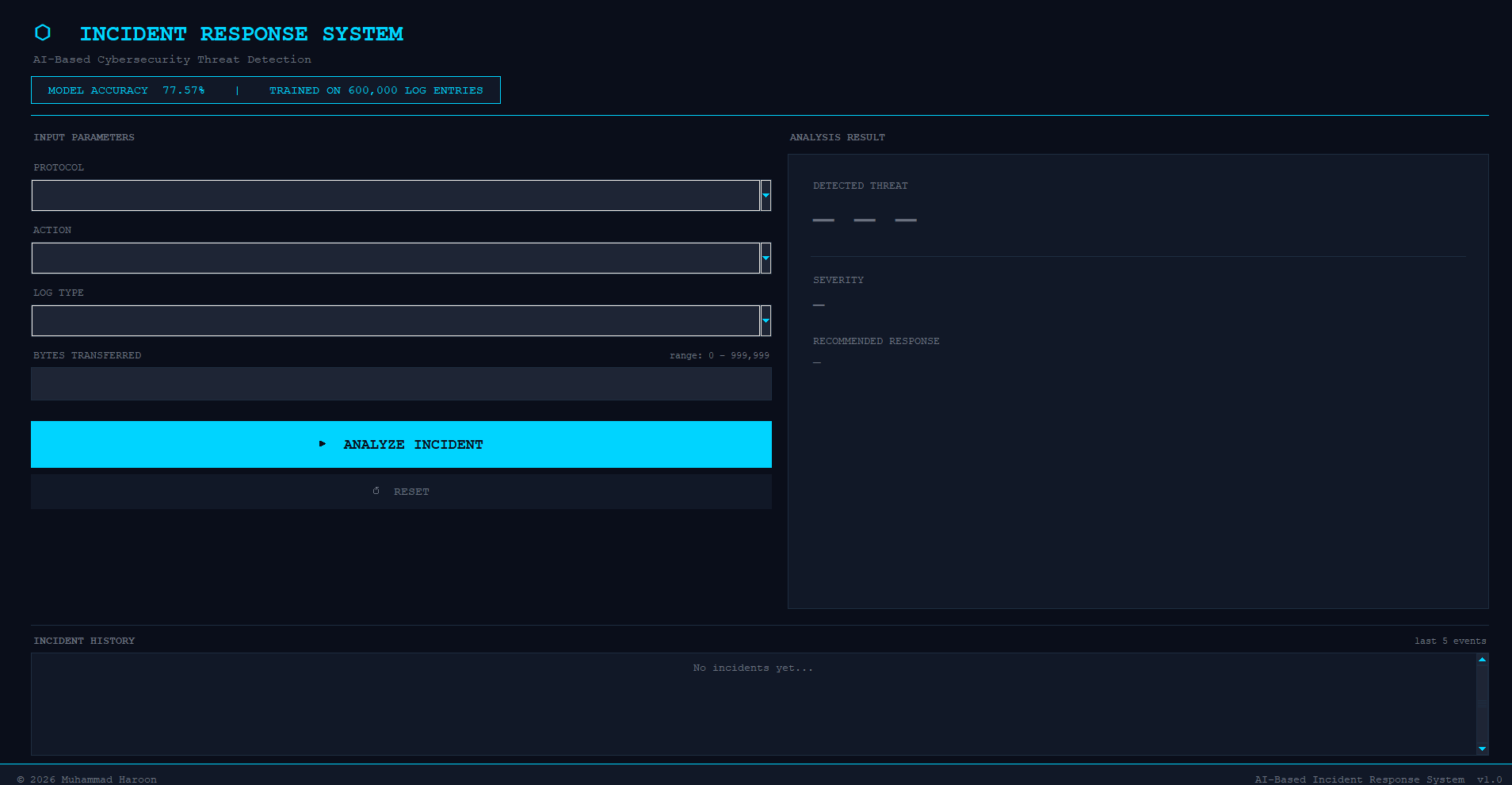 | 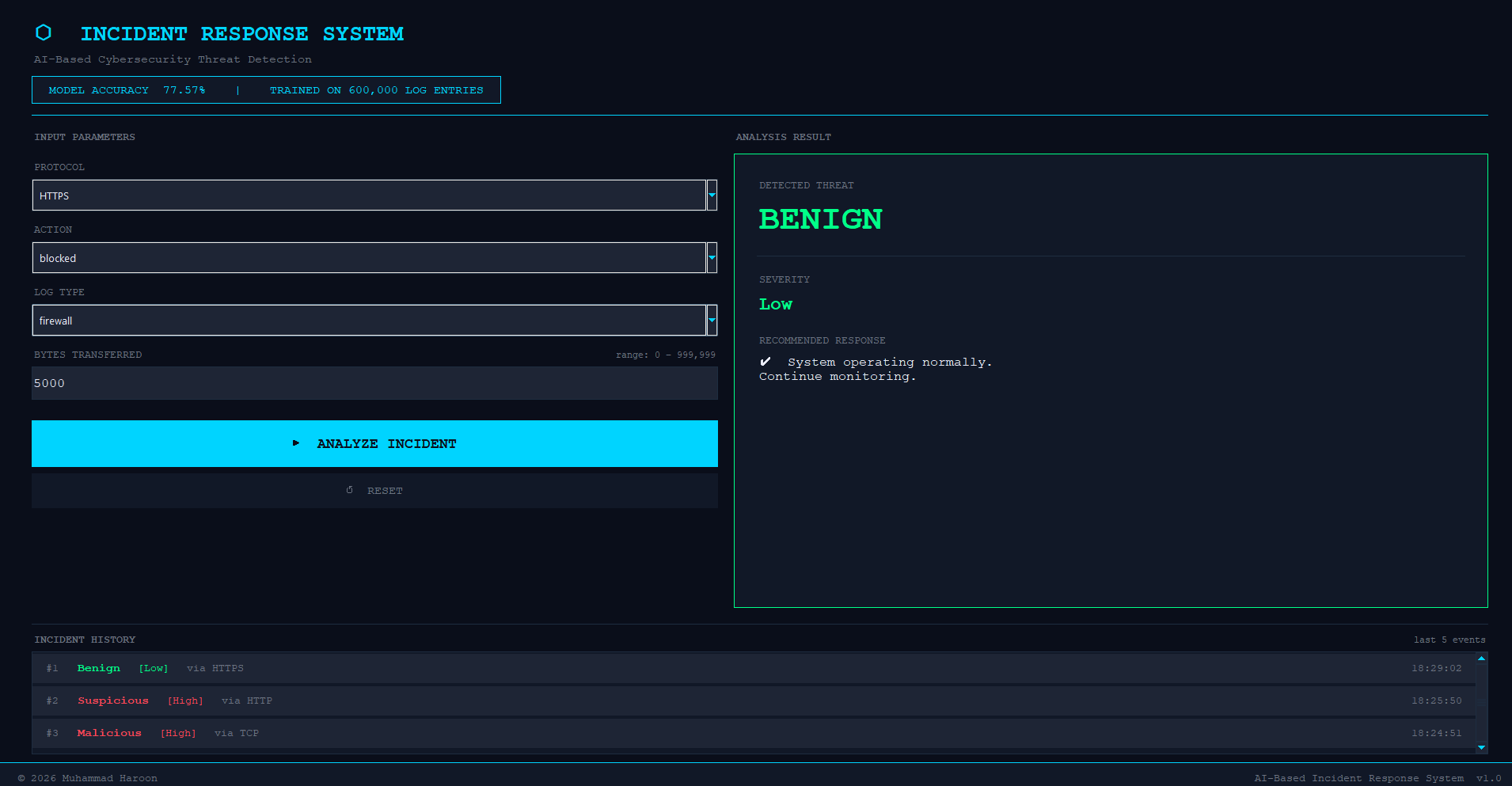 |
| 恶意 | 可疑 |
|---|---|
| 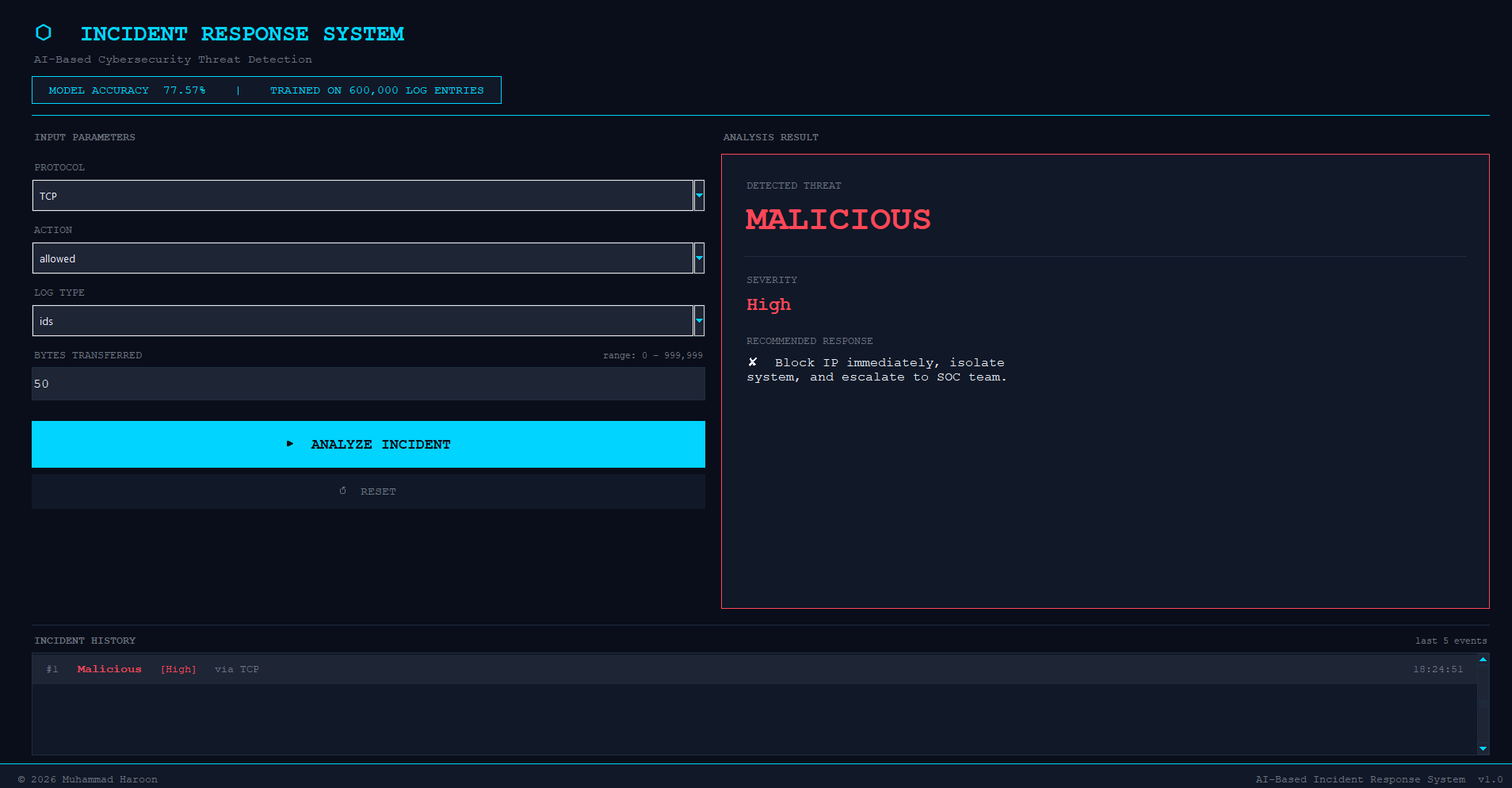 | 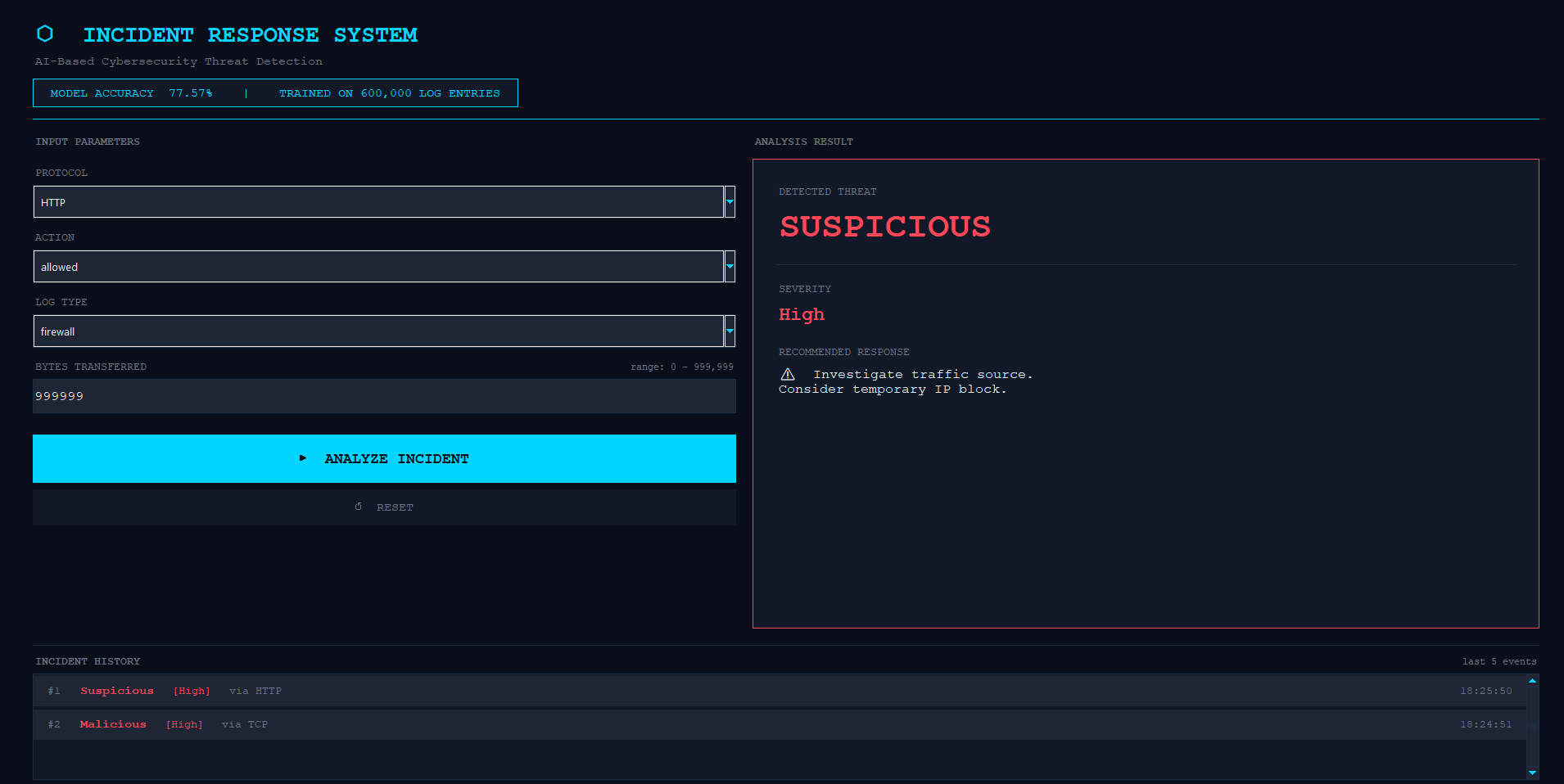 |
## 功能
- **基于ML的检测** — 基于多达 600,000 条网络日志条目训练的 Random Forest 模型
- **3级威胁分类** — 恶意 / 可疑 / 良性,并带有颜色编码的严重程度
- **实时分析** — 根据协议、动作、日志类型和传输字节数进行即时预测
- **事件历史** — 可滚动显示最近 5 次分析事件记录
- **暗色网络安全 UI** — 采用自定义主题的 Tkinter 界面,带有动画结果闪烁效果
- **模块化架构** — 清晰分离 ML 核心、GUI 和配置模块
## 构建技术
| 技术 | 用途 |
|---|---|
| Python 3.10+ | 核心语言 |
| Tkinter / ttk | GUI 框架 |
| scikit-learn | Random Forest classifier |
| pandas / numpy | 数据加载和特征工程 |
## 项目结构
```
AI_Incident_Response/
├── main.py # Entry point — loads data, trains model, launches GUI
├── core/
│ ├── config.py # Constants, feature names, dataset path, dropdown options
│ ├── data_loader.py # CSV loading, preprocessing, label encoding, scaling
│ ├── model.py # Random Forest training and accuracy reporting
│ └── analyzer.py # Prediction logic for a single incident
├── gui/
│ ├── app.py # Main window assembly and event handlers
│ ├── widgets.py # Input fields, dropdowns, result panel
│ ├── history.py # Scrollable incident history panel
│ └── styles.py # Color palette and ttk styling
├── data/ # Place your dataset CSV here (gitignored)
│ └── logs.csv
├── screenshots/ # App screenshots
├── requirements.txt
├── .gitignore
├── LICENSE
└── README.md
```
## 设置与安装
### 前置条件
- Python 3.10 或更高版本
- pip
### 步骤
1. **克隆仓库**
git clone https://github.com/Haroon0805/AI-Incident-Response.git
cd AI-Incident-Response
2. **安装依赖**
pip install -r requirements.txt
3. **添加您的数据集**
将您的 CSV 文件放置在 `data/logs.csv`,或者通过环境变量指向它:
# Windows
set DATASET_PATH=C:\path\to\your\logs.csv
# Linux / macOS
export DATASET_PATH=/path/to/your/logs.csv
数据集应包含以下列:
| 列名 | 描述 |
|---|---|
| `protocol` | 网络协议 (HTTP, TCP, SSH 等) |
| `action` | 流量动作 (ALLOWED / BLOCKED) |
| `log_type` | 日志来源 (APPLICATION / FIREWALL / IDS) |
| `bytes_transferred` | 会话中传输的字节数 |
| `threat_label` | 真实标签 (malicious / suspicious / benign) |
4. **运行应用程序**
python main.py
模型会在启动时自动训练(根据数据集大小约需 5–15 秒)。
## 工作原理
```
CSV Dataset
│
▼
data_loader.py → Label Encoding + StandardScaler + log(bytes) feature
│
▼
model.py → RandomForestClassifier (80 estimators, balanced weights)
│
▼
analyzer.py → Single-incident prediction + post-processing rules
│
▼
gui/ → Dark-themed Tkinter interface with live results
```
该模型使用了 5 个特征:`protocol`、`action`、`log_type`、`bytes_transferred`,以及派生的 `bytes_log`(为了更好的缩放比例而对字节数进行对数转换)。
## 威胁分类
| 结果 | 严重程度 | 建议操作 |
|---|---|---|
| **良性** | 低 | 系统运行正常。继续监控。 |
| **可疑** | 中 | 调查流量来源。考虑暂时封锁 IP。 |
| **恶意** | 高 | 立即封锁 IP,隔离系统,升级至 SOC 团队处理。 |
## 作者
**Muhammad Haroon**
- GitHub: [@Haroon0805](https://github.com/Haroon0805)
- LinkedIn: [mharoon0805](https://linkedin.com/in/mharoon0805)
## 许可证
本项目采用 MIT 许可证授权。详情请参阅 [LICENSE](LICENSE) 文件。
标签:Apex, Python, 恶意流量检测, 无后门, 机器学习, 桌面应用, 网络安全, 逆向工具, 隐私保护