# DevContext — 面向人类和 LLM 的 .NET 代码库上下文
[](LICENSE)
[](global.json)
[](https://github.com/shaahink/DevContext2/actions/workflows/ci.yml)
[](src/DevContext.App)
[](src/DevContext.App/src-tauri)
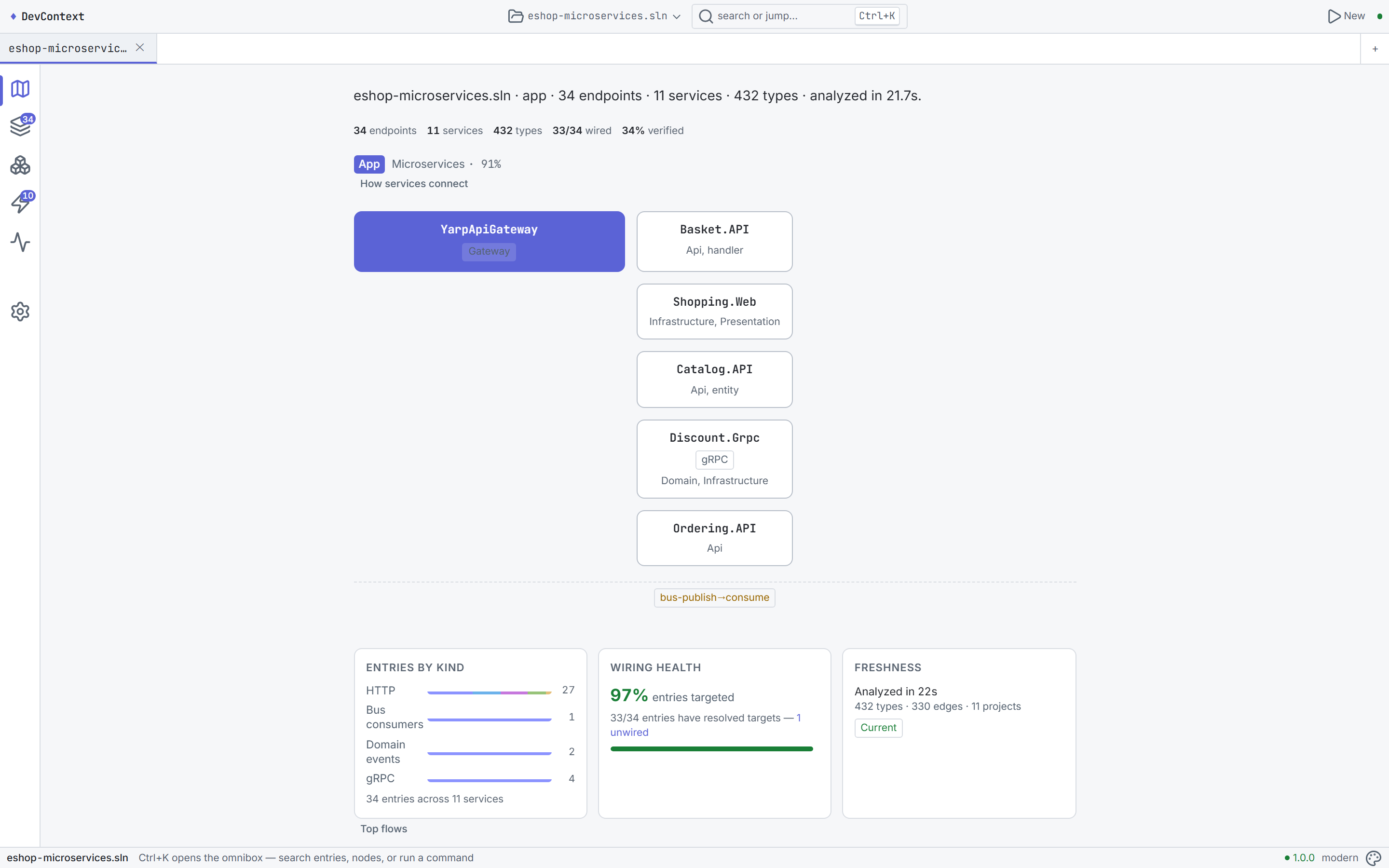
Home page after analyzing a 7-service eShop microservices solution — identity strip, service map, topology tiles, and onboarding
| | CLI | Desktop |
|---|-----|---------|
| **平台** | Linux, macOS, Windows | Windows 10+ (build 19041+) |
| **要求** | [.NET 10 SDK](https://dotnet.microsoft.com/download/dotnet/10.0) | 无需任何依赖 — 独立运行的 `.exe` |
| **安装** | `dotnet tool install -g DevContext.Cli` | [GitHub Releases](https://github.com/shaahink/DevContext2/releases) |
## 什么是 DevContext?
DevContext 将任何 .NET 解决方案转化为**结构化、可查询的代码图** —— 不仅是语法树,更是对架构、装配、入口点、数据流和依赖注入的语义理解。可用于:
- **不到一分钟**即可上手 unfamiliar repo
- **为 LLM 提供精准的上下文** —— 没有 token 浪费,没有幻觉代码
- **追踪请求流**端到端,从 HTTP endpoint 穿过 handler、event 和数据库
- **导出适配 LLM 的上下文包**,内置 scope picker、token budget 和 intent preset
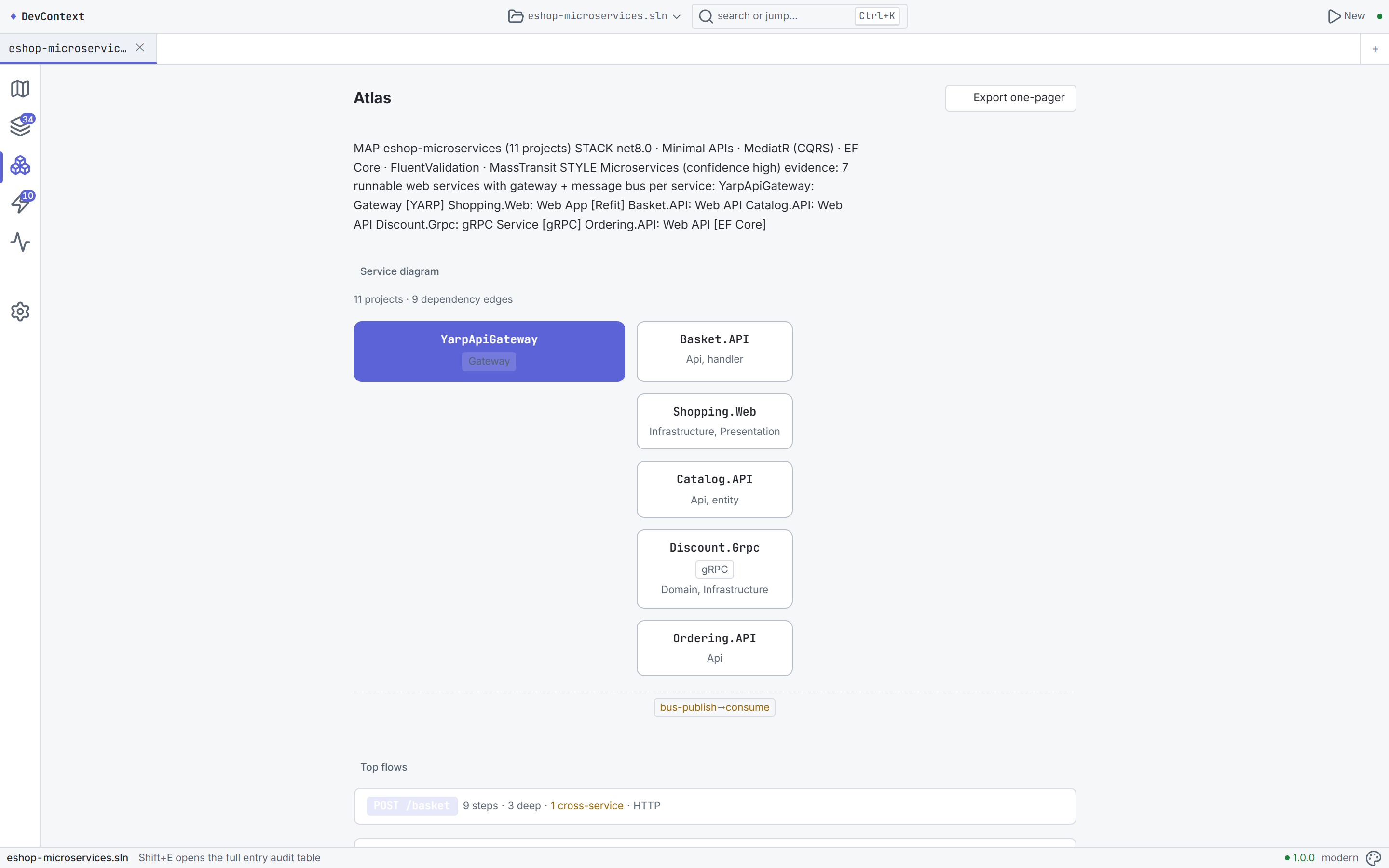
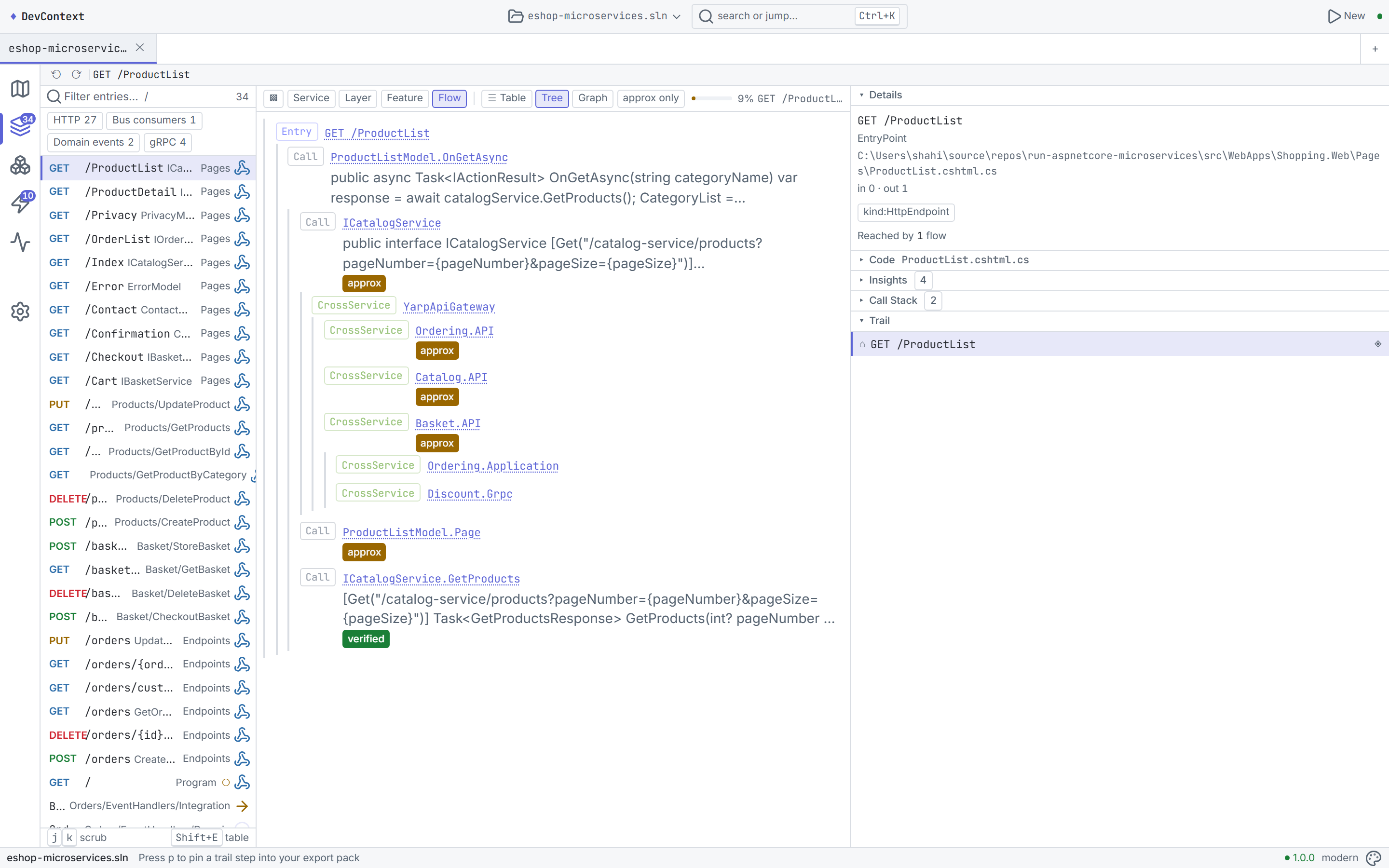
Atlas one-pager (left) and Explore workbench with entry deck + trace (right)
## 功能
### 🗺 Map & Trace 引擎
只需分析任何 .NET 解决方案一次,便可以通过百种方式查询。Map 展示了**仓库中的内容**(架构风格、项目拓扑、入口点、包)。Trace 梳理**事物是如何连接的** —— 从 endpoint 穿过 MediatR handler、MassTransit consumer、EF Core entity 和 DI 装配。
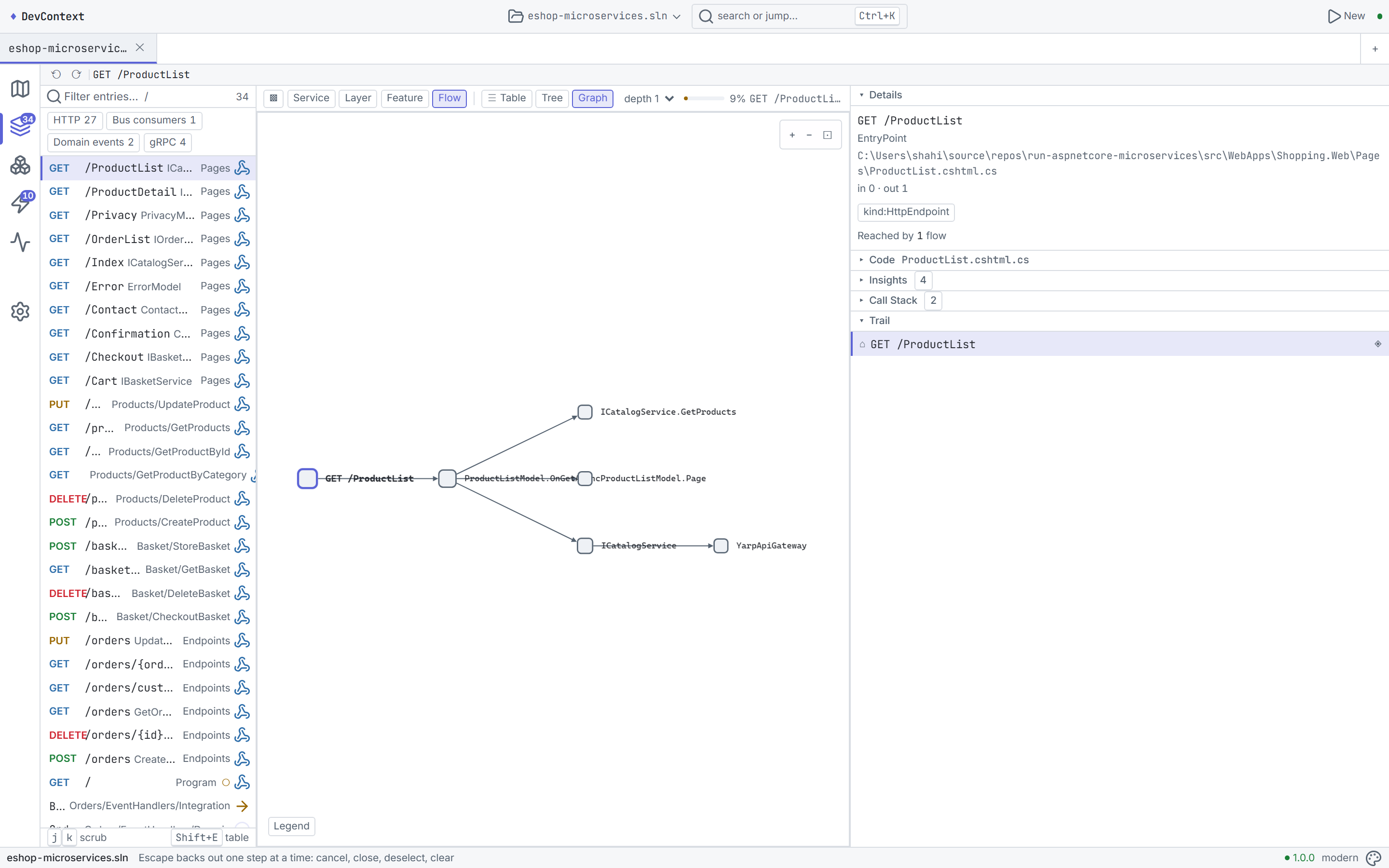
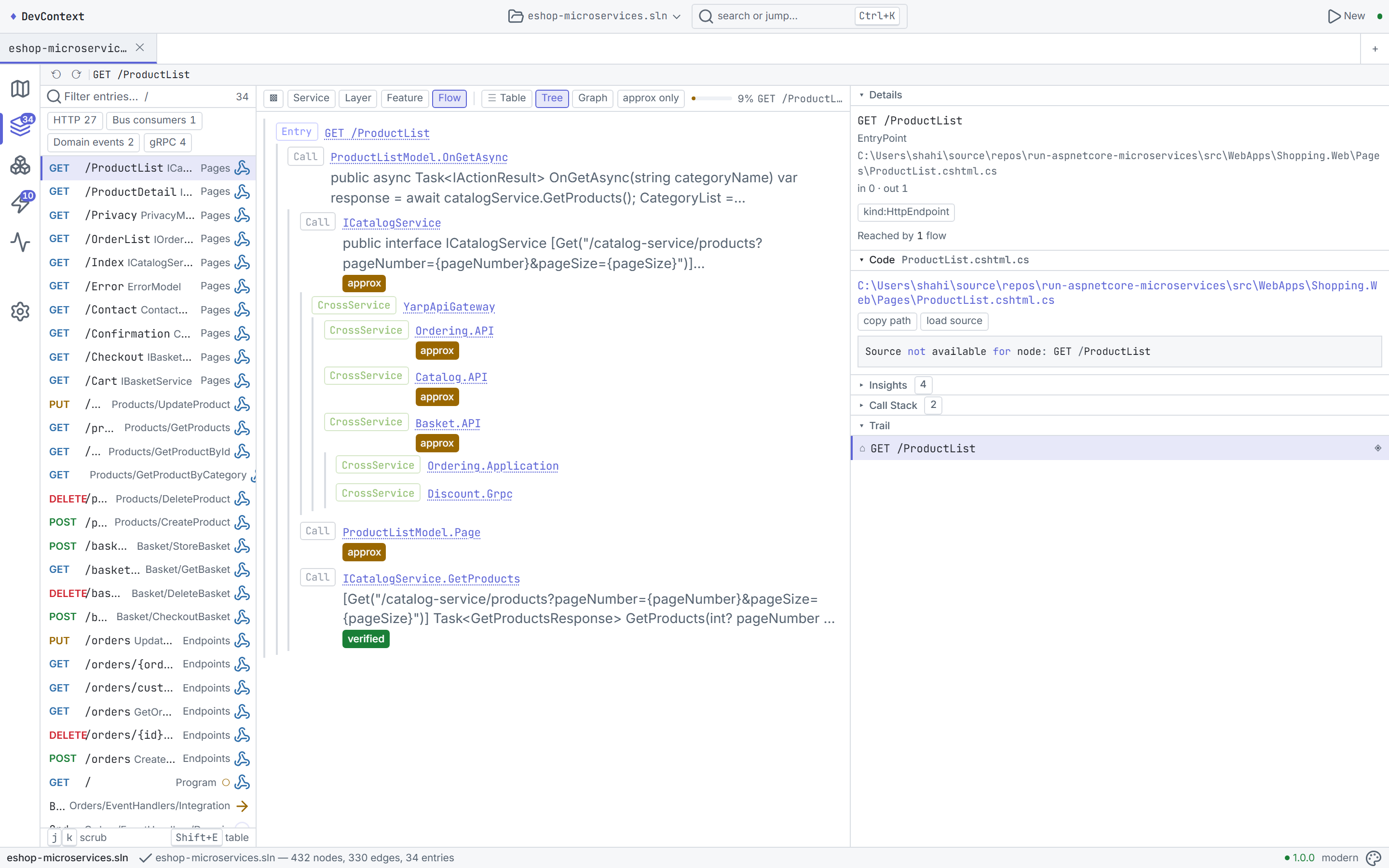
Interactive graph visualization (left) and source inspector with PrismJS syntax highlighting (right)
### 🔬 探索 Workbench
Explore 视图是你的核心工作台:一个展示所有入口点(HTTP endpoint、bus consumer、background service)的**入口面板**,一个交互式 **trace/inspector** 面板,以及一个将调用图渲染为 Cytoscape dagre 布局的**交互式图表**。在 Service、Layer、Feature 和 Flow 视角之间切换,从不同角度理解代码库。
### 📊 Table Lens 与 Insights
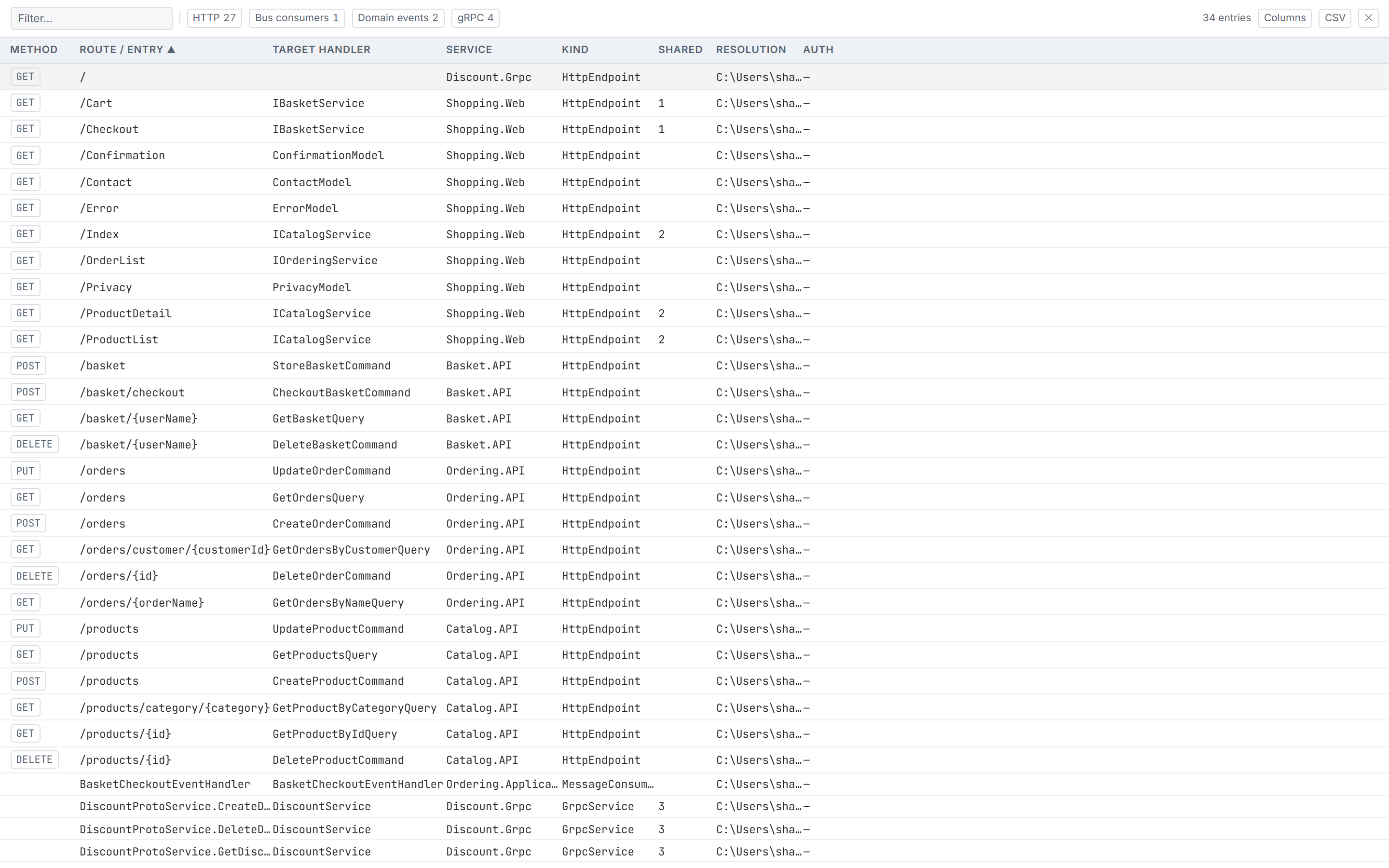
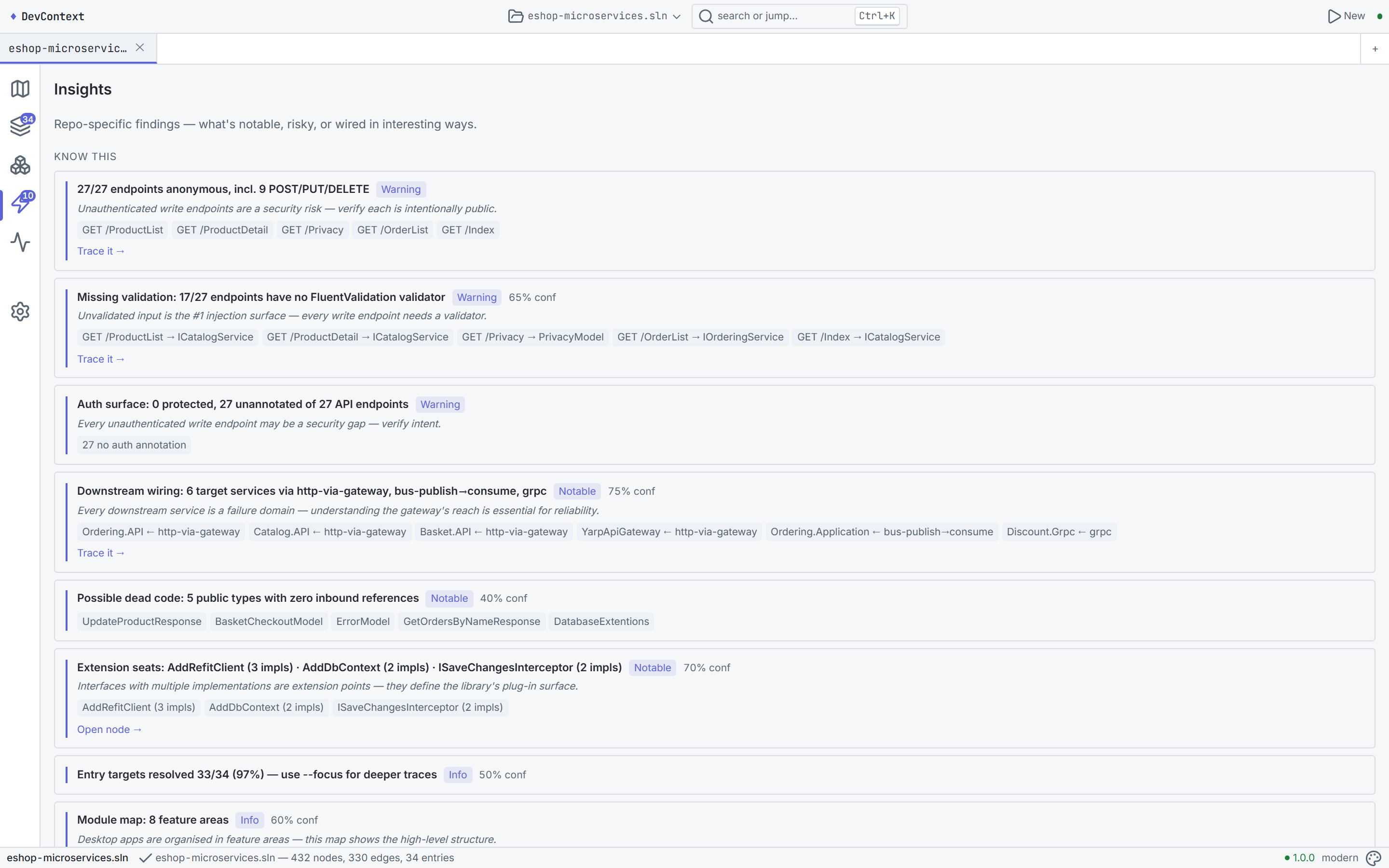
Table lens — CDK-virtualized entry audit (left) and architecture insights (right)
### 🧠 Context Studio
使用 **Context Studio** 组装适配 LLM 的上下文包 —— 一个包含三个面板的工具:
- **Scope picker**(左侧):以树状结构浏览 service → entry,使用 omnibox 搜索,使用诸如*“我正在修改此 endpoint”*之类的 preset
- **Composition view**(中间):为 flow、signature、body、DI 装配、config、entity、contract、test 提供有序的卡片 —— 拖动以重新排序,开启/关闭 body
- **Budget panel**(右侧):带有每张卡片度量的 token budget 滑块、intent 选择器(trace / explain / review)、格式(markdown / plain)、带有 toast 反馈的 Copy / Save
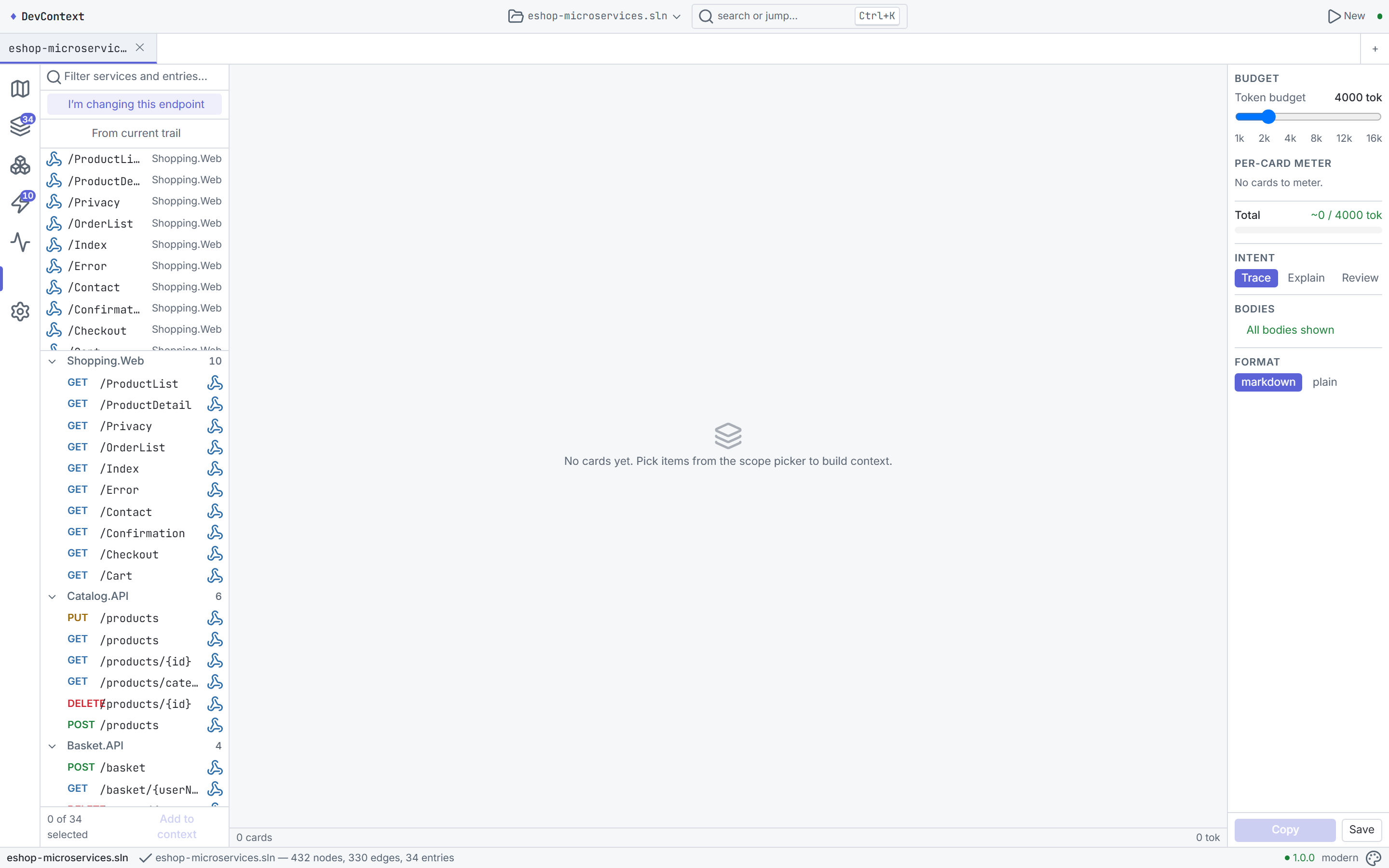
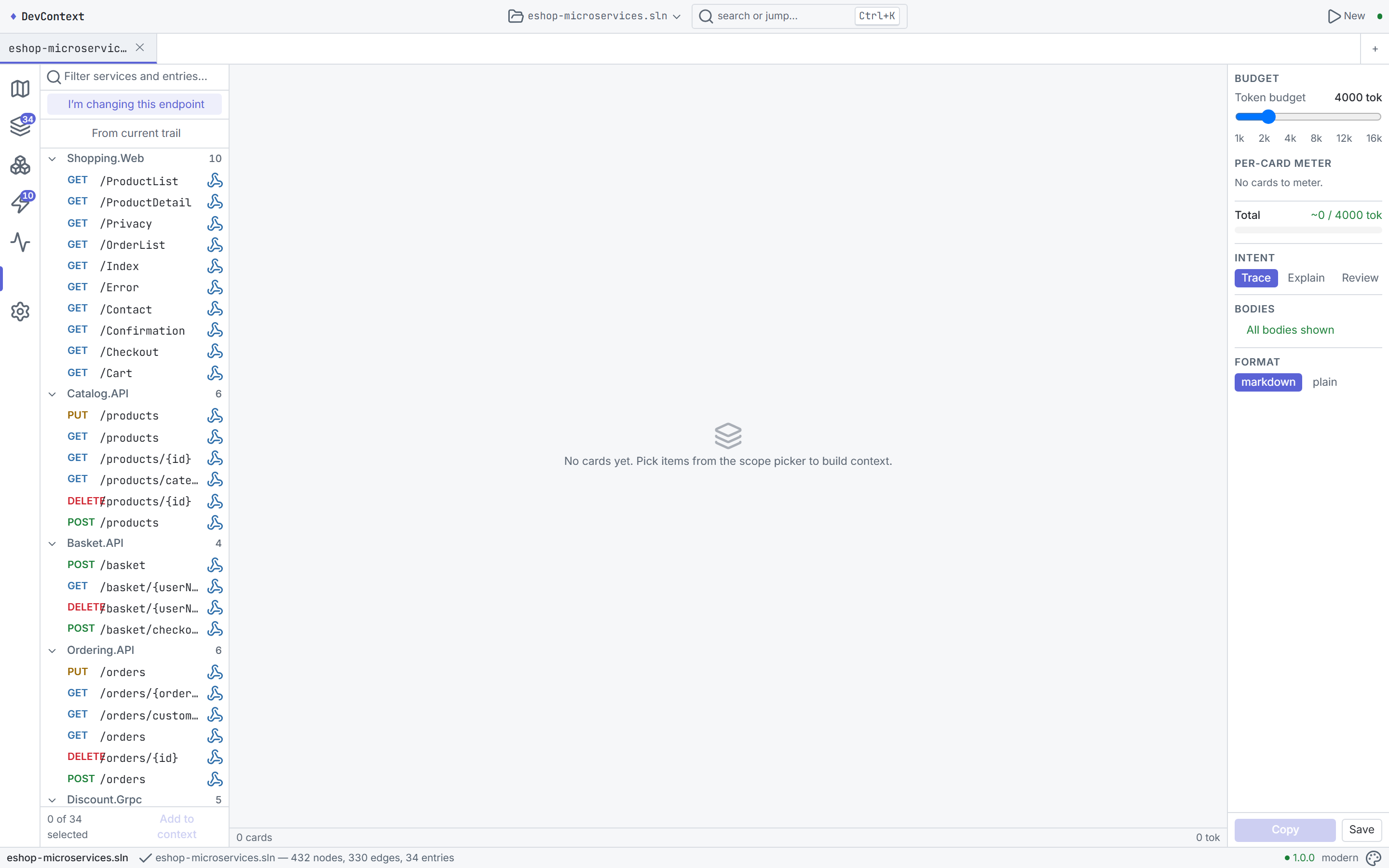
Context Studio with scope picker + composition (left) and export/copy with token budget (right)
### 🔌 MCP 集成
DevContext 内置了 **MCP server**,公开了 23 个用于 AI agent 集成的 tool。桌面 UI 提供了完整的 MCP 管理页面 —— 状态卡片、配置片段、session 表格、实时日志流,以及一个“Try a tool”沙盒。使用它可以让任何兼容 MCP 的 agent 查询你的代码库。
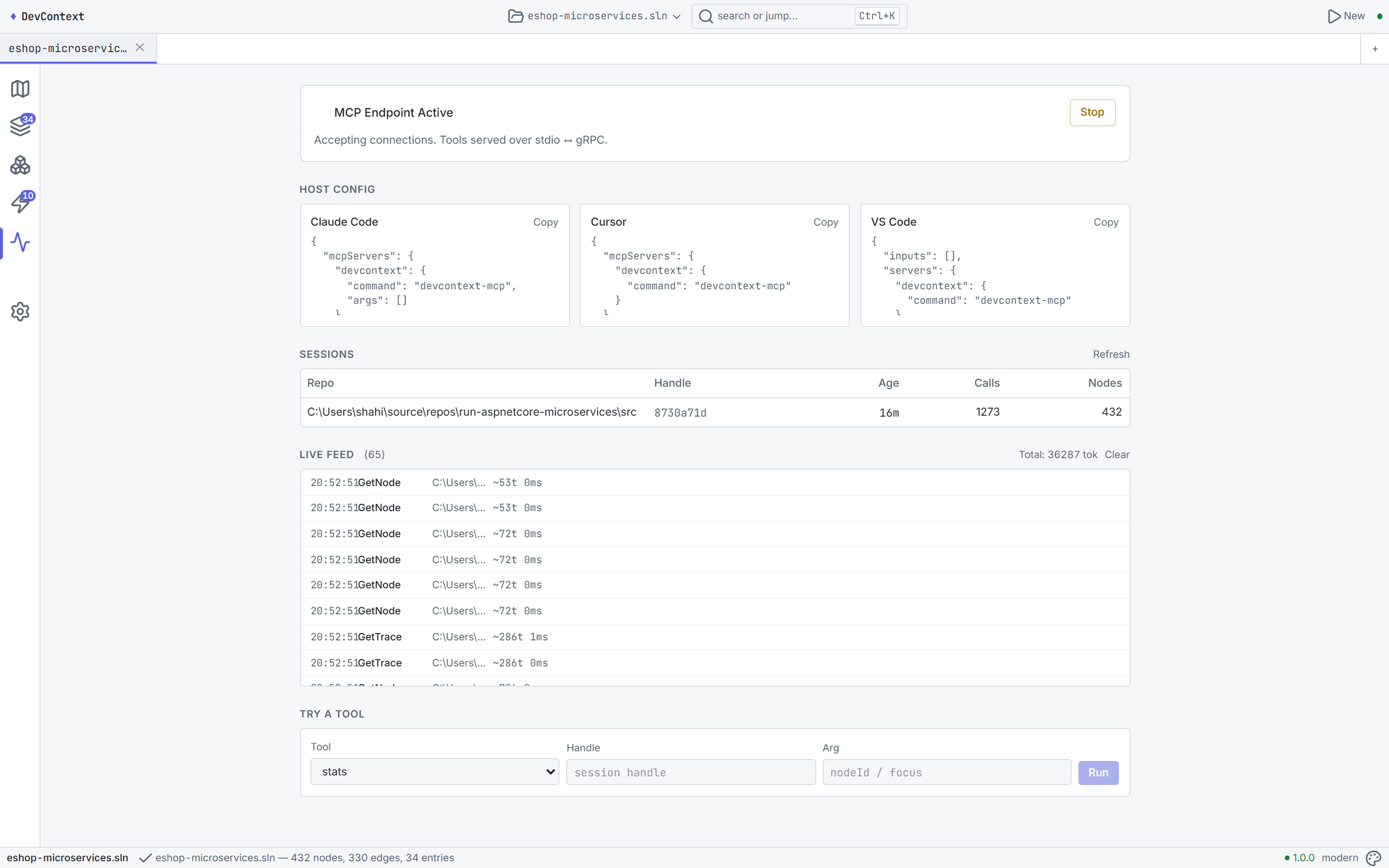
MCP management page — status, config, sessions, live feed, try-a-tool sandbox
## 检测内容
| 检测项 | 查找目标 |
|-----------|-------|
| **Endpoint** | Minimal API, FastEndpoints, MVC controller action |
| **MediatR handler** | `IRequestHandler
`、command、query、notification |
| **Message consumer** | MassTransit `IConsumer`、NServiceBus、内存中 handler |
| **EF Core entity** | DbContext, DbSet, `OnModelCreating` config, aggregate root |
| **DI 注册** | `AddSingleton`/`AddScoped`/`AddTransient`、factory delegate |
| **Background worker** | `IHostedService`, `BackgroundService`, Quartz job |
| **Middleware pipeline** | Program.cs 中的 `Use*` 调用,注册顺序 |
| **跨 service 链接** | Bus 发布 (MassTransit/RabbitMQ)、gRPC、service 之间的 HTTP |
| **架构风格** | 证据驱动:Microservices, CleanArchitecture, NLayer, MinimalApi 等 |
| **调用图** | 解决方案类型之间基于 Roslyn 的句法调用边 |
## Trace 引擎工作原理
trace 是对类型化 CodeGraph 的**结构化遍历** —— 节点和边是在分析时通过将检测结果连接成一个连通图而构建的。每条边都包含来源(`file:line`)、解析方式(`Join`/`Syntactic`/`Semantic`)和置信度。
| 边 | 优先级 | 构建自 |
|------|----------|-----------|
| **Sends** | 0 (最高) | `.Send(new XCommand())` / `.Publish(new XEvent())` |
| **Handles** | 1 | MediatR handler join |
| **Raises** | 2 | `AddDomainEvent(new XEvent())` |
| **Consumes** | 3 | Event → handler join |
| **ReadsWrites** | 4 | EF entity + body reference |
| **Resolves** | 5 | DI 注册 + 单一实现者 |
| **WrappedBy** | 6 | `IPipelineBehavior` |
| **Calls** | 7 (最低) | Roslyn 调用图 |
深度限制(默认为 6)、扇出上限(12)、框架边界检测、重访防护和循环断开等机制使 trace 保持聚焦。[完整设计 →](docs/product/TRACE-ENGINE-DESIGN.md)
## 快速开始
**CLI:**
```
dotnet tool install -g DevContext.Cli
devcontext analyze . # Map (architecture overview)
devcontext analyze . --focus OrderService # Trace from a type
devcontext analyze . --focus "GET /api/orders" # Trace from an endpoint
devcontext analyze . --depth 6 --detail salient # Full trace with source context
devcontext analyze . --stats # Timing, funnel, cache
devcontext analyze . --format json --strict # JSON with validation
```
**Desktop:** 从 [Releases](https://github.com/shaahink/DevContext2/releases) 下载,解压,运行 `DevContext.Desktop.exe`。标签页:Home, Atlas, Explore, Table, Insights, Context Studio, MCP, Settings。
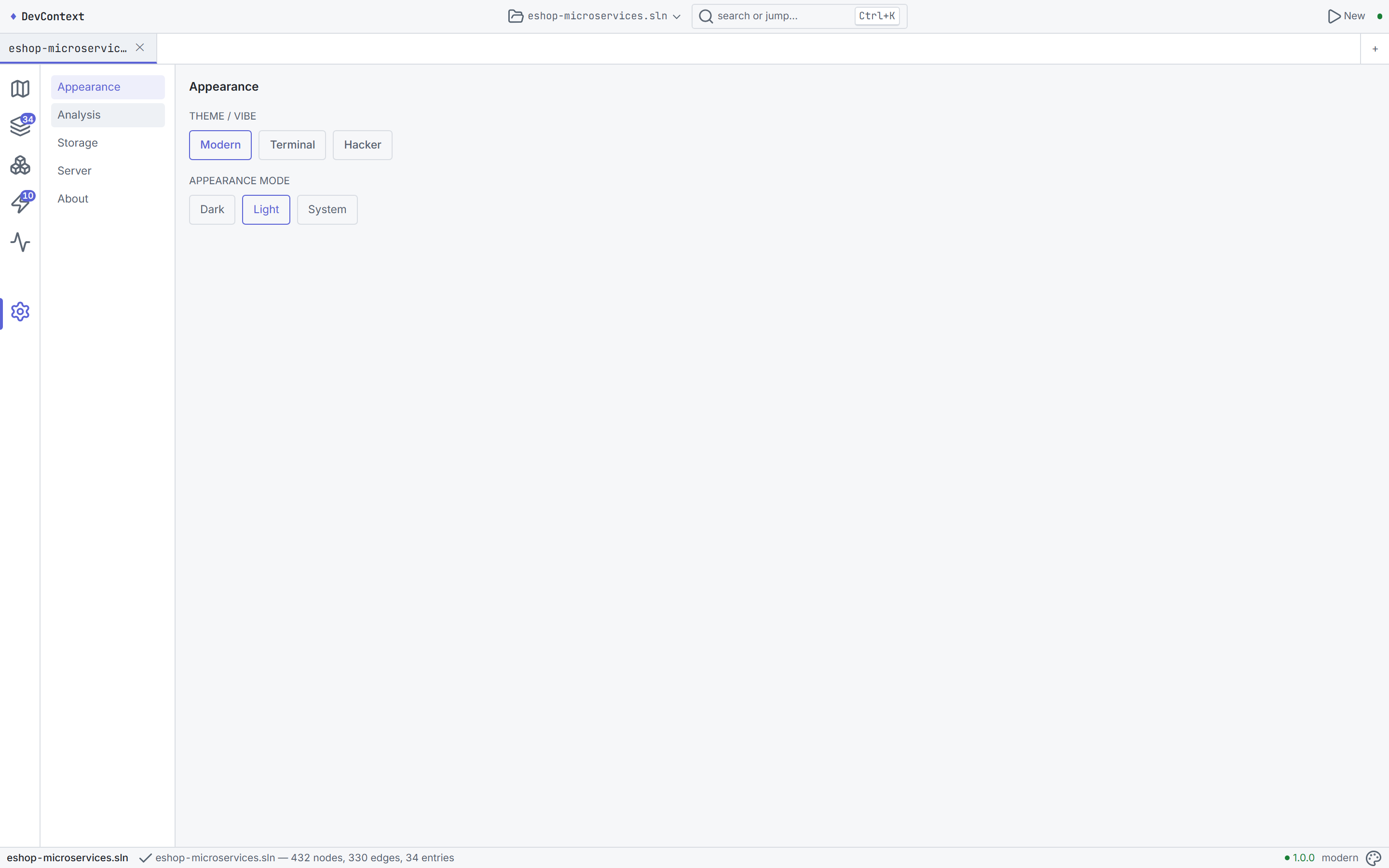
Settings — appearance, analysis defaults, storage, server, about
## AI Agent 上下文
专为编程 agent(Copilot、Cursor、Cline 等)设计:
| 文件 | 用途 |
|------|-----|
| `AGENTS.md` | 冷启动、gate battery、架构、恢复协议 |
| `LOOM-START.md` | 阶段追踪器、当前状态、checkpoint 表 |
| `docs/dev/HANDOVER-LOOM.md` | **先阅读此文件** —— 架构、基准、已知缺陷 |
| `docs/dev/briefs/loom-graph-design.md` | 图模型、法则 (R1/R2)、pipeline 设计 |
| `proto/devcontext/v1/devcontext.proto` | gRPC contract — 唯一事实来源 |
### 架构
```
DevContext.Core (kernel) — Graph2: SymbolTable, BodyFacts, SemanticLitePopulator
├── DevContext.Cli — dotnet tool
├── DevContext.Server — gRPC-Web backend
├── DevContext.Mcp — MCP server (23 tools)
DevContext.App (Angular 22) — Tauri desktop, zoneless, signals
```
### Gate 电池
```
dotnet build DevContext.slnx # 0w 0e
dotnet test DevContext.slnx --filter "Category!=Eval" # 518 tests
dotnet test DevContext.slnx --filter "Category=Truth" # 9 pass / 2 skip
cd src/DevContext.App; pnpm check # lint + 27/27 + build
powershell -File scripts/loom-guards.ps1 # 0 banned
```
## 开发
```
dotnet build DevContext.slnx
dotnet test DevContext.slnx --filter "Category!=Eval"
# Desktop(浏览器模式):
cd src/DevContext.App
pnpm dev:web # Angular @ :4200 + .NET server
# 或者使用 background services(对 AI agent 友好):
powershell -File scripts/start-dev-bg.ps1
node --experimental-strip-types scripts/capture-readme.mts --no-spawn
powershell -File scripts/start-dev-bg.ps1 -Kill
```
## 许可证
MIT
DevContext at rest — ready to analyze


