Abhishek-Raj0/CODEATLAS
GitHub: Abhishek-Raj0/CODEATLAS
基于 Graph RAG 和多智能体架构的 Python 代码库智能分析与问答系统,通过融合语义向量检索与知识图谱遍历帮助开发者快速理解复杂代码结构。
Stars: 0 | Forks: 0
# CodeAtlas 🧭
一个先进的、生产级别的**使用 Graph RAG 的多智能体代码智能系统**。CodeAtlas 支持对 Python 仓库进行具备语法感知的代码库摄取、语义和结构索引,以及自我纠错的查询执行。
由 **LangGraph**、**Neo4j**、**Qdrant**、**FastAPI**、**Streamlit** 和 **Groq Llama-3.1** 提供支持。
## 📖 目录
1. [概述](#-overview)
2. [核心功能](#-key-features)
3. [系统架构](#-system-architecture)
- [1. 摄取流水线](#1-ingestion-pipeline)
- [2. 多智能体查询流水线](#2-multi-agent-query-pipeline)
4. [技术栈](#-technology-stack)
5. [目录结构](#-directory-structure)
6. [前置条件与要求](#-prerequisites--requirements)
7. [安装与设置](#-installation--setup)
8. [运行应用程序](#-running-the-application)
9. [运行测试](#-running-tests)
10. [数据库详情](#-database-details)
## 🌟 概述
CodeAtlas 是一个多智能体代码智能系统,它使用 Graph RAG 来理解和查询复杂的 Python 代码库。它的工作原理是使用 Tree-sitter 解析代码结构,并将其索引到 Qdrant 中以进行语义搜索,以及索引到 Neo4j 中以构建调用链和继承图。当你提出问题时,一组 LangGraph 智能体会分析你的意图,并行检索语义和结构上下文,并综合生成带有完整引用的 Markdown 答案。为了确保准确性,评估智能体会自动标记错误,并触发自我纠正循环,以重写缺乏代码依据的回复。所有这些都包装在一个交互式的 Streamlit 仪表板中,具有动态、力导向的 D3.js 可视化功能,让你可以直观地探索代码库的依赖关系。
## ✨ 核心功能
- **语法感知代码摄取**:使用 [Tree-sitter](https://tree-sitter.github.io/tree-sitter/) 解析 Python 代码库,以提取类、函数、docstring、参数、导入和变量。
- **双数据库索引**:
- **Qdrant**:存储代码块的密集语义嵌入(来自 `nvidia/nv-embedcode-7b-v1` 的 4096 维向量)。
- **Neo4j**:捕获结构化代码语法,包括继承(`INHERITS`)、函数调用(`CALLS`)、定义作用域(`DEFINES`)和导入语句(`IMPORTS`)。
- **并行检索**:将向量数据库的语义相似性搜索与基于 Cypher 的图遍历相结合。
- **多智能体编排**:由 **LangGraph** 协调,执行具有容错能力的状态机工作流。
- **自我纠正循环**:专门的评估智能体会对综合生成的答案进行评分;如果依据不足(分数 < 0.6),工作流会自动路由回纠正环节,并提供可操作的反馈。
- **交互式可视化 UI**:一个基于 Streamlit 的自定义 Web 仪表板,可显示实时仓库统计信息,并使用 D3.js 渲染交互式力导向代码依赖关系图。
## 🏗️ 系统架构
### 1. 摄取流水线
摄取流水线将原始源代码文件转换为向量嵌入和知识图谱结构。
```
graph TD
A[GitHub URL / Local Repo] -->|Cloner| B[Temp Storage]
B -->|Checkpoints Check| C{Has Changed?}
C -->|No| D[Skip File]
C -->|Yes| E[File Walker]
E -->|Python File| F[Tree-Sitter Parser]
E -->|Markdown / Docs| G[Text Chunker]
F -->|AST Structures| H[Semantic Code Chunker]
F -->|Relationships| I[Entity-Relationship Extractor]
H -->|Code Blocks| J[NVIDIA Embedder]
J -->|4096d Vectors| K[(Qdrant Vector DB)]
I -->|Node & Edge Objects| L[(Neo4j Graph DB)]
G -->|Text Chunks| J
```
- **克隆与过滤**:[cloner.py](file:///c:/Users/Abhishek/Desktop/Code-Atlas/ingestion/cloner.py) 动态克隆仓库并遍历文件。
- **增量索引**:[checkpoint.py](file:///c:/Users/Abhishek/Desktop/Code-Atlas/ingestion/checkpoint.py) 对代码文件进行哈希处理并跟踪状态,以支持快速增量更新。
- **AST 解析**:[parser.py](file:///c:/Users/Abhishek/Desktop/Code-Atlas/ingestion/parser.py) 读取文件结构以检测组件(类、函数、方法)。
- **语义代码分块**:[chunker.py](file:///c:/Users/Abhishek/Desktop/Code-Atlas/ingestion/chunker.py) 利用 AST 类和函数块的行边界来分割代码,避免任意的文本拆分。
- **关系提取**:[extractor.py](file:///c:/Users/Abhishek/Desktop/Code-Atlas/ingestion/extractor.py) 分析标识符以提取语法连接(`CALLS`、`INHERITS`)。
### 2. 多智能体查询流水线
CodeAtlas 使用 LangGraph 状态机工作流,根据意图分类动态处理查询。
```
graph TD
Start([User Query]) --> Planner[Planner Agent]
Planner -->|Intent: Explain / Both| Retriever[Retriever Agent]
Planner -->|Intent: Explain / Both| GraphAgent[Graph Agent]
Planner -->|Intent: Search / Docs| Retriever
Planner -->|Intent: Impact / Trace| GraphAgent
Retriever -->|Semantic Hits| Answer[Answer Agent]
GraphAgent -->|Structural Context| Answer
Answer --> Evaluator[Evaluator Agent]
Evaluator -->|Score < 0.6 & Retries < 2| Answer
Evaluator -->|Score >= 0.6 / Max Retries| End([Synthesized Citation Answer])
```
- **规划智能体**:[planner.py](file:///c:/Users/Abhishek/Desktop/Code-Atlas/agents/planner.py) 对用户的意图(`search`、`impact`、`trace`、`docs`、`explain`)进行分类,并提取提及的 Python 代码实体。
- **检索智能体**:[retriever.py](file:///c:/Users/Abhishek/Desktop/Code-Atlas/agents/retriever.py) 使用 [semantic.py](file:///c:/Users/Abhishek/Desktop/Code-Atlas/retrieval/semantic.py) 在 Qdrant 中执行向量搜索。
- **图智能体**:[graph_agent.py](file:///c:/Users/Abhishek/Desktop/Code-Atlas/agents/graph_agent.py) 使用 [graph.py](file:///c:/Users/Abhishek/Desktop/Code-Atlas/retrieval/graph.py) 运行 Neo4j Cypher 查询,以提取调用层次结构和继承模型。
- **解答智能体**:[answer.py](file:///c:/Users/Abhishek/Desktop/Code-Atlas/agents/answer.py) 通过 [hybrid.py](file:///c:/Users/Abhishek/Desktop/Code-Atlas/retrieval/hybrid.py) 格式化和合并数据,提示 LLM 编写带有引用的 Markdown 答案。
- **评估智能体**:[evaluator.py](file:///c:/Users/Abhishek/Desktop/Code-Atlas/agents/evaluator.py) 根据检索到的上下文检查答案是否存在幻觉。如果有缺陷,它会循环回解答智能体。
- **状态流**:[graph_flow.py](file:///c:/Users/Abhishek/Desktop/Code-Atlas/agents/graph_flow.py) 实现了 LangGraph 工作流结构。
## 🖥️ 用户界面与交互式演示
### 📊 仓库仪表板与统计信息
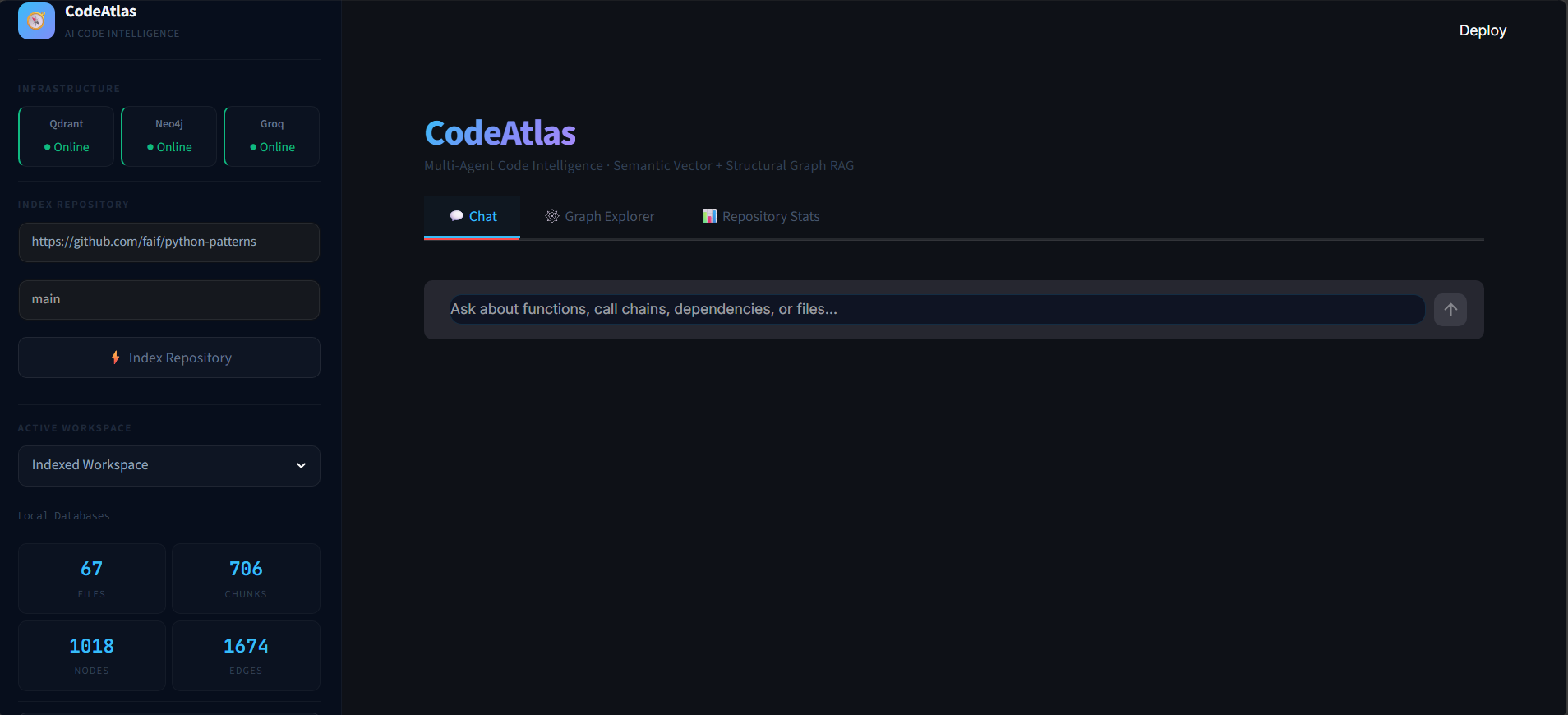
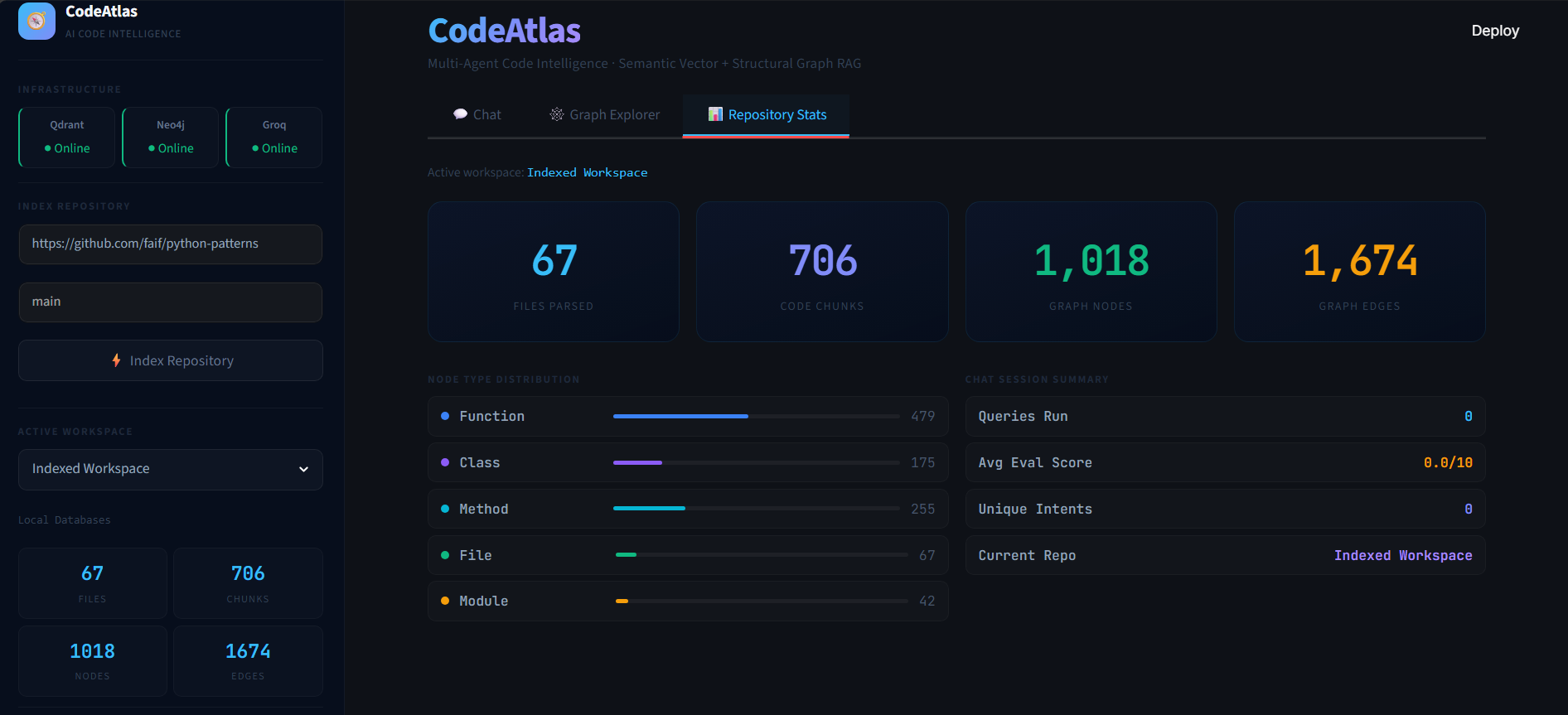
Streamlit 仪表板允许你摄取任何公开的 GitHub 仓库,跟踪解析统计信息,并管理本地检查点。
| 摄取仪表板 | 仓库统计信息 |
| :---: | :---: |
|  |  |
### 🕸️ 交互式 D3.js 代码图
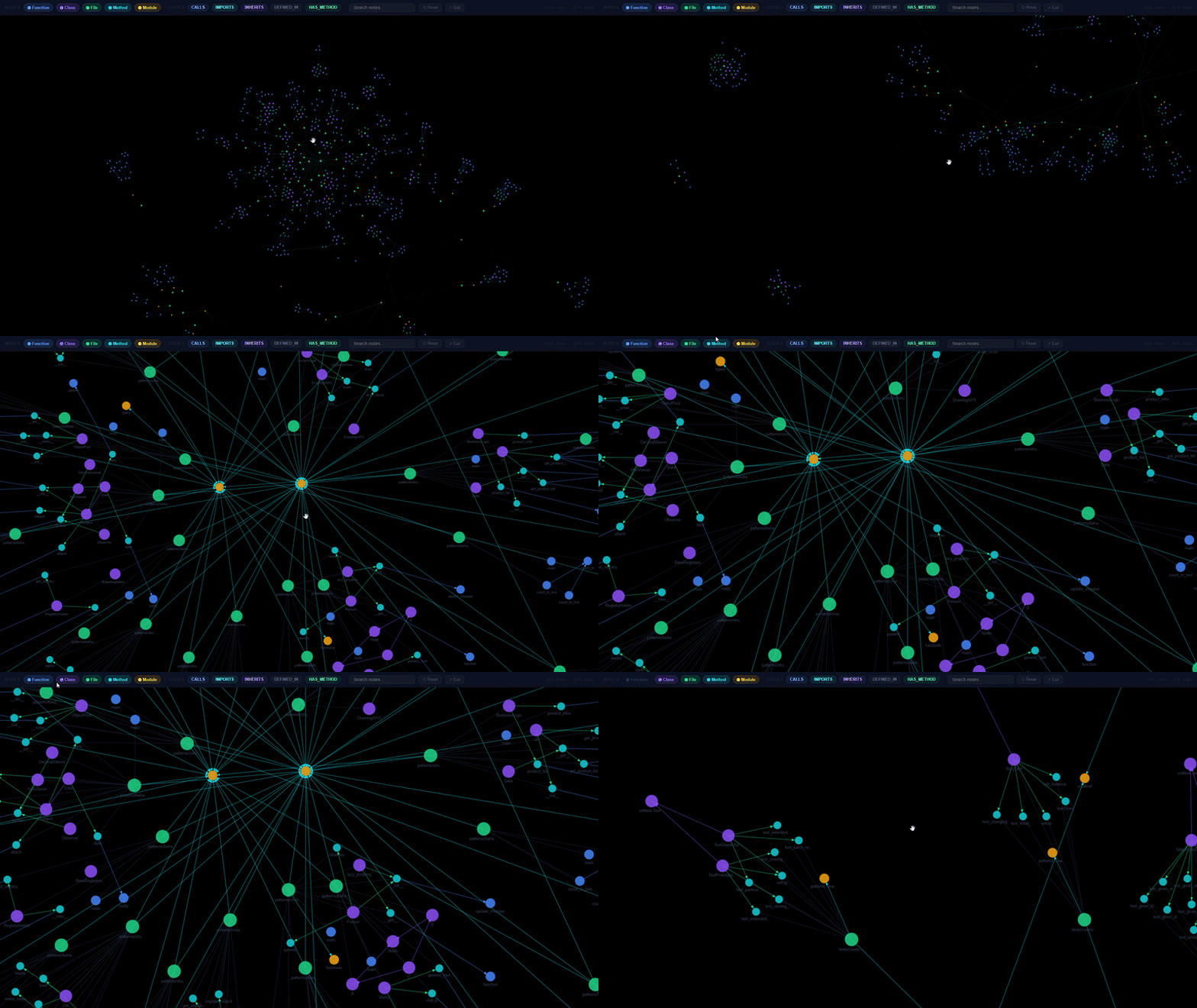
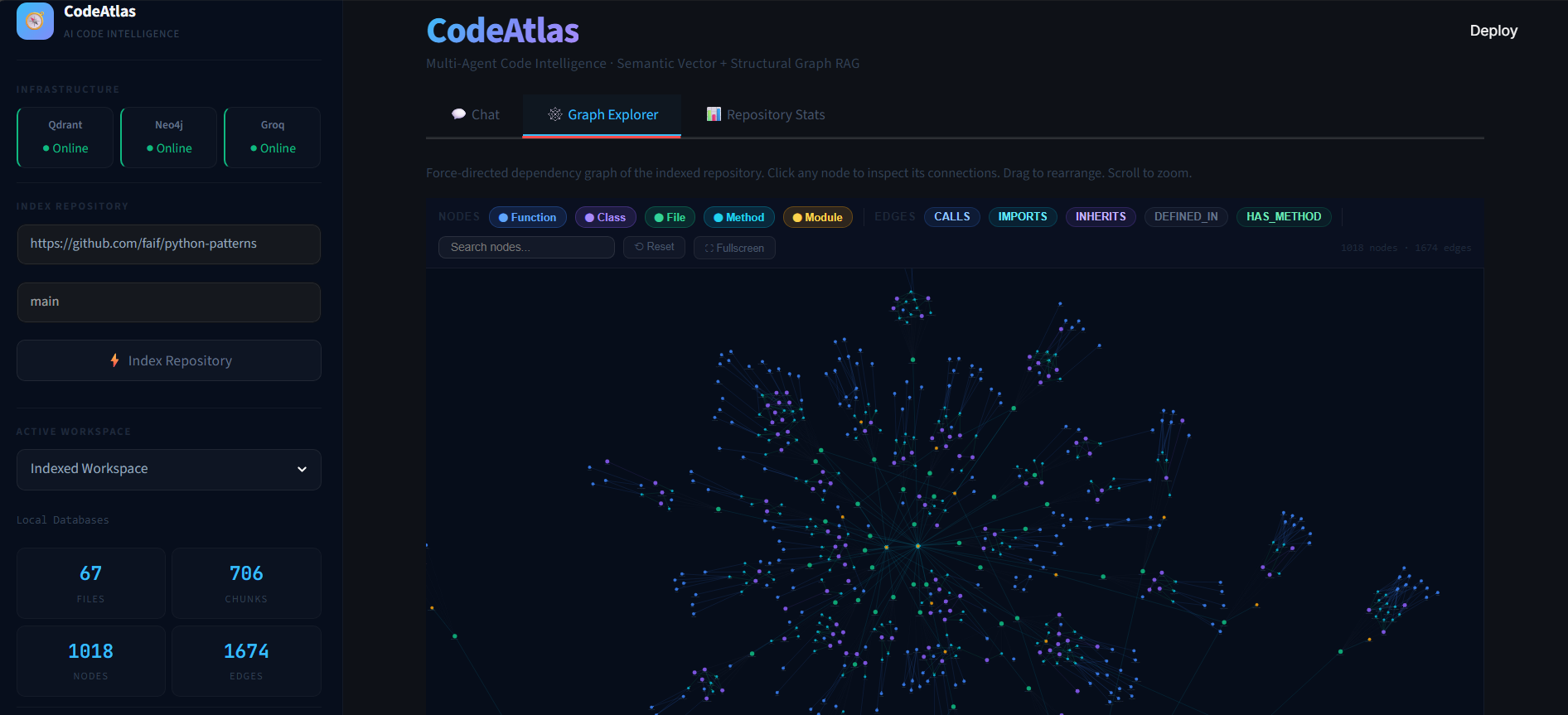
交互式地探索调用图、定义和类继承关系。将鼠标悬停在节点上以高亮显示代码连接,并检查元素以查看底层的源代码结构。
| 图浏览器 | 动态力导向图 |
| :---: | :---: |
|  |  |
### 💬 多智能体聊天与自我纠正
观看 CodeAtlas 实时回答复杂的代码查询,执行混合搜索并通过纠正反馈评估答案:
## 🛠️ 技术栈
| 层级 | 组件 / 包 | 用途 |
| :--- | :--- | :--- |
| **AST 解析** | `tree-sitter`, `tree-sitter-python` | 语法结构提取 |
| **向量数据库** | `qdrant-client` | 语义代码片段相似性索引 |
| **图数据库** | `neo4j` | 调用图与层次结构遍历 |
| **嵌入** | `openai`(兼容的 API 客户端) | NVIDIA `nv-embedcode-7b-v1` 嵌入生成器 |
| **LLM 与智能体** | `groq`, `langgraph`, `langchain-core` | 智能体推理、工作流编排 |
| **API 后端** | `fastapi`, `uvicorn`, `pydantic` | 后端 REST 服务 |
| **前端 UI** | `streamlit` | 用户仪表板与交互式 D3.js 可视化 |
| **实用工具** | `gitpython`, `python-dotenv` | Git 仓库克隆与配置 |
| **测试** | `pytest` | 单元测试与集成测试 |
## 📂 目录结构
```
Code-Atlas/
├── agents/ # Multi-agent orchestrators and nodes
│ ├── answer.py # Answer Synthesis Agent
│ ├── evaluator.py # Grounding & Correctness Evaluation Agent
│ ├── graph_agent.py # Graph Retrieval Agent
│ ├── graph_flow.py # LangGraph Workflow Construction
│ ├── planner.py # Intent Classification & Entity Extraction Agent
│ └── retriever.py # Semantic Vector Retrieval Agent
├── api/ # FastAPI Backend Server
│ ├── routes/
│ │ ├── ingest.py # Repository ingestion & checkpoint endpoints
│ │ └── query.py # Agent query & repository visualization endpoints
│ ├── main.py # Backend Application Entrypoint
│ └── models.py # Pydantic Request/Response Models
├── data/ # Local storage for databases and repo checkpoints
│ ├── neo4j_data/ # Neo4j volume mount
│ ├── qdrant_storage/ # Qdrant volume mount
│ └── temp_repos/ # Cloned repositories directory (gitignored)
├── ingestion/ # Code parser and indexer pipeline
│ ├── checkpoint.py # Incremental indexing tracker
│ ├── chunker.py # Syntax-aware & text chunkers
│ ├── cloner.py # Git repository cloner & file walker
│ ├── extractor.py # Entity & relationship extractor (Tree-sitter AST)
│ └── parser.py # Code AST parser (Tree-sitter Python)
├── retrieval/ # Query retrievers
│ ├── graph.py # Neo4j Cypher query interfaces
│ ├── hybrid.py # Semantic and Graph context merger & formatter
│ └── semantic.py # Qdrant vector retrieval interface
├── storage/ # Database managers and embedder
│ ├── embedder.py # NVIDIA NV-EmbedCode API client
│ ├── graph_store.py # Neo4j database driver connector
│ └── vector_store.py # Qdrant database driver connector
├── tests/ # Integration and Mock Tests
│ ├── run_tests.py # CLI test suite entry point
│ ├── test_agents.py # Agent component and state machine mock tests
│ ├── test_checkpoint.py # Checkpointing logic unit tests
│ ├── test_parser.py # Tree-sitter AST parsing integration tests
│ └── test_retrieval.py # Mock database retrieval tests
├── docker-compose.yml # Qdrant and Neo4j database service configuration
├── requirements.txt # Project Dependencies
└── .env # Local Environment configuration (API Keys & Ports)
```
## 📋 前置条件与要求
- **Python**:`3.10` 或 `3.11`
- **Docker 和 Docker Compose**:已安装并正在运行(用于数据库容器)
- **API 密钥**:
- **GROQ API 密钥**:用于执行智能体 LLM(Llama-3.1-8b-instant)。请从 [Groq 控制台](https://console.groq.com/) 获取密钥。
- **NVIDIA API 密钥**:用于代码嵌入(`nv-embedcode-7b-v1`)。请在 [NVIDIA Build](https://build.nvidia.com/) 获取带有额度的免费密钥。
## ⚙️ 安装与设置
### 1. 克隆 Code-Atlas 仓库
```
git clone https://github.com/Abhishek-Raj0/CODEATLAS.git Code-Atlas
cd Code-Atlas
```
### 2. 配置环境变量
在根目录下创建一个名为 `.env` 的文件(从现有配置中复制或使用以下模板):
```
# LLM Keys
GROQ_API_KEY=your_groq_api_key_here
# NVIDIA Embedding API
NVIDIA_API_KEY=your_nvidia_api_key_here
NVIDIA_EMBED_MODEL=nvidia/nv-embedcode-7b-v1
# Neo4j 配置
NEO4J_URI=bolt://127.0.0.1:7687
NEO4J_USER=neo4j
NEO4J_PASSWORD=password123
# Qdrant 配置
QDRANT_HOST=127.0.0.1
QDRANT_PORT=6333
QDRANT_COLLECTION=codeatlas_code
```
### 3. 启动数据库容器
使用 Docker 在本地启动 Neo4j 和 Qdrant 数据库实例:
```
docker-compose up -d
```
验证它们是否正在运行:
- **Qdrant 仪表板**:[http://localhost:6333/dashboard](http://localhost:6333/dashboard)
- **Neo4j 浏览器**:[http://localhost:7474](http://localhost:7474)(使用用户名 `neo4j` 和密码 `password123` 或你自定义的凭据登录)
### 4. 创建并激活虚拟环境
```
python -m venv atlas_venv
# 在 Windows (PowerShell) 上:
.\atlas_venv\Scripts\Activate.ps1
# 在 macOS/Linux 上:
source atlas_venv/bin/activate
```
### 5. 安装依赖项
```
pip install --upgrade pip
pip install -r requirements.txt
```
## 🚀 运行应用程序
### 1. 启动 FastAPI 后端服务器
使用 Uvicorn 运行 FastAPI Web 服务器:
```
uvicorn api.main:app --host 127.0.0.1 --port 8000 --reload
```
访问交互式 OpenAPI Swagger 文档:[http://127.0.0.1:8000/docs](http://127.0.0.1:8000/docs)。
### 2. 启动 Streamlit 前端 Web 应用程序
在一个新的终端窗口中(确保已激活虚拟环境),启动 Streamlit 前端:
```
streamlit run ui/app.py
```
Streamlit 将自动在你的默认浏览器中打开仪表板,地址为:[http://localhost:8501](http://localhost:8501)。
## 🧪 运行测试
在 `tests` 目录下提供了一套全面的模拟和集成测试套件。
运行验证套件:
```
python tests/run_tests.py
```
此脚本将运行:
1. **阶段 4 智能体模拟测试**:验证智能体节点和编译器流程,而无需调用实时 LLM。
2. **阶段 2 存储模拟测试**:验证向量和图存储管理器。
3. **阶段 1 摄取集成测试**:在临时目录上运行 Tree-sitter 代码解析器、语法分块器和实体提取器。
## 📊 数据库详情
### Qdrant 向量集合
- **集合名称**:`codeatlas_code`
- **向量大小**:4096(余弦距离相似度)
- **Payload 元数据**:
- `name`:元素名称(函数/类名称)
- `file_path`:源文件相对路径
- `entity_type`:实体类型分类(`class`、`function`、`method`、`documentation`、`generic`)
- `start_line` / `end_line`:用于上下文代码提取的文件行边界
### Neo4j 图模型
CodeAtlas 在 Neo4j 中构建了一个语法网络:
- **节点**:
- `File`:表示一个源代码或文档文件。
- `Class`:表示一个 Python 类声明。
- `Function`:表示一个模块级别的 Python 函数。
- `Method`:表示一个类作用域内的函数。
- **关系**:
- `DEFINES`:将 `File` 或 `Class` 连接到其内部的 `Class`、`Function` 或 `Method`。
- `INHERITS`:将子 `Class` 节点连接到其父 `Class` 节点。
- `CALLS`:将一个 `Function`/`Method` 调用者节点连接到被调用者节点。
- `IMPORTS`:将 `File` 节点连接到导入的命名空间。
标签:Graph RAG, Kubernetes, LangGraph, Python, 代码智能, 代码结构分析, 多智能体, 无后门, 请求拦截, 逆向工具