manderse21/claude-powershell-lsp
GitHub: manderse21/claude-powershell-lsp
为 Claude Code 提供实时 PowerShell 语言服务器诊断能力的插件,让 AI 在编辑脚本时即时发现并修正语法与规范问题。
Stars: 4 | Forks: 0
# PowerShell diagnostics for Claude Code
[](https://github.com/manderse21/claude-powershell-lsp/actions/workflows/powershell-lsp-ci.yml)
[](https://github.com/manderse21/claude-powershell-lsp/tags)
[](./LICENSE)
[](./TRUST.md#supply-chain-artifacts-sbom--build-provenance)
[](#diagnostic-correctness-corpus)
[](./TRUST.md#signing-posture)
As Claude edits a `.ps1`, `.psm1`, or `.psd1`, this plugin runs real PowerShell
Editor Services + PSScriptAnalyzer over that file and feeds the result -- syntax
errors and lint findings, with fix suggestions -- straight back into Claude's
context, so a mistake gets caught and corrected in the same turn. It is language
tooling, not project tooling: near-zero always-on token cost, a language server
spawns only when a PowerShell file is open, and one warm process serves the whole
session, so each edit pays a fast pipe round-trip instead of a cold start.
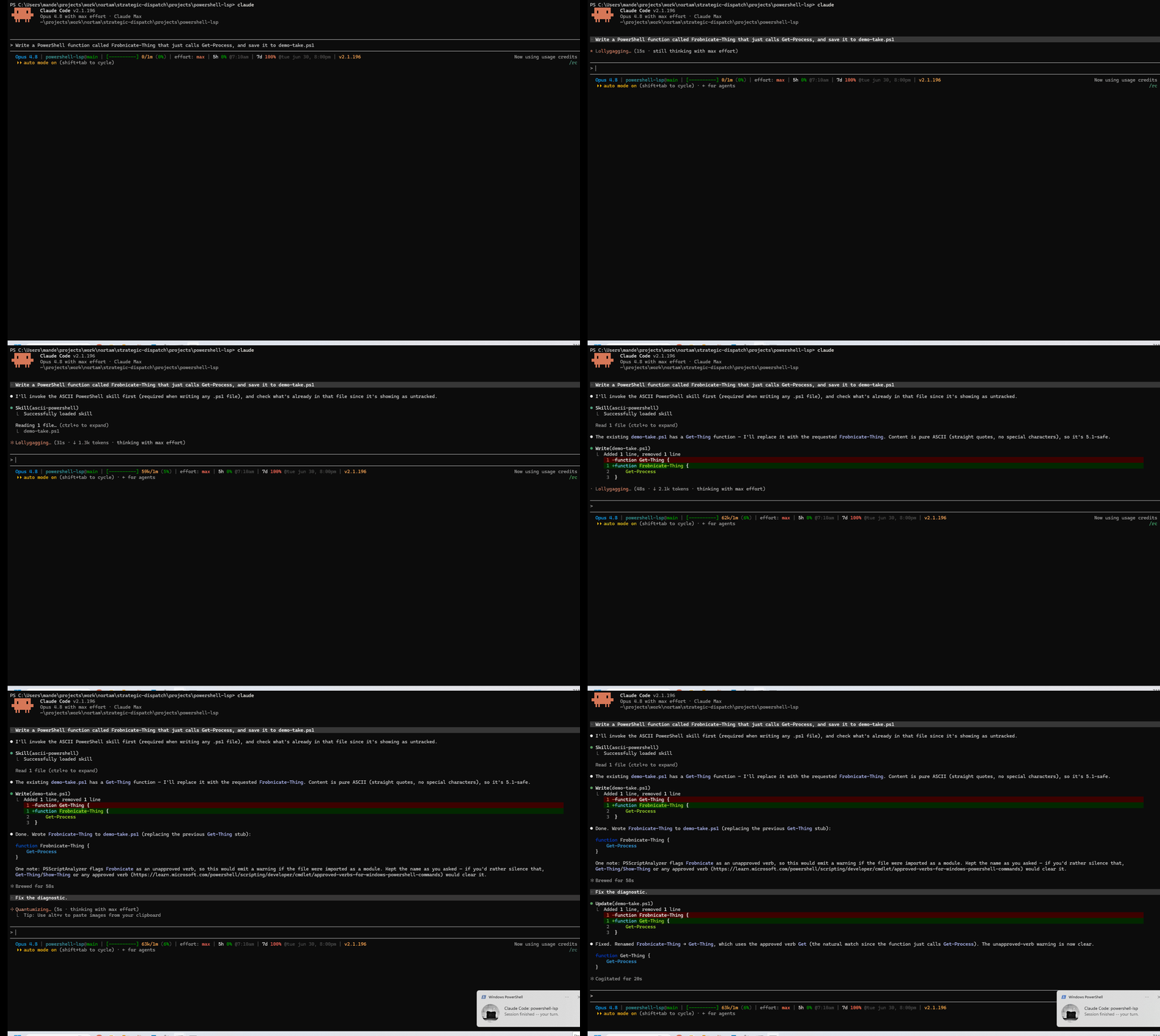
**See it catch something.** Ask Claude to write:
function Frobnicate-Thing { Get-Process }
and the PostToolUse hook returns, right in Claude's context:
Claude sees its own mistake and corrects it without you switching tools.
**Install in under a minute.** Requires `pwsh` (PowerShell 7+) on your PATH; then,
in Claude Code:
/plugin marketplace add manderse21/claude-powershell-lsp
/plugin install powershell-lsp@claude-powershell-lsp
/plugin enable powershell-lsp
Start a new session and you are running. The full prerequisites, the self-bootstrap
sequence, and the preflight doctor are in [Quick start](#quick-start) below.
## Prerequisites
Check these before you start; the [Quick start](#quick-start) below runs them in order.
- [ ] **PowerShell 7+ (`pwsh`) on your PATH.** As of 1.1.1 the plugin's hooks launch
under `pwsh`; Windows PowerShell 5.1 alone cannot bootstrap them. Check with
`pwsh -v`; if it is missing, step 1 of the Quick start installs it.
- [ ] **Internet access on the first enabled session.** PowerShell Editor Services
(PSES) and PSScriptAnalyzer are downloaded on first use, not vendored (see
[Pinned versions](#pinned-versions) for the exact pins). The download is idempotent
and marker-gated -- it runs once and no-ops every session after. Offline or behind a
proxy, the first run surfaces an honest `unavailable` banner instead of failing
silently (see [Diagnostics status](#diagnostics-status)).
- [ ] **On managed / locked-down Windows,** a security control (WDAC / AppLocker /
ExecutionPolicy / Constrained Language Mode) can block a downloaded component; it
then reads as `unavailable` rather than crashing. See [Troubleshooting](#troubleshooting).
Windows PowerShell 5.1 can still serve as the PSES *child host* (set `ps_host` to
`powershell`); it simply cannot launch the hooks themselves. See
[Platform support](#platform-support).
## Quick start
Copy-paste, top to bottom:
# 1. Prerequisite (run in a terminal) -- skip if `pwsh -v` already works:
winget install Microsoft.PowerShell
# 2. In Claude Code -- add the marketplace, install, then enable the plugin:
/plugin marketplace add manderse21/claude-powershell-lsp
/plugin install powershell-lsp@claude-powershell-lsp
/plugin enable powershell-lsp
# 3. Start a new session (or run /reload-plugins) so the hooks load and the first
# SessionStart bootstraps PSES + the warm daemon.
# 4. Confirm it is healthy before you rely on it -- run the preflight DOCTOR from
# inside the enabled session (so it can see the plugin data dir):
pwsh -File "$env:CLAUDE_PLUGIN_ROOT/scripts/doctor.ps1"
# All PASS (benign UNKNOWNs are fine) -> ready. A FAIL names the exact fix.
# 5. See it catch something: ask Claude to edit a .ps1 -- e.g. write
# `function Frobnicate-Thing { Get-Process }` -- and the PostToolUse hook returns
# "The cmdlet 'Frobnicate-Thing' uses an unapproved verb." (PSUseApprovedVerbs).
The machinery self-bootstraps, so the sequence above is the whole job -- from install to a
real caught diagnostic in about five minutes. A few of its steps are deliberate, documented
here rather than removed:
- **`/plugin enable` stays an explicit step.** The plugin ships disabled by default
(`defaultEnabled: false`) because it downloads a bundle and spawns a language server,
so enabling it is a conscious opt-in.
- **The new session / reload is required** -- Claude Code loads plugin hooks at session
start, so enabling alone does not load them.
- **The first enabled session does the rest itself.** Its `SessionStart` hook downloads
PSES and vendors PSScriptAnalyzer (both idempotent and marker-gated), then launches
one warm daemon for the session. The first edit may briefly read `incomplete` while
PSES finishes starting, then settles on the next edit (see
[Diagnostics status](#diagnostics-status)).
- **Run the doctor first (step 4).** It turns the worst onboarding failure -- enabled but a
prerequisite is missing, so diagnostics silently do nothing -- into a named, actionable
fix-list, and it confirms the warm daemon is actually answering before you trust a silent
result as "analyzed, clean". It is **report-only** (it never downloads, repairs, or starts
anything); fuller details under [the preflight doctor](#preflight-self-check-the-doctor).
## Configuration
Set these via the `/plugin` config UI for `powershell-lsp`, or leave the defaults.
For the full reference -- every knob's allowed values, guards, and edge cases -- see
[**docs/configuration.md**](docs/configuration.md). The config panel and the table below are
summaries of it.
| Key | Default | Meaning |
|--------------------|----------|--------------------------------------------------------------------------------------|
| `ps_host` | `pwsh` | Host executable: `pwsh` (PowerShell 7+, recommended/tested) or `powershell` (Win 5.1) |
| `severityThreshold`| `Hint` | Least-severe level to report: `Error` > `Warning` > `Information` > `Hint` |
| `ruleInclude` | _(empty)_| Comma-separated PSScriptAnalyzer rule codes to report exclusively; empty = all |
| `ruleExclude` | _(empty)_| Comma-separated rule codes to suppress (e.g. `PSAvoidUsingWriteHost`) |
| `timeoutMs` | `5000` | Total hard cap (ms) before the PostToolUse client degrades to log-only |
| `debounceMs` | `150` | Edits landing within this window (ms) fold into one analysis pass |
| `keepLastN` | `10` | Newest rolling log files kept per family (swept at SessionStart) |
| `idleTtlMin` | `30` | Daemon self-terminates after this many minutes with no diagnostics request |
| `perFileCap` | `20` | Max diagnostics reported per file; the rest collapse into an `... and N more` line; `0` = no cap |
| `enableStats` | `false` | Append one JSONL timing line per analyzed edit to `logs/stats.jsonl` (rotating, ~5 MB); observe-only, never changes output. View with `scripts/show-stats.ps1`. `0`/`off` disable |
| `settingsPath` | _(empty)_| Absolute path to a `PSScriptAnalyzerSettings.psd1` to honor, overriding auto-discovery; a relative value is ignored; empty = auto-discover (nearest file walked up to the project root) |
| `scopeToEdit` | `true` | Scope surfaced diagnostics to the lines the edit touched (plus `editContextLines`); fails open to whole-file when the range is indeterminate. `0`/`off` report whole-file |
| `editContextLines` | `0` | Extra context lines kept above and below the touched range when `scopeToEdit` is on; the edit's patch already includes a few, so the default is `0` |
| `formatOnEdit` | `off` | When `suggest`, after an edit the warm daemon runs `Invoke-Formatter` on the file (honoring the repo's `PSScriptAnalyzerSettings.psd1`) and surfaces the formatted result as a **suggestion** -- a unified diff -- via the same channel as diagnostics; it **never rewrites your file**. `apply` additionally **writes it back**, guarded: a stale-write compare-and-swap aborts if the file changed since formatting (the newer edit wins), the write is atomic, and the original BOM + line-ending style are preserved (only the formatting changes); an applied write is announced so you re-read. `off` (default) does nothing and the diagnostics surface is unchanged. Values: `off` (default), `suggest`, `apply`; `apply` is doubly opt-in and aborts to a suggestion for mixed-EOL / non-UTF-8 files. See [Format-on-edit](#format-on-edit-suggest-or-guarded-apply) |
| `ruleset` | `pses-default` | Live diagnostics ruleset tier. `pses-default` (default) keeps PSES's built-in no-settings rule set (about 15 rules) -- unchanged from prior versions. `base` opts in to the plugin's shipped enumerated base ruleset (PSScriptAnalyzer's default-on set minus the compatibility rules), broadening the live surface so `PSAvoidUsingWriteHost` and the three Error-severity security rules surface. A repo-local `PSScriptAnalyzerSettings.psd1` and an explicit `settingsPath` always win over the base. See [Ruleset tiers](#ruleset-tiers-opt-in-broaden) |
| `moduleAwareness` | `off` | When `suggest`, the warm daemon adds an **Information** hint when a command in the edited file is exported by a **known** module (a shipped, offline command->module index) that is **not installed** on this machine, so the call would not resolve (`Install-Module M or import it`). It fires only on positive identification and stays **silent** on any ambiguity (a not-yet-ready install snapshot, a dynamic include); it **never writes** your file and adds **no** edit-path network or latency. `off` (default) does nothing and the diagnostics surface is unchanged. Values: `off` (default), `suggest`. See [Module awareness](#module-awareness-uninstalled-module-hint) |
| `nativeServe` | `off` | When `shim`, a thin stdio proxy serves **hover / go-to-definition / find-references / documentSymbol** to Claude Code's **native** LSP client -- un-gating the navigation tier past an upstream client init-handshake bug without waiting on the fix. `off` (default) is a **transparent pass-through** (every LSP frame relayed unchanged, no patch, no interception), so native nav stays gated exactly as today and nothing about the diagnostics hook changes. It is a workaround for an upstream bug, hence default-off and removable. Values: `off` (default), `shim`. See [Native serve](#native-serve-hover--go-to-definition--find-references) |
Diagnostics are returned in a stable order (severity, then line, then column),
deduped, threshold- and rule-filtered, then capped per file.
These filters apply on top of whatever **PSES** publishes. By default (`ruleset` =
`pses-default`) PSES runs its own built-in no-settings rule set for live analysis, which is
narrower than the `Invoke-ScriptAnalyzer` CLI default -- for example `PSAvoidUsingWriteHost`
is not surfaced on the fly even though the CLI flags it. The filter knobs
(`severityThreshold`, `ruleInclude`, `ruleExclude`) can *suppress or narrow* what PSES
reports. To *broaden* the live surface instead, set `ruleset` = `base` -- or point
`settingsPath` at your own settings file -- which replaces that built-in set with a resolved
rule set (see [Ruleset tiers](#ruleset-tiers-opt-in-broaden) below).
### Format-on-edit (suggest, or guarded apply)
`formatOnEdit` is **off by default**. When set to `suggest`, each time Claude edits a
PowerShell file the warm daemon runs PSScriptAnalyzer's `Invoke-Formatter` over it --
honoring the repo's own `PSScriptAnalyzerSettings.psd1` formatter rules when present (the
same settings auto-discovery the analyzer uses) -- and surfaces the reformatted result as a
**suggestion**: a compact unified diff, clearly labelled and distinct from a diagnostic,
stating that the file was **not** modified. In `suggest` mode the hook **never writes your
file** -- it only suggests, so editing is never disrupted and you stay in control of what lands.
When set to `apply`, the daemon additionally **writes the formatted result back** -- the one
mode that ever touches your file -- behind a deliberately strict guard:
- **Stale-write compare-and-swap.** The file's bytes are fingerprinted when formatting starts
and re-checked immediately before the write; if anything changed the file in between, the
apply **aborts** and your newer content is left untouched (the concurrent edit always wins).
- **Atomic-or-abort.** The formatted bytes are staged and swapped in atomically, so a crashed
write can never leave a torn or half-written file.
- **Byte fidelity.** The original BOM state and dominant line-ending style are preserved; the
only byte difference from your file is the formatting change itself. A file with **mixed**
line endings, or a non-UTF-8 (UTF-16) file, **aborts to a suggestion** rather than risk a
broader rewrite.
- **Loud, and re-read.** An applied write surfaces a block that plainly says the file **was
modified** and tells the agent to re-read before its next edit (its in-context copy is now
stale). Diagnostics for that turn -- computed before the reformat -- are omitted to avoid
stale line numbers and refresh on the next edit.
`apply` is **doubly opt-in**: only the exact value `apply` activates it (a boolean like `true`
maps to the safe `suggest`), and the default stays `off`. Any failure or ambiguity -- a
formatter error, a guard trip, a write error -- degrades to a suggestion or to nothing, the
hook always exits 0, and editing is never blocked. Formatting runs on the already-warm daemon,
so it adds no cold-start, and a file that already matches the configured style is **never
touched**. Values are `off` (default), `suggest`, and `apply`.
### Ruleset tiers (opt-in broaden)
`ruleset` is **`pses-default` by default**, which keeps today's live surface exactly: PowerShell
Editor Services applies its own built-in no-settings rule set (about 15 PSScriptAnalyzer rules) on
the fly, and no plugin ruleset is resolved. Set `ruleset` = `base` to opt in to the plugin's shipped
**base ruleset** (`rulesets/base.psd1`): PSScriptAnalyzer's full default-on set **minus** the
compatibility-profile rules, **enumerated explicitly** so the surfaced set is deterministic and does
not drift when the pinned analyzer is bumped (regenerate with `scripts/regen-base-ruleset.ps1`).
Opting in broadens the live surface -- notably `PSAvoidUsingWriteHost` and the three Error-severity
security rules (`PSAvoidUsingComputerNameHardcoded`, `PSAvoidUsingConvertToSecureStringWithPlainText`,
`PSAvoidUsingUsernameAndPasswordParams`) start surfacing where the built-in set omits them.
Precedence is always yours to control: an explicit `settingsPath` and a repo-local
`PSScriptAnalyzerSettings.psd1` **both win over the base** -- the base only fills the gap when neither
is present. The existing noise controls still apply on top: `scopeToEdit` (on by default) limits
findings to the lines you edited, `perFileCap` caps the count per file, and `severityThreshold` drops
low-severity findings -- so `base` broadens *what can surface* without flooding a single edit. The
default is deliberately **not** flipped: the broadened surface never activates unless you opt in.
### Module awareness (uninstalled-module hint)
`moduleAwareness` is **off by default**. When set to `suggest`, each time Claude edits a PowerShell
file the warm daemon checks the commands used against a **shipped, offline command->module index** --
a curated map of common first-party and Gallery modules (Az, Microsoft.Graph, Exchange Online,
ActiveDirectory, Pester, and more) to the commands they export -- and adds an **Information**-severity
hint when a command is a positive index hit whose owning module is **not installed** on this machine.
The message is actionable: *"`Get-MgUser` is exported by module `Microsoft.Graph.Users`, which is not
installed on this machine; Install-Module Microsoft.Graph.Users or import it."*
The check is built to be **quiet and correct** -- a missing hint costs you a web search, but a *wrong*
"install X" would teach you to ignore the plugin, so it fires only on **positive identification** and
degrades to **silence** on every ambiguity:
- It only flags a **literal command name** that is a hit in the shipped index, never an unknown
command (an unknown name is not evidence of a missing module -- it could be your own function, a
profile module, or private tooling).
- It stays silent when the command is a **built-in**, is **defined in the file** (a function or
alias), is pulled in by a **literal dot-source** the check follows, or when the module is
**declared** via `#Requires -Modules`, the nearest manifest's `RequiredModules`, or a literal
`Import-Module`.
- It suppresses the **whole file** on a **dynamic** include (`. $path`, `Import-Module $name`) it
cannot resolve -- it never guesses across something it cannot read.
- **Design B (the install-check):** because PowerShell auto-loads an installed module on first use, a
command whose module *is* installed resolves fine -- so the hint fires **only** when the module is
absent. Install-state is read **once per session** by a background snapshot taken off the critical
path (it never delays your first edit); until that snapshot is ready, the check stays **silent**.
It **never rewrites your file** and adds **no network on the edit path** -- the index is a shipped
artifact (`rulesets/command-module-index.psd1`), regenerated offline from a vendored source snapshot by
`scripts/regen-command-module-index.ps1` and refreshed only by a deliberate release, so an edit never
reaches the network or a live module query. The default is deliberately **not** flipped: the hint never
appears unless you opt in. Values are `off` (default) and `suggest`.
### Native serve (hover / go-to-definition / find-references)
`nativeServe` is **off by default**. When set to `shim`, hover, go-to-definition, find-references, and
documentSymbol serve to Claude Code's **native** LSP client on a `.ps1`/`.psm1`/`.psd1` -- so a
go-to-definition or a hover in Claude Code resolves through PowerShell Editor Services, not just the
diagnostics you get from the warm hook.
**Why it needs a shim.** Once the server is registered, Claude Code launches PSES and it reaches
"Starting Language Server", but Claude Code's LSP client currently rejects the standard server-to-client
requests PSES sends during initialization (the upstream `#1359`-class handshake gap -- see [Why a hook,
not native registration](#why-a-hook-not-native-lspjson-registration)), so init times out (~30 s) and
nav never serves. `nativeServe = shim` inserts a thin stdio proxy (`scripts/pses-serve-shim.ps1`)
between Claude Code and PSES that closes the gap locally, **without** waiting on the upstream fix:
- It **patches the forwarded `initialize`** -- disabling `dynamicRegistration` so PSES advertises its
providers **statically** in the initialize result (and sends **no** `client/registerCapability` at
all), dropping the params-level `workspaceFolders` that trips a PSES v4.6.0 Linux init NRE, and
ensuring a `rename` capability (another PSES init NRE dodge).
- It **answers the residual `workspace/configuration` and `window/workDoneProgress/create` locally**
(navigation is symbol-derived and settings-independent, so a null answer costs nothing).
- It forwards **everything else on the LSP transport byte-exact**, in both directions.
The added latency is ~1-2 ms of framing per navigation round-trip -- about **1%** of PSES's own
per-operation compute (hover/definition/references run tens to hundreds of ms), so nav feels the same as
direct.
**`off` (the default) is a transparent pass-through.** The proxy still runs but neither patches nor
intercepts anything -- every LSP frame is relayed unchanged -- so the protocol behavior is byte-for-byte
what it is without the shim (native nav stays gated exactly as it does today). The warm PostToolUse
**diagnostics** hook -- the plugin's primary value -- is wholly independent of this knob and unaffected in
either mode.
**It is a workaround, so it is default-off and removable.** The shim exists only to route around an
upstream Claude Code client bug; when that bug is fixed, native nav will serve without it. To remove the
shim entirely, point the manifest `lspServers` command back at `scripts/pses-stdio.ps1`. How you will
*know* it is removable, and the full removal path, are recorded in
[`docs/upstream/claude-code-lsp-registration.md`](docs/upstream/claude-code-lsp-registration.md). Values
are `off` (default) and `shim`.
## Performance
Measured on `pwsh` 7.6.3, Windows 11, at the v1.12.0 build:
- **Warm-path latency** (edit -> diagnostic round-trip; median of 5 successive
real edits against an already-warm daemon): **~2.2 s** (median ~2210 ms; range
~2154-2236 ms).
- **Cold-start latency** (SessionStart hook -> the per-session PSES daemon reaches
ready; median of 3): **~3.9 s** (median ~3892 ms; range ~3789-4561 ms).
Roughly 0.7 s of the warm path is the per-hook `pwsh` process spawn that Claude
Code pays regardless of plugin code.
These latencies are **measured and guarded in CI** by a repeatable benchmark
harness (`tests/PowerShellLsp.Benchmark.Tests.ps1`): it times the real daemon/pipe
path on all four CI legs (Windows `pwsh`, Windows PowerShell 5.1, Ubuntu, macOS),
emits structured results (`benchmark-results.json`), and fails if a median
regresses past a generous threshold. The first-pass bounds are deliberately loose
(cold under 20 s, warm under 9 s) -- enough to catch a gross regression without
flaking on slower hosted runners; they tighten as per-leg CI numbers are
characterized.
The acceptance suite also confirms: cold-session bring-up launches exactly one
daemon; a deliberate diagnostic returns over the warm path; the settled
PSScriptAnalyzer pass (not the early parser publish) is reported; file URIs carry
uppercase drive letters; three rapid edits coalesce into one analysis pass;
SessionEnd leaves no daemon/PSES processes; and killing the daemon mid-session
degrades gracefully (no stdout, under the hard cap) while the next SessionStart
reaps the stale session and its orphaned PSES.
## How it works (warm-start daemon)
Diagnostics are delivered through a **PostToolUse hook backed by a warm,
per-session daemon** -- one PSES stays hot for the whole session, so each edit
pays a pipe round-trip instead of a cold PSES start.
SessionStart -> scripts/session-start.ps1
ensure-pses.ps1 (idempotent PSES bootstrap, pinned tag)
ensure-pssa.ps1 (idempotent PSScriptAnalyzer vendor, pinned)
log sweep (keep-last-10 per family)
reap OUR stale daemons (recorded pids only, verified)
launch scripts/pses-daemon.ps1 (one warm PSES via -Stdio;
named pipe powershell-lsp-; pid/heartbeat in
CLAUDE_PLUGIN_DATA/session/.json)
PostToolUse -> scripts/lsp-client.ps1
read hook JSON (session_id, file_path) from stdin
connect to the pipe, request diagnostics for the edited file
daemon: didOpen/didChange -> wait for the SETTLED PScriptAnalyzer
publish (not the early parser publish) -> debounce
return deduped, severity-sorted diagnostics to Claude via
hookSpecificOutput.additionalContext
SessionEnd -> scripts/session-end.ps1
pipe {shutdown} -> daemon sends LSP shutdown/exit to PSES,
removes its session file, exits
- **`scripts/lib/lsp-common.ps1`**: shared helpers (host detection, file-URI with
uppercase drive, LSP framing, diagnostics ordering/dedupe), dot-sourced by the
daemon, client, hooks, and tests.
- **`scripts/ensure-pses.ps1`**: idempotent PSES bootstrap into
`${CLAUDE_PLUGIN_DATA}/PowerShellEditorServices`; no-op once present.
- **`scripts/ensure-pssa.ps1`**: idempotent vendor of pinned PSScriptAnalyzer into
`${CLAUDE_PLUGIN_DATA}/modules`, prepended to the PSES child's `PSModulePath` so
the analyzer pass runs (PSES emits only parser errors without it).
- **`scripts/pses-stdio.ps1`**: the cold-start `-Stdio` launcher -- the destination
for native `.lsp.json` registration (see below).
All scripts run `-NoLogo -NoProfile`, write nothing to stdout on the daemon/LSP
path, and keep all state, logs, and pids under `CLAUDE_PLUGIN_DATA` only.
## CI mode: SARIF + standalone scanning
The same diagnostics engine that runs in-agent is also a standalone gate you can wire into
CI. `scripts/lsp-scan.ps1` runs over a path -- a single file or a whole directory -- and
emits **SARIF 2.1.0** for GitHub code scanning, or a human-readable text report. (The first
run bootstraps PSES + the pinned PSScriptAnalyzer, exactly as a session does.)
# Scan a directory, emit SARIF for code scanning (the default format):
pwsh -File scripts/lsp-scan.ps1 ./src -OutputPath results.sarif
# Scan a single file, human-readable text:
pwsh -File scripts/lsp-scan.ps1 ./build.ps1 -Format text
# Fail the build (exit 2) if any warning-or-worse finding is present:
pwsh -File scripts/lsp-scan.ps1 ./src -Format text -FailOn warning
**One engine, in-agent and in-CI.** The scan is a *sibling* invocation of the exact same
path the PostToolUse hook uses: it brings up the same warm PSES daemon and runs the same
`scripts/lsp-client.ps1` over each file, so a finding is identical whether it surfaces while
Claude edits or in your CI. This is not a re-implementation -- a test
(`tests/PowerShellLsp.SarifScan.Tests.ps1`) runs the whole diagnostic-correctness corpus
through the scan entry point and asserts its findings match the in-agent snapshots exactly
(the same measured 0% false-positive / 100% true-positive numbers). PSScriptAnalyzer is the
same pinned, SHA-256-verified vendor; there is no second acquisition path.
**What is scanned.** Only the file types the tool handles -- `.ps1`, `.psm1`, `.psd1`. A
directory is **recursed by default** (`-NoRecurse` limits to the top level); every
non-PowerShell file is skipped (and counted in the text summary). The repository's own
`PSScriptAnalyzerSettings.psd1` is honored, exactly as in-agent.
**Severity mapping (honest -- no inflation, no deflation).** The tool's diagnostic
severities map to SARIF result levels as:
| Tool severity | SARIF level |
|---------------|-------------|
| Error | `error` |
| Warning | `warning` |
| Information | `note` |
| Hint | `note` |
SARIF 2.1.0 has exactly four levels (`error`, `warning`, `note`, `none`). The only fold is
Information **and** Hint to `note`, because SARIF has no separate info/hint level below
warning; nothing is mapped to `none` (which would suppress it from code-scanning views), and
an unknown severity maps to `warning`, so a finding is never silently dropped. The emitted
SARIF is validated against the official SARIF 2.1.0 JSON Schema in CI.
**Output format is a CLI parameter, not a config knob.** `-Format sarif|text` is an
entry-point parameter -- the CI invocation is explicit, so the choice is a parameter, not a
`userConfig` knob. (The 1.x contract freezes the knob names and status tokens; this entry
point adds neither, so `CONTRACT.md` is unchanged.)
**Exit codes.** `0` = completed (clean, or under the `-FailOn` threshold); `2` = `-FailOn`
threshold met; `3` = usage error (no PowerShell host, or the path does not exist); `4` =
scan incomplete (the analyzer was not reachable -- an unanalyzed file is never reported as a
clean one).
A minimal GitHub Actions step that uploads the results to code scanning:
- shell: pwsh
run: ./scripts/lsp-scan.ps1 . -OutputPath results.sarif
- uses: github/codeql-action/upload-sarif@v3
with:
sarif_file: results.sarif
## Why a hook, not native `.lsp.json` registration
Claude Code declares plugin language servers through an inline `lspServers` block in
`plugin.json` (or a standalone per-plugin
[`.lsp.json`](https://code.claude.com/docs/en/plugins-reference#lsp-servers) file). This plugin
carries the inline block. As of v1.18.1 the manifest-side blocker that kept it from registering
is removed -- so native **registration** is no longer the obstacle. The plugin still ships
diagnostics over a **warm PostToolUse hook** for one reason: **registration is restored, but
end-to-end serve is not.**
Once the server is registered, Claude Code launches it and PSES reaches "Starting Language
Server", but Claude Code's LSP client rejects the standard server->client requests PSES sends
during initialization (the `#1359`-class handshake), so on the **direct** path init times out
(~30 s) and native nav does not serve -- it is gated **upstream**, on the Claude Code side, not
on this plugin's launcher (which is provably stdout-clean: its first stdout line is a valid
`Content-Length:` LSP header). As of dispatch 000103 the plugin ships an **opt-in handshake
shim** (`nativeServe = shim`) that closes this gap **locally**, so a native `goToDefinition` /
`hover` / `findReferences` on a `.ps1` **does** serve without waiting on the upstream fix -- see
[Native serve](#native-serve-hover--go-to-definition--find-references). It is **off by default**
(the shim is a workaround for an upstream client bug, removable once that bug is fixed). The
warm hook, independently, works on every supported host today and does not depend on the native
path at all: the hook is the product; native serve is the additive bonus, now shipped behind the
shim rather than waiting on upstream.
### What used to block registration, and what fixed it
For a long stretch (Claude Code 2.1.167 through 2.1.183) the native path looked **inert** -- every
probe returned `No LSP server available for file type: .ps1` -- and two upstream issues were the
leading suspects:
1. **A marketplace packaging gap.** A marketplace install copies only the plugin's source
directory, so an `lspServers` block living **solely** in `marketplace.json` is dropped and the
installed plugin registers **0 servers**. Tracked (open) at
[claude-plugins-official#379](https://github.com/anthropics/claude-plugins-official/issues/379);
the proposed fix [PR #378](https://github.com/anthropics/claude-plugins-official/pull/378) was
**closed unmerged** (2026-02-11). This plugin sidesteps it by declaring the server inline in
`plugin.json`, which the installer does copy.
2. **A registration race.** `LspServerManager` could initialize before plugins finished loading.
First reported in
[claude-code#14803](https://github.com/anthropics/claude-code/issues/14803) (**fixed**) and
analyzed in [#29858](https://github.com/anthropics/claude-code/issues/29858);
[#15168](https://github.com/anthropics/claude-code/issues/15168) /
[#15148](https://github.com/anthropics/claude-code/issues/15148) track the residual symptom.
On Claude Code 2.1.195, a controlled single-field probe matrix (dispatch 000069) showed neither of
those was what blocked **this** plugin: the official `typescript` control plugin registers and
serves, and a clean known-good `lspServers` block in a `plugin.json` registers too -- so the
platform path is effective. The real blocker was **two fields in our own manifest**:
Removing those two fields (v1.18.1) clears the obstacle; a CI guard
(`tests/PowerShellLsp.Unit.Tests.ps1`) now fails if any `lspServers` entry re-declares a field
outside the registrar-supported set `{command, args, extensionToLanguage, transport,
startupTimeout, maxRestarts, env}`. Full methodology and the 23-probe matrix are in
[`docs/upstream/claude-code-lsp-registration.md`](docs/upstream/claude-code-lsp-registration.md).
### The standalone `.lsp.json` template
The plugin's `plugin.json` already carries the registrar-clean `lspServers` block, so native
registration needs no extra step once the plugin is enabled -- there is nothing to copy in. A
standalone copy of the declaration also ships at
[`docs/lsp.json.template`](docs/lsp.json.template) for reference and for any setup that wants a
root-level `.lsp.json`; it is deliberately **not** live at the repo root, because a second,
duplicate declaration would risk double registration.
## Pinned versions
| Component | Version | Pinned in | Source |
|-------------------|----------|---------------------------|-----------------------------------------|
| PSES | `v4.6.0` | `scripts/ensure-pses.ps1` (`$PsesTag`) | GitHub release `PowerShellEditorServices.zip` |
| PSScriptAnalyzer | `1.25.0` | `scripts/ensure-pssa.ps1` (`$PssaVersion`) | PowerShell Gallery |
To bump either, change the single pin variable named above and start a fresh
session (the ensure-step re-vendors at the new version, keyed by a per-version
marker). See [CHANGELOG](./CHANGELOG.md#versioning) for how a bump maps to SemVer.
In CI, the pinned PSScriptAnalyzer `.nupkg` is cached (`actions/cache`, keyed by the
pinned version **and** SHA-256) and restored on a cache hit, so the PowerShell
Gallery is contacted only on a miss -- the analyzer-acquisition step does not depend
on live Gallery egress every run. The integrity pin is still load-bearing on every
path: a restored `.nupkg` is run through the exact same SHA-256 verification as a
fresh download before use, and a poisoned or stale cache entry fails closed (it is
refused, never installed). The cache is a transport optimization, never a trust
shortcut. For a normal install (no `POWERSHELL_LSP_PSSA_CACHE` set) acquisition is
unchanged: download, verify against the pin, then vendor.
## Platform support
As of 1.1.1 the **hooks require `pwsh` (PowerShell 7)** -- they launch the bootstrap
under it on every platform. Windows PowerShell 5.1 is supported as the **PSES child
host** (set `ps_host` to `powershell`), not as the hook interpreter.
CI runs the Pester suite on a four-leg matrix: **Windows `pwsh` 7**, **Windows
PowerShell 5.1**, **Ubuntu `pwsh`**, and (as of 1.3.0) **macOS `pwsh`**. The full
warm-daemon **integration suite** (one-daemon bring-up, the settled PSScriptAnalyzer
pass, clean SessionEnd) runs and is **green on all four legs** -- so the **Linux and
macOS daemon paths are CI-verified**, not merely authored. The integration tests drive the daemon under
`pwsh` on every leg, so the Windows-PowerShell-5.1 leg's distinct value is exercising
the **shared-library surface under 5.1** -- file-URI casing, BOM-tolerant stdin, the
`ArgumentList`-vs-quoted-`.Arguments` split, and the config-env fallback -- the code
that must keep working when PSES runs as a 5.1 child.
The scripts are cross-platform: all paths go through `Join-Path`, host detection is
shared, the single Windows-only call (process command-line lookup, used to verify a
pid is ours before any kill) is guarded behind `Test-OnWindows` with Linux `/proc`
and macOS `ps` fallbacks, and the client/daemon transport is `System.IO.Pipes` (Unix
domain socket semantics on *nix). As of 1.3.0 that macOS `ps` fallback is exercised by
the macOS CI integration leg, so **macOS is CI-verified** alongside Linux.
## Diagnostics status
Every analyzed edit resolves to one of four statuses. The clean case is silent; the other
three surface a one-line banner in Claude's context, so a result is never *mistaken* for
"analyzed, clean" when it was not actually analyzed. The wording is owned in one place
(`Get-DiagnosticsStatusBanner` in `scripts/lib/lsp-common.ps1`).
| Status | When | What you see / what to do |
|-------------------|----------------------------------------------------------------------|---------------------------|
| **`ok`** | The PSScriptAnalyzer pass settled and the analyzer was available. | Nothing extra -- diagnostics (if any) are shown, no banner. The warm happy path. |
| **`incomplete`** | The pass did **not** settle for this edit -- PSES timed out, threw, exited, a supervised re-spawn was mid-flight, or PSES is **still starting** (pipe-first opens the request pipe before PSES is ready, dispatch 000028). | `analysis did not complete -- this edit was NOT checked.` Transient: the next edit usually succeeds once PSES is ready. |
| **`degraded`** | PSES is up and settled, but the vendored **PSScriptAnalyzer is absent**, so only the parser ran. | `parser-only mode -- PSScriptAnalyzer unavailable, lint rules were NOT checked (syntax errors are still reported).` Start a fresh session so `ensure-pssa` re-vendors; see `logs/ensure-pssa.log`. |
| **`unavailable`** | PSES **could not start at all**, for the whole session -- either the bundle **never bootstrapped** (a clean box, offline or behind a proxy) or it is present but **failed to initialize** (a startup failure / init timeout, dispatch 000028). | `PowerShell editor services could not start -- not installed (the bootstrap did not complete), or installed but failed to start. Diagnostics will stay OFF for this whole session until it is fixed and the session is restarted.` Fix the install/startup, then start a fresh session; see `logs/ensure-pses.log` and `logs/pses-daemon.log`. |
`incomplete` (transient -- "not ready/settled this time, the next edit will be") and
`unavailable` (permanent for the session -- "could not start; fix and restart") are
deliberately distinct, with distinct remedies. The install-time `unavailable` arrived in 1.5.0
(dispatch 000024); 1.6.0 (dispatch 000028) made the daemon **pipe-first** -- it opens the
request pipe *before* bringing PSES up -- so a first edit that races startup now gets one of
these honest banners instead of silence, and generalized `unavailable` to also cover a
present-but-failed start (not just a missing install). When the daemon is unreachable entirely --
no pipe at all (the brief daemon-launch window, or a session whose daemon has stopped after idle) --
the PostToolUse client surfaces its own honest "analyzer was not reachable -- this edit was NOT
checked" banner (start a new session to restart the daemon), so even the no-pipe case is never
silent. The mid-session `incomplete`/`degraded` split was introduced earlier (dispatch 000022).
## Dogfood diagnostic capture
Every diagnostic the plugin surfaces is also **teed to a local, append-only log** so the real
diagnostics from real day-to-day editing can drive the roadmap's quality work -- rule curation,
false-positive reduction, fix-suggestion quality -- ranked on evidence instead of guesses. The
companion tool that annotates this log -- filling each `verdict` -- is documented in **Dogfood
review** below.
- **Where:** `dogfood/diagnostics.jsonl` in the plugin tree. Override with the
`POWERSHELL_LSP_DOGFOOD_LOG` environment variable (a full path to the `.jsonl` file).
- **What:** one JSON object per line, one line per diagnostic **occurrence** -- two identical
diagnostics make two lines (frequency is the signal; de-duplication is an analysis-time concern,
never a capture-time one). Each entry carries: `ts` (ISO-8601), `file`, `line`, `col`, `ruleId`
(the PSScriptAnalyzer rule, or empty for a parser error), `source` (`PSScriptAnalyzer` or
`parser`), `severity`, `message`, `snippet` (the full offending line), `hash` (a stable key over
the rule id + the normalized offending-line shape, for analysis-time de-duplication), and
`verdict` -- written **empty**, reserved for you to annotate later with `scripts/review-dogfood.ps1`
(see **Dogfood review** below).
- **Invisible side channel:** capture runs *after* the diagnostics are surfaced and is fully
fail-safe. If the write fails for any reason, the diagnostics you see and the hook's exit code are
byte-for-byte unchanged; logging never changes, reorders, delays, or gates what is surfaced.
## Dogfood review
The offline tool `scripts/review-dogfood.ps1` fills the empty `verdict` field that the capture
reserves. It never changes what the daemon or hooks run and never alters the diagnostics surface or
the capture log. Instead, it turns raw captured diagnostics into ranked input for the roadmap's
quality work (rule curation, false-positive reduction, fix quality).
- Collapses captured occurrences into distinct diagnostic **shapes**, keyed by the record's `hash`
(rule id + normalized offending-line shape). Identical diagnostics share one verdict, so a misfire
seen many times is judged once; re-runs skip shapes that already have a verdict (resumable).
- Fixed verdict vocabulary (lower-case): `useful` (true, actionable), `false-positive` (the rule
misfired), `noisy` (correct but low-value / clutter), `bad-fix` (the finding is fine but its
suggested correction is wrong / harmful), `unsure` (needs a second look). It is a fixed enum, not
free text; an optional one-line rationale may accompany a verdict.
- **Persistence:** verdicts are written to a **separate sibling file**, `dogfood/annotations.jsonl`,
keyed by the shape hash. Append-only, last-write-wins (a corrected verdict appends a new line;
readers honor the latest). The capture log (`diagnostics.jsonl`) is never rewritten -- it stays
immutable evidence.
- **Read-only by default:** with no write action the tool lists the pending shapes and prints a
**summary** (counts by verdict, annotation coverage, the source split, and the top "actionable"
rules -- those verdicted false-positive / noisy / bad-fix -- ranked by occurrence count). Writing a
verdict is the explicit action.
- **Reading the right log (`-Source`):** by default (`-Source auto`) the reviewer reads the
**installed marketplace-cache** log -- the one the live hook writes to under normal installed use --
when it exists and is non-empty, so a review run from the dev checkout is not blind to the real
captures; otherwise it falls back to the running-tree (checkout) log. Force one with `-Source cache`
or `-Source checkout`. The versioned cache path is **discovered** (it follows `CLAUDE_PLUGIN_ROOT`
when set, else picks the current installed version under the plugin cache tree) -- never hardcoded.
This is a read-side locator only; it never changes where the hook writes.
- **Source split:** the summary also buckets captures **by source** -- `canonical-checkout` (edits of
the real checkout), `other-genuine` (linked worktrees, the demo recording, other repos), and
`synthetic` (temp / Pester-fixture paths) -- so the quality wave can tell real canonical source from
the rest. An ambiguous path is classified conservatively (never as `canonical-checkout`).
- **Recording a verdict:** non-interactively with `-Hash -Verdict [-Rationale
"..."]`, or interactively with `-Review` (a guarded prompt loop over pending shapes; on a
non-interactive host it falls back to the read-only listing instead of blocking).
- Use `-Redact` to mask the offending-line snippet in listings when sharing a review. Other flags:
`-Summary` (summary only), `-All` (list every shape, not just pending), `-Source`
(`auto` / `cache` / `checkout`), `-Path` and `-AnnotationsPath` (point at explicit files).
pwsh -File scripts/review-dogfood.ps1
pwsh -File scripts/review-dogfood.ps1 -Summary
pwsh -File scripts/review-dogfood.ps1 -Source cache
pwsh -File scripts/review-dogfood.ps1 -Review
pwsh -File scripts/review-dogfood.ps1 -Hash -Verdict false-positive -Rationale "..."
## Diagnostic-correctness corpus
A curated corpus (`tests/corpus/`) proves the diagnostics the tool *reports* are correct -- not
merely present, and not merely honest when it cannot analyze. Three sample categories:
- **clean** (34 cases) -- expect zero findings (no false positives on clean code); a deliberately
broad span of real-world idioms (advanced functions with `begin`/`process`/`end`, classes with
inheritance and static members, `[Flags]` enums, validation attributes, `SecureString` /
`PSCredential` parameters, splatting, multi-stage pipelines, typed `try`/`catch`/`finally`,
here-strings, regex, `ShouldProcess`, and more).
- **known-bad** (36 cases) -- six cases per surfaced rule, each tripping a specific PSScriptAnalyzer
rule the tool surfaces, asserting the exact rule id, line, and severity; the several cases per
rule exercise varied triggering constructs.
- **parser-error** (3 cases) -- expect parser diagnostics.
**Measured correctness (default config, all four CI legs).** Across those curated cases the tool
posts a **0% false-positive rate** (0 of 34 known-good cases produced any finding) and **100%
true-positive coverage** (36 of 36 known-bad cases surfaced their expected rule), spanning every
rule the default ruleset surfaces. These numbers are not prose -- they are recomputed from the live
tool on every CI run and **guarded** (`tests/PowerShellLsp.Corpus.Tests.ps1`: the report fails CI if
the false-positive rate rises above zero, coverage drops below 100%, the corpus shrinks below 30
known-good or 30 known-bad, or any surfaced default rule loses its known-bad case), and the per-run
report is uploaded as a CI artifact (`logs/corpus-correctness-report.json`). The claim is *measured
and defensible*, not *exhaustive*.
**The invariant that makes it trustworthy:** every expected finding is *derived* by running the
REAL tool over the sample and snapshotting exactly what it emits (through the plugin's own dogfood
capture channel) -- never hand-authored, never model-authored. A generator
(`tests/corpus/Update-CorpusSnapshots.ps1`) writes the committed snapshots; the corpus test
re-derives the same way and asserts the live tool still matches. A future behavior change becomes a
visible, located failure, and a hand-edited snapshot cannot make the test pass -- it would simply
disagree with the real tool.
One fact the corpus surfaced: the tool's effective default ruleset (via PowerShell Editor Services)
is **narrower** than raw PSScriptAnalyzer. Measured against the live daemon, it surfaces **six** rules
on the fly -- `PSAvoidUsingCmdletAliases`, `PSUseApprovedVerbs`,
`PSUseDeclaredVarsMoreThanAssignments`, `PSAvoidUsingPlainTextForPassword`,
`PSPossibleIncorrectComparisonWithNull`, and `PSAvoidDefaultValueSwitchParameter` -- and drops others
the CLI flags (e.g. `PSAvoidUsingEmptyCatchBlock`, `PSReviewUnusedParameter`,
`PSUseShouldProcessForStateChangingFunctions`, `PSAvoidUsingWriteHost`,
`PSAvoidUsingPositionalParameters`, `PSUseSingularNouns`). The corpus records what the tool actually
surfaces; tuning the ruleset is a separate, dogfood-paced quality track. The corpus runs in CI on all
four legs.
## Troubleshooting
### Preflight self-check (the doctor)
Before chasing a specific symptom, run the preflight **doctor** -- it checks the
prerequisites and bootstrap health in one place and prints a named fix-list:
pwsh -File scripts/doctor.ps1
It verifies, in order: PowerShell 7 (`pwsh`) is present and new enough (see
[Prerequisites](#prerequisites)); the plugin is enabled (see [Quick start](#quick-start)); the PSES
bundle and PSScriptAnalyzer finished bootstrapping (the pinned markers plus
`Start-EditorServices.ps1`, see [Pinned versions](#pinned-versions)); the first-run
download hosts are reachable; and the **warm per-session daemon** is alive and answering on its
named pipe -- the *runtime* check the first five cannot make (they confirm the bundle is
**installed**; this confirms the language server is actually **running**). Each check reports
`PASS`, a specific failure with the fix, or an honest `UNKNOWN` when it genuinely cannot
determine -- for example, run outside a Claude Code session it cannot see the plugin data
directory, so the enable-state, bundle, and daemon checks report `UNKNOWN` (run it from inside
an enabled session for a definitive result).
The daemon check **observes only** -- it never starts, restarts, or kills the daemon -- and it
is honest about the auto-relaunch design (see [Diagnostics status](#diagnostics-status)): **no
daemon running** reports `PASS` (benign -- one auto-relaunches on your next edit), never a scary
failure, while a daemon that is alive but parked `unavailable` / `degraded`, or alive but not
answering its pipe, is a `FAIL` with the restart remedy.
The doctor is **report-only**: it never downloads, repairs, runs the bootstrap, or
starts/restarts the daemon. It also does **not** probe security controls itself -- but when a *bootstrap* failure is
caused by one, the SessionStart banner now names the most likely control and the
legitimate fix (see [Security-control blocks on managed Windows](#security-control-blocks-on-managed-windows)
below). If a doctor check fails for a reason its own fix does not resolve, a security
control on a managed machine (an execution or application-control policy) may be the
cause -- check that banner and the section below.
### Symptoms
- **Hooks fail with `'pwsh' is not recognized` / pwsh not found:** as of 1.1.1 the
hooks launch under PowerShell 7. Install it (`winget install Microsoft.PowerShell`)
-- Windows PowerShell 5.1 alone cannot launch the hooks. (`ps_host` only selects the
PSES *child* host, not the hook interpreter.)
- **A leftover user-level PSES hook fires alongside the plugin (duplicate or
conflicting diagnostics):** if you previously wired a PowerShell diagnostics hook
directly in `~/.claude/settings.json` (a pre-plugin setup), remove it -- the plugin
owns the SessionStart / PostToolUse / SessionEnd hooks now, and a stray user-level
hook will double up or conflict with them.
- **`/plugin` Errors tab shows `Executable not found in $PATH`** for the
`powershell` server: `ps_host` points at an executable that is not on PATH.
Install PowerShell 7 (`pwsh`) or set `ps_host` to `powershell`.
- **No diagnostics / server never starts:** confirm the bootstrap ran by checking
that
`${CLAUDE_PLUGIN_DATA}/PowerShellEditorServices/PowerShellEditorServices/Start-EditorServices.ps1`
exists. If not, start a fresh session so the `SessionStart` hook can run, and
inspect `${CLAUDE_PLUGIN_DATA}/logs/ensure-pses.log`.
- **Server starts but handshake fails:** inspect the PSES log under
`${CLAUDE_PLUGIN_DATA}/logs/pses-lsp.log/StartEditorServices-.log` for the
PSES-side error.
- **`PrepareRenameHandler` `NullReferenceException` on initialize:** a PSES
`v4.6.0` bug -- its rename handler dereferences a null `RenameCapability` when an
LSP client's `textDocument` capabilities **omit** `rename`. This plugin's daemon
**declares a minimal `rename` capability on purpose**, which is what *avoids* the
NRE, so the warm path is unaffected. You would only hit this by driving PSES from
a client that omits rename (e.g. a hand-rolled minimal client against the cold
`-Stdio` launcher); if so, pin PSES `v4.5.0` in `scripts/ensure-pses.ps1`
(`$PsesTag`), which predates the rename handler.
### Security-control blocks on managed Windows
PowerShell developers often work inside locked-down Windows estates, and this plugin does
exactly what those estates gate: it **downloads** executables (PSES, PSScriptAnalyzer),
**runs** PowerShell, and **spawns** a daemon. When a security control blocks one of those
at first start, the bootstrap fails -- and instead of a generic "could not start", the
SessionStart banner now **names the most likely control and the legitimate remediation**.
The status stays `unavailable` (see [Diagnostics status](#diagnostics-status)); only the
message gets specific.
A control is named **only on positive evidence**, with calibrated confidence -- an
uncertain case gets an honest "here is how to check" pointer, never a guessed control:
| Control | How it is detected | Confidence | Banner names / fix |
|---------|--------------------|------------|--------------------|
| **ExecutionPolicy** (Group Policy) | `Get-ExecutionPolicy -List` shows `MachinePolicy`/`UserPolicy` = `AllSigned`/`RemoteSigned` (a command-line `-Bypass` is ignored when the policy is from GPO) | likely | the policy + scope. Fix: an admin allow-lists / signs the scripts, or adjusts the policy. |
| **Constrained Language Mode** | the session `LanguageMode` is `ConstrainedLanguage` | likely | CLM. The plugin's .NET-using bootstrap cannot run under it. Fix: sign + policy-trust the plugin (admin). |
| **App Control / WDAC** | a CodeIntegrity Operational event **3077** (enforced) or **3076** (audit) names a plugin component | confirmed / likely | the control + event id. Fix: an admin adds an allow rule. |
| **Microsoft Defender ASR** | a Defender Operational event **1121** (block) or **1122** (audit) names a plugin component | confirmed / likely | the rule family + event id. Fix: an admin reviews / allows the rule. |
| **Smart App Control** | the SAC registry state (`VerifiedAndReputablePolicyState`) is enforced / evaluation | possible | SAC is reputation-gated, so it is only ever *possible*. Fix: it relaxes as reputation accrues, or an admin turns it off. |
| *(none identified)* | no positive evidence | -- | honest pointer: usually network/proxy; if managed, check `Get-ExecutionPolicy -List`, the language mode, and the CodeIntegrity log. |
To investigate a named (or suspected) block yourself, on the affected machine:
Get-ExecutionPolicy -List
$ExecutionContext.SessionState.LanguageMode
Get-WinEvent -FilterHashtable @{ LogName = 'Microsoft-Windows-CodeIntegrity/Operational'; Id = 3076, 3077 } -MaxEvents 20
**The plugin only ever detects and explains a block -- it never bypasses, disables, or
modifies a security control.** Every remediation above is something a user or their
administrator does deliberately (sign, allow-list, adjust policy); the plugin itself takes
no such action. A tool that tried to circumvent enterprise security would deserve to be
banned -- honest degradation, telling you exactly what is blocked and how to allow it, is
the whole value.
## Verify your install
You do not have to take this plugin's integrity on trust -- you can check it. The two pinned
dependencies it downloads on first run are each verified against a SHA-256 computed from the real
known-good artifact *before* they are used, and a mismatch **fails closed** (the unverified bundle is
refused and the session reads `unavailable`). The pins and their hashes live in the repo, so you can
confirm the bytes on your machine match what this repo ships:
# The pinned versions + SHA-256 hashes are tabulated in TRUST.md; the pins themselves live in
# scripts/ensure-pses.ps1 ($PsesTag / $PsesSha256) and scripts/ensure-pssa.ps1 ($PssaVersion /
# $PssaSha256). Confirm a downloaded component matches the pin this repo ships:
(Get-FileHash -Algorithm SHA256 -LiteralPath .\PowerShellEditorServices.zip).Hash
Every release cut by the **gated release pipeline** also ships a **CycloneDX SBOM**
(`powershell-lsp-.cdx.json`, generated straight from those same pins, so it cannot disagree
with what the tool downloads) and a **SLSA build-provenance attestation** over the source archive,
and the release **tag itself is keyless-signed via Sigstore** (gitsign) -- see
**[Verifying a release](#verifying-a-release)** below for the download-and-verify steps, the tag
signature check, and what a pass proves.
The full pinned-hash table, the SBOM / provenance details, the **signing posture** (release tags
keyless-signed via Sigstore; scripts deliberately not Authenticode-signed; not independently
audited), and paste-ready WDAC / AppLocker allow-list rules are all in **[TRUST.md](./TRUST.md)**.
## Verifying a release
Every tagged release is built by this repository's own gated release pipeline, which publishes a
**SLSA v1.0 build-provenance attestation** over the release archive and a **keyless gitsign (Sigstore)
signature on the release tag** -- both made through GitHub's OIDC identity, with **no maintainer-held
key** in the trust path. Anyone can verify a release. First download the archive for the version you
want:
gh release download v1.17.0 --repo manderse21/claude-powershell-lsp --pattern "*.tar.gz"
Then verify its provenance (a pass prints `Verification succeeded!` and exits 0; any mismatch fails
non-zero):
gh attestation verify powershell-lsp-1.17.0.tar.gz --repo manderse21/claude-powershell-lsp
A successful verification proves that exact archive:
- **was built by this repository's release workflow**
(`.github/workflows/powershell-lsp-release.yml`) -- workflow identity, not another repo or a
hand-run command;
- **is byte-identical to what was signed** -- its SHA-256 digest matches the attestation, so a
single tampered byte fails the check;
- **carries SLSA v1.0 build provenance** -- a provenance predicate issued through GitHub's OIDC,
verifiable with no key the maintainer holds or could leak.
You can also verify the **signature on the release tag** itself. This needs
[gitsign](https://github.com/sigstore/gitsign) installed -- a plain `git verify-tag` cannot read the
x509 / Sigstore signature, and gitsign must be given the expected identity (it checks WHO signed, not
merely that a signature exists). Fetch the tags, then verify against this repository's release
workflow identity and the GitHub OIDC issuer:
git fetch --tags
gitsign verify \
--certificate-identity="https://github.com/manderse21/claude-powershell-lsp/.github/workflows/powershell-lsp-release.yml@refs/heads/main" \
--certificate-oidc-issuer="https://token.actions.githubusercontent.com" \
v1.17.0
A successful verify confirms the tag was signed by THIS repository's release workflow under GitHub's
OIDC issuer, anchored in the public Rekor transparency log.
**What this does and does not prove.** This is build provenance and integrity over the downloadable
**source archive** -- it proves the release came untampered from this repository's pipeline. It is
**not** Windows Authenticode and does **not** assert a Windows verified-publisher identity (no
SmartScreen reputation, no signed-script trust) -- Authenticode signing of the scripts is deliberately
not pursued for a git-distributed plugin. That is the correct boundary for a plugin distributed by
`git clone`: the integrity of the normal `/plugin` install path rests on the **git commit and the
keyless-signed tag** themselves, not on the archive -- verify the tag as shown above, then trust the
tree it names. See
**[SECURITY.md](./SECURITY.md#verifying-release-integrity)** for the full step-by-step walkthrough
(with sample output), and
**[docs/RELEASING.md](docs/RELEASING.md#provenance-what-it-covers-and-what-it-does-not)** for exactly
what the provenance covers.
## Security and trust
Evaluating this plugin for a managed or locked-down Windows estate? **[TRUST.md](./TRUST.md)**
is the approve-or-deny reference: what runs locally and what never leaves the machine (no
network service, no telemetry), the **pinned + SHA-256-verified** downloads, the CycloneDX
SBOM and build-provenance attestation, the **signing posture** (release tags keyless-signed via
Sigstore; scripts deliberately not Authenticode-signed; no security audit), paste-ready WDAC /
AppLocker allow-list rules, and the governance / bus-factor posture.
Found a vulnerability? See **[SECURITY.md](./SECURITY.md)** -- report it privately via GitHub
private vulnerability reporting (never a public issue); it covers supported versions, scope,
and what to expect.
## Releasing
Releases are cut by a **maintainer-triggered, gate-validated pipeline** -- never automatically
on push or merge. The pipeline refuses to tag unless the target commit is merged to `main`,
green on every CI leg, and version-matched (`plugin.json` agrees with `marketplace.json`), then
cuts the **keyless gitsign-signed** tag itself on that validated commit and publishes a GitHub
Release with CHANGELOG-sourced notes, a CycloneDX SBOM, and a build-provenance attestation. See
[docs/RELEASING.md](docs/RELEASING.md) for how to trigger a release, what it validates, what it
produces, and the manual fallback.
## Contributing and development
Contributions are welcome. Start with **[CONTRIBUTING.md](./CONTRIBUTING.md)** (prerequisites, how
to run the suite, the test story), **[ARCHITECTURE.md](./ARCHITECTURE.md)** (how a diagnostic flows
from edit to banner), and **[DEV_NOTES.md](./DEV_NOTES.md)** (the quirks that bite -- ASCII
discipline, the 5.1 traps, the pipe-first daemon, the tool-derived corpus). Found a false positive?
The [report-a-false-positive form](./.github/ISSUE_TEMPLATE/false_positive_report.yml) feeds it
straight into the correctness corpus. The single-maintainer bus factor and the GPLv3 continuity path
are stated honestly in **[CONTINUITY.md](./CONTINUITY.md)**.
**Git hooks (contributors).** This repo ships a tracked pre-push guard that refuses a direct push to
`origin/main` -- main lands via a reviewed, merged PR (the PR-and-HOLD discipline), never a local
push. Enable it once per clone with `pwsh -File scripts/install-git-hooks.ps1`; it sets
`core.hooksPath`, so the guard fires from linked worktrees too, not only the primary checkout. A
deliberate one-off is allowed and audited:
`POWERSHELL_LSP_ALLOW_PUSH_TO_MAIN="" git push ...`. See
[CONTRIBUTING.md](./CONTRIBUTING.md#git-hooks) for the override, the audit log, and the rationale.
## License
[GPL-3.0-or-later](https://spdx.org/licenses/GPL-3.0-or-later.html) (GPLv3). See [LICENSE](./LICENSE).
The change to GPLv3 is **forward-only**, effective from **v1.6.1**. Prior releases (v1.0 through
v1.6.0) remain under the MIT license they shipped with -- that grant is irrevocable and is not
affected by this change.
PowerShell Editor Services and PSScriptAnalyzer are **downloaded at install time** (not bundled in
this repository) and remain under their own MIT licenses (Microsoft); MIT is GPL-compatible. See
[THIRD-PARTY-LICENSES.md](./THIRD-PARTY-LICENSES.md).
标签:AI合规, AI辅助编程, Claude, CVE检测, IPv6, Libemu, PowerShell, SOC Prime, 代码诊断, 回调移除, 开发工具, 语言服务协议, 静态检查