PhantomBanditX/Signals-After-the-Noise
GitHub: PhantomBanditX/Signals-After-the-Noise
基于 Microsoft Sentinel 和 KQL 的威胁狩猎实战项目,通过分析多源遥测数据逐步重建攻击链并将其映射至 MITRE ATT&CK 框架。
Stars: 0 | Forks: 0
🚩 Flag 01: Password Reuse
### 🎯 Objective Determine whether the successful authentication resulted from brute force or the use of previously compromised credentials. SigninLogs | where TimeGenerated between (todatetime('2025-12-13 09:00') .. todatetime('2025-12-13 18:00')) | where ResultSignature == "FAILURE" | project TimeGenerated, ResultType, ResultSignature, ResultDescription, Location, LocationDetails, AuthenticationRequirement | order by TimeGenerated desc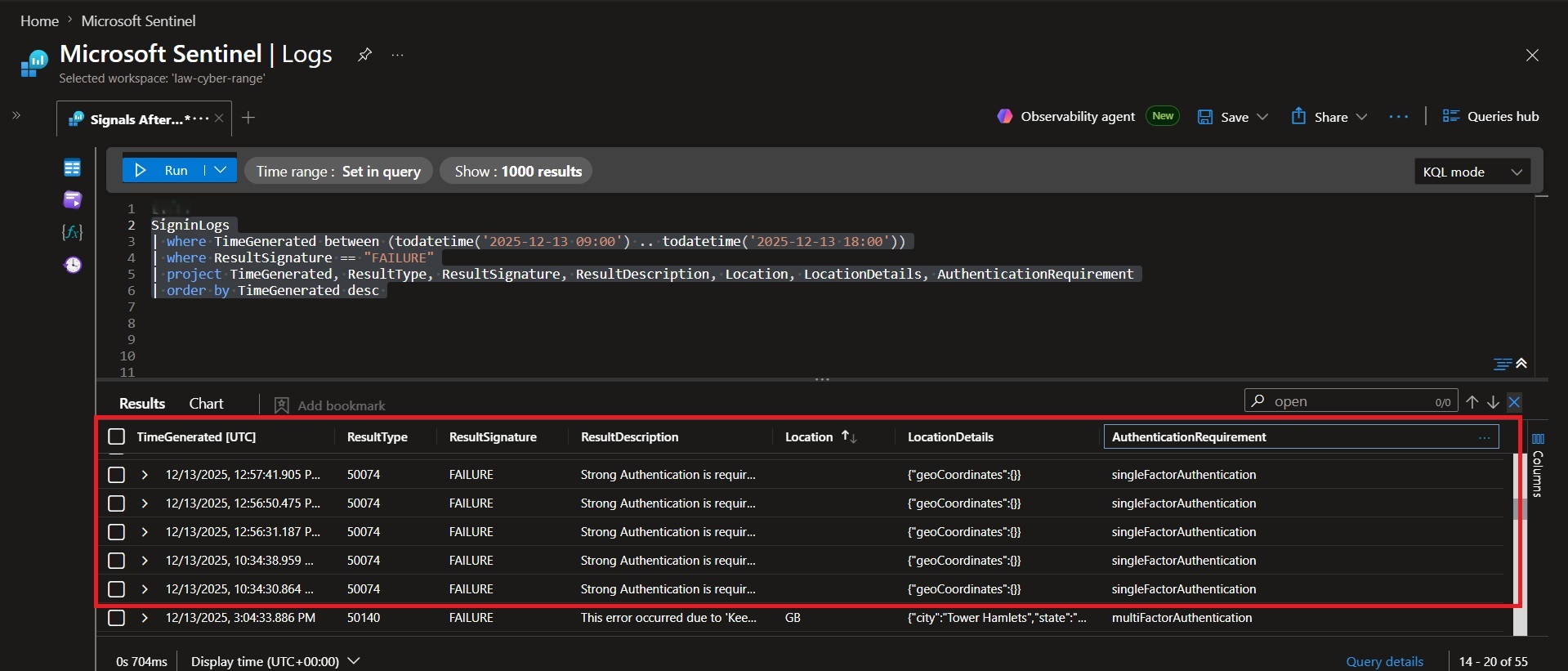 ### 📌 Findings
Initial review suggested a brute-force attack due to multiple failed authentication attempts originating from different geographic regions. However, comparison of the authentication activity revealed that the successful login was associated with credential material that had already been used elsewhere, indicating that the attacker possessed valid credentials rather than successfully guessing them through repeated login attempts.
### 💡 Why it matters
- Multiple failed logons can create the appearance of a brute-force attack.
- Attribution should be based on authentication evidence rather than assumptions.
- Correctly identifying the access vector improves incident response and remediation decisions.
### Conclusion
The successful authentication was not the result of a brute-force attack. The actual access vector was `Password Reuse`.
### 📌 Findings
Initial review suggested a brute-force attack due to multiple failed authentication attempts originating from different geographic regions. However, comparison of the authentication activity revealed that the successful login was associated with credential material that had already been used elsewhere, indicating that the attacker possessed valid credentials rather than successfully guessing them through repeated login attempts.
### 💡 Why it matters
- Multiple failed logons can create the appearance of a brute-force attack.
- Attribution should be based on authentication evidence rather than assumptions.
- Correctly identifying the access vector improves incident response and remediation decisions.
### Conclusion
The successful authentication was not the result of a brute-force attack. The actual access vector was `Password Reuse`.
🚩 Flag 02: Initial Access Account
### 🎯 Objective DeviceLogonEvents | where TimeGenerated >= datetime(2025-12-13T09:48:00Z) | where ActionType == "LogonSuccess" | project TimeGenerated, AccountName, RemoteIP, DeviceName, ActionType | sort by TimeGenerated asc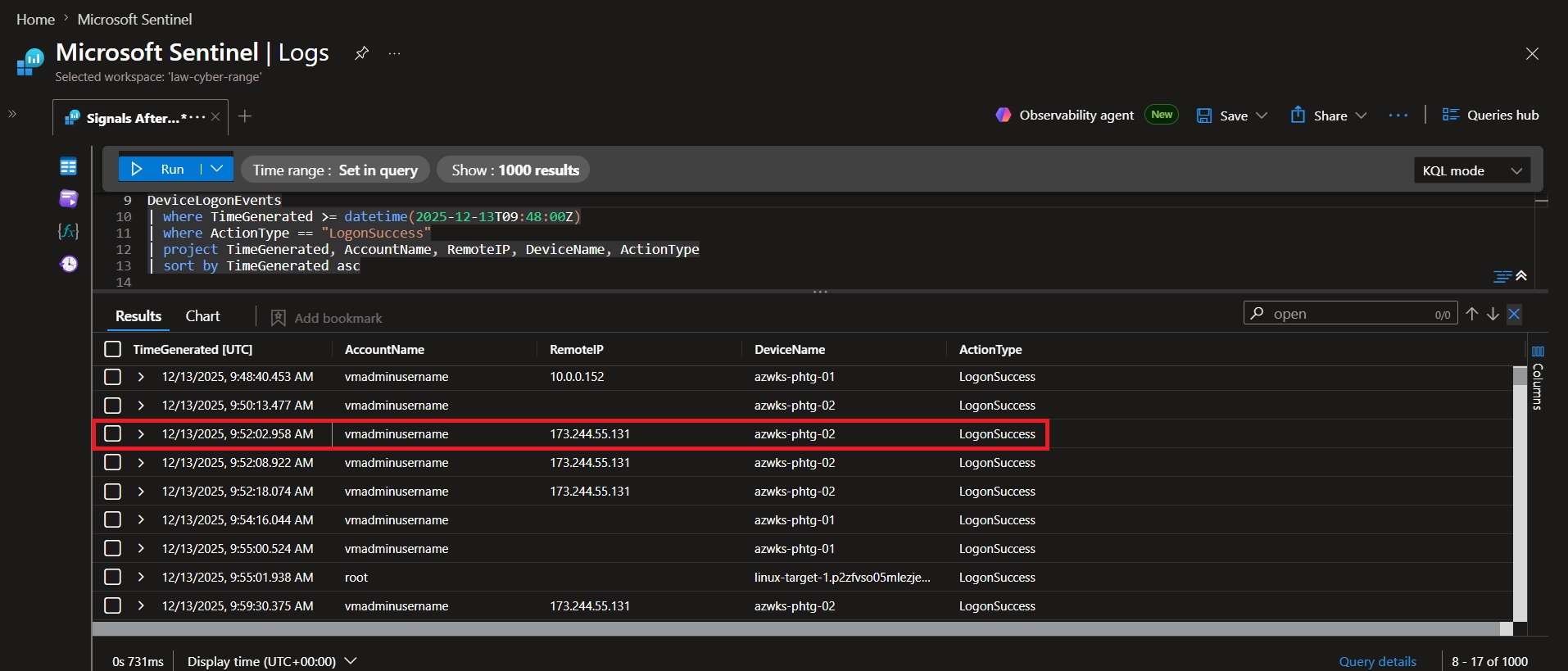 ### 📌 Findings
Analysis of successful logon events after the compromise window revealed that the account vmadminusername successfully authenticated to `azwks-phtg-02` from source IP `173.244.55.131`. The authentication occurred shortly after the initial activity began and represents the first observed movement to a secondary host.
### 💡 Why it matters
- Identifies the compromised account used to access another system.
- Reveals the attacker's movement path from the source IP to the target host.
- Confirms successful authentication through a LogonSuccess event, proving access was obtained.
### Conclusion
The attacker successfully performed lateral movement using the `vmadminusername` account from `173.244.55.131` to `azwks-phtg-02`. This event established the attacker's movement path within the environment and identified the account, source system, and destination host involved in the activity.
### 📌 Findings
Analysis of successful logon events after the compromise window revealed that the account vmadminusername successfully authenticated to `azwks-phtg-02` from source IP `173.244.55.131`. The authentication occurred shortly after the initial activity began and represents the first observed movement to a secondary host.
### 💡 Why it matters
- Identifies the compromised account used to access another system.
- Reveals the attacker's movement path from the source IP to the target host.
- Confirms successful authentication through a LogonSuccess event, proving access was obtained.
### Conclusion
The attacker successfully performed lateral movement using the `vmadminusername` account from `173.244.55.131` to `azwks-phtg-02`. This event established the attacker's movement path within the environment and identified the account, source system, and destination host involved in the activity.
🚩 Flag 03: Successful Authentication
### 🎯 Objective DeviceLogonEvents | where TimeGenerated >= datetime(2025-12-13T09:48:00Z) | where RemoteIP == "10.0.0.105" | project TimeGenerated, AccountName, RemoteIP, DeviceName, ActionType | sort by TimeGenerated asc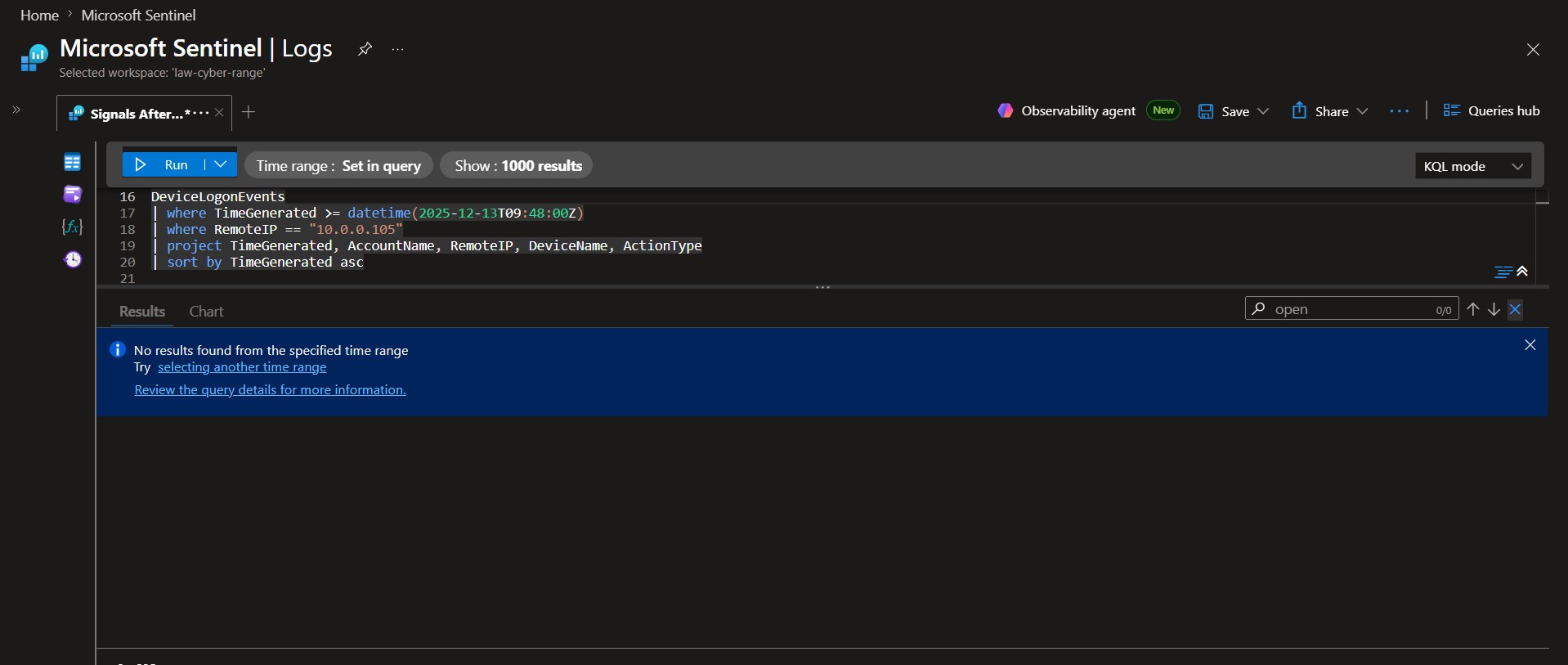 ### 📌 Findings
Analysis of DeviceLogonEvents using the secondary host IP address `10.0.0.105` as the source identified no additional logon activity across the environment. No successful or failed authentication events were observed originating from the compromised host.
### 💡 Why it matters
- Confirms the attacker did not use the secondary host to access additional systems.
- Helps define the scope of the compromise and reduces the number of affected assets.
- Demonstrates that negative results are valuable when validating whether lateral movement continued.
### Conclusion
No evidence of onward lateral movement was observed from `10.0.0.105`. Based on the available telemetry, attacker activity appears to have stopped at the secondary host and did not progress further into the environment.
### 📌 Findings
Analysis of DeviceLogonEvents using the secondary host IP address `10.0.0.105` as the source identified no additional logon activity across the environment. No successful or failed authentication events were observed originating from the compromised host.
### 💡 Why it matters
- Confirms the attacker did not use the secondary host to access additional systems.
- Helps define the scope of the compromise and reduces the number of affected assets.
- Demonstrates that negative results are valuable when validating whether lateral movement continued.
### Conclusion
No evidence of onward lateral movement was observed from `10.0.0.105`. Based on the available telemetry, attacker activity appears to have stopped at the secondary host and did not progress further into the environment.
🚩 Flag 04: Source Infrastructure
### 🎯 Objective DeviceProcessEvents | where TimeGenerated >= datetime(2025-12-13T09:48:00Z) | where AccountName == "vmadminusername" | where FileName =~ "powershell.exe" | where ProcessCommandLine contains "-File" | project TimeGenerated, DeviceName, InitiatingProcessAccountName, ProcessCommandLine | order by TimeGenerated asc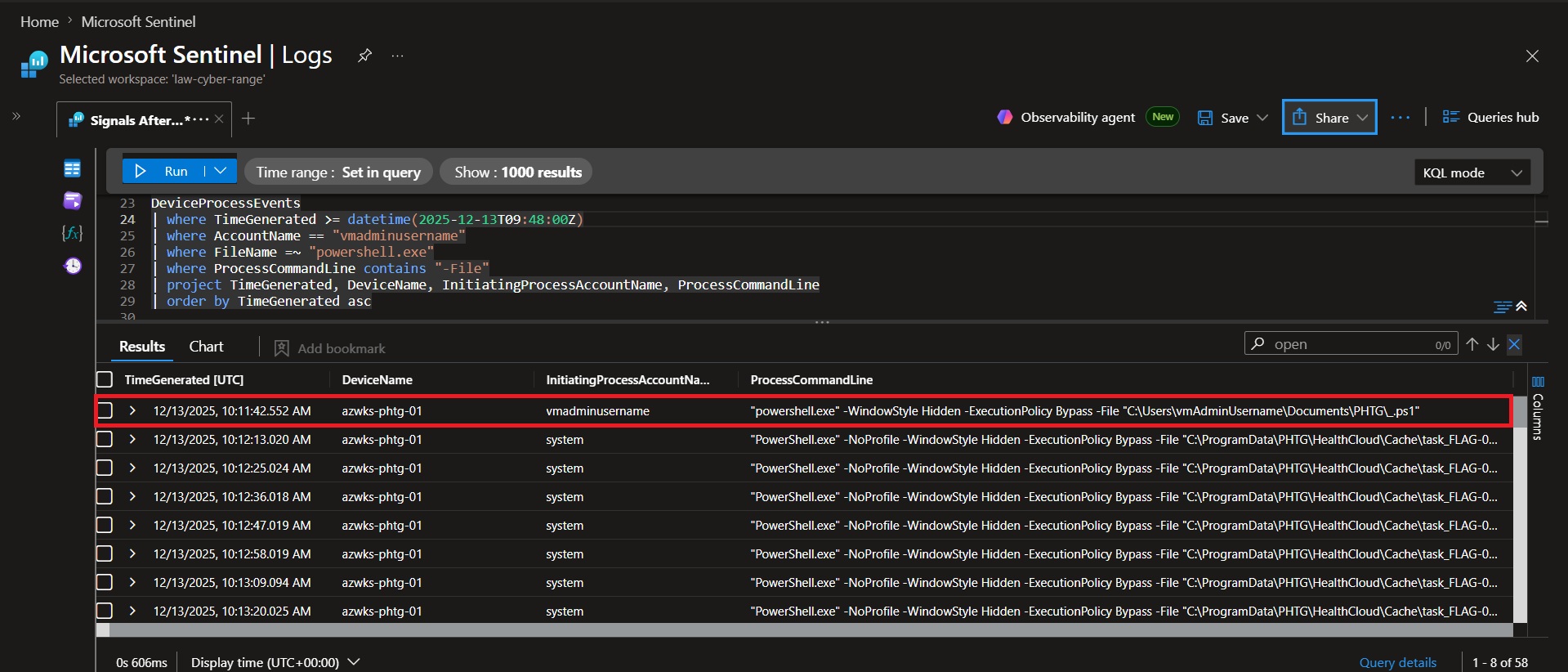 ### 📌 Findings
Analysis of DeviceProcessEvents identified a PowerShell process launched by vmadminusername shortly after lateral movement activity. The command executed a script using the `-File` parameter and referenced the path `C:\Users\vmAdminUsername\Documents\PHTG_.ps1`. The process was launched with a hidden window and bypassed PowerShell execution policy restrictions.
### 💡 Why it matters
- Identifies the first script executed directly by the attacker after gaining access.
- Reveals the exact file path used to launch malicious activity.
- Shows PowerShell running with ExecutionPolicy Bypass, a common technique used to evade script execution restrictions.
### Conclusion
The first script executed by the operator was `C:\Users\vmAdminUsername\Documents\PHTG_.ps1`. This execution represents the initial attacker-controlled script activity observed following successful lateral movement and provides a key artifact for further investigation.
### 📌 Findings
Analysis of DeviceProcessEvents identified a PowerShell process launched by vmadminusername shortly after lateral movement activity. The command executed a script using the `-File` parameter and referenced the path `C:\Users\vmAdminUsername\Documents\PHTG_.ps1`. The process was launched with a hidden window and bypassed PowerShell execution policy restrictions.
### 💡 Why it matters
- Identifies the first script executed directly by the attacker after gaining access.
- Reveals the exact file path used to launch malicious activity.
- Shows PowerShell running with ExecutionPolicy Bypass, a common technique used to evade script execution restrictions.
### Conclusion
The first script executed by the operator was `C:\Users\vmAdminUsername\Documents\PHTG_.ps1`. This execution represents the initial attacker-controlled script activity observed following successful lateral movement and provides a key artifact for further investigation.
🚩 Flag 05: Interactive Access
### 🎯 Objective DeviceProcessEvents | where TimeGenerated >= datetime(2025-12-13T09:48:00Z) | where AccountName == "vmadminusername" | where FileName =~ "powershell.exe" | where ProcessCommandLine contains "-File" | project TimeGenerated, DeviceName, InitiatingProcessAccountName, ProcessCommandLine | order by TimeGenerated asc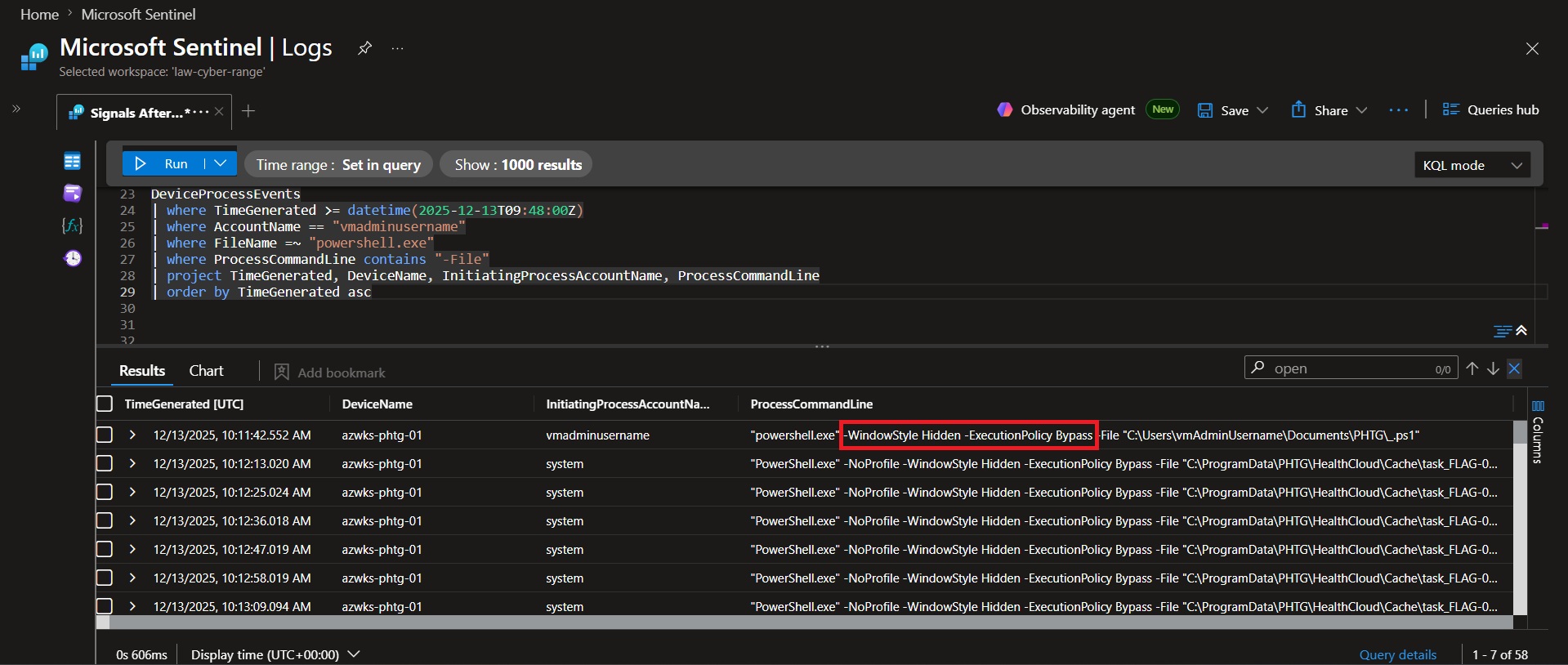 ### 📌 Findings
At `2025-12-13 10:11:42 UTC`, the operator launched a PowerShell script using both `-WindowStyle Hidden` and `-ExecutionPolicy Bypass`. These parameters altered default PowerShell behavior by hiding the execution window and bypassing script execution policy controls.
### 💡 Why it matters
- `-WindowStyle Hidden` prevents the PowerShell window from being visible to the user.
- `-ExecutionPolicy Bypass` allows scripts to run regardless of local PowerShell execution restrictions.
- Together, these flags indicate an attempt to reduce visibility and evade standard administrative safeguards.
### Conclusion
The operator used `-WindowStyle Hidden` and `-ExecutionPolicy Bypass` when launching the initial PowerShell script. These flags demonstrate intent to conceal execution and avoid PowerShell security restrictions during post-compromise activity.
### 📌 Findings
At `2025-12-13 10:11:42 UTC`, the operator launched a PowerShell script using both `-WindowStyle Hidden` and `-ExecutionPolicy Bypass`. These parameters altered default PowerShell behavior by hiding the execution window and bypassing script execution policy controls.
### 💡 Why it matters
- `-WindowStyle Hidden` prevents the PowerShell window from being visible to the user.
- `-ExecutionPolicy Bypass` allows scripts to run regardless of local PowerShell execution restrictions.
- Together, these flags indicate an attempt to reduce visibility and evade standard administrative safeguards.
### Conclusion
The operator used `-WindowStyle Hidden` and `-ExecutionPolicy Bypass` when launching the initial PowerShell script. These flags demonstrate intent to conceal execution and avoid PowerShell security restrictions during post-compromise activity.
🚩 Flag 06: Initial Tool Execution
### 🎯 Objective Identify the first malicious tooling executed following successful access. DeviceFileEvents | where DeviceName == "azwks-phtg-01" | where TimeGenerated >= datetime(2025-12-13T09:48:00Z) | where FolderPath startswith "C:\\ProgramData\\PHTG" | project TimeGenerated, ActionType, FolderPath, FileName | sort by TimeGenerated asc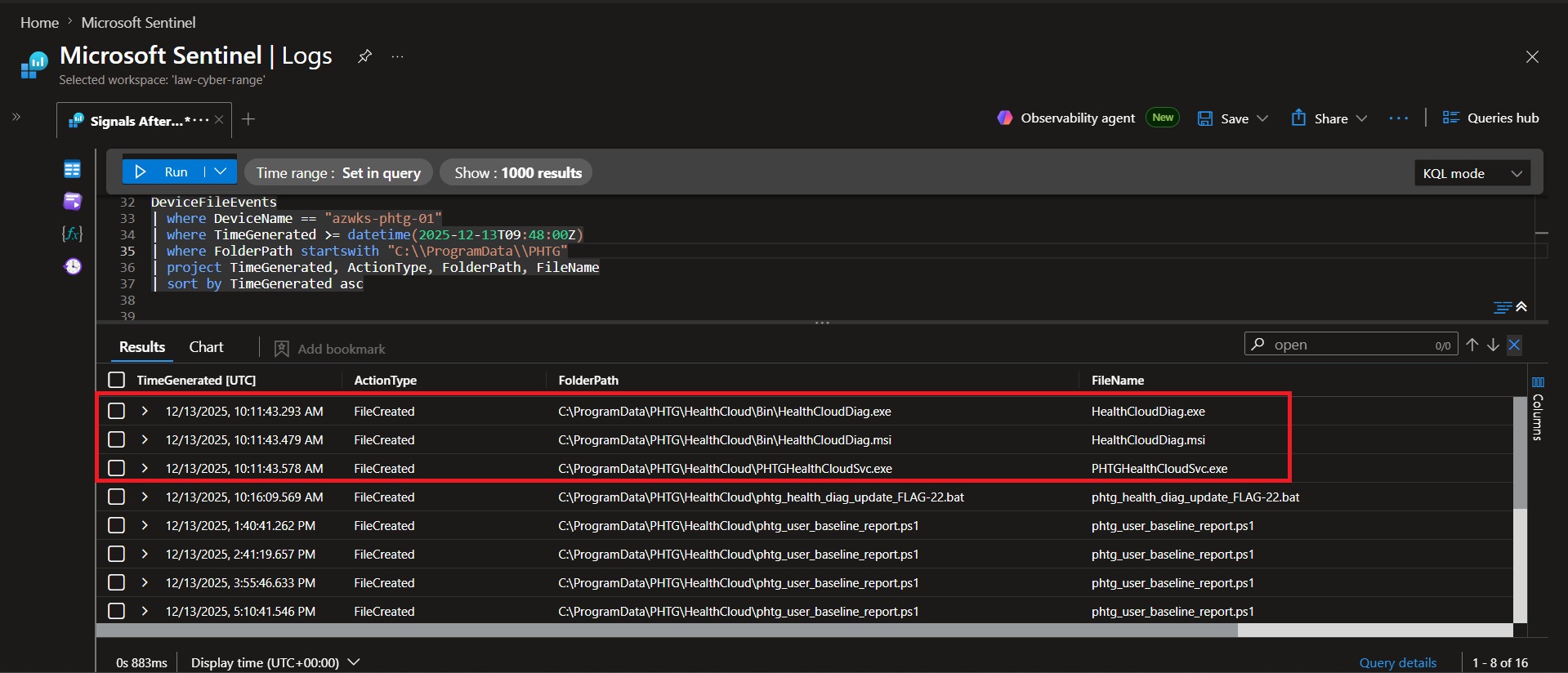 ### 📌 Findings
Analysis of DeviceFileEvents identified multiple files being created within `C:\ProgramData\PHTG\HealthCloud\` beginning at `2025-12-13 10:11:43 UTC`. The creation of executables and installation files within this directory indicates it was used as the operator's workspace for staging tools and supporting components.
### 💡 Why it matters
- Identifies the operator's staging directory used to store tooling and supporting files.
- Reveals a masqueraded workspace name (HealthCloud) designed to appear legitimate.
- Provides a key location for further investigation of attacker tools and persistence mechanisms.
### Conclusion
The operator established `C:\ProgramData\PHTG\HealthCloud\` as a working directory for tool deployment and operational activity. File creation events within this path provide evidence that it served as the primary staging location during the intrusion.
### 📌 Findings
Analysis of DeviceFileEvents identified multiple files being created within `C:\ProgramData\PHTG\HealthCloud\` beginning at `2025-12-13 10:11:43 UTC`. The creation of executables and installation files within this directory indicates it was used as the operator's workspace for staging tools and supporting components.
### 💡 Why it matters
- Identifies the operator's staging directory used to store tooling and supporting files.
- Reveals a masqueraded workspace name (HealthCloud) designed to appear legitimate.
- Provides a key location for further investigation of attacker tools and persistence mechanisms.
### Conclusion
The operator established `C:\ProgramData\PHTG\HealthCloud\` as a working directory for tool deployment and operational activity. File creation events within this path provide evidence that it served as the primary staging location during the intrusion.
🚩 Flag 07: HealthCloud Deployment
### 🎯 Objective Determine how the operator established the HealthCloud workspace and supporting tooling. DeviceProcessEvents | where DeviceName == "azwks-phtg-01" | where TimeGenerated >= datetime(2025-12-13T09:48:00Z) | where FileName =~ "attrib.exe" | where ProcessCommandLine has_any ("+h", "+s") | project TimeGenerated, ProcessCommandLine | sort by TimeGenerated asc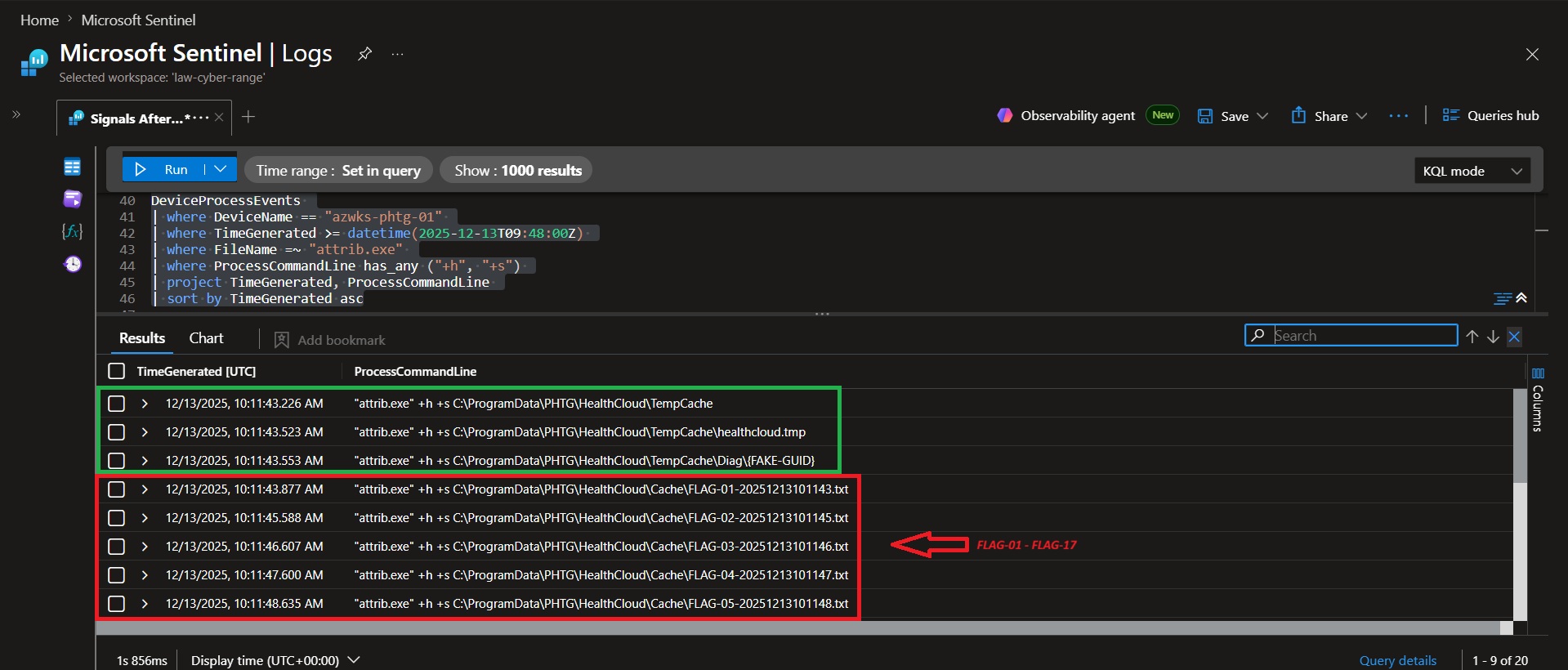 ### 📌 Findings
Analysis of `attrib.exe` executions revealed repeated use of the +h (Hidden) and +s (System) flags within the HealthCloud workspace. Between `10:11:43 UTC` and `10:12:02 UTC`, the operator applied attribute modifications to two staging directories: TempCache (3 modifications) and Cache (17 modifications).
### 💡 Why it matters
- The +h and +s flags were used to hide files and directories from normal user view.
- Repeated attribute modifications indicate a deliberate effort to conceal attacker artifacts.
- The significantly higher number of modifications within Cache identifies it as the primary location used for hiding operational files.
### Conclusion
The operator concealed artifacts in both TempCache and Cache, applying 3 attribute modifications to TempCache and 17 attribute modifications to Cache. The Cache directory received the heavier concealment treatment and served as the primary location for hidden artifacts.
### 📌 Findings
Analysis of `attrib.exe` executions revealed repeated use of the +h (Hidden) and +s (System) flags within the HealthCloud workspace. Between `10:11:43 UTC` and `10:12:02 UTC`, the operator applied attribute modifications to two staging directories: TempCache (3 modifications) and Cache (17 modifications).
### 💡 Why it matters
- The +h and +s flags were used to hide files and directories from normal user view.
- Repeated attribute modifications indicate a deliberate effort to conceal attacker artifacts.
- The significantly higher number of modifications within Cache identifies it as the primary location used for hiding operational files.
### Conclusion
The operator concealed artifacts in both TempCache and Cache, applying 3 attribute modifications to TempCache and 17 attribute modifications to Cache. The Cache directory received the heavier concealment treatment and served as the primary location for hidden artifacts.
🚩 Flag 08: Masqueraded Binary
### 🎯 Objective Identify the disguised executable used to blend malicious activity with legitimate software. DeviceProcessEvents | where DeviceName == "azwks-phtg-01" | where TimeGenerated >= datetime(2025-12-13T09:48:00Z) | where FileName != ProcessVersionInfoOriginalFileName | project TimeGenerated, FileName, ProcessVersionInfoOriginalFileName, FolderPath | sort by TimeGenerated asc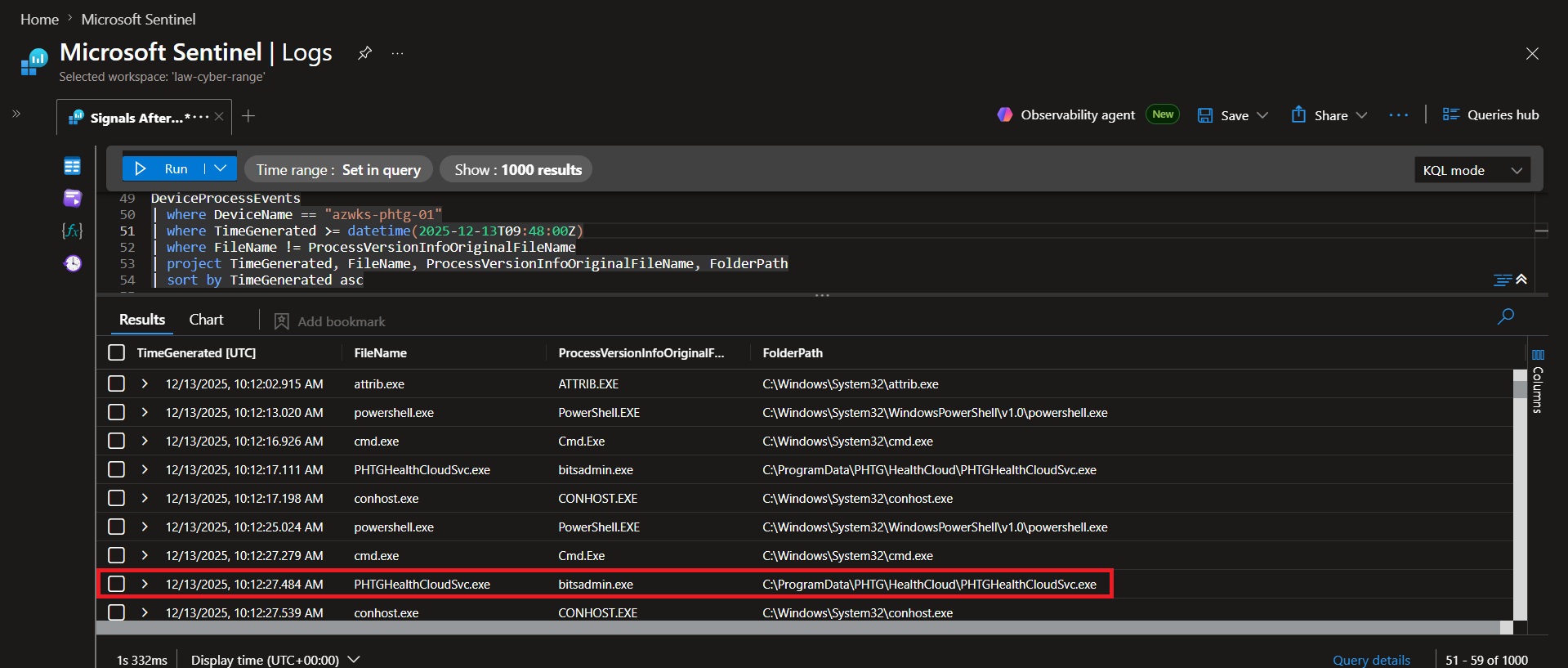 ### 📌 Findings
Analysis of processes where FileName differed from ProcessVersionInfoOriginalFileName identified several legitimate Microsoft binaries. However, at `2025-12-13 10:12:17.111 UTC`, `PHTGHealthCloudSvc.exe` was observed executing from `C:\ProgramData\PHTG\HealthCloud\` while retaining an original filename of `bitsadmin.exe`. This mismatch occurred within the operator's staging directory and was inconsistent with normal Windows software behavior.
### 💡 Why it matters
- The executable name and embedded original filename do not match, indicating potential masquerading.
- The binary retained the metadata of bitsadmin.exe, a legitimate Windows utility commonly trusted by administrators.
- The executable was located in the attacker-controlled HealthCloud staging directory rather than a standard Windows system location.
### Conclusion
`PHTGHealthCloudSvc.exe` was masquerading as `bitsadmin.exe`. It was distinguished from legitimate filename mismatches by its location within the attacker-controlled HealthCloud workspace and its retention of metadata associated with a trusted Windows binary.
### 📌 Findings
Analysis of processes where FileName differed from ProcessVersionInfoOriginalFileName identified several legitimate Microsoft binaries. However, at `2025-12-13 10:12:17.111 UTC`, `PHTGHealthCloudSvc.exe` was observed executing from `C:\ProgramData\PHTG\HealthCloud\` while retaining an original filename of `bitsadmin.exe`. This mismatch occurred within the operator's staging directory and was inconsistent with normal Windows software behavior.
### 💡 Why it matters
- The executable name and embedded original filename do not match, indicating potential masquerading.
- The binary retained the metadata of bitsadmin.exe, a legitimate Windows utility commonly trusted by administrators.
- The executable was located in the attacker-controlled HealthCloud staging directory rather than a standard Windows system location.
### Conclusion
`PHTGHealthCloudSvc.exe` was masquerading as `bitsadmin.exe`. It was distinguished from legitimate filename mismatches by its location within the attacker-controlled HealthCloud workspace and its retention of metadata associated with a trusted Windows binary.
🚩 Flag 09: Registry Activity Volume
### 🎯 Objective Measure post-compromise registry modification activity performed by the operator. DeviceRegistryEvents | where DeviceName == "azwks-phtg-01" | where InitiatingProcessAccountName == "vmadminusername" | where TimeGenerated > datetime(2025-12-13T09:48:40Z) | summarize Count=count()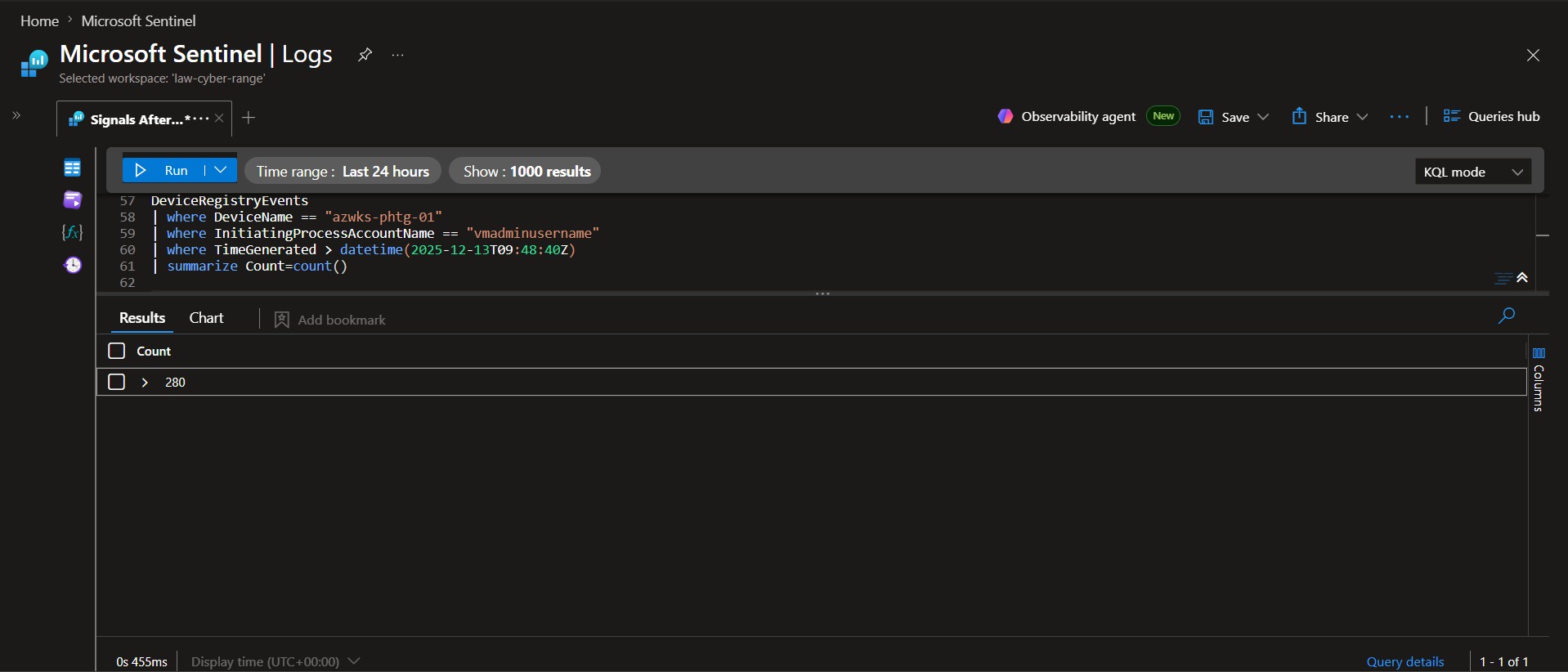 ### 📌 Findings
Analysis of DeviceRegistryEvents identified 280 registry modification events performed by vmadminusername on `azwks-phtg-01` after the lateral movement timestamp of `2025-12-13 09:48:40 UTC`. The volume of activity indicates significant interaction with the Windows Registry during post-compromise operations.
### 💡 Why it matters
- Registry modifications can reveal persistence mechanisms, configuration changes, and attacker attempts to maintain access.
- A high volume of registry activity often indicates post-compromise tooling installation or system configuration changes.
- Quantifying registry modifications helps prioritize deeper investigation into the specific keys and values that were altered.
### Conclusion
The operator generated 280 registry modification events following lateral movement to `azwks-phtg-01`. This elevated level of registry activity suggests extensive post-compromise system modification and warrants further investigation into persistence mechanisms, service creation, and configuration changes established during the intrusion.
### 📌 Findings
Analysis of DeviceRegistryEvents identified 280 registry modification events performed by vmadminusername on `azwks-phtg-01` after the lateral movement timestamp of `2025-12-13 09:48:40 UTC`. The volume of activity indicates significant interaction with the Windows Registry during post-compromise operations.
### 💡 Why it matters
- Registry modifications can reveal persistence mechanisms, configuration changes, and attacker attempts to maintain access.
- A high volume of registry activity often indicates post-compromise tooling installation or system configuration changes.
- Quantifying registry modifications helps prioritize deeper investigation into the specific keys and values that were altered.
### Conclusion
The operator generated 280 registry modification events following lateral movement to `azwks-phtg-01`. This elevated level of registry activity suggests extensive post-compromise system modification and warrants further investigation into persistence mechanisms, service creation, and configuration changes established during the intrusion.
🚩 Flag 10: Persistence Signal Isolation
### 🎯 Objective Isolate registry modifications that contributed to persistence from routine system activity. DeviceRegistryEvents | where DeviceName == "azwks-phtg-01" | where InitiatingProcessAccountName == "vmadminusername" | where TimeGenerated > datetime(2025-12-13T09:48:40Z) | project TimeGenerated, RegistryKey, RegistryValueName, RegistryValueData, ActionType | order by TimeGenerated asc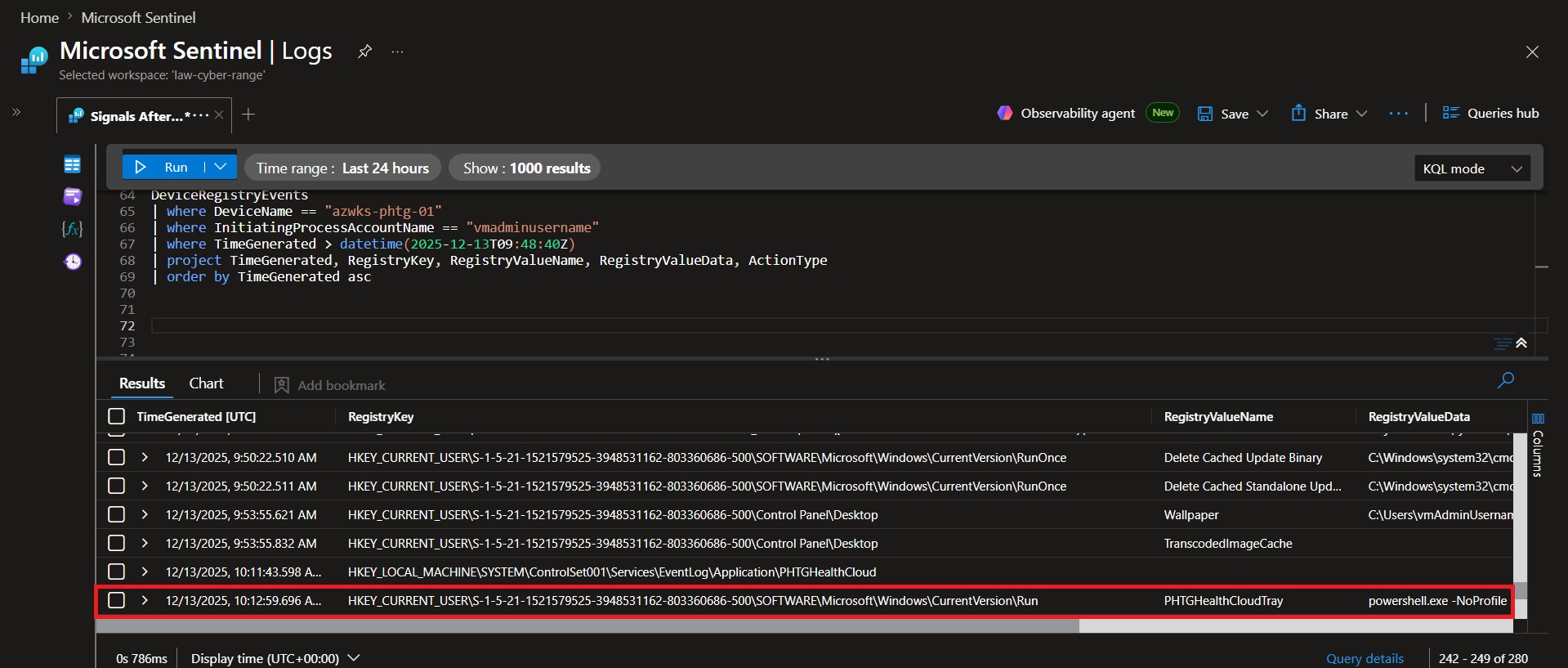 ### 📌 Findings
Analysis of 280 registry events identified substantial user-context registry churn, including theme settings, MUI cache activity, and COM registration updates. At `2025-12-13 10:12:59.696 UTC`, a value named PHTGHealthCloudTray was written to:
`HKEY_CURRENT_USER\S-1-5-21-1521579525-3948531162-803360686-500\SOFTWARE\Microsoft\Windows\CurrentVersion\Run`
The value launched:
`powershell.exe -NoProfile -WindowStyle Hidden -ExecutionPolicy Bypass -File "C:\ProgramData\PHTG\HealthCloud\Bin\HealthCloudTray.ps1"`
### 💡 Why it matters
- The Run key automatically executes configured programs when the user logs in.
- The value PHTGHealthCloudTray establishes persistence by launching a PowerShell script at logon.
- The use of `-WindowStyle Hidden` and `-ExecutionPolicy Bypass` indicates an attempt to conceal execution and bypass PowerShell security controls..
### Conclusion
The persistence mechanism was created through:
`HKEY_CURRENT_USER\S-1-5-21-1521579525-3948531162-803360686-500\SOFTWARE\Microsoft\Windows\CurrentVersion\Run`
At `10:12:59.696 UTC`, the attacker added the PHTGHealthCloudTray value, which automatically launched HealthCloudTray.ps1 using hidden PowerShell execution each time the user logged in.
### 📌 Findings
Analysis of 280 registry events identified substantial user-context registry churn, including theme settings, MUI cache activity, and COM registration updates. At `2025-12-13 10:12:59.696 UTC`, a value named PHTGHealthCloudTray was written to:
`HKEY_CURRENT_USER\S-1-5-21-1521579525-3948531162-803360686-500\SOFTWARE\Microsoft\Windows\CurrentVersion\Run`
The value launched:
`powershell.exe -NoProfile -WindowStyle Hidden -ExecutionPolicy Bypass -File "C:\ProgramData\PHTG\HealthCloud\Bin\HealthCloudTray.ps1"`
### 💡 Why it matters
- The Run key automatically executes configured programs when the user logs in.
- The value PHTGHealthCloudTray establishes persistence by launching a PowerShell script at logon.
- The use of `-WindowStyle Hidden` and `-ExecutionPolicy Bypass` indicates an attempt to conceal execution and bypass PowerShell security controls..
### Conclusion
The persistence mechanism was created through:
`HKEY_CURRENT_USER\S-1-5-21-1521579525-3948531162-803360686-500\SOFTWARE\Microsoft\Windows\CurrentVersion\Run`
At `10:12:59.696 UTC`, the attacker added the PHTGHealthCloudTray value, which automatically launched HealthCloudTray.ps1 using hidden PowerShell execution each time the user logged in.
🚩 Flag 11: Run Key Value Name
### 🎯 Objective Identify the Registry Run Key value used to automatically launch operator tooling. DeviceRegistryEvents | where DeviceName == "azwks-phtg-01" | where InitiatingProcessAccountName == "vmadminusername" | where TimeGenerated > datetime(2025-12-13T09:48:40Z) | where RegistryKey contains "CurrentVersion\\Run" | project TimeGenerated, RegistryKey, RegistryValueName, RegistryValueData | order by TimeGenerated asc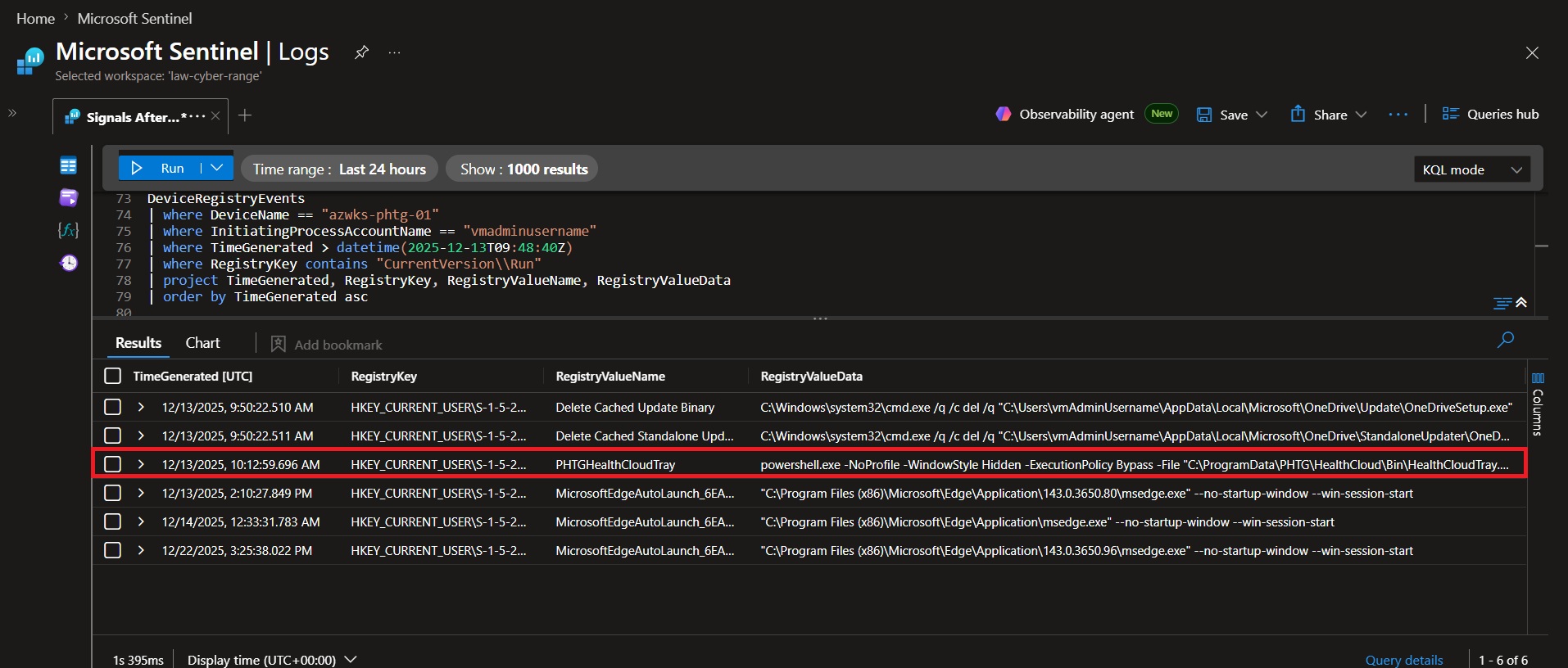 ### 📌 Findings
Analysis of Run key activity after `2025-12-13 09:48:40 UTC` identified multiple values. The MicrosoftEdgeAutoLaunch entries were legitimate browser auto-start configurations. However, at `2025-12-13 10:12:59.696 UTC`, the value PHTGHealthCloudTray was added and configured to launch `HealthCloudTray.ps1` using hidden PowerShell execution with execution policy bypass.
### 💡 Why it matters
- Identifies the exact registry value used to establish persistence.
- Links the Run key directly to the attacker's HealthCloud tooling.
- Shows the automatic execution of a hidden PowerShell script at user logon.
### Conclusion
The operator's persistence value was PHTGHealthCloudTray. At `2025-12-13 10:12:59.696 UTC`, it was configured to automatically execute `HealthCloudTray.ps1` from the HealthCloud workspace whenever the user logged in.
### 📌 Findings
Analysis of Run key activity after `2025-12-13 09:48:40 UTC` identified multiple values. The MicrosoftEdgeAutoLaunch entries were legitimate browser auto-start configurations. However, at `2025-12-13 10:12:59.696 UTC`, the value PHTGHealthCloudTray was added and configured to launch `HealthCloudTray.ps1` using hidden PowerShell execution with execution policy bypass.
### 💡 Why it matters
- Identifies the exact registry value used to establish persistence.
- Links the Run key directly to the attacker's HealthCloud tooling.
- Shows the automatic execution of a hidden PowerShell script at user logon.
### Conclusion
The operator's persistence value was PHTGHealthCloudTray. At `2025-12-13 10:12:59.696 UTC`, it was configured to automatically execute `HealthCloudTray.ps1` from the HealthCloud workspace whenever the user logged in.
🚩 Flag 12: Run Key Persistence Command
### 🎯 Objective Determine the command configured to execute through the persistence mechanism. DeviceRegistryEvents | where DeviceName == "azwks-phtg-01" | where InitiatingProcessAccountName == "vmadminusername" | where TimeGenerated > datetime(2025-12-13T09:48:40Z) | where RegistryKey contains "CurrentVersion\\Run" | where RegistryValueName == "PHTGHealthCloudTray" | project TimeGenerated, RegistryKey, RegistryValueName, RegistryValueData | order by TimeGenerated asc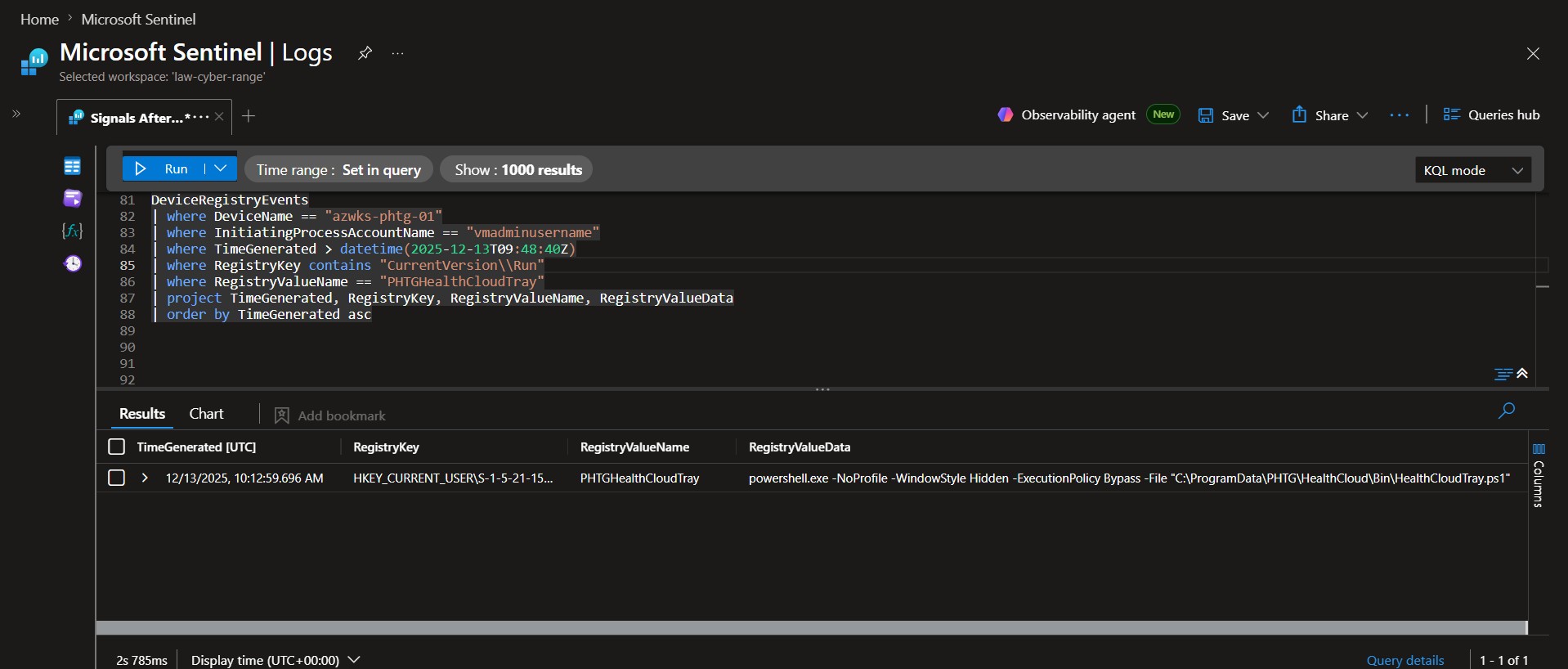 ### 📌 Findings
At `2025-12-13 10:12:59.696 UTC`, the operator configured the PHTGHealthCloudTray Run key value to launch a PowerShell command that executed `HealthCloudTray.ps1` from the HealthCloud staging directory. The command included -NoProfile, -WindowStyle Hidden, and -ExecutionPolicy Bypass, indicating an attempt to reduce visibility and circumvent PowerShell execution restrictions.
### 💡 Why it matters
- Reveals the exact command that would execute automatically whenever the user logged in.
- Demonstrates the use of hidden PowerShell execution and execution policy bypass techniques.
- Directly links the persistence mechanism to the operator-controlled HealthCloud workspace.
### Conclusion
The operator established persistence by configuring the following command to execute at user logon:
`powershell.exe -NoProfile -WindowStyle Hidden -ExecutionPolicy Bypass -File "C:\ProgramData\PHTG\HealthCloud\Bin\HealthCloudTray.ps1"`
This Run key entry ensured that the HealthCloudTray PowerShell script would automatically execute each time the user signed in.
### 📌 Findings
At `2025-12-13 10:12:59.696 UTC`, the operator configured the PHTGHealthCloudTray Run key value to launch a PowerShell command that executed `HealthCloudTray.ps1` from the HealthCloud staging directory. The command included -NoProfile, -WindowStyle Hidden, and -ExecutionPolicy Bypass, indicating an attempt to reduce visibility and circumvent PowerShell execution restrictions.
### 💡 Why it matters
- Reveals the exact command that would execute automatically whenever the user logged in.
- Demonstrates the use of hidden PowerShell execution and execution policy bypass techniques.
- Directly links the persistence mechanism to the operator-controlled HealthCloud workspace.
### Conclusion
The operator established persistence by configuring the following command to execute at user logon:
`powershell.exe -NoProfile -WindowStyle Hidden -ExecutionPolicy Bypass -File "C:\ProgramData\PHTG\HealthCloud\Bin\HealthCloudTray.ps1"`
This Run key entry ensured that the HealthCloudTray PowerShell script would automatically execute each time the user signed in.
🚩 Flag 13: Second Persistence Mechanism
### 🎯 Objective Identify additional persistence mechanisms deployed beyond the Registry Run Key. DeviceFileEvents | where DeviceName == "azwks-phtg-01" | where TimeGenerated > datetime(2025-12-13T09:48:40Z) | where FileName endswith ".lnk" | project TimeGenerated, ActionType, FileName, FolderPath | order by TimeGenerated asc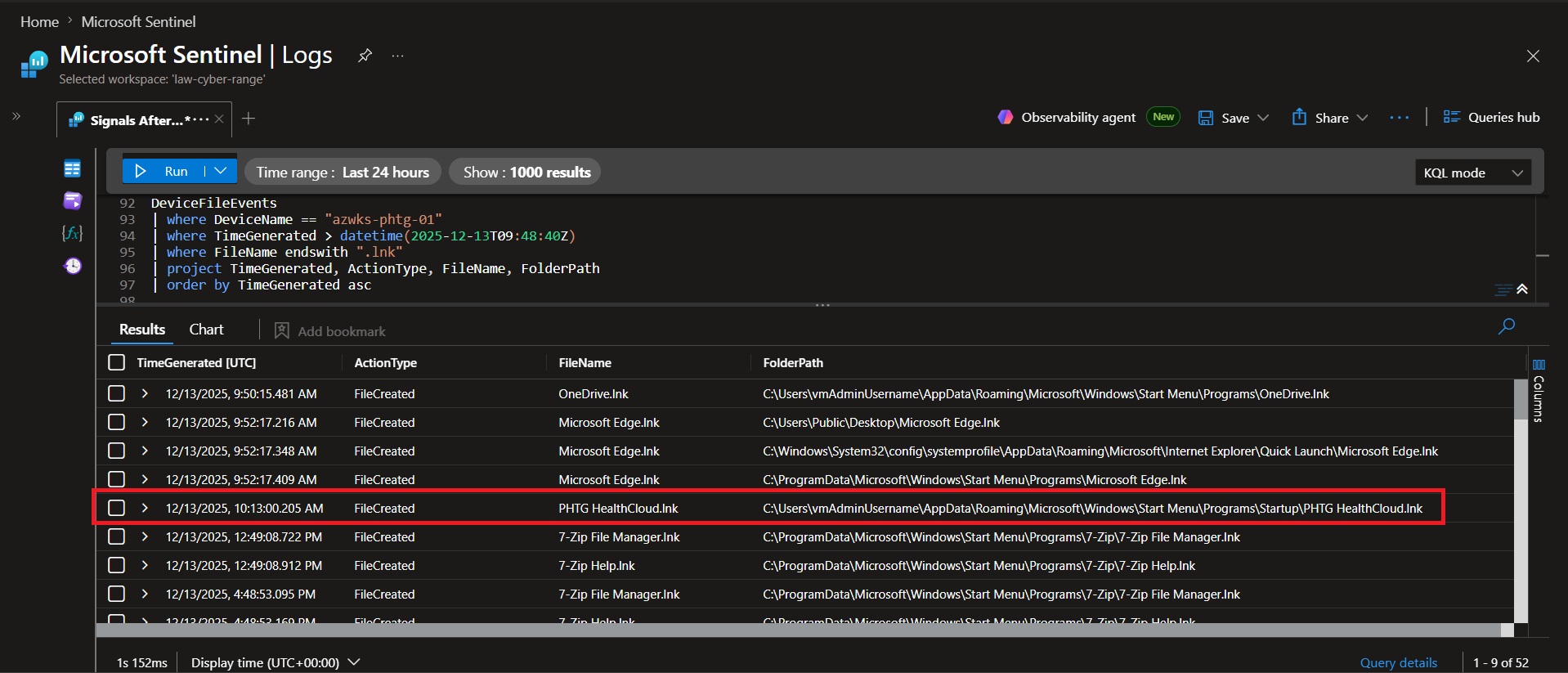 ### 📌 Findings
Analysis of DeviceFileEvents identified the creation of `PHTG HealthCloud.lnk`, a shortcut file placed within a Windows startup location. Because files stored in Startup folders execute automatically during user logon, the shortcut provided an additional method for launching the operator's tooling.
### 💡 Why it matters
- Windows Startup folder shortcuts automatically execute when a user logs in.
- Provides a second persistence mechanism if the Run key is discovered or removed.
- Demonstrates the operator's use of redundant persistence techniques to maintain access.
### Conclusion
The operator established a second persistence mechanism through the creation of PHTG HealthCloud.lnk. By placing a shortcut within a Windows startup location, the operator ensured their tooling would automatically execute at user logon even if the Run key persistence mechanism was removed.
### 📌 Findings
Analysis of DeviceFileEvents identified the creation of `PHTG HealthCloud.lnk`, a shortcut file placed within a Windows startup location. Because files stored in Startup folders execute automatically during user logon, the shortcut provided an additional method for launching the operator's tooling.
### 💡 Why it matters
- Windows Startup folder shortcuts automatically execute when a user logs in.
- Provides a second persistence mechanism if the Run key is discovered or removed.
- Demonstrates the operator's use of redundant persistence techniques to maintain access.
### Conclusion
The operator established a second persistence mechanism through the creation of PHTG HealthCloud.lnk. By placing a shortcut within a Windows startup location, the operator ensured their tooling would automatically execute at user logon even if the Run key persistence mechanism was removed.
🚩 Flag 14: Third Persistence Mechanism
### 🎯 Objective Identify system-level persistence established through Windows Event Log registration. DeviceRegistryEvents | where DeviceName == "azwks-phtg-01" | where TimeGenerated > datetime(2025-12-13T09:48:40Z) | where RegistryKey contains "EventLog\\Application" | project TimeGenerated, RegistryKey, RegistryValueName, RegistryValueData, ActionType | order by TimeGenerated asc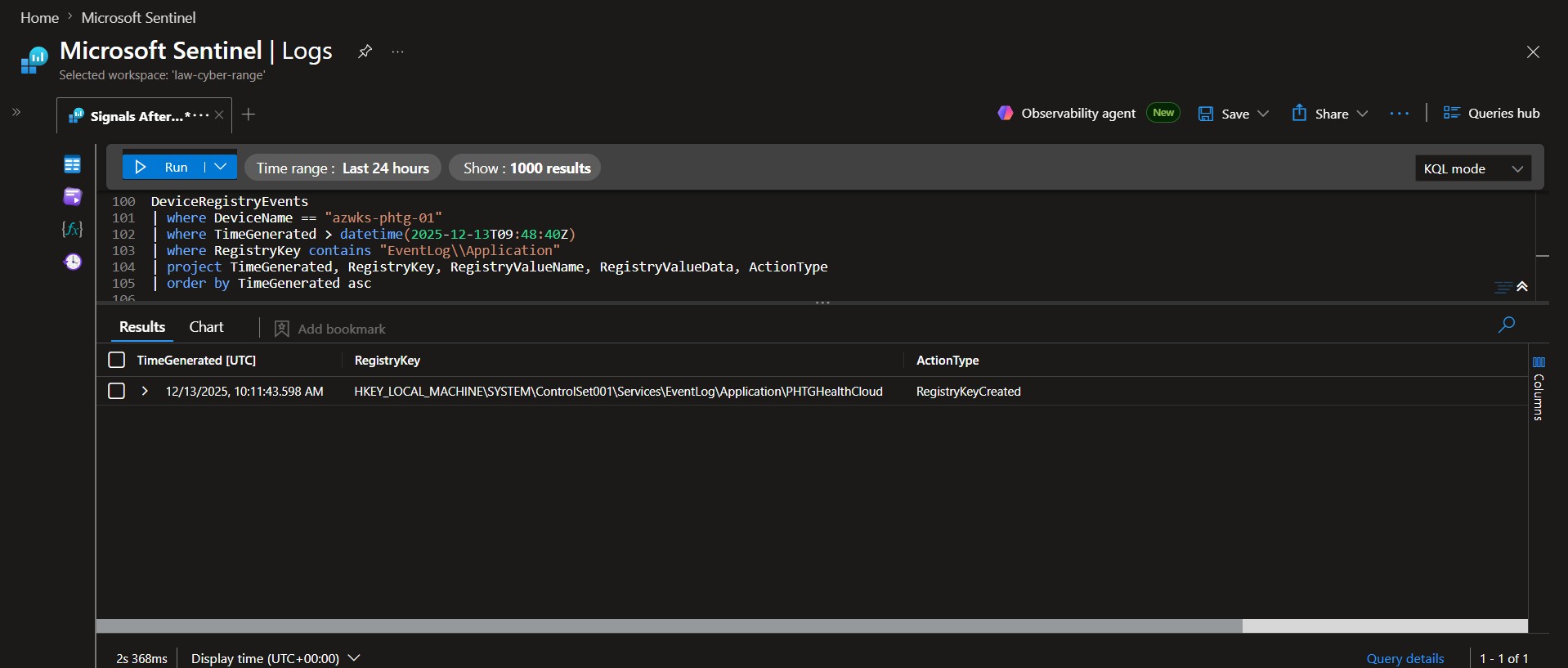 ### 📌 Findings
Analysis of HKLM registry modifications identified the creation of the registry path:
`HKEY_LOCAL_MACHINE\SYSTEM\ControlSet001\Services\EventLog\Application\PHTGHealthCloud`
This registry key registered PHTGHealthCloud as an Application Event Log source, enabling the operator's tooling to generate entries within a trusted Windows logging channel.
### 💡 Why it matters
- Registers PHTGHealthCloud as a Windows Event Log source, allowing the tooling to write entries into the trusted Application log.
- Helps attacker activity blend into normal operating system logging by appearing as a legitimate application source.
- Demonstrates a system-level configuration change that extends the functionality and legitimacy of the operator's tooling.
### Conclusion
The operator created the registry key:
`HKEY_LOCAL_MACHINE\SYSTEM\ControlSet001\Services\EventLog\Application\PHTGHealthCloud`
This modification allowed the HealthCloud tooling to write events to the Windows Application log, helping the activity blend with legitimate system and application logging while establishing additional operational capability.
### 📌 Findings
Analysis of HKLM registry modifications identified the creation of the registry path:
`HKEY_LOCAL_MACHINE\SYSTEM\ControlSet001\Services\EventLog\Application\PHTGHealthCloud`
This registry key registered PHTGHealthCloud as an Application Event Log source, enabling the operator's tooling to generate entries within a trusted Windows logging channel.
### 💡 Why it matters
- Registers PHTGHealthCloud as a Windows Event Log source, allowing the tooling to write entries into the trusted Application log.
- Helps attacker activity blend into normal operating system logging by appearing as a legitimate application source.
- Demonstrates a system-level configuration change that extends the functionality and legitimacy of the operator's tooling.
### Conclusion
The operator created the registry key:
`HKEY_LOCAL_MACHINE\SYSTEM\ControlSet001\Services\EventLog\Application\PHTGHealthCloud`
This modification allowed the HealthCloud tooling to write events to the Windows Application log, helping the activity blend with legitimate system and application logging while establishing additional operational capability.
🚩 Flag 15: Tooling HealthCheck Loop
### 🎯 Objective Measure recurring beacon activity generated by the operator's HealthCloud service. DeviceProcessEvents | where DeviceName == "azwks-phtg-01" | where TimeGenerated > datetime(2025-12-13T09:48:40Z) | where FileName == "PHTGHealthCloudSvc.exe" | where ProcessCommandLine contains "/healthcheck" | summarize Count=count()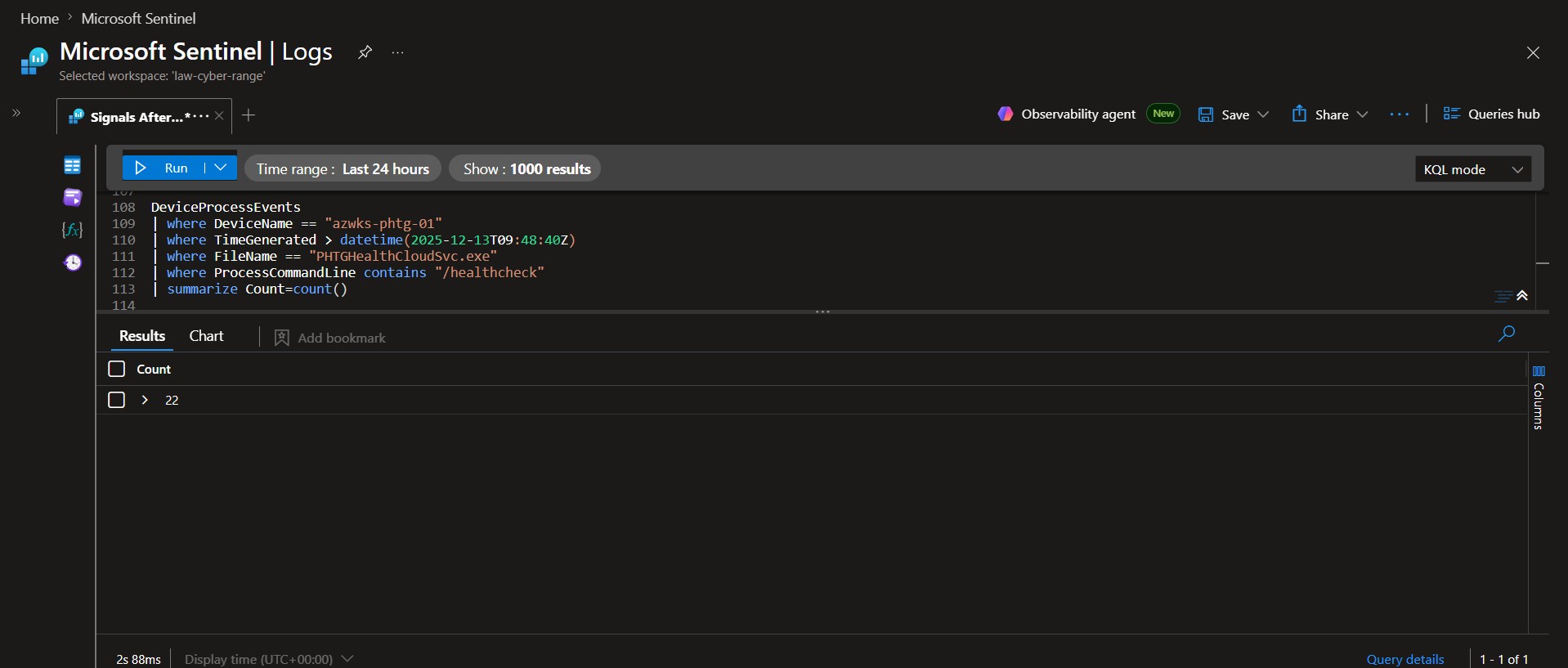 ### 📌 Findings
Analysis of DeviceProcessEvents identified repeated executions of `PHTGHealthCloudSvc.exe` with the /healthcheck argument after the post-access timestamp. The query returned 22 healthcheck executions, indicating the masqueraded binary was running repeatedly at short intervals.
### 💡 Why it matters
- Shows the masqueraded binary was repeatedly executing in a loop.
- Indicates beacon-like behavior through repeated /healthcheck activity.
- Helps confirm the HealthCloud tooling remained active after initial access.
### Conclusion
The masqueraded HealthCloud binary generated 22 /healthcheck executions during post-access activity. This repeated execution pattern suggests automated tooling behavior consistent with a healthcheck or beaconing loop.
### 📌 Findings
Analysis of DeviceProcessEvents identified repeated executions of `PHTGHealthCloudSvc.exe` with the /healthcheck argument after the post-access timestamp. The query returned 22 healthcheck executions, indicating the masqueraded binary was running repeatedly at short intervals.
### 💡 Why it matters
- Shows the masqueraded binary was repeatedly executing in a loop.
- Indicates beacon-like behavior through repeated /healthcheck activity.
- Helps confirm the HealthCloud tooling remained active after initial access.
### Conclusion
The masqueraded HealthCloud binary generated 22 /healthcheck executions during post-access activity. This repeated execution pattern suggests automated tooling behavior consistent with a healthcheck or beaconing loop.
🚩 Flag 16: Encoded Beacon Endpoints
### 🎯 Objective Identify external endpoints contacted by encoded PowerShell beacon activity. DeviceProcessEvents | where DeviceName == "azwks-phtg-01" | where TimeGenerated > datetime(2025-12-13T09:48:40Z) | where FileName =~ "powershell.exe" | where ProcessCommandLine has_any ("-EncodedCommand", "-enc", "-e") | project TimeGenerated, DeviceName, InitiatingProcessAccountName, ProcessCommandLine | order by TimeGenerated asc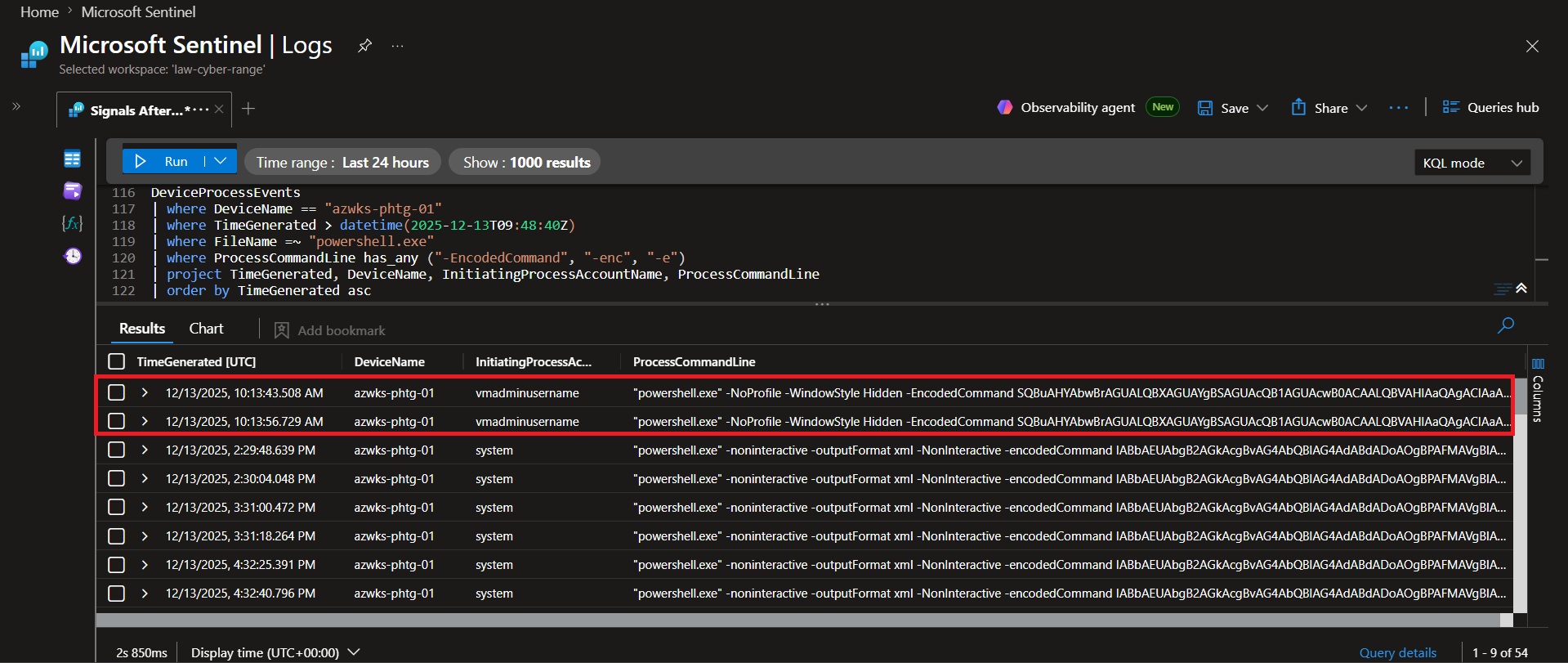 ### 📌 Findings
Analysis of encoded PowerShell executions identified two beaconing events initiated by vmadminusername. After decoding the Base64-encoded commands, the first request contacted the /api/checkin endpoint at `10:13:43.508 UTC`, followed by a request to the /api/status endpoint at `10:13:56.729 UTC`. Both requests were directed to the parent domain `status.health-cloud.cc`.
### 💡 Why it matters
- Encoded PowerShell commands are commonly used to obscure network activity from casual inspection.
- Decoding the commands reveals the exact infrastructure contacted by the operator.
- The sequence of requests helps reconstruct post-compromise communications between the host and attacker-controlled services.
### Conclusion
The operator's encoded PowerShell beacons contacted the following endpoints in chronological order:
1. `https://status.health-cloud.cc/api/checkin?flag=FLAG-09&device=azwks-phtg-01`
2. `https://status.health-cloud.cc/api/status?flag=FLAG-10&device=azwks-phtg-01`
Both beacons communicated with the parent domain `status.health-cloud.cc`.
### 📌 Findings
Analysis of encoded PowerShell executions identified two beaconing events initiated by vmadminusername. After decoding the Base64-encoded commands, the first request contacted the /api/checkin endpoint at `10:13:43.508 UTC`, followed by a request to the /api/status endpoint at `10:13:56.729 UTC`. Both requests were directed to the parent domain `status.health-cloud.cc`.
### 💡 Why it matters
- Encoded PowerShell commands are commonly used to obscure network activity from casual inspection.
- Decoding the commands reveals the exact infrastructure contacted by the operator.
- The sequence of requests helps reconstruct post-compromise communications between the host and attacker-controlled services.
### Conclusion
The operator's encoded PowerShell beacons contacted the following endpoints in chronological order:
1. `https://status.health-cloud.cc/api/checkin?flag=FLAG-09&device=azwks-phtg-01`
2. `https://status.health-cloud.cc/api/status?flag=FLAG-10&device=azwks-phtg-01`
Both beacons communicated with the parent domain `status.health-cloud.cc`.
🚩 Flag 17: Two Beacons, Why?
### 🎯 Objective Determine the operational advantage gained by maintaining multiple command-and-control channels. ### 🔍 Evidence Previous analysis identified two parallel communication mechanisms: 1. **PHTGHealthCloudSvc.exe** executing recurring `/healthcheck` requests. 2. **Encoded PowerShell beacons** communicating with `status.health-cloud.cc`. ### 📌 Findings Analysis revealed that the operator maintained both a recurring HealthCloud service beacon and separate encoded PowerShell beacons during the intrusion. - These channels operated in parallel. - These channels provided both communication redundancy and operational resilience. ### 💡 Why it matters - Multiple command-and-control channels increase operational resilience during an intrusion. - Alternate communication paths allow the operator to maintain access despite defensive actions. - Splitting communications across separate channels complicates detection and investigation efforts. ### Conclusion The operator maintained two beacon channels to provide redundancy so command-and-control survives if one channel is blocked, and to disperse traffic across multiple paths, making detection and correlation more difficult for defenders.🚩 Flag 18: Deployment Pattern Recognition
### 🎯 Objective Reconstruct the sequence used to retrieve and execute operator payloads. DeviceNetworkEvents | where DeviceName == "azwks-phtg-01" | where TimeGenerated > datetime(2025-12-13T09:48:40Z) | project TimeGenerated, InitiatingProcessFileName, RemoteUrl, RemoteIP | order by TimeGenerated asc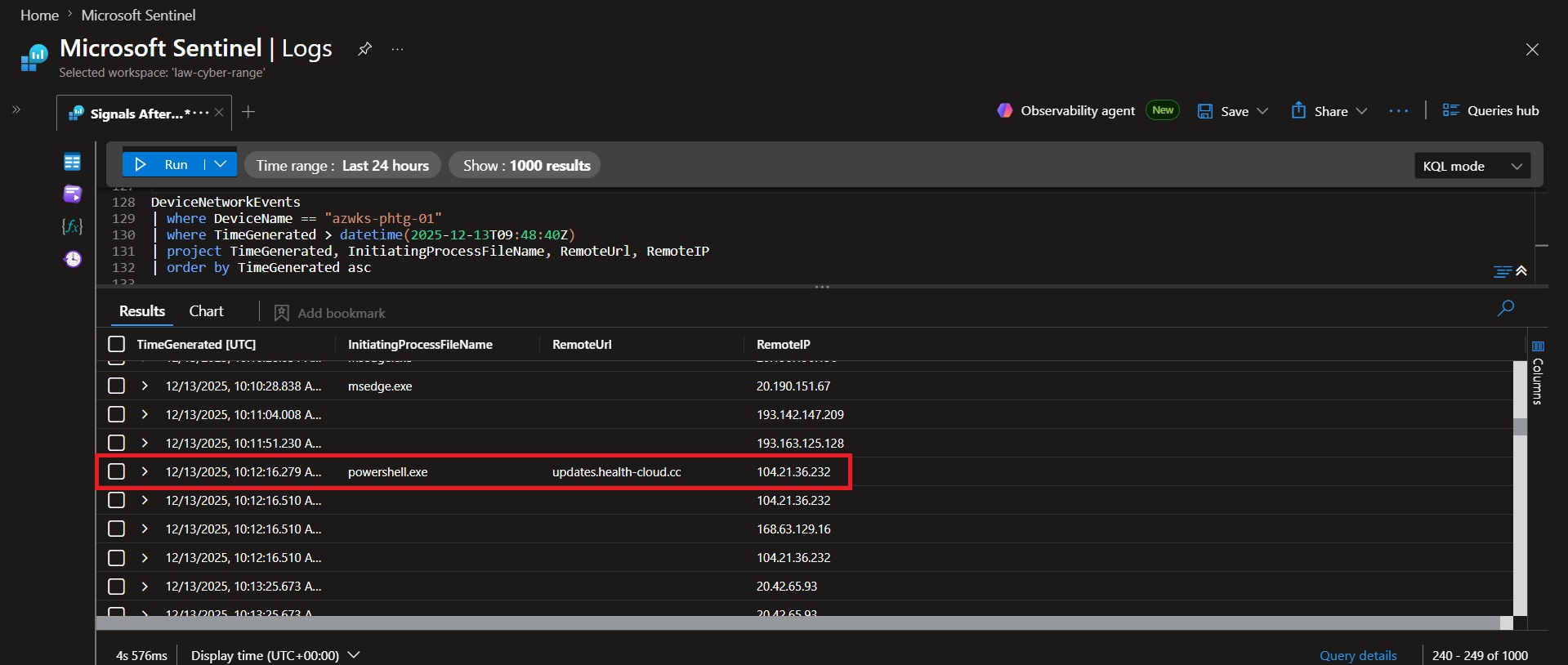 ### 📌 Findings
Analysis of network and process telemetry revealed a rapid deployment sequence. At `2025-12-13 10:12:16.279 UTC`, `powershell.exe` initiated outbound communication with updates.health-cloud.cc, indicating retrieval of attacker-controlled content. Less than one second later, at `2025-12-13 10:12:17.111 UTC`, `PHTGHealthCloudSvc.exe` was executed on the host.
### 💡 Why it matters
- Demonstrates the complete delivery-to-execution workflow used by the operator.
- Establishes a direct link between external infrastructure and local payload execution.
- Provides a timeline that can be used to identify similar download-and-execute activity in future investigations.
### Conclusion
The first step downloads or retrieves a payload from the C2 server, and the second step immediately executes the retrieved payload on the host.
### 📌 Findings
Analysis of network and process telemetry revealed a rapid deployment sequence. At `2025-12-13 10:12:16.279 UTC`, `powershell.exe` initiated outbound communication with updates.health-cloud.cc, indicating retrieval of attacker-controlled content. Less than one second later, at `2025-12-13 10:12:17.111 UTC`, `PHTGHealthCloudSvc.exe` was executed on the host.
### 💡 Why it matters
- Demonstrates the complete delivery-to-execution workflow used by the operator.
- Establishes a direct link between external infrastructure and local payload execution.
- Provides a timeline that can be used to identify similar download-and-execute activity in future investigations.
### Conclusion
The first step downloads or retrieves a payload from the C2 server, and the second step immediately executes the retrieved payload on the host.
🚩 Flag 19: Operator Outbound Domains
### 🎯 Objective Identify domains contacted by the operator during post-access activity. DeviceNetworkEvents | where DeviceName == "azwks-phtg-01" | where TimeGenerated > datetime(2025-12-13T09:48:40Z) | where InitiatingProcessFileName =~ "powershell.exe" | project TimeGenerated, RemoteUrl, RemoteIP | order by TimeGenerated asc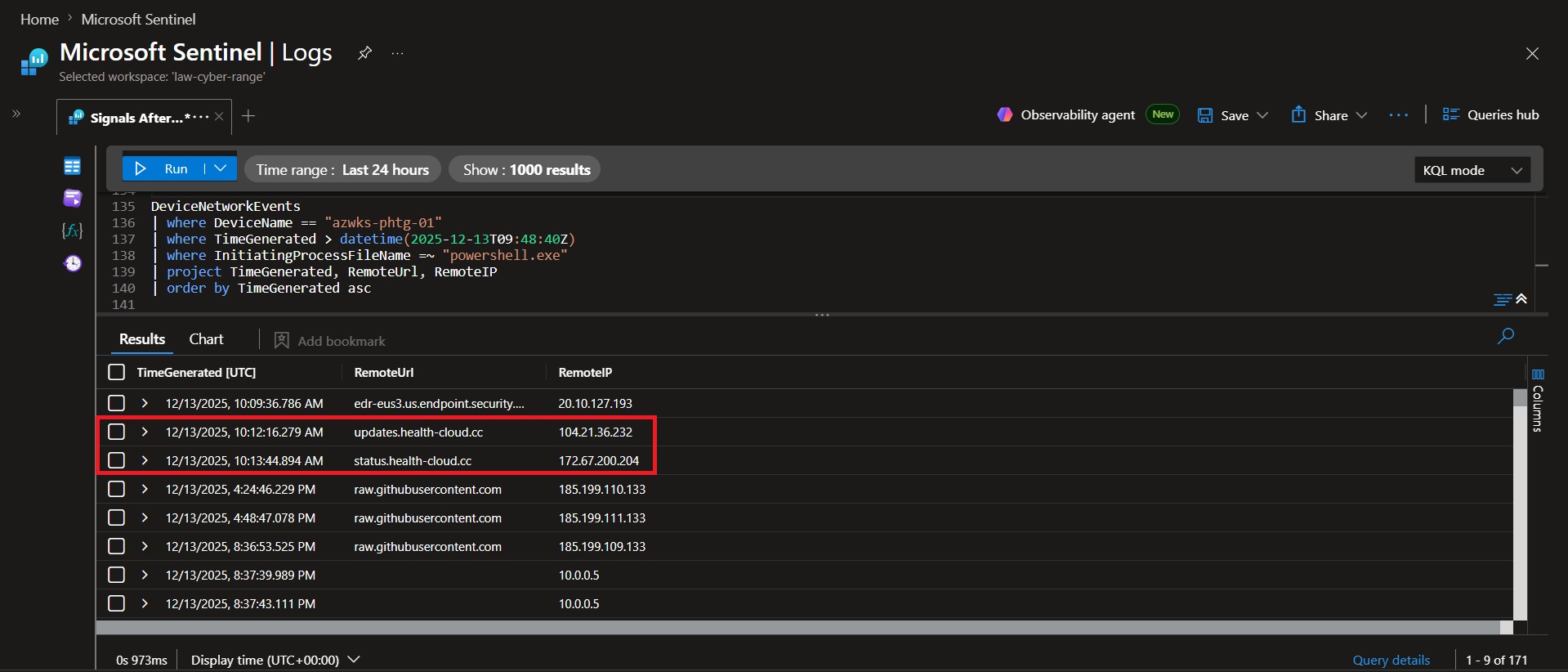 ### 📌 Findings
Analysis of PowerShell-generated network activity on `azwks-phtg-01` identified communication with two HealthCloud-related domains during post-access operations. At `10:12:16.279 UTC`, PowerShell contacted updates.health-cloud.cc, followed by communication with status.health-cloud.cc at `10:13:44.894 UTC`.
### 💡 Why it matters
- Identifies the external infrastructure contacted by attacker-controlled PowerShell activity.
- Reveals the domains used for payload retrieval and command-and-control communications.
- Provides network indicators that can be used for detection, blocking, and threat hunting.
### Conclusion
The operator's PowerShell activity contacted the following domains in chronological order:
1. `updates.health-cloud.cc`
2. `status.health-cloud.cc`
### 📌 Findings
Analysis of PowerShell-generated network activity on `azwks-phtg-01` identified communication with two HealthCloud-related domains during post-access operations. At `10:12:16.279 UTC`, PowerShell contacted updates.health-cloud.cc, followed by communication with status.health-cloud.cc at `10:13:44.894 UTC`.
### 💡 Why it matters
- Identifies the external infrastructure contacted by attacker-controlled PowerShell activity.
- Reveals the domains used for payload retrieval and command-and-control communications.
- Provides network indicators that can be used for detection, blocking, and threat hunting.
### Conclusion
The operator's PowerShell activity contacted the following domains in chronological order:
1. `updates.health-cloud.cc`
2. `status.health-cloud.cc`
🚩 Flag 20: AMSI Probe Identification
### 🎯 Objective Determine whether the operator validated AMSI visibility prior to executing additional tooling. DeviceProcessEvents | where DeviceName == "azwks-phtg-01" | where TimeGenerated > datetime(2025-12-13T09:48:40Z) | where FileName =~ "powershell.exe" | where ProcessCommandLine contains "C:\\ProgramData\\PHTG\\HealthCloud\\Bin" | project TimeGenerated, FileName, ProcessCommandLine | order by TimeGenerated asc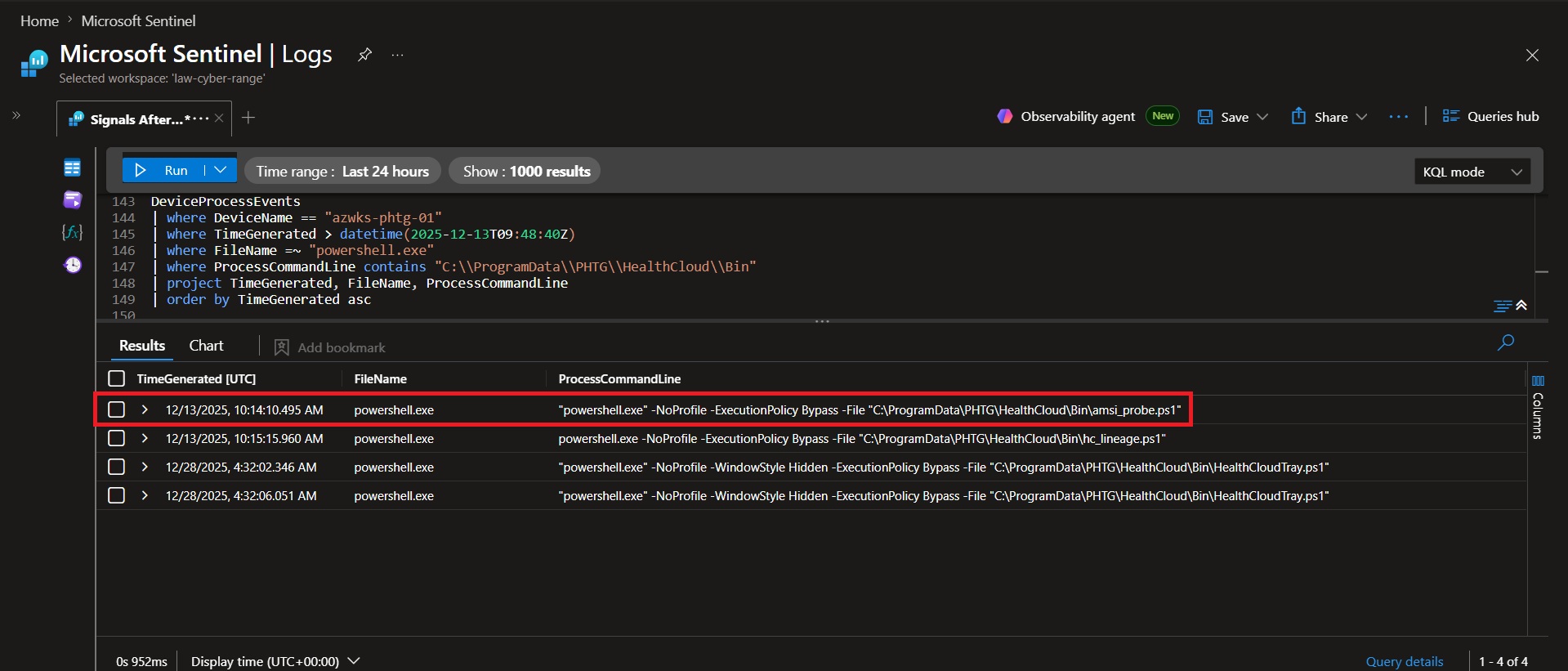 ### 📌 Findings
At `2025-12-13 10:14:10.495 UTC`, the operator executed `amsi_probe.ps1` from the HealthCloud staging directory using PowerShell with ExecutionPolicy Bypass. The script was used to determine whether PowerShell content was being inspected by AMSI before additional tooling was executed.
### 💡 Why it matters
- AMSI (Antimalware Scan Interface) is used by security tools to inspect PowerShell content before execution.
- Operators often test AMSI visibility before running more sensitive scripts or payloads.
- Understanding defensive visibility helps attackers decide whether additional evasion techniques are necessary.
### Conclusion
`amsi_probe.ps1` was an AMSI detection/probe script used to verify whether PowerShell content was being inspected by AMSI before further payload execution.
### 📌 Findings
At `2025-12-13 10:14:10.495 UTC`, the operator executed `amsi_probe.ps1` from the HealthCloud staging directory using PowerShell with ExecutionPolicy Bypass. The script was used to determine whether PowerShell content was being inspected by AMSI before additional tooling was executed.
### 💡 Why it matters
- AMSI (Antimalware Scan Interface) is used by security tools to inspect PowerShell content before execution.
- Operators often test AMSI visibility before running more sensitive scripts or payloads.
- Understanding defensive visibility helps attackers decide whether additional evasion techniques are necessary.
### Conclusion
`amsi_probe.ps1` was an AMSI detection/probe script used to verify whether PowerShell content was being inspected by AMSI before further payload execution.
🚩 Flag 21: Lineage Break Pattern
### 🎯 Objective Identify process-launch techniques used to obscure execution lineage and parent-child relationships. DeviceProcessEvents | where DeviceName == "azwks-phtg-01" | where InitiatingProcessAccountName == "vmadminusername" | where TimeGenerated between (datetime(2025-12-13T09:48:40Z) .. datetime(2025-12-13T10:48:40Z)) | where FileName =~ "cmd.exe" | project TimeGenerated, ProcessCommandLine, InitiatingProcessFileName | order by TimeGenerated asc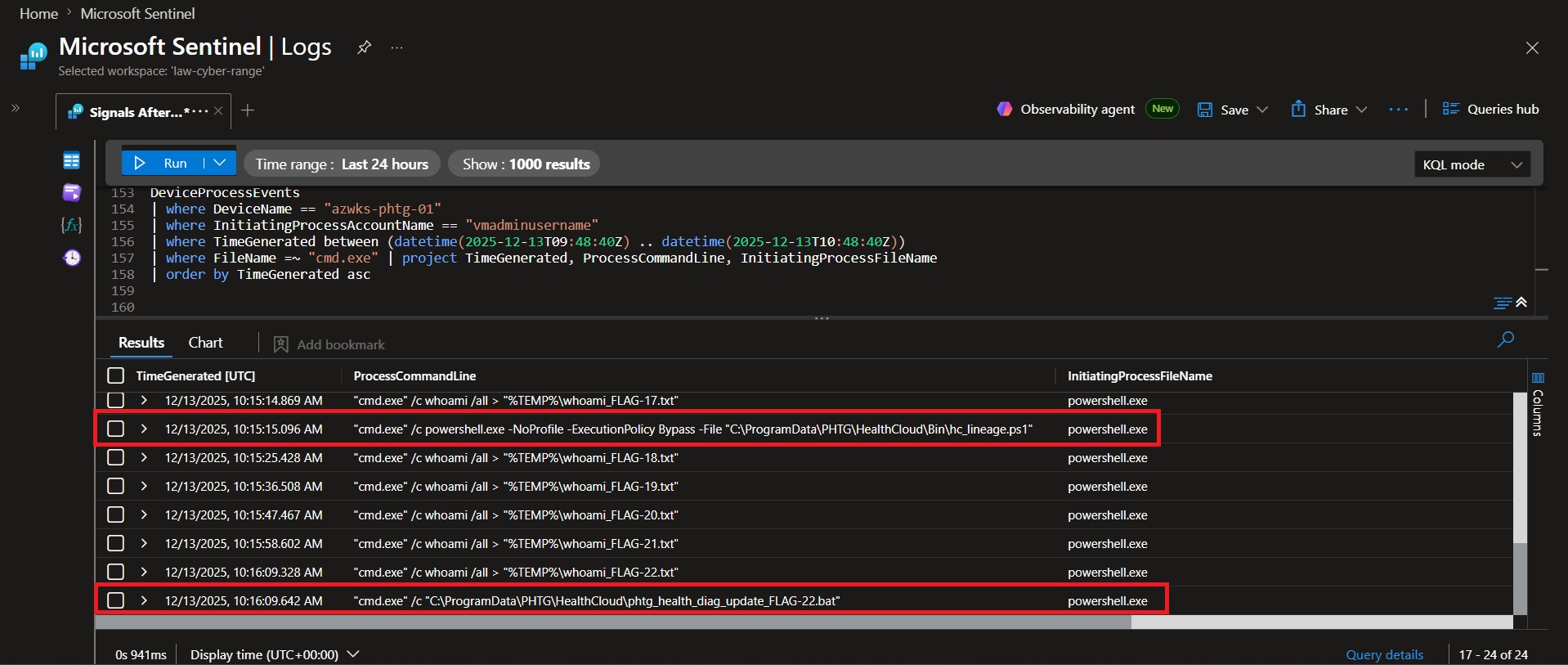 ### 📌 Findings
Analysis of process execution activity on `azwks-phtg-01` identified two payloads launched through `cmd.exe` during the first hour following the operator's initial access. At `10:15:15.096 UTC`, `cmd.exe` launched `hc_lineage.ps1`, and at `10:16:09.642 UTC`, cmd.exe launched `phtg_health_diag_update_FLAG-22.bat`. Both payloads were executed indirectly rather than being launched directly from the operator's PowerShell session.
### 💡 Why it matters
- Launching payloads through cmd.exe inserts an additional process into the execution chain.
- This obscures the true parent-child relationship between the operator's PowerShell session and the final payload.
- Process lineage manipulation makes forensic reconstruction and detection more difficult for defenders.
### Conclusion
The operator used cmd.exe to launch `hc_lineage.ps1` and `phtg_health_diag_update_FLAG-22.bat`; chaining payloads through an intermediate process helps obscure parent-child process relationships and complicates process lineage analysis for defenders.
### 📌 Findings
Analysis of process execution activity on `azwks-phtg-01` identified two payloads launched through `cmd.exe` during the first hour following the operator's initial access. At `10:15:15.096 UTC`, `cmd.exe` launched `hc_lineage.ps1`, and at `10:16:09.642 UTC`, cmd.exe launched `phtg_health_diag_update_FLAG-22.bat`. Both payloads were executed indirectly rather than being launched directly from the operator's PowerShell session.
### 💡 Why it matters
- Launching payloads through cmd.exe inserts an additional process into the execution chain.
- This obscures the true parent-child relationship between the operator's PowerShell session and the final payload.
- Process lineage manipulation makes forensic reconstruction and detection more difficult for defenders.
### Conclusion
The operator used cmd.exe to launch `hc_lineage.ps1` and `phtg_health_diag_update_FLAG-22.bat`; chaining payloads through an intermediate process helps obscure parent-child process relationships and complicates process lineage analysis for defenders.
🚩 Flag 22: Defender Tampering
### 🎯 Objective Identify Microsoft Defender exclusions configured to reduce detection of operator tooling. DeviceRegistryEvents | where DeviceName == "azwks-phtg-01" | where TimeGenerated > datetime(2025-12-13T09:48:40Z) | where RegistryKey contains @"Microsoft\Windows Defender\Exclusions" | project TimeGenerated, RegistryKey, RegistryValueName, RegistryValueData | order by TimeGenerated asc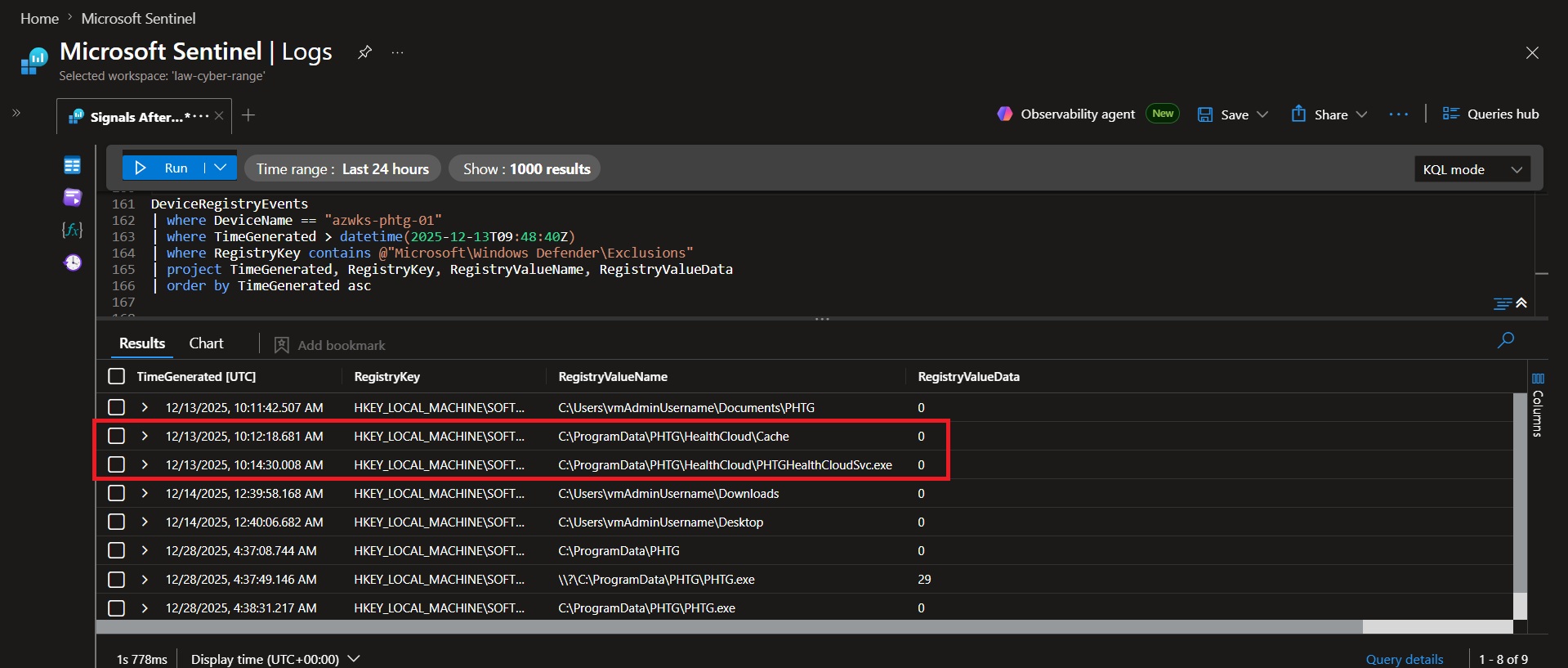 ### 📌 Findings
Analysis of Windows Defender exclusion activity identified two exclusions directly associated with the HealthCloud tooling. At `2025-12-13 10:12:18.681 UTC`, the operator excluded `C:\ProgramData\PHTG\HealthCloud\Cache` from Microsoft Defender scanning. At `2025-12-13 10:14:30.008 UTC`, the operator excluded `C:\ProgramData\PHTG\HealthCloud\PHTGHealthCloudSvc.exe`, reducing Defender visibility into the primary HealthCloud service process.
### 💡 Why it matters
- Defender exclusions reduce security visibility into attacker-controlled files and processes.
- Excluding the Cache directory helps conceal staged tools, scripts, and operational artifacts.
- Excluding the HealthCloud service executable reduces the likelihood of Defender scanning or alerting on the operator's primary beacon process.
### Conclusion
The operator excluded the path `C:\ProgramData\PHTG\HealthCloud\Cache` and the process `C:\ProgramData\PHTG\HealthCloud\PHTGHealthCloudSvc.exe` from Microsoft Defender scanning, helping conceal both stored tooling and active beacon activity.
### 📌 Findings
Analysis of Windows Defender exclusion activity identified two exclusions directly associated with the HealthCloud tooling. At `2025-12-13 10:12:18.681 UTC`, the operator excluded `C:\ProgramData\PHTG\HealthCloud\Cache` from Microsoft Defender scanning. At `2025-12-13 10:14:30.008 UTC`, the operator excluded `C:\ProgramData\PHTG\HealthCloud\PHTGHealthCloudSvc.exe`, reducing Defender visibility into the primary HealthCloud service process.
### 💡 Why it matters
- Defender exclusions reduce security visibility into attacker-controlled files and processes.
- Excluding the Cache directory helps conceal staged tools, scripts, and operational artifacts.
- Excluding the HealthCloud service executable reduces the likelihood of Defender scanning or alerting on the operator's primary beacon process.
### Conclusion
The operator excluded the path `C:\ProgramData\PHTG\HealthCloud\Cache` and the process `C:\ProgramData\PHTG\HealthCloud\PHTGHealthCloudSvc.exe` from Microsoft Defender scanning, helping conceal both stored tooling and active beacon activity.
🚩 Flag 23: Defender Detection Outcome
### 🎯 Objective Determine whether Defender detections resulted in prevention, remediation, or only alert generation. DeviceEvents | where DeviceName == "azwks-phtg-01" | where TimeGenerated between (datetime(2025-12-13T09:48:40Z) .. datetime(2025-12-13T10:48:40Z)) | where ActionType has "AntivirusReport" | project TimeGenerated, DeviceName, ActionType, FileName, FolderPath, AdditionalFields | order by TimeGenerated desc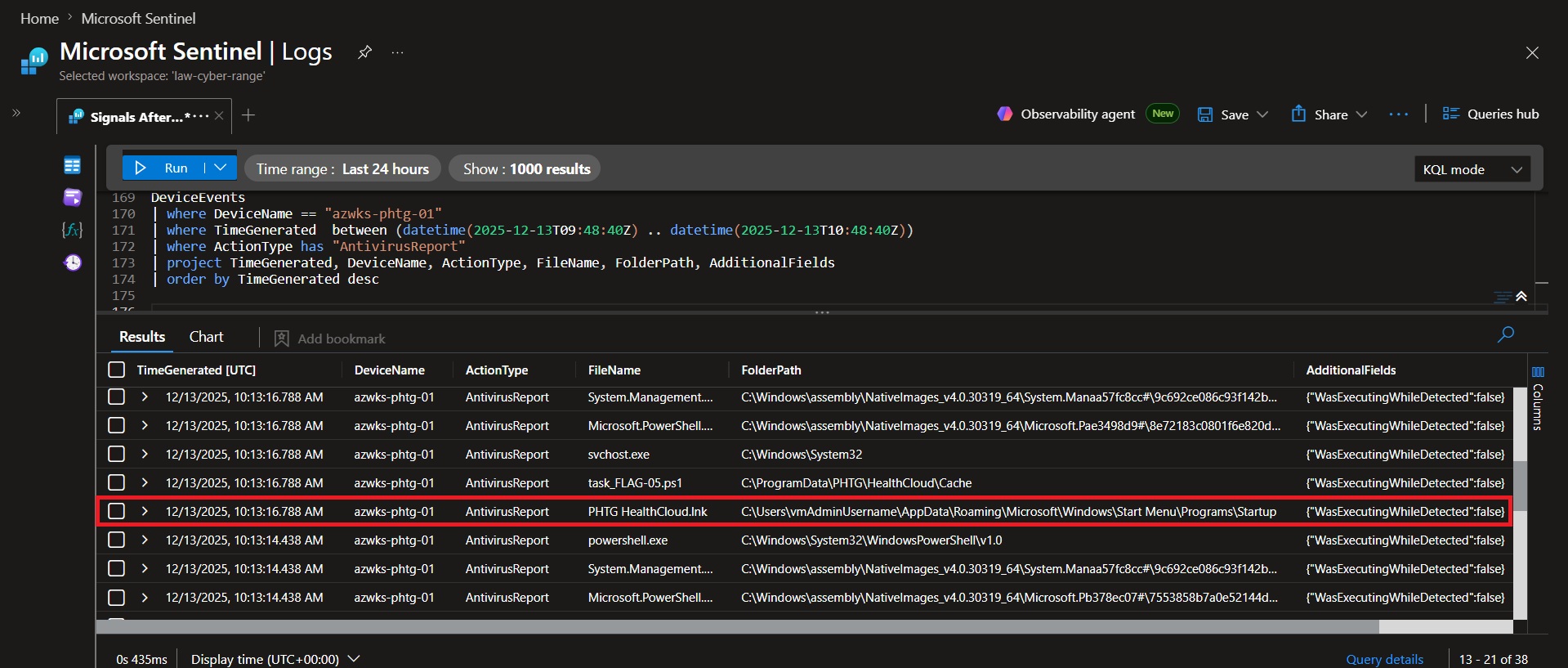 ### 📌 Findings
Analysis of Defender AntivirusReport events identified detections associated with `PHTG HealthCloud.lnk`, the startup shortcut used by the persistence mechanism. Although Defender generated detection events, the telemetry indicates WasExecutingWhileDetected = False, and there was no evidence that the persistence artifact was quarantined, removed, or remediated.
### 💡 Why it matters
- Confirms Microsoft Defender identified suspicious activity associated with the persistence mechanism.
- Detection events do not necessarily indicate prevention or remediation.
- Understanding whether security controls merely detect or actively block threats is critical during incident response.
### Conclusion
Microsoft Defender detected and generated AntivirusReport events associated with the malicious PowerShell activity launched by the persistence mechanism, but the persistence remained in place and there is no evidence that Defender blocked, removed, or remediated it.
### 📌 Findings
Analysis of Defender AntivirusReport events identified detections associated with `PHTG HealthCloud.lnk`, the startup shortcut used by the persistence mechanism. Although Defender generated detection events, the telemetry indicates WasExecutingWhileDetected = False, and there was no evidence that the persistence artifact was quarantined, removed, or remediated.
### 💡 Why it matters
- Confirms Microsoft Defender identified suspicious activity associated with the persistence mechanism.
- Detection events do not necessarily indicate prevention or remediation.
- Understanding whether security controls merely detect or actively block threats is critical during incident response.
### Conclusion
Microsoft Defender detected and generated AntivirusReport events associated with the malicious PowerShell activity launched by the persistence mechanism, but the persistence remained in place and there is no evidence that Defender blocked, removed, or remediated it.
🚩 Flag 24: Temporary Defender Exclusion
### 🎯 Objective Verify whether temporary Defender exclusions were used to facilitate payload execution. DeviceEvents | where DeviceName == "azwks-phtg-01" | where TimeGenerated between (datetime(2025-12-13T09:48:40Z) .. datetime(2025-12-13T10:48:40Z)) | where ActionType == "PowerShellCommand" | where AdditionalFields has_any ("Add-MpPreference", "Remove-MpPreference") | project TimeGenerated, AdditionalFields | order by TimeGenerated asc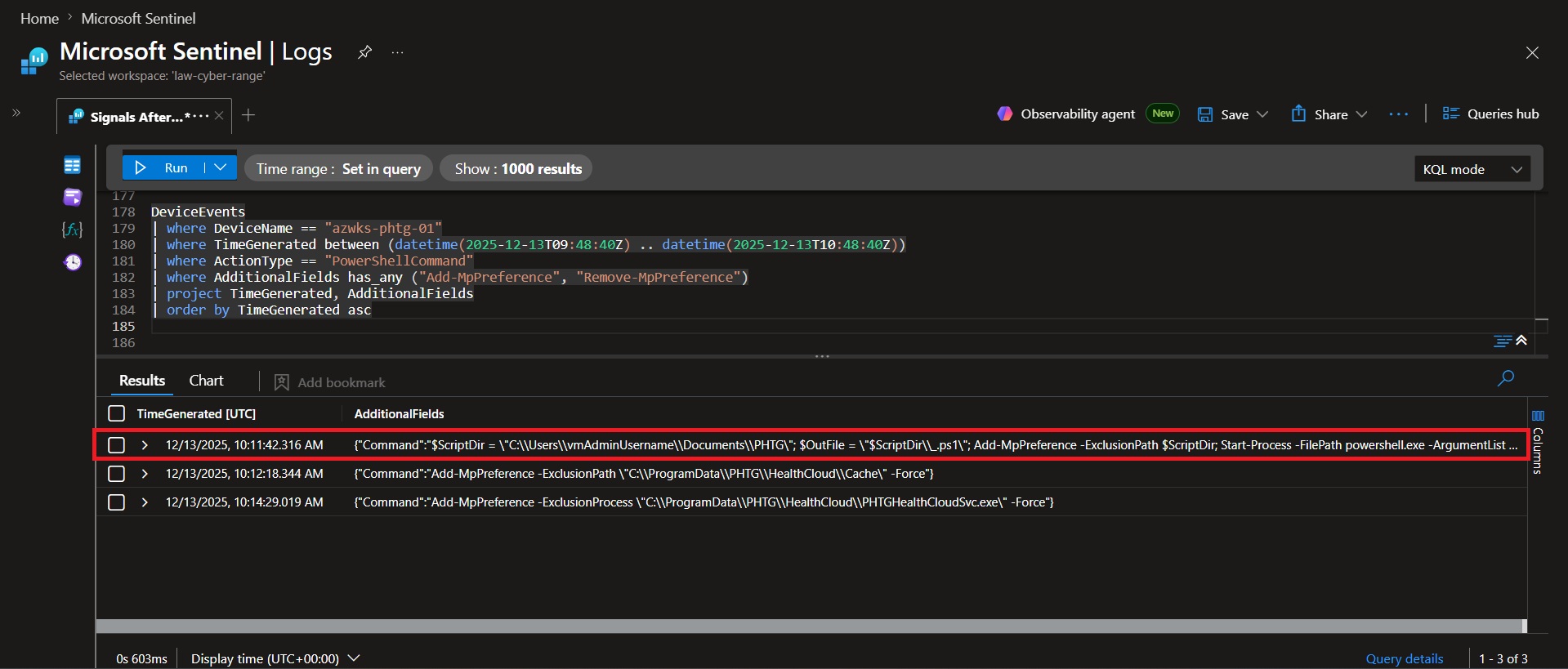 ### 📌 Findings
Analysis of PowerShell command telemetry identified a temporary Defender exclusion applied to `C:\Users\vmAdminUsername\Documents\PHTG`, the directory containing the operator's staging script. The exclusion was added using `Add-MpPreference -ExclusionPath` and removed moments later using `Remove-MpPreference -ExclusionPath`, demonstrating an intentional add-then-remove pattern.
### 💡 Why it matters
- Temporarily disabling Defender inspection creates a short execution window for attacker tooling.
- Immediate removal of the exclusion reduces visible evidence of Defender tampering.
- This technique balances payload execution success with operational stealth.
### Conclusion
The operator temporarily excluded `C:\Users\vmAdminUsername\Documents\PHTG` from Microsoft Defender scanning, then removed the exclusion immediately afterward. This allowed the payload to run without Defender interference while minimizing evidence of a persistent Defender exclusion.
### 📌 Findings
Analysis of PowerShell command telemetry identified a temporary Defender exclusion applied to `C:\Users\vmAdminUsername\Documents\PHTG`, the directory containing the operator's staging script. The exclusion was added using `Add-MpPreference -ExclusionPath` and removed moments later using `Remove-MpPreference -ExclusionPath`, demonstrating an intentional add-then-remove pattern.
### 💡 Why it matters
- Temporarily disabling Defender inspection creates a short execution window for attacker tooling.
- Immediate removal of the exclusion reduces visible evidence of Defender tampering.
- This technique balances payload execution success with operational stealth.
### Conclusion
The operator temporarily excluded `C:\Users\vmAdminUsername\Documents\PHTG` from Microsoft Defender scanning, then removed the exclusion immediately afterward. This allowed the payload to run without Defender interference while minimizing evidence of a persistent Defender exclusion.
🚩 Flag 25: Startup Execution Validation
### 🎯 Objective Confirm that the deployed persistence mechanism successfully executed after configuration. DeviceProcessEvents | where DeviceName == "azwks-phtg-01" | where TimeGenerated > datetime(2025-12-13T10:12:59Z) | where ProcessCommandLine has "HealthCloudTray.ps1" | project TimeGenerated, ProcessCommandLine | order by TimeGenerated asc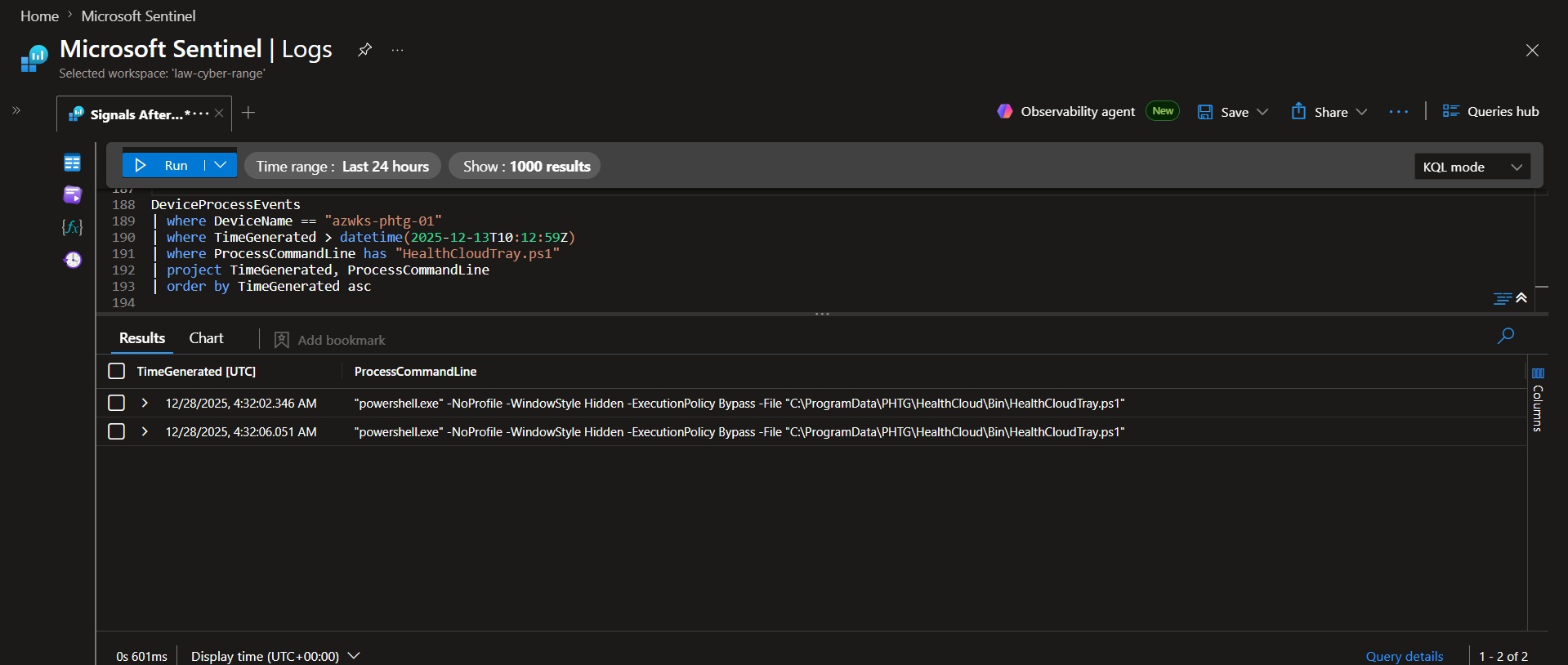 ### 📌 Findings
Analysis of DeviceProcessEvents identified two executions of `HealthCloudTray.ps1` after the persistence mechanisms were configured. Both executions launched PowerShell with hidden window execution and execution policy bypass parameters, confirming that the startup persistence mechanism was actively triggering.
### 💡 Why it matters
- Persistence mechanisms are only valuable to an attacker if they successfully execute.
- Observing actual execution validates that the Run key and Startup Folder persistence methods functioned as intended.
- Execution events provide evidence that the operator's persistence survived long enough to trigger after system startup or user logon.
### Conclusion
The `HealthCloudTray.ps1` startup command executed 2 times, confirming that the configured persistence mechanism successfully fired during the investigation period.
### 📌 Findings
Analysis of DeviceProcessEvents identified two executions of `HealthCloudTray.ps1` after the persistence mechanisms were configured. Both executions launched PowerShell with hidden window execution and execution policy bypass parameters, confirming that the startup persistence mechanism was actively triggering.
### 💡 Why it matters
- Persistence mechanisms are only valuable to an attacker if they successfully execute.
- Observing actual execution validates that the Run key and Startup Folder persistence methods functioned as intended.
- Execution events provide evidence that the operator's persistence survived long enough to trigger after system startup or user logon.
### Conclusion
The `HealthCloudTray.ps1` startup command executed 2 times, confirming that the configured persistence mechanism successfully fired during the investigation period.
🚩 Flag 26: Custom Event Log Source Purpose
### 🎯 Objective Determine the purpose and operational benefit of the custom Windows Event Log source registration. ### 🔍 Evidence Previously identified registry key: `HKEY_LOCAL_MACHINE\SYSTEM\ControlSet001\Services\EventLog\Application\PHTGHealthCloud` ### 📌 Findings Analysis identified the registration of PHTGHealthCloud as a custom Windows Application Event Log source. This configuration enables the operator's tooling to generate entries in the Windows Application Log through the standard Event Log API. ### 💡 Why it matters - Allows tooling to write directly to the Windows Application Event Log. - Uses a trusted Windows logging mechanism. - Helps malicious telemetry blend in with legitimate application events. ### Conclusion Registering the PHTGHealthCloud event source allows the tooling to write entries to the Windows Application event log via the Event Log API, giving the operator a trusted-looking place to store telemetry and status information that blends in with legitimate application events and receives less scrutiny.🚩 Flag 27: LSASS Access Anomaly
### 🎯 Objective Identify non-standard access to LSASS and determine the responsible process and account context. DeviceEvents | where DeviceName == "azwks-phtg-01" | where TimeGenerated between (datetime(2025-12-13T09:48:40Z) .. datetime(2025-12-13T10:48:40Z)) | where ActionType == "OpenProcessApiCall" | project TimeGenerated, InitiatingProcessAccountName, InitiatingProcessFileName, FileName, FolderPath, AdditionalFields | sort by TimeGenerated asc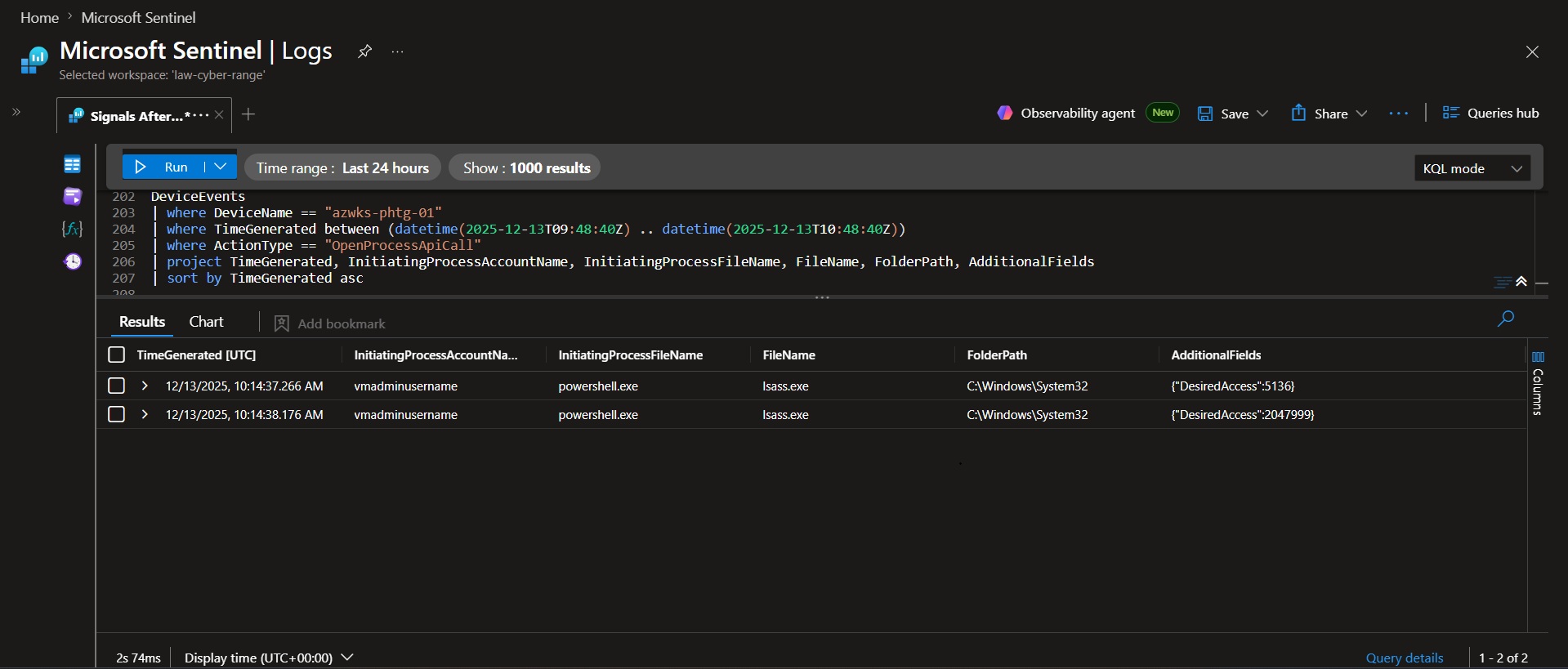 ### 📌 Findings
Analysis of OpenProcessApiCall events identified 139 attempts to access `lsass.exe` during the investigation window. Most activity originated from expected system and security-related processes, including Microsoft Defender and Windows management components. However, two events showed `powershell.exe` accessing `lsass.exe` under the vmadminusername account context, making it the only non-system access pattern observed.
### 💡 Why it matters
- LSASS stores authentication material and is a common target for credential access activity.
- Most LSASS access events originate from trusted security products or system processes.
- PowerShell accessing LSASS under a user account stands out from the expected baseline and warrants investigation.
### Conclusion
The anomalous LSASS access was performed by `powershell.exe` running under the `vmadminusername` account, distinguishing it from the baseline system and security-process activity observed throughout the investigation window.
### 📌 Findings
Analysis of OpenProcessApiCall events identified 139 attempts to access `lsass.exe` during the investigation window. Most activity originated from expected system and security-related processes, including Microsoft Defender and Windows management components. However, two events showed `powershell.exe` accessing `lsass.exe` under the vmadminusername account context, making it the only non-system access pattern observed.
### 💡 Why it matters
- LSASS stores authentication material and is a common target for credential access activity.
- Most LSASS access events originate from trusted security products or system processes.
- PowerShell accessing LSASS under a user account stands out from the expected baseline and warrants investigation.
### Conclusion
The anomalous LSASS access was performed by `powershell.exe` running under the `vmadminusername` account, distinguishing it from the baseline system and security-process activity observed throughout the investigation window.
🚩 Flag 28: Access Right Escalation
### 🎯 Objective Determine the level of access obtained to LSASS and identify evidence of privilege escalation toward full process access. DeviceEvents | where DeviceName == "azwks-phtg-01" | where TimeGenerated between (datetime(2025-12-13T09:48:40Z) .. datetime(2025-12-13T10:48:40Z)) | where ActionType == "OpenProcessApiCall" | project TimeGenerated, AdditionalFields | sort by TimeGenerated asc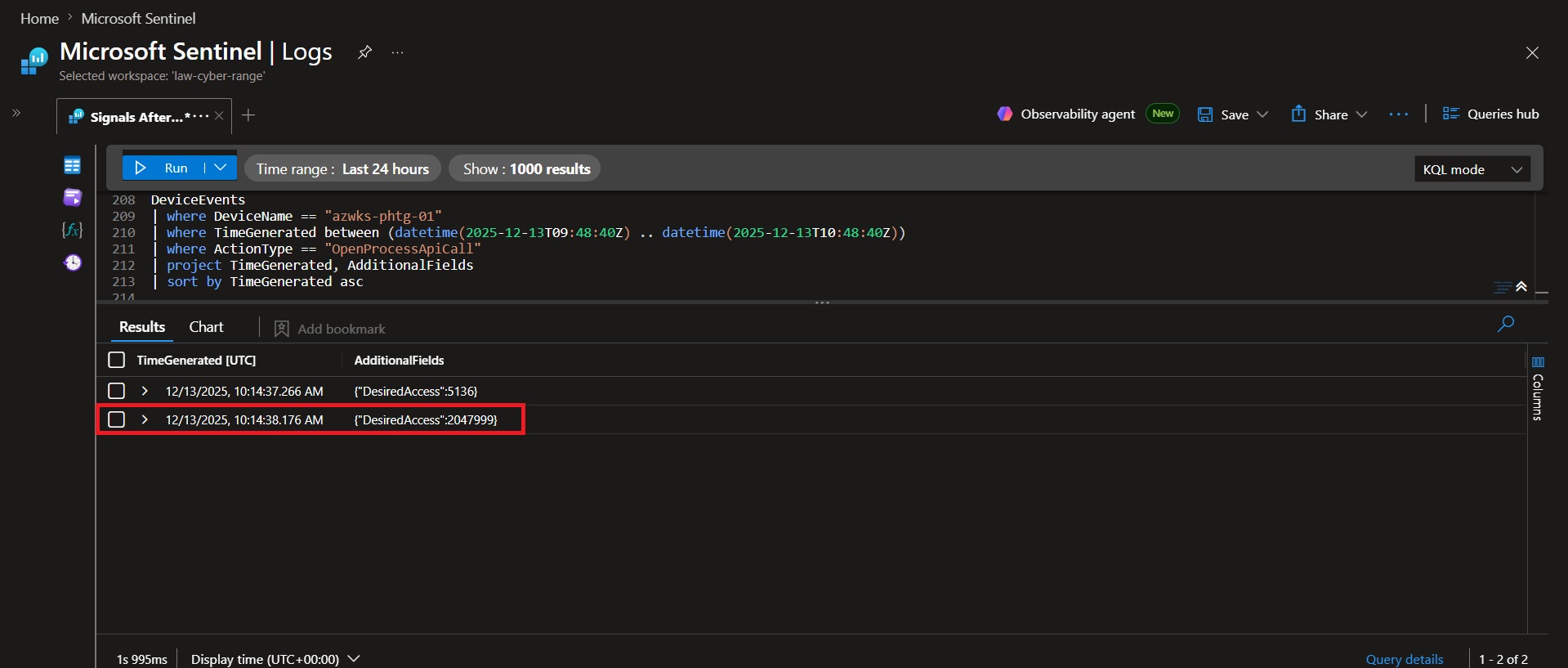 ### 📌 Findings
Analysis of LSASS access events identified two sequential DesiredAccess values requested by PowerShell. The first request used `5136 (0x1410)`, while the second used `2047999 (0x1F3FFF)`. The latter corresponds to PROCESS_ALL_ACCESS, granting full access to the LSASS process.
### 💡 Why it matters
- LSASS stores authentication material and credentials.
- Full process access enables memory inspection and credential theft techniques.
- Escalating access rights indicates increasing control over the target process.
### Conclusion
The DesiredAccess value ``2047999 (0x1F3FFF)`` grants full access to LSASS. The escalation from limited access to full process access is significant because it enables actions such as reading LSASS memory and accessing stored authentication material.
### 📌 Findings
Analysis of LSASS access events identified two sequential DesiredAccess values requested by PowerShell. The first request used `5136 (0x1410)`, while the second used `2047999 (0x1F3FFF)`. The latter corresponds to PROCESS_ALL_ACCESS, granting full access to the LSASS process.
### 💡 Why it matters
- LSASS stores authentication material and credentials.
- Full process access enables memory inspection and credential theft techniques.
- Escalating access rights indicates increasing control over the target process.
### Conclusion
The DesiredAccess value ``2047999 (0x1F3FFF)`` grants full access to LSASS. The escalation from limited access to full process access is significant because it enables actions such as reading LSASS memory and accessing stored authentication material.
🚩 Flag 29: Credential Dump Confirmation
### 🎯 Objective Confirm whether the operator progressed beyond handle access and successfully read memory from LSASS. DeviceEvents | where DeviceName == "azwks-phtg-01" | where TimeGenerated between (datetime(2025-12-13T09:48:40Z) .. datetime(2025-12-13T10:48:40Z)) | where ActionType == "ReadProcessMemoryApiCall" | project TimeGenerated, ActionType, FileName, InitiatingProcessFileName, InitiatingProcessAccountName, AdditionalFields | order by TimeGenerated asc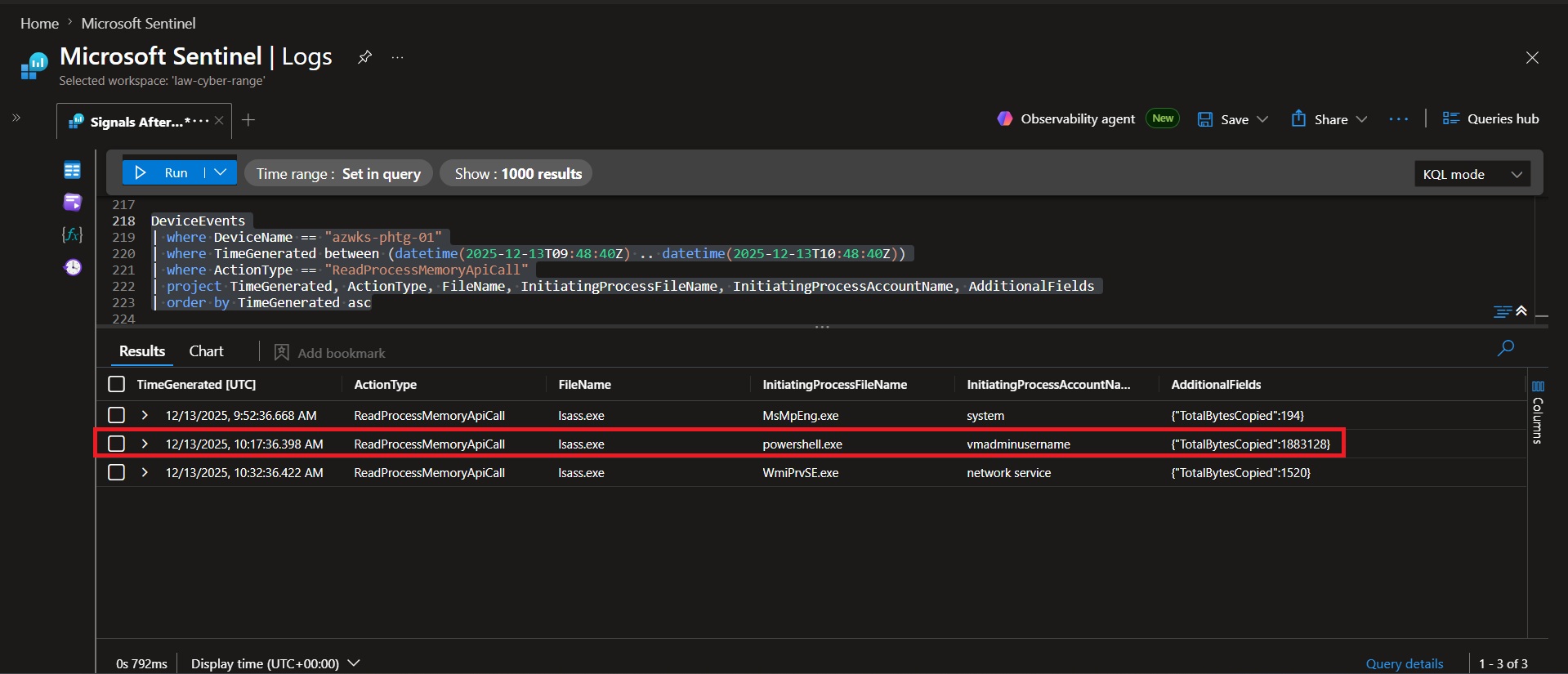 ### 📌 Findings
Analysis of DeviceEvents identified a `ReadProcessMemoryApiCall` event involving `lsass.exe` during the investigation window. The event was initiated by `powershell.exe` under the `vmadminusername` account, confirming activity beyond simple handle access.
### 💡 Why it matters
- `OpenProcessApiCall` only proves that a handle to LSASS was opened.
- `ReadProcessMemoryApiCall` confirms the operator actually read memory from LSASS.
- Reading LSASS memory is consistent with credential dumping activity.
### Conclusion
The ActionType that confirmed LSASS memory was read was `ReadProcessMemoryApiCall`. This event confirmed credential-access behavior because PowerShell moved from opening LSASS to actually reading its memory.
### 📌 Findings
Analysis of DeviceEvents identified a `ReadProcessMemoryApiCall` event involving `lsass.exe` during the investigation window. The event was initiated by `powershell.exe` under the `vmadminusername` account, confirming activity beyond simple handle access.
### 💡 Why it matters
- `OpenProcessApiCall` only proves that a handle to LSASS was opened.
- `ReadProcessMemoryApiCall` confirms the operator actually read memory from LSASS.
- Reading LSASS memory is consistent with credential dumping activity.
### Conclusion
The ActionType that confirmed LSASS memory was read was `ReadProcessMemoryApiCall`. This event confirmed credential-access behavior because PowerShell moved from opening LSASS to actually reading its memory.
标签:IP 地址批量处理, KQL, Microsoft Sentinel, 安全运营, 扫描框架