ChrisHuber1/KustoForge
GitHub: ChrisHuber1/KustoForge
KustoForge:微软安全和Azure服务的桌面KQL查询构建器。
Stars: 45 | Forks: 4
# KustoForge
一个用于微软安全和Azure服务的桌面KQL(Kusto查询语言)查询构建器。通过基于表单的GUI构建语法正确的KQL查询,而不是从头开始编写。
为SOC分析师、安全工程师、云管理员以及任何使用微软KQL服务的人士而构建。
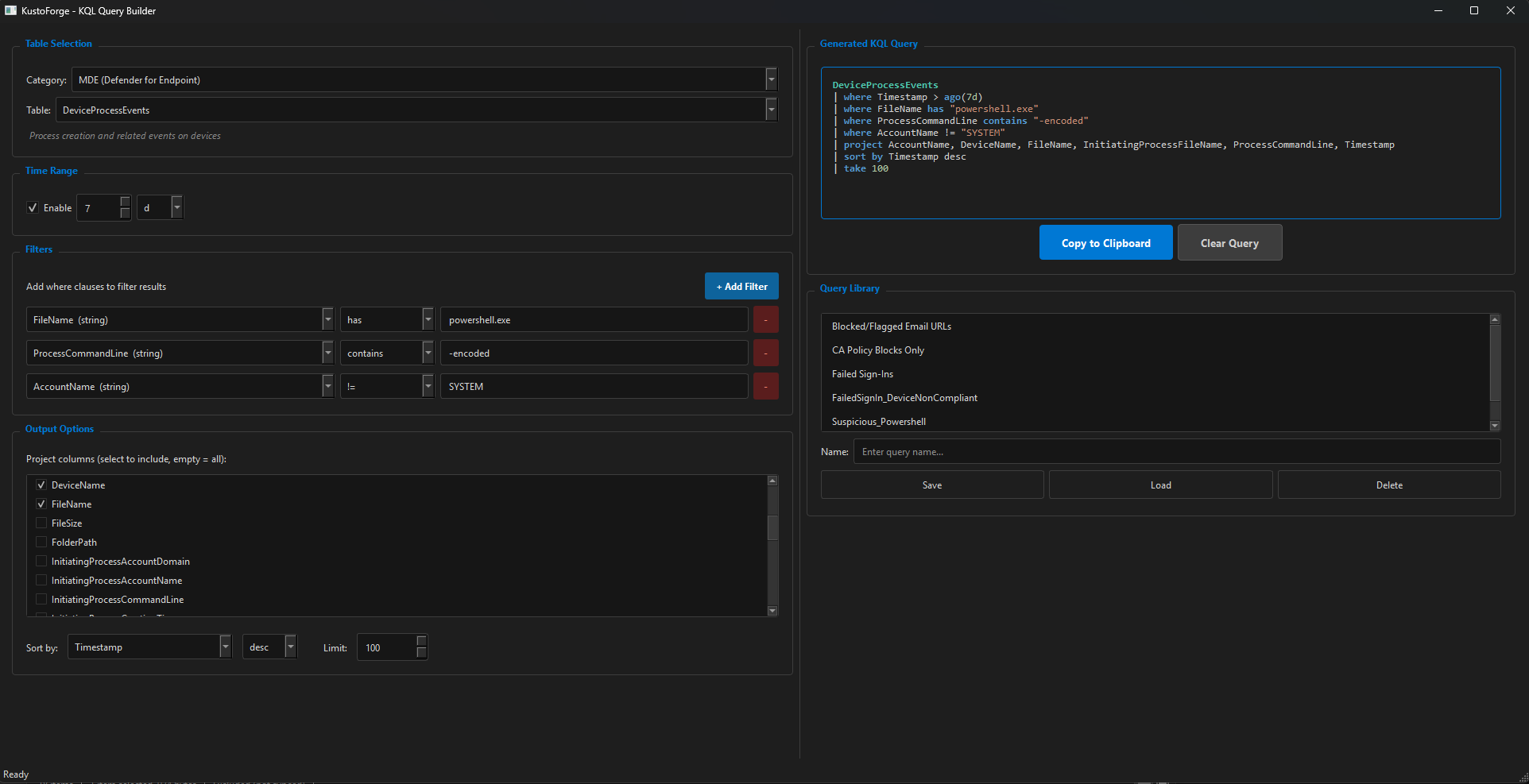
## 功能
- **基于表单的查询构建** - 选择一个表,添加过滤器,选择输出列,并获取有效的KQL
- **9个服务类别中的52个表** - 完全覆盖微软KQL生态系统
- **智能运算符选择** - 运算符根据列数据类型(字符串、整数、日期时间、布尔值、动态)变化
- **实时查询预览** - 在填写表单时实时查看KQL更新,带有语法高亮
- **查询库** - 在本地JSON文件中保存、加载和管理命名查询
- **复制到剪贴板** - 一键复制生成的查询
- **深色主题** - 专业深色UI,带有微软蓝色强调
- **键盘快捷键** - Ctrl+Shift+C(复制),Ctrl+S(保存),Ctrl+N(清除)
## 表覆盖范围
| 类别 | 表 | 示例 |
|---|---|---|
| **MDE(终端点Defender)** | 9 | DeviceProcessEvents, DeviceNetworkEvents, DeviceFileEvents, AlertInfo |
| **身份(Entra ID)** | 4 | SigninLogs, AADSignInEventsBeta, IdentityLogonEvents |
| **电子邮件(Defender for Office 365)** | 3 | EmailEvents, EmailAttachmentInfo, EmailUrlInfo |
| **漏洞管理** | 2 | DeviceTvmSoftwareVulnerabilities, DeviceTvmSoftwareInventory |
| **Microsoft Sentinel** | 11 | SecurityEvent, Syslog, CommonSecurityLog, SecurityAlert, SecurityIncident |
| **Azure Monitor / Log Analytics** | 9 | Heartbeat, Perf, Event, ContainerLog, KubeEvents, VMConnection |
| **Application Insights** | 8 | requests, exceptions, traces, dependencies, pageViews |
| **Azure Resource Graph** | 5 | Resources, ResourceContainers, SecurityResources, PolicyResources |
| **Defender for Cloud Apps** | 1 | CloudAppEvents |
## 支持的KQL运算符
| 数据类型 | 运算符 |
|---|---|
| **字符串** | `==`, `!=`, `in`, `!in`, `contains`, `!contains`, `has`, `!has`, `startswith`, `endswith`, `matches regex` |
| **整数** | `==`, `!=`, `in`, `!in`, `>`, `<`, `>=`, `<=`, `between` |
| **日期时间** | `ago()`, `>`, `<`, `>=`, `<=`, `between` |
| **布尔值** | `==`, `!=` |
| **动态** | `contains`, `has`, `!has`, `array_length() >` |
## 安装
### 先决条件
- Python 3.10或更高版本
- pip(Python包管理器)
### 选项1:克隆并运行(推荐)
```
git clone https://github.com/ChrisHuber1/KustoForge.git
cd KustoForge
pip install -r requirements.txt
python main.py
```
### 选项2:作为包安装
```
git clone https://github.com/ChrisHuber1/KustoForge.git
cd KustoForge
pip install .
kustoforge
```
### 选项3:直接下载
1. 从[发布](https://github.com/ChrisHuber1/KustoForge/releases)页面下载最新版本
2. 解压
3. 运行`pip install -r requirements.txt`
4. 运行`python main.py`
## 使用
1. **从顶部下拉菜单中选择一个类别和表**
2. **设置时间范围**(默认启用,使用KQL `ago()`语法)
3. **使用“+添加过滤器”按钮添加过滤器** - 选择一个列、运算符和值
4. **检查您想要的结果中的输出列**(如果不勾选所有列,则获取所有列)
5. **设置排序和限制选项**
6. **将查询复制到剪贴板**并将其粘贴到您的KQL环境中:
- **Defender Advanced Hunting**:security.microsoft.com > Hunting > Advanced Hunting
- **Sentinel**:portal.azure.com > Microsoft Sentinel > Logs
- **Log Analytics**:portal.azure.com > Log Analytics workspace > Logs
- **Azure Resource Graph**:portal.azure.com > Resource Graph Explorer
- **Application Insights**:portal.azure.com > Application Insights > Logs
### 保存查询
1. 使用表单构建您的查询
2. 在查询库下的“名称”字段中输入名称
3. 点击“保存” - 保存完整的表单状态,而不仅仅是查询文本
4. 加载任何保存的查询以恢复完整的表单并继续编辑
### 示例:查找失败的登录尝试
| 字段 | 值 |
|---|---|
| 类别 | 身份(Entra ID) |
| 表 | AADSignInEventsBeta |
| 时间范围 | 7d |
| 过滤器 | ErrorCode != 0 |
| 过滤器 | ErrorCode !in 700082, 50140 |
| 项目 | Timestamp, AccountUpn, ErrorCode, Country, City, IPAddress, ConditionalAccessStatus |
| 排序 | Timestamp desc |
| 限制 | 100 |
生成:
```
AADSignInEventsBeta
| where Timestamp > ago(7d)
| where ErrorCode != 0
| where ErrorCode !in (700082, 50140)
| project AccountUpn, City, ConditionalAccessStatus, Country, ErrorCode, IPAddress, Timestamp
| sort by Timestamp desc
| take 100
```
## 项目结构
```
KustoForge/
main.py # App entry point, dark theme, main window
schemas.py # 52 table definitions with columns and types
engine.py # KQL query assembly (pure functions, no Qt)
ui_builder.py # All GUI widgets, filter rows, query library
requirements.txt # Python dependencies
pyproject.toml # Package metadata
query_library.json # Created at runtime (not tracked in git)
```
## 贡献
欢迎贡献。常见的帮助方式:
- **添加表** - 在`schemas.py`中添加新的表模式,遵循现有模式
- **添加运算符** - 在`engine.py`中扩展`OPERATORS_BY_TYPE`
- **报告问题** - 如果表模式错误或缺少列,请打开一个问题
- **请求功能** - 总结、扩展、加入支持等
`schemas.py`中的每个表都遵循以下模式:
```
"TableName": {
"description": "What this table contains",
"columns": OrderedDict({
"ColumnName": {"type": "string", "desc": "Column description"},
# types: string, int, datetime, bool, dynamic
}),
},
```
## 许可证
MIT许可证 - 有关详细信息,请参阅[LICENSE](LICENSE)。
## 作者
**Chris Huber** - 网络安全专业人士和讲师
- GitHub: [@ChrisHuber1](https://github.com/ChrisHuber1)
标签:Azure Monitor, Azure服务, Azure资源图, Defender for Endpoint, Defender for Office 365, Entra ID, GPT, GUI工具, JSON库, KQL查询, KustoForge, Kusto查询语言, Microsoft Sentinel, Microsoft安全, TLS抓取, Vulnerability Management, 云管理员, 代码生成, 复制到剪贴板, 威胁情报, 安全工程师, 安全运营中心, 实时预览, 应用洞察, 开发者工具, 快捷键, 暗色主题, 查询构建器, 桌面工具, 渗透测试工具, 漏洞管理, 网络映射, 表单界面, 软件安全, 逆向工具