House-lovers7/supabase-rls-guard
GitHub: House-lovers7/supabase-rls-guard
一个零配置的静态扫描 CLI,在本地解析 Supabase migration SQL 以在部署前发现行级安全配置错误,无需连接数据库。
Stars: 1 | Forks: 1
# Supabase RLS Guard
[](https://github.com/House-lovers7/supabase-rls-guard/actions/workflows/ci.yml)
[](https://www.npmjs.com/package/supabase-rls-guard)
[](./LICENSE)
[](https://nodejs.org)
```
npx supabase-rls-guard ./supabase/migrations
```
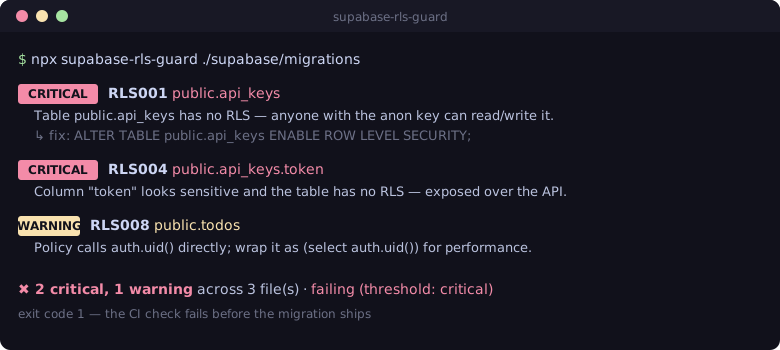
### 在 pull request 中将其拦截
将以下内容放入 `.github/workflows/rls-guard.yml` 中,以使任何添加了危险 RLS migration 的 PR 失败(结果将作为内联注解显示在 diff 上):
```
name: rls-guard
on:
pull_request:
paths: ['supabase/migrations/**.sql']
jobs:
rls-guard:
runs-on: ubuntu-latest
steps:
- uses: actions/checkout@v4
- uses: actions/setup-node@v4
with:
node-version: 22
- run: npx supabase-rls-guard ./supabase/migrations --format github
```
更多方案 — SARIF / GitHub Code Scanning、pre-commit、GitLab CI — 详见 [docs/ci-integration.md](./docs/ci-integration.md)。
## 为什么会有这个项目
AI 辅助开发(Cursor、Lovable、Bolt、Claude Code、Codex…)让你能在半天内轻松构建出一个 Supabase 应用。它同样也很容易让你发布一个**没有启用 Row Level Security** 的 `public` 表,导致你的数据库能够被任何拥有 anon/publishable key 的人读取——甚至写入。
这并非假设。**[CVE-2025-48757](https://supabase.com/blog/supabase-security-2025-retro)** 发现,在 170 个 AI 构建的项目中,**10.3%** 的分析端点可以被未经身份验证的请求读取,原因就是从未启用 RLS。
Supabase 自带的 [Security Advisor](https://supabase.com/docs/guides/database/database-linter) 可以捕获这些问题——但只能在你部署并连接到实时数据库**之后**。`supabase-rls-guard` 运行在你本地的 `.sql` 文件上,因此它可以在你的编辑器、pre-commit hook 或 PR 的 CI 中将其拦截。
### 在真实项目中得到验证
在 **14 个真实的 Supabase 项目**上运行时,supabase-rls-guard **纯粹通过本地的 migration 文件**重现了**两个实时的 Supabase Security Advisor 警报**(`rls_disabled_in_public` 和 `sensitive_columns_exposed`)——也就是说,它本可以在部署前就发现这些问题。它还发现了仪表板尚未标记的、包含 2FA 密钥和 session token 且已禁用 RLS 的额外表。(仅提供汇总数据——不发布任何项目名称、schema 或数据。)
## 检查内容
18 条规则,在重合之处与 Supabase 官方的 [Splinter](https://github.com/supabase/splinter) lint 目录保持一致。运行 `npx supabase-rls-guard --list-rules` 获取实时列表,或查看 [docs/rules.md](./docs/rules.md) 了解详情和修复方法。
| ID | 严重性 | 捕获内容 |
| --- | --- | --- |
| `RLS001` | 严重 | API 暴露 schema 中的表未启用 RLS |
| `RLS002` | 警告 | 启用了 RLS 但不存在策略(每次读取都返回空) |
| `RLS003` | 严重 | 存在策略但从未启用 RLS —— 策略无效 |
| `RLS004` | 警告/信息 | 未启用 RLS 的表上存在敏感列(`password`、`token`、`ssn`…) |
| `RLS005` | 严重 | 在没有 RLS 的表上执行 `GRANT … TO anon` |
| `RLS006` | 严重/警告 | 带有 `USING (true)` 的宽松策略 |
| `RLS007` | 警告 | 没有 `TO` 角色的策略(对所有角色运行,包括 anon) |
| `RLS008` | 警告 | `auth.uid()` / `auth.jwt()` 未包裹在 `(select …)` 中(出于性能考虑) |
| `RLS009` | 严重 | 策略信任 `user_metadata`(用户可编辑 → 权限提升) |
| `RLS010` | 严重 | 没有 `security_invoker` 的视图(绕过调用者的 RLS) |
| `RLS011` | 警告 | 没有固定 `search_path` 的函数 |
| `RLS012` | 严重 | 暴露 schema 中的物化视图由 API 提供服务,但无法承载 RLS |
| `RLS013` | 信息 | `UPDATE` 策略省略了 `WITH CHECK`(Postgres 复用 `USING`)——如果是有意为之,请明确写出 |
| `RLS014` | 严重 | 暴露 schema 中的外部表由 API 提供服务,但绕过了 RLS |
| `RLS015` | 严重 | 暴露 schema 中的视图从 `auth.users` 查询(泄露用户 PII) |
| `RLS016` | 信息 | 策略在其判断条件中限制 `auth.role()` —— 首选使用 `TO ` 子句 |
| `RLS017` | 警告 | 针对相同角色 + 命令的多个宽松策略(在每一行上进行 OR 运算) |
| `RLS018` | 警告 | 一个 migration 执行了 `ALTER TABLE … DISABLE ROW LEVEL SECURITY` |
## 示例
**1. 一个带有典型错误的 migration** —— 一个没有 RLS 的公开表,持有一个 token:
```
-- supabase/migrations/001_api_keys.sql
create table public.api_keys (
id uuid primary key,
user_id uuid,
token text not null
);
```
**2. 工具在你部署前将其拦截**(并且以非零状态退出,导致 CI 失败):
```
$ npx supabase-rls-guard ./supabase/migrations
CRITICAL RLS001 public.api_keys
Table public.api_keys is in an API-exposed schema but RLS is not enabled — anyone with the anon/publishable key can read and write it.
↳ 001_api_keys.sql:1:1
↳ fix: ALTER TABLE public.api_keys ENABLE ROW LEVEL SECURITY;
CRITICAL RLS004 public.api_keys.token
Column public.api_keys.token looks sensitive and the table has no RLS — this data is exposed over the API.
✖ 2 critical across 1 file(s) · failing (threshold: critical) # exit 1
```
**3. 修复方案** —— 启用 RLS,并使用作用域受限的策略。(在*后续* migration 中启用 RLS 会正确地被接受。)
```
-- supabase/migrations/002_api_keys_rls.sql
alter table public.api_keys enable row level security;
create policy "api_keys_select_own"
on public.api_keys
for select
to authenticated
using ((select auth.uid()) = user_id);
```
```
$ npx supabase-rls-guard ./supabase/migrations
✔ No RLS issues found across 2 file(s). # exit 0
```
## 核心理念:migrations 是累积的
在 `001_*.sql` 中创建并在 `002_*.sql` 中启用 RLS 的表是**正确**的。
一个简单的逐文件扫描器会在 `001` 上标记出误报。
`supabase-rls-guard` 按时间戳顺序解析**每一个** migration,将它们折叠为*最终*的 schema 状态(将 `ENABLE`/`DISABLE`/`DROP`/`IF NOT EXISTS` 应用为状态转换),然后再对规则进行评估。你能看到所有 migration 运行后数据库的真实样貌——而不是逐文件的猜测。
在底层,它使用 **[libpg-query](https://github.com/launchql/libpg-query-node)** —— 真正的 PostgreSQL 解析器编译为 WASM —— 因此 dollar-quoted 的函数体、注释和字符串字面量绝不会产生误报。如果某个文件无法解析,它会透明地回退到健壮的正则表达式后端。
## 用法
```
# 扫描默认位置 (./supabase/migrations)
npx supabase-rls-guard
# 扫描指定路径(文件、目录或项目根目录)
npx supabase-rls-guard ./supabase/migrations
# 机器可读的输出
npx supabase-rls-guard --format json
npx supabase-rls-guard --format sarif > rls.sarif
# 在出现警告时也使 CI 失败
npx supabase-rls-guard --strict
# 列出所有规则
npx supabase-rls-guard --list-rules
```
### 选项
| 标志 | 描述 |
| --- | --- |
| `--format ` | 输出格式(默认 `text`) |
| `--strict` | 将警告视为失败 |
| `--fail-on ` | 触发非零退出的严重程度(默认 `critical`) |
| `--config ` | 使用特定的配置文件 |
| `--disable RLS002,RLS011` | 在此次运行中禁用规则 |
| `--backend ` | 解析器后端(默认 `auto`) |
| `--no-color` | 禁用 ANSI 颜色 |
| `--quiet` | 抑制 stderr 上的警告 |
| `--allow-empty` | 未找到 `.sql` 文件时退出代码为 0(默认:退出代码为 2) |
| `--list-rules` | 打印所有规则并退出 |
### 退出代码
| 代码 | 含义 |
| --- | --- |
| `0` | 没有达到或超过阈值的发现 |
| `1` | 存在达到或超过阈值的发现 |
| `2` | 工具/配置错误(标志值错误、找不到路径、**扫描了零个 `.sql` 文件** —— 参见 `--allow-empty`) |
## CI 集成
添加 GitHub Actions 工作流(参见 [docs/ci-integration.md](./docs/ci-integration.md)):
```
name: rls-guard
on:
pull_request:
paths: ['supabase/migrations/**.sql']
jobs:
rls-guard:
runs-on: ubuntu-latest
steps:
- uses: actions/checkout@v4
- uses: actions/setup-node@v4
with: { node-version: 22 }
- run: npx supabase-rls-guard ./supabase/migrations --format github
```
要通过 GitHub Code Scanning 获取 pull-request 警报,请输出 SARIF 并上传它 —— 参见 [docs/ci-integration.md](./docs/ci-integration.md)。
## 配置
在你的 repo 根目录放置一个 `.rlsguardrc.json`(或 `package.json` 中的 `rlsguard` 键)。所有字段均为可选:
```
{
// schemas exposed over the Data API (default: ["public"])
"exposedSchemas": ["public"],
// tables that are intentionally world-readable (suppresses RLS001/RLS006)
"publicTables": ["public.blog_posts"],
// fail the build at this severity (default: "critical")
"failOn": "critical",
// turn rules off
"disabledRules": ["RLS011"],
// override a rule's severity
"severity": { "RLS010": "warning" },
// extend the sensitive-column keyword lists
"sensitiveColumns": { "critical": ["pan", "vat_number"] }
}
```
### 内联抑制
```
-- rls-guard-disable-next-line RLS001
create table public.intentionally_public (id int);
-- rls-guard-disable-file RLS011
```
## 作为库使用
```
import { scan } from 'supabase-rls-guard'
const result = await scan({ path: 'supabase/migrations' })
console.log(result.summary) // { critical, warning, info, total, failed, ... }
for (const finding of result.findings) {
console.log(finding.ruleId, finding.target, finding.message)
}
```
## 对比
| 工具 | 运行时机 | 需要数据库? | 范围 |
| --- | --- | --- | --- |
| **supabase-rls-guard** | 编辑器 / pre-commit / PR CI | **否** | 本地 `.sql` migrations |
| Supabase Advisor / Splinter | 部署后 | 是(实时数据库) | 仪表板 |
| pgrls | 使用 Postgres 的 CI | 是(实时/临时数据库) | 内省 |
它是 Supabase Advisor 的**补充**,而不是替代品——它将同类检查向左移到了你发布代码之前。
## 非目标
- 它**不**连接到你的数据库,也绝不需要你的密钥。
- 它是对实时 Splinter linter 的静态近似,而不是替代品。
- 它不声称提供完整的安全覆盖——它捕获的是常见且代价高昂的错误。
- 它不解析每一个有效的 PostgreSQL 构造(`DO` 块中动态生成的 SQL 超出了范围)。
## 许可证
[MIT](./LICENSE) © House-lovers7。
本项目是独立的,未得到 Supabase Inc. 的附属认可或背书。
标签:LNA, MITM代理, Supabase, 动态分析, 测试用例, 自动化攻击, 行级安全, 静态代码扫描