M2Station/M2_GIT_DIFF
GitHub: M2Station/M2_GIT_DIFF
一款基于 Electron + React 构建的桌面应用,用于并排比较两个本地 Git 仓库的提交历史,通过多种匹配策略自动识别相同提交与 cherry-pick 关系,帮助开发者掌握跨仓库的代码同步与漂移状况。
Stars: 30 | Forks: 0
# M2_GIT_DIFF (Side-by-Side Git History Comparison Tool for Two Repos)
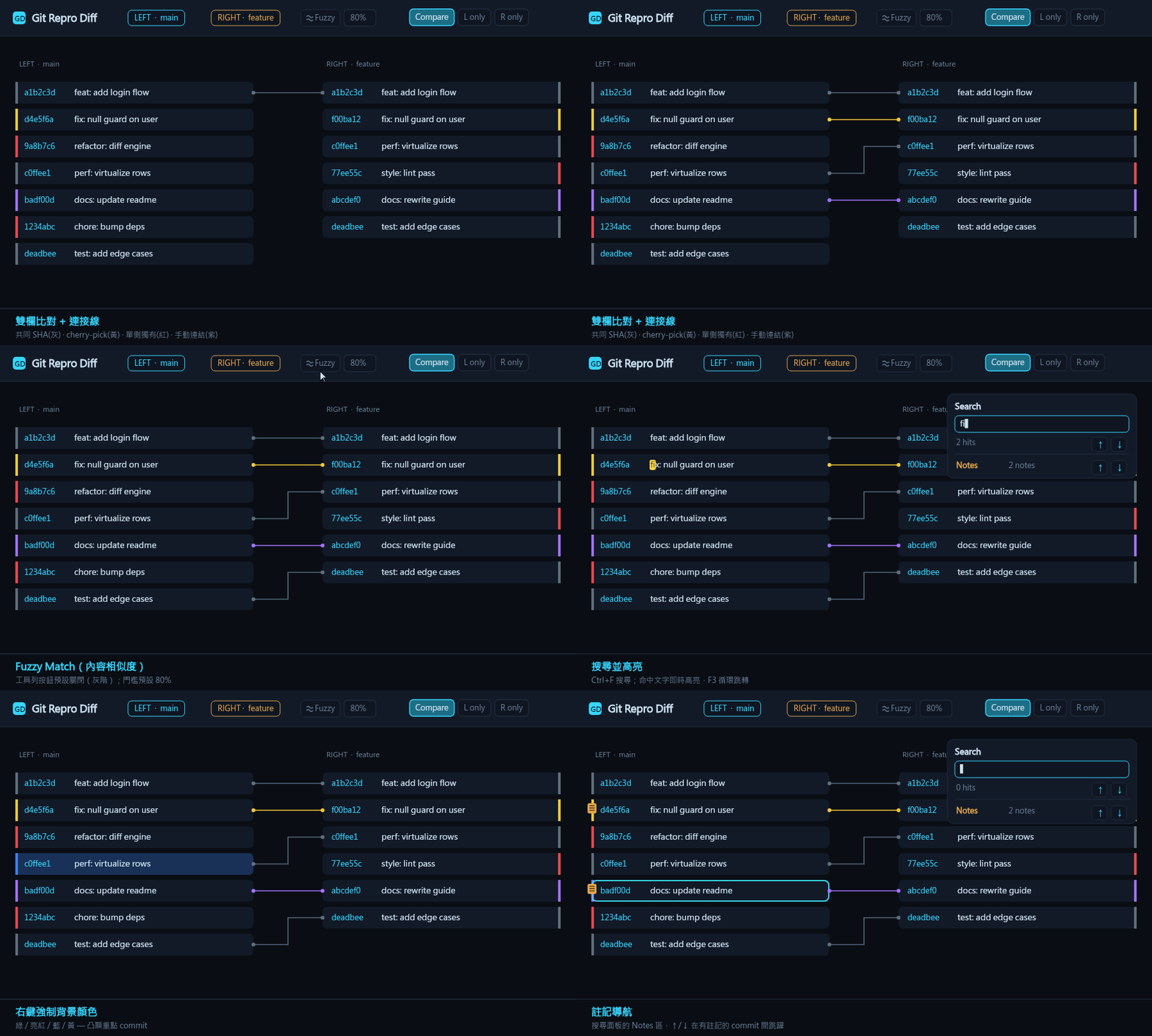
A desktop tool dedicated to **comparing the commit history of two local Git repositories (local repros)**, using a GitLens / GenLen–style HUD dark theme. The two repos are shown side by side, with colours and connection lines highlighting their differences. The application name and LOGO are **M2_GIT_DIFF**, shown in the toolbar, window title, and taskbar icon.
## Preview
## 1. Feature Overview
| Feature | Description | Colour |
| --- | --- | --- |
| Side-by-side columns | Open one local repo on each side, each showing its branches and commit list | — |
| Identical commit | **SHA exactly matches** on both sides | Grey background |
| Unique to each side | Commit existing on only one side | Red background |
| Cherry-pick (title) | **Same title but different SHA**, connected left-to-right with an aligned line | Yellow background + yellow dashed line |
| Cherry-pick (content / patch-id) | **Different** title but identical `git patch-id` (fingerprint of the actual changes) → matches even cherry-picks whose title was rewritten | Yellow background + yellow dotted line |
| **Fuzzy Match (content similarity)** | Toggleable fuzzy matching in the toolbar: when SHA / title / patch-id **all fail to match**, it compares the **actual changed lines of code** of the two commits; if the similarity (containment) ≥ threshold (default **80%**, adjustable 0–100%) they are matched. Suited to the **subset** scenario where "TOT changed multiple projects together, but the personal branch only changed one of them" | Pink background + thick pink dashed line |
| **Side-by-side compare (inline diff)** | Select any linked pair (click the connection line or a linked row) → a **⚡VS Compare** pill appears on the connector showing a pre-computed similarity %. Or **Shift+Click any two commits** (even unlinked, even in the same column) to drop them into a pick basket, then hit **Compare**. Either way you get a draggable, resizable window that fetches **each commit's full unified diff** and renders them **side by side, line by line** (`+`/`-` coloured), aligned by file path, with an overall and **per-file** Jaccard similarity %. Answers "did this cherry-pick actually stay identical, or did the code drift?" | Green add / red remove lines |
| **Left-right alignment** | Successfully matched rows (grey + yellow + pink) are placed on the **same display row**, making the connection line a horizontal straight line; unmatched commits fill the gaps | — |
| Search | Search by title / body / SHA / author / date; hits are highlighted, the rest dimmed, with a hit count shown | — |
| Filter mode | When on, keep only matching commits (compacted layout); when off, just dim the rest | — |
| **Command-line auto-open** | Launch with `-L -R ` to auto-load the left and right repros | — |
| **In-app repo picker** | "Open repo…" / `Alt`+`F` open a built-in keyboard-driven folder browser (instead of the OS dialog) that scans each level for git repositories (including nested submodules) and marks them, with a live name filter and a **repos-only** toggle (`Ctrl`+`G`); it remembers the last visited folder per side. Keys: `↑`/`↓` move, `Enter` open repo or descend, `→` descend (even into a repo, for submodules), `←`/`Backspace` go up, `Ctrl`+`Enter` select a non-repo folder, `Esc` cancel | — |
| **Manual links** | On an unmatched (red) commit, click the node ◗; click one on each side to manually link them; the colour is **purple** to distinguish from cherry yellow; can be detached and is auto-saved, so reopening the same repros auto-restores them | Purple background + purple solid line |
| **Single-repo mode** | Toolbar **View** toggles `⇄ Compare` / `◧ Left only` / `◨ Right only`; in single-side view that column expands to fill the whole window, hiding the gutter and lines; in single-column mode the commit background becomes **normal (transparent)**, while forced colours are still kept | — |
| **Per-row notes** | Right-click any commit → add/edit a note (a floating draggable editor, `Ctrl+Enter` to save); commits with notes show a 📝 icon, click it to view/edit/delete | — |
| **Forced background colour** | Right-click a commit → choose green / bright red / blue / yellow to force-override that row's background; clear a single row or all at once | Green/Bright red/Blue/Yellow |
| **Custom colour (5th colour)** | The last swatch in the context menu is an `` picker; after picking, it applies to that row and is recorded as the global 5th "quick" swatch (stored in `localStorage` as `customSwatch`); thereafter the context menu shows an extra custom swatch for reuse | Any HEX |
| **Per-commit virtual tag** | Right-click a commit → 🏷️ add/edit a virtual tag: a user-defined version label (e.g. a release name) shown inline next to the commit like a git tag, but painted in the **manual-link purple**. Saved per repo-pair in `localStorage` (`vtag:|`) and restored on reopening; clear it from the same single-line editor (`Enter` to save) | Purple tag |
| **Undo / redo** | `Ctrl`+`Z` undoes — and `Ctrl`+`Y` (or `Ctrl`+`Shift`+`Z`) redoes — the last edit to notes, forced colours, virtual tags, or manual links, so an accidental delete or wrong colour is one keystroke away from recovery. The toolbar's **↶ Undo** / **↷ Redo** buttons do the same. One shared history (up to 100 steps) covers all four annotation types in edit order; switching or swapping the repo pair starts a fresh history | — |
| **Git operation popup (terminal)** | After the per-side Git bar runs pull / fetch etc., a draggable floating window pops up showing that `git` command with full stdout/stderr and exit code; green border on success, red on failure; only a successful op reloads that repo | Green/Red border |
| **Error / Log panel** | A centralized **🧾 Log** (toolbar, top-right) collects every diagnostic in one place — git command failures (with the full transcript), cache save problems (when annotations can't be persisted to `localStorage`), repo-load / pagination errors, and export failures — so nothing vanishes into a transient banner. Each entry has a timestamp, level (error / warning / info), a category tag, and an expandable detail; filter by level, **copy all** to the clipboard, or clear. The button shows a red badge counting new problems since you last opened it, and the bottom error bar is clickable to jump straight in | Red badge |
| **Switch branch** | The per-side Git bar **⎇ Switch branch** button opens a draggable, resizable floating modal listing every branch of that repo — **local branches** plus one group per remote (e.g. `origin`) — in a collapsible tree (collapsed by default), with the **current branch** badged. A search box does case-insensitive substring filtering (auto-expanding matches); full keyboard navigation works (↑/↓ move, → expand / descend, ← collapse / ascend, `Enter` select-then-switch, `Ctrl+F` jump to search, `Esc` close), and right-clicking a folder/group toggles it. Picking a branch and confirming runs `git switch` via IPC; remote refs strip the remote prefix so git DWIM checks out a local tracking branch, and the result appears in the same Git operation popup before that side reloads | — |
| **Export panel** | Toolbar top-right **⬇ Export** opens one panel for all exports. Choose **Excel workbook (.xlsx)** to output aligned commits, forced colours, notes, hyperlinks, and manual links into a styled workbook, or **Markdown review report (.md)** to output a Typora-friendly, table-heavy review report. Both formats ask how many rows to export (default **ALL**) | Same data as the screen |
| **Export count confirmation** | Before exporting, a dialog asks how many rows to output (default **ALL**, or the first N); it warns on large data sets to avoid lag from exporting too much at once | — |
| **Commit detail popup** | `Ctrl`+left-click a commit → a floating window shows SHA / author / date (clearly labelled) plus the Markdown-rendered commit body (the identifying numbers of a **Merged PR** and each id under **Related work items** are underlined in the accent colour for quick scanning); the matched **Related item** is specially emphasised; a top-right **HL** input live-highlights matching text (auto-filled with the current search term when opened); movable, drag-resizable, auto-sized to content; **multiple can be open at once** (clicking the same one does not reopen it) | — |
| **Clickable commit links** | The commit detail popup shows links next to the SHA: **🔗 Web** opens that commit's remote page in the system default browser (auto-detects GitHub / GitLab / Gitea / ADO / Bitbucket); **🔀 PR {n}** opens each Merged PR's page; **🔍 #{n}** opens a host code-search for each related work-item id. On Excel export the SHA cell is also hyperlinked to the same remote URL | — |
| **VS Code Chat integration** | The detail popup's **💬 Chat** button invokes the locally installed VS Code (`code chat`), opening Copilot Chat (agent mode) with that repo as the workspace, auto-passing an English prompt describing the commit (you can run `git show ` inside chat to see the full diff); if VS Code is not installed, a hint is shown in the popup | — |
| Virtualization | Renders only the rows within the viewport, supporting smooth scrolling of large repos (thousands of commits) | — |
| **Keyboard navigation & back-to-top** | Arrow keys walk the commit list: `↑`/`↓` move the focus cursor within the current column (**clamped** at the top/bottom — no wrap-around), `←`/`→` switch columns (landing on the nearest row), `Enter` opens the focused commit's detail popup. When the cursor reaches the **last** commit of its column, a floating **back-to-top** button (▲) appears and smoothly scrolls that column back to the top | — |
| **Keyboard shortcuts help** | Toolbar top-right **❓ Help** opens a centred modal listing all shortcuts (keycap style); the bottom has a clickable `Powered by OA Hsiao` badge linking to the author's GitHub. Click the backdrop / ✕ / `Esc` to close | — |
| **Internationalization (i18n)** | Toolbar top-right **⚙ Settings** opens a settings popup to switch the UI language (currently **English** and **中文(繁體)** built in). Locale strings live in `src/locales/*.json`; the app uses Vite `import.meta.glob` to **auto-scan that directory** and decide which languages are supported—adding an `xx.json` makes it appear in the language list automatically, no code changes. The choice is stored in `localStorage` as `appLang` and remembered across restarts | — |
| **Multiple themes (Theme)** | The same **⚙ Settings** popup can switch the colour theme (**Low Key** (default dark), **Daylight** (light), **Army** (tactical olive), **Army (Dark)** (steel grey), **VS Code Dark** built in). Theme definitions live in `src/themes/*.json`, each file mapping a `vars` object to CSS custom properties (such as `--accent`, `--bg`); the app uses Vite `import.meta.glob` to **auto-scan that directory**—drop an `xx.json` in and it appears in the theme list automatically, no code changes. On switching it writes `vars` to `` and sets the `data-theme` attribute. The choice is stored in `localStorage` as `appTheme` and applied before React renders to avoid a flash of the wrong theme (FOUC) | — |
| Cache | Parsing results are cached versioned by HEAD SHA, so reopening the same repo skips re-parsing | — |
| LOGO / branding | LOGO + `M2_GIT_DIFF` name at the toolbar top-left; window title and favicon stay in sync | — |
Click any row with a link (grey/yellow/pink), or **click the connection line directly**, to highlight its corresponding line and dim the rest. Connection lines use **orthogonal (right-angle)** routing, and thicken on hover, with a bold glow when selected. After selecting, focus moves to the comparison area; press `Esc` or click an empty area to deselect.
**Fuzzy Match (content-similarity fuzzy matching)**: the **≈ Fuzzy Match** button to the left of Swap in the toolbar (greyscale when off, bright pink when on) toggles fuzzy matching, and the adjacent number box is the similarity threshold (0–100%, **default 80%**). When on, for commits that fail to match by SHA / title / patch-id, it fetches via IPC the **actual changed lines** of the commits on both sides (the `+`/`-` content of the diff, with headers stripped and deduplicated), and scores by **containment** $\frac{|A\cap B|}{\min(|A|,|B|)}$; a score ≥ threshold matches them with a **thick pink dashed line**, each commit matching at most once (higher scores prioritised). Using min as the denominator means a **subset can still score high**: for example, a TOT commit that changed two projects at once while the personal branch changed only one—the shared project's changed lines are fully contained → near 100%, and they still link up. To avoid false positives on tiny diffs, commits with fewer than 3 changed lines are excluded.
**Side-by-side compare (inline diff)**: after selecting a matched pair (click the connection line, or a grey/yellow/pink/purple linked row), a **⚡VS Compare** pill (a stylised "VS" lightning mark) appears on the selected connector in the centre gutter, pre-showing the two commits' content similarity % (the fuzzy score when available, an identical-SHA 100% for common pairs, or a quick Jaccard of any cached changed lines). You can also **Shift+Click any two commits** — they need not be linked, and may even be in the same column / repo — to add them to a floating *pick-to-compare* basket at the bottom of the window; once two are picked, its **Compare** button opens the same window for that ad-hoc pair. Clicking either entry point opens a floating **side-by-side diff window**: the renderer fetches each commit's full unified diff over IPC (`repo:commitDiff` → `git show --no-color --first-parent`), parses it into files / hunks (`parseUnifiedDiff` in `src/lib/diff.js`), and lays the two patches out in **two columns aligned by file path**, each line `+`/`-` coloured. The header shows the **overall** Jaccard similarity of the two commits' changed lines, and every file row shows its **per-file** similarity %; files touched on only one side are labelled accordingly. The window is draggable by its header and resizable from any edge/corner (mirroring the commit detail popup); press `Esc` to close. This makes it easy to verify whether a cherry-pick / fuzzy match truly carried the same code or quietly diverged. The window also has its **own built-in search** (a find bar under the header, or `Ctrl/Cmd+F` while it's focused): it highlights matches across both columns and file paths, shows a hit counter, and cycles hits with `Enter` / `F3` (`Shift` for previous). This search is **fully isolated** from the app's main `Ctrl+F` — the popup's hotkeys never leak out and the main search is never disturbed — though it is conveniently **seeded** with the app's current search keyword when opened.
**Manual links**: move the mouse over an unmatched (red) commit; a circular node ◗ appears on the centre side. Click one on the left, then one on the right to create a purple manual link. Click a linked node again to detach, or select the link and press `Delete` / `Backspace` to remove it. Manual links are stored in `localStorage` keyed by both repo paths, so **opening the exact same repros auto-RESUMEs and restores them** (recorded by SHA, still restorable after new commits are added).
**Storage location**: manual links live in the renderer's `localStorage`, with key `mlink:|` and value a JSON of `[{ leftSha, rightSha }, …]`. The purple **◗ Clear manual links** button in the toolbar (same colour as manual links) cancels **all manual links for the current repro pair and deletes that storage** at once (shows a count when links exist, disabled when none).
**Notes & forced-colour storage**: per-row notes and forced background colours are likewise stored in `localStorage` keyed by both repo paths—notes as `note:|` and colours as `color:|`, both values being `{ ":": }` objects. Per-commit **virtual tags** are stored the same way under `vtag:|`. The toolbar also has **📝 Clear notes** and **🎨 Clear colors** buttons to clear each at once.
**Context menu & detail popup**: right-clicking any commit opens a context menu (add/edit note, add/edit a 🏷️ virtual tag, forced background colour green/bright red/blue/yellow, clear colour). `Ctrl`+left-click opens the commit detail popup: SHA / author / date are clearly labelled at the top, and the body is shown with a built-in lightweight Markdown renderer (`src/lib/markdown.js`, HTML-escaped first then marked up, with links not navigating for safety); within the body, only the identifying numbers of a PR (the number after `Merged PR`) and each id in a `Related work items:` list are underlined in the accent colour so they stand out, while all other numbers and inline `code` spans are left untouched; if the commit has a match, a purple-highlighted **Related item** block shows the opposite-side commit, clickable to open another popup. The popup's top-right **HL** input live-highlights all matching text within that popup (case-insensitive), auto-filled with the current global search term when opened. The popup can be dragged by its title bar, resized from any edge/corner, with initial width auto-estimated from content length, and multiple can be open at once (clicking the same commit does not reopen it); press `Esc` to close all at once.
**Search panel & note navigation**: `Ctrl`+`F` opens a floating draggable search panel where you can choose the search scope (Title / Body / SHA / Author / Date), cycle hits with ↑ / ↓ or `F3` / `Shift`+`F3`, and use Filter to show only matching rows. Below the panel is a separate **📝 Notes** navigation area (distinct from search) that jumps between every commit with a note using ↑ / ↓ (display-row order, left column before right), scrolling it to centre and highlighting it. While the search panel is open, pressing `Esc` (regardless of focus) closes the panel and clears the term and highlights.
**Export panel**: Toolbar **⬇ Export** opens `ExportPrompt.jsx`, where you pick Excel or Markdown and choose **ALL** rows or the first N rows. Excel export keeps the workbook workflow. Markdown export is generated in `electron/markdownReport.js` via the `markdown:export` IPC and writes a review report with Summary, Cherry / Patch-id Matches, Unhandled Unique Commits, Outside Loaded Range, Fuzzy Matches To Review, Manual Links, Notes, and Aligned Review Rows. To keep Typora responsive, the final Aligned Review Rows table omits common aligned rows and reports that omitted count in the top field table; long subjects, tags, and notes are truncated for display while commit SHA cells link to the detected remote commit URL when available.
### How left-right alignment works
The match lines themselves may cross each other (non-monotonic); forcing everything to align would tangle the lines. So `alignLayout()`:
1. Sorts all matches (common + cherry) by left-column position.
2. Takes the **longest increasing subsequence (LIS)** of right-column positions as "anchors"—only this monotonic set of matches is placed on the same row, with horizontal lines.
3. The remaining non-monotonic matches keep their lines but stay diagonal.
4. Gaps between anchors are filled by each side's unmatched commits in order (sharing the same row where possible to shorten total height).
## 2. Technical Architecture
Electron (main process)
├─ electron/main.js Window creation, IPC handlers, folder picker dialog, Excel / Markdown export save dialogs
├─ electron/preload.js contextBridge secure bridge, exposes window.api (incl. exportExcel / exportMarkdown)
├─ electron/git.js Calls system git, parses git log → structured commits; getPatchIds / getDiffTexts (Fuzzy changed lines) / getCommitDiff (full unified diff for side-by-side compare); gitOp returns full stdout/stderr and exit code
├─ electron/excel.js ExcelJS generates styled .xlsx (colour fills, note cell comments, SHA hyperlink to remote commit URL, Manual Links worksheet)
├─ electron/markdownReport.js Builds the table-heavy Markdown review report (.md) with truncated display cells and remote commit links
├─ electron/fsdialog.js Directory listing for the in-app FolderPicker (dialog:listDir / dialog:rememberDir)
└─ electron/db.js better-sqlite3 cache layer (auto-falls back to in-memory cache when absent)
Renderer (React + Vite)
├─ src/main.jsx React entry
├─ src/App.jsx State management, diff computation, virtualized scrolling, filter logic
├─ src/styles.css HUD dark-theme styles
├─ src/lib/diff.js Core comparison algorithm (grey/red/yellow classification, links, search, left-right alignment alignLayout; parseUnifiedDiff / changedLineSet / patchSimilarity for the compare window)
├─ src/lib/constants.js Layout constants (row height, gutter width, overscan…)
├─ src/assets/logo.svg Toolbar LOGO (cyan M2 wordmark)
└─ src/components/
├─ Toolbar.jsx Top toolbar: LOGO + name, open repo, branch badges, stats, Fuzzy Match toggle + threshold, View mode toggle, search, Clear manual/notes/colors, Export panel
├─ RepoColumn.jsx Single-column virtualized rendering (only draws rows in the viewport)
├─ CommitRow.jsx Single commit row (absolute positioning + highlight + note icon + context menu + Ctrl-click detail)
├─ ConnectionLines.jsx SVG connection lines in the central gutter (degenerate to a horizontal line when endpoints share a row)
├─ SearchPanel.jsx Floating draggable search panel (scope selection, next/prev, Filter, plus a separate 📝 Notes navigation area)
├─ NotePopup.jsx Floating note editor/viewer (draggable)
├─ VtagPopup.jsx Floating single-line virtual-tag (version label) editor (draggable)
├─ RowMenu.jsx Right-click context menu (notes + virtual tag + forced background colour + custom 5th colour picker)
├─ RepoGitBar.jsx Per-side Git operation bar (pull / fetch…)
├─ GitTerminalPopup.jsx Git operation result popup (draggable, shows command/output/exit code, green border on success red on failure)
├─ BranchSwitchPopup.jsx Branch picker (draggable/resizable, collapsible local + per-remote tree, search box, full keyboard nav, runs git switch via IPC)
├─ FolderPicker.jsx In-app keyboard-driven repo/folder picker (replaces the OS dialog; scans for git repos incl. submodules, repos-only filter, remembers the last visited folder)
├─ ExportPrompt.jsx Unified export panel (Excel or Markdown, default ALL or first N rows)
├─ HelpPopup.jsx Keyboard shortcuts help popup (centred modal, keycap list, OA Hsiao badge, `Esc`/backdrop to close)
├─ SettingsPopup.jsx Settings popup (language selector + theme selector; locales from `src/locales`, themes from `src/themes`, both auto-scanned)
└─ CommitDetail.jsx Commit detail popup (Markdown rendering, Related item, 🔗 Web / 🔀 PR / 🔍 code-search links next to SHA, movable/resizable, multi-open, 💬 Chat opens VS Code)
└─ DiffComparePopup.jsx Side-by-side inline-diff compare window (fetches both commits' unified diffs, file-aligned two-column +/- view, overall + per-file similarity %, draggable/resizable)
**Multiple themes (Theme)**: theme definitions live in `src/themes/*.json` (one theme per file; the filename minus `.json` is the theme id, the file's `_meta.name` is the display name, and `vars` is the CSS custom-property map). `src/lib/theme.js` uses Vite `import.meta.glob('../themes/*.json', { eager: true })` to **auto-scan** that directory at build time, providing as many themes as files found—adding an `xx.json` makes it appear in the settings list automatically, no code changes. `ThemeProvider` wraps `App` (`src/main.jsx`); on switching, `applyTheme()` writes the theme's `vars` one by one to `document.documentElement`'s inline style and sets the `data-theme` attribute, and since every colour in `src/styles.css` is referenced via `var(--…)`, the skin changes instantly. The choice is stored in `localStorage` as `appTheme` (default: stored value → `low_key` → the first one scanned), and is applied once at module load to avoid a flash of the wrong theme (FOUC). Five themes are built in: **Low Key** (native dark), **Daylight** (light), **Army** (tactical olive), **Army (Dark)** (steel grey), **VS Code Dark**.
**Internationalization (i18n)**: locale strings live in `src/locales/*.json` (one language per file; the filename minus `.json` is the locale code, the file's `_meta.name` is the display name). `src/lib/i18n.js` uses Vite `import.meta.glob('../locales/*.json', { eager: true })` to **auto-scan** that directory at build time, providing as many languages as files found—adding a `ja.json` for Japanese makes it appear in the settings list automatically, no code changes. `I18nProvider` wraps `App` (`src/main.jsx`), and each component gets the translation function `t(key, vars)` via `useT()` (dot-path lookup, falling back to `en` then to the key itself, with `{var}` interpolation). The choice is stored in `localStorage` as `appLang` (default: stored value → `zh-TW` → `en` → the first one scanned).
There is also `public/icon.svg` (a transparent-background, gradient M wordmark icon, used as the favicon and the Electron window / taskbar icon). Running `node scripts/make-icon.mjs` generates a multi-size `public/icon.ico` from it, for use in the Windows Explorer context menu and the packaged application icon.
**VS Code Chat integration**: `CommitDetail.jsx`'s 💬 Chat button goes through `window.api.openInVSCodeChat` → the main process `vscode:chat` IPC, which resolves the VS Code path with `where code.cmd` then runs `code chat -r -m agent -`, piping the commit description prompt via **stdin** (not the command line, to avoid injection); if VS Code is not found it throws `VSCODE_NOT_FOUND`, shown as a hint in the popup. The prompt is entirely in English to avoid garbled text from stdin encoding.
**Tech stack**: Electron + React + Vite + better-sqlite3 (cache, optional).
## 3. Data Flow
1. User presses "Open repo…" (or `Alt`+`F`) → the in-app `FolderPicker` opens, listing directories via the `dialog:listDir` IPC (`electron/fsdialog.js`) and remembering the chosen folder via `dialog:rememberDir`.
2. `repo:load` IPC:
- Checks whether it is a git repository (whether `.git` exists).
- Looks up the cache (`db.js`) keyed by `repoPath::branch::limit`, versioned by HEAD SHA.
- On a miss, calls `git.js`'s `git log`, parses it, and writes to the cache.
3. `App.jsx` gets both repos → `computeDiff()` computes classification and links → `view` builds display rows by search/Filter → each column renders virtualized.
### git log parsing (electron/git.js)
Uses custom delimiters (`\x1f` for fields, `\x1e` for records) to avoid commit messages colliding with delimiters:
Corresponding fields: `sha / short / parents / author / authorEmail / authorDate / commitDate / subject / body`.
Default `limit = 2000` (see `DEFAULT_LIMIT`).
### Lazy pagination & cross-repo alignment
- **On open**, an automatic balancer in `App.jsx` compares the oldest loaded
commit on each side and pages the time-shallower one deeper until both windows
cover the same range, bounded per head by the auto-fill range (a Settings
value, default `100`, `0` = off).
- **Load more** is a two-phase manual control that takes over once clicked. When
the sides are misaligned the first click *aligns* them — it pulls the shallower
side straight down to the other side's oldest date in a single `--since`
request (`git.loadMoreCommits` via the `repo:loadMore` IPC). Once aligned, each
further click simply *loads more* on both sides together (a `PAGE_BATCH = 500`
`git log --skip`). A progress overlay (“Aligning…” / “Loading more…”) covers
the stage while the work is in flight, since the align pull can be large.
New commits are appended and deduped by SHA, so the existing diff / patch-id /
fuzzy passes re-run and enrich only the newcomers. The lazy `repo:loadMore` IPC
is deliberately uncached, and the per-head load cache is versioned (`CACHE_VERSION`
in `db.js`) so a payload-shape change like `hasMore` invalidates stale entries
instead of silently serving them back.
## 4. Comparison Algorithm (src/lib/diff.js)
`computeDiff(left, right, patchIds, manualLinks, fuzzy)` is multi-stage:
1. **Identical commit (grey)**: build a set by SHA; a SHA present on both sides → `status = 'common'`, creating a `type: 'common'` link.
2. **Cherry-pick — title (yellow, dashed)**: group commits not yet matched by SHA by "normalized title" (`normalizeSubject`: trim, lowercase, collapse whitespace), and pair same-title left/right in order → `status = 'cherry'`, creating a `type: 'cherry'` link.
3. **Cherry-pick — content / patch-id (yellow, dotted)**: for commits still unique after the first two steps, group and pair by `git patch-id` (the actual diff content fingerprint) → `status = 'cherry'`, creating a `type: 'patch'` link. Even with a rewritten title, content-identical cherry-picks still match.
4. **Manual links (purple)**: apply the user-created `manualLinks` (see §1), creating `type: 'manual'` links.
5. **Fuzzy Match — content similarity (pink, thick dashed)**: only runs when `fuzzy.enabled`. For still-unique commits, use `fuzzy.diffTexts` (the changed-line set per sha) to compute pairwise **containment** `inter / min(|A|,|B|)`; a score ≥ `fuzzy.threshold` matches → `status = 'fuzzy'`, creating a `type: 'fuzzy'` link; higher scores prioritised, each commit matches at most once, and those with fewer than 3 lines are skipped.
6. **Unique (red)**: the rest remain `status = 'unique'`.
Returns: `leftRows / rightRows` (each row carries `status`, `matchId`, `index`), `links`, and per-side stats `{ common, cherry, unique, fuzzy }`.
`matchesQuery(commit, query)`: case-insensitive substring match across subject / body / sha / short / author / authorDate.
### patch-id (content) matching data flow
- After `App.jsx`'s first `computeDiff` finishes SHA + title matching, it collects commits still `unique` on both sides and requests `git patch-id` from the main process via IPC `repo:patchIds`.
- `electron/git.js`'s `getPatchIds()` is **batched**: the whole batch of `git show` is piped at once to `git patch-id --stable`, for only two git calls total (not two per commit).
- The returned `sha → patchId` map is backfilled and `computeDiff` is recomputed, completing content-identical commits as yellow matches. Best-effort throughout; on failure it falls back to title matching. Each sha is queried only once.
### Fuzzy Match (content similarity) data flow
- Only activated when **≈ Fuzzy Match** is on in the toolbar. `App.jsx` collects commits still `unique` on both sides and requests each commit's changed lines from the main process via IPC `repo:diffTexts`.
- `electron/git.js`'s `getDiffTexts()` fetches the diffs of all specified shas in a **single** `git show` (NUL-delimited format), keeping only `+`/`-` content lines (excluding `+++`/`---` headers), deduplicated, signs preserved, up to 4000 lines per commit, returning `sha → string[]`.
- The returned changed lines are cached in `diffTexts` (per-sha, so adjusting the threshold needs no refetch), and passed with the threshold into `computeDiff`'s `fuzzy` parameter to recompute, completing similarity ≥ threshold as **pink** matches. Best-effort throughout.
### Left-right alignment layout (`alignLayout`)
`alignLayout(Lrows, Rrows, links)` is responsible for placing matched rows on the same display row:
- `longestIncreasingByPr()`: takes the LIS of right-column positions over "matches sorted by left-column position" (binary search + predecessor backtracking), yielding the monotonic anchor set.
- Fills unmatched rows from both sides between anchors segment by segment (`Math.max(gapL, gapR)` rows high, sharing where possible), with anchors themselves landing on shared rows → horizontal lines.
- Returns `{ L, R, links, totalRows }`, where each row carries a `displayIndex` and link coordinates are remapped to display rows.
## 5. Layout and Virtualization
- Fixed row height `ROW_HEIGHT = 36px`, keeping the SVG link y-coordinate math simple.
- Each row carries a `displayIndex`, positioned with `position: absolute; top = displayIndex * ROW_HEIGHT`, keeping the left/right columns and lines perfectly aligned.
- `RepoColumn` renders only rows within `scrollTop ~ scrollTop + viewportHeight` (plus `OVERSCAN = 8` rows).
- The scroll container is `.diff-body`; `App.jsx` updates `scrollTop / viewportHeight` via `onScroll` and `resize` listeners.
- Display rows are produced by `alignLayout` (see §4): matched rows share the same `displayIndex`, so lines degenerate to horizontal in `ConnectionLines.jsx`.
### Left/right column layout (important fix)
Both columns' DOM child order is fixed as `sha → date → subject → author`. The right column, to mirror the display (`author | subject | date | sha`), uses CSS Grid `130px 1fr 92px 78px`.
- **Problem**: `1fr` would land on the second DOM child (date), making the date column very wide and squeezing the title and later columns out of view.
- **Fix**: the right column applies `order: 1~4` to the four children (author→subject→date→sha), so the flexible `1fr` correctly lands on subject and date returns to a fixed 92px.
### Filter mode and link remapping
- **Filter off**: keep all commits, feed into `alignLayout`, and decide `displayIndex` by match result; non-matches are dimmed (`dimmed`).
- **Filter on (with a search term)**: first remove non-matching rows, then feed into `alignLayout` to re-align and renumber.
- `alignLayout` internally builds a table by left/right column position; any link with one end hidden (filtered out) is dropped, and all other link coordinates are remapped to `displayIndex`.
## 6. Colours and Theme (src/styles.css)
CSS variables are centralized in `:root`:
| Variable | Purpose |
| --- | --- |
| `--common-bg / --common-bd` | Grey: identical commit |
| `--cherry-bg / --cherry-bd` | Yellow: cherry-pick |
| `--unique-bg / --unique-bd` | Red: unique commit |
| `--manual-bd` | Purple: manual link |
| `--fuzzy-bg / --fuzzy-bd` | Pink: Fuzzy Match content-similarity match |
| `--accent` | Cyan accent colour (HUD glow) |
| `--row-h` | Row height |
Line styles: `.link.common` (grey solid), `.link.cherry` (yellow dashed), `.link.patch` (yellow dotted, content/patch-id match), `.link.manual` (purple solid, manual link), `.link.fuzzy` (thick pink dashed, content-similarity match), `.link.selected` (bold glow), `.link.faded` (the rest dimmed). Lines use **right-angle (orthogonal)** routing (`ConnectionLines.jsx`), with a transparent widened `.link-hit` path catching clicks.
## 7. Development and Running
### Prerequisites to install
| Program | Recommended version | Purpose | How to get it |
| --- | --- | --- | --- |
| **Node.js** (incl. npm) | **18 LTS or above** (20/22 LTS recommended) | Run Vite / Electron, install dependencies, generate the demo GIF | ` | Branch to build/release from (default `main`). |
| `-Publish` | **Opt in** to an emergency local publish: bump + commit + tag + push + GitHub Release. Without it, the script only verifies the build. |
| `-SkipPush` | Deprecated no-op (the script is already verify-only by default); kept for backward compatibility. |
Prefer the CI path for every normal release. Only reach for `-Publish` when CI
is unavailable; it requires the GitHub CLI (`gh`) on `PATH`, `gh auth login`
done, and a clean working tree on the target branch, and the script aborts if
the tag already exists or the build fails (publishing is irreversible).
**Release Manager agent** — the **Release Manager** custom agent in VS Code
(Copilot Chat agent picker) drives this flow: it confirms the version, runs the
pre-flight git checks, suggests a local `npm run release` verification build
first, and prefers the CI tag-push path — only falling back to `-Publish` with
your explicit confirmation. The agent definition lives in
`.github/agents/release-manager.agent.md`.
### Launch and auto-open repros (-L / -R)
At launch you can pass `-L ` / `-R ` (also accepts `--left` / `--right`) to auto-load the left and right repros:
# Normal mode (start.cmd: npm run build first, then load dist/ in production—faster startup, no dev server)
.\start.cmd -L "D:\path\to\repoA" -R "D:\path\to\repoB"
# Dev mode (start_dev.cmd: Vite dev server + Electron, with HMR)
.\start_dev.cmd -L "D:\path\to\repoA" -R "D:\path\to\repoB"
# Already built (production) or packaged exe
npx electron . -L "D:\path\to\repoA" -R "D:\path\to\repoB"
### Windows Explorer context-menu integration (Beyond Compare–style)
You can add two menu items on folder right-click for a two-step "select left first, then select right to compare" flow, auto-passing the directories to launch M2 GIT DIFF:
- **Select Folder for M2 GIT DIFF** — remember this folder as the left side (`-L`).
- **Compare in M2 GIT DIFF** — launch the comparison with the just-remembered folder as `-L` and the current folder as `-R`.
Install / remove (**writes to HKCU, no administrator needed**):
# Install context menu
powershell -NoProfile -ExecutionPolicy Bypass -File tools\install-context-menu.ps1
# Remove context menu
powershell -NoProfile -ExecutionPolicy Bypass -File tools\uninstall-context-menu.ps1
How it works:
- The menu items are registered under `HKCU\Software\Classes\Directory\shell` (right-click on a folder) and `Directory\Background\shell` (right-click on a folder's empty area), so **no administrator privileges are needed**.
- The two-step state is handled by `tools\m2gitdiff-launcher.ps1`: "Select" writes the left path to `%LOCALAPPDATA%\M2_GIT_DIFF\left-folder.txt`; "Compare" reads it back and calls `start.cmd -L -R ` to launch, clearing the state afterward.
- If you press Compare before selecting a left side, a prompt is shown.
- The menu points to the scripts in `tools\` and the project root's `start.cmd`, so **do not move the project folder**; if you moved it, rerun `install-context-menu.ps1` to update the paths.
- The menu icon uses `public\icon.ico` (generated from `public/icon.svg` by `node scripts/make-icon.mjs`); if that file is missing it falls back to PowerShell's built-in icon. The Windows context menu only supports `.ico` / `.exe` / `.dll` icons, not SVG/PNG, so conversion is needed first.
### Environment notes (known local conditions)
1. **better-sqlite3 cannot compile**: this machine lacks Visual Studio's *ClangCL* toolset, so the native module fails to build. It is set as an `optionalDependency`, and when `db.js` does not detect it, it auto-falls back to **in-memory caching** with no functional impact. To enable persistent caching: install ClangCL (or tick the corresponding toolset in the VS installer) then run `npm run rebuild`.
2. **Electron binary fails to extract on the `Z:` network drive**: the post-install silently fails on `Z:`. Workaround: use PowerShell `Expand-Archive` to extract the cached `electron-vXX-win32-x64.zip` into `node_modules/electron/dist`, and create `node_modules/electron/path.txt` (content `electron.exe`). After reinstalling `node_modules` you must redo this, or run `node node_modules/electron/install.js`.
3. The DevTools `Autofill.enable` / GPU warnings are harmless noise and can be ignored.
## 8. Keyboard Shortcuts and Interactions
| Key / action | Effect |
| --- | --- |
| `Ctrl` + `F` | Jump to the search box and select the existing text (start searching) |
| `Alt` + `F` | Open the folder picker to load a repo: if the left is not loaded, pick the **left** first; if the left is loaded, pick the **right** (still picks the right again when both are loaded) |
| `Esc` (when the search panel is open, any focus) | Close the search panel, clear the search term and highlights, and return focus to the comparison area |
| `F3` | Cycle to the **next** search-hit commit, scrolling to centre and highlighting it with a cyan outline |
| `Shift` + `F3` | Cycle to the **previous** search-hit commit |
| `↑` / `↓` | Move the focus cursor to the previous / next commit **within the current column**; **clamps** at the top/bottom (no wrap-around), scrolling to centre |
| `←` / `→` | Switch the focus cursor to the left / right column, landing on the commit with the closest displayIndex |
| `Enter` (when focus is in the comparison area) | Open the detail popup for the currently focused commit |
| Floating ▲ back-to-top button | Appears only when the focus cursor is on the **last** commit of its column; click it to smoothly scroll that column back to the top |
| Search panel 📝 Notes ↑ / ↓ | Jump between every commit with a note (separate from search), scrolling to centre and highlighting |
| Commit detail popup top-right HL input | Live-highlight matching text within that popup; auto-filled with the current search term when opened |
| `Esc` (when focus is in the comparison area) | Deselect the current line, cancel an in-progress manual link, close all detail popups |
| `Delete` / `Backspace` | Delete the currently selected **manual link** (recoverable with `Ctrl`+`Z`) |
| `Ctrl` + `Z` | **Undo** the last note / forced-colour / virtual-tag / manual-link edit |
| `Ctrl` + `Y` / `Ctrl` + `Shift` + `Z` | **Redo** the last undone edit |
| Click a row with a link / click the connection line | Highlight that match line and dim the rest; move focus to the comparison area and **sync the keyboard cursor** to that row (subsequent ↑↓←→ start from it) |
| Click an empty area | Deselect and cancel an in-progress manual link |
| Click the node ◗ (unmatched row) | Start / complete / detach a manual link (one click on each side) |
| `Ctrl` + left-click a commit | Open that commit's detail popup (multi-open; clicking the same one does not reopen) |
| Right-click a commit | Open the context menu: add/edit note, add/edit virtual tag, forced background colour (green/bright red/blue/yellow), clear colour |
| Click the 📝 icon on a commit | View / edit / delete that row's note |
| Toolbar ≈ Fuzzy Match toggle / threshold box | Toggle content-similarity fuzzy matching; the threshold box sets the similarity percentage (0–100%, default 80%) |
| Toolbar View (Compare / Left only / Right only) | Switch between dual-side comparison and single-side enlarged mode |
| Toolbar ↶ Undo / ↷ Redo | Step backward / forward through note, forced-colour, virtual-tag and manual-link edits (same as `Ctrl`+`Z` / `Ctrl`+`Y`); disabled when there is nothing to undo / redo |
| Toolbar ◗ Clear manual links / 📝 Clear notes / 🎨 Clear colors | Clear the current repro pair's manual links / notes / forced colours and their `localStorage` storage at once |
| Toolbar 🧾 Log | Open the centralized error / diagnostics log (git failures, cache problems, export errors); filter by level, copy all, or clear. A red badge counts new problems; the bottom error bar is also clickable to open it |
| Toolbar ⬇ Export | Open the export panel: export aligned commits as `.xlsx` or a table-heavy Markdown review report (`.md`), both with count selection (default ALL) |
| Toolbar ❓ Help | Open the keyboard shortcuts help popup (lists all shortcuts; `Esc` / ✕ / click backdrop to close) |
| Toolbar ⚙ Settings | Open the settings popup: UI language, colour theme, commits-to-load limit, and auto-fill range (English / 中文; `Esc` / ✕ / click backdrop to close) |
| The colour picker at the end of the context menu | Apply any custom colour to that row and record it as the global 5th quick swatch |
## 9. Security
- `contextIsolation: true`, `nodeIntegration: false`; the renderer only gets a restricted interface through preload's `window.api`.
- `index.html` has a CSP.
- git commands always use `execFile` (array arguments, not a shell string) to avoid command injection.
- The VS Code Chat integration's commit content is always piped to `code chat` via **stdin** (the command line contains only fixed/allow-listed arguments) to avoid shell injection.
## 10. Possible Future Extensions
- Load by specified branch / tag / date range (`getCommits` already supports the `branch`, `limit` parameters).
- Additional export formats such as CSV. Excel (.xlsx) and Markdown review report (.md) export are **already implemented** (colours, notes, manual links, see §1).
- More compare views such as range-based or file-filtered review. Side-by-side per-commit unified diff is **already implemented** via the ⚡VS Compare popup.
## 11. File Quick Reference
| I want to change… | Go here |
| --- | --- |
| Colours / classification rules | `src/lib/diff.js` (`computeDiff`) |
| Fuzzy Match (similarity matching / containment) | `src/lib/diff.js` (`computeDiff` stage 5, `containment`), `electron/git.js` (`getDiffTexts`), `src/App.jsx` (`fuzzyEnabled`/`fuzzyThreshold`/`diffTexts`), `src/components/Toolbar.jsx` (`fuzzy-toggle`) |
| Left-right alignment logic | `src/lib/diff.js` (`alignLayout` / `longestIncreasingByPr`) |
| Colour values / theme | `src/styles.css` (`:root` variables) |
| Row height / overscan / default count | `src/lib/constants.js` |
| Toolbar / search / Filter buttons | `src/components/Toolbar.jsx` |
| LOGO artwork | `src/assets/logo.svg`, `public/icon.svg` |
| Left/right column field layout (order) | `src/styles.css` (`.repo-column[data-side='R']`) |
| Connection line drawing (orthogonal / clickable) | `src/components/ConnectionLines.jsx` |
| Select focus / Esc / click-empty deselect | `src/App.jsx` (`handleSelect` / `onBodyClick` / keydown) |
| Shortcuts (Ctrl+F / Esc / F3) | `src/App.jsx` (`cycleHit` / keydown / `onSearchKeyDown` / `closeSearch`) |
| Keyboard cursor navigation (↑↓←→ / Enter) + back-to-top | `src/App.jsx` (`navRows` / `moveCursor` / `moveCursorSide` / `openCursorDetail` / `activeHit` / `atListBottom` / `jumpToTop`), `.scroll-top-fab` |
| Shortcuts help popup (Help) | `src/components/HelpPopup.jsx`, `src/components/Toolbar.jsx` (`onOpenHelp`), `src/App.jsx` (`helpOpen`) |
| Internationalization (i18n / locale strings / auto-scan) | `src/locales/*.json`, `src/lib/i18n.js` (`I18nProvider`/`useT`/`makeT`/`import.meta.glob`), `src/components/SettingsPopup.jsx`, `src/main.jsx` (`I18nProvider` wrapper) |
| Multiple themes (Theme / theme files / auto-scan) | `src/themes/*.json`, `src/lib/theme.js` (`ThemeProvider`/`useTheme`/`applyTheme`/`import.meta.glob`), `src/components/SettingsPopup.jsx`, `src/main.jsx` (`ThemeProvider` wrapper) |
| Floating search panel / 📝 Notes navigation | `src/components/SearchPanel.jsx`, `src/App.jsx` (`noteHits` / `cycleNote`) |
| Note popup / logic | `src/components/NotePopup.jsx`, `src/App.jsx` (`openNote`/`saveNote`/`deleteNote`/`clearNotes`) |
| Per-commit virtual tag (🏷️) | `src/components/VtagPopup.jsx`, `src/App.jsx` (`openVtag`/`vtags`/`vtagMap`), `src/components/RowMenu.jsx` (`onAddVtag`) |
| Context menu / forced colours | `src/components/RowMenu.jsx`, `src/App.jsx` (`openRowMenu`/`setColor`/`clearColors`), `src/styles.css` (`.commit-row.force-*`) |
| Commit detail popup / Markdown / HL highlight | `src/components/CommitDetail.jsx`, `src/lib/markdown.js`, `src/App.jsx` (`openDetail`/`resolveDetail`/`details`) |
| Clickable commit links (🌐 Web / remote URL) | `src/components/CommitDetail.jsx`, `electron/git.js` (`getRemoteUrl` / `loadRepo` remoteUrl), `electron/main.js` (`shell:openExternal`), `electron/excel.js` (SHA hyperlink) |
| Export panel / Excel workbook / Markdown review report | `src/components/ExportPrompt.jsx`, `src/App.jsx` (`buildExportRows` / `runExport`), `electron/preload.js` (`exportExcel` / `exportMarkdown`), `electron/main.js` (`excel:export` / `markdown:export`), `electron/excel.js`, `electron/markdownReport.js` |
| VS Code Chat integration (💬 Chat) | `src/components/CommitDetail.jsx` (`openInChat`), `electron/preload.js` (`openInVSCodeChat`), `electron/main.js` (`vscode:chat` / `resolveCodeCommand`) |
| App icon generation (SVG→ICO) | `scripts/make-icon.mjs`, `public/icon.svg`, `public/icon.ico` |
| Single-repo (View) mode | `src/App.jsx` (`single` state, `view` useMemo), `src/components/Toolbar.jsx`, `src/styles.css` (`.repo-column.plain`) |
| Manual links (nodes / storage / RESUME / Clear) | `src/App.jsx` (`onNode` / `manualLinks` / `clearManualLinks` / localStorage), `src/lib/diff.js` (manual stage) |
| Virtualized rendering | `src/components/RepoColumn.jsx` |
| git log parsing fields / patch-id | `electron/git.js` |
| Cache logic | `electron/db.js` |
| Window / IPC / CLI args / app name and icon | `electron/main.js` |
| Launch checks / Electron repair / -L -R forwarding | `start.cmd` (normal/production), `start_dev.cmd` (dev), `repair-electron.ps1` |
标签:Electron, Git客户端, React, SOC Prime, Syscalls, 代码比对, 安全可观测性, 开发工具, 版本控制, 自定义脚本