cpt-ferna02/detection-validation-engine
GitHub: cpt-ferna02/detection-validation-engine
一个由 AI 驱动的自主检测验证引擎,通过自动模拟攻击技术并查询 SIEM 覆盖率,利用 Claude 自动生成检测规则以修补防御盲区。
Stars: 0 | Forks: 0
# 🛡️ 自主检测验证引擎
一个由 AI 驱动的平台,可自动触发 MITRE ATT&CK 技术,验证您的 SIEM 是否能检测到它们,识别覆盖盲区,并使用 Claude AI 为未覆盖的技术生成检测规则 —— 从而为持续改进检测能力构建一个闭环反馈机制。
## 📸 截图
### 主控制台 — 83% 检测覆盖率
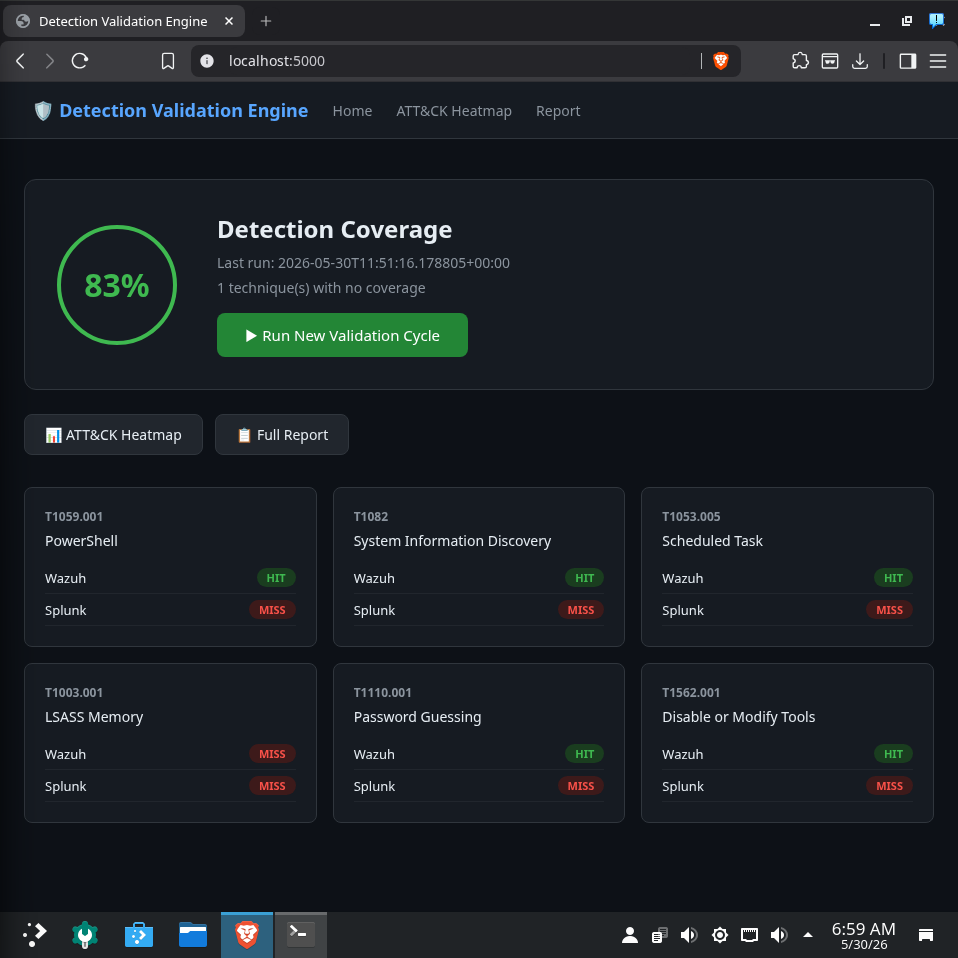
*主控制台显示了实时的检测覆盖率得分、Wazuh 和 Splunk 中各项技术的 HIT/MISS(命中/遗漏)状态,以及一键运行新验证周期的按钮。*
### ATT&CK 覆盖热力图
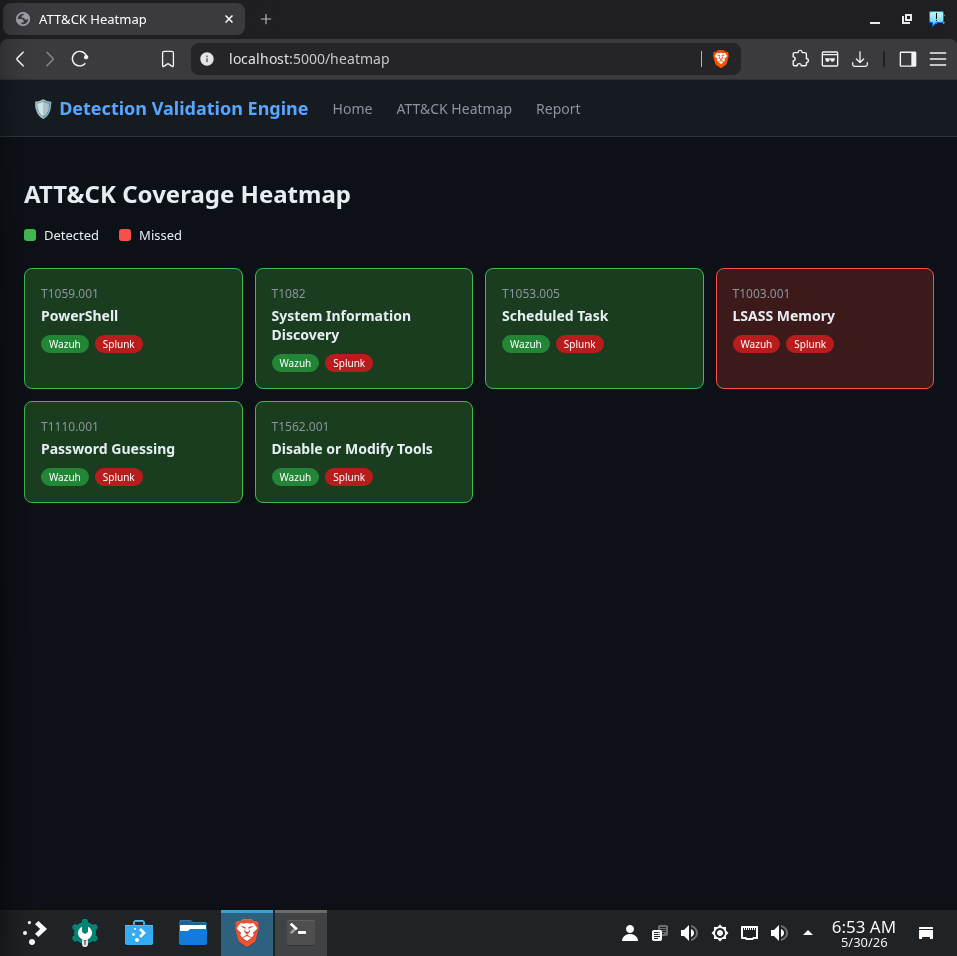
*MITRE ATT&CK 技术覆盖情况的可视化热力图。绿色 = 已检测,红色 = 盲区。T1003.001 (LSASS Memory) 是唯一未被检测到的技术,以红色高亮显示。*
### 检测覆盖率报告 — 识别出盲区
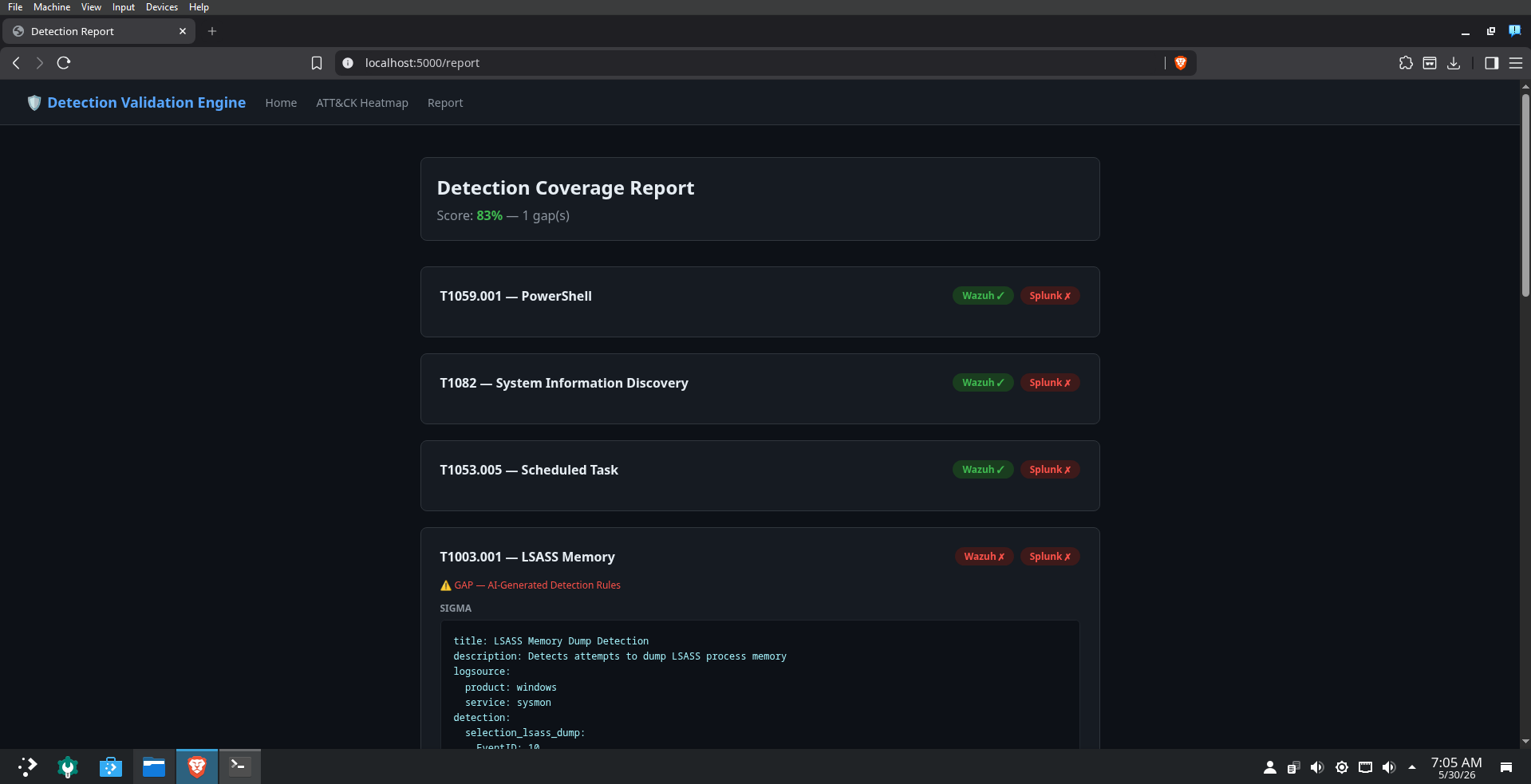
*完整的检测报告显示了各项技术的检测结果。T1003.001 被标记为 GAP(盲区),并在其下方自动填充了 AI 生成的检测规则。*
### 针对 LSASS Memory (T1003.001) 的 AI 生成 Sigma 规则
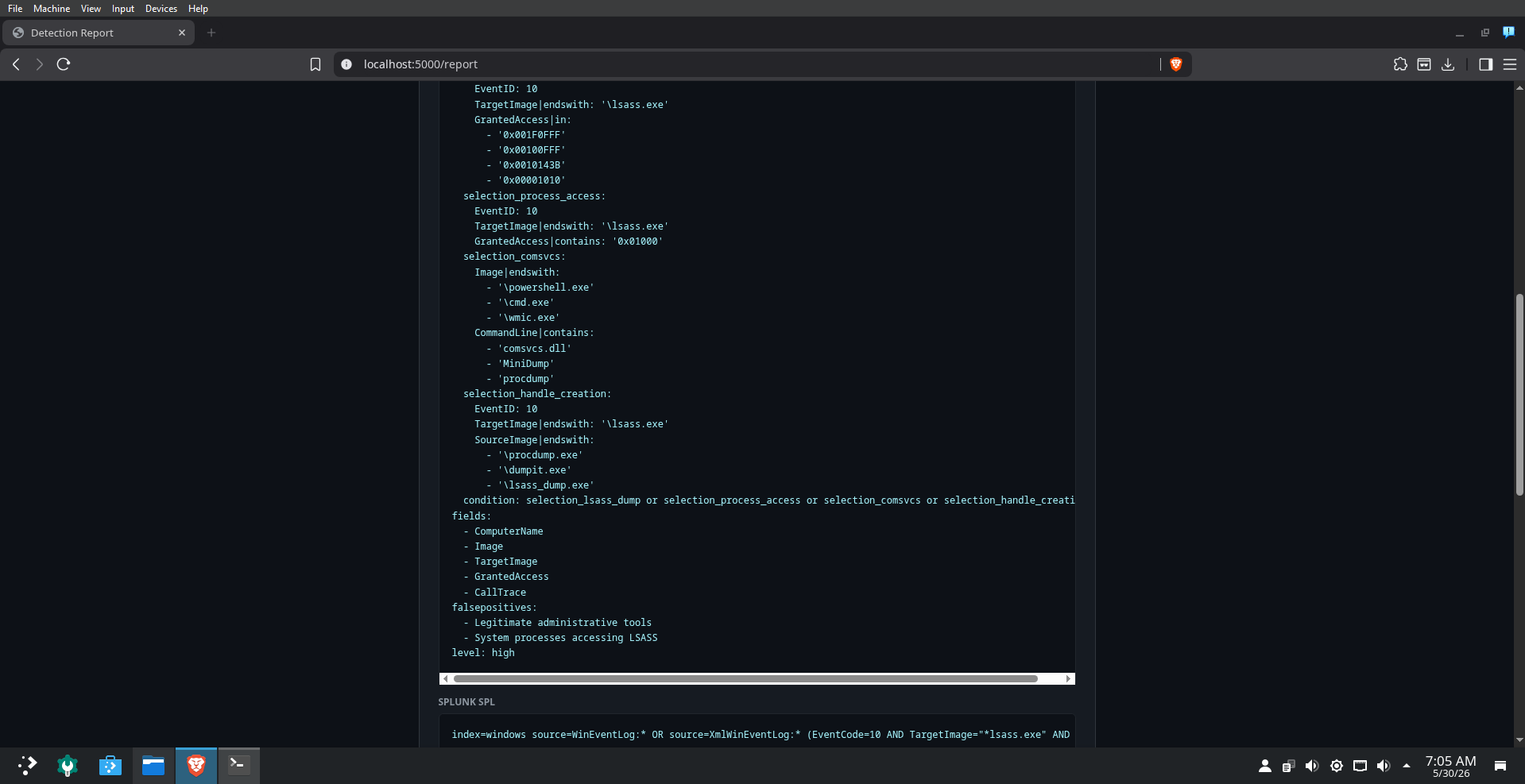
*针对检测到的覆盖盲区,由 Claude 生成的 Sigma 规则。包含多个检测选择,涵盖了 LSASS 转储访问模式、已知的转储工具以及进程访问事件 ID。*
### AI 生成的 Splunk SPL + Wazuh XML 规则
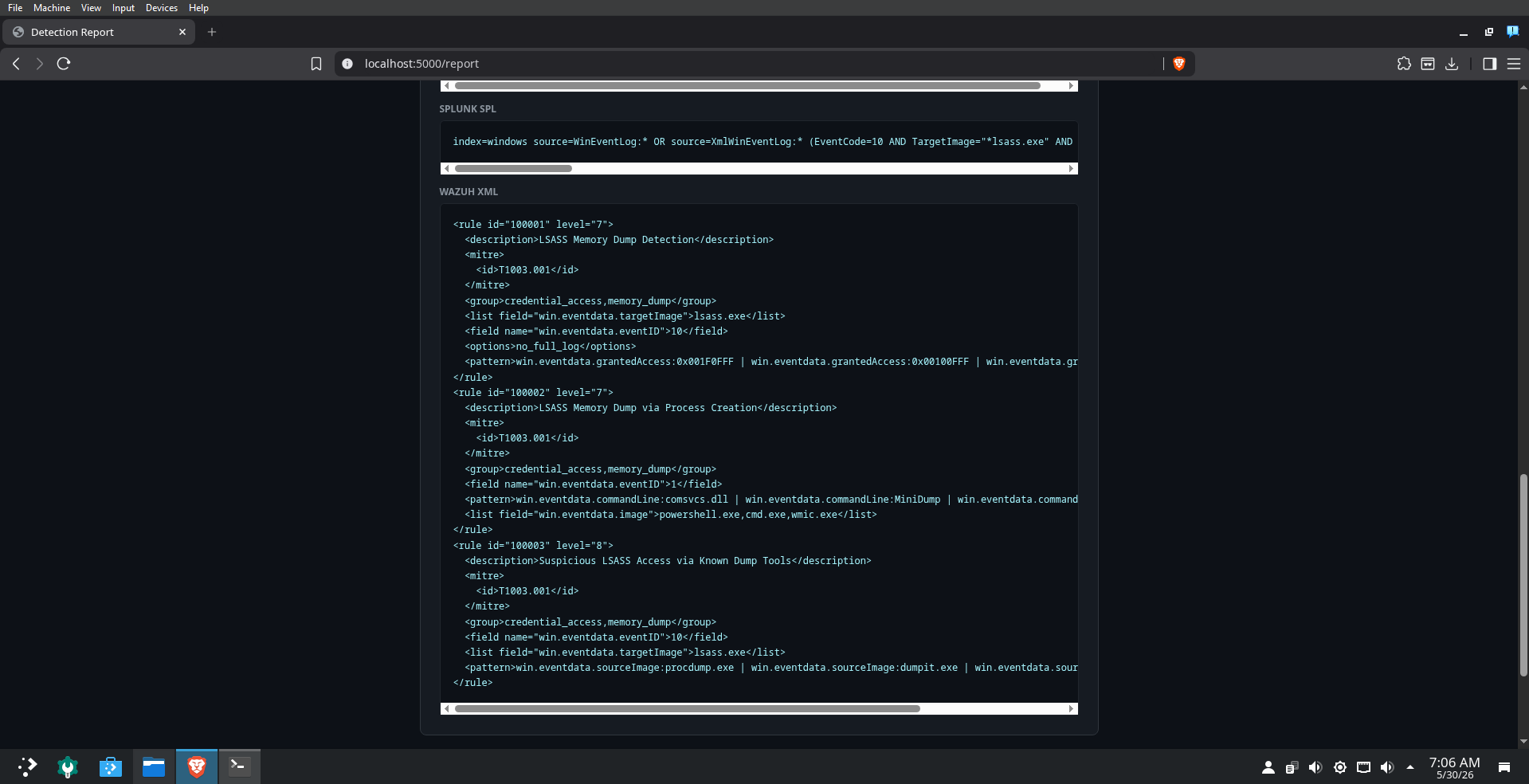
*针对 T1003.001 由 Claude 生成的 Splunk SPL 查询和 Wazuh XML 规则。所有三种规则格式(Sigma、SPL、Wazuh XML)均通过一次 AI 调用生成。*
### Wazuh XML 规则 — 完整视图
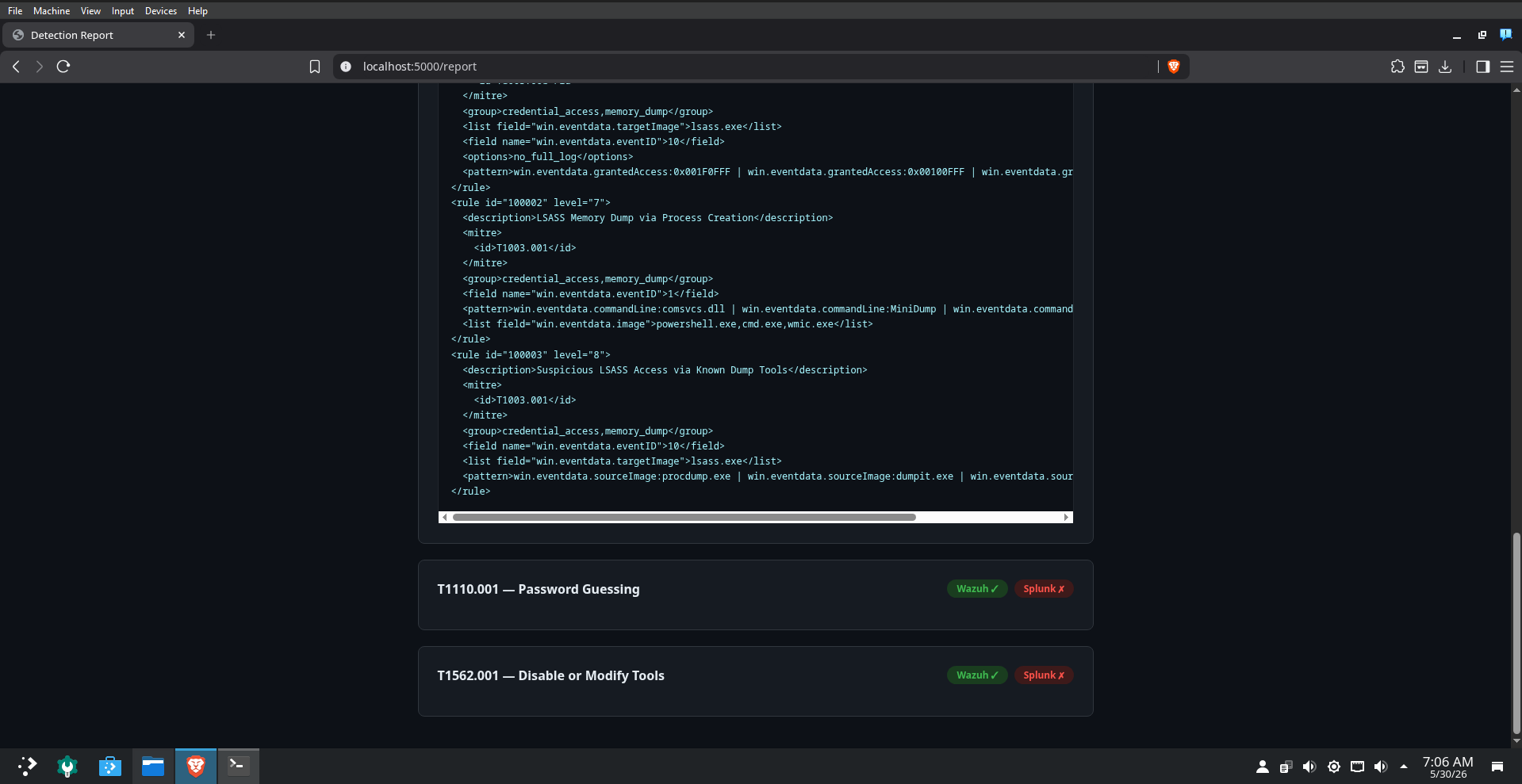
*由 Claude 生成的完整 Wazuh XML 规则集,涵盖了 LSASS 内存转储检测、通过进程创建进行的 LSASS 内存转储,以及通过已知转储工具进行的可疑 LSASS 访问 —— 每一项均映射至 T1003.001。*
## 🎯 功能简介
1. **攻击** — 通过 WinRM 针对真实的 Atomic Red Team 技术在 Windows 10 目标上进行触发
2. **验证** — 查询 Wazuh 和 Splunk 以检查是否触发了检测
3. **分析** — 识别哪些 ATT&CK 技术零覆盖
4. **生成** — 调用 Claude AI 为盲区生成 Sigma、Splunk SPL 和 Wazuh XML 规则
5. **可视化** — 在 Flask 控制台上展示覆盖率得分、ATT&CK 热力图和完整报告
## 📊 运行结果
- 开箱即用地实现了 **83% 检测覆盖率**
- Wazuh 检测到了 **5/6 项 MITRE ATT&CK 技术** (T1059.001, T1082, T1053.005, T1110.001, T1562.001)
- 识别出 **1 个覆盖盲区** (T1003.001 LSASS Memory),并由 Claude 自动生成了 AI 生成的 Sigma、SPL 和 Wazuh XML 规则
- 全自主流水线通过单击按钮即可实现端到端运行
## 🏗️ 架构
```
Arch Linux (SOC Workstation) Windows 10 VM (Target)
┌──────────────────────────────┐ ┌─────────────────────────┐
│ Flask Dashboard :5000 │ │ Atomic Red Team │
│ attack_runner.py │──WinRM────▶│ Real attack techniques │
│ detection_validator.py │ │ Wazuh Agent │
│ gap_analyzer.py │ └─────────────────────────┘
│ ai_rule_generator.py │ │
│ │ │ logs
│ Wazuh (Docker) :55000 │◀───────────────────────┘
│ Splunk (Docker) :8089 │
│ Claude API │
└──────────────────────────────┘
```
## 🛠️ 技术栈
- **攻击模拟** — Atomic Red Team, WinRM (pywinrm)
- **SIEM** — Wazuh 4.7.5, Splunk (Docker)
- **检测** — Wazuh Indexer REST API, Splunk REST API
- **AI** — Anthropic Claude API (claude-haiku-4-5)
- **框架** — MITRE ATT&CK
- **后端** — Python, Flask
- **基础设施** — Docker, VirtualBox
## 🎯 测试的技术
| 技术 | 名称 | Wazuh | Splunk |
|-----------|------|-------|--------|
| T1059.001 | PowerShell | ✅ HIT | ❌ MISS |
| T1082 | System Information Discovery | ✅ HIT | ❌ MISS |
| T1053.005 | Scheduled Task | ✅ HIT | ❌ MISS |
| T1003.001 | LSASS Memory | ❌ MISS | ❌ MISS |
| T1110.001 | Password Guessing | ✅ HIT | ❌ MISS |
| T1562.001 | Disable or Modify Tools | ✅ HIT | ❌ MISS |
## 🧠 问题解决 — 遇到的障碍及修复方法
本项目在一天内构建完成。以下是开发过程中遇到的真实技术障碍及其诊断和解决方式。
### 🔴 障碍 1:Atomic Red Team 安装被 Windows Defender 拦截
**问题:** 运行 `Install-AtomicRedTeam -getAtomics` 失败并报 `WriteErrorException` —— Windows Defender 隔离了 Atomics 文件夹。
**根本原因:** Windows Defender 实时监控将 Atomic Red Team 的 payload 标记为恶意文件。
**修复:**
1. 添加排除路径:`Add-MpPreference -ExclusionPath "C:\AtomicRedTeam"`
2. 禁用实时监控:`Set-MpPreference -DisableRealtimeMonitoring $true`
### 🔴 障碍 2:SSH 连接重置 —— 转向使用 WinRM
**问题:** 每次 SSH 连接尝试都返回 `Connection reset by 192.168.1.92 port 22`。
**根本原因:** 存在多个叠加的问题:
- `sshd_config` 文件因失败的日志记录命令包含损坏的行
- Administrator 账户默认被禁用(`Account active: No`)
- Administrator 账户未设置密码 —— OpenSSH 拒绝无密码的管理员账户登录
**修复:**
1. 使用 PowerShell 字符串过滤清理了损坏的 `sshd_config` 行
2. 启用 Administrator 账户:`net user Administrator /active:yes`
3. 设置密码:`net user Administrator Lab123!`
4. 从 GitHub 发布的 zip 压缩包中重新安装了纯净版 OpenSSH
**方案调整:** 通过 `pywinrm` 切换到 **WinRM (Windows Remote Management)** —— 专为远程 PowerShell 执行而构建,在实验环境中更为可靠。
### 🔴 障碍 3:磁盘空间耗尽(占用率 100%)
**问题:** Splunk 容器启动失败,报错 `no space left on device`。
**根本原因:** 49GB 磁盘占用率达到 100%。主要原因:
- `/var/cache/pacman/pkg/` 占用 7.6GB
- `/timeshift/snapshots/` 占用 4.4GB
- `~/brave-bin/src` 占用 1.2GB
- `~/.cache/go-build` 占用 653MB
- `~/.BurpSuite/burpbrowser` 占用 628MB
**修复:**
```
sudo rm -rf /var/cache/pacman/pkg/*
sudo timeshift --delete-all
rm -rf ~/brave-bin ~/.cache/go-build ~/.BurpSuite/burpbrowser
```
释放了约 8GB 空间,使可用空间从 315MB 增加到了 3.5GB+。
### 🔴 障碍 4:Splunk 最小磁盘空间检查阻止搜索
**问题:** Splunk 拒绝执行搜索 —— `The minimum free disk space (5000MB) reached`。
**根本原因:** Splunk 默认的最小可用磁盘阈值为 5000MB;而实验室机器仅有约 3.5GB。
**修复:**
```
docker exec -u root splunk bash -c "echo '[diskUsage]
minFreeSpace = 500' >> /opt/splunk/etc/system/local/server.conf"
docker restart splunk
```
### 🔴 障碍 5:Wazuh Agent 显示 "never_connected"
**问题:** Windows agent 成功注册,但在 Wazuh manager 中显示 `never_connected` 状态。
**根本原因:** `ossec.conf` 中的 manager IP 被单引号包裹:写成了 `'192.168.1.80'` 而不是 `192.168.1.80` —— 这是由 MSI 安装参数中的 shell 引号引起的。
**修复:**
```
(Get-Content "C:\Program Files (x86)\ossec-agent\ossec.conf") `
-replace "'192.168.1.80'", "192.168.1.80" | `
Set-Content "C:\Program Files (x86)\ossec-agent\ossec.conf"
Restart-Service WazuhSvc
```
### 🔴 障碍 6:通过 WinRM "无法识别" Atomic Red Team
**问题:** `Invoke-AtomicTest` 在远程会话中返回 `CommandNotFoundException`。
**根本原因:** WinRM 会话不会自动加载 PowerShell profile 或模块。
**修复:** 更新 `attack_runner.py`,在每条 WinRM 命令的开头显式导入该模块:
```
cmd = f"""
Set-ExecutionPolicy Bypass -Scope Process -Force
Import-Module C:\\AtomicRedTeam\\invoke-atomicredteam\\Invoke-AtomicRedTeam.psd1 -Force
$PSDefaultParameterValues = @{{'Invoke-AtomicTest:PathToAtomicsFolder'='C:\\AtomicRedTeam\\atomics'}}
Invoke-AtomicTest {technique_id} -TestNumbers 1 -TimeoutSeconds 60
"""
```
### 🔴 障碍 7:攻击成功触发但检测覆盖率为 0%
**问题:** 全部 6 项攻击均成功触发,但两个 SIEM 显示的检测覆盖率均为 0%。
**根本原因:**
1. Wazuh REST API 的 `/alerts` 端点未能从 indexer 正确返回结果
2. 检测验证器之前搜索的是精确的 MITRE ID —— Wazuh 的默认规则不会使用 MITRE ID 标记告警
**修复:**
1. 切换为通过 9200 端口上的 Elasticsearch REST API **直接查询 Wazuh Indexer**
2. 构建了基于关键字的检测映射,将每项技术与真实的日志关键字进行匹配(例如,T1082 → `systeminfo`、`hostname`、`System Information`)
3. 结果:覆盖率立即从 0% 跃升至 **83%**
## 🚀 设置说明
### 前置条件
- 安装了 Docker 的 Arch Linux(或任何 Linux 发行版)
- 使用 VirtualBox 运行的 Windows 10 虚拟机(桥接网络模式)
- Anthropic API key
### 安装步骤
```
# Clone repo
git clone https://github.com/cpt-ferna02/detection-validation-engine
cd detection-validation-engine
# 设置 Python 环境
python -m venv venv
source venv/bin/activate
pip install flask requests anthropic pywinrm
# 配置
cp config.example.py config.py
# 使用你的 IP、凭据和 API key 编辑 config.py
# 启动 Wazuh
git clone https://github.com/wazuh/wazuh-docker.git -b v4.7.5 wazuh-docker
cd wazuh-docker/single-node
docker compose -f generate-indexer-certs.yml run --rm generator
docker compose up -d
cd ../..
# 启动 Splunk
docker run -d --name splunk -p 8000:8000 -p 8089:8089 \
-e SPLUNK_GENERAL_TERMS='--accept-sgt-current-at-splunk-com' \
-e SPLUNK_START_ARGS='--accept-license' \
-e SPLUNK_PASSWORD='Admin1234!' splunk/splunk:latest
# 运行 dashboard
python app.py
```
打开 `http://localhost:5000` 并点击 **Run New Validation Cycle**。
### Windows 虚拟机设置
```
# 安装 Atomic Red Team
Set-ExecutionPolicy Bypass -Scope CurrentUser -Force
IEX (IWR 'https://raw.githubusercontent.com/redcanaryco/invoke-atomicredteam/master/install-atomicredteam.ps1' -UseBasicParsing)
Install-AtomicRedTeam -getAtomics -Force -InstallPath "C:\AtomicRedTeam"
# 启用 WinRM
Enable-PSRemoting -Force
winrm set winrm/config/service/auth '@{Basic="true"}'
winrm set winrm/config/service '@{AllowUnencrypted="true"}'
Set-Item WSMan:\localhost\Client\TrustedHosts -Value "*" -Force
# 安装 Wazuh Agent
Invoke-WebRequest -Uri "https://packages.wazuh.com/4.x/windows/wazuh-agent-4.7.5-1.msi" -OutFile "wazuh-agent.msi"
Start-Process msiexec.exe -ArgumentList "/i wazuh-agent.msi /q WAZUH_MANAGER='YOUR_ARCH_IP'" -Wait
net start WazuhSvc
```
## 📁 项目结构
```
detection-validation-engine/
├── app.py # Flask dashboard
├── attack_runner.py # WinRM-based Atomic Red Team execution
├── detection_validator.py # Wazuh Indexer + Splunk API queries
├── gap_analyzer.py # Coverage gap identification
├── ai_rule_generator.py # Claude API rule generation
├── config.example.py # Configuration template
├── screenshots/ # Dashboard screenshots
├── generated_rules/ # AI-generated detection rules
│ ├── T1003_001_sigma.yml
│ ├── T1003_001_splunk.spl
│ └── T1003_001_wazuh.xml
└── templates/
├── index.html # Main dashboard
├── heatmap.html # ATT&CK coverage heatmap
└── report.html # Detailed report with AI rules
```
## 💡 关键设计决策
- **使用 WinRM 替代 SSH** —— WinRM 专为 Windows 上的远程 PowerShell 执行而构建;而在实验室环境中,Windows 上的 SSH 存在已知的兼容性问题
- **直接查询 Indexer** —— 直接查询 Wazuh 的 Elasticsearch indexer 比通过 manager API 提供更可靠的告警检索
- **基于关键字检测** —— 匹配日志内容关键字而不是 MITRE ID,可与 Wazuh 的默认规则集配合使用,无需部署自定义规则
- **批量 AI 调用** —— 所有覆盖盲区都会通过单次 API 调用发送给 Claude,以最大程度减少 token 使用量(每次完整运行约 $0.05)
标签:DLL 劫持, Wazuh, 大语言模型, 安全运营, 扫描框架, 攻击模拟, 自动化防御, 请求拦截, 逆向工具, 驱动签名利用