rukmandfir/Purview-Audit-Log-Parser
GitHub: rukmandfir/Purview-Audit-Log-Parser
将 Microsoft Purview 审计日志中复杂的 JSON 字段自动解析为面向 DFIR 调查的 Excel 工作表,大幅减少安全分析师手动数据准备工作量。
Stars: 0 | Forks: 0


# Purview Audit Log Parser
该工具会自动解析 Purview AuditData 字段中包含的复杂 JSON,并将其转换为以调查为重点的 Excel 工作表,从而减少手动数据准备工作,使分析师能够将更多时间用于调查,而不是清理数据。
## 功能
### Exchange 调查
- Exchange 调查工作表
- MailItemsAccessed (Bind) 解析
- MailItemsAccessed (Sync) 解析
- 多邮件主题提取
- 多邮件 Internet Message ID 提取
### Inbox Rule 分析
- New-InboxRule
- Set-InboxRule
- Enable-InboxRule
- Disable-InboxRule
- Remove-InboxRule
- UpdateInboxRules
### SharePoint / OneDrive 调查
- 文件访问活动
- 文件下载活动
- 共享活动
- 用户和设备信息
### IP 地址分析
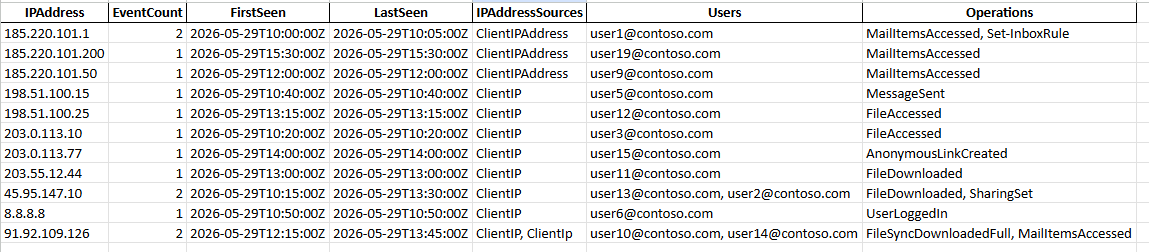
- IP 标准化
- IP 来源识别
- 去重 IP 分析工作表
### 通用功能
- 工作负载识别
- 以调查为重点的工作表
- 解析器统计信息
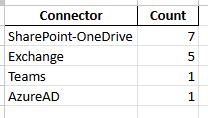
- 工作负载摘要
- 解析器错误报告
## 输出工作表
解析器会生成以下工作表:
- Parser Statistics
- Workload Summary
- IP-Analysis
- All Events
- Parser Errors
- Exchange-Investigation
- InboxRules
- MailItemsAccessed-Bind
- MailItemsAccessed-Sync
- SPOD-Investigation
- AzureAD-Investigation
- Teams
## 示例输出
### 工作负载摘要
### IP 分析
### Exchange 调查

### SharePoint/OneDrive 调查

## 安装说明
克隆仓库:
```
git clone https://github.com/rukmandfir/Purview-Audit-Log-Parser.git
```
安装依赖项:
```
pip install -r requirements.txt
```
## 用法
将 Purview audit log CSV 导出文件放入 input 文件夹并运行:
```
python main.py
```
解析后的工作簿将在 output 文件夹中生成。
## 典型用例
- 商业电子邮件入侵 (BEC) 调查
- Microsoft 365 事件响应
- 内部威胁调查
- Microsoft Purview audit log 审查
- eDiscovery 支持
- 快速调查分类
- 时间线构建
## 路线图
### 计划功能
- IP 地理位置丰富
- 调查时间线工作表
- BEC 摘要工作表
- 可疑活动工作表
- Teams 调查工作表
- 额外的 Microsoft 365 工作负载支持
## 免责声明
本项目旨在通过减少手动数据准备工作来协助调查人员。结果应始终由调查人员进行验证和审查。
请勿将真实的客户数据上传到公开仓库。
## 许可证
本项目基于 MIT 许可证授权。
标签:Microsoft 365, Microsoft Purview, Python, 安全运营, 库, 应急响应, 扫描框架, 无后门, 日志解析, 证书伪造, 逆向工具