Akshat200008/macOS-ClickFix-Malware-Analysis
GitHub: Akshat200008/macOS-ClickFix-Malware-Analysis
一份基于 Wireshark 的 macOS 信息窃取恶意软件网络取证分析报告,完整追踪了从 ClickFix 社会工程攻击到数据外泄和 C2 通信的感染链。
Stars: 0 | Forks: 0
# 🕵️♂️ 端到端数字取证报告:macOS 信息窃取程序分析
## 📖 执行摘要
我最近对一个捕获了现代 macOS 威胁的 PCAP 文件进行了深入的网络取证分析。该场景始于一个名为“ClickFix”的社会工程活动,受害者被伪装成 Claude AI 的恶意 Google 广告所诱惑。随后,用户被迫直接在其 macOS Terminal 中执行恶意命令。我能够分析流量并追踪由此单一行为引发的快速感染链。我观察到他们交付并运行了 Atomic macOS Stealer (AMOS) payload,并外泄了高度敏感的系统数据,例如凭证、浏览器详细信息和加密货币钱包,他们竟然明目张胆地通过未加密的 HTTP 发送这些数据。
**注意**:所有的研究和学习都是借助 AI 聊天机器人 完成的,但大部分努力都是我个人的成果。我使用这个聊天机器人的目的是为了双重检查,以及解释我之前不太了解的术语。
## 🛠️ 项目环境与方法论
* **分析工具:** Wireshark v4.x
* **分析环境:** macOS
* **调查范围:** 从初始 Web 请求到数据外泄以及命令与控制 (C2) 信标通信的完整生命周期分析。
## 📅 项目阶段分解
### 阶段 1:数据获取
为了确保安全并获取真实的威胁行为,获取了一个公开的恶意软件流量捕获包进行分析。之所以这样做,是因为真正的威胁行为者攻击我的 Mac 的几率非常低,而且那非常耗时,这就是我选择使用在线可用资源的原因。
1. **来源网站:** `Malware-Traffic-Analysis.net`
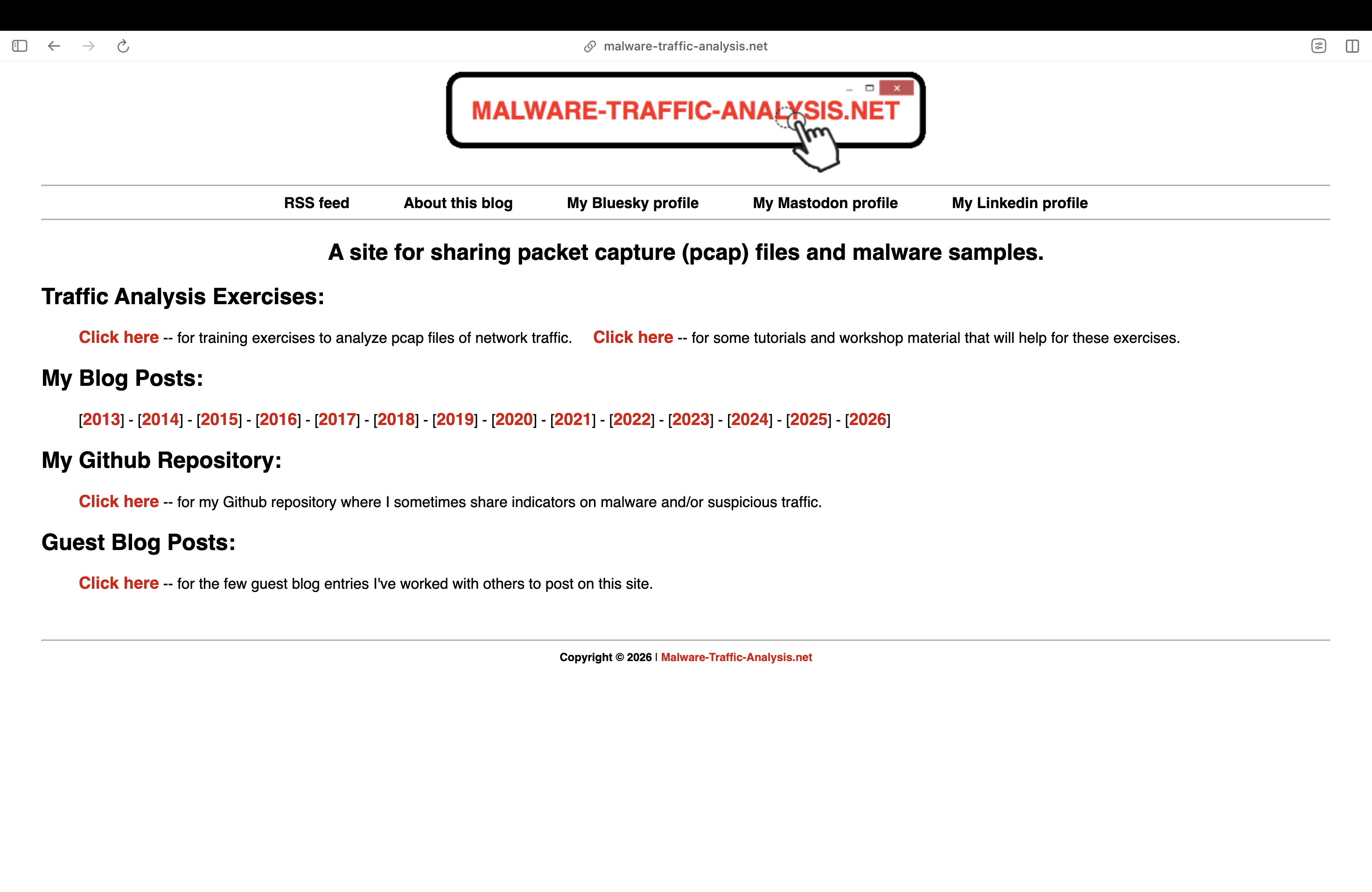 **截图来源:** malware-traffic-analysis.net
2. **选择的练习:** *GOOGLE AD FOR CLAUDE LEADS TO MACOS MALWARE INFECTION*
**截图来源:** malware-traffic-analysis.net
2. **选择的练习:** *GOOGLE AD FOR CLAUDE LEADS TO MACOS MALWARE INFECTION*
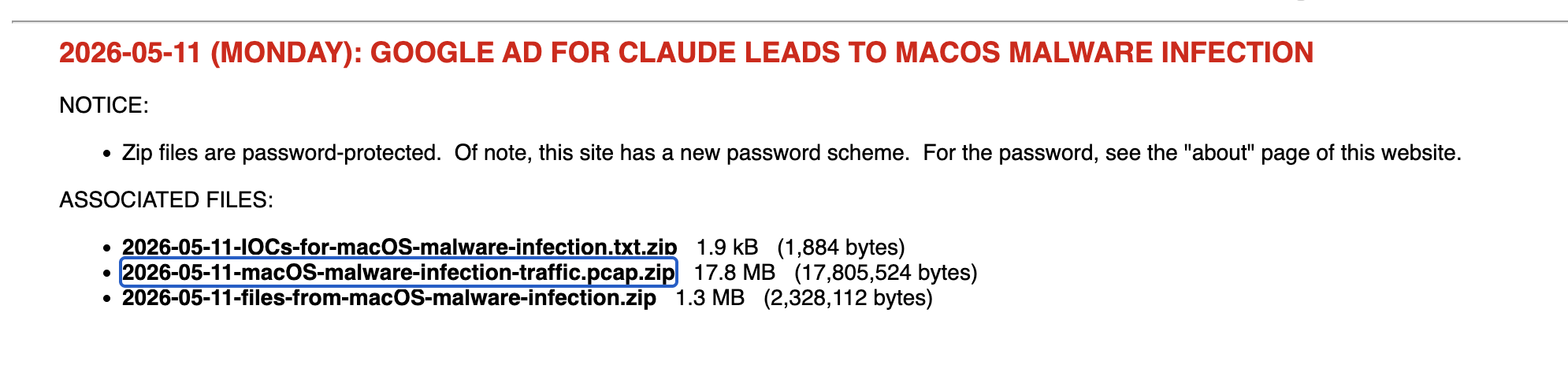 3. **下载过程:**
* 下载了安全存档文件:`2026-05-11-macOS-malware-infection-traffic.pcap.zip`
* 使用行业标准仓库密码 `infected` 解压并提取了加密的 payload
4. **环境初始化:** 在 Wireshark 中打开提取的 `.pcap` 文件,开始进行数据包解码。
在执行这些步骤时我非常害怕,因为这是我的第一个项目,而且我以前从未接触过恶意软件。这些文件中可能包含恶意软件的痕迹,可能会使我的数据面临风险;更重要的是,我是在我的主要设备上进行所有这些操作的,而不是在 VM 上,这让我感到更加谨慎。
⚠️**注意**:处理此类文件时请务必小心谨慎,因为它们可能包含恶意的代码片段
### 阶段 2:高级别分流
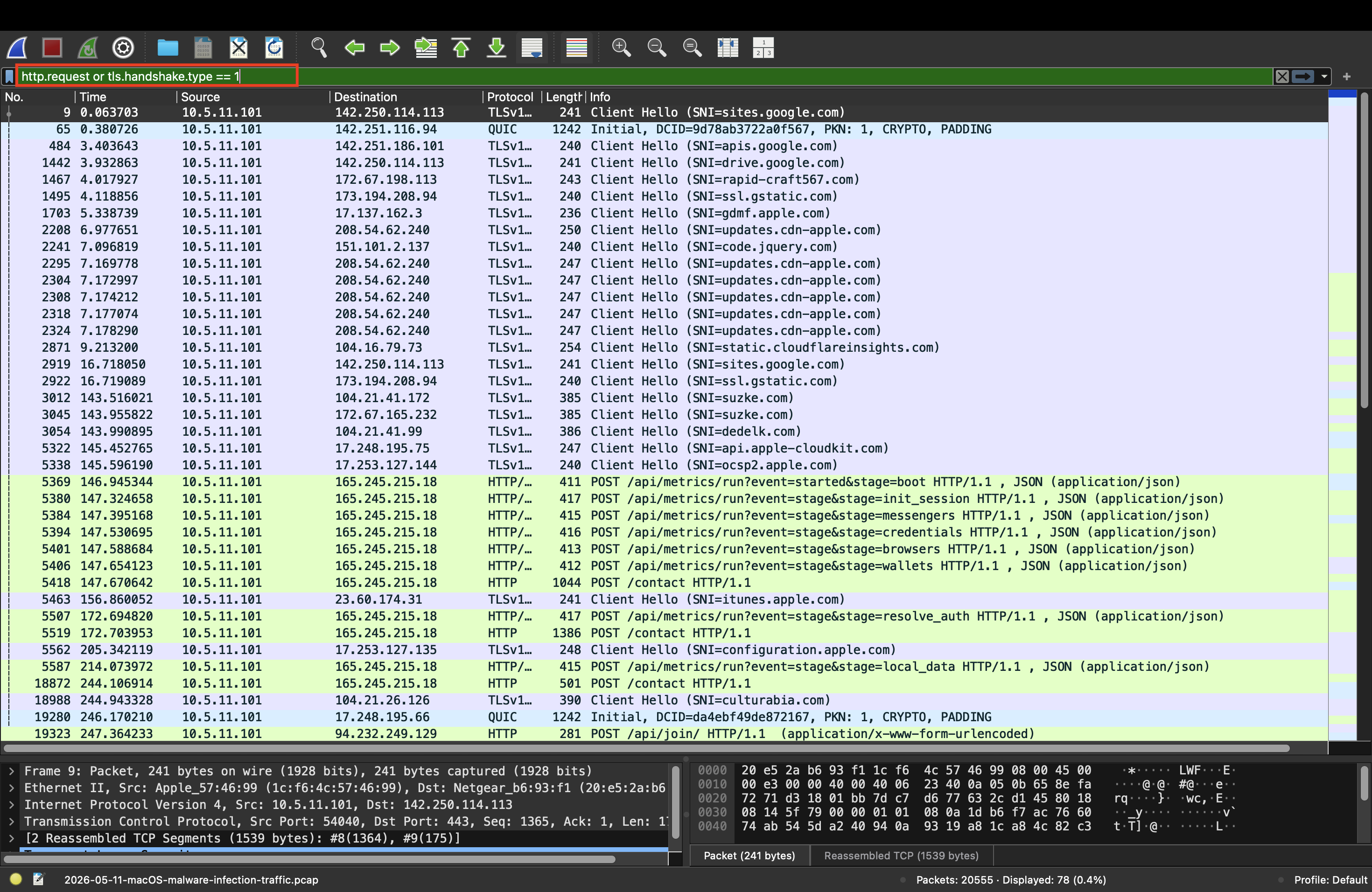
在进行逐包分析之前,先进行了宏观级别的分流,以评估流量构成并定位异常。所使用的过滤器是:
```
http.request or tls.handshake.type == 1
```
这个过滤器告诉 Wireshark:“只向我展示计算机请求访问网站的那些通信,无论是不安全的 HTTP 站点还是安全的 HTTPS 站点。”
3. **下载过程:**
* 下载了安全存档文件:`2026-05-11-macOS-malware-infection-traffic.pcap.zip`
* 使用行业标准仓库密码 `infected` 解压并提取了加密的 payload
4. **环境初始化:** 在 Wireshark 中打开提取的 `.pcap` 文件,开始进行数据包解码。
在执行这些步骤时我非常害怕,因为这是我的第一个项目,而且我以前从未接触过恶意软件。这些文件中可能包含恶意软件的痕迹,可能会使我的数据面临风险;更重要的是,我是在我的主要设备上进行所有这些操作的,而不是在 VM 上,这让我感到更加谨慎。
⚠️**注意**:处理此类文件时请务必小心谨慎,因为它们可能包含恶意的代码片段
### 阶段 2:高级别分流
在进行逐包分析之前,先进行了宏观级别的分流,以评估流量构成并定位异常。所使用的过滤器是:
```
http.request or tls.handshake.type == 1
```
这个过滤器告诉 Wireshark:“只向我展示计算机请求访问网站的那些通信,无论是不安全的 HTTP 站点还是安全的 HTTPS 站点。”
 * **协议层级工具 (`Statistics > Protocol Hierarchy`):** 分析了协议的基准分布。检测到大量未加密的明文 HTTP 流量,需要进一步仔细检查,这对于正常的现代 Web 浏览来说是非常不寻常的。
* **网络会话工具 (`Statistics > Conversations`):** 按流量大小和频率对网络流量进行了排序。识别出两个主要的外部 IP 地址与内部受害机器 (`10.5.11.101`) 进行了大量交互:
* `165.245.215.18`
* `94.232.249.129`
### 阶段 3:深入分析与技术发现
使用自定义的 Wireshark 显示过滤器,隔离了流量流以重构入侵时间线。
#### 1. 感染媒介(ClickFix 执行)
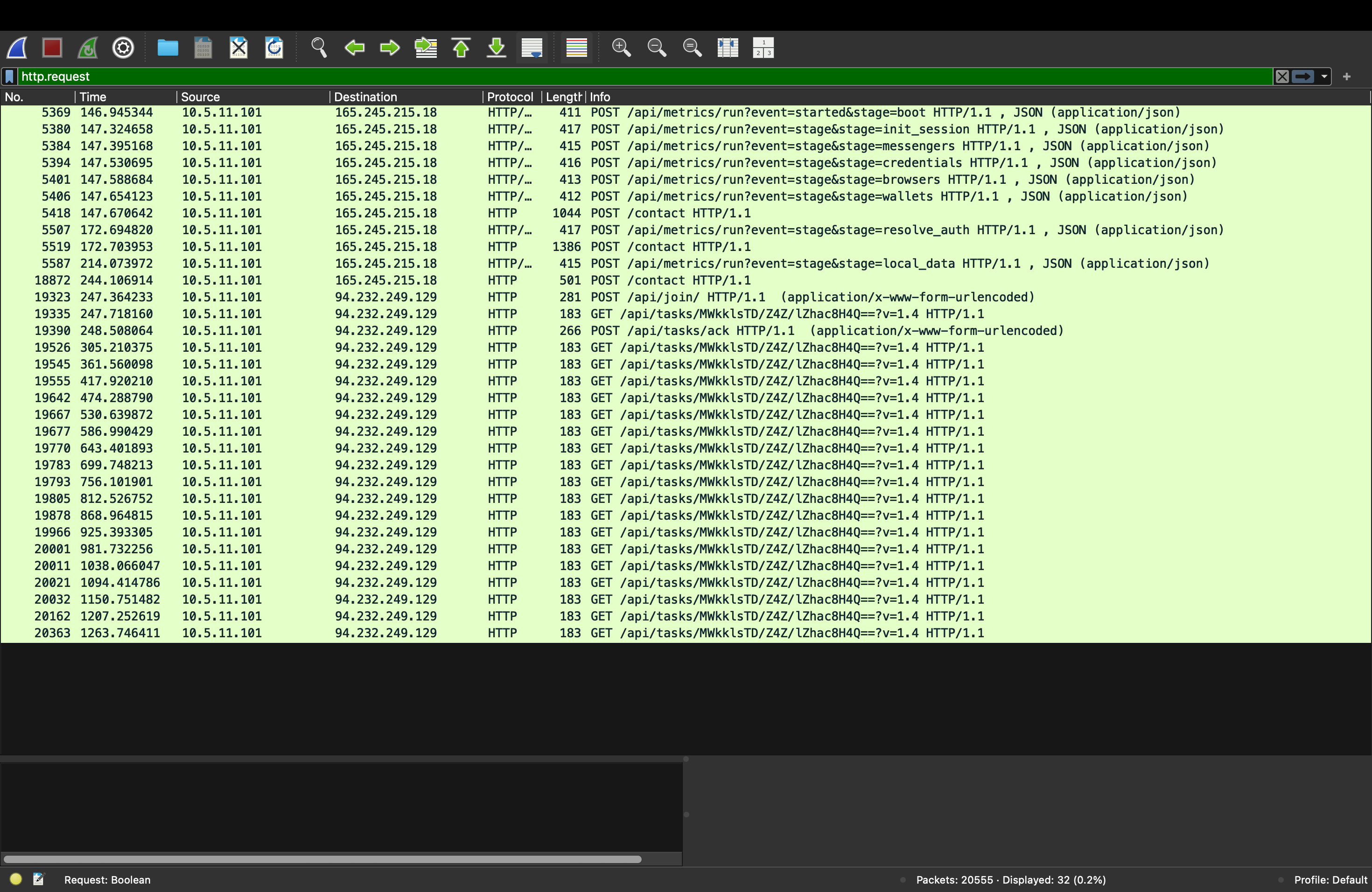
使用以下过滤器过滤明文请求,揭示了 payload 部署的机制:
```
http.request
```
* **协议层级工具 (`Statistics > Protocol Hierarchy`):** 分析了协议的基准分布。检测到大量未加密的明文 HTTP 流量,需要进一步仔细检查,这对于正常的现代 Web 浏览来说是非常不寻常的。
* **网络会话工具 (`Statistics > Conversations`):** 按流量大小和频率对网络流量进行了排序。识别出两个主要的外部 IP 地址与内部受害机器 (`10.5.11.101`) 进行了大量交互:
* `165.245.215.18`
* `94.232.249.129`
### 阶段 3:深入分析与技术发现
使用自定义的 Wireshark 显示过滤器,隔离了流量流以重构入侵时间线。
#### 1. 感染媒介(ClickFix 执行)
使用以下过滤器过滤明文请求,揭示了 payload 部署的机制:
```
http.request
```
 通过分析初始连接的原始数据包字节,检查了 User-Agent 字符串。请求不是由标准的 Web 浏览器(如 Safari 或 Chrome)发起的,而是由以下工具发起的:
```
User-Agent: curl /8.7.1
```
这是在数据包 19335 的信息部分发现的。
通过分析初始连接的原始数据包字节,检查了 User-Agent 字符串。请求不是由标准的 Web 浏览器(如 Safari 或 Chrome)发起的,而是由以下工具发起的:
```
User-Agent: curl /8.7.1
```
这是在数据包 19335 的信息部分发现的。
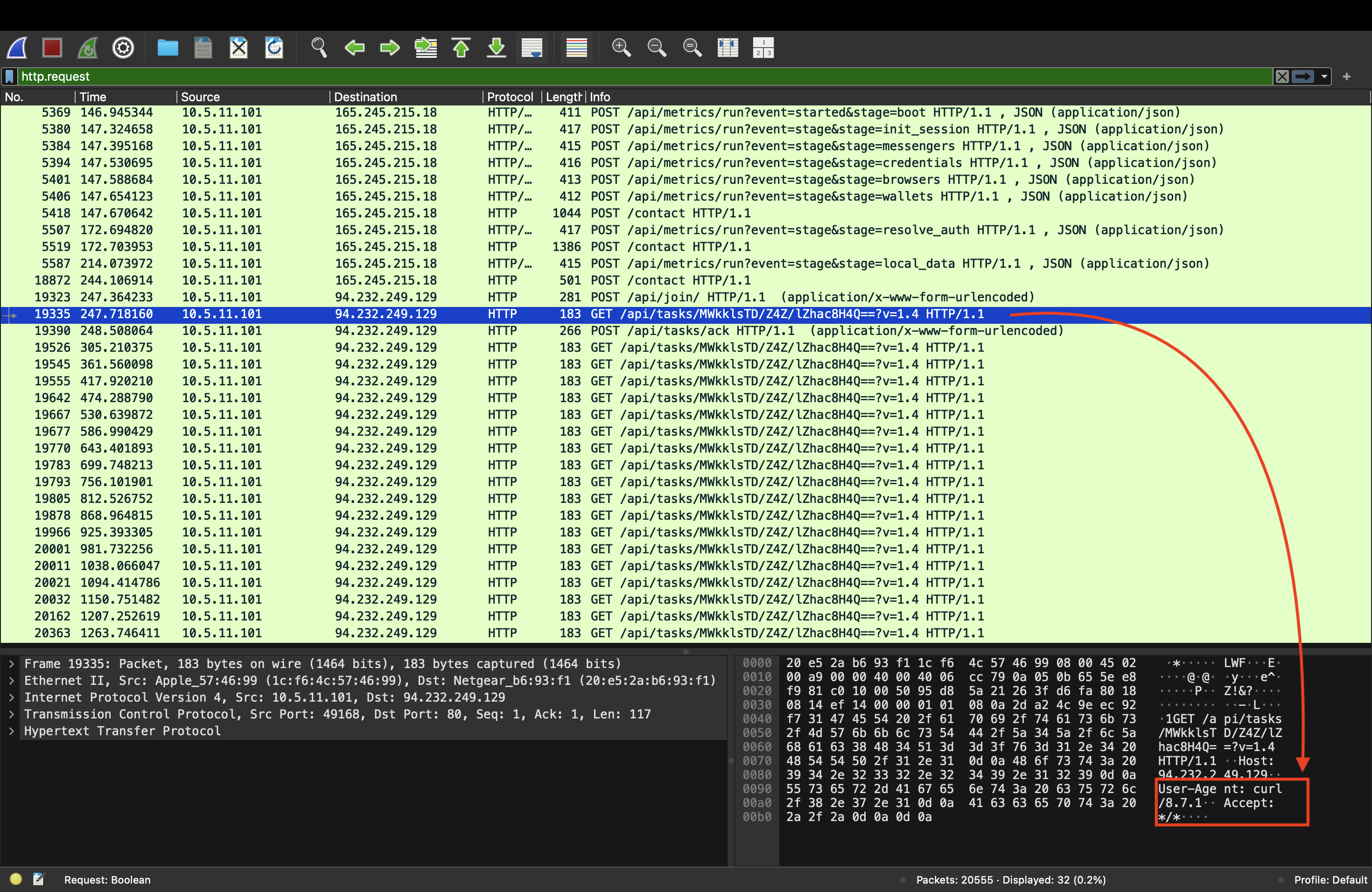 curl 是 macOS Terminal 中使用的命令行工具。这证明了流量是由在 Terminal 中运行的脚本生成的,与受害者被诱骗粘贴恶意命令的 **“ClickFix”** 伎俩完美吻合!
#### 2. 实时数据外泄
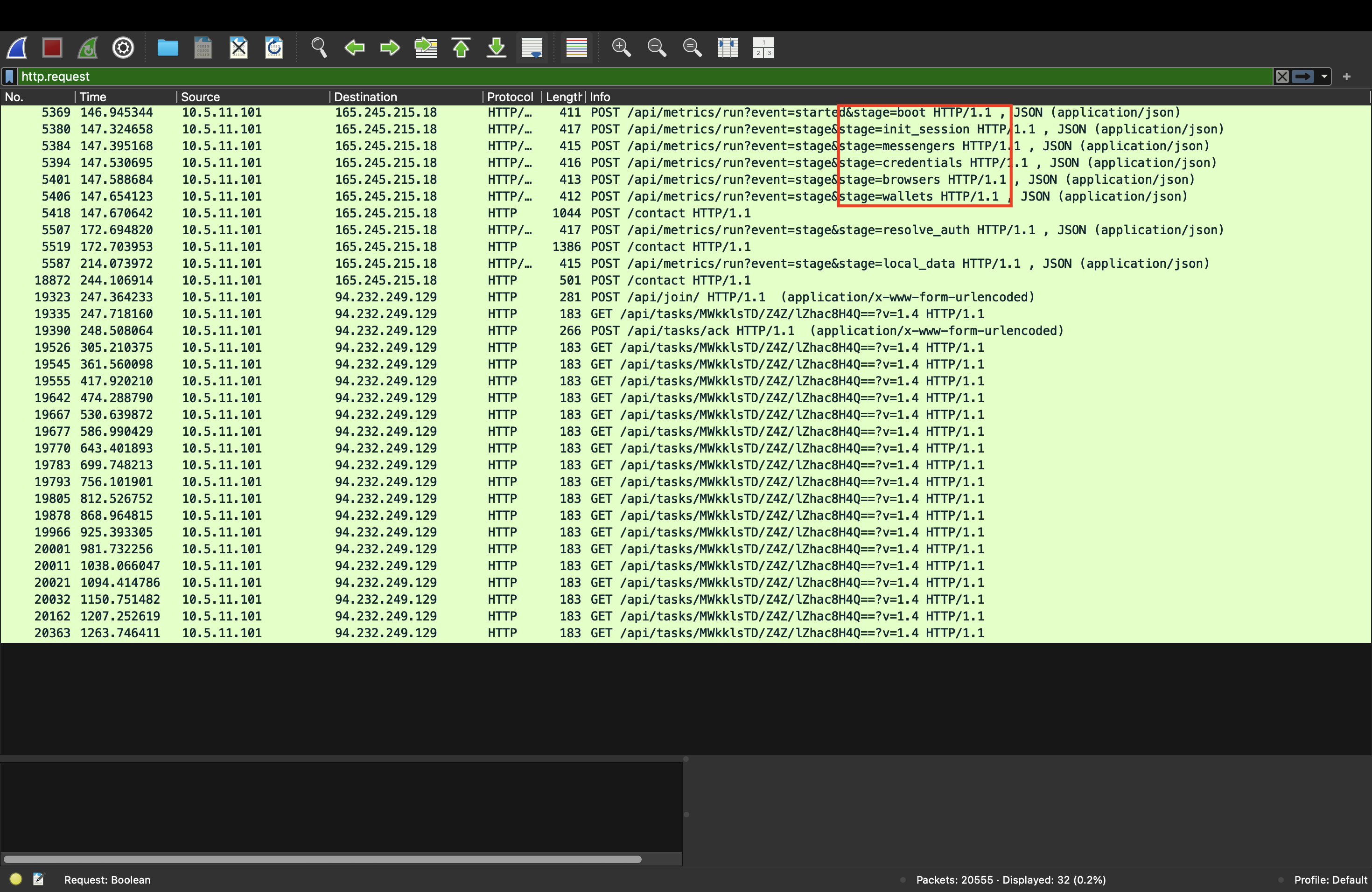
信息窃取程序主动收集本地主机数据,并将其直接传输给攻击者。恶意脚本利用未加密的 HTTP `POST` 请求将原始数据传输到 `165.245.215.18`。
在 `Info` 列中捕获的明文参数明确描绘了模块化的数据窃取阶段:
* `stage=boot (主机画像/Host profiling)`
* `stage=init_session (会话建立)`
* `stage=messengers (针对本地保存的聊天数据)`
* `stage=credentials (针对系统密码和 Keychain 文件)`
* `stage=browsers (针对保存的自动填充、cookie 和历史记录)`
* `stage=wallets (针对本地加密货币钱包扩展)`
curl 是 macOS Terminal 中使用的命令行工具。这证明了流量是由在 Terminal 中运行的脚本生成的,与受害者被诱骗粘贴恶意命令的 **“ClickFix”** 伎俩完美吻合!
#### 2. 实时数据外泄
信息窃取程序主动收集本地主机数据,并将其直接传输给攻击者。恶意脚本利用未加密的 HTTP `POST` 请求将原始数据传输到 `165.245.215.18`。
在 `Info` 列中捕获的明文参数明确描绘了模块化的数据窃取阶段:
* `stage=boot (主机画像/Host profiling)`
* `stage=init_session (会话建立)`
* `stage=messengers (针对本地保存的聊天数据)`
* `stage=credentials (针对系统密码和 Keychain 文件)`
* `stage=browsers (针对保存的自动填充、cookie 和历史记录)`
* `stage=wallets (针对本地加密货币钱包扩展)`
 ### 3. 命令与控制 (C2) 信标通信
在数据外泄之后,受感染的机器利用重复的 HTTP `GET` 请求向 `/api/tasks/...` 发送到位于 `94.232.249.129` 的辅助 C2 服务器的持续信标连接,以请求进一步的恶意指令。
## 🚨 入侵指标
从流量捕获中提取了以下取证工件,可用于构建检测规则 (SIEM/Firewall),以在整个企业网络中识别此威胁:
| 工件类型 | 值 / 指标 | 上下文 |
| :--- | :--- | :--- |
| **受害者 IP** | `10.5.11.101` | 被入侵的 macOS 客户端 |
| **恶意目标 IP** | `165.245.215.18` | 数据外泄端点 |
| **恶意目标 IP** | `94.232.249.129` | 命令与控制 (C2) 服务器 |
| **观察到的 User-Agent** | `curl /8.7.1` | 非浏览器终端活动 |
| **恶意 URI 模式** | `/api/metrics/run?event=*&stage=*` | 信息窃取程序暂存流量 |
## 🛡️ 补救与战略预防
基于此次事件调查期间收集的取证证据,建议采取以下深度防御措施:
### 紧急事件响应(遏制与清除)
1. **网络隔离:** 立即将受感染的 macOS 设备 (`10.5.11.101`) 从本地网络和 Wi-Fi 断开,以阻止正在进行的 C2 通信或潜在的横向移动。
2. **严格的边界阻断:** 实施紧急防火墙规则,阻断所有进出 `165.245.215.18` 和 `94.232.249.129` 的流量。
3. **彻底系统清除:** 由于此恶意软件在执行期间会请求深度访问权限以刮取 Keychain 和钱包,标准的删除操作是不够的。必须对端点进行安全擦除,并重新进行干净的 macOS 安装。
4. **凭证撤销:** 强制要求所有用户的企业、个人和浏览器存储的账户立即进行全局密码重置。使所有活动平台上的会话 cookie 失效,并轮换系统上存储的任何加密货币密钥。
### 长期安全强化(预防)
1. **DNS 过滤:** 实施安全的企业 DNS 路由,主动阻断与广告冒充和 ClickFix 基础设施相关的已知恶意或动态域名。
2. **广告拦截扩展:** 在企业 Web 浏览器中部署托管式广告拦截实用程序,以在用户与之交互之前消除恶意的 Google 广告。我个人使用 uBlock,并强烈推荐它。
3. **端点权限管理:** 限制标准用户帐户在没有明确的二级安全控制的情况下,通过终端运行特权脚本。
### 3. 命令与控制 (C2) 信标通信
在数据外泄之后,受感染的机器利用重复的 HTTP `GET` 请求向 `/api/tasks/...` 发送到位于 `94.232.249.129` 的辅助 C2 服务器的持续信标连接,以请求进一步的恶意指令。
## 🚨 入侵指标
从流量捕获中提取了以下取证工件,可用于构建检测规则 (SIEM/Firewall),以在整个企业网络中识别此威胁:
| 工件类型 | 值 / 指标 | 上下文 |
| :--- | :--- | :--- |
| **受害者 IP** | `10.5.11.101` | 被入侵的 macOS 客户端 |
| **恶意目标 IP** | `165.245.215.18` | 数据外泄端点 |
| **恶意目标 IP** | `94.232.249.129` | 命令与控制 (C2) 服务器 |
| **观察到的 User-Agent** | `curl /8.7.1` | 非浏览器终端活动 |
| **恶意 URI 模式** | `/api/metrics/run?event=*&stage=*` | 信息窃取程序暂存流量 |
## 🛡️ 补救与战略预防
基于此次事件调查期间收集的取证证据,建议采取以下深度防御措施:
### 紧急事件响应(遏制与清除)
1. **网络隔离:** 立即将受感染的 macOS 设备 (`10.5.11.101`) 从本地网络和 Wi-Fi 断开,以阻止正在进行的 C2 通信或潜在的横向移动。
2. **严格的边界阻断:** 实施紧急防火墙规则,阻断所有进出 `165.245.215.18` 和 `94.232.249.129` 的流量。
3. **彻底系统清除:** 由于此恶意软件在执行期间会请求深度访问权限以刮取 Keychain 和钱包,标准的删除操作是不够的。必须对端点进行安全擦除,并重新进行干净的 macOS 安装。
4. **凭证撤销:** 强制要求所有用户的企业、个人和浏览器存储的账户立即进行全局密码重置。使所有活动平台上的会话 cookie 失效,并轮换系统上存储的任何加密货币密钥。
### 长期安全强化(预防)
1. **DNS 过滤:** 实施安全的企业 DNS 路由,主动阻断与广告冒充和 ClickFix 基础设施相关的已知恶意或动态域名。
2. **广告拦截扩展:** 在企业 Web 浏览器中部署托管式广告拦截实用程序,以在用户与之交互之前消除恶意的 Google 广告。我个人使用 uBlock,并强烈推荐它。
3. **端点权限管理:** 限制标准用户帐户在没有明确的二级安全控制的情况下,通过终端运行特权脚本。
**截图来源:** malware-traffic-analysis.net
2. **选择的练习:** *GOOGLE AD FOR CLAUDE LEADS TO MACOS MALWARE INFECTION*
3. **下载过程:**
* 下载了安全存档文件:`2026-05-11-macOS-malware-infection-traffic.pcap.zip`
* 使用行业标准仓库密码 `infected` 解压并提取了加密的 payload
4. **环境初始化:** 在 Wireshark 中打开提取的 `.pcap` 文件,开始进行数据包解码。
在执行这些步骤时我非常害怕,因为这是我的第一个项目,而且我以前从未接触过恶意软件。这些文件中可能包含恶意软件的痕迹,可能会使我的数据面临风险;更重要的是,我是在我的主要设备上进行所有这些操作的,而不是在 VM 上,这让我感到更加谨慎。
⚠️**注意**:处理此类文件时请务必小心谨慎,因为它们可能包含恶意的代码片段
### 阶段 2:高级别分流
在进行逐包分析之前,先进行了宏观级别的分流,以评估流量构成并定位异常。所使用的过滤器是:
```
http.request or tls.handshake.type == 1
```
这个过滤器告诉 Wireshark:“只向我展示计算机请求访问网站的那些通信,无论是不安全的 HTTP 站点还是安全的 HTTPS 站点。”
* **协议层级工具 (`Statistics > Protocol Hierarchy`):** 分析了协议的基准分布。检测到大量未加密的明文 HTTP 流量,需要进一步仔细检查,这对于正常的现代 Web 浏览来说是非常不寻常的。
* **网络会话工具 (`Statistics > Conversations`):** 按流量大小和频率对网络流量进行了排序。识别出两个主要的外部 IP 地址与内部受害机器 (`10.5.11.101`) 进行了大量交互:
* `165.245.215.18`
* `94.232.249.129`
### 阶段 3:深入分析与技术发现
使用自定义的 Wireshark 显示过滤器,隔离了流量流以重构入侵时间线。
#### 1. 感染媒介(ClickFix 执行)
使用以下过滤器过滤明文请求,揭示了 payload 部署的机制:
```
http.request
```
通过分析初始连接的原始数据包字节,检查了 User-Agent 字符串。请求不是由标准的 Web 浏览器(如 Safari 或 Chrome)发起的,而是由以下工具发起的:
```
User-Agent: curl /8.7.1
```
这是在数据包 19335 的信息部分发现的。
curl 是 macOS Terminal 中使用的命令行工具。这证明了流量是由在 Terminal 中运行的脚本生成的,与受害者被诱骗粘贴恶意命令的 **“ClickFix”** 伎俩完美吻合!
#### 2. 实时数据外泄
信息窃取程序主动收集本地主机数据,并将其直接传输给攻击者。恶意脚本利用未加密的 HTTP `POST` 请求将原始数据传输到 `165.245.215.18`。
在 `Info` 列中捕获的明文参数明确描绘了模块化的数据窃取阶段:
* `stage=boot (主机画像/Host profiling)`
* `stage=init_session (会话建立)`
* `stage=messengers (针对本地保存的聊天数据)`
* `stage=credentials (针对系统密码和 Keychain 文件)`
* `stage=browsers (针对保存的自动填充、cookie 和历史记录)`
* `stage=wallets (针对本地加密货币钱包扩展)`
### 3. 命令与控制 (C2) 信标通信
在数据外泄之后,受感染的机器利用重复的 HTTP `GET` 请求向 `/api/tasks/...` 发送到位于 `94.232.249.129` 的辅助 C2 服务器的持续信标连接,以请求进一步的恶意指令。
## 🚨 入侵指标
从流量捕获中提取了以下取证工件,可用于构建检测规则 (SIEM/Firewall),以在整个企业网络中识别此威胁:
| 工件类型 | 值 / 指标 | 上下文 |
| :--- | :--- | :--- |
| **受害者 IP** | `10.5.11.101` | 被入侵的 macOS 客户端 |
| **恶意目标 IP** | `165.245.215.18` | 数据外泄端点 |
| **恶意目标 IP** | `94.232.249.129` | 命令与控制 (C2) 服务器 |
| **观察到的 User-Agent** | `curl /8.7.1` | 非浏览器终端活动 |
| **恶意 URI 模式** | `/api/metrics/run?event=*&stage=*` | 信息窃取程序暂存流量 |
## 🛡️ 补救与战略预防
基于此次事件调查期间收集的取证证据,建议采取以下深度防御措施:
### 紧急事件响应(遏制与清除)
1. **网络隔离:** 立即将受感染的 macOS 设备 (`10.5.11.101`) 从本地网络和 Wi-Fi 断开,以阻止正在进行的 C2 通信或潜在的横向移动。
2. **严格的边界阻断:** 实施紧急防火墙规则,阻断所有进出 `165.245.215.18` 和 `94.232.249.129` 的流量。
3. **彻底系统清除:** 由于此恶意软件在执行期间会请求深度访问权限以刮取 Keychain 和钱包,标准的删除操作是不够的。必须对端点进行安全擦除,并重新进行干净的 macOS 安装。
4. **凭证撤销:** 强制要求所有用户的企业、个人和浏览器存储的账户立即进行全局密码重置。使所有活动平台上的会话 cookie 失效,并轮换系统上存储的任何加密货币密钥。
### 长期安全强化(预防)
1. **DNS 过滤:** 实施安全的企业 DNS 路由,主动阻断与广告冒充和 ClickFix 基础设施相关的已知恶意或动态域名。
2. **广告拦截扩展:** 在企业 Web 浏览器中部署托管式广告拦截实用程序,以在用户与之交互之前消除恶意的 Google 广告。我个人使用 uBlock,并强烈推荐它。
3. **端点权限管理:** 限制标准用户帐户在没有明确的二级安全控制的情况下,通过终端运行特权脚本。标签:AMOS, DAST, Wireshark, 句柄查看, 恶意软件分析, 数字取证, 网络信息收集, 网络流量分析, 自动化脚本