ericaghdz/threat-hunting-scenario-sudden-network-slowdowns
GitHub: ericaghdz/threat-hunting-scenario-sudden-network-slowdowns
一个基于 Microsoft Defender for Endpoint 和 KQL 的威胁狩猎实战案例,演示如何从网络性能下降切入,调查并定位未经授权的内部端口扫描活动。
Stars: 0 | Forks: 0
# 威胁狩猎调查:网络性能下降与未经授权的端口扫描
## 目录
* [场景](#scenario)
* [使用的工具与技术](#tools-and-technologies-utilized)
* [步骤 1:识别异常的失败网络连接](#step-1-identify-abnormal-failed-network-connections)
* [步骤 2:分析近期的失败连接活动](#step-2-analyze-recent-failed-connection-activity)
* [步骤 3:识别发起进程](#step-3-identify-the-initiating-process)
* [遏制与响应](#containment-and-response)
* [MITRE ATT&CK 映射](#mitre-attck-mapping)
* [结果](#outcome)
## 场景
在收到有关网络性能显著下降的报告后,我们启动了威胁狩猎。分布式拒绝服务攻击已被排除,这使我们得出假设:环境中的某台主机可能正在进行过量下载或未经授权的网络扫描。
## 使用的工具与技术
- Microsoft Defender for Endpoint (MDE) / Endpoint Detection & Response (EDR)
- Kusto Query Language (KQL)
- MITRE ATT&CK Framework
## 步骤 1:识别异常的失败网络连接
调查的初始阶段侧重于识别产生异常数量失败网络连接的主机。
以下 KQL 查询用于按本地 IP 地址统计失败的连接尝试:
```
// Query to identify excessive failed connections by local IP
let honeypot = "windows-target-";
DeviceNetworkEvents
| where DeviceName == honeypot
| where ActionType == "ConnectionFailed"
| summarize ConnectionCount = count() by DeviceName, ActionType, LocalIP
| order by ConnectionCount desc
```
### 发现
 查询识别出与该本地 IP 地址相关的 **1,799 次失败连接尝试**:
`10.0.0.155`
如此大量的失败连接被认为是异常的,需要进行进一步调查。
## 步骤 2:分析近期的失败连接活动
为了更好地理解失败连接的行为,收集了该可疑 IP 地址的额外遥测数据。
使用了以下查询:
```
// Query to observe detailed failed connection events
let honeypot = "windows-target-";
let IPinQuestion = "10.0.0.155";
DeviceNetworkEvents
| where DeviceName == honeypot
| where ActionType == "ConnectionFailed"
| where LocalIP == IPinQuestion
| order by Timestamp desc
```
### 发现
对失败连接的分析揭示了**在快速连续的时间内,跨众多不常见目标端口的大量连续连接尝试**。
查询识别出与该本地 IP 地址相关的 **1,799 次失败连接尝试**:
`10.0.0.155`
如此大量的失败连接被认为是异常的,需要进行进一步调查。
## 步骤 2:分析近期的失败连接活动
为了更好地理解失败连接的行为,收集了该可疑 IP 地址的额外遥测数据。
使用了以下查询:
```
// Query to observe detailed failed connection events
let honeypot = "windows-target-";
let IPinQuestion = "10.0.0.155";
DeviceNetworkEvents
| where DeviceName == honeypot
| where ActionType == "ConnectionFailed"
| where LocalIP == IPinQuestion
| order by Timestamp desc
```
### 发现
对失败连接的分析揭示了**在快速连续的时间内,跨众多不常见目标端口的大量连续连接尝试**。
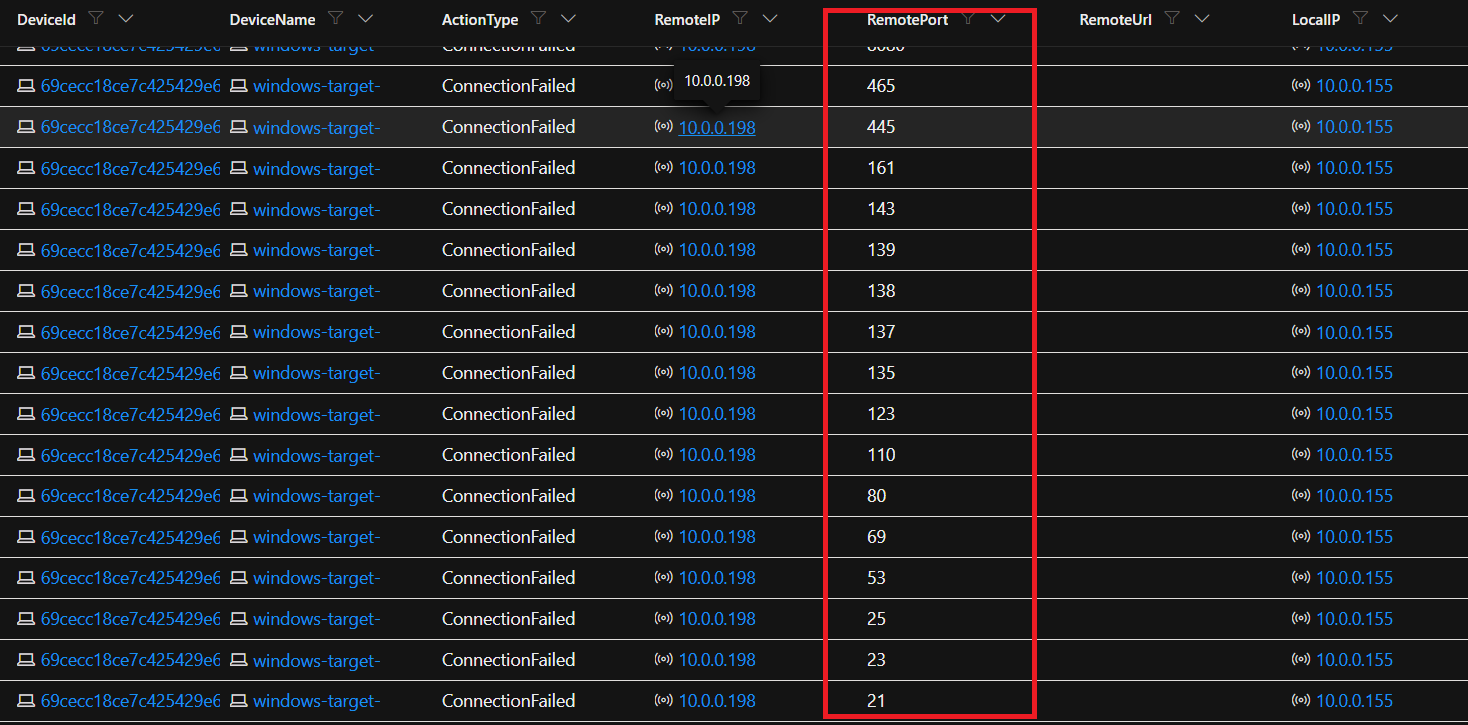 此行为高度可疑,并与通常与**未经授权的端口扫描活动**相关的指标相符。合法服务通常使用可预测且一致的端口进行通信,而观察到的活动则表现出广泛且快速的探测行为。
**观察到的关键指标:**
- 连续的目标端口枚举
- 高频率的失败连接尝试
- 目标包含大量不常见端口
- 连接失败出现的频率极快
### 评估
观察到的网络行为被评估为极可能是**未经授权的内部端口扫描**,这也是导致报告的网络速度下降的原因。
## 步骤 3:识别发起进程
在确认了可疑的网络行为后,调查转向识别负责发起该活动的进程。
执行了初始查询,以审查端口扫描估计开始时间前后 **10 分钟窗口**内的进程创建事件。
```
// Search for the initiating process of the port scan
let honeypot = "windows-target-";
let specificTime = datetime(2026-05-28T20:53:53.5185177Z);
DeviceProcessEvents
| where DeviceName == honeypot
| where Timestamp between ((specificTime - 10m) .. (specificTime + 10m))
| order by Timestamp desc
| project Timestamp, FileName, InitiatingProcessCommandLine
```
### 发现
在初始时间范围内未识别出可疑的进程活动。
查询窗口被扩大到事件前后 **20 分钟**,以扩大可见性。
```
// Expanded timeframe to identify initiating process
let honeypot = "windows-target-";
let specificTime = datetime(2026-05-28T20:53:53.5185177Z);
DeviceProcessEvents
| where DeviceName == honeypot
| where Timestamp between ((specificTime - 20m) .. (specificTime + 20m))
| order by Timestamp desc
| project Timestamp, FileName, InitiatingProcessCommandLine
```
### 发现
此行为高度可疑,并与通常与**未经授权的端口扫描活动**相关的指标相符。合法服务通常使用可预测且一致的端口进行通信,而观察到的活动则表现出广泛且快速的探测行为。
**观察到的关键指标:**
- 连续的目标端口枚举
- 高频率的失败连接尝试
- 目标包含大量不常见端口
- 连接失败出现的频率极快
### 评估
观察到的网络行为被评估为极可能是**未经授权的内部端口扫描**,这也是导致报告的网络速度下降的原因。
## 步骤 3:识别发起进程
在确认了可疑的网络行为后,调查转向识别负责发起该活动的进程。
执行了初始查询,以审查端口扫描估计开始时间前后 **10 分钟窗口**内的进程创建事件。
```
// Search for the initiating process of the port scan
let honeypot = "windows-target-";
let specificTime = datetime(2026-05-28T20:53:53.5185177Z);
DeviceProcessEvents
| where DeviceName == honeypot
| where Timestamp between ((specificTime - 10m) .. (specificTime + 10m))
| order by Timestamp desc
| project Timestamp, FileName, InitiatingProcessCommandLine
```
### 发现
在初始时间范围内未识别出可疑的进程活动。
查询窗口被扩大到事件前后 **20 分钟**,以扩大可见性。
```
// Expanded timeframe to identify initiating process
let honeypot = "windows-target-";
let specificTime = datetime(2026-05-28T20:53:53.5185177Z);
DeviceProcessEvents
| where DeviceName == honeypot
| where Timestamp between ((specificTime - 20m) .. (specificTime + 20m))
| order by Timestamp desc
| project Timestamp, FileName, InitiatingProcessCommandLine
```
### 发现
 扩大后的搜索识别出一个可疑的 PowerShell 执行事件:
```
powershell.exe
cmd.exe /c powershell.exe -ExecutionPolicy Bypass -File C:\programdata\portscan.ps1
```
脚本 `portscan.ps1` 在以下时间执行:
`2026-05-28T20:36:59.3858182Z`
为了确定负责启动该脚本的账户,更新了查询以包含账户归属信息:
```
| project Timestamp, FileName, InitiatingProcessCommandLine, AccountName
```
### 发现
扩大后的搜索识别出一个可疑的 PowerShell 执行事件:
```
powershell.exe
cmd.exe /c powershell.exe -ExecutionPolicy Bypass -File C:\programdata\portscan.ps1
```
脚本 `portscan.ps1` 在以下时间执行:
`2026-05-28T20:36:59.3858182Z`
为了确定负责启动该脚本的账户,更新了查询以包含账户归属信息:
```
| project Timestamp, FileName, InitiatingProcessCommandLine, AccountName
```
### 发现
 脚本执行归属于:
`SYSTEM`
账户。
此活动被认定为可疑,原因如下:
1. 未经授权的端口扫描行为
2. 在高权限的 `SYSTEM` 账户下执行
3. 没有管理员发起活动的证据
4. 使用了 `-ExecutionPolicy Bypass`,这可能表明试图绕过安全限制
## 遏制与响应
受影响的主机 **`windows-target-1`** 被立即隔离,以防止进一步的活动。
执行了恶意软件扫描;然而,在初步分析中未识别出恶意工件。
由于观察到可疑行为,该系统保持隔离状态,并创建了一张升级工单以进行进一步调查和修复。
## MITRE ATT&CK 映射
| 战术 | 技术ID | 技术名称 | 相关性 |
|---------|--------------|----------------|------------|
| Discovery | T1046 | Network Service Scanning | 跨众多端口的连续连接尝试强烈表明存在用于识别开放服务的端口扫描活动。 |
| Execution | T1059.001 | Command and Scripting Interpreter: PowerShell | 使用 `powershell.exe` 执行了 PowerShell 脚本(`portscan.ps1`),表明存在基于脚本的执行。 |
| Defense Evasion | T1059.001 | Command and Scripting Interpreter: PowerShell | `-ExecutionPolicy Bypass` 参数暗示试图规避 PowerShell 执行限制。 |
| Privilege Escalation | T1548 *(Possible)* | Abuse Elevation Control Mechanism | 在 `SYSTEM` 账户下执行表明存在提升的权限,从而实现了广泛的主机/网络访问。 |
## 结果
调查得出结论,**未经授权的内部端口扫描**是观察到的网络性能下降的最可能原因。
证据表明,在 `SYSTEM` 账户下执行的基于 PowerShell 的扫描脚本(`portscan.ps1`)跨多个端口发起了反复的失败网络连接尝试,这与侦察活动相符。
该设备保持隔离状态,等待进一步调查和修复。
脚本执行归属于:
`SYSTEM`
账户。
此活动被认定为可疑,原因如下:
1. 未经授权的端口扫描行为
2. 在高权限的 `SYSTEM` 账户下执行
3. 没有管理员发起活动的证据
4. 使用了 `-ExecutionPolicy Bypass`,这可能表明试图绕过安全限制
## 遏制与响应
受影响的主机 **`windows-target-1`** 被立即隔离,以防止进一步的活动。
执行了恶意软件扫描;然而,在初步分析中未识别出恶意工件。
由于观察到可疑行为,该系统保持隔离状态,并创建了一张升级工单以进行进一步调查和修复。
## MITRE ATT&CK 映射
| 战术 | 技术ID | 技术名称 | 相关性 |
|---------|--------------|----------------|------------|
| Discovery | T1046 | Network Service Scanning | 跨众多端口的连续连接尝试强烈表明存在用于识别开放服务的端口扫描活动。 |
| Execution | T1059.001 | Command and Scripting Interpreter: PowerShell | 使用 `powershell.exe` 执行了 PowerShell 脚本(`portscan.ps1`),表明存在基于脚本的执行。 |
| Defense Evasion | T1059.001 | Command and Scripting Interpreter: PowerShell | `-ExecutionPolicy Bypass` 参数暗示试图规避 PowerShell 执行限制。 |
| Privilege Escalation | T1548 *(Possible)* | Abuse Elevation Control Mechanism | 在 `SYSTEM` 账户下执行表明存在提升的权限,从而实现了广泛的主机/网络访问。 |
## 结果
调查得出结论,**未经授权的内部端口扫描**是观察到的网络性能下降的最可能原因。
证据表明,在 `SYSTEM` 账户下执行的基于 PowerShell 的扫描脚本(`portscan.ps1`)跨多个端口发起了反复的失败网络连接尝试,这与侦察活动相符。
该设备保持隔离状态,等待进一步调查和修复。
查询识别出与该本地 IP 地址相关的 **1,799 次失败连接尝试**:
`10.0.0.155`
如此大量的失败连接被认为是异常的,需要进行进一步调查。
## 步骤 2:分析近期的失败连接活动
为了更好地理解失败连接的行为,收集了该可疑 IP 地址的额外遥测数据。
使用了以下查询:
```
// Query to observe detailed failed connection events
let honeypot = "windows-target-";
let IPinQuestion = "10.0.0.155";
DeviceNetworkEvents
| where DeviceName == honeypot
| where ActionType == "ConnectionFailed"
| where LocalIP == IPinQuestion
| order by Timestamp desc
```
### 发现
对失败连接的分析揭示了**在快速连续的时间内,跨众多不常见目标端口的大量连续连接尝试**。
此行为高度可疑,并与通常与**未经授权的端口扫描活动**相关的指标相符。合法服务通常使用可预测且一致的端口进行通信,而观察到的活动则表现出广泛且快速的探测行为。
**观察到的关键指标:**
- 连续的目标端口枚举
- 高频率的失败连接尝试
- 目标包含大量不常见端口
- 连接失败出现的频率极快
### 评估
观察到的网络行为被评估为极可能是**未经授权的内部端口扫描**,这也是导致报告的网络速度下降的原因。
## 步骤 3:识别发起进程
在确认了可疑的网络行为后,调查转向识别负责发起该活动的进程。
执行了初始查询,以审查端口扫描估计开始时间前后 **10 分钟窗口**内的进程创建事件。
```
// Search for the initiating process of the port scan
let honeypot = "windows-target-";
let specificTime = datetime(2026-05-28T20:53:53.5185177Z);
DeviceProcessEvents
| where DeviceName == honeypot
| where Timestamp between ((specificTime - 10m) .. (specificTime + 10m))
| order by Timestamp desc
| project Timestamp, FileName, InitiatingProcessCommandLine
```
### 发现
在初始时间范围内未识别出可疑的进程活动。
查询窗口被扩大到事件前后 **20 分钟**,以扩大可见性。
```
// Expanded timeframe to identify initiating process
let honeypot = "windows-target-";
let specificTime = datetime(2026-05-28T20:53:53.5185177Z);
DeviceProcessEvents
| where DeviceName == honeypot
| where Timestamp between ((specificTime - 20m) .. (specificTime + 20m))
| order by Timestamp desc
| project Timestamp, FileName, InitiatingProcessCommandLine
```
### 发现
扩大后的搜索识别出一个可疑的 PowerShell 执行事件:
```
powershell.exe
cmd.exe /c powershell.exe -ExecutionPolicy Bypass -File C:\programdata\portscan.ps1
```
脚本 `portscan.ps1` 在以下时间执行:
`2026-05-28T20:36:59.3858182Z`
为了确定负责启动该脚本的账户,更新了查询以包含账户归属信息:
```
| project Timestamp, FileName, InitiatingProcessCommandLine, AccountName
```
### 发现
脚本执行归属于:
`SYSTEM`
账户。
此活动被认定为可疑,原因如下:
1. 未经授权的端口扫描行为
2. 在高权限的 `SYSTEM` 账户下执行
3. 没有管理员发起活动的证据
4. 使用了 `-ExecutionPolicy Bypass`,这可能表明试图绕过安全限制
## 遏制与响应
受影响的主机 **`windows-target-1`** 被立即隔离,以防止进一步的活动。
执行了恶意软件扫描;然而,在初步分析中未识别出恶意工件。
由于观察到可疑行为,该系统保持隔离状态,并创建了一张升级工单以进行进一步调查和修复。
## MITRE ATT&CK 映射
| 战术 | 技术ID | 技术名称 | 相关性 |
|---------|--------------|----------------|------------|
| Discovery | T1046 | Network Service Scanning | 跨众多端口的连续连接尝试强烈表明存在用于识别开放服务的端口扫描活动。 |
| Execution | T1059.001 | Command and Scripting Interpreter: PowerShell | 使用 `powershell.exe` 执行了 PowerShell 脚本(`portscan.ps1`),表明存在基于脚本的执行。 |
| Defense Evasion | T1059.001 | Command and Scripting Interpreter: PowerShell | `-ExecutionPolicy Bypass` 参数暗示试图规避 PowerShell 执行限制。 |
| Privilege Escalation | T1548 *(Possible)* | Abuse Elevation Control Mechanism | 在 `SYSTEM` 账户下执行表明存在提升的权限,从而实现了广泛的主机/网络访问。 |
## 结果
调查得出结论,**未经授权的内部端口扫描**是观察到的网络性能下降的最可能原因。
证据表明,在 `SYSTEM` 账户下执行的基于 PowerShell 的扫描脚本(`portscan.ps1`)跨多个端口发起了反复的失败网络连接尝试,这与侦察活动相符。
该设备保持隔离状态,等待进一步调查和修复。标签:AI合规, KQL, 安全调查, 插件系统, 端点检测与响应(EDR), 网络扫描检测