chrisvrakas/sovereign-mac
GitHub: chrisvrakas/sovereign-mac
一个菜单驱动的 macOS 隐私安全加固 Shell 脚本工具,无需技术背景即可自动完成系统隐私设置、安全扫描和日志清理。
Stars: 6 | Forks: 0
# SOVEREIGN-MAC

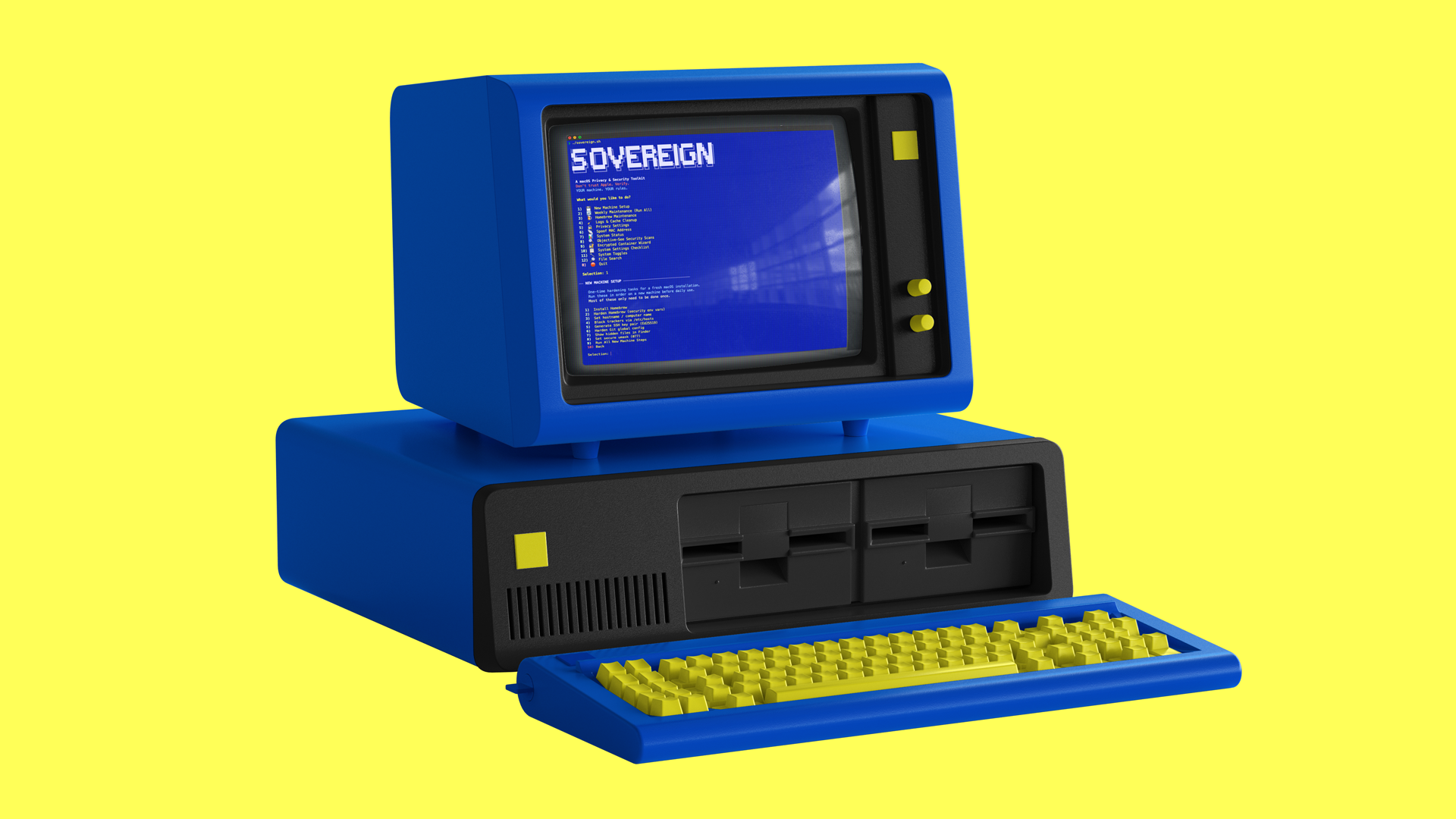 sovereign-mac 是一个菜单驱动的 shell 脚本,可自动完成 macOS 隐私加固、系统清理和安全扫描。无需任何专业技术。每个选项在执行前都会明确告诉你它将执行什么操作——绝不在后台静默运行。
专为希望拥有一个注重隐私、经过安全加固的 Mac,却不想花数小时去谷歌搜索终端命令的用户而生。
## 快速链接
- [快速开始](#quick-start)
- [功能](#features)
- [理念](#philosophy)
- [推荐工具](#-recommended-tools)
- [命令参考](COMMANDS.md) ← 包含所有终端命令的完整列表
- [致谢](#-credits--inspiration)
- [许可证](#-license)
## 为什么会有这个项目
手动关闭所有选项需要执行数十条散落在论坛帖子、博客文章和安全指南中的独立终端命令。sovereign-mac 将所有这些操作集中于一处,并在每一步提供简单易懂的解释。
## 快速开始
**第 1 步** — 从本代码库下载 `sovereign.sh`(点击该文件,然后点击下载按钮)
**第 3 步** — 为脚本添加可执行权限(这是一次性操作,目的是告诉 macOS “允许运行此文件”):
```
chmod +x sovereign.sh
```
**第 4 步** — 运行它:
```
./sovereign.sh
```
大功告成。你会看到一个菜单。输入数字并按 Enter 键即可选择相应选项。
## 环境要求
- macOS 12 Monterey 或更高版本(已在 Sequoia 上全面测试)
- 对于大多数功能,有这些就足够了
**可选(解锁额外功能):**
- [Homebrew](https://brew.sh) — macOS 包管理器,供“新机设置”和“文件搜索”模块使用
- [ripgrep](https://github.com/BurntSushi/ripgrep) — `brew install ripgrep` — 解锁“文件搜索”中的内容搜索功能
- [exiftool](https://exiftool.org) — `brew install exiftool` — 解锁“文件搜索”中的 EXIF 元数据清除功能
- [Objective-See tools](https://objective-see.org) — “安全扫描”模块中使用的免费安全应用
## 功能
### 1 · 新机设置
针对全新 macOS 安装的一次性加固任务。请在全新机器或恢复出厂设置后按顺序运行这些任务。
sovereign-mac 是一个菜单驱动的 shell 脚本,可自动完成 macOS 隐私加固、系统清理和安全扫描。无需任何专业技术。每个选项在执行前都会明确告诉你它将执行什么操作——绝不在后台静默运行。
专为希望拥有一个注重隐私、经过安全加固的 Mac,却不想花数小时去谷歌搜索终端命令的用户而生。
## 快速链接
- [快速开始](#quick-start)
- [功能](#features)
- [理念](#philosophy)
- [推荐工具](#-recommended-tools)
- [命令参考](COMMANDS.md) ← 包含所有终端命令的完整列表
- [致谢](#-credits--inspiration)
- [许可证](#-license)
## 为什么会有这个项目
手动关闭所有选项需要执行数十条散落在论坛帖子、博客文章和安全指南中的独立终端命令。sovereign-mac 将所有这些操作集中于一处,并在每一步提供简单易懂的解释。
## 快速开始
**第 1 步** — 从本代码库下载 `sovereign.sh`(点击该文件,然后点击下载按钮)
**第 3 步** — 为脚本添加可执行权限(这是一次性操作,目的是告诉 macOS “允许运行此文件”):
```
chmod +x sovereign.sh
```
**第 4 步** — 运行它:
```
./sovereign.sh
```
大功告成。你会看到一个菜单。输入数字并按 Enter 键即可选择相应选项。
## 环境要求
- macOS 12 Monterey 或更高版本(已在 Sequoia 上全面测试)
- 对于大多数功能,有这些就足够了
**可选(解锁额外功能):**
- [Homebrew](https://brew.sh) — macOS 包管理器,供“新机设置”和“文件搜索”模块使用
- [ripgrep](https://github.com/BurntSushi/ripgrep) — `brew install ripgrep` — 解锁“文件搜索”中的内容搜索功能
- [exiftool](https://exiftool.org) — `brew install exiftool` — 解锁“文件搜索”中的 EXIF 元数据清除功能
- [Objective-See tools](https://objective-see.org) — “安全扫描”模块中使用的免费安全应用
## 功能
### 1 · 新机设置
针对全新 macOS 安装的一次性加固任务。请在全新机器或恢复出厂设置后按顺序运行这些任务。
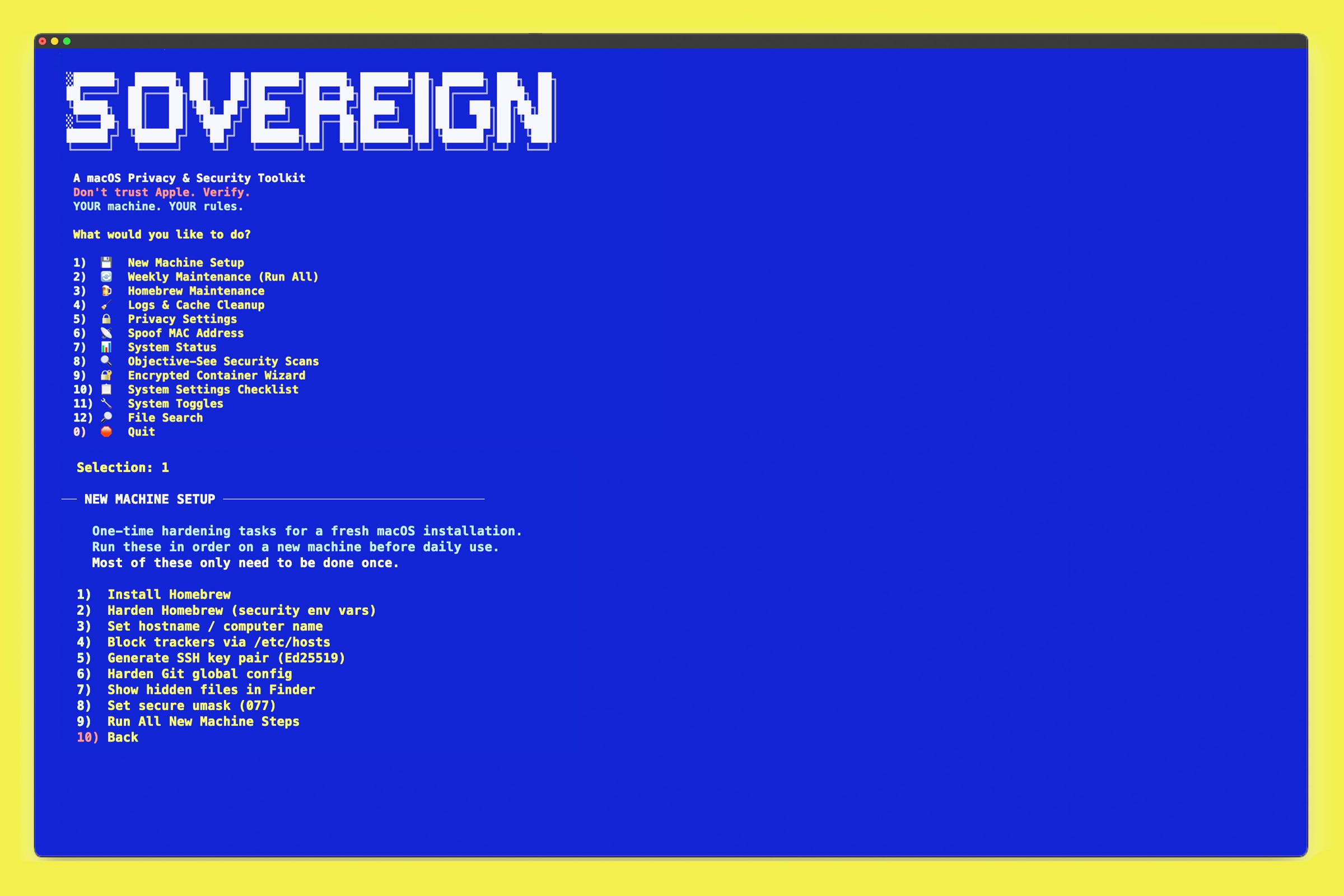 | 步骤 | 功能说明 |
|------|-------------|
| 安装 Homebrew | 安装最受欢迎的 macOS 包管理器,并锁定安全设置 |
| 加固 Homebrew | 禁用不安全的重定向,要求在所有安装过程中进行校验和验证 |
| 设置主机名 | 随机生成你的计算机网络名称,避免广播你的真实姓名 |
| 拦截追踪器 | 下载 Steven Black 的统一 hosts 文件 — 在操作系统层面拦截约 150,000 个已知的追踪器和广告域名 |
| 生成 SSH Key | 创建现代的 Ed25519 SSH 密钥对,用于安全的服务器访问 |
| 加固 Git | 根据安全最佳实践配置 Git |
| 显示隐藏文件 | 在 Finder 中显示隐藏的系统文件 |
| 安全 umask | 设置文件权限,使新文件默认仅限所有者访问(需要重启) |
| 步骤 | 功能说明 |
|------|-------------|
| 安装 Homebrew | 安装最受欢迎的 macOS 包管理器,并锁定安全设置 |
| 加固 Homebrew | 禁用不安全的重定向,要求在所有安装过程中进行校验和验证 |
| 设置主机名 | 随机生成你的计算机网络名称,避免广播你的真实姓名 |
| 拦截追踪器 | 下载 Steven Black 的统一 hosts 文件 — 在操作系统层面拦截约 150,000 个已知的追踪器和广告域名 |
| 生成 SSH Key | 创建现代的 Ed25519 SSH 密钥对,用于安全的服务器访问 |
| 加固 Git | 根据安全最佳实践配置 Git |
| 显示隐藏文件 | 在 Finder 中显示隐藏的系统文件 |
| 安全 umask | 设置文件权限,使新文件默认仅限所有者访问(需要重启) |
"` | 在所有三个系统命名空间中设置电脑名称 |
| `curl -fsSL https://raw.githubusercontent.com/StevenBlack/hosts/master/hosts` | 下载约 15 万个域名的拦截列表 |
| `ssh-keygen -t ed25519 -C "
### 2 · 每周维护
只需一次选择,即可背靠背依次运行 Homebrew 更新、所有隐私设置以及完整的日志与缓存清理。专为每周运行而设计。在开始前会向你确切展示它将要执行的操作。
### 3 · Homebrew 维护
保持你的 Homebrew 安装整洁且安全。
- 更新所有已安装的软件包
- 列出当前已安装的所有内容
- 使用 `--zap` 卸载应用(删除所有相关文件,而不仅仅是应用本身)
- 移除孤立的依赖项
- 清除下载缓存
` | 移除应用及其所有相关文件 |
### 4 · 日志与缓存清理
清除取证痕迹并释放磁盘空间。通常可恢复 1–10GB+ 的空间。
**将被删除的内容:**
- 终端历史记录(bash 和 zsh)
- 下载隔离历史记录
- 所有已挂载卷的废纸篓
- 系统日志、审计日志、ASL 日志、诊断日志
- 每日、每周和每月的维护日志
- 系统和用户缓存(包括 Homebrew、pip、npm、yarn)
- Quick Look 缩略图缓存
- 打印后台处理程序缓存
- Xcode 派生数据和归档
- **Safari 取证级擦除** — 历史数据库(所有日志文件)、下载列表、常用站点、上次会话、cookie、最近搜索记录、网页预览、缓存图标
- 邮件应用连接日志
- iOS 设备备份记录和已连接设备的指纹
- 应用安装回执和历史记录
- DNS 缓存刷新
- RAM 缓存清理
### 5 · 隐私设置
该工具包的核心。包含十二个细分类别的 `defaults write` 命令 —— 全部安全、均可撤销、无需任何删除操作。可一次性全部运行,也可挑选单个类别执行。
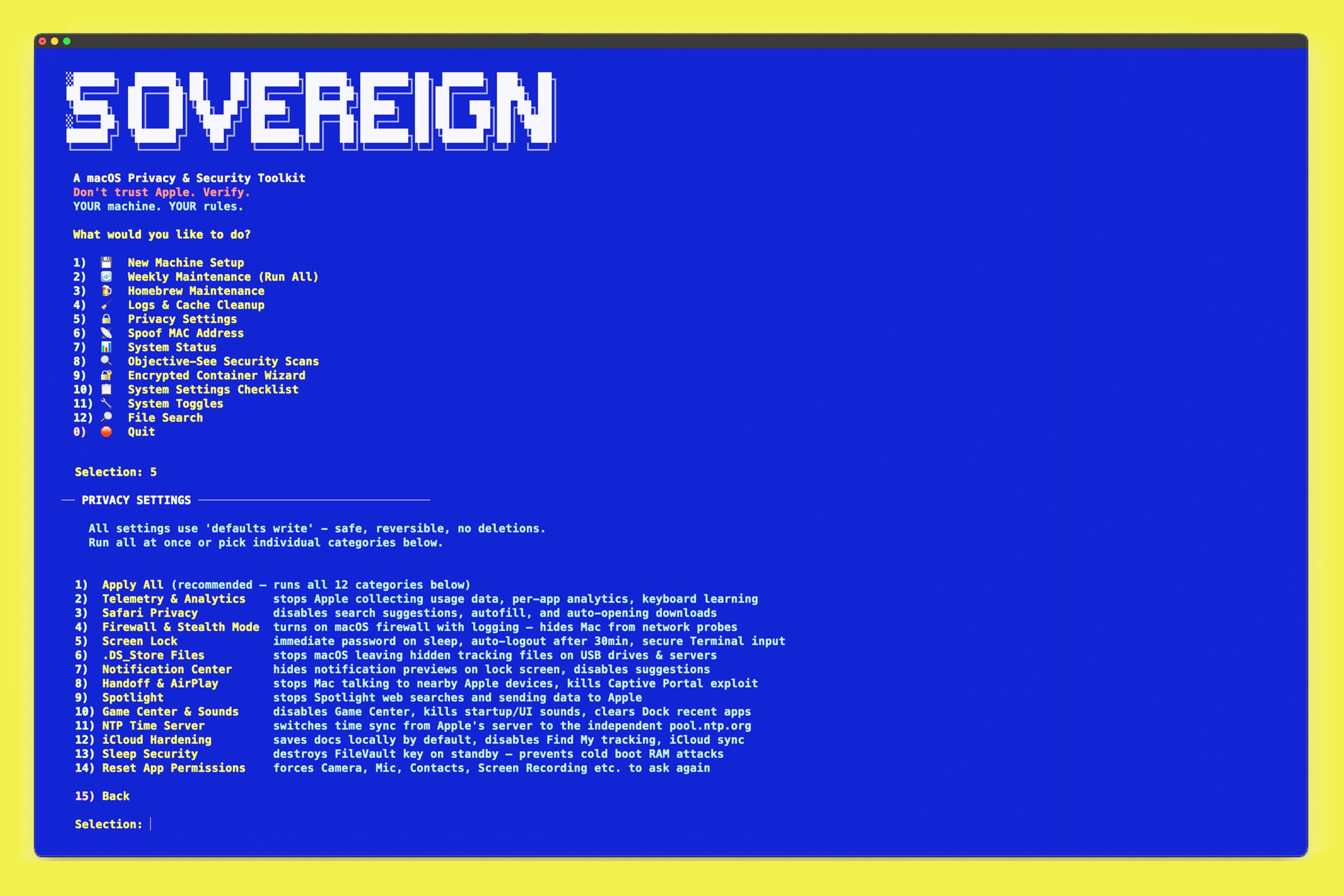 | 类别 | 功能说明 |
|----------|-------------|
| **遥测与分析** | 阻止 Apple 收集使用数据、崩溃报告、各应用分析(WiFi、钱包、地图、新闻、照片)、键盘学习记录、互联网拼写纠正、广告追踪 |
| **Safari 隐私** | 禁用搜索建议、自动填充(地址、密码、信用卡、表单)、自动打开已下载的文件 |
| **防火墙与隐身模式** | 启用带日志记录的 macOS 防火墙,开启隐身模式(你的 Mac 将不会响应网络探测),禁用对已签名应用的自动允许 |
| **锁屏** | 屏幕进入睡眠状态后立即要求输入密码,禁用 FDE 自动登录,设置 30 分钟自动注销,在终端中启用安全键盘输入 |
| **.DS_Store 文件** | 阻止 macOS 在 USB 驱动器和网络服务器上生成隐藏的元数据文件 |
| **通知中心** | 在锁屏界面隐藏通知内容,禁用通知建议 |
| **Handoff 与 AirPlay** | 阻止你的 Mac 与附近的 Apple 设备通信,扼杀 Captive Portal(已知的 WiFi 攻击媒介),禁用远程 Apple 事件,禁用网络唤醒 |
| **Spotlight** | 阻止 Spotlight 向 Apple 发送你的搜索内容,禁用 Siri 建议和网络搜索结果 |
| **Game Center 与声音** | 彻底禁用 Game Center,关闭开机声音和 UI 声音,从 Dock 中移除最近使用的应用,显示所有文件扩展名(防止 `.jpg.app` 伪装) |
| **NTP 时间服务器** | 将时间同步从 Apple 服务器切换为独立的 pool.ntp.org |
| **iCloud 加固** | 将文档保存的默认位置从 iCloud 改为本地磁盘,禁用桌面/文档文件夹同步,禁用“查找我的”追踪 |
| **睡眠安全** | 当 Mac 进入待机状态时销毁你的 FileVault 加密密钥 —— 防止冷启动 RAM 提取攻击。无论电池电量如何,均启用立即待机。 |
**重置应用权限** — 一个独立的子菜单,包含 10 个单独选项以及一个覆盖总计 22 个 TCC 服务类别的“扩展”批处理选项。强制所有应用重新请求相机、麦克风、屏幕录制、完全磁盘访问权限、通讯录、日历、辅助功能、定位、照片、语音识别等权限。
### 6 · 欺骗 MAC 地址
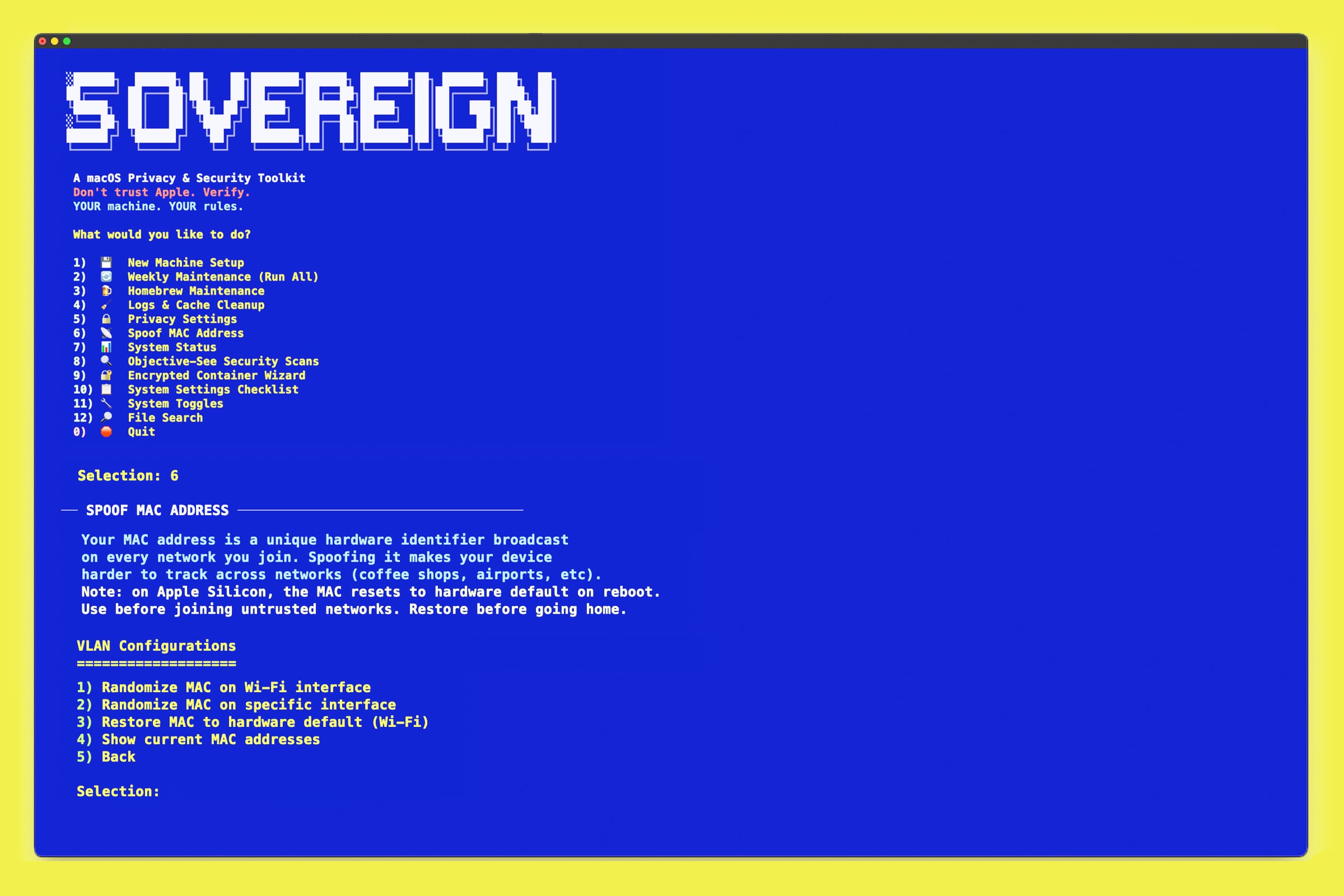
更改你的 Wi-Fi 适配器硬件地址 —— 有利于在公共网络上保护隐私。重启后会恢复真实的 MAC 地址(Apple Silicon 的限制)。
| 类别 | 功能说明 |
|----------|-------------|
| **遥测与分析** | 阻止 Apple 收集使用数据、崩溃报告、各应用分析(WiFi、钱包、地图、新闻、照片)、键盘学习记录、互联网拼写纠正、广告追踪 |
| **Safari 隐私** | 禁用搜索建议、自动填充(地址、密码、信用卡、表单)、自动打开已下载的文件 |
| **防火墙与隐身模式** | 启用带日志记录的 macOS 防火墙,开启隐身模式(你的 Mac 将不会响应网络探测),禁用对已签名应用的自动允许 |
| **锁屏** | 屏幕进入睡眠状态后立即要求输入密码,禁用 FDE 自动登录,设置 30 分钟自动注销,在终端中启用安全键盘输入 |
| **.DS_Store 文件** | 阻止 macOS 在 USB 驱动器和网络服务器上生成隐藏的元数据文件 |
| **通知中心** | 在锁屏界面隐藏通知内容,禁用通知建议 |
| **Handoff 与 AirPlay** | 阻止你的 Mac 与附近的 Apple 设备通信,扼杀 Captive Portal(已知的 WiFi 攻击媒介),禁用远程 Apple 事件,禁用网络唤醒 |
| **Spotlight** | 阻止 Spotlight 向 Apple 发送你的搜索内容,禁用 Siri 建议和网络搜索结果 |
| **Game Center 与声音** | 彻底禁用 Game Center,关闭开机声音和 UI 声音,从 Dock 中移除最近使用的应用,显示所有文件扩展名(防止 `.jpg.app` 伪装) |
| **NTP 时间服务器** | 将时间同步从 Apple 服务器切换为独立的 pool.ntp.org |
| **iCloud 加固** | 将文档保存的默认位置从 iCloud 改为本地磁盘,禁用桌面/文档文件夹同步,禁用“查找我的”追踪 |
| **睡眠安全** | 当 Mac 进入待机状态时销毁你的 FileVault 加密密钥 —— 防止冷启动 RAM 提取攻击。无论电池电量如何,均启用立即待机。 |
**重置应用权限** — 一个独立的子菜单,包含 10 个单独选项以及一个覆盖总计 22 个 TCC 服务类别的“扩展”批处理选项。强制所有应用重新请求相机、麦克风、屏幕录制、完全磁盘访问权限、通讯录、日历、辅助功能、定位、照片、语音识别等权限。
### 6 · 欺骗 MAC 地址
更改你的 Wi-Fi 适配器硬件地址 —— 有利于在公共网络上保护隐私。重启后会恢复真实的 MAC 地址(Apple Silicon 的限制)。
显示终端命令
命令 | 功能说明 |
|---------|-------------|
| `networksetup -setairportpower off` | 关闭 Wi-Fi(更改 MAC 前必须执行此操作) |
| `sudo ifconfig ether ` | 设置新的 MAC 地址 |
| `networksetup -setairportpower on` | 重新启用 Wi-Fi |
| `networksetup -listallhardwareports` | 列出所有接口和当前的 MAC 地址 |
### 7 · 系统状态
只读安全审计。不作任何更改 —— 仅进行检查和报告。
- Spotlight 索引状态
- FileVault 加密状态
- 系统完整性保护 (SIP) 状态
- Gatekeeper 状态
- 可用的操作系统更新
- LaunchAgents(在 Finder 中打开以便于查看和删除)
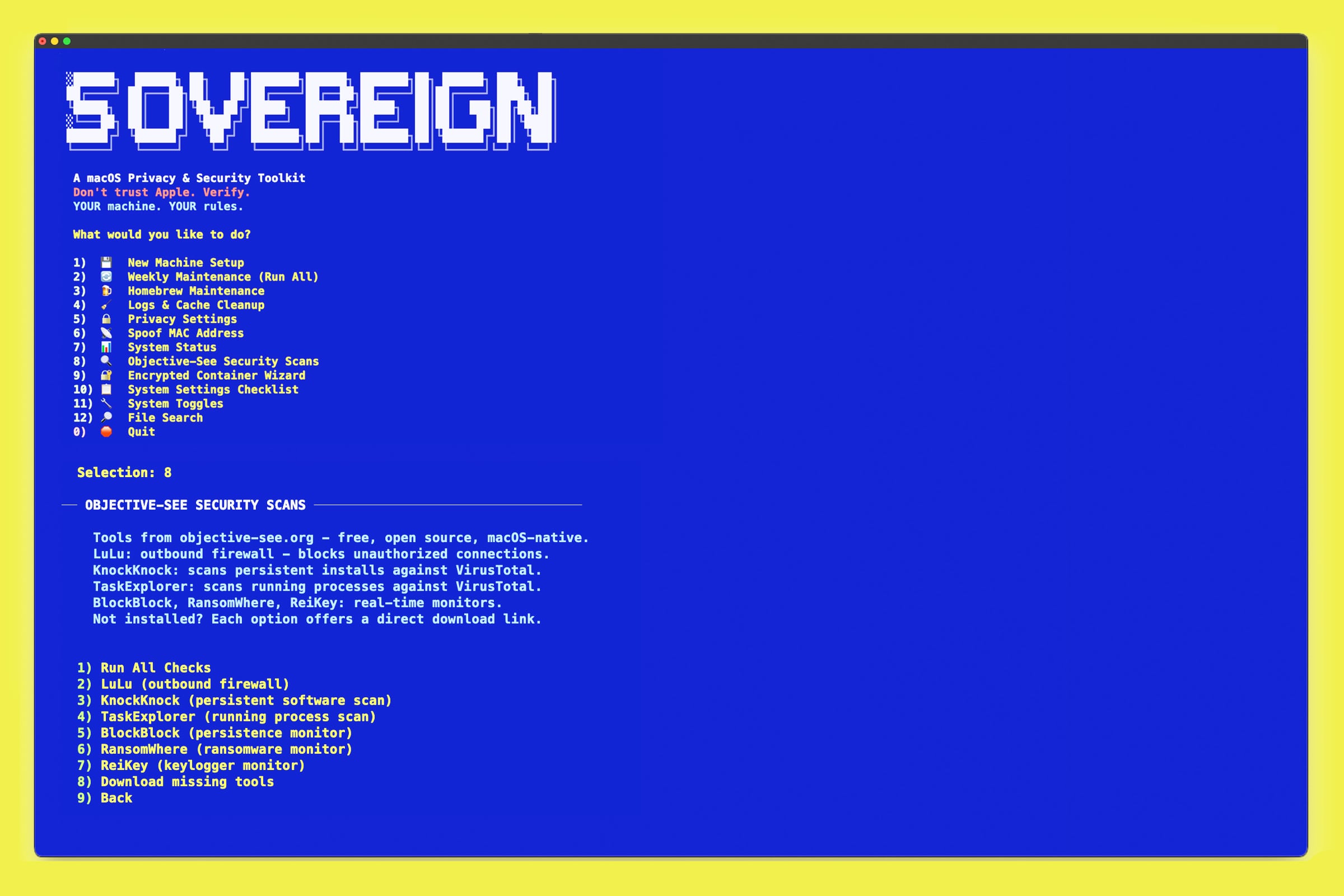
### 8 · Objective-See 安全扫描
检查 Patrick Wardle 的免费安全工具的状态,并在已安装的情况下运行它们。
 | 工具 | 功能说明 |
|------|-------------|
| **LuLu** | 开源出站防火墙 —— 当应用尝试对外联系时发出警报 |
| **KnockKnock** | 扫描持久化恶意软件并对照 VirusTotal 进行检查 |
| **TaskExplorer** | 显示所有正在运行的进程及其 VirusTotal 信誉评分 |
| **BlockBlock** | 实时监控持久化尝试 |
| **RansomWhere** | 检测类似勒索软件的文件加密活动 |
| **ReiKey** | 通过监控键盘事件 tapping 来检测键盘记录器 |
如果未安装某工具,脚本会提示你打开其下载页面。
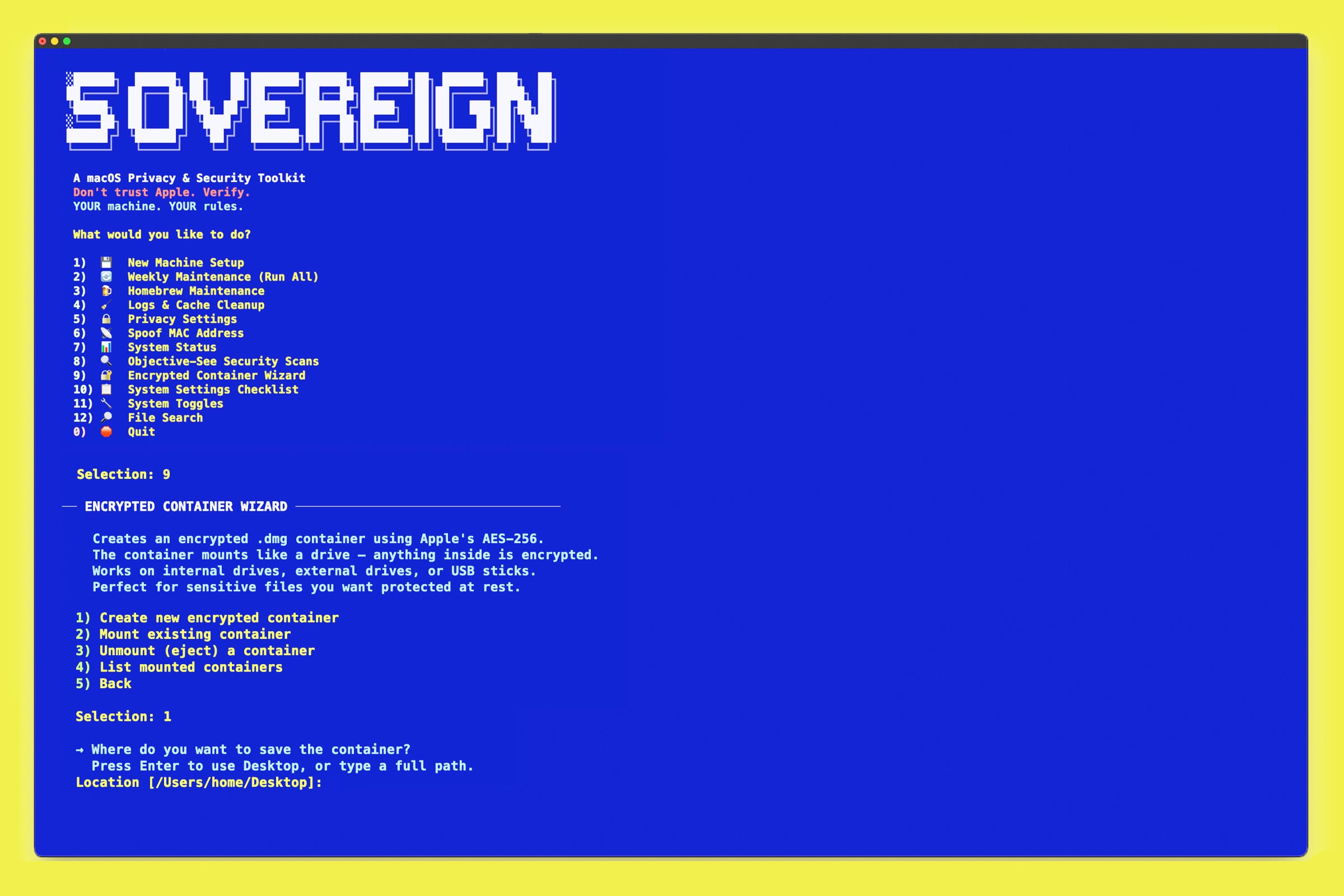
### 9 · 加密容器向导
使用 macOS 内置的 `hdiutil` 创建并管理 AES-256 加密磁盘映像。无需任何第三方软件。
| 工具 | 功能说明 |
|------|-------------|
| **LuLu** | 开源出站防火墙 —— 当应用尝试对外联系时发出警报 |
| **KnockKnock** | 扫描持久化恶意软件并对照 VirusTotal 进行检查 |
| **TaskExplorer** | 显示所有正在运行的进程及其 VirusTotal 信誉评分 |
| **BlockBlock** | 实时监控持久化尝试 |
| **RansomWhere** | 检测类似勒索软件的文件加密活动 |
| **ReiKey** | 通过监控键盘事件 tapping 来检测键盘记录器 |
如果未安装某工具,脚本会提示你打开其下载页面。
### 9 · 加密容器向导
使用 macOS 内置的 `hdiutil` 创建并管理 AES-256 加密磁盘映像。无需任何第三方软件。
显示终端命令
| 命令 | 功能说明 |
|---------|-------------|
| `hdiutil create -size m -fs APFS -encryption AES-256 -volname -type UDIF ` | 创建 AES-256 加密磁盘映像 |
| `hdiutil attach -notremovable` | 挂载容器(提示输入密码) |
| `hdiutil detach /Volumes/` | 卸载(弹出)容器 |
| `hdiutil info` | 列出所有已挂载的磁盘映像 |
### 10 · 系统设置清单
涵盖:Wi-Fi、通用、Siri 与 Spotlight、通知、锁定屏幕、隐私与安全性(包括锁定模式)、iCloud、Game Center、钱包与 Apple Pay,以及自动更新。
### 11 · 系统开关
用于常见加固任务的一键开关。每个开关在运行前都会进行确认。
| 开关 | 功能说明 |
|--------|-------------|
| 启用 / 禁用 Spotlight | 完全开启或关闭 Spotlight 索引 |
| 启用 / 禁用 Gatekeeper | 控制 macOS 是否验证应用签名 |
| 禁用 Siri | 通过 launchctl 彻底禁用 —— 清除所有 Siri 后台服务 |
| 禁用 AirDrop | 关闭 AirDrop |
| 禁用远程连接 | 关闭 SSH、TFTP、Telnet、mDNS 组播、打印机共享,并清除所有 Apple Remote Desktop 数据 |
| 禁用 Time Machine | 关闭自动备份 |
| 禁用访客账户 | 通过 `defaults write` 和 `sysadminctl` 实现全面锁定 —— 涵盖登录界面、SMB 和 AFP 访问 |
| 登录窗口名称与密码 | 将登录界面从显示用户图标切换为名称 + 密码提示(防止攻击者知道存在哪些账户) |
### 12 · 文件搜索
搜索你的文件系统并从图像中剥离元数据。将文件夹拖入终端即可设置搜索位置 —— 无需手动输入。
| 选项 | 功能说明 |
|--------|-------------|
| 按文件名搜索 | 在你的主文件夹(或你拖入的任何文件夹)中的任何位置按名称查找文件。搜索深度为 5 层,结果上限为 100 条。 |
| 按内容搜索 | 使用 ripgrep 对文件内部进行全文搜索。跳过二进制文件。默认目录:~/Documents。 |
| 按大小搜索 | 查找大于指定大小阈值的文件。提供预设选项(100MB–5GB)或自定义。显示前 50 个最大文件。 |
| **剥离 EXIF 元数据** | 移除图像中的所有元数据 —— GPS 位置、相机型号、序列号、时间戳。防止通过分享照片进行人肉搜索。需要 exiftool(脚本会提示安装)。 |
## 理念
sovereign-mac 遵循一系列严格的原则:
**每次操作前充分披露。** 每个选项在要求你确认之前,都会确切地显示它将要做什么。绝不在后台静默运行。
**安全且可逆。** 隐私设置使用 `defaults write` —— 这是标准的 macOS 偏好设置系统。每一项更改都可以撤销。绝不删除系统文件。
**最小占用。** 无需安装。无后台进程。无配置文件。仅靠一个脚本。运行完毕,关闭终端即可。
**通俗易懂。** 每个菜单选项都有简单易懂的描述。无需具备任何技术知识背景。
## 关于名字的含义
**VONU** — *自愿且不脆弱*
这个名字源于 Rayo 关于通过彻底的自我解放来实现个人主权的哲学。在 macOS 隐私的语境下,vonu 的含义正如其字面意思:你的机器应当是自愿且不脆弱的 —— 它只为你工作,按照你的意愿,听从你的控制。而不是 Apple 的。
## 安全提示
运行前请务必检查脚本。`sovereign.sh` 是纯 zsh 代码 —— 没有代码混淆,没有压缩,没有任何猫腻。请自行阅读。
在运行前验证文件完整性:
```
shasum -a 256 sovereign.sh
```
**预期的 SHA256:**
```
a24a61eb638d6fc9bd55a6c517c0c5f0bd3dae630fbfbcb82b410bc772a49057
```
## 🔧 推荐工具
这些并非运行 sovereign-mac 的必需品,但它们代表了值得围绕其构建的更广泛的隐私技术栈。
### 浏览器
- **[Firefox](https://www.mozilla.org/firefox/)** — 开源、可扩展的日常主力浏览器。建议搭配 uBlock Origin 使用。
- **[LibreWord](https://librewolf.net/)** — 开箱即用具有强化默认设置的 Firefox 分支版本
- **[Mullvad Browser](https://mullvad.net/browser)** — 与 Tor Project 合作开发,旨在无需依赖 Tor 网络的情况下最小化指纹追踪
- **[Tor Browser](https://www.torproject.org/)** — 匿名性最高,但在速度和可用性上有较大折衷。不建议作为日常主力使用。
### VPN
- **[Mullvad VPN](https://mullvad.net)** — 无需账号,接受现金和加密货币支付,无日志记录。业界标杆。
- **[ProtonVPN](https://protonvpn.com)** — 开源,通过审计,拥有良好的过往记录
### 防火墙与安全 (macOS)
- **[LuLu](https://objective-see.org/products/lulu.html)** — 免费的出站防火墙,当应用对外联系时发出警报
- **[KnockKnock](https://objective-see.org/products/knockknock.html)** — 扫描持久化恶意软件,对照 VirusTotal 进行检查
- **[TaskExplorer](https://objective-see.org/products/taskexplorer.html)** — 显示所有正在运行的进程及其信誉评分
- **[BlockBlock](https://objective-see.org/products/blockblock.html)** — 实时监控持久化尝试
- **[RansomWhere](https://objective-see.org/products/ransomwhere.html)** — 检测类似勒索软件的文件加密活动
- **[ReiKey](https://objective-see.org/products/reikey.html)** — 检测键盘记录器
- **[Oversight](https://objective-see.org/products/oversight.html)** — 当麦克风或摄像头被激活时发出警报
- **[ClamAV](https://www.clamav.net/)** — 开源防病毒软件,基于 CLI,与该脚本配合良好
- **[Little Snitch](https://www.obdev.at/products/littlesnitch)** — 付费,比 LuLu 更高级的出站防火墙
### 电子邮件与即时通讯
- **[ProtonMail](https://proton.me)** — 加密电子邮件,零知识加密
- **[Signal](https://signal.org)** — 加密通讯的业界标杆
- **[Session](https://getsession.org)** — Signal 的替代品,无需提供手机号
### 密码管理
- **[KeePassXC](https://keepassxc.org)** — 本地存储,开源,无需云同步
- **[Bitwarden](https://bitwarden.com)** — 开源,支持自托管的云同步方案
### 终端配置
- **[iTerm2](https://iterm2.com)** — macOS 终端替代品。本 README 中的截图就是使用它制作的。
- **[Powerlevel10k](https://github.com/romkatv/powerlevel10k)** — zsh 主题,即时提示,美观且极速
- **[iTerm2 Color Schemes](https://iterm2colorschemes.com)** — 250 多种精选配色主题
### 延伸阅读
- **[privacytools.io](https://www.privacytools.io)** — 全面且持续维护的隐私工具推荐
- **[Privacy Guides](https://www.privacyguides.org)** — 社区驱动的隐私保护建议
- **[Surveillance Self-Defense (EFF)](https://ssd.eff.org)** — 来自电子前哨基金会 (EFF) 的实用指南
想要了解更多?我维护着一个不断更新的清单,包含 1,000 多种精心挑选的隐私工具、书籍、软件和资源,请访问 **[chrisvrakas.com/resources.html](https://chrisvrakas.com/resources.html)** — 同时也作为一个开源代码库提供,地址为 **[github.com/chrisvrakas/awesome-polymathic-resource-stack](https://github.com/chrisvrakas/awesome-polymathic-resource-stack)**。
## 📄 许可证
**当所有人都保留版权时,我们选择著佐权。**
本项目是开源的,基于 [MIT License](LICENSE) 发布 —— 随意复刻、修改、学习。只需在适当的地方注明出处即可。
## 📬 联系方式
**Chris Vrakas**
- 网站:[chrisvrakas.com](https://chrisvrakas.com)
- GitHub: [@chrisvrakas](https://github.com/chrisvrakas)
- X: [@chris_vrakas](https://x.com/chris_vrakas)
- Medium: [@chrisvrakas](https://medium.com/@chrisvrakas)
- PGP: [connect@chrisvrakas.com](mailto:connect@chrisvrakas.com)
## ⚡ 速览
- **零安装** — 无需 npm,无需 webpack,无需构建步骤,无任何依赖
- **零追踪** — 没有分析,没有遥测,不会对外联系
- **零信任** — 不信任 Apple 的默认设置,不信任监控资本主义,不认同隐私必须是一种需要主动选择加入的事物
- **100% zsh** — 可读、可审计、属于你
- **展示操作明细** — 每个选项在执行操作前,都会确切地告诉你它将要做什么。没有静默执行,也没有意外。大多数同类竞争脚本只是直接运行。
- **自动打开系统设置** — 清单模块不仅仅是让你自己去找设置项。它会自动打开确切的“系统设置”面板。没有其他工具会这样做。
显示终端命令
| 命令 | 功能说明 | |---------|-------------| | `/bin/bash -c "$(curl -fsSL https://raw.githubusercontent.com/Homebrew/install/HEAD/install.sh)"` | 安装 Homebrew | | `echo "export HOMEBREW_NO_INSECURE_REDIRECT=1" >> ~/.zprofile` | 阻止跟随不安全的 HTTP 重定向 | | `echo "export HOMEBREW_CASK_OPTS=--require-sha" >> ~/.zprofile` | 要求所有 cask 安装均进行 SHA 验证 | | `sudo scutil --set ComputerName / HostName / LocalHostName "显示终端命令
| 命令 | 功能说明 | |---------|-------------| | `brew analytics off` | 禁用 Homebrew 遥测 | | `brew update` | 获取最新的软件包索引 | | `brew upgrade --greedy` | 升级所有软件包,包括 GUI 应用 | | `brew cleanup -s` | 移除旧版本并清除下载缓存 | | `brew autoremove` | 移除未使用的依赖项 | | `brew doctor` | 诊断安装问题 | | `brew uninstall --cask --zap --force显示终端命令
| 命令 | 功能说明 | |---------|-------------| | `sqlite3 ~/Library/Preferences/com.apple.LaunchServices.QuarantineEventsV2 'delete from LSQuarantineEvent'` | 清除下载隔离历史记录 | | `rm -f ~/.bash_history && rm -f ~/.zsh_history` | 删除终端历史记录 | | `sudo rm -rf /Volumes/*/.Trashes/*` | 清空所有卷的废纸篓 | | `sudo rm -rf /Library/Logs/* /var/audit/* /private/var/log/asl/*` | 删除系统、审计和 ASL 日志 | | `sudo rm -rf /Library/Caches/* ~/Library/Caches/*` | 删除系统和用户缓存 | | `qlmanage -r cache` | 清除 Quick Look 缩略图缓存 | | `sudo rm -rf /var/spool/cups/c0*` | 清除打印后台处理程序 | | `rm -f ~/Library/Safari/History.db ~/Library/Cookies/Cookies.binarycookies` | Safari 取证级擦除(共 16 个文件) | | `sudo rm -rf /var/db/lockdown/*` | 删除已连接设备的指纹 | | `sudo dscacheutil -flushcache && sudo killall -HUP mDNSResponder` | 刷新 DNS 缓存 | | `sudo purge` | 清理 RAM 缓存 | 有关约 45 条清理命令的完整列表,请参阅 [COMMANDS.md](COMMANDS.md)。显示终端命令
隐私设置使用 `defaults write` —— 这是标准的 macOS 偏好设置系统。每一项更改都是可逆的。有关涵盖所有 12 个类别的约 60 条命令的完整列表,请参阅 [COMMANDS.md](COMMANDS.md)。以下是一些具有代表性的示例: | 命令 | 功能说明 | |---------|-------------| | `defaults write com.apple.AdLib forceLimitAdTracking -bool true` | 强制限制广告追踪 | | `sudo /usr/libexec/ApplicationFirewall/socketfilterfw --setstealthmode on` | 启用隐身模式 — Mac 将忽略未经请求的网络探测 | | `sudo pmset -a destroyfvkeyonstandby 1` | 待机时销毁 FileVault 密钥 — 防止冷启动攻击 | | `sudo defaults write /Library/Preferences/SystemConfiguration/com.apple.captive.control.plist Active -bool false` | 禁用 Captive Portal(WiFi 攻击媒介) | | `defaults write com.apple.screensaver askForPasswordDelay -int 0` | 睡眠后立即要求输入密码 | | `tccutil reset Camera` | 强制所有应用重新请求相机访问权限 | | `defaults write NSGlobalDomain AppleShowAllExtensions -bool true` | 显示所有文件扩展名 — 防止 `.jpg.app` 伪装 |显示终端命令
| 命令 | 功能说明 | |---------|-------------| | `mdutil -s /` | 报告 Spotlight 索引状态 | | `fdesetup status` | 报告 FileVault 状态 | | `csrutil status` | 报告 SIP 状态 | | `spctl --status` | 报告 Gatekeeper 状态 | | `softwareupdate -l` | 列出可用的操作系统更新 |显示终端命令
| 命令 | 功能说明 | |---------|-------------| | `sudo mdutil -i off / && sudo mdutil -E /` | 禁用 Spotlight 索引 | | `sudo spctl --master-disable` | 禁用 Gatekeeper | | `sudo launchctl disable 'system/com.apple.assistantd'` | 禁用 Siri(共 6 次 launchctl 调用之一) | | `defaults write com.apple.NetworkBrowser DisableAirDrop -bool true` | 禁用 AirDrop | | `sudo systemsetup -setremotelogin off` | 禁用 SSH | | `sudo launchctl disable 'system/com.apple.tftpd'` | 禁用 TFTP | | `sudo launchctl disable system/com.apple.telnetd` | 禁用 Telnet | | `sudo defaults write /Library/Preferences/com.apple.mDNSResponder.plist NoMulticastAdvertisements -bool true` | 禁用 mDNS 组播 | | `cupsctl --no-share-printers --no-remote-any --no-remote-admin` | 禁用所有打印机共享 | | `sudo rm -rf /var/db/RemoteManagement` | 清除 Apple Remote Desktop 数据 | | `sudo tmutil disable` | 禁用 Time Machine | | `sudo sysadminctl -guestAccount off` | 禁用访客账户(共 3 次 sysadminctl 调用之一) | | `sudo defaults write /Library/Preferences/com.apple.loginwindow SHOWFULLNAME -bool true` | 设置名称 + 密码登录界面 |
*“隐私不是安全的对立面。隐私即是安全,而安全并非没有犯罪,而是存在正义。”*
**— Andreas Antonopoulos**
**[chrisvrakas.com](https://chrisvrakas.com)** · **[@chris_vrakas](https://x.com/chris_vrakas)** · **[GitHub](https://github.com/chrisvrakas)**
*你的机器。你做主。*
**[chrisvrakas.com](https://chrisvrakas.com)** · **[@chris_vrakas](https://x.com/chris_vrakas)** · **[GitHub](https://github.com/chrisvrakas)**
*你的机器。你做主。*
标签:Cutter, GitHub Advanced Security, Shell脚本, 安全加固, 安全基线, 应用安全, 教学环境, 系统配置, 网络安全, 运维工具, 隐私保护