Rishisharma029/resqnet
GitHub: Rishisharma029/resqnet
一个结合 AI 辅助分析和实时 GIS 追踪的灾害应急响应与协调平台,旨在灾时打通遇险者、救援人员和指挥中心之间的信息链路。
Stars: 0 | Forks: 0

ResqNet
Next-Generation Real-Time Disaster Response & Coordination Platform
[](http://creativecommons.org/licenses/by-nd/4.0/) [](https://rishisharma029.github.io/resqnet)[](https://github.com/Rishisharma029/resqnet) [](https://github.com/Rishisharma029)
[](mailto:i.rishisharma2007@gmail.com)
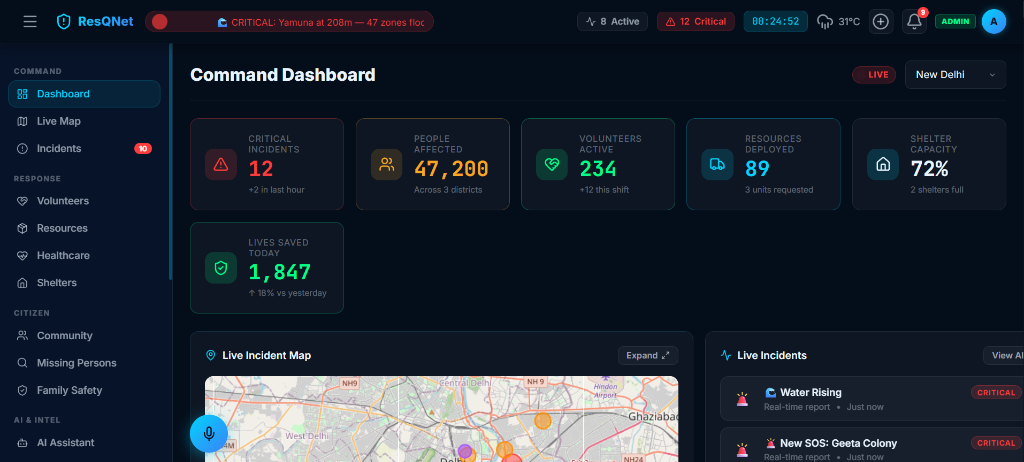
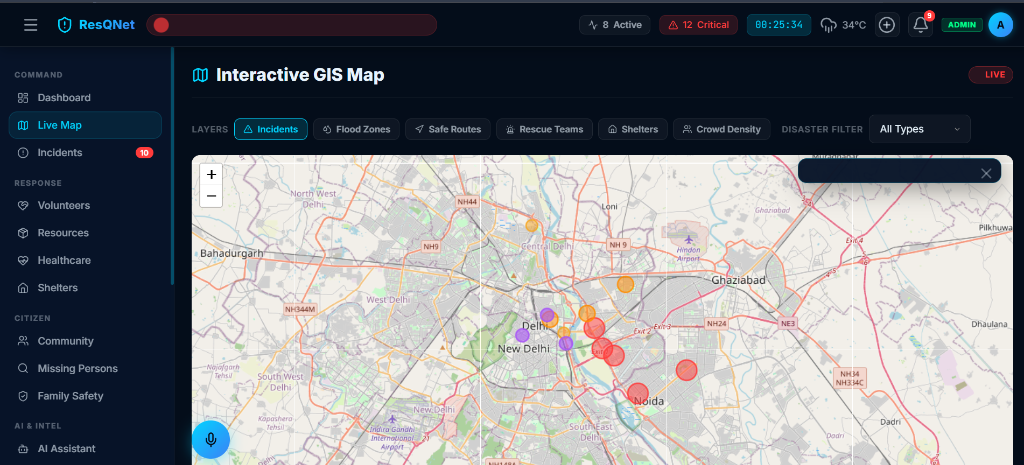
## 🌍 项目简介 **ResqNet** 是一个先进、实时的应急管理与协调系统,旨在关键的灾害事件中,弥合遇险者、第一响应人员与指挥中心之间的沟通鸿沟。通过利用实时地理空间追踪、AI 辅助的事件分析以及高可用的 WebSocket 通信,ResqNet 赋能团队在分秒必争的时刻做出数据驱动的决策。

 |
|  |
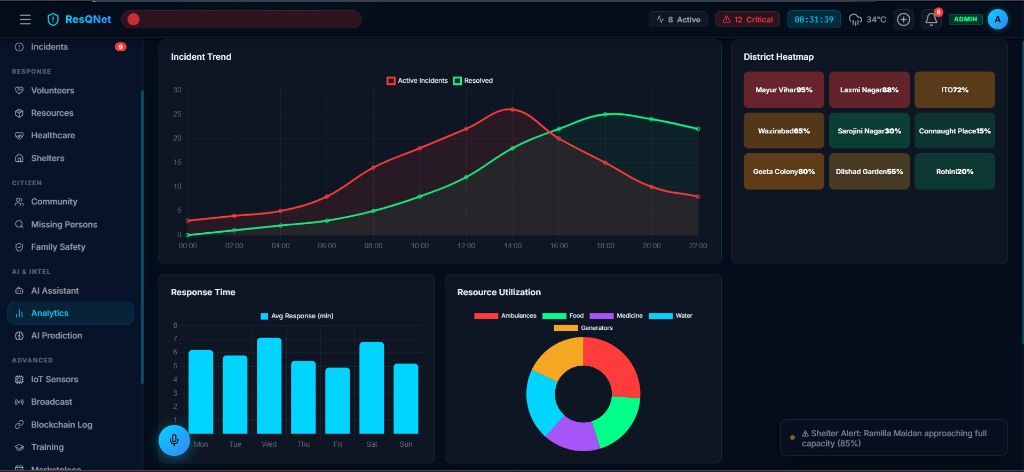
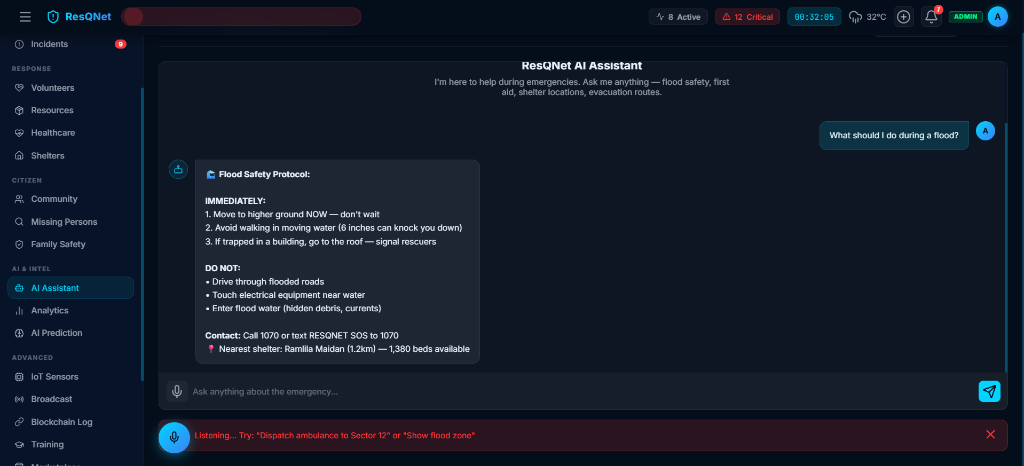
| **指挥中心数据分析** | **AI 助手与事件分流** |
|
|
| **指挥中心数据分析** | **AI 助手与事件分流** |
|  |
|  |
|
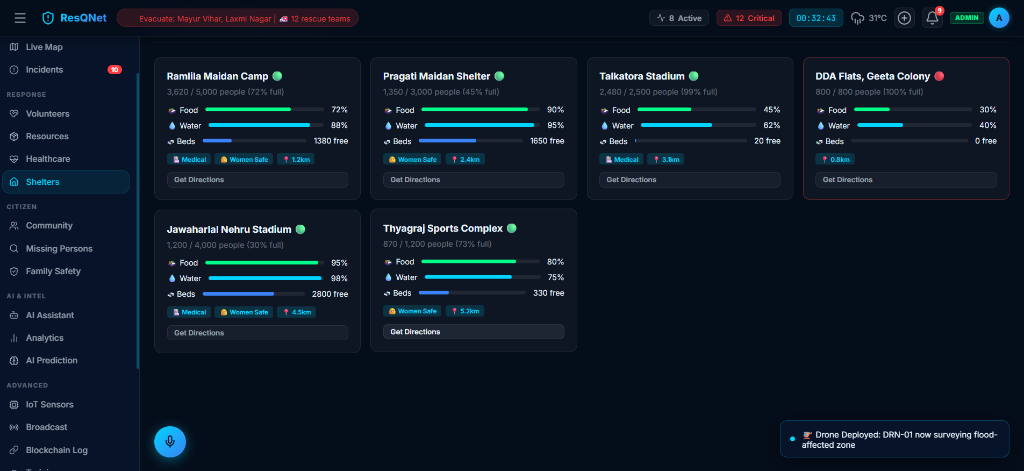
Shelter Capacity & Management System
## 🏗️ 架构图
ResqNet 采用分布式架构,以确保在流量高峰期(灾害事件)的高可用性和低延迟。
### 系统流程图
```
graph TD
User([End User / Victim]) -->|SOS Signal| Client(ResqNet Client / PWA)
Client -->|REST / WSS| LoadBalancer[Load Balancer]
LoadBalancer --> API[API Gateway]
LoadBalancer --> WSS[WebSocket Server]
API --> Services[Backend Microservices]
WSS --> PubSub[(Redis Pub/Sub)]
Services --> DB[(PostgreSQL)]
Services --> ML[AI Triage Engine]
PubSub --> WSS
WSS --> Responder([First Responder Terminal])
```
### 后端服务图
```
graph LR
Gateway[API Gateway] --> Auth[Auth Service]
Gateway --> Incident[Incident Service]
Gateway --> Geo[Geo-Spatial Service]
Gateway --> Shelter[Shelter Management]
Incident --> DB[(Primary DB)]
Geo --> Redis[(Cache & Location)]
Incident --> Kafka[Event Bus]
```
### WebSocket 流程(实时通信)
```
sequenceDiagram
participant C as Client (Victim)
participant W as WebSocket Node
participant R as Redis Pub/Sub
participant D as Dispatcher UI
C->>W: Connect (Token)
W-->>C: Ack & Subscribe
C->>W: Emit 'location_update' {lat, lng}
W->>R: Publish 'incident:123'
R->>W: Fan-out to Subscribers
W->>D: Push 'location_update'
D-->>W: Acknowledge
```
## ✨ 功能特性
- **实时事件仪表盘**:俯瞰所有活跃事件、严重程度以及资源分配的鸟瞰图。
- **地理空间追踪(地图)**:在交互式 3D 地图上实时追踪响应人员、资产和 SOS 信号。
- **高级数据分析**:事件后报告、响应时间热力图以及资源利用率指标。
- **AI 助手**:基于 NLP 的分流系统,可根据传入的求救文本/音频对事件进行优先级排序。
- **避难所管理系统**:实时容量追踪、库存管理以及为流离失所者提供路线规划。
- **离线功能**:核心功能通过 PWA 进行缓存,适用于间歇性连接区域。
### 🧪 模拟功能
*为了在不依赖硬件集成的情况下展示架构的全部潜力,平台内模拟了以下功能:*
- **无人机直播**:通过流媒体 pipeline 传输预录制的航拍素材。
- **卫星监控**:将历史热力异常数据作为实时事件进行重播。
- **区块链日志**:模拟用于审计追踪的不可变账本交易。
- **热成像 AI**:在热成像视频流上生成模拟的物体检测边界框。
## 🛠️ 技术栈
**前端:**
- React (Vite) / Next.js
- Tailwind CSS
- Mapbox GL JS / Deck.gl
- Socket.io-client / Zustand
**后端:**
- Node.js (Express / NestJS)
- PostgreSQL (PostGIS)
- Redis (发布/订阅与缓存)
- Socket.io
- Prisma ORM
**基础设施(已模拟/规划中):**
- Docker & Kubernetes
- AWS (EC2, S3, RDS)
- NGINX
## 🚀 安装与配置
1. **克隆仓库**
git clone https://github.com/Rishisharma029/resqnet.git
cd resqnet
2. **环境变量**
cp .env.example .env
# 使用您的特定密钥(数据库、Mapbox 等)更新 .env 文件
3. **安装依赖**
# 安装服务端依赖
cd server
npm install
# 安装客户端依赖
cd ../client
npm install
4. **运行应用**
# 在终端 1 中(后端)
cd server
npm run dev
# 在终端 2 中(前端)
cd client
npm run dev
## 🗺️ 路线图
- [x] 第一阶段:核心身份验证与基础 SOS 路由。
- [x] 第二阶段:实时地图集成与 WebSocket 设置。
- [ ] 第三阶段:集成 AI 助手 NLP 以实现自动分流。
- [ ] 第四阶段:部署移动应用(React Native)以实现离线优先使用。
- [ ] 第五阶段:硬件集成(IoT 传感器、真实无人机直播)。
标签:AI辅助分析, GIS地图, MITM代理, 子域名突变, 实时通信, 库, 应急响应, 指挥中心, 搜索引擎查询, 测试用例, 灾害管理, 自定义脚本, 请求拦截, 资源调度