VaishuSidhu/Malware-PCAP-Investigation
GitHub: VaishuSidhu/Malware-PCAP-Investigation
一个基于 AgentTesla 恶意软件 PCAP 样本的 SOC 调查实战项目,完整记录了从网络流量分析到 IOC 提取和检测规则编写的端到端事件响应过程。
Stars: 0 | Forks: 0
# 恶意软件 PCAP 调查 – AgentTesla 凭据外泄
**#30DaysOfSOC – 第 17 至 20 天** | 动手实践 | 初级 SOC 学习
## 概述
这是我 #30DaysOfSOC 学习之旅中的一个动手实践项目。我目前正致力于成为一名 SOC 分析师,并通过此类实际操作来提升我的技能。
我偶然发现了一个公开的恶意软件训练 PCAP,并决定从头开始分析它——把它当作一次真正的调查——以练习 SOC 分析师每天使用的技能。
## 调查场景
作为我 #30DaysOfSOC 挑战的一部分,我分析了一个源于真实场景启发的公开 AgentTesla 风格恶意软件 PCAP 训练文件。
场景:一台工作站正在生成异常的出站 FTP 流量。我们已经获取了数据包捕获文件,需要对其进行调查。
假设我是负责此案例的 SOC 分析师,我试图回答以下问题:
- 这是恶意行为,还是仅仅是异常?
- 是否真的有数据被窃取?
- 谁或什么接收了这些数据?
- 我们可以使用哪些指标在未来检测到这种情况?
## 学习目标
这些是我希望通过该项目培养的技能:
- [ ] 在 Wireshark 中加载和探索 PCAP
- [ ] 阅读协议层次结构统计
- [ ] 过滤 FTP 流量并理解所看到的内容
- [ ] 跟踪 TCP 流以阅读明文对话
- [ ] 直接从数据包捕获中提取通过 FTP 传输的文件
- [ ] 分析窃取的凭据转储
- [ ] 进行基本的威胁情报查询(VirusTotal、AbuseIPDB)
- [ ] 了解 MITRE ATT&CK 技术 ID
- [ ] 编写简单的检测规则
## 使用的工具
- **Wireshark** – 我将其作为打开和分析数据包捕获的主要工具
- **VirusTotal** – 用于检查攻击者的 IP 地址之前是否被标记过
- **AbuseIPDB** – 用于查询该 IP 的滥用历史和托管信息
- **Kali Linux** – 我在 VirtualBox 中的分析环境
## 调查工作流
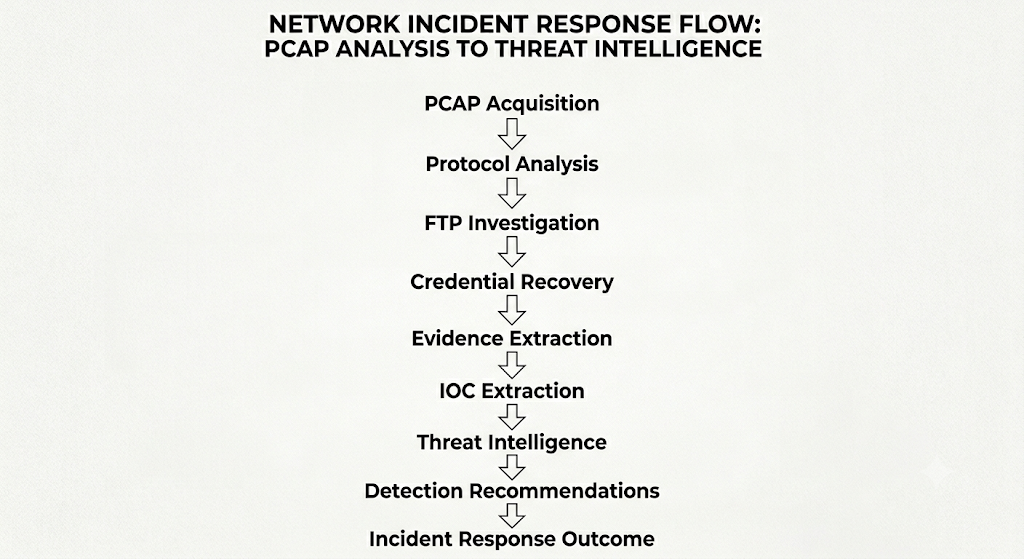
## 关键发现
在仔细检查 PCAP 后,以下是我的发现:
### 受害者
| 项目 | 值 |
|------|-------|
| 内部 IP 地址 | 10.1.31.101 |
| 用户名 | david.miller |
| 计算机名 | DESKTOP-WE9H2FM |
| 操作系统 | Windows 11 Pro |
### 攻击者服务器
| 项目 | 值 |
|------|-------|
| FTP 服务器 IP | 93.89.225.40 |
| FTP 用户名 | pgizemM6 |
| FTP 密码 | [已隐去] |
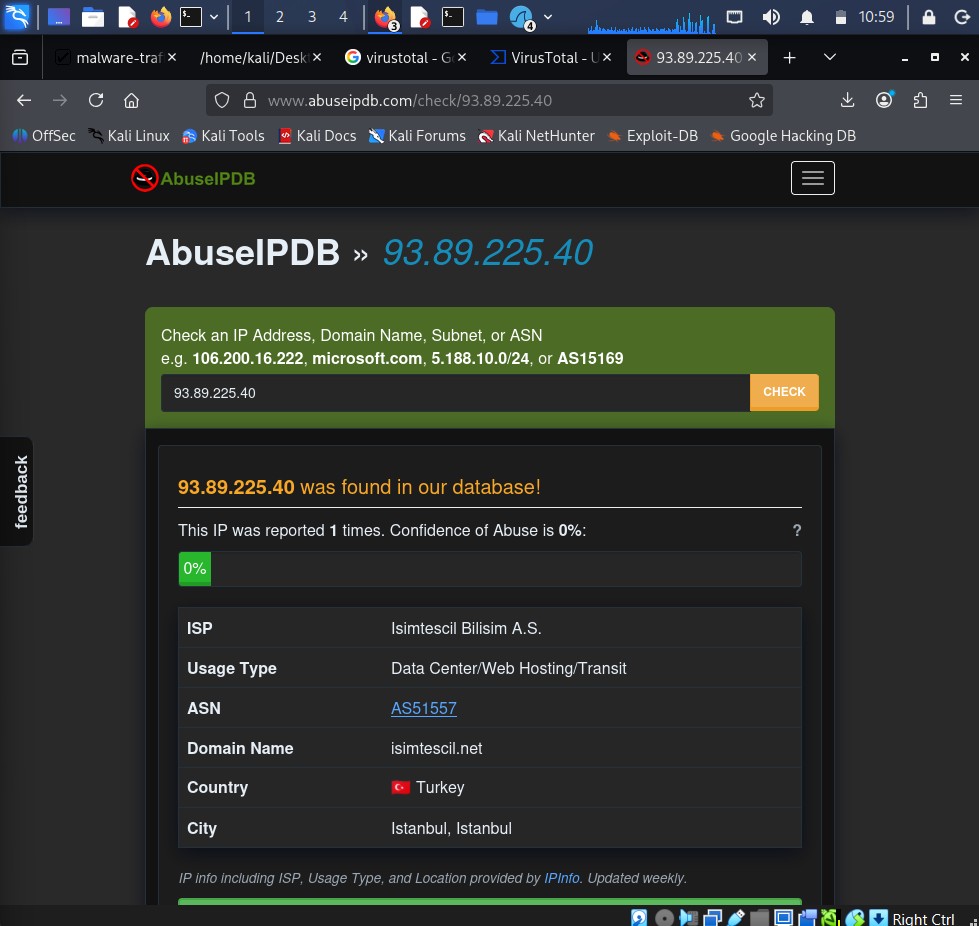
| 位置 | 土耳其伊斯坦布尔 |
### 窃取的内容
恶意软件收集并上传了一个名为以下名称的文件:
```
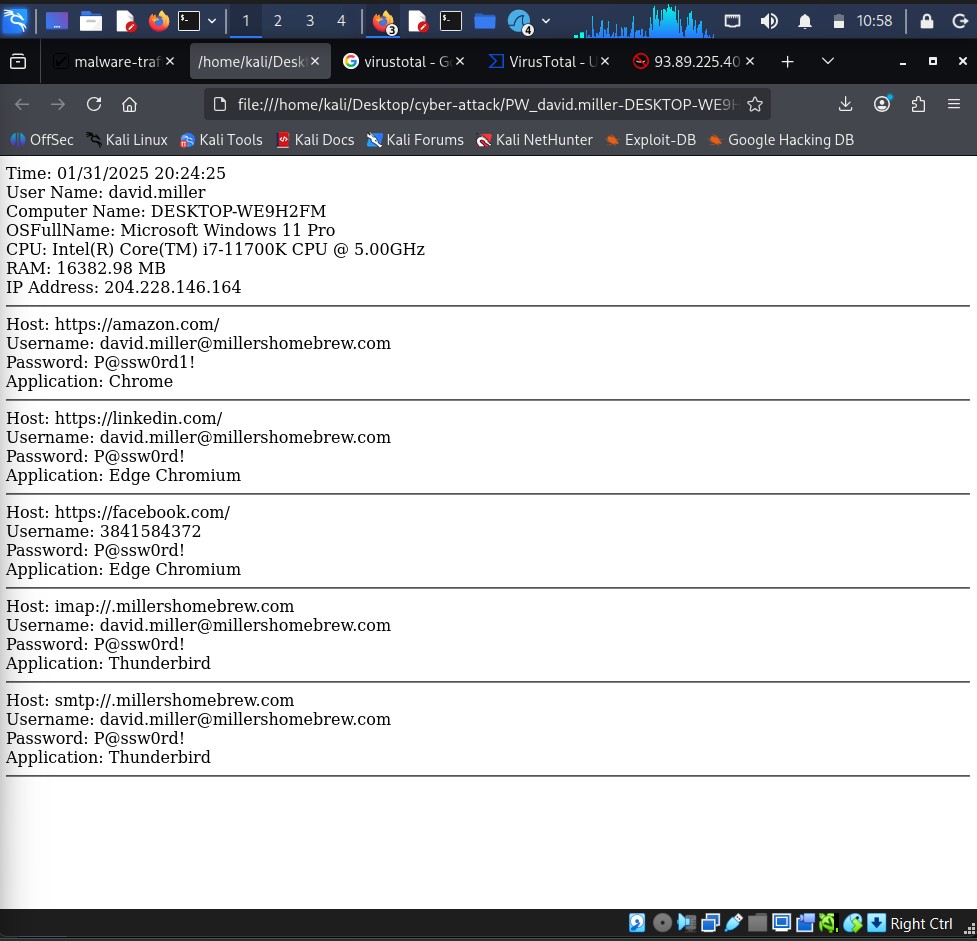
PW_david.miller-DESKTOP-WE9H2FM_2025_01_31_20_24_25.html
```
该文件包含:
- 来自 Chrome 和 Edge 的保存密码(如 Amazon、LinkedIn、Facebook 等网站)
- 来自 Thunderbird 的电子邮件凭据
- 系统信息,如计算机规格和 IP 地址
## 我的操作 – 调查亮点
✅ 发现 FTP 流量来自一台工作站(这是一个危险信号)
✅ 从数据包中重建了完整的 FTP 会话
✅ 使用 Wireshark 的导出对象功能恢复了被窃取的实际文件
✅ 打开并阅读了被窃取的凭据转储
✅ 在 VirusTotal 和 AbuseIPDB 上查询了攻击者的 IP
✅ 提取了所有入侵指标 (IOC)
✅ 将发生的情况映射到 MITRE ATT&CK 技术
✅ 为网络和端点监控编写了基本的检测规则
## 调查阶段
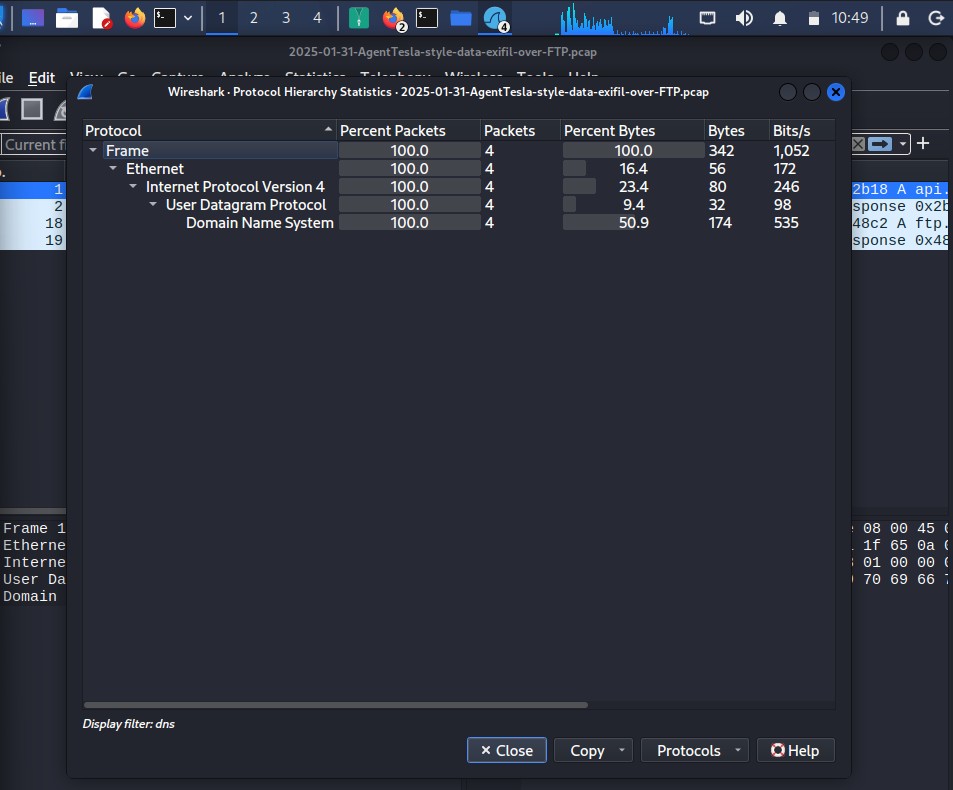
### 第一阶段 – 协议分析
我做的第一件事是打开 PCAP 并转到 **统计 → 协议层次结构**。这为你提供了捕获中所有协议的快速概览。我立刻注意到了 FTP 流量,这是很不寻常的。
### 第二阶段 – FTP 会话分析
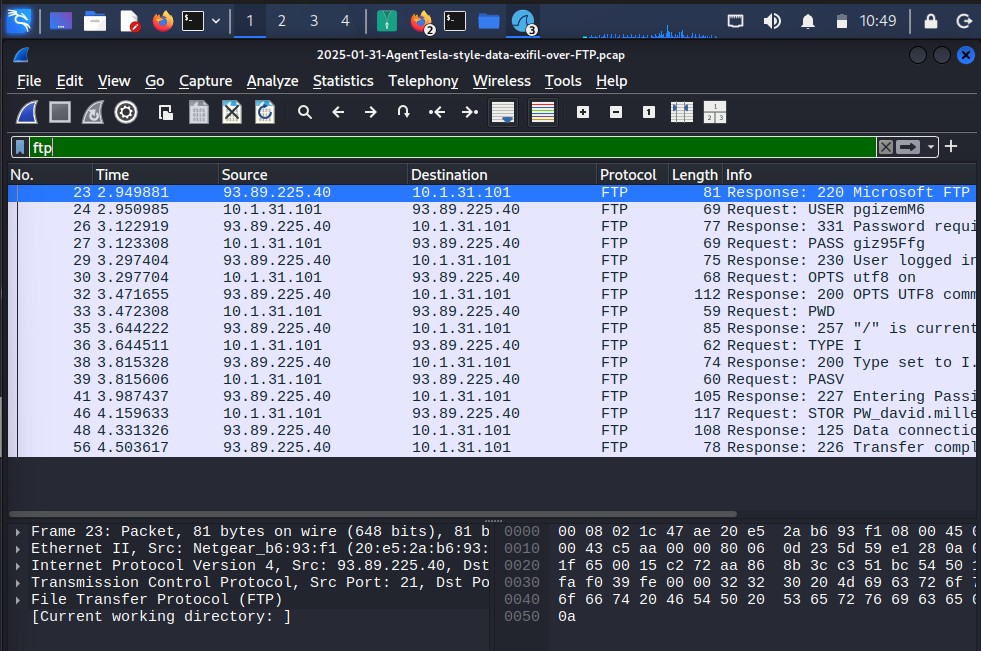
我在 Wireshark 中使用 `ftp` 过滤器过滤了 FTP 流量。这向我展示了完整的对话——登录、命令以及文件上传。
### 第三阶段 – 阅读 TCP 流
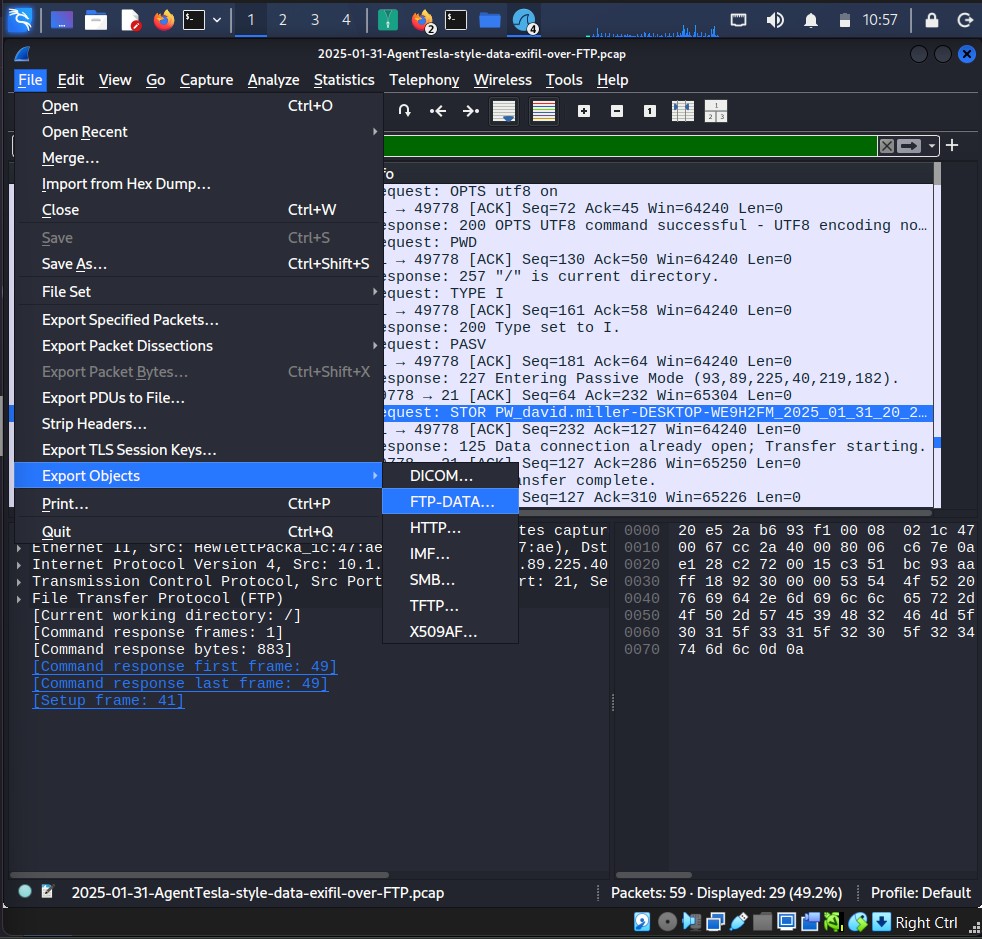
我右键单击一个数据包并跟踪了 TCP 流。这让我能够像阅读对话一样阅读整个 FTP 会话——而且是明文形式,包括正在上传的文件名。
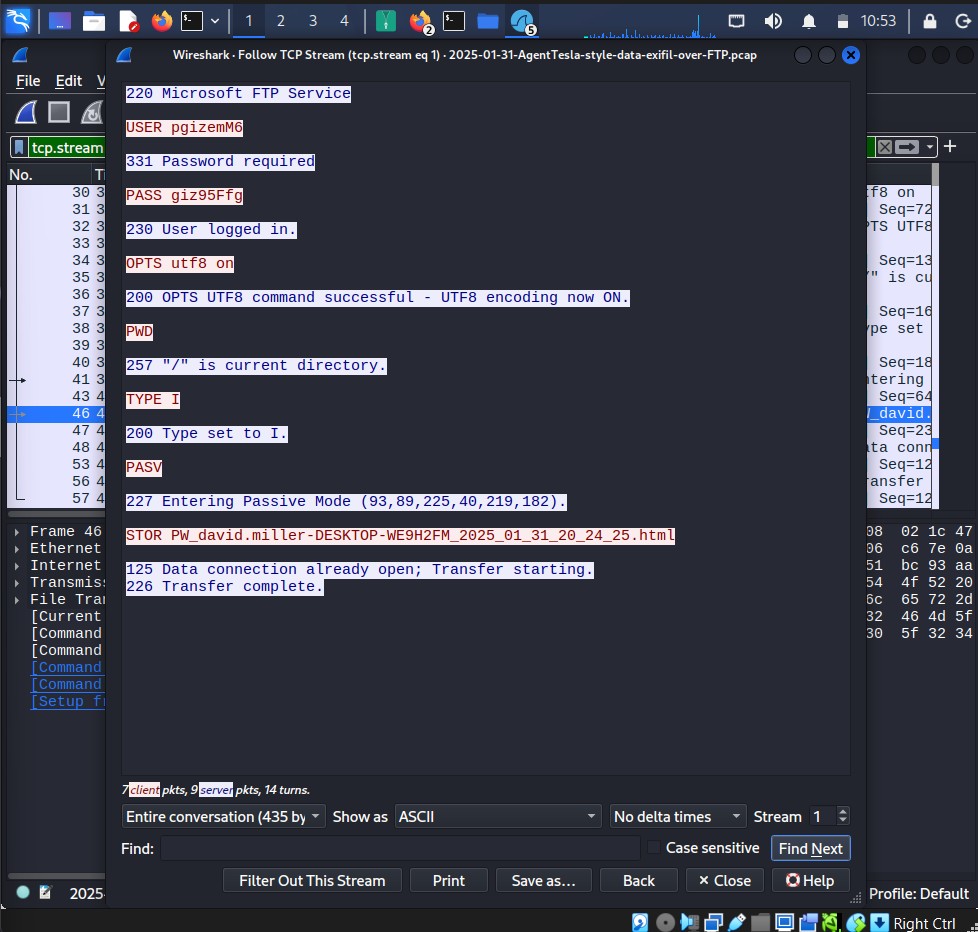
然后我使用 **文件 → 导出对象 → FTP-DATA** 来提取实际已上传的文件。
### 第四阶段 – 凭据恢复
我打开了提取的 HTML 文件,并发现了所有被窃取的凭据。看到它像那样展示出来真的让人觉得非常真实——这就是 AgentTesla 发送给攻击者的内容。
### 第五阶段 – 威胁情报
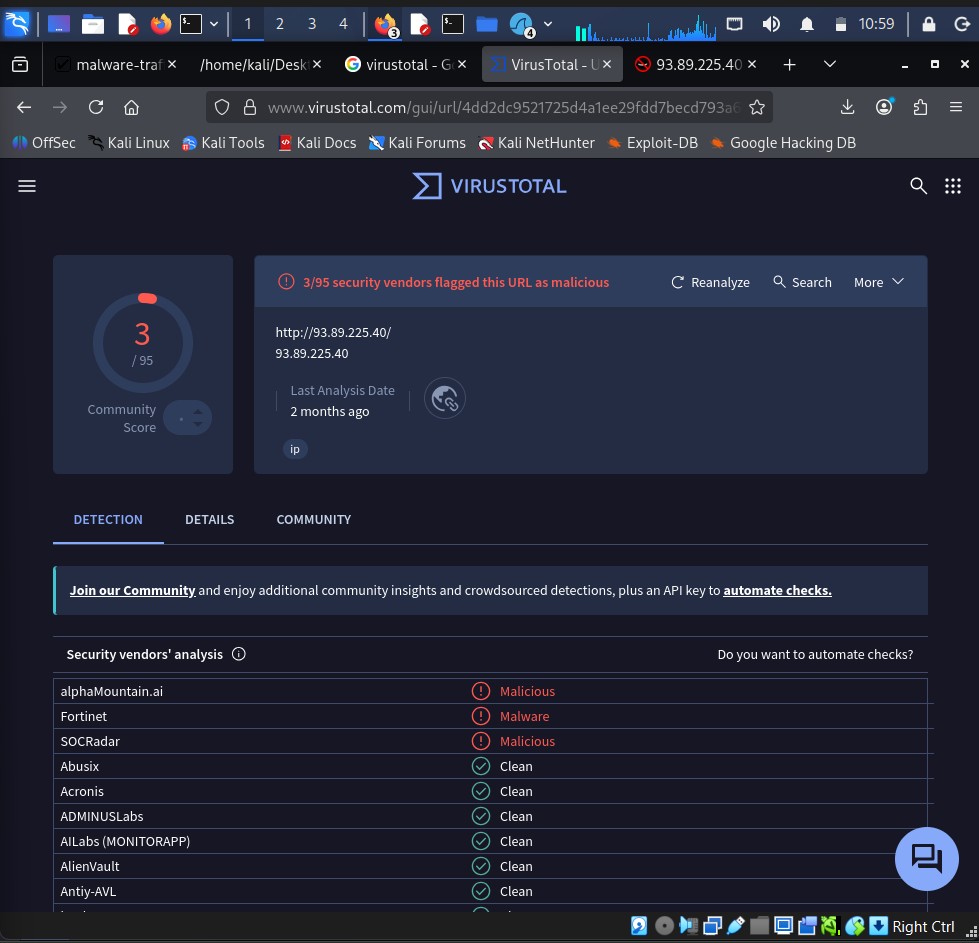
我在 VirusTotal 和 AbuseIPDB 上搜索了攻击者的 IP 地址,以查看关于它的已知信息。
## MITRE ATT&CK 技术
| 发生的情况 | 技术 | ID |
|---------------|-----------|-----|
| 窃取浏览器密码 | Credentials from Web Browsers | T1555.003 |
| 窃取电子邮件密码 | Credentials from Mail Clients | T1555.004 |
| 收集系统信息 | System Information Discovery | T1082 |
| 收集 IP 信息 | System Network Configuration Discovery | T1016 |
| 创建 HTML 转储文件 | Data from Local System | T1005 |
| 通过 FTP 上传 | Exfiltration Over Alternative Protocol | T1048.003 |
## 展示的技能
- 使用 Wireshark 进行网络流量分析
- 恶意软件行为调查
- 事件文档记录
- 威胁情报查询 (VirusTotal, AbuseIPDB)
- IOC 提取
- MITRE ATT&CK 框架映射
- 基础检测工程
- 安全运营中心 (SOC) 工作流
- 技术撰写与报告
## 仓库结构
```
Malware-PCAP-Investigation/
│
├── README.md ← You are here
│
├── PCAP/
│ └── 2025-01-31-AgentTesla-style-data-exfil-over-FTP.pcap
│
├── Evidence/
│ ├── 01_Protocol_Hierarchy.png
│ ├── 02_FTP_Conversation.png
│ ├── 03_TCP_Stream.png
│ ├── 04_FTP_File_Upload.png
│ ├── 05_Credential_Dump.png
│ ├── 06_VirusTotal_Analysis.png
│ ├── 07_AbuseIPDB_Analysis.png
│ └── 08_Investigation_Workflow.png
│
└── Reports/
├── Investigation_Report.md ← My full step-by-step walkthrough
├── IOC_Report.md ← All the indicators I found
├── Incident_Timeline.md ← Timeline of what happened
└── Detection_Recommendations.md ← Detection rules and recommendations
```
## 参考资料
- [恶意软件流量分析 – 我获取 PCAP 的地方](https://www.malware-traffic-analysis.net/)
- [MITRE ATT&CK – AgentTesla](https://attack.mitre.org/software/S0331/)
- [VirusTotal](https://www.virustotal.com/)
- [AbuseIPDB](https://www.abuseipdb.com/)
## 报告
| 报告 | 内容 |
|--------|--------------|
| [调查报告.md](Reports/Investigation_Report.md) | 我对整个调查的完整记录 |
| [IOC 报告.md](Reports/IOC_Report.md) | 我提取的所有入侵指标 |
| [事件时间线.md](Reports/Incident_Timeline.md) | 数据包捕获中的事件时间线 |
| [检测建议.md](Reports/Detection_Recommendations.md) | 检测规则和响应步骤 |
*这是我 #30DaysOfSOC 动手实践学习系列的一部分,在此系列中,我通过处理真实的网络安全场景来培养实践技能。*
标签:DAST, HTTP工具, IP 地址批量处理, SOC分析, Wireshark, 句柄查看, 威胁情报, 开发者工具, 恶意软件分析