cheng-lin-max/sift-self-correction-agent
GitHub: cheng-lin-max/sift-self-correction-agent
该项目是一个用于自动化数字取证(DFIR)的 AI 自我纠正 Agent,通过强制审查循环减少分析幻觉,提升调查报告的可信度。
Stars: 0 | Forks: 0
# SIFT 自我纠正 Agent
这是一个 Protocol SIFT 扩展,它教会 AI 分析员反复核对自身的工作——从而减少幻觉,并使自动化 DFIR 结果更加值得信赖。
**FIND EVIL! Hackathon 2026 参赛作品**
## 架构
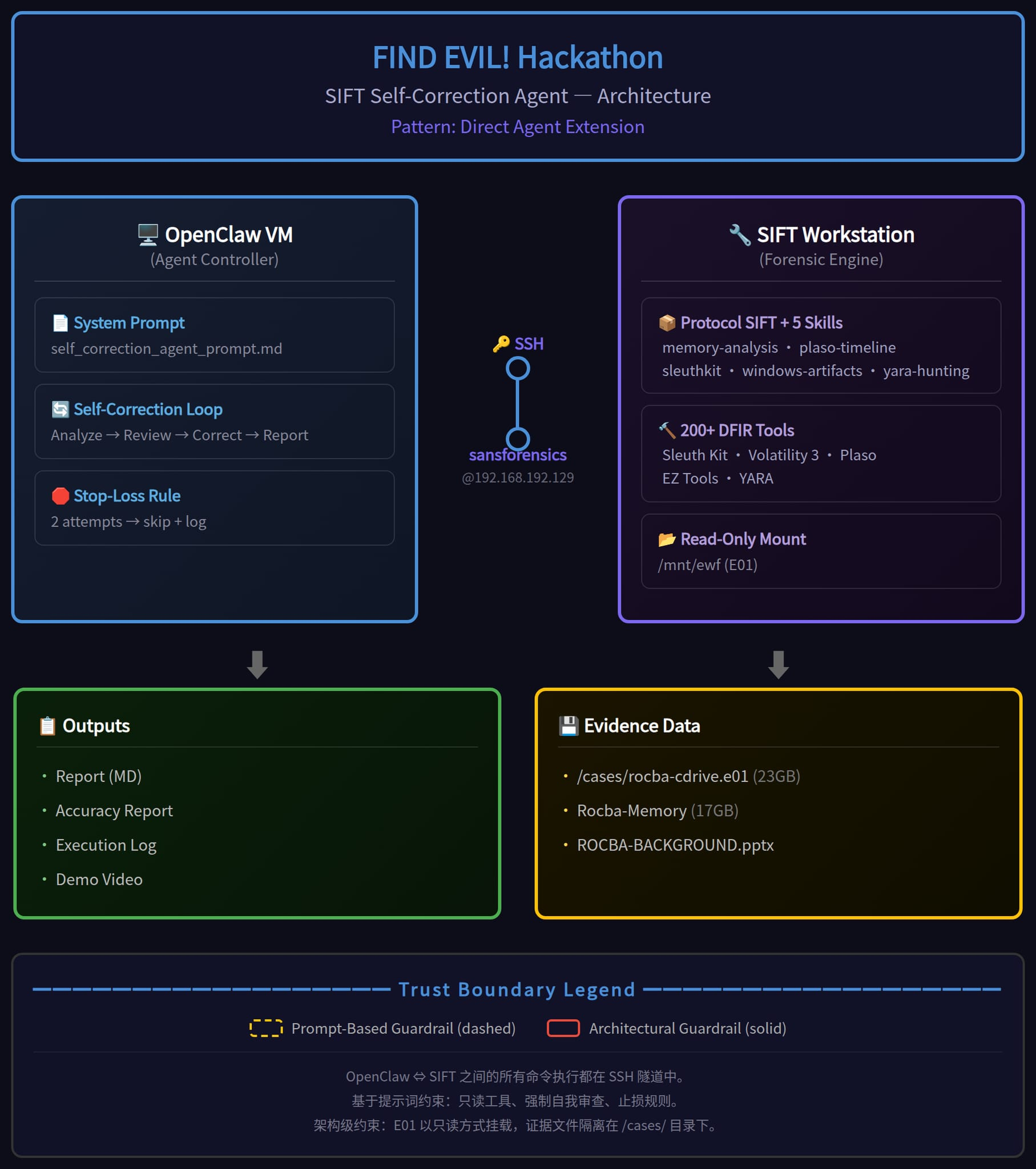
本项目采用 **Direct Agent Extension**(直接 Agent 扩展)架构:
┌─────────────────┐ SSH ┌────────────────────┐
│ OpenClaw (Agent)│ ◄─────► │ SIFT Workstation │
│ (推理 + │ │ (取证工具) │
│ 自我纠正) │ │ IP: 192.168.192.129│
└─────────────────┘ └────────────────────┘
- **基于 Prompt 的护栏**:Agent 指令强制执行只读工具的使用,并强制进行自我纠正。
- 有关详细的组件图,请参阅 `architecture.png`。
## 自我纠正工作流
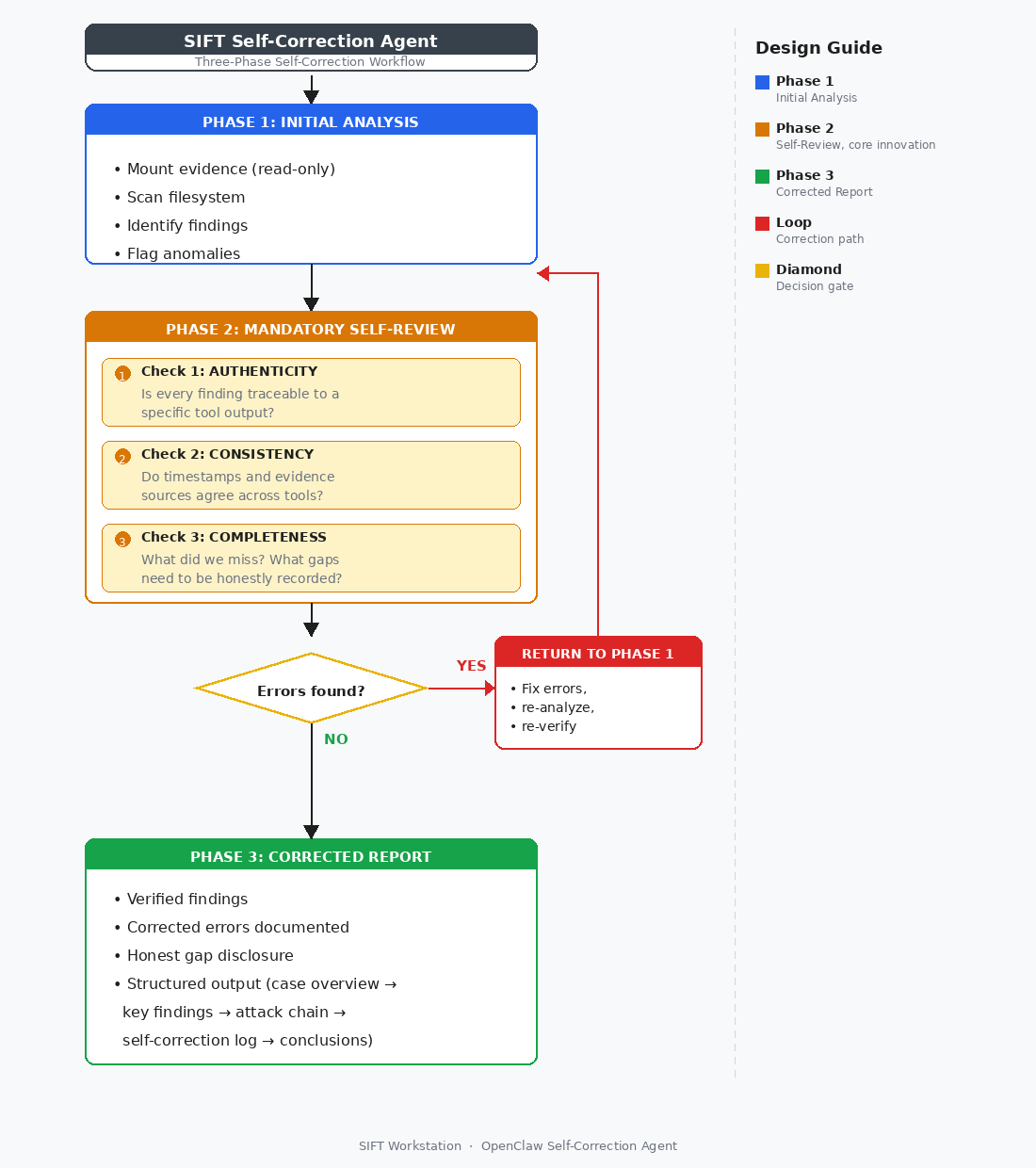
该 Agent 遵循强制性的三阶段工作流:初始分析 → 强制自我审查(真实性、一致性、完整性检查) → 纠正后的报告。如果在自我审查期间发现错误,Agent 将返回分析阶段进行纠正,然后再生成最终报告。
## 项目结构
├── self_correction_agent_prompt.md # 核心 Agent 系统指令
├── skills/ # Protocol SIFT 技能包(5 个技能)
├── analysis_report.md # 完整调查报告 (ROCBA-001)
├── accuracy_report.md # 准确性自我评估
├── execution_log.md # 结构化工具执行日志
├── architecture.png # 架构图
├── README.md
└── LICENSE # MIT 许可证
## 核心特性
·自我纠正循环:在最终定稿报告之前,Agent 会检查自身结论中是否存在幻觉、不一致之处以及遗漏的 artifacts。
·诚实面对不确定性:明确区分已确认的发现与推论;如实记录跳过的分析。
·实验方法论:受数据科学竞赛工作流启发——控制变量、基线对比、迭代测试。
## 构建工具
·OpenClaw(Agent 框架)
·SIFT Workstation(取证平台)
·Protocol SIFT(AI-DFIR 集成)
·Sleuth Kit(fls, icat)
·Python(pptx 解析,数据提取)
·Bash
## 作者
Cheng Lin — FIND EVIL! 2026 独立参赛者
## 许可证
MIT — 详见 LICENSE 文件
## 局限性与未来工作
### 已知局限性
1. **Prompt 级别的护栏**:当前架构使用基于 prompt 的限制来强制执行只读工具的使用。虽然 Agent 在测试期间确认未执行任何写入命令,但恶意构造的 prompt 理论上可以绕过这些限制。这一点已在准确性报告中如实记录。
2. **单 Agent 架构**:当前实现使用单个 Agent 同时进行分析和自我审查。多 Agent 架构——即由一个 Agent 进行分析,另一个进行独立验证——可以提供更强大的职责分离。
3. **跳过的分析**:根据止损规则,跳过了三个分析维度(事件日志、通过 Volatility 进行的内存分析以及 Prefetch 时间戳)。内存分析由于缺少 Windows ISF 符号文件(符号服务器返回 HTTP 204)而受阻。注册表配置单元 (Registry hive) 分析已在补充更新 (2026-05-31) 中完成。这些缺口已如实记录。
4. **手动 SSH 设置**:当前工作流需要手动配置 SSH。未来版本可以通过基于 MCP 的 Agent 与 Workstation 集成来实现连接设置的自动化。
### 计划改进
1. **自定义 MCP 服务器架构**:从 Direct Agent Extension 迁移到自定义 MCP 服务器。这将仅公开类型安全的、只读的取证功能——从架构层面杜绝证据篡改,而非依赖 prompt 约束。
2. **多 Agent 拆分**:实现双 Agent 系统:分析 Agent + 验证 Agent。验证 Agent 独立检查分析 Agent 的发现,从而提供更强大的自我纠正保障。
3. **扩大分析覆盖范围**:完成事件日志解析、Volatility 内存分析(待符号文件可用后)以及 Prefetch 时间戳提取。
4. **自动化证据完整性验证**:在分析前后对证据文件添加加密哈希,以提供防篡改的证据保管链文档。
## 演示视频
🎥 [观看 5 分钟演示](https://youtube.com/placeholder) *(链接即将推出)*
## 设置与试用指南
### 前置条件
- SIFT Workstation 虚拟机([在此下载](https://www.sans.org/tools/sift-workstation/))
- OpenClaw 或其他 Agentic 框架
- 连接在同一网络中的两台虚拟机(推荐使用桥接模式)
- 位于 SIFT 上 `/cases/` 目录下的案件数据(E01 取证镜像)
### 快速开始(5 分钟)
想在你自己的 SIFT Workstation 上验证已发布的 ROCBA-001 发现吗?
1. **放置案件数据** — 将 E01 镜像复制到 SIFT 上的 `/cases/rocba-cdrive.e01` **(约 1 分钟)**
2. **下载复现脚本** — `wget -O /tmp/reproduce_findings.sh https://raw.githubusercontent.com/cheng-lin-max/sift-self-correction-agent/main/reproduce_findings.sh && chmod +x /tmp/reproduce_findings.sh` **(约 1 分钟)**
3. **运行它** — `sudo bash /tmp/reproduce_findings.sh` **(约 3 分钟,主要为 ewfmount I/O 耗时)**
该脚本将挂载 E01,对所有关键 artifacts 运行 `fls`/`istat`/`icat`,提取注册表字符串,并将所有内容保存到 `/cases/reproduce_output//`。将输出与已发布的 `analysis_report.md` 进行比较,以确认可复现性。
### 完整设置
预计总耗时:**20–30 分钟**
| 步骤 | 操作内容 | 预计耗时 |
|------|-----------|-----------|
| 1 | **启动 SIFT Workstation 虚拟机** — 以 `sansforensics` 登录(密码:`forensics`) | 2 分钟 |
| 2 | **安装 Protocol SIFT 组件** — `curl -fsSL https://raw.githubusercontent.com/teamdfir/protocol-sift/main/install.sh \| bash` | 3 分钟 |
| 3 | **配置 SSH 访问** — 在你的 Agent 机器上,生成密钥并复制它:`ssh-keygen -t ed25519 && ssh-copy-id sansforensics@` | 2 分钟 |
| 4 | **将技能包复制到 Agent 机器** — `scp -r sansforensics@:/home/sansforensics/.claude/skills ~/protocol-sift-skills/` | 2 分钟 |
| 5 | **在 SIFT 上放置案件数据** — 从 FIND EVIL! 资源页面下载标准取证案件并将其解压到 `/cases/` | 5 分钟 |
| 6 | **加载 Agent prompt** — 使用 `self_correction_agent_prompt.md` 作为你的 Agent 的系统指令 | 2 分钟 |
| 7 | **运行分析** — 指示你的 Agent 通过 SSH 连接到 SIFT 并分析 `/cases/` | 5–10 分钟 |
分析完成后,Agent 将生成:
- `analysis_report.md` — 包含已验证发现的完整调查报告
- `accuracy_report.md` — 包含证据验证矩阵的自我评估
- `execution_log.md` — 原始工具命令及输出
### 故障排除
| 问题 | 可能原因 | 解决方案 |
|---------|-------------|----------|
| **拒绝 SSH 连接** | SIFT 虚拟机未运行或 IP 错误 | 在 SIFT 虚拟机上运行 `ip addr` 查找其 IP。确保两台虚拟机在同一个桥接网络中。使用 `ssh sansforensics@ -o StrictHostKeyChecking=no` 进行测试。 |
| **`ewfmount: command not found`** | SIFT 上未安装 ewftools | 使用 `sudo apt-get update && sudo apt-get install -y ewftools` 安装。SIFT Workstation 通常包含此项,但最小化安装可能未包含。 |
| **Agent 运行 `fls` 但输出为空** | 分区偏移量错误 | E01 可能需要非零的分区偏移量。运行 `mmls /mnt/ewf2/ewf1` 列出分区,然后传入正确的偏移量:`fls -f ntfs -o /mnt/ewf2/ewf1`。常见偏移量:0(superfloppy)、2048(标准)、206848(Windows 10 默认)。 |
## 核心特性

·自我纠正循环:在最终定稿报告之前,Agent 会检查自身结论中是否存在幻觉、不一致之处以及遗漏的 artifacts。
·诚实面对不确定性:明确区分已确认的发现与推论;如实记录跳过的分析。
·实验方法论:受数据科学竞赛工作流启发——控制变量、基线对比、迭代测试。
## 构建工具
·OpenClaw(Agent 框架)
·SIFT Workstation(取证平台)
·Protocol SIFT(AI-DFIR 集成)
·Sleuth Kit(fls, icat)
·Python(pptx 解析,数据提取)
·Bash
## 作者
Cheng Lin — FIND EVIL! 2026 独立参赛者
## 许可证
MIT — 详见 LICENSE 文件
## 局限性与未来工作
### 已知局限性
1. **Prompt 级别的护栏**:当前架构使用基于 prompt 的限制来强制执行只读工具的使用。虽然 Agent 在测试期间确认未执行任何写入命令,但恶意构造的 prompt 理论上可以绕过这些限制。这一点已在准确性报告中如实记录。
2. **单 Agent 架构**:当前实现使用单个 Agent 同时进行分析和自我审查。多 Agent 架构——即由一个 Agent 进行分析,另一个进行独立验证——可以提供更强大的职责分离。
3. **跳过的分析**:根据止损规则,跳过了三个分析维度(事件日志、通过 Volatility 进行的内存分析以及 Prefetch 时间戳)。内存分析由于缺少 Windows ISF 符号文件(符号服务器返回 HTTP 204)而受阻。注册表配置单元 (Registry hive) 分析已在补充更新 (2026-05-31) 中完成。这些缺口已如实记录。
4. **手动 SSH 设置**:当前工作流需要手动配置 SSH。未来版本可以通过基于 MCP 的 Agent 与 Workstation 集成来实现连接设置的自动化。
### 计划改进
1. **自定义 MCP 服务器架构**:从 Direct Agent Extension 迁移到自定义 MCP 服务器。这将仅公开类型安全的、只读的取证功能——从架构层面杜绝证据篡改,而非依赖 prompt 约束。
2. **多 Agent 拆分**:实现双 Agent 系统:分析 Agent + 验证 Agent。验证 Agent 独立检查分析 Agent 的发现,从而提供更强大的自我纠正保障。
3. **扩大分析覆盖范围**:完成事件日志解析、Volatility 内存分析(待符号文件可用后)以及 Prefetch 时间戳提取。
4. **自动化证据完整性验证**:在分析前后对证据文件添加加密哈希,以提供防篡改的证据保管链文档。
## 演示视频
🎥 [观看 5 分钟演示](https://youtube.com/placeholder) *(链接即将推出)*
标签:AI智能体, Clair, 库, 应急响应, 应用安全, 数字取证, 自动化分析, 自动化脚本, 跨站脚本, 逆向工具