nurzhassec/home-soc-lab-elastic
GitHub: nurzhassec/home-soc-lab-elastic
基于 Elastic Stack 的家庭 SOC 实验室项目,演示在 Ubuntu 上部署 SIEM 环境并进行安全日志采集、检测规则创建与告警分诊的完整流程。
Stars: 1 | Forks: 0
# 家庭 SOC 实验室:使用 Elastic Stack 进行 SIEM 告警分诊
## 项目概述
本项目演示了如何在 Ubuntu Linux 上使用 Elastic Stack(Elasticsearch、Kibana 和 Filebeat)部署和运营安全信息与事件管理(SIEM)环境。
目标是收集 Linux 身份验证日志、创建自定义检测规则、生成安全告警,并执行告警分诊和调查,以模拟安全运营中心(SOC)的工作流程。
在此过程中,我配置了 Filebeat 来收集系统日志,针对 SSH 暴力破解攻击和端口扫描活动创建了检测规则,并通过 Kibana 调查了生成的告警。
## 项目目标
* 在 Ubuntu 上部署 Elasticsearch、Kibana 和 Filebeat
* 收集和分析 Linux 身份验证日志
* 创建自定义检测规则
* 生成并调查安全告警
* 执行 SOC 风格的告警分诊
* 将 MITRE ATT&CK 技术应用于检测
* 记录安全发现
# 实验室架构
```
Ubuntu Linux
│
▼
Filebeat
│
▼
Elasticsearch
│
▼
Kibana
│
▼
Detection Rules
│
▼
Security Alerts
```
# 使用的技术
| 技术 | 用途 |
| --------------- | ------------------------- |
| Ubuntu Linux | 操作系统 |
| Elasticsearch | 日志存储与搜索 |
| Kibana | 可视化与告警 |
| Filebeat | 日志收集 |
| SSH | 身份验证监控 |
| Syslog/Auth.log | 安全事件源 |
| MITRE ATT&CK | 检测映射 |
# 检测用例
## 1. SSH 暴力破解检测
### 场景
攻击者针对 Linux 主机尝试多次失败的 SSH 登录。
### 检测查询
```
message: "Failed password"
```
### 严重程度
中危
### MITRE ATT&CK
**T1110 - Brute Force**
### 调查步骤
1. 审查身份验证失败记录。
2. 确定受攻击的目标账户。
3. 确定攻击频率。
4. 检查失败后是否有成功的登录。
5. 如果存在入侵指标,则进行升级处理。
## 2. 端口扫描检测
### 场景
检测到针对 Linux 主机的侦测活动。
### 检测查询
```
message: "PORT SCAN DETECTED"
```
### 严重程度
中危
### MITRE ATT&CK
**T1595 - Active Scanning**
### 调查步骤
1. 审查来源活动。
2. 确定受攻击的目标资产。
3. 确定扫描频率。
4. 调查相关告警。
5. 评估潜在的后续攻击。
# 项目证据
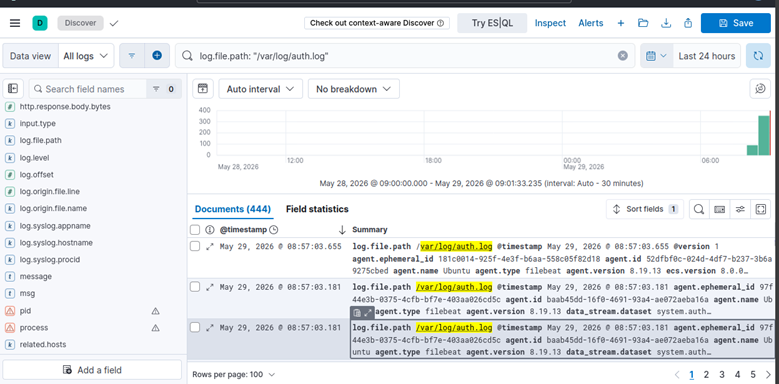
## 日志摄入验证
Filebeat 成功收集 Linux 身份验证日志并将其转发至 Elasticsearch。
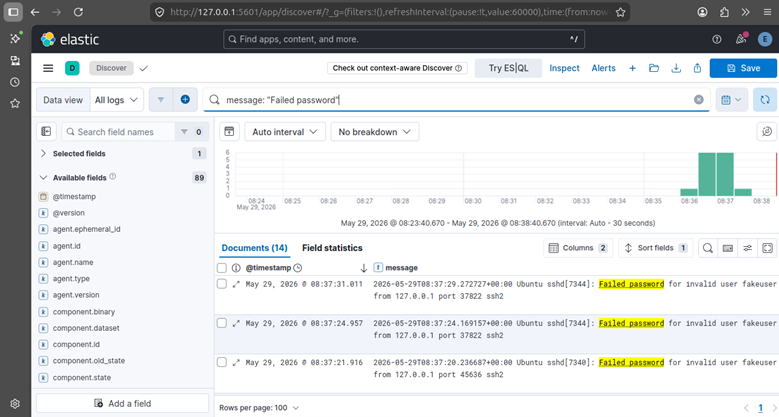
## SSH 身份验证失败事件
Kibana Discover 显示用于暴力破解检测的 SSH 登录失败尝试。
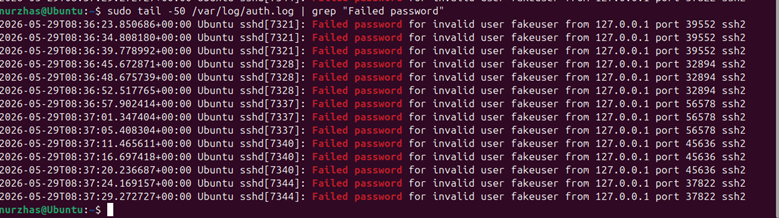
## 来自 Linux 主机的身份验证证据
直接从 Ubuntu 主机验证的密码错误事件。
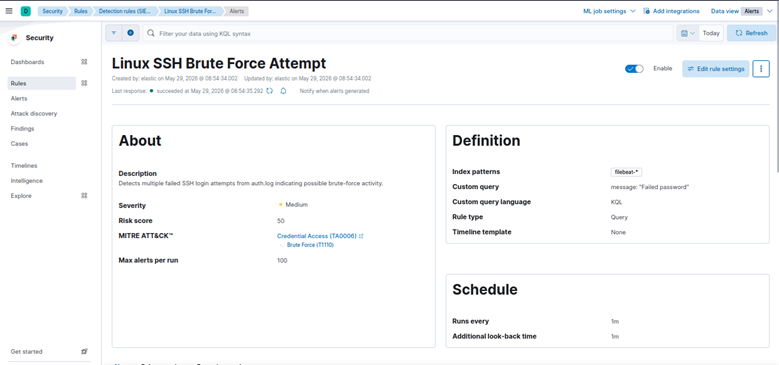
## SSH 暴力破解检测规则
创建的自定义 Kibana 检测规则,用于识别重复的 SSH 登录失败尝试。
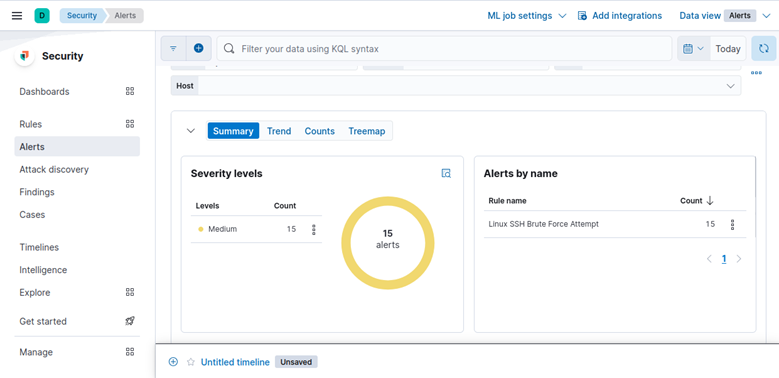
## SSH 告警仪表板
模拟暴力破解活动产生的告警。
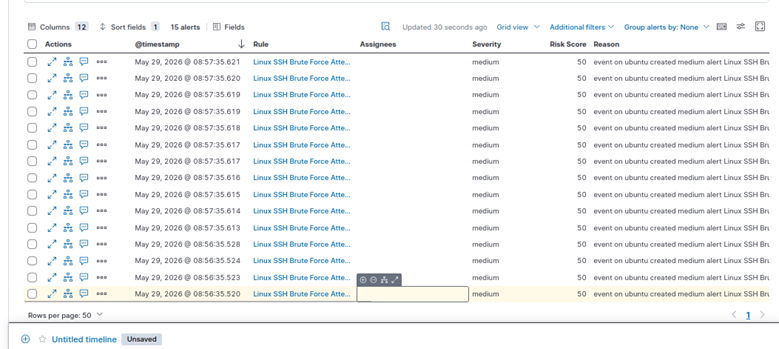
## SSH 告警调查视图
调查期间使用的告警详情和分诊视图。
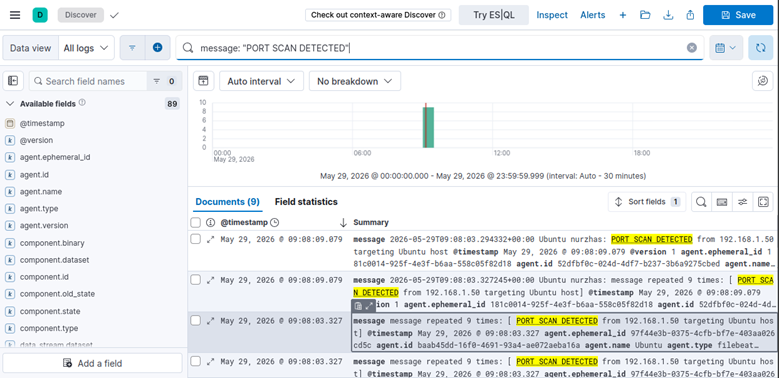
## 端口扫描日志事件
成功摄入至 Elasticsearch 的模拟侦测活动。
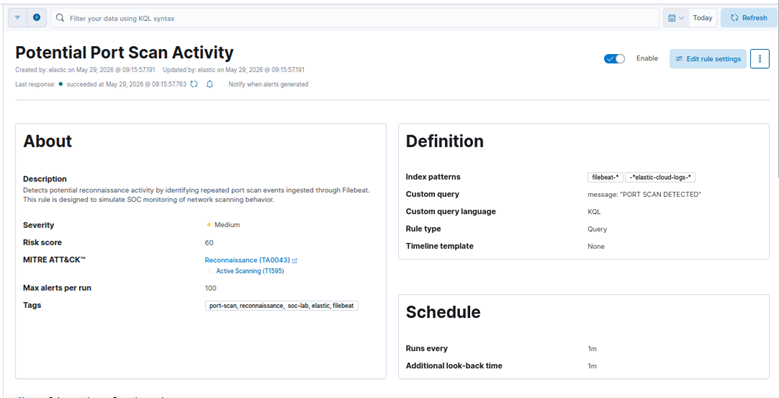
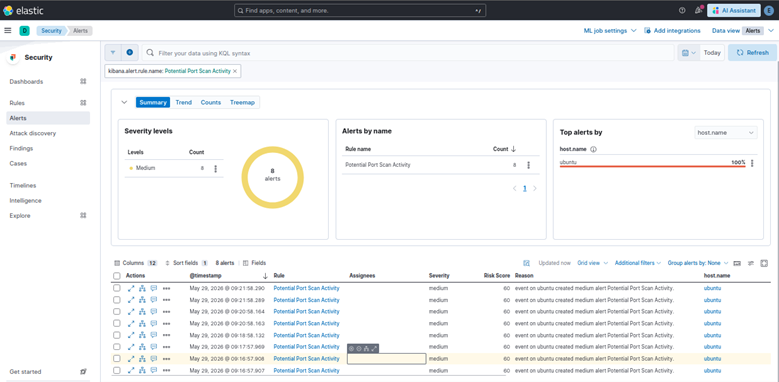
## 端口扫描检测规则
用于检测端口扫描行为的自定义规则。
## 端口扫描告警仪表板
模拟端口扫描活动产生的告警。
# 展示的 SOC 分析师技能
本项目展示了以下方面的实践经验:
* SIEM 管理
* 日志分析
* 检测工程
* 告警分诊
* 事件调查
* Linux 安全监控
* 安全运营
* MITRE ATT&CK 映射
* 事件记录
* 威胁检测
# 经验总结
通过本项目,我获得了以下方面的实践经验:
* 部署和配置 Elastic Stack
* 使用 Filebeat 收集 Linux 安全日志
* 在 Kibana 中创建检测规则
* 生成并验证安全告警
* 调查可疑活动
* 将检测映射到 MITRE ATT&CK
* 记录安全调查过程
# 未来改进
计划的增强功能包括:
* Windows Event Log 监控
* 集成 Auditbeat
* 集成 Suricata IDS
* 威胁情报源
* 自定义 Kibana 仪表板
* 自动化告警通知
* 检测调优与优化
# 仓库结构
```
home-soc-lab-elastic/
│
├── README.md
│
├── screenshots/
│ ├── 01_log_ingestion.png
│ ├── 02_failed_ssh_logins.png
│ ├── 02_failed_ssh_logins_interminal.png
│ ├── 03_ssh_rule.png
│ ├── 04_ssh_alert.png
│ ├── 04_ssh_alert_list.png
│ ├── 05_portscan_logs.png
│ ├── 06_portscan_rule.png
│ └── 07_portscan_alert.png
│
├── reports/
├── runbooks/
└── detection-rules/
```
# 作者
**Nurzhas Bolatbekov**
有志于成为 SOC 分析师,专注于安全监控、检测工程、事件响应和蓝队运营。
创建此项目旨在通过实践 SIEM 部署、告警创建和安全事件调查,培养实际的 SOC 技能。
标签:Elastic Stack, 安全运营中心, 流量重放, 网络映射, 越狱测试