iosif-castrucci-hub/n8n-Threat-Intelligence-Enrichment-Pipeline
GitHub: iosif-castrucci-hub/n8n-Threat-Intelligence-Enrichment-Pipeline
基于 n8n 构建的 SOAR 风格自动化流水线,用于对 IP、URL 和域名等妥协指标(IOC)进行自动化情报富化、风险评分及告警分发。
Stars: 1 | Forks: 0
# 威胁情报富化流水线
一个使用 **n8n**、**AbuseIPDB**、**VirusTotal**、**Google Sheets** 和 **Telegram** 构建的网络安全自动化项目。
本项目演示了一个高级的威胁情报富化流水线,它接收 IOC,检测其是 IP 地址、URL 还是域名,使用威胁情报 API 对其进行富化,计算风险评分,将报告保存在 Google Sheets 中,并在该指标被归类为高风险时发送 Telegram 告警。
## 项目概述
该项目的目标是自动化妥协指标(IOC)的富化和分类。
IOC 可以通过 Webhook 以 JSON 格式提交。工作流会自动标准化该指标,检测其类型,将其路由到正确的富化分支,收集威胁情报数据,计算最终的风险评分,记录结果,并在需要时发送告警。
支持的 IOC 类型:
```
IP address
URL
Domain
Unsupported / Unknown IOC
```
本项目旨在作为 **SOAR 风格自动化**、**威胁情报富化**、**IOC 分类**、**风险评分** 和 **安全告警** 的实际演示。
## 技术栈
* **n8n Cloud** — 工作流自动化平台
* **Webhook Trigger** — 接收 IOC 提交
* **Code Nodes** — 标准化指标,处理富化结果,计算风险
* **Switch Node** — 按类型路由指标
* **HTTP Request Nodes** — 调用威胁情报 API
* **Wait Node** — 等待 VirusTotal URL 分析
* **Google Sheets** — 存储富化报告
* **IF Node** — 检查 IOC 是否为高风险
* **Telegram Bot API** — 发送高风险威胁情报告警
* **AbuseIPDB API** — 富化 IP 地址
* **VirusTotal API** — 富化 IP、URL 和域名
## 主要功能
### IOC 接收
工作流以接收 IOC 的 Webhook 开始。
IP 提交示例:
```
{
"indicator": "185.220.101.1",
"source": "Manual Investigation",
"caseId": "CASE-001",
"submittedBy": "analyst@example.com"
}
```
URL 提交示例:
```
{
"indicator": "http://fake-login-security-example.com/verify",
"source": "Phishing Investigation",
"caseId": "CASE-002",
"submittedBy": "analyst@example.com"
}
```
Domain 提交示例:
```
{
"indicator": "example.com",
"source": "Domain Investigation",
"caseId": "CASE-003",
"submittedBy": "analyst@example.com"
}
```
### IOC 类型检测
工作流会检测提交的指标是否为:
```
ip
url
domain
unknown
```
此检测在指标通过 Switch 节点路由之前由 Code 节点处理。
### 按 IOC 类型路由
工作流使用 Switch 节点将指标路由到独立的富化分支。
```
IP → AbuseIPDB + VirusTotal IP Report
URL → VirusTotal URL Analysis
Domain → VirusTotal Domain Report
Unknown → Logged as Unsupported
```
### IP 富化
IP 指标使用以下工具进行富化:
```
AbuseIPDB IP Check
VirusTotal IP Report
```
收集的值包括:
```
AbuseIPDB Score
AbuseIPDB Total Reports
Country
ISP
Usage Type
VirusTotal Malicious Detections
VirusTotal Suspicious Detections
VirusTotal Harmless Detections
VirusTotal Undetected Detections
```
### URL 富化
URL 指标被提交给 VirusTotal 进行分析。
工作流:
```
Submits URL to VirusTotal
Waits for the analysis
Retrieves the VirusTotal analysis result
Normalizes the enrichment output
```
收集的值包括:
```
VirusTotal Analysis Status
VirusTotal Malicious Detections
VirusTotal Suspicious Detections
VirusTotal Harmless Detections
VirusTotal Undetected Detections
Extracted Domain
```
### 域名富化
域名指标使用 VirusTotal 域名报告 endpoint 进行富化。
收集的值包括:
```
VirusTotal Malicious Detections
VirusTotal Suspicious Detections
VirusTotal Harmless Detections
VirusTotal Undetected Detections
VirusTotal Domain Reputation
VirusTotal Categories
```
### 不支持的 IOC 处理
如果提交的指标不是有效的 IP 地址、URL 或域名,工作流不会失败。
相反,它会将该指标记录为:
```
Indicator Type = unknown
Status = Unsupported
Risk Level = Unsupported
```
这使得工作流保持稳定,并为无效提交提供可追溯性。
### 风险评分计算
工作流计算从 `0` 到 `100` 的最终风险评分。
风险因素包括:
```
AbuseIPDB score
VirusTotal malicious detections
VirusTotal suspicious detections
Indicator type
VirusTotal URL analysis status
Negative domain reputation
```
评分逻辑示例:
```
High AbuseIPDB score → adds risk
VirusTotal malicious detections → adds risk
VirusTotal suspicious detections → adds risk
URL indicator submitted → adds contextual risk
Domain indicator submitted → adds contextual risk
Negative domain reputation → adds risk
```
### 风险等级分类
工作流将最终评分分类为:
```
0 - 34 Low
35 - 64 Medium
65 - 84 High
85 - 100 Critical
```
### Google Sheets 报告
每个受支持的 IOC 富化结果都会保存在 Google Sheets 中。
不支持的 IOC 也会被记录。
Google Sheets 充当轻量级的威胁情报案例日志。
存储的字段包括:
```
Report ID
Timestamp
Case ID
Submitted By
Source
Indicator
Indicator Type
AbuseIPDB Score
VT Malicious
VT Suspicious
VT Harmless
VT Undetected
Risk Score
Risk Level
Recommendation
Action Taken
Status
Notes
```
### Telegram 告警
如果 IOC 被分类为 **高** 或 **严重**,工作流会发送 Telegram 告警。
告警示例:
```
🚨 Threat Intelligence Alert
Risk Level: High
Risk Score: 90/100
Indicator: 185.220.101.1
Type: ip
Case ID: CASE-001
Source: Manual Investigation
Submitted By: analyst@example.com
AbuseIPDB Score: 100
VirusTotal:
Malicious: 12
Suspicious: 3
Harmless: 50
Undetected: 20
Recommendation:
Block or monitor the indicator, review related logs, and check for connections from internal assets.
Status: Open
```
在发送 Telegram 告警后,工作流会更新 Google Sheets 行:
```
Action Taken = Telegram alert sent
Status = Notified
```
## 工作流结构
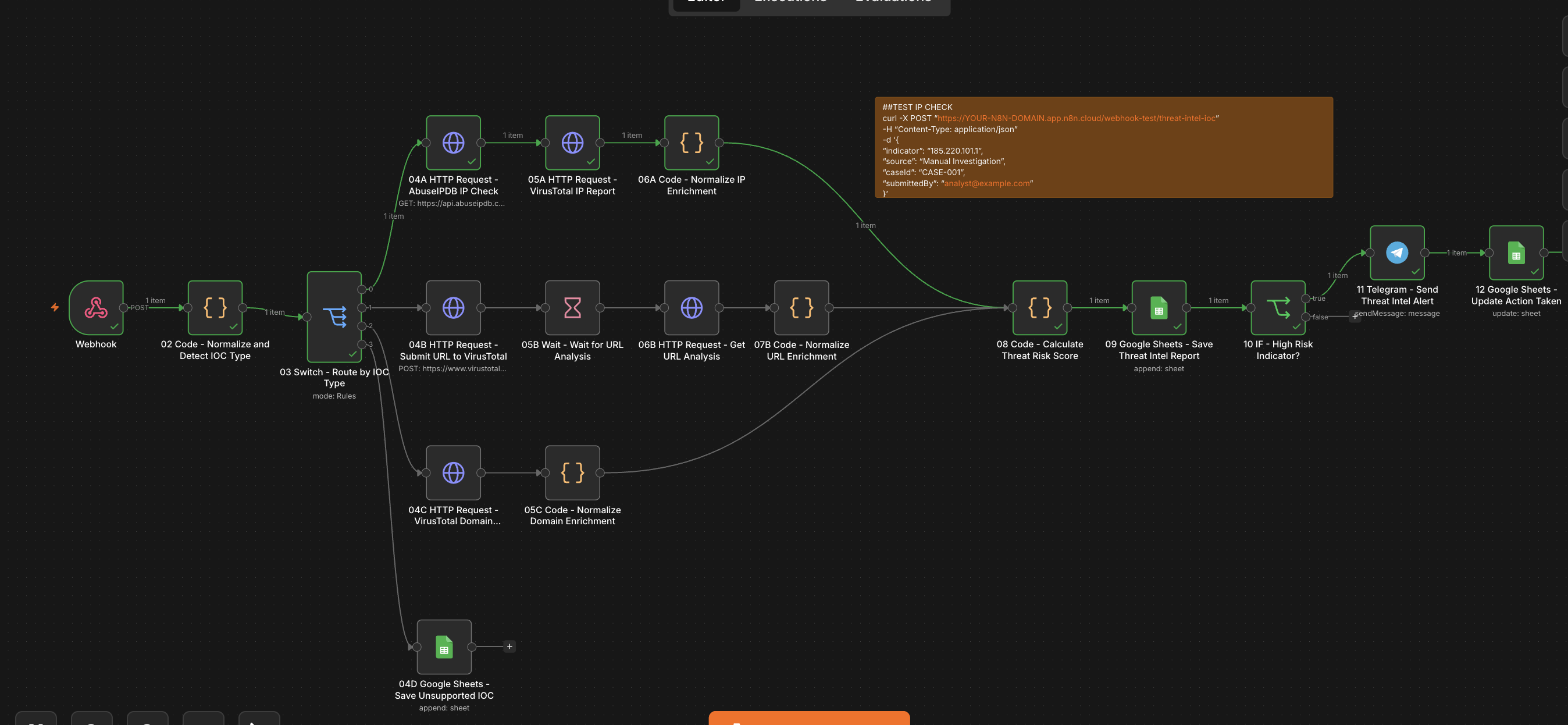
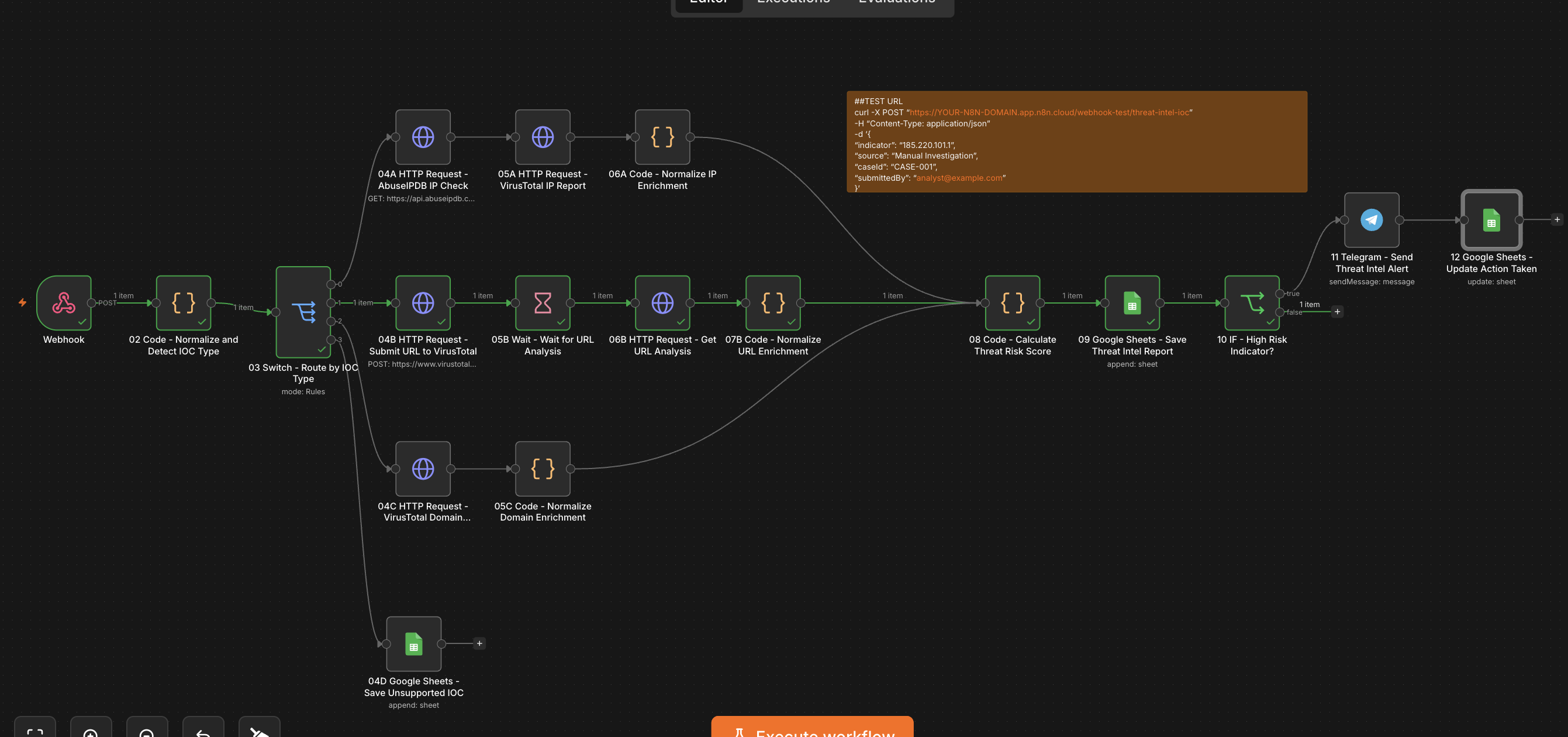
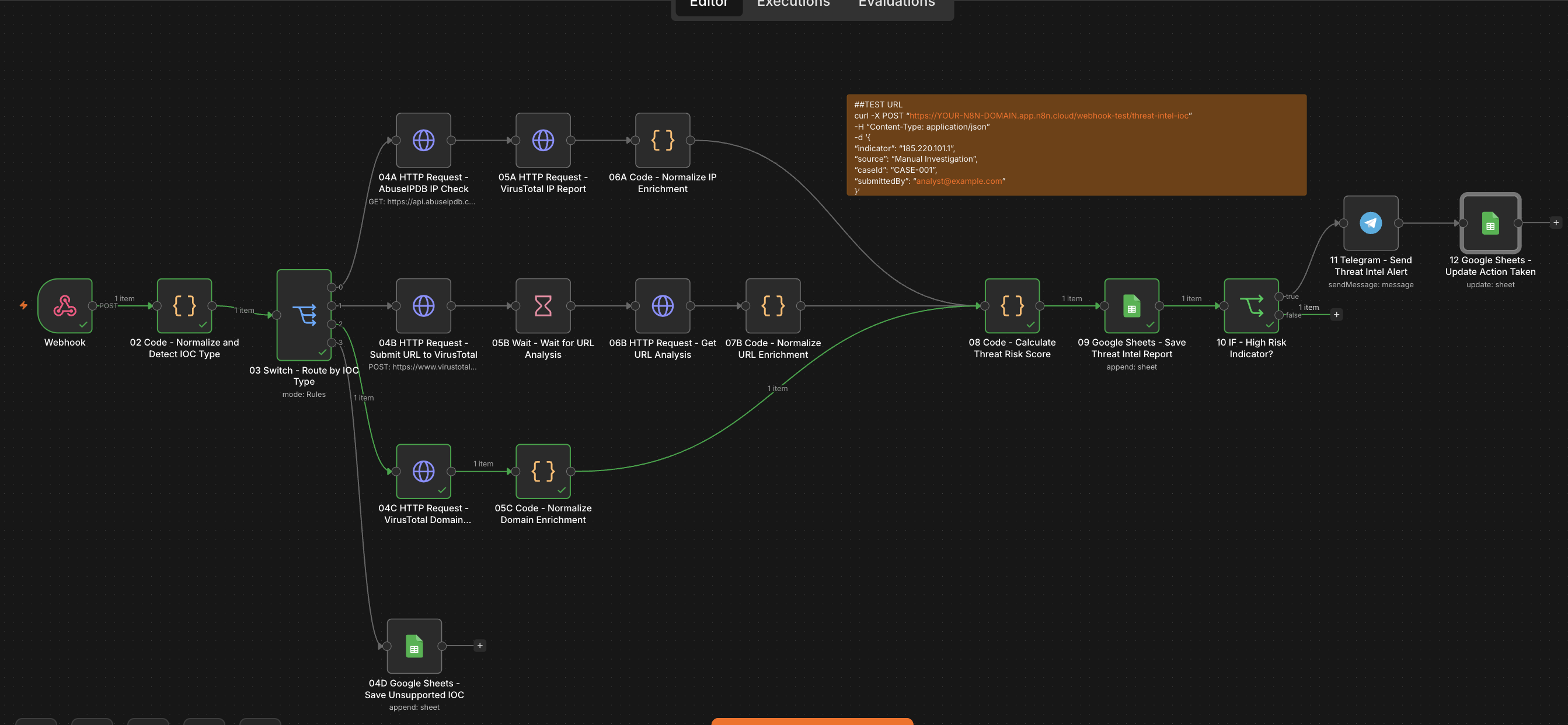
高级版本包含 16 个节点。
```
01 Webhook - Receive IOC
02 Code - Normalize and Detect IOC Type
03 Switch - Route by IOC Type
IP Branch:
04A HTTP Request - AbuseIPDB IP Check
05A HTTP Request - VirusTotal IP Report
06A Code - Normalize IP Enrichment
URL Branch:
04B HTTP Request - Submit URL to VirusTotal
05B Wait - Wait for URL Analysis
06B HTTP Request - Get URL Analysis
07B Code - Normalize URL Enrichment
Domain Branch:
04C HTTP Request - VirusTotal Domain Report
05C Code - Normalize Domain Enrichment
Unsupported Branch:
04D Google Sheets - Save Unsupported IOC
Common Branch:
08 Code - Calculate Threat Risk Score
09 Google Sheets - Save Threat Intel Report
10 IF - High Risk Indicator?
11 Telegram - Send Threat Intel Alert
12 Google Sheets - Update Action Taken
```
## 工作流走向
```
01 Webhook - Receive IOC
↓
02 Code - Normalize and Detect IOC Type
↓
03 Switch - Route by IOC Type
├── IP
│ ↓
│ 04A HTTP Request - AbuseIPDB IP Check
│ ↓
│ 05A HTTP Request - VirusTotal IP Report
│ ↓
│ 06A Code - Normalize IP Enrichment
│
├── URL
│ ↓
│ 04B HTTP Request - Submit URL to VirusTotal
│ ↓
│ 05B Wait - Wait for URL Analysis
│ ↓
│ 06B HTTP Request - Get URL Analysis
│ ↓
│ 07B Code - Normalize URL Enrichment
│
├── Domain
│ ↓
│ 04C HTTP Request - VirusTotal Domain Report
│ ↓
│ 05C Code - Normalize Domain Enrichment
│
└── Unknown
↓
04D Google Sheets - Save Unsupported IOC
06A / 07B / 05C
↓
08 Code - Calculate Threat Risk Score
↓
09 Google Sheets - Save Threat Intel Report
↓
10 IF - High Risk Indicator?
├── true
│ ↓
│ 11 Telegram - Send Threat Intel Alert
│ ↓
│ 12 Google Sheets - Update Action Taken
└── false
end
```
## 节点详情
### 01 Webhook - 接收 IOC
接收 IOC 提交。
配置:
```
HTTP Method: POST
Path: threat-intel-ioc
Authentication: None
Respond: Immediately
```
对于生产环境使用,应添加身份验证或 secret header。
### 02 Code - 标准化并检测 IOC 类型
标准化提交的指标并检测其类型。
输出字段包括:
```
reportId
timestamp
caseId
submittedBy
source
indicator
domain
indicatorType
status
notes
```
支持的类型:
```
ip
url
domain
unknown
```
### 03 Switch - 按 IOC 类型路由
根据 `indicatorType` 路由 IOC。
规则:
```
indicatorType = ip → IP branch
indicatorType = url → URL branch
indicatorType = domain → Domain branch
indicatorType = unknown → Unsupported branch
```
### 04A HTTP Request - AbuseIPDB IP 检查
使用 AbuseIPDB 检查 IP 地址信誉。
配置:
```
Method: GET
URL: https://api.abuseipdb.com/api/v2/check
```
查询参数:
```
ipAddress = {{ $('02 Code - Normalize and Detect IOC Type').item.json.indicator }}
maxAgeInDays = 90
```
请求头:
```
Key = YOUR_ABUSEIPDB_API_KEY
Accept = application/json
```
### 05A HTTP Request - VirusTotal IP 报告
获取 VirusTotal IP 报告。
配置:
```
Method: GET
URL: https://www.virustotal.com/api/v3/ip_addresses/{{ $('02 Code - Normalize and Detect IOC Type').item.json.indicator }}
```
请求头:
```
x-apikey = YOUR_VIRUSTOTAL_API_KEY
accept = application/json
```
### 06A Code - 标准化 IP 富化
将 AbuseIPDB 和 VirusTotal 的 IP 结果标准化为通用格式。
输出字段包括:
```
abuseIpdbScore
vtMalicious
vtSuspicious
vtHarmless
vtUndetected
enrichmentSource
notes
```
### 04B HTTP Request - 提交 URL 到 VirusTotal
提交 URL 以进行 VirusTotal 分析。
配置:
```
Method: POST
URL: https://www.virustotal.com/api/v3/urls
Body Content Type: Form URLencoded
```
请求头:
```
x-apikey = YOUR_VIRUSTOTAL_API_KEY
accept = application/json
```
请求体:
```
url = {{ $('02 Code - Normalize and Detect IOC Type').item.json.indicator }}
```
### 05B Wait - 等待 URL 分析
在获取 VirusTotal URL 分析之前等待。
推荐配置:
```
Resume: After Time Interval
Amount: 20
Unit: Seconds
```
如果 VirusTotal 返回 `queued`,请增加至 `30–45 秒`。
### 06B HTTP Request - 获取 URL 分析
从 VirusTotal 获取 URL 分析结果。
配置:
```
Method: GET
URL: https://www.virustotal.com/api/v3/analyses/{{ $('04B HTTP Request - Submit URL to VirusTotal').item.json.data.id }}
```
请求头:
```
x-apikey = YOUR_VIRUSTOTAL_API_KEY
accept = application/json
```
### 07B Code - 标准化 URL 富化
标准化 VirusTotal URL 分析结果。
输出字段包括:
```
vtStatus
vtMalicious
vtSuspicious
vtHarmless
vtUndetected
enrichmentSource
notes
```
### 04C HTTP Request - VirusTotal 域名报告
获取 VirusTotal 域名报告。
配置:
```
Method: GET
URL: https://www.virustotal.com/api/v3/domains/{{ $('02 Code - Normalize and Detect IOC Type').item.json.indicator }}
```
请求头:
```
x-apikey = YOUR_VIRUSTOTAL_API_KEY
accept = application/json
```
### 05C Code - 标准化域名富化
标准化 VirusTotal 域名结果。
输出字段包括:
```
vtMalicious
vtSuspicious
vtHarmless
vtUndetected
vtDomainReputation
vtCategories
enrichmentSource
notes
```
### 04D Google Sheets - 保存不支持的 IOC
将不支持的指标保存在 Google Sheets 中,而不调用任何富化 API。
映射的值:
```
Risk Score = 0
Risk Level = Unsupported
Recommendation = Submit a valid IP address, URL, or domain for enrichment.
Action Taken = Logged only
Status = Unsupported
```
### 08 Code - 计算威胁风险评分
计算最终的威胁风险评分。
输入:
```
AbuseIPDB Score
VirusTotal malicious detections
VirusTotal suspicious detections
Indicator type
VirusTotal domain reputation
VirusTotal analysis status
```
输出字段包括:
```
riskScore
riskLevel
recommendation
actionTaken
status
riskReasons
notes
```
### 09 Google Sheets - 保存威胁情报报告
保存最终的富化报告。
Google Sheet:
```
Threat Intel Pipeline
```
工作表:
```
Reports
```
### 10 IF - 高风险指标?
检查最终风险等级是否为:
```
High
Critical
```
如果为真,则发送 Telegram 告警。
### 11 Telegram - 发送威胁情报告警
为高风险或严重指标发送 Telegram 告警。
### 12 Google Sheets - 更新已采取的行动
在发送 Telegram 告警后更新相同的 Google Sheets 行。
更新的字段:
```
Action Taken = Telegram alert sent
Status = Notified
```
## Google Sheets 结构
Google Sheet:
```
Threat Intel Pipeline
```
工作表:
```
Reports
```
列:
```
Report ID
Timestamp
Case ID
Submitted By
Source
Indicator
Indicator Type
AbuseIPDB Score
VT Malicious
VT Suspicious
VT Harmless
VT Undetected
Risk Score
Risk Level
Recommendation
Action Taken
Status
Notes
```
示例行:
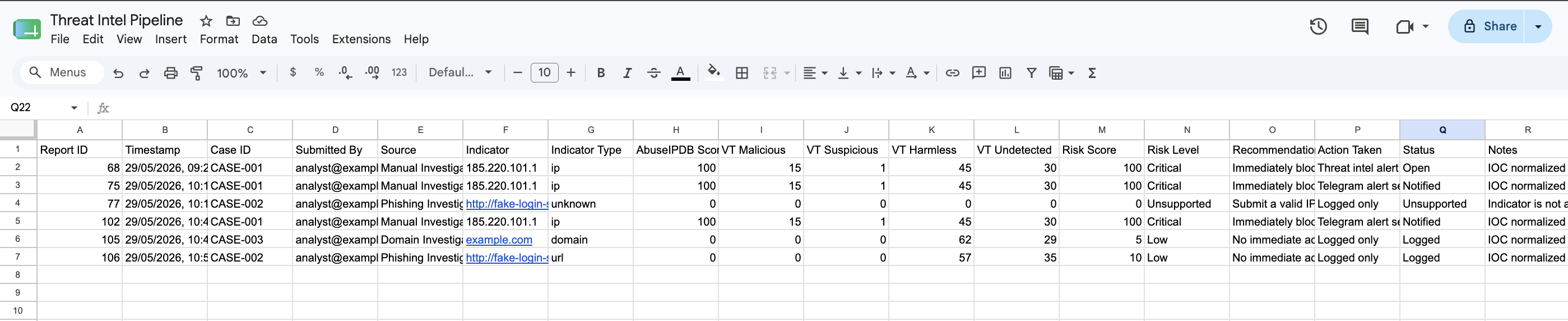
| Report ID | Timestamp | Case ID | Submitted By | Source | Indicator | Indicator Type | AbuseIPDB Score | VT Malicious | VT Suspicious | VT Harmless | VT Undetected | Risk Score | Risk Level | Recommendation | Action Taken | Status | Notes |
| --------- | -------------------- | -------- | ------------------------------------------------- | -------------------- | ------------- | -------------- | --------------: | -----------: | ------------: | ----------: | ------------: | ---------: | ---------- | ------------------------------------------------------- | ------------------- | -------- | -------------------- |
| 128 | 29/05/2026, 10:30:00 | CASE-001 | [analyst@example.com](mailto:analyst@example.com) | Manual Investigation | 185.220.101.1 | ip | 100 | 12 | 3 | 50 | 20 | 90 | High | Block or monitor the indicator and review related logs. | Telegram alert sent | Notified | AbuseIPDB score: 100 |
## 测试负载
### IP 测试
```
{
"indicator": "185.220.101.1",
"source": "Manual Investigation",
"caseId": "CASE-001",
"submittedBy": "analyst@example.com"
}
```
预期结果:
```
IOC detected as IP
AbuseIPDB enrichment runs
VirusTotal IP report runs
Risk score is calculated
Google Sheets report is saved
Telegram alert is sent if risk is High or Critical
```
### URL 测试
```
{
"indicator": "http://fake-login-security-example.com/verify",
"source": "Phishing Investigation",
"caseId": "CASE-002",
"submittedBy": "analyst@example.com"
}
```
预期结果:
```
IOC detected as URL
VirusTotal URL submission runs
Workflow waits for analysis
VirusTotal URL analysis is retrieved
Risk score is calculated
Google Sheets report is saved
Telegram alert is sent if risk is High or Critical
```
### Domain 测试
```
{
"indicator": "example.com",
"source": "Domain Investigation",
"caseId": "CASE-003",
"submittedBy": "analyst@example.com"
}
```
预期结果:
```
IOC detected as Domain
VirusTotal domain report runs
Risk score is calculated
Google Sheets report is saved
Telegram alert is sent if risk is High or Critical
```
### 不支持的 IOC 测试
```
{
"indicator": "not-a-valid-ioc",
"source": "Manual Test",
"caseId": "CASE-004",
"submittedBy": "analyst@example.com"
}
```
预期结果:
```
IOC detected as unknown
Unsupported IOC is saved in Google Sheets
No enrichment API is called
No Telegram alert is sent
```
## cURL 测试示例
### IP 测试
```
curl -X POST "https://crmsolutions.app.n8n.cloud/webhook-test/threat-intel-ioc" \
-H "Content-Type: application/json" \
-d '{
"indicator": "185.220.101.1",
"source": "Manual Investigation",
"caseId": "CASE-001",
"submittedBy": "analyst@example.com"
}'
```
### URL 测试
```
curl -X POST "https://crmsolutions.app.n8n.cloud/webhook-test/threat-intel-ioc" \
-H "Content-Type: application/json" \
-d '{
"indicator": "http://fake-login-security-example.com/verify",
"source": "Phishing Investigation",
"caseId": "CASE-002",
"submittedBy": "analyst@example.com"
}'
```
### Domain 测试
```
curl -X POST "https://crmsolutions.app.n8n.cloud/webhook-test/threat-intel-ioc" \
-H "Content-Type: application/json" \
-d '{
"indicator": "example.com",
"source": "Domain Investigation",
"caseId": "CASE-003",
"submittedBy": "analyst@example.com"
}'
```
### 不支持的 IOC 测试
```
curl -X POST "https://crmsolutions.app.n8n.cloud/webhook-test/threat-intel-ioc" \
-H "Content-Type: application/json" \
-d '{
"indicator": "not-a-valid-ioc",
"source": "Manual Test",
"caseId": "CASE-004",
"submittedBy": "analyst@example.com"
}'
```
## 仓库截图
在下方添加您的截图。
### IP 富化执行
### URL 富化执行
### Domain 富化执行
### 威胁情报报告表
## 安全与业务价值
本项目演示了一个高级的威胁情报富化工作流。
它通过以下方式帮助安全分析师自动执行重复的 IOC 分类任务:
* 从外部系统或分析师接收 IOC
* 自动检测 IOC 类型
* 富化 IP、URL 和域名
* 计算一致的风险评分
* 将结果记录在中央报告中
* 仅在风险较高时发送告警
* 保持不支持的提交的可追溯性
此类工作流可支持:
* SOC 自动化
* 威胁情报运营
* 事件响应分类
* 网络钓鱼调查
* 防火墙调查工作流
* 可疑域名分析
* 案例富化流水线
## 可能的实际用例
此工作流可适用于:
* SIEM 告警富化
* 钓鱼邮件 IOC 分析
* 防火墙告警分类
* 可疑 IP/域名审查
* SOC 分析师手动提交
* 安全案例富化
* 事件响应调查支持
* 自动化黑名单审查
## 未来改进
可能的升级:
* 添加 URLScan.io 富化
* 添加 WHOIS 富化
* 添加 DNS 解析富化
* 添加 ASN 和地理位置富化
* 添加 CISA KEV 或 CVE 关联
* 添加多个 IOC 批处理
* 添加对文件哈希的支持
* 添加对 IPv6 的支持
* 添加对邮件指标的支持
* 添加 Slack 或 Microsoft Teams 告警
* 添加 Jira/Trello/Notion 工单创建
* 添加重复 IOC 检测
* 添加案例状态跟踪
* 添加分析师审批工作流
* 添加自动黑名单更新
* 添加仪表板报告
* 添加定期的威胁情报摘要报告
## 安全说明
在生产环境中使用之前:
* 使用身份验证或 secret token 保护 Webhook。
* 请勿在截图或 GitHub 中暴露 API keys。
* 将 n8n 凭据或环境变量用于敏感信息。
* 查看 AbuseIPDB 和 VirusTotal API 的速率限制。
* 未经批准,请勿将敏感的内部指标提交给第三方 API。
* 验证传入的 payload。
* 为 API 故障添加错误处理。
* 为临时性 API 错误添加重试逻辑。
* 添加去重以避免重复告警。
* 保护 Google Sheets 的访问权限。
* 将此工作流视为富化辅助工具,而不是一个完整的检测系统。
## 项目状态
当前版本:可运行的高级演示
已实现:
* Webhook IOC 接收
* IOC 标准化
* IOC 类型检测
* IP 富化分支
* URL 富化分支
* 域名富化分支
* 不支持的 IOC 记录
* AbuseIPDB 集成
* VirusTotal 集成
* 威胁风险评分
* Google Sheets 报告
* 高/严重风险 IF 逻辑
* Telegram 告警
* 告警后更新 Google Sheets 状态
## 作者
由 **Iosif Castrucci** 构建
GitHub: `iosif-castrucci-hub`
Email: `contact.iosifcastrucci@gmail.com`
## 免责声明
本项目是一个演示性网络安全自动化工作流,出于作品集和教育目的而创建。
它不是一个完整的 SOC、SIEM、SOAR 或威胁情报平台,不应在生产环境中作为做出安全决策的唯一方法。
若要在生产环境中使用,请添加身份验证、输入验证、错误处理、去重、案例管理、安全凭据存储、审计日志记录以及正式的事件响应流程。
## 许可证
本仓库旨在用于作品集和教育目的。
您可以根据自己的项目调整工作流结构。
标签:Homebrew安装, n8n, SOAR自动化, 威胁情报, 安全告警, 开发者工具, 自动化运维