deglyph-re/cli
GitHub: deglyph-re/cli
deglyph 是一个终端原生的二进制文件静态分析工具,用于快速理解二进制结构并在 CI 中自动化扫描密钥与漏洞。
Stars: 0 | Forks: 0
# deglyph - 理解原生二进制文件
[](https://pypi.org/project/deglyph/)
[](https://pypi.org/project/deglyph/)
[](https://github.com/deglyph-re/cli/actions/workflows/ci.yml)
deglyph 加载 PE、ELF 或 Mach-O 文件并恢复其函数,即使二进制文件不导出任何内容也能实现。你可以借此阅读带注释的反汇编代码、遍历递归调用图、阅读启发式伪 C 视图,并运行模式检测器来恢复结构事实(常量、调用参数、CRC 循环),而无需反编译器。分支和调用目标均可点击,重命名和注释在不同会话间持久保存,可选的 AI 助手可以解释选定的函数。
deglyph 专为分流、探索和 CI 审查而构建,并非用于完整的逆向工程。它不是反编译器,也不能替代 Ghidra、IDA 或 Binary Ninja。其分析是静态和启发式的,因此存在实际的盲点:间接和虚拟调用、跳转表、混淆或加壳的代码、经过深度优化的剥离 C++ 代码、不常见的 ABI,以及仅在运行时出现的任何内容。
完整列表请参见[局限性](doc/help/Limitations.md),了解如何阅读输出请参见[启发式,而非证明](doc/help/Heuristics.md)。
## 适用人群
- **探索与理解。** 理解陌生的 PE/ELF/Mach-O 文件:从导出的包装器追踪到真正的实现,遍历调用者和被调用者,阅读已将目标解析为名称的反汇编代码,并询问助手某个函数的功能。
- **面向应用开发者的防御性审查。** 在发布前审核你自己的二进制文件:查找硬编码的密钥和魔数、识别 CRC/校验和以及命令分发例程、查看你暴露了哪些函数和导入,并对比同一库的两个构建版本以捕捉意外的更改。`deglyph scan` 可通过 SARIF 报告和 CI 退出码在 pipeline 中无头执行此操作。
deglyph 绝不会执行它分析的二进制文件;它只读取并对其进行反汇编。它基于 [LIEF](https://lief.re) 进行容器解析,基于 [Capstone](https://www.capstone-engine.org) 进行反汇编,并基于 [Textual](https://textual.textualize.io) 构建界面。要求 Python 3.10+。采用 GPLv3 许可证。
## 功能与用途
**加载任何对象。** PE32、PE32+、ELF、Mach-O 和胖二进制文件。格式和架构均从文件中自动检测;当文件被错误标记或你想以不同方式读取某个切片时,可以使用 `--fmt` 和 `--arch` 覆盖检测结果。
**查找函数。** 树状图列出了导出、符号、导入、入口点,以及对于不导出任何内容的剥离二进制文件,通过扫描 `.text` 寻找 `call` 目标恢复出的函数(命名为 `sub_<地址>`)。(正式发布的 `notepad.exe` 没有导出;发现机制将其唯一的入口点变成了数百个可导航的函数。)剥离的 Go 二进制文件会从其 pclntab 命名,因此它会显示像 `main.main` 这样的真实名称,而不是 `sub_*`,并且 C++ 和 Rust 符号(包括 Rust v0 方案)会被还原为可读名称。函数按种类和名称前缀分组到可展开的文件夹中,你可以通过输入子序列匹配进行过滤(输入 `encfr` 即可找到 `encode_frame`)。
**阅读反汇编。** 分支和调用目标会根据符号表进行解析并按名称显示。镜像内的目标是可点击的:点击其中一个即可跳转到该位置。移动表格光标,列表会随之滚动。
**追踪包装器至其实现。** 导出的函数通常是轻量的存根,仅用于验证参数并跳转到真正的例程。按下 `f`,deglyph 会将链条解析到实际执行工作的函数。
**遍历调用图。** 对于任何函数,你都可以看到从包装器到实现的链条以及递归的调用者和被调用者树,在终端中绘制为 ASCII 树(调用者在整个镜像中进行一次遍历索引;该遍历是防循环且有边界的)。
**通过调用图导航 (`c`)。** 以选定函数为中心的聚焦节点视图:其调用者位于上方,被调用者位于下方,屏幕上一次最多显示七个节点。点击节点可使图以该节点为中心重新排列;当某个组包含更多节点时,会有一个分页节点在其中循环切换。这是通过跟踪调用来浏览陌生二进制文件的方法,而不是仅仅滚动表格。
**恢复结构。** 分析视图运行三个检测器:
- *立即数存储*:`mov [buffer + offset], imm` 写入操作在固定偏移量处初始化结构或缓冲区,从而暴露魔数、标志、大小和头部字段。
- *调用参数立即数*:在 `call` 之前放置在寄存器中的常量值,例如传递给共享例程的模式选择器、标志、大小和命令码。
- *CRC 和校验和循环*:位操作循环,包含候选多项式和初始值,以及已知多项式的名称(CRC-16/CCITT、MCRF4XX、MODBUS、CRC-32 等)。
这些启发式方法可为你指出正确的指令。反汇编视图只需按下一个按键即可确认检测器发现的内容。
这些检测器运行在与架构无关的操作数遍历之上,因此它们可以检查 x86、x86-64、AArch64 (arm64) 和 32 位 ARM 目标。伪 C 视图目前仍仅支持 x86。RISC-V (RV32 / RV64) 可以加载和反汇编,但检测器处于关闭状态。deglyph 仅读取原生代码;托管格式(.NET、JVM)不在范围内。
**提取数据。** 按下 `s` 获取二进制文件中每个字符串(ASCII、UTF-8 和 UTF-16LE,附带地址和节)的可浏览列表:内置的 `strings(1)`。分析视图还列出了**函数引用的数据**:它读取的字符串、查找表和指针常量,每个都解码为文本或简短的十六进制预览。使用 `deglyph BINARY --strings` 无头拉取相同的字符串列表(添加 `--json` 以通过管道传输);`--strings-min`、`--strings-section` 和 `--strings-all` 可调整导出内容。
**搜索镜像。** 支持带有 `??` 通配符的字节模式、ASCII 和 UTF-16 字符串,以及可执行代码中任意位置引用的立即数常量(用于定位 CRC 多项式或魔数)。
**阅读伪 C。** 所选函数的可逐行阅读的类 C 视图:寄存器作为变量,`mov` 作为赋值,比较操作驱动随后的条件跳转,调用和跳转表示为 `name(...)` / `goto`。这是对汇编的启发式解读(仅限 x86,无类型恢复),因此在细节至关重要时,请以反汇编作为事实来源。
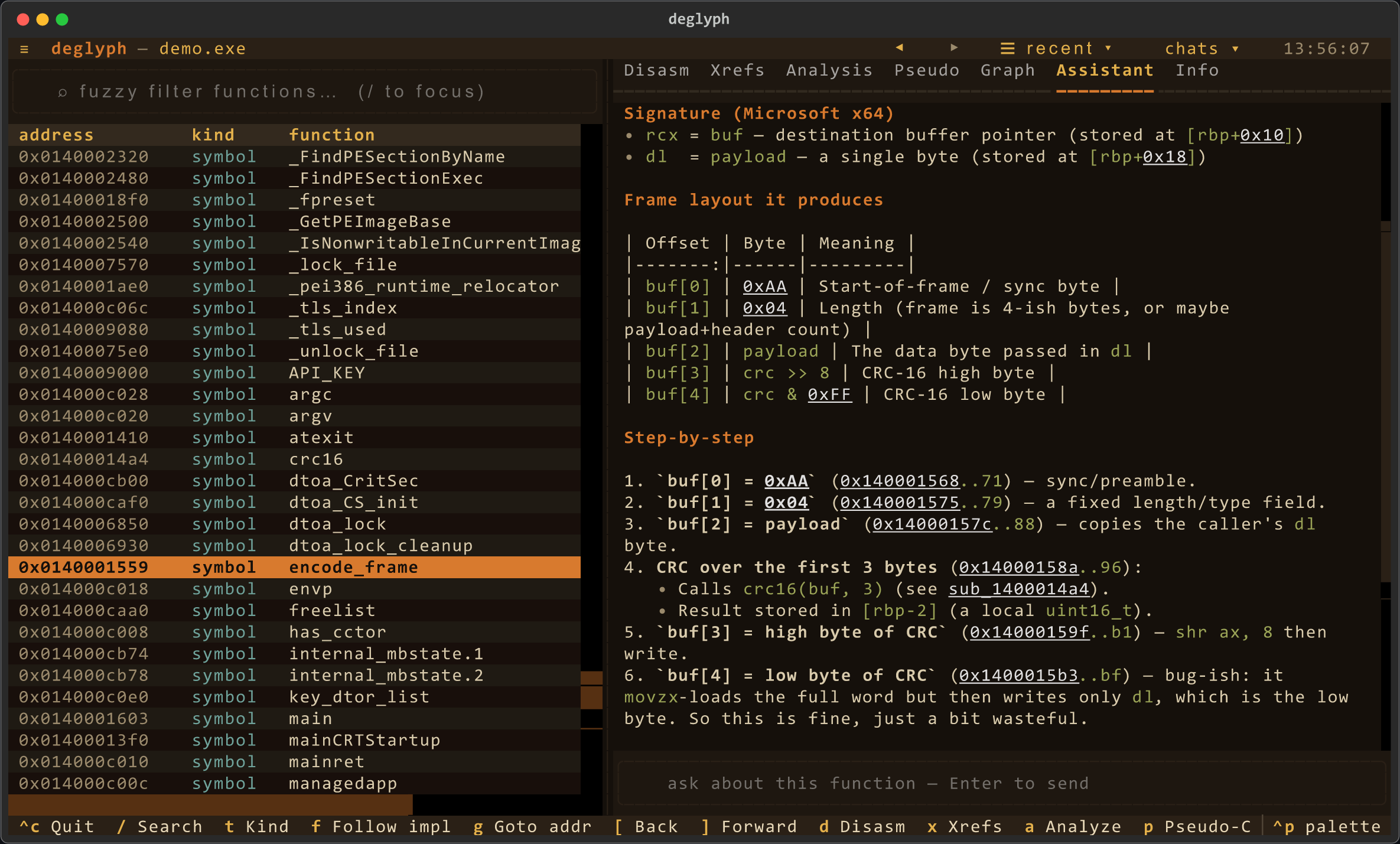
**询问助手。** 设置 `ANTHROPIC_API_KEY` 后,按 `i` 即可与 Claude 聊天以了解该二进制文件。它是**Agentic** 的:询问“它在何处解析 header / 构建 frame / 访问网络”,它会调用只读工具(查找/反汇编/分析/xrefs/搜索)来定位并解释函数本身,并引用可点击的地址。当前函数的反汇编被缓存为上下文;工具调用会在其工作时实时显示。回复渲染为 markdown,引用的地址仍然可点击,并且每个函数的对话都会与其他注释一起保存,因此当你重新打开该二进制文件时会恢复对话。此功能为可选,在你询问之前不会发送任何内容。它随每次安装提供;你可以选择模型并添加密钥。使用你自己的密钥使用 Claude,或者将其指向任何兼容 OpenAI 的 endpoint,包括本地的 Ollama 或 LM Studio。具体步骤请参见[设置 AI 助手](#set-up-the-ai-assistant)。
**面向 CI 的扫描 (`deglyph scan`)。** 针对构建 pipeline 的无头检查:它会报告嵌入的**密钥**(私钥、云/提供商 token 和带凭据标签的字符串)、**危险导入**(进程执行、代码注入、动态加载、网络、反调试)以及针对 `--baseline` 的**构建漂移**(出现或消失的函数和导入)。它还会检查二进制文件的**加固态势**(ASLR/DEP/CFG、PIE/RELRO、stack canaries、强化调用),**指纹识别链接库**(zlib、OpenSSL、SQLite 等),并可以在 **osv.dev 上查询已知的 CVE** (`--cve`)。输出可以是人工可读的文本、`--format markdown`(用于 PR 评论)、`--format html`(用于单文件仪表板)、`--format sarif`(用于 GitHub 代码扫描)、`--format json`(用于工具集成)或 `--format badge`(用于实时的 shields.io 徽章);发现的问题会设置非零退出码(`--fail-on` 用于选择门禁级别)。规则级别和抑制可通过 `.deglyphrules` 和 `.deglyphignore` 进行配置。可立即复制的工作流请参见下方的 [GitHub Actions](#github-actions)。
**生成 SBOM (`deglyph sbom`)。** 生成基于指纹库构建的 CycloneDX 1.5 或 SPDX 2.3 物料清单,以扫描的二进制文件作为根组件,并为每个检测到的库提供一个包 URL:
```
deglyph sbom path/to/app --format cyclonedx # or spdx
```
**导出分析 (`deglyph export`)。** 生成包含整个分析过程(带有置信度/证据的函数、交叉引用、检测器命中结果、字符串、扫描发现,可选包含每个函数的控制流块)的带版本号的确定性 JSON 文档,用于提供给其他工具或进行 diff。**在机器之间移动你的工作 (`deglyph project export/import`)** 会将你的重命名、注释、书签和保存的视图写入一个与路径无关的文件中,你可以将其重新附加到位于其他位置的二进制文件上。
**识别函数 (`deglyph scan --identify`)。** 将恢复出的 `sub_<地址>` 与函数签名语料库进行匹配,例如将其命名为 `zlib` 中的 `inflate`。签名是函数的规范化指令流,因此即使重建移动了代码,它也能保留下来;精确匹配具有高置信度,近似匹配则带有相似度得分。该语料库在 CI 中基于许多知名的库构建,并随工具一起发布。请参见[函数数据库](doc/help/Function-Database.md)。
**对比两个构建 (`deglyph diff OLD NEW`)。** 根据内容而不是名称或地址来匹配各个构建中的函数:未更改、已修改(带有相似度)、已添加或已移除。相同的签名支持 `scan --baseline` 漂移报告,该报告现在会将重新编译的函数报告为“已修改”,而不是“已移除并添加”。
**分享你的命名 (`deglyph knowledge export/import`)。** 与项目文件(以地址为键)不同,知识文件将每个重命名和注释以函数的内容 hash 为键,因此它可以重新附加到不同构建或另一台机器上的相同函数上。
**证明扫描 (`deglyph attest`)。** 生成扫描的防篡改记录:工具版本、二进制文件的 hash 以及发现的结果集,并带有 sha256 摘要和可选的 ed25519 签名(`pip install 'deglyph[sign]'`)。`deglyph verify-attest` 会检查摘要,并在提供公钥的情况下检查签名,从而使扫描结果成为可验证、可对比的制品。
**添加注释并保留。** 重命名函数 (`n`)、添加注释 (`;`) 或为其添加书签 (`b`)。注释以地址为键并保存到用户专属的附属文件中(`~/.deglyph/annotations/` 或 `$DEGLYPH_STORE_DIR`),因此它们可以跨会话保留,即使二进制文件位于只读系统目录中也能生效。重命名会显示在函数出现的所有地方:表格、调用目标、图和 xrefs 中。重新打开你曾处理过的二进制文件时,deglyph 会询问是加载已保存的上下文还是重新开始;你的工作会在退出时自动保存。
**通过历史记录导航。** 标题下方的工具栏在一个浏览器风格的跳转堆栈(包含每次故意的 goto/follow/点击,而不是空闲滚动)上提供后退/前进箭头,此外还有访问过的函数的“最近”菜单以及你曾询问过的函数的“聊天”菜单。`[` 和 `]` 用于后退和前进。
**设置主题。** `ctrl-p` 打开命令面板;“Change theme”可在默认的 deglyph 调色板与 Textual 内置的浅色和深色主题之间切换,并且你的选择会被记住以供下次使用`--ascii`(或 `$DEGLYPH_ASCII`)在受限终端上将制表符和箭头字形交换为 ASCII;`--nerd`(或 `$DEGLYPH_NERD`)在终端运行 Nerd Font 时使用 Font Awesome 图标。
**随处开始。** 不带文件启动时,deglyph 会打开一个欢迎屏幕:选取最近的会话(你为其添加过注释的任何二进制文件)或使用微型导航器浏览文件。带文件启动时,该文件会作为“Continue”选项显示在同一屏幕上。
## 安装与运行
启动器会在首次运行时创建一个隔离的虚拟环境,并将所有内容安装到其中,因此主机上唯一的要求是 Python 3.10 或更高版本。
```
./deglyph.sh path/to/library.dll # or just ./deglyph.sh to open the welcome screen
```
首次启动会打印 `creating virtual environment...`,安装依赖项,然后打开界面。随后的启动会立即开始。
你也可以将其作为包安装并使用 `deglyph` 命令。普通的安装是完整的:AI 助手(`anthropic`)和 C++ 符号解名称(`cxxfilt`)都是运行时依赖项。
```
python3 -m venv .venv
. .venv/bin/activate
pip install -e .
deglyph path/to/library.dll
```
每个标记的发布版本还为 Linux、macOS 和 Windows 附加了一个独立的 `deglyph-.pyz` zipapp:这是一个捆绑了所有依赖项的单一文件,由装有 Python 3.10 或更高版本的主机直接运行,无需安装步骤。
```
python deglyph-Linux.pyz path/to/library.dll
```
## 设置 AI 助手
助手随 deglyph 一起提供,因此无需额外安装。在你选择模型并为其提供访问途径之前,它会保持安静。选择以下两种途径中适合你的一种,然后打开任何函数并按 `i` 用自然语言提问(“它在何处解析 header?”、“谁调用了这个?”)。助手会调用只读工具在二进制文件中寻找答案,并引用地址,这些地址在其回复中仍然可点击。在你询问之前,它不会发送任何内容。
**使用你自己的密钥使用 Claude。** 从 [Anthropic 控制台](https://console.anthropic.com/) 获取密钥并将其放入你的环境中:
```
export ANTHROPIC_API_KEY=sk-ant-...
deglyph path/to/library.dll # press i on any function
```
默认模型是 `claude-opus-4-7`;设置 `DEGLYPH_MODEL` 以使用不同的模型。
**使用其他提供商或本地模型。** 助手还支持任何兼容 OpenAI 的 endpoint:OpenAI、Azure、Groq、OpenRouter、DeepSeek,以及本地的 [Ollama](https://ollama.com/) 或 [LM Studio](https://lmstudio.ai/)。打开命令面板(`ctrl-p`),选择 **AI provider**,然后挑选提供商、模型和 base URL;本地提供商会自动填写各自的 URL,因此你只需选择一个你已拉取的模型。你的选择会被记住。相同的设置也可作为环境变量使用,适用于无头或脚本化设置:
```
export DEGLYPH_AI_PROVIDER=openai # or groq, openrouter, deepseek, ollama, lmstudio
export DEGLYPH_AI_BASE_URL=https://api.openai.com/v1
export DEGLYPH_AI_MODEL=gpt-4o
export DEGLYPH_AI_API_KEY=sk-... # not needed for a local model
```
当缺少密钥时,deglyph 会告诉你以及如何处理。另外还有两个调节项:`DEGLYPH_AI_TIMEOUT`(每次请求的秒数,默认为 90)和 `DEGLYPH_AI_MAX_ITERS`(助手最多可以执行的工具步骤数,默认为 24)。
## 命令行
```
deglyph BINARY # open the interface (format and arch auto-detected)
deglyph notepad.exe # a bare name is resolved on PATH (and System32 on Windows)
deglyph BINARY --arch arm64 # force the architecture
deglyph BINARY --fmt PE # force the container format
deglyph BINARY --slice N # pick a slice of a fat (universal) Mach-O by index
deglyph BINARY --list # print the function table and exit
deglyph BINARY --analyze NAME # print constant and CRC analysis for matching functions
deglyph BINARY --strings # dump extracted strings (ASCII / UTF-8 / UTF-16LE); add --json
deglyph BINARY --list --json # machine-readable output for scripts and build diffs
deglyph BINARY --no-discover # skip sub_* discovery of unexported functions
deglyph BINARY --ascii # ASCII glyphs for limited terminals
deglyph BINARY --nerd # Font Awesome icons (needs a Nerd Font terminal)
deglyph scan PATH # CI scan: hardening, secrets, libs, CVEs, imports, drift
deglyph scan PATH --format sarif # emit a SARIF 2.1.0 report for code scanning
deglyph scan PATH --baseline OLD # also report what changed since a prior build
deglyph scan PATH --identify # name recovered functions against the signature corpus
deglyph diff OLD NEW # semantic function-level diff between two builds
deglyph sbom PATH # CycloneDX (or --format spdx) bill of materials
deglyph export PATH # versioned JSON analysis document (--cfg, --identify, --max-funcs)
deglyph project export BINARY -f work.json # portable renames / notes / bookmarks
deglyph project import BINARY -f work.json # reattach them on another machine
deglyph knowledge export BINARY -f work.json # renames keyed by function content hash
deglyph attest PATH # signed, machine-checkable scan attestation
deglyph verify-attest DOC --pub key.pem # verify an attestation's digest and signature
deglyph login TOKEN # store a hosted-AI (Pro) token; logout clears it
deglyph --version
```
`--list`、`--analyze`、`--strings`、`export` 和 `sbom` 是无头的:它们会打印到终端(或 `--output FILE`)并退出,这是在脚本中使用或对比同一库的两个构建版本时应使用的命令;向 `--list`/`--analyze` 添加 `--json` 可获得结构化输出。`deglyph scan` 接受文件或目录,并在发现任何等于或高于 `--fail-on`(默认为 `warning`)的问题时以非零状态退出。
## GitHub Actions
`deglyph scan` 作为复合 Action 提供,因此每次 push 或 pull request 时都会扫描发布二进制文件。将 `path` 指向你构建出的制品,该 Action 将运行与 CLI 相同的检查:加固态势、密钥、库指纹识别、可选的 CVE 查询、危险导入和基线漂移。
```
# .github/workflows/binary-scan.yml
name: binary scan
on:
push:
branches: [main]
pull_request:
permissions:
contents: read
security-events: write # required to upload SARIF
pull-requests: write # required to post the PR comment
jobs:
deglyph:
runs-on: ubuntu-latest
steps:
- uses: actions/checkout@v4
# Build your binary here, then point `path` at the artifact.
# - run: make release
- name: Scan with deglyph
uses: deglyph-re/cli@v1.4.0
with:
path: build/app # file or directory
sarif: deglyph.sarif
comment: "true" # sticky PR comment with the findings
fail-on: never # let code scanning gate; do not fail this step
- name: Upload SARIF
if: always()
uses: github/codeql-action/upload-sarif@v3
with:
sarif_file: deglyph.sarif
```
输入项与 CLI 参数相对应:`baseline` 用于与先前的构建进行 diff,`cve` 查询 osv.dev(需要网络),`entropy` 启用会产生大量噪音的高熵规则,`no-hardening` / `no-fingerprint` 跳过这些检测器。在 pull request 中设置 `comment: "true"` 时,该 Action 会保持一个单一的置顶评论同步更新,而不是每次 push 都堆叠新评论。使用 `fail-on`(`note` / `warning` / `error` / `never`)选择发现的问题是否会导致作业失败;上面的副本将门禁交给了代码扫描。可在此处获取可直接复制使用的版本 [`examples/deglyph-scan.yml`](examples/deglyph-scan.yml)。
## 徽章
添加一个静态的“已使用 deglyph 扫描”徽章:
```
[](https://github.com/deglyph-re/cli)
```
如果要获取跟踪你最新扫描结果的实时徽章,`deglyph scan --format badge` 会写入一个 [shields.io endpoint](https://shields.io/badges/endpoint-badge) JSON,你的 CI 可以发布并嵌入它。完整操作指南请参见[徽章](https://deglyph.dev/help#badges)。
## 按键
| 按键 | 操作 |
|-----|--------|
| `/` | 聚焦过滤器(子序列匹配) |
| `esc` | 清除过滤器 |
| `j` / `k` / 方向键 | 在函数树中移动 |
| `d` | 反汇编选项卡(分支/调用目标可点击) |
| `x` | 交叉引用:包装器链,以及递归的调用者和被调用者树 |
| `a` | 分析:立即数存储、调用参数、CRC 循环、常量 |
| `p` | 伪 C:所选内容的启发式类 C 视图 |
| `c` | 调用图:以所选内容为中心的可点击节点导航器 |
| `i` | 助手:向 Claude 询问有关所选函数的信息 |
| `s` | 字符串:浏览二进制文件中的每个字符串 |
| `t` | 数据:全文件内容映射和引用数据视图 |
| `v` | 将当前构建与另一个二进制文件进行对比 |
| `n` | 重命名所选函数(持久保存) |
| `b` | 切换所选内容上的书签(持久保存) |
| `;` | 为所选内容添加注释(持久保存) |
| `y` | 复制活动窗格的文本 |
| `f` | 追踪所选内容至其实现 |
| `g` | 转到地址 |
| `e` | 导出该二进制文件的分析报告 |
| `[` / `]` | 在跳转历史记录中向后 / 向前导航 |
| `f1` / `?` | 关于和按键映射 |
| `ctrl-p` | 命令面板(主题切换器、AI 提供商等) |
| `ctrl-c` / `ctrl-q` | 退出 |
## 布局
```
deglyph/
core/ image.py LIEF -> Image: base, sections, function list
disasm.py Capstone wrapper: arch mapping, disassembly, thunk follow
demangle.py C++ (MSVC / Itanium) and Rust (legacy + v0) demangling
re/ search.py byte / string / immediate image search
strings.py string extraction and per-function data references
xref.py callers, callees, wrapper-to-implementation chain
patterns.py immediate_stores, call_immediate_args, detect_crc_loops
pseudo.py heuristic C-like view of a function
discover.py recover sub_* functions from unwind tables and call targets
gosym.py Go pclntab function-name recovery
unwind.py authoritative function starts from unwind metadata
cfg.py bounded per-function control-flow graph
funcsig.py content-addressed function identity (hash + similarity)
funcdb.py function fingerprinting against a signature corpus
bindiff.py semantic function diff between two builds
fingerprint.py library fingerprinting (zlib / OpenSSL / SQLite / ...)
tui/ app.py Textual application
render.py colorized disassembly and hexdump
glyphs.py Nerd Font / Unicode / ASCII glyph set
style.tcss theme
ai.py agentic assistant (bring your own key); read-only tools over Image
scan.py headless CI scanner: hardening, secrets, libs, imports, drift, SARIF
sbom.py CycloneDX 1.5 / SPDX 2.3 bill of materials
cve.py osv.dev lookups with an on-disk cache
attest.py signed, machine-checkable scan attestations
report.py markdown (PR comment) and single-file HTML scan reports
export.py versioned JSON analysis document for other tools
store.py per-user annotation sidecar (names, comments, bookmarks, chats)
cache.py on-disk cache for the slow whole-image passes
cli.py command-line entry point (interface, headless, scan, sbom, export)
```
`core` 和 `re` 不依赖于界面;它们可作为库用于无头分析,并且是测试所执行的内容。完整源代码是开放的;没有闭源分支。
## 测试
```
pip install -e ".[dev]"
pytest
```
可编辑安装会将此检出版本连同其测试和 lint 工具放入路径中;随后 `pytest` 将针对源代码树运行。即使不安装直接运行,测试套件也会解析检出版本,因此全局安装的 `deglyph` 不会覆盖它。
该套件涵盖了纯分析逻辑,并加载主机上存在的二进制文件以测试加载器和反汇编器。当计算机上不存在特定供应商二进制文件时,检查这些文件的测试用例将跳过,因此该套件可在任何地方通过。
`scripts/verify.py` 会根据项目的语调契约(无营销文案、无 AI 叙述口吻、无第一人称、用户文档使用 ASCII)检查文档和源代码注释。在提交之前运行它:
```
python3 scripts/verify.py
```
## 许可证
GPLv3。请参见 [LICENSE](LICENSE)。作者:Alex Spataru。
deglyph 是自由软件:你可以根据 GNU 通用公共许可证 v3(或更高版本)使用、研究、共享和修改它。分发修改版本意味着必须在相同的许可证下发布你的更改。没有闭源分支。
标签:DevSecOps, LLM防护, 上游代理, 二进制分析, 云安全监控, 云安全运维, 云资产清单, 逆向工具, 逆向工程, 静态分析