iosif-castrucci-hub/n8n-security-incident-response
GitHub: iosif-castrucci-hub/n8n-security-incident-response
一个基于 n8n 的安全事件响应自动化工作流,通过 Webhook 接收告警并自动完成严重程度分级、日志记录和高危事件的实时通知。
Stars: 1 | Forks: 0
# 安全事件响应自动化
一个使用 **n8n**、**Webhook**、**Google Sheets** 和 **Telegram** 构建的网络安全自动化项目。
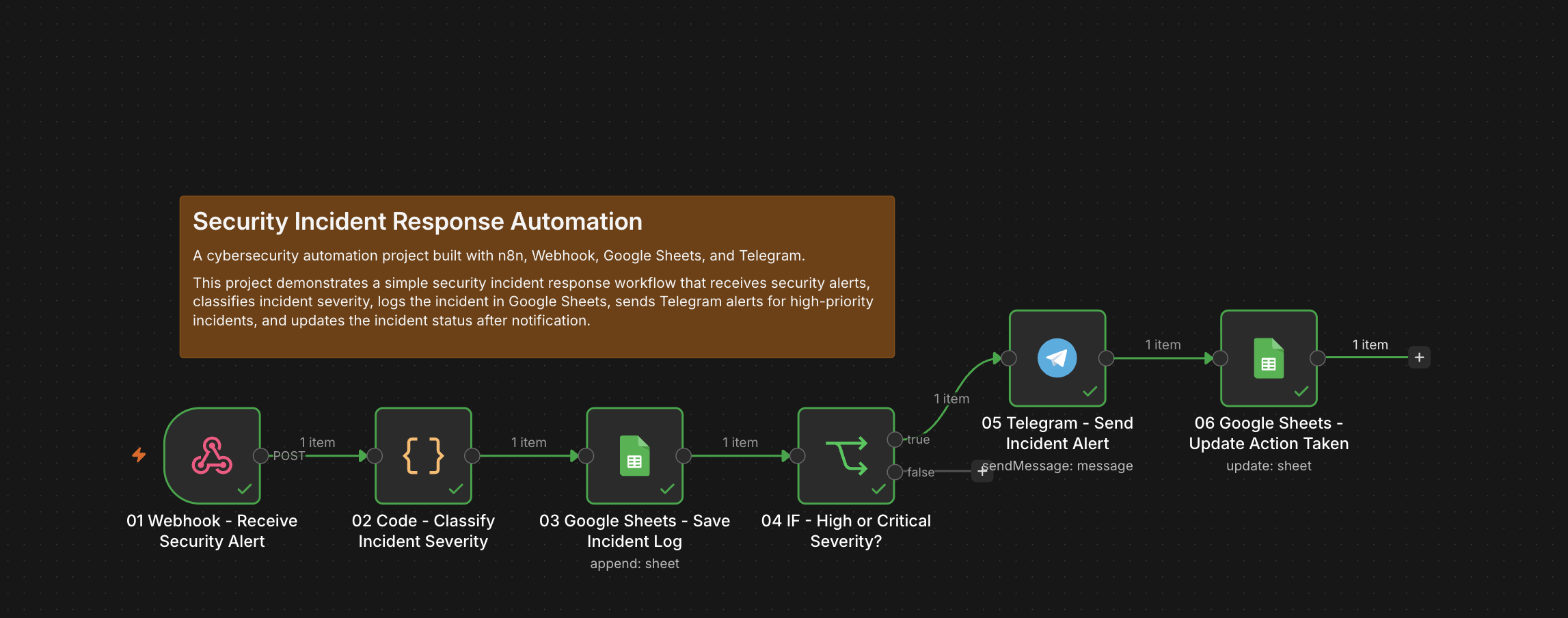
本项目演示了一个简单的安全事件响应工作流:接收安全告警,对事件严重程度进行分类,将事件记录到 Google Sheets 中,针对高优先级事件发送 Telegram 告警,并在通知后更新事件状态。

## 项目概述
本项目的目标是创建一个轻量级的安全事件响应自动化系统。
该工作流通过 n8n Webhook 接收安全告警,分析事件详情,计算严重程度得分,分配严重程度级别,将事件保存到 Google Sheets 中,针对高危或严重事件发送 Telegram 告警,并在通知后更新事件日志。
本项目旨在作为**安全自动化**、**事件分类**、**告警分诊**和**基础事件响应工作流编排**的实用演示。
## 技术栈
* **n8n Cloud** — 工作流自动化平台
* **Webhook Trigger** — 接收安全告警
* **Code Node** — 对事件严重程度进行分类
* **Google Sheets** — 存储事件日志
* **IF Node** — 检查事件是否需要告警
* **Telegram Bot API** — 发送事件告警
本项目不需要任何付费的外部 API。
## 主要功能
### 安全告警接入
工作流以 Webhook 开始,接收 JSON 格式的安全告警。
告警示例:
```
{
"source": "Firewall",
"eventType": "Blocked IP",
"asset": "web-server-01",
"ip": "185.220.101.1",
"description": "Multiple blocked requests detected from suspicious IP",
"eventCount": 45
}
```
### 自动严重程度分类
工作流使用 Code node 根据以下内容计算严重程度得分:
* 事件类型
* 事件次数
* 受影响资产
* 告警来源
* 描述中的可疑关键词
最终严重程度得分上限为 `100`。
### 严重程度级别
工作流将事件分为四个级别:
```
0 - 34 Low
35 - 64 Medium
65 - 84 High
85 - 100 Critical
```
只有被分类为 **High** 或 **Critical** 的事件才会触发 Telegram 告警。
### 事件记录
每次接收到的告警都会作为事件记录保存在 Google Sheets 中。
记录的字段包括:
```
Incident ID
Timestamp
Source
Event Type
Asset
IP
Description
Event Count
Severity Score
Severity Level
Recommendation
Action Taken
Status
Notes
```
这将创建一个简单的事件登记表,供日后查阅。
### 实时 Telegram 告警
当事件被归类为 **High** 或 **Critical** 时,工作流会发送 Telegram 告警。
告警示例:
```
🚨 Security Incident Alert
Severity: High
Severity Score: 80/100
Source: Firewall
Event Type: Blocked IP
Asset: web-server-01
IP: 185.220.101.1
Event Count: 45
Description:
Multiple blocked requests detected from suspicious IP
Recommended action:
Investigate immediately, review affected asset logs, validate the source IP, and consider blocking or isolating affected systems.
Status: Open
```
### 事件状态更新
在发送 Telegram 告警后,工作流会更新同一行 Google Sheets 数据:
```
Action Taken = Telegram alert sent
Status = Notified
```
这确认了该事件已被上报。
## 工作流结构
该工作流包含 6 个节点:
```
01 Webhook - Receive Security Alert
02 Code - Classify Incident Severity
03 Google Sheets - Save Incident Log
04 IF - High or Critical Severity?
05 Telegram - Send Incident Alert
06 Google Sheets - Update Action Taken
```
## 工作流走向
```
01 Webhook - Receive Security Alert
↓
02 Code - Classify Incident Severity
↓
03 Google Sheets - Save Incident Log
↓
04 IF - High or Critical Severity?
├── true
│ ↓
│ 05 Telegram - Send Incident Alert
│ ↓
│ 06 Google Sheets - Update Action Taken
└── false
end
```
## 节点详情
### 01 Webhook - 接收安全告警
此节点接收安全告警。
配置:
```
HTTP Method: POST
Path: security-alert
Authentication: None
Respond: Immediately
```
在生产环境中使用时,应添加身份验证或 secret header。
### 02 Code - 对事件严重程度进行分类
此节点分析传入的告警并计算事件严重程度。
它会产生:
```
incidentId
timestamp
source
eventType
asset
ip
description
eventCount
severityScore
severityLevel
recommendation
actionTaken
status
notes
```
评分逻辑会考虑:
```
Malware-related event type
Data exfiltration
Blocked IP activity
Failed login events
Brute force activity
Privilege escalation
Suspicious process activity
High event count
Critical assets
Suspicious keywords
Security monitoring sources
```
### 03 Google Sheets - 保存事件日志
此节点将事件记录保存到 Google Sheets 中。
Google Sheet 名称:
```
Security Incident Response
```
标签页名称:
```
Incidents
```
列:
```
Incident ID
Timestamp
Source
Event Type
Asset
IP
Description
Event Count
Severity Score
Severity Level
Recommendation
Action Taken
Status
Notes
```
映射示例:
```
Incident ID: {{ $json.incidentId }}
Timestamp: {{ $json.timestamp }}
Source: {{ $json.source }}
Event Type: {{ $json.eventType }}
Asset: {{ $json.asset }}
IP: {{ $json.ip }}
Description: {{ $json.description }}
Event Count: {{ $json.eventCount }}
Severity Score: {{ $json.severityScore }}
Severity Level: {{ $json.severityLevel }}
Recommendation: {{ $json.recommendation }}
Action Taken: {{ $json.actionTaken }}
Status: {{ $json.status }}
Notes: {{ $json.notes }}
```
### 04 IF - 是 High 或 Critical 严重程度?
此节点检查事件是否应触发告警。
条件:
```
Severity Level = High
OR
Severity Level = Critical
```
推荐表达式:
```
{{ $('02 Code - Classify Incident Severity').item.json.severityLevel }}
```
### 05 Telegram - 发送事件告警
此节点针对高危或严重事件发送 Telegram 消息。
消息示例:
```
🚨 Security Incident Alert
Severity: {{ $('02 Code - Classify Incident Severity').item.json.severityLevel }}
Severity Score: {{ $('02 Code - Classify Incident Severity').item.json.severityScore }}/100
Source: {{ $('02 Code - Classify Incident Severity').item.json.source }}
Event Type: {{ $('02 Code - Classify Incident Severity').item.json.eventType }}
Asset: {{ $('02 Code - Classify Incident Severity').item.json.asset }}
IP: {{ $('02 Code - Classify Incident Severity').item.json.ip }}
Event Count: {{ $('02 Code - Classify Incident Severity').item.json.eventCount }}
Description:
{{ $('02 Code - Classify Incident Severity').item.json.description }}
Reason:
{{ $('02 Code - Classify Incident Severity').item.json.notes }}
Recommended action:
{{ $('02 Code - Classify Incident Severity').item.json.recommendation }}
Status: {{ $('02 Code - Classify Incident Severity').item.json.status }}
```
### 06 Google Sheets - 更新已执行操作
此节点在发送 Telegram 告警后更新同一事件行。
用于匹配的列:
```
Incident ID
```
匹配值:
```
{{ $('02 Code - Classify Incident Severity').item.json.incidentId }}
```
更新的字段:
```
Action Taken: Telegram alert sent
Status: Notified
Notes: {{ $('02 Code - Classify Incident Severity').item.json.notes }} | Telegram alert sent
```
## Google Sheets 结构
Google Sheet:
```
Security Incident Response
```
标签页:
```
Incidents
```
列:
```
Incident ID
Timestamp
Source
Event Type
Asset
IP
Description
Event Count
Severity Score
Severity Level
Recommendation
Action Taken
Status
Notes
```
行示例:
| Incident ID | Timestamp | Source | Event Type | Asset | IP | Description | Event Count | Severity Score | Severity Level | Recommendation | Action Taken | Status | Notes |
| ----------- | -------------------- | -------- | ---------- | ------------- | ------------- | ----------------------------------------------------- | ----------: | -------------: | -------------- | ------------------------------------------------------- | ------------------- | -------- | ------------------------- |
| 51 | 2026-05-29T10:30:00Z | Firewall | Blocked IP | web-server-01 | 185.220.101.1 | Multiple blocked requests detected from suspicious IP | 45 | 80 | High | Investigate immediately and review affected asset logs. | Telegram alert sent | Notified | Blocked IP event detected |
### 高危测试
```
{
"source": "Firewall",
"eventType": "Blocked IP",
"asset": "web-server-01",
"ip": "185.220.101.1",
"description": "Multiple blocked requests detected from suspicious IP",
"eventCount": 45
}
```
预期结果:
```
Incident is logged
Severity is calculated as High
Telegram alert is sent
Google Sheets row is updated to Notified
```
### 严重测试
```
{
"source": "EDR",
"eventType": "Malware Detected",
"asset": "production-db-server",
"ip": "10.0.0.25",
"description": "Ransomware behavior detected with possible credential theft and lateral movement",
"eventCount": 12
}
```
预期结果:
```
Incident is logged
Severity is calculated as Critical
Telegram alert is sent
Google Sheets row is updated to Notified
```
### 低危测试
```
{
"source": "Firewall",
"eventType": "Blocked IP",
"asset": "test-machine-01",
"ip": "203.0.113.10",
"description": "Single blocked request detected",
"eventCount": 1
}
```
预期结果:
```
Incident is logged
Severity is calculated as Low or Medium
No Telegram alert is sent
```
## cURL 测试示例
将 URL 替换为您自己的 n8n 测试 Webhook URL。
```
curl -X POST "https://YOUR-N8N-DOMAIN.app.n8n.cloud/webhook-test/security-alert" \
-H "Content-Type: application/json" \
-d '{
"source": "Firewall",
"eventType": "Blocked IP",
"asset": "web-server-01",
"ip": "185.220.101.1",
"description": "Multiple blocked requests detected from suspicious IP",
"eventCount": 45
}'
```
## 安全与业务价值
本项目演示了一个简单的事件响应自动化工作流。
它通过以下方式帮助自动执行重复的告警分诊任务:
* 接收结构化的安全告警
* 自动计算严重程度
* 记录事件
* 针对严重事件发送实时告警
* 在通知后更新事件状态
* 减少人工审查时间
* 提高响应速度
* 小型 IT 团队
* 管理客户系统的自由职业者
* SOC 自动化演示
* 事件响应作品集
* 安全告警分诊流程
* 内部监控工作流
## 可能的实际应用场景
此工作流可适用于:
* 防火墙告警
* EDR 告警
* SIEM 告警
* 登录失败告警
* 恶意软件检测
* 可疑 IP 活动
* 云安全通知
* 服务器监控告警
* 网站安全事件
* 内部安全运营
## 未来改进
可能的升级方向:
* 添加 Jira/Trello/Notion 工单创建功能
* 添加 Slack 或 Microsoft Teams 告警
* 添加 AbuseIPDB IP 信誉丰富化
* 添加 VirusTotal 文件或 URL 丰富化
* 添加自动事件分配
* 添加 SLA 跟踪
* 添加状态保持开启时的升级机制
* 添加每日事件摘要报告
* 添加针对特定严重程度的响应预案
* 添加重复事件检测
* 添加 Webhook 身份验证
* 添加多重通知渠道
* 添加仪表盘报告
* 添加自动化证据收集
* 添加事件关闭工作流
## 安全注意事项
在生产环境中使用前:
* 使用身份验证或 secret token 保护 Webhook。
* 验证传入的 payload。
* 请勿公开暴露内部 IP 或敏感日志。
* 保护 Telegram bot 凭证。
* 限制对 Google Sheets 的访问。
* 添加错误处理和重试逻辑。
* 添加告警去重功能。
* 在执行自动遏制操作前添加审批步骤。
* 审查隐私和数据保留要求。
## 项目状态
当前版本:可用演示版
已实现功能:
* Webhook 安全告警接入
* 事件严重程度评分
* 严重程度级别分类
* Google Sheets 事件记录
* 高危/严重程度告警
* Telegram 事件通知
* 通知后更新 Google Sheets 状态
## 作者
由 **Iosif Castrucci** 构建
GitHub: `iosif-castrucci-hub`
邮箱:`contact.iosifcastrucci@gmail.com`
## 免责声明
本项目是一个用于作品集和教育目的的演示性网络安全自动化工作流。
它不是一个完整的事件响应平台,不应在生产环境中作为管理安全事件的唯一方法。
如用于生产环境,请添加身份验证、payload 验证、日志记录、上报规则、错误处理、安全凭证管理以及正式的事件响应流程。
## 许可证
本仓库仅用于作品集和教育目的。
您可以将此工作流结构调整用于您自己的项目。
标签:n8n, 安全告警分诊, 安全运营, 扫描框架, 网络调试, 自动化, 自动化编排