mohammedabdallahcv-creator/shieldops-cli

GitHub: mohammedabdallahcv-creator/shieldops-cli

Stars: 1 | Forks: 0

# ShieldOps CLI [![PyPI version](https://img.shields.io/pypi/v/shieldops-cli.svg)](https://pypi.org/project/shieldops-cli/) [![Python](https://img.shields.io/pypi/pyversions/shieldops-cli.svg)](https://pypi.org/project/shieldops-cli/) [![License](https://img.shields.io/badge/license-MIT-green.svg)](LICENSE) [![GitHub Stars](https://img.shields.io/github/stars/mohammedabdallahcv-creator/shieldops-cli?style=social)](https://github.com/mohammedabdallahcv-creator/shieldops-cli) [![Powered by ShieldOps AI](https://img.shields.io/badge/powered%20by-ShieldOps%20AI-8B5CF6)](https://shieldops-ai.dev)

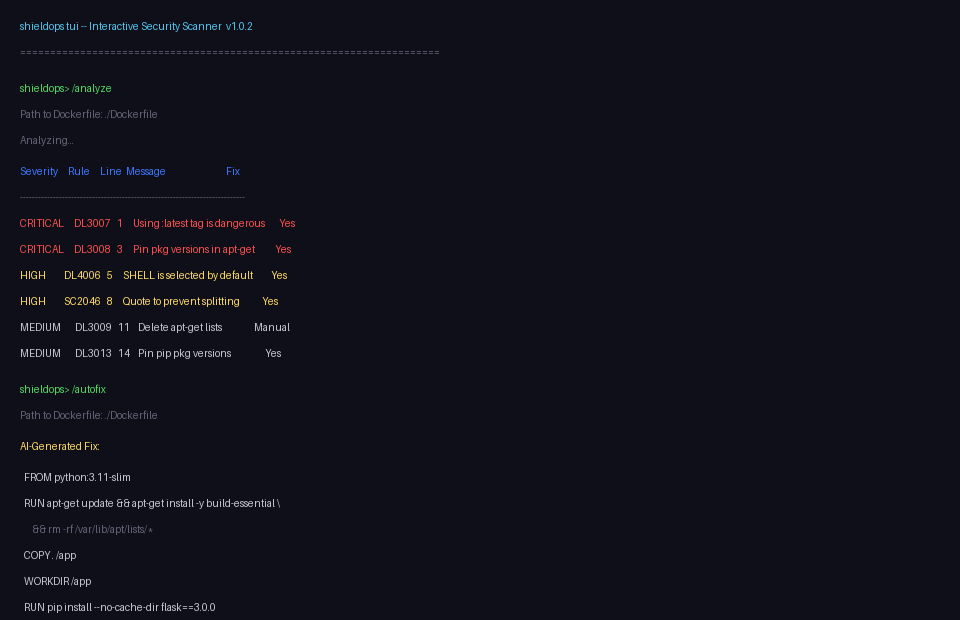
ShieldOps TUI interactive session

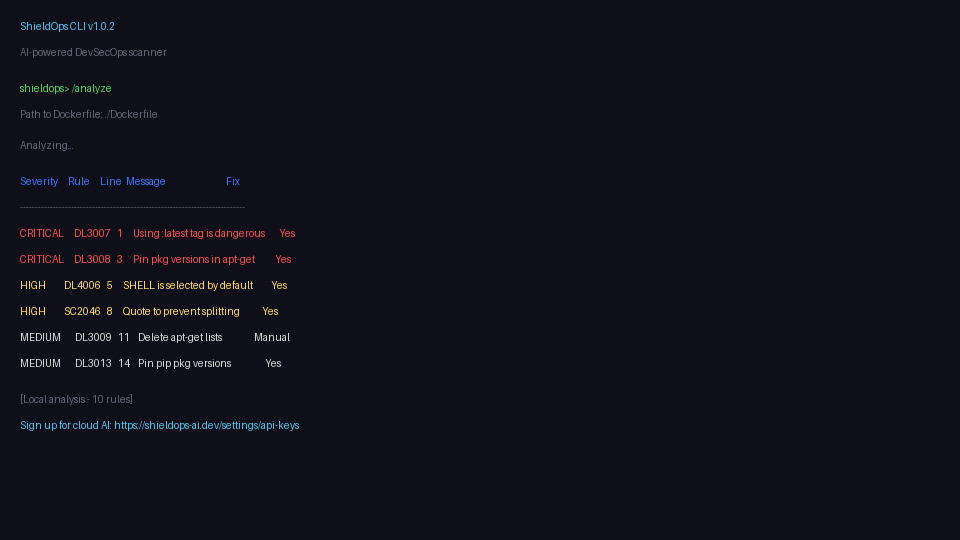
ShieldOps CLI scan results

## Why ShieldOps CLI Most Dockerfile/K8s scanners tell you **what** is wrong. ShieldOps CLI also tells you **how to fix it** — using AI that understands your specific configuration, not generic rule text. | Feature | ShieldOps CLI | Hadolint | Trivy | |---|---|---|---| | Dockerfile scan | Yes | Yes | Partial | | Docker Compose scan | Yes | No | No | | K8s manifest scan | Yes | No | Yes | | AI-powered autofix | Yes | No | No | | SBOM generation | Yes | No | Yes | | Compose file generation | Yes | No | No | | Docker image scan | Yes | No | Yes (built-in) | | Interactive TUI | Yes | No | No | | CI/CD ready (`--fail-on`) | Yes | Yes | Yes | | Free tier (local) | Unlimited scans, no signup | Yes | Yes | | Cloud AI analysis | With API key (5 free/day) | — | — | ### What makes it different 1. **AI Autofix** — not just "you have a problem" but "here's your fixed Dockerfile, ready to apply" 2. **Interactive TUI** — slash-command interface with fuzzy completion, history, and live spinner (think Claude Code but for security scans) 3. **One tool, many inputs** — Dockerfile, docker-compose.yml, K8s YAML, requirements.txt, package.json, Docker images 4. **CI/CD gate** — `--fail-on high` exits non-zero in pipelines so bad configs never merge ## Quick Start # 1. Install pip install shieldops-cli # 2. Scan your Dockerfile (local — no login needed) shieldops analyze Dockerfile That's it. You get severity-graded findings with 10+ built-in rules — no signup, no API key. For AI-powered analysis with deeper scanning: # 3. Login (free tier — 5 scans/day) shieldops login # 4. Scan with cloud AI shieldops analyze Dockerfile --api ## Installation ### From PyPI pip install shieldops-cli ### With TUI (interactive terminal) pip install 'shieldops-cli[tui]' ### CI/CD (no TUI) pip install shieldops-cli ## Commands ### `analyze` — Dockerfile Security Scan Runs locally by default (no API key). Use `--api` for cloud AI analysis. shieldops analyze Dockerfile # local (free, unlimited) shieldops analyze Dockerfile --api # cloud AI (requires login) shieldops analyze Dockerfile --format json --output report.json shieldops analyze Dockerfile --fail-on high # CI/CD gate shieldops analyze Dockerfile --open-report # open browser report ### `autofix` — AI-Powered Dockerfile Fix shieldops autofix Dockerfile # see suggested fix shieldops autofix Dockerfile --apply # apply fix in-place (.bak backup) shieldops autofix Dockerfile --format json -o fix.json ### `sbom` — Software Bill of Materials shieldops sbom requirements.txt shieldops sbom package.json shieldops sbom Dockerfile --format json ### `compose-scan` — Docker Compose Scan shieldops compose-scan docker-compose.yml shieldops compose-scan docker-compose.yml --fail-on high ### `compose-generate` — Generate Compose from Dockerfile shieldops compose-generate Dockerfile shieldops compose-generate Dockerfile --output docker-compose.yml ### `k8s-scan` — Kubernetes Manifest Scan shieldops k8s-scan deployment.yaml shieldops k8s-scan pod.yaml --format sarif ### `scan-image` — Docker Image Scan shieldops scan-image nginx:latest shieldops scan-image myapp:v1.2.3 --format json ### `login` / `logout` / `whoami` shieldops login # interactive prompt shieldops login --key sk-... # direct key export SHIELDOPS_API_KEY=sk-... # or env var (CI/CD) shieldops whoami shieldops logout ## Output Formats | Format | Best For | |---|---| | `table` (default) | Terminal reading | | `json` | Scripting, API integration | | `sarif` | GitHub Security tab, CodeQL | | `summary` | One-line pipeline status | shieldops analyze Dockerfile --format json --output scan.json shieldops analyze Dockerfile --format sarif --output results.sarif shieldops analyze Dockerfile --format summary ## TUI — Interactive Terminal Interface pip install 'shieldops-cli[tui]' shieldops tui Slash-command interface with fuzzy completion, command history, and live loading spinner: shieldops> /analyze Path to Dockerfile: ./Dockerfile Analyzing... [results] Completed shieldops> /autofix Path to Dockerfile: ./Dockerfile [AI fix suggestions] shieldops> /save Report saved: reports/autofix_20260528_143022.txt shieldops> /exit Session closed. **Available commands**: `/analyze`, `/analyze-json`, `/autofix`, `/sbom`, `/compose-scan`, `/compose-generate`, `/k8s-scan`, `/scan-image`, `/login`, `/logout`, `/whoami`, `/config`, `/save`, `/help`, `/clear`, `/exit` Append `-json` to any scan command for JSON output (e.g., `/analyze-json`). **Free tier local analysis**: `/analyze` runs **locally** with 20 security rules — no API key needed. Free users get real, actionable Dockerfile security findings including: - Critical: curl piped to shell, exposed SSH ports, hardcoded secrets - High: latest tag, running as root, sudo in container, chmod 777 - Medium: apt-get without install in same RUN, npm without --production, insecure HTTP - Low: ADD instead of COPY, missing HEALTHCHECK, pip without --no-cache-dir - Info: deprecated MAINTAINER, privileged ports, multiple RUNs **Tab** = autocomplete, **Up/Down** = history, **/save** = write to file, **/exit** = return to normal terminal for scroll/copy. ## CI/CD Integration ### GitHub Actions name: ShieldOps Security Scan on: [push, pull_request] jobs: security: runs-on: ubuntu-latest steps: - uses: actions/checkout@v4 - name: Install ShieldOps CLI run: pip install shieldops-cli - name: Scan Dockerfile env: SHIELDOPS_API_KEY: ${{ secrets.SHIELDOPS_API_KEY }} run: shieldops analyze Dockerfile --fail-on high --format sarif --output results.sarif - name: Upload SARIF uses: github/codeql-action/upload-sarif@v3 with: sarif_file: results.sarif ### GitLab CI shieldops-scan: image: python:3.11-slim stage: test before_script: - pip install shieldops-cli script: - shieldops analyze Dockerfile --fail-on high --format summary variables: SHIELDOPS_API_KEY: $SHIELDOPS_API_KEY ### Exit Codes | Code | Meaning | |---|---| | `0` | Pass — no issues above threshold | | `1` | Fail — issues found at or above `--fail-on` severity | | `2` | Error — auth, network, or configuration problem | ## Free vs Pro | Feature | Free | Pro | |---|---|---| | Scans per day | 5 | Unlimited | | Dockerfile analysis | Yes | Yes | | K8s / Compose scan | Yes | Yes | | SBOM | Yes | Yes | | AI Autofix | Yes | Yes + `--apply` | | Image scan | Yes | Yes | | HTML reports | Yes | Yes + PDF | | Browser reports | Yes | Yes | | Team access | No | Yes | | Policy engine | No | Yes | | Priority queue | No | Yes | Get your API key at [shieldops-ai.dev](https://shieldops-ai.dev). ## Configuration shieldops config list # show all settings shieldops config set api_url ... # custom API endpoint shieldops config get api_key # check stored key Config is stored in `~/.shieldops/config.json`. API keys are stored as-is (encrypt at rest on your machine if needed). ## What Runs Where | Component | Runs Locally | Requires API Key | |---|---|---| | CLI argument parsing | Yes | No | | File reading & validation | Yes | No | | Output formatting (table/json/sarif) | Yes | No | | Security analysis | No | Yes — sent to ShieldOps AI backend | | AI autofix | No | Yes | | SBOM generation | No | Yes | | Report generation | No | Yes | ## Development git clone https://github.com/mohammedabdallahcv-creator/shieldops-cli.git cd shieldops-cli pip install -e '.[dev]' pytest Run the CLI from source: python -m shieldops_cli.main analyze Dockerfile ## License MIT ShieldOps CLI is open-source. The analysis backend is proprietary and hosted at [shieldops-ai.dev](https://shieldops-ai.dev).