mafjuuu/wireshark-incidents-analysis
GitHub: mafjuuu/wireshark-incidents-analysis
Stars: 0 | Forks: 0
# wireshark-incidents-analysis
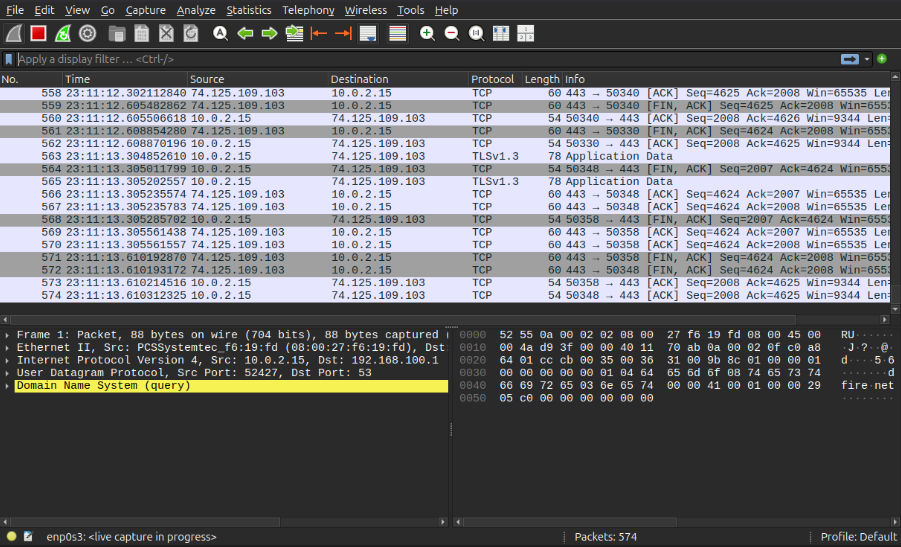
To analyze these files safely without risking my main computer, I set up a dedicated lab environment. I created an Ubuntu Linux virtual machine (with GUI) inside VirtualBox.
I installed Wireshark on the VM to look closely at the network packets. As you can see in the screenshot below, this setup allows me to see everything happening on the network interface. The image shows a mix of live traffic, including TCP handshakes, encrypted TLSv1.3 data, and a highlighted DNS query.
Using Wireshark on Linux made it much easier to filter the noise, reconstruct HTTP streams, and find the exact indicators of compromise (IoCs) for this project.
## DNS
I used a DNS filter (dns.qry.name contains ".com") to see the communication between my device and the DNS server. This technique is useful in network forensics because it shows a history of domains the machine tried to resolve.
As seen in the screenshot, we can clearly see the Source and Destination IP addresses. Here, 10.0.2.15 is my virtual machine, and 192.168.68.1 is my gateway router acting as the DNS server.
However, it is important to note that **DNS logs do not show exactly which specific pages were visited or what the user did there**. A DNS query only reveals the main domain name. Once the IP address is found, the actual web traffic is encrypted using TLS (HTTPS). Because of this encryption, the exact content, full URLs, and transferred data remain completely hidden from network sniffing. Even with this limitation, tracking DNS requests is critical for finding suspicious domains connected to malware or C2 servers.
## HTTP Cleartext Credential Theft
Before we look at the real malware incidents, I want to show how easy it is to steal login credentials when a website uses a basic, unencrypted HTTP connection. To test this, I used a vulnerable demo banking website called Altoro Mutual. I opened the site in my lab environment, entered a test username and password, and clicked login.
After capturing the network traffic, I needed to find the exact moment the login data was sent to the server. I filtered the huge mass of packets in Wireshark using the http filter and looked specifically for the HTTP POST method, which is used to submit form data.
Because the website does not use HTTPS, it does not encrypt anything. To reveal these credentials, I expanded the HTML Form URL Encoded section within Wireshark's Packet Details pane, which parses the raw body of the HTTP POST request. As a result, the parameters uid=robert123 and passw=robert123 became fully visible in plaintext, demonstrating how effortlessly an attacker can intercept sensitive login data over an unencrypted connection.
## AgentTesla Malware Analysis (Infostealer)
After showing the basic risks of HTTP, we will now analyze a real-world infection. In this case, an employee fell victim to a phishing attack and executed a malicious file, which turned out to be the AgentTesla malware. To perform this analysis, I used real traffic data and infection artifacts from Malware-Traffic-Analysis.net. AgentTesla is a dangerous infostealer designed to silently extract sensitive data, such as browser passwords, email credentials, and keystrokes, from the infected machine.
Now I will investigate the network traffic to find out exactly how the malware communicated with the attacker's server and what data was stolen.
I started by filtering the DNS traffic to see which domains the infected machine was trying to reach. As shown in the screenshot, I found several queries for ftp.ercolina-usa.com.
This is highly suspicious because ordinary office employees rarely use the FTP protocol in their daily work. In this context, it suggests that the AgentTesla malware is looking for its Command & Control (C2) server or an exfiltration point to upload stolen data.
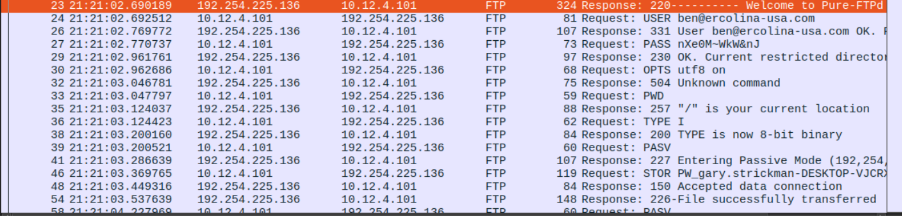
After finding the suspicious DNS requests, I applied the ftp filter to check what was actually happening during the connection. The results in the screenshot gave me a clear view of the data theft.
We can see the malware automatically authenticating on the server (ftp.ercolina-usa.com) with the username `ben@ercolina-usa.com` and a plaintext password. Right after logging in, the infection signature becomes obvious. The malware uses the STOR command to upload a file named PW_gary.strickman-DESKTOP..., which is a clear sign that AgentTesla collected a list of passwords belonging to the user "Gary" and sent them out. Finally, the server responds with a 226 code, confirming the file was successfully transferred. This completely confirms the data exfiltration phase of the attack.
As shown in the first stream snapshot, we can read the exact sequence of the breach. The infected host connects to ftp.ercolina-usa.com, passes the credentials in cleartext, and issues the first STOR command to upload Gary's system passwords.
Looking further into the stream, the malware didn't stop there. It performed a thorough exfiltration by uploading targeted credential stores from local web browsers. We can see separate STOR commands for Chrome (CO_Chrome_Default.txt...) and Microsoft Edge (CO_Edge Chromium_Default.txt...) databases. This clear visualization serves as definitive proof of how an infostealer operates once it gains a foothold on a system.
Beyond looking at the network traffic, we can investigate the initial access vector. The source files include the raw phishing email that started the entire infection chain. By opening the .eml file, we can look directly at the email headers and the HTML body code to understand how the attacker tricked the employee.
As shown in the headers, the email arrived with the subject line PURCHASE QUOTATION. The attacker is using impersonation techniques here. The From: header shows that the message pretends to come from a real company employee (`sertan@acronas.com.tr`). This is a classic social engineering trick designed to create urgency and make the business target open the malicious attachment.
## SmartApeSG RAT malware Analysis
After investigating the infostealer, I moved to a more advanced threat: a Remote Access Trojan (RAT) known as SmartApeSG. While an infostealer just grabs data and leaves, a RAT stays on the system to give the attacker full, long-term control over the infected machine.
In this analysis, I focused on identifying the C2 (Command & Control) communication. By looking at the network logs, I can show how the malware persistently "beacons" out to the attacker's server, waiting for remote instructions. This type of malware is especially dangerous because it allows for real-time spying and further exploitation of the internal network. To investigate the SmartApeSG RAT, I applied the http filter to analyze the web traffic originating from the infected host (10.12.17.101). The network logs quickly revealed a highly automated pattern, commonly known as a heartbeat or beaconing.
As shown in the screenshot, the malware uses a highly descriptive header: User-Agent: NetSupport Manager/1.3. By using a modified version of a known remote administration tool, the attackers attempt to blend in with normal network operations. Inside the HTTP request body, the actual C2 protocol becomes visible. The infected host sends a CMD=POLL request, which acts as a check-in to see if the operator has queued any new instructions. The server (NetSupport Gateway/1.8) responds with CMD=ENCD and an encrypted data payload (DATA=...), establishing a persistent execution channel.
The second stream capture shows the continuation of this loop. The client repeatedly responds with its own CMD=ENCD packets, uploading obfuscated system data or execution results back to the C2 server at 194.180.191.64. This continuous loop of encoded exchange confirms that the attacker has successful interactive control over the victim's environment.
Based on the evidence gathered, as a SOC Analyst, I would immediately isolate the infected workstation from the network to terminate the active remote control session. I would then blacklist the C2 IP address 194.180.191.64 on the corporate firewall to prevent any further communication with the malicious infrastructure. Finally, I would create a detection rule for the unauthorized NetSupport Manager User-Agent string to hunt for potential sister infections across the environment.
## DNS
I used a DNS filter (dns.qry.name contains ".com") to see the communication between my device and the DNS server. This technique is useful in network forensics because it shows a history of domains the machine tried to resolve.
As seen in the screenshot, we can clearly see the Source and Destination IP addresses. Here, 10.0.2.15 is my virtual machine, and 192.168.68.1 is my gateway router acting as the DNS server.
However, it is important to note that **DNS logs do not show exactly which specific pages were visited or what the user did there**. A DNS query only reveals the main domain name. Once the IP address is found, the actual web traffic is encrypted using TLS (HTTPS). Because of this encryption, the exact content, full URLs, and transferred data remain completely hidden from network sniffing. Even with this limitation, tracking DNS requests is critical for finding suspicious domains connected to malware or C2 servers.
## HTTP Cleartext Credential Theft
Before we look at the real malware incidents, I want to show how easy it is to steal login credentials when a website uses a basic, unencrypted HTTP connection. To test this, I used a vulnerable demo banking website called Altoro Mutual. I opened the site in my lab environment, entered a test username and password, and clicked login.
After capturing the network traffic, I needed to find the exact moment the login data was sent to the server. I filtered the huge mass of packets in Wireshark using the http filter and looked specifically for the HTTP POST method, which is used to submit form data.
Because the website does not use HTTPS, it does not encrypt anything. To reveal these credentials, I expanded the HTML Form URL Encoded section within Wireshark's Packet Details pane, which parses the raw body of the HTTP POST request. As a result, the parameters uid=robert123 and passw=robert123 became fully visible in plaintext, demonstrating how effortlessly an attacker can intercept sensitive login data over an unencrypted connection.
## AgentTesla Malware Analysis (Infostealer)
After showing the basic risks of HTTP, we will now analyze a real-world infection. In this case, an employee fell victim to a phishing attack and executed a malicious file, which turned out to be the AgentTesla malware. To perform this analysis, I used real traffic data and infection artifacts from Malware-Traffic-Analysis.net. AgentTesla is a dangerous infostealer designed to silently extract sensitive data, such as browser passwords, email credentials, and keystrokes, from the infected machine.
Now I will investigate the network traffic to find out exactly how the malware communicated with the attacker's server and what data was stolen.
I started by filtering the DNS traffic to see which domains the infected machine was trying to reach. As shown in the screenshot, I found several queries for ftp.ercolina-usa.com.
This is highly suspicious because ordinary office employees rarely use the FTP protocol in their daily work. In this context, it suggests that the AgentTesla malware is looking for its Command & Control (C2) server or an exfiltration point to upload stolen data.
We can see the malware automatically authenticating on the server (ftp.ercolina-usa.com) with the username `ben@ercolina-usa.com` and a plaintext password. Right after logging in, the infection signature becomes obvious. The malware uses the STOR command to upload a file named PW_gary.strickman-DESKTOP..., which is a clear sign that AgentTesla collected a list of passwords belonging to the user "Gary" and sent them out. Finally, the server responds with a 226 code, confirming the file was successfully transferred. This completely confirms the data exfiltration phase of the attack.
As shown in the first stream snapshot, we can read the exact sequence of the breach. The infected host connects to ftp.ercolina-usa.com, passes the credentials in cleartext, and issues the first STOR command to upload Gary's system passwords.
Looking further into the stream, the malware didn't stop there. It performed a thorough exfiltration by uploading targeted credential stores from local web browsers. We can see separate STOR commands for Chrome (CO_Chrome_Default.txt...) and Microsoft Edge (CO_Edge Chromium_Default.txt...) databases. This clear visualization serves as definitive proof of how an infostealer operates once it gains a foothold on a system.
Beyond looking at the network traffic, we can investigate the initial access vector. The source files include the raw phishing email that started the entire infection chain. By opening the .eml file, we can look directly at the email headers and the HTML body code to understand how the attacker tricked the employee.
As shown in the headers, the email arrived with the subject line PURCHASE QUOTATION. The attacker is using impersonation techniques here. The From: header shows that the message pretends to come from a real company employee (`sertan@acronas.com.tr`). This is a classic social engineering trick designed to create urgency and make the business target open the malicious attachment.
## SmartApeSG RAT malware Analysis
After investigating the infostealer, I moved to a more advanced threat: a Remote Access Trojan (RAT) known as SmartApeSG. While an infostealer just grabs data and leaves, a RAT stays on the system to give the attacker full, long-term control over the infected machine.
In this analysis, I focused on identifying the C2 (Command & Control) communication. By looking at the network logs, I can show how the malware persistently "beacons" out to the attacker's server, waiting for remote instructions. This type of malware is especially dangerous because it allows for real-time spying and further exploitation of the internal network. To investigate the SmartApeSG RAT, I applied the http filter to analyze the web traffic originating from the infected host (10.12.17.101). The network logs quickly revealed a highly automated pattern, commonly known as a heartbeat or beaconing.
As shown in the screenshot, the malware uses a highly descriptive header: User-Agent: NetSupport Manager/1.3. By using a modified version of a known remote administration tool, the attackers attempt to blend in with normal network operations. Inside the HTTP request body, the actual C2 protocol becomes visible. The infected host sends a CMD=POLL request, which acts as a check-in to see if the operator has queued any new instructions. The server (NetSupport Gateway/1.8) responds with CMD=ENCD and an encrypted data payload (DATA=...), establishing a persistent execution channel.
The second stream capture shows the continuation of this loop. The client repeatedly responds with its own CMD=ENCD packets, uploading obfuscated system data or execution results back to the C2 server at 194.180.191.64. This continuous loop of encoded exchange confirms that the attacker has successful interactive control over the victim's environment.
Based on the evidence gathered, as a SOC Analyst, I would immediately isolate the infected workstation from the network to terminate the active remote control session. I would then blacklist the C2 IP address 194.180.191.64 on the corporate firewall to prevent any further communication with the malicious infrastructure. Finally, I would create a detection rule for the unauthorized NetSupport Manager User-Agent string to hunt for potential sister infections across the environment.