esdohr/it-triage-system-crewai
GitHub: esdohr/it-triage-system-crewai
Stars: 0 | Forks: 0
# AI-Powered IT Incident Triage System
## Executive Summary
## Background Context
1. Read and interpret the ticket
2. Decide which category the issue falls into
3. Assess how urgent it is and who is affected
4. Draft an acknowledgment email to the user
5. Route the ticket to the correct team with the right SLA
In busy IT departments this triage step consumes significant technician time, is inconsistent across shifts and individuals, and introduces delays in getting the right people working on critical issues. P1 outages, where every minute of downtime costs the business money, are especially vulnerable to slow triage.
## Why CrewAI?
CrewAI is an open-source framework specifically designed for building systems where multiple AI agents collaborate on a shared task. Instead of asking a single AI model to do everything at once (which produces inconsistent results on complex, multi-step problems), CrewAI lets you assign each step to a dedicated agent with its own area of expertise, its own instructions, and its own defined output format.
Other reasons CrewAI was chosen:
- **Sequential pipelines:** Each agent automatically receives the outputs of the agents before it, so later agents have full context without any extra wiring.
- **Structured outputs:** CrewAI integrates with Pydantic (Python's leading data validation library), so every agent produces a guaranteed, machine-readable output rather than a freeform paragraph that has to be parsed.
- **Rapid iteration:** Agents and tasks are defined in plain YAML configuration files, making it easy to adjust an agent's role, expertise, or instructions without rewriting code.
- **LLM-agnostic:** The framework works with OpenAI, Anthropic, Google, and local models. Swapping the underlying model requires changing one environment variable.
## Implementation Overview
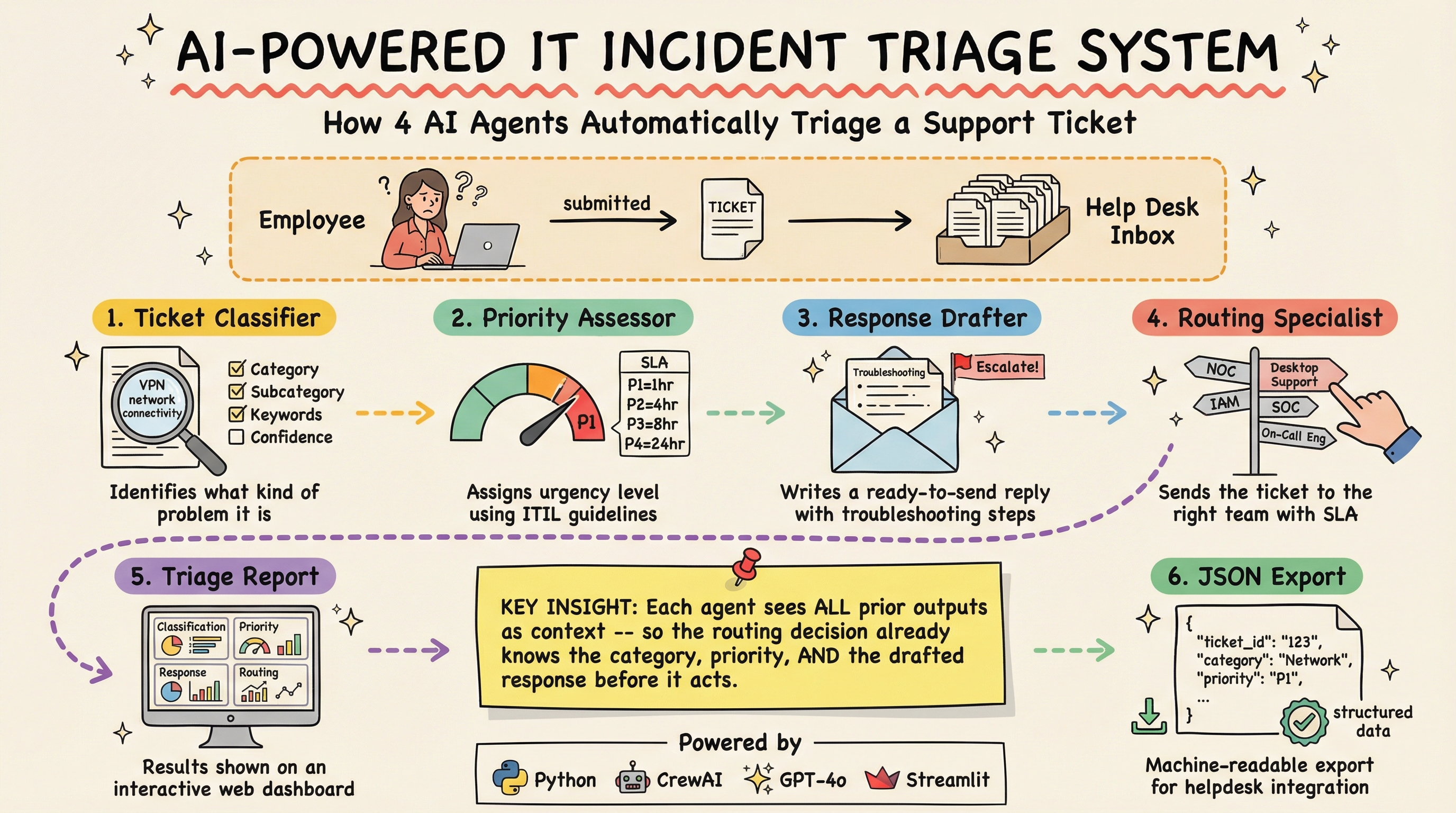
The system runs four AI agents in sequence. Each agent receives the original ticket text plus all prior agents' outputs as context.
Incoming Ticket (plain text)
│
▼
┌─────────────────────────┐
│ Agent 1: Classifier │ → Category, subcategory, keywords, confidence
└─────────────────────────┘
│
▼
┌──────────────────────────────┐
│ Agent 2: Priority Assessor │ → P1–P4, severity score, business impact
└──────────────────────────────┘
│
▼
┌───────────────────────────────┐
│ Agent 3: Response Drafter │ → Email subject, body, troubleshooting steps
└───────────────────────────────┘
│
▼
┌───────────────────────────────┐
│ Agent 4: Routing Specialist │ → Team, tier, queue, SLA in hours
└───────────────────────────────┘
│
▼
Structured Triage Report (JSON + UI)
**Categories supported:** Network, Hardware, Software, Access & Permissions, Other
**Priority levels (ITIL standard):**
|Level|Description|SLA Target|
|---|---|---|
|P1 (Critical)|Full outage, widespread impact, revenue at risk|1 hour|
|P2 (High)|Significant degradation, department-level impact|4 hours|
|P3 (Medium)|Single user affected, workaround available|8 hours|
|P4 (Low)|Service request, minor inconvenience|24 hours|
**Routing rules encoded in the system:**
|Issue Type|Destination|
|---|---|
|Network (VPN, WiFi, DNS, firewall)|Network Operations Center (NOC)|
|Hardware (laptop, monitor, printer)|Desktop Support|
|Software (P3/P4)|IT Helpdesk Tier 1|
|Software (P1/P2)|Desktop Engineering Tier 2|
|Access & Permissions (AD, MFA, SSO)|Identity & Access Management (IAM)|
|Any P1 incident|On-Call Engineering Tier 3 + Incident Commander|
|Security incidents (ransomware, breach)|Security Operations Center (SOC), auto-elevated to P1|
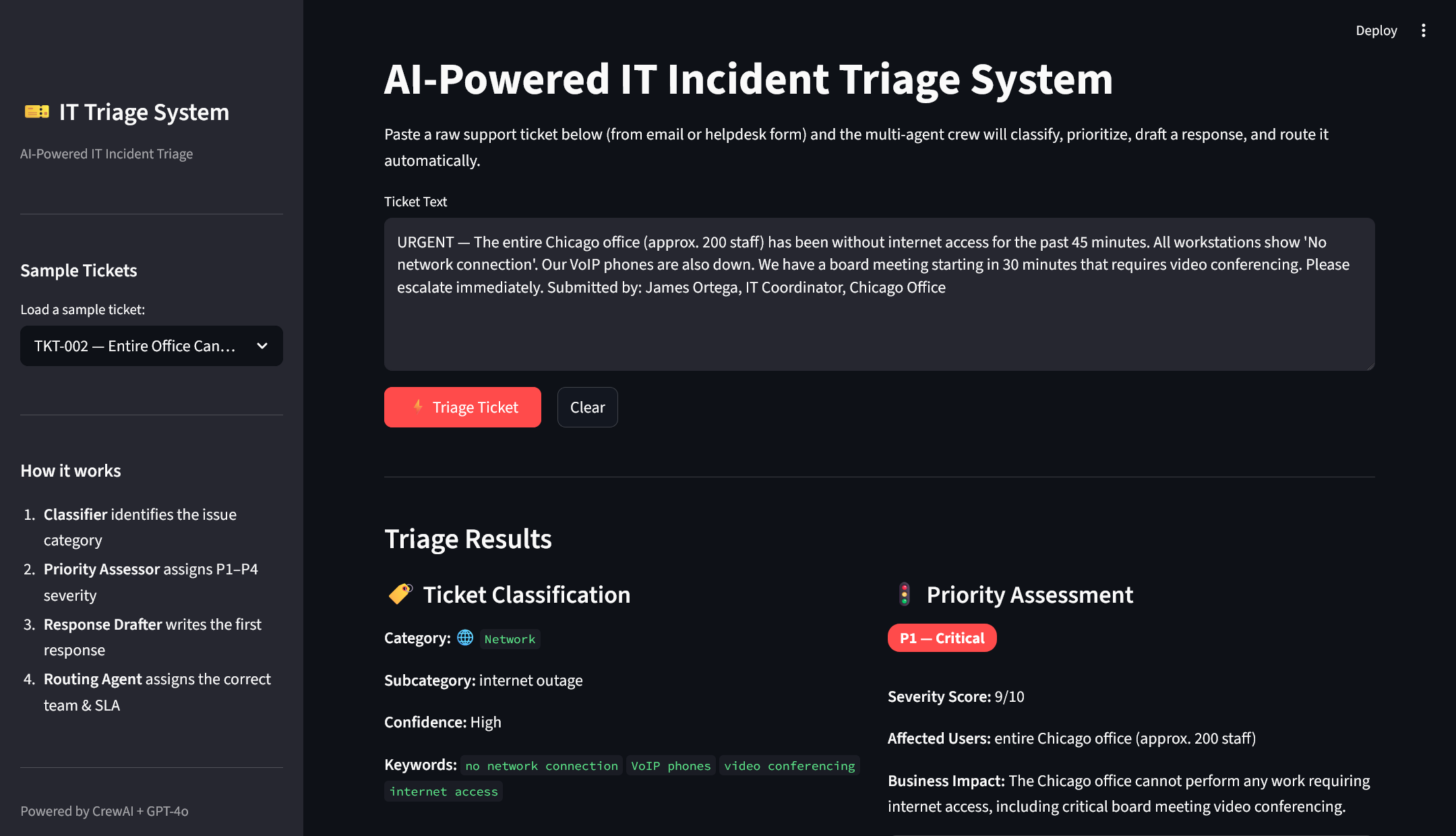
**Streamlit web interface** allows non-technical users to:
- Paste any free-text ticket
- Load one of 8 built-in sample tickets spanning all categories and priorities
- View all four agent outputs side-by-side with color-coded priority badges
- Export the full result as a JSON file
## Results Summary
The system was validated against 8 representative sample tickets that collectively cover every supported category, all four priority levels, and edge cases such as security incidents (ransomware), VIP users, multi-user outages, and new employee onboarding requests. Sample scenarios include:
- **TKT-001:** A Sales Manager cannot connect to VPN 2 hours before a client presentation (P2, NOC)
- **TKT-002:** An entire Chicago office of 200 staff loses internet 30 minutes before a board meeting (P1, On-Call Engineering)
- **TKT-003:** A cracked laptop screen with no urgency (P3/P4, Desktop Support)
- **TKT-004:** Access denied after a promotion, manager already approved (P3, IAM)
- **TKT-005:** Outlook crashes on startup, web email still working (P3, Helpdesk Tier 1)
- **TKT-006:** New hire onboarding covering AD account, email, licenses, and laptop (P4, IAM)
- **TKT-007:** Ransomware pop-up with encrypted files on a Finance Director's machine (P1, SOC, auto-escalated)
- **TKT-008:** Shared printer down, 8 HR staff affected during performance review day (P2/P3, Desktop Support)
Across all tested tickets, the agents produced correctly structured, validated outputs with accurate classifications, appropriate priority assignments, empathetic and actionable response emails, and correctly targeted routing decisions.
## Business Impact
Deploying a system like this at scale in an IT department would deliver several measurable benefits:
**Speed:** Triage that takes a human technician 3–5 minutes per ticket is completed in seconds, around the clock, with no shift gaps.
**Consistency:** Every ticket is evaluated against the same priority criteria and routing rules, eliminating the variance that occurs across different technicians or different times of day.
**Faster P1 response:** Critical incidents are identified and escalated immediately, without waiting in a queue for a human to notice them.
**Reduced ticket bounce rate:** Tickets routed to the wrong team are a common source of frustration and delay. Routing based on structured, rule-encoded logic significantly reduces that problem compared to individual judgment calls.
**Scalability:** A spike in ticket volume (for example, after a company-wide software rollout) does not degrade triage speed or quality.
**Documentation quality:** Every triage decision is logged as structured JSON, providing a consistent audit trail for SLA reporting and post-incident analysis.
## Terminology Explained
**AI Agent**
In plain terms: think of an AI agent as a virtual specialist hired to do one specific job, who figures out _how_ to do that job based on their expertise and the information in front of them.
**Agentic Workflow**
An agentic workflow is a pipeline where multiple AI agents work together in sequence (or in parallel), each handling one part of a larger task and passing their results to the next. The key distinction from traditional automation is that the agents adapt to the content. A ransomware ticket and a printer jam ticket are handled completely differently by the same agents, because the agents reason about what they are reading rather than following fixed if-then rules.
In plain terms: it is like an assembly line staffed by expert consultants rather than identical machines. Each consultant sees the same raw material (the ticket), applies their specific expertise, and adds their output to the growing package before passing it on.
## AI Agents Used in This Project
**2. Priority Assessor** _Role:_ IT Incident Priority Assessor _What it does:_ Takes the classification and the original ticket text and applies ITIL (IT Infrastructure Library) best-practice guidelines to assign a P1–P4 priority level. It evaluates the number of affected users, the criticality of the affected systems, any urgency signals in the text (words like "urgent," "down," "can't work"), and the downstream business impact. It outputs a numeric severity score from 1 to 10 and a written rationale for its decision.
## Tech Stack
|Component|Technology|Purpose|
|---|---|---|
|Language|Python 3.12|Core implementation language|
|AI Agent Framework|CrewAI 1.12.2|Multi-agent orchestration and sequential pipeline|
|Large Language Model|OpenAI GPT-4o|The reasoning engine powering all four agents|
|Data Validation|Pydantic|Enforces structured, typed outputs from every agent|
|Web Interface|Streamlit|Interactive browser-based UI for ticket submission and results display|
|Package Management|UV|Fast, modern Python dependency management|
|Configuration|YAML|Agent roles and task prompts defined as human-readable config files|
|Export Format|JSON|Machine-readable output for downstream integration|
|AI Concepts Applied|Prompt engineering, agentic workflows, sequential multi-agent pipelines, structured output parsing||