markobel/kkt-kolbe-homeassistant
GitHub: markobel/kkt-kolbe-homeassistant
该项目通过透明代理桥接 Hekr 云端协议,将已失去官方 App 支持的 KKT KOLBE 抽油烟机无缝接入 Home Assistant 进行 MQTT 控制。
Stars: 0 | Forks: 0
# KKT KOLBE 抽油烟机 → Home Assistant (Hekr 云端桥接)
从 **Home Assistant** 控制 **KKT KOLBE** 抽油烟机(以及可能支持其他 **Hekr / WISEN** WiFi
设备)—— **无需任何硬件修改**。
KKT 停止了 WISEN 应用,导致这些抽油烟机变成半砖状态:WiFi
仍然可用,但已经没有官方途径来控制它们了。该项目在抽油烟机和 Hekr 云端之间放置了一个小型透明代理,通过支持自动发现的 MQTT 将抽油烟机接入 Home Assistant。
## 功能
- 透明 MITM 代理:抽油烟机 ↔ **桥接** ↔ Hekr 云端
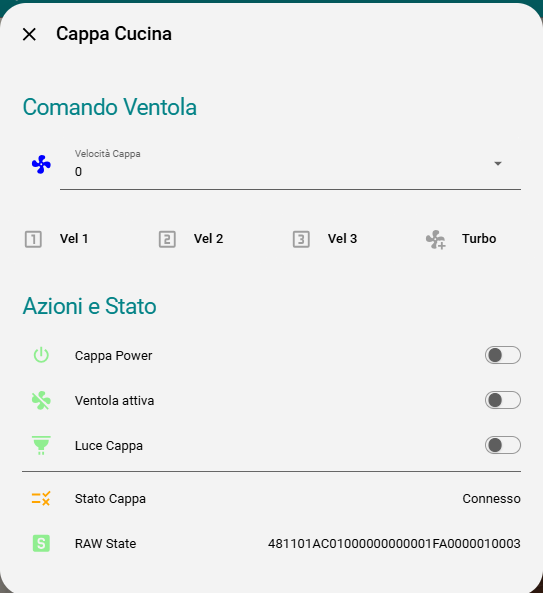
- Home Assistant **MQTT 自动发现** (switch, select, fan, sensors)
- 向抽油烟机注入指令 (电源 / 灯光 / 风速)
- 实时记录完整的 Hekr JSON 协议,用于进一步的逆向工程
- 交互式 REPL,用于映射未知的 command ID
- 作为微型 Docker 容器运行
## 在 Home Assistant 中暴露的实体
| 实体 | 类型 | 备注 |
|---|---|---|
| 电源 | `switch` | 总开关(风扇 + 灯光)— cmdId `0x02` |
| 灯光 | `switch` | 仅灯光 — cmdId `0x03` |
| 风速 | `select` | 0 / 1 / 2 / 3 / 4 — cmdId `0x04` |
| 风扇 | `fan` | 同风速,以带百分比的风扇形式暴露 |
| 连接状态 | `binary_sensor` | 在线 / 离线 |
| 原始状态 | `sensor` | 最后的原始十六进制数据帧(诊断) |
| 序列号 | `sensor` | 设备帧计数器(诊断) |
## 工作原理
抽油烟机内部包含一个 **基于 ESP 的 Hekr WiFi 模块**。它会向 Hekr 云端发起一个明文 TCP
连接(无 TLS),并交换以换行符分隔的 JSON:
```
device -> cloud : {"msgId":..,"action":"heartbeat"}
device -> cloud : {"msgId":..,"action":"devSend","params":{... "raw":"4811..."}}
cloud -> device: {"msgId":..,"action":"appSend","params":{... "raw":"4807..."}}
```
- `devSend.raw` 是抽油烟机上报的**状态**帧。
- `appSend.raw` 是云端发送给抽油烟机的**指令**。
- 每个 `raw` 都是一段简短的二进制 payload,并经过了十六进制编码。
通过将抽油烟机的云端流量重定向到此桥接(仅需在您的路由器上设置一条 DNAT 规则),桥接就可以读取每次状态更新并注入自己的
指令,同时仍会将所有数据转发给真实的云端,从而确保抽油烟机保持
正常工作。
### 状态帧结构 (KKT KOLBE FREE)
17 字节,例如 `4811 01 23 01 01 00 01 02 00 01 FA 00 00 01 00 7E`:
| 偏移量 | 含义 |
|---|---|
| 0 | `0x48` 魔数 |
| 1 | 长度 (`0x11` = 17) |
| 2 | 帧类型 |
| 3 | 序列计数器 |
| 6 | 灯光 (0/1) |
| 7 | **风速 (0..4)** |
| 9–14 | 滤网 / 计数器区块 |
| 16 | 校验和 = `sum(prev bytes) & 0xFF` |
### 指令帧结构
7 字节:`48 07 02 [seq] [cmdId] [value] [chk]`,校验和 = `sum & 0xFF`。
| cmdId | 功能 |
|---|---|
| `0x02` | 主电源(风扇 + 灯光) |
| `0x03` | 灯光开关 |
| `0x04` | 风扇转速 (值 0..4) |
## 设置
### 前置条件
- 使用 Hekr 云端(WISEN 应用)且在您的局域网中可达的抽油烟机
- 一台可以添加 **DNAT** 规则的路由器(例如:UniFi, OpenWrt, pfSense)
- 一个 MQTT broker(例如 Mosquitto)
- 启用了 MQTT 集成的 Home Assistant
- 您网络中一台主机上的 Docker + Docker Compose
### 1. 查找您的设备标识符
您需要三样东西:**设备 IP**、**devTid** 和 **ctrlKey**。
抓取抽油烟机的流量(在路由器上运行,或在任何可以镜像流量的主机上运行):
```
tcpdump -i any -nn -s 0 -w hood.pcap 'host '
```
在抓包的同时,通过 WISEN 应用切换抽油烟机的状态(或重启其电源)。然后
检查 JSON(payload 是纯 ASCII 文本):
```
tshark -r hood.pcap -Y 'tcp.len > 0' -T fields -e tcp.payload \
| while read p; do printf "%b\n" "$(echo "$p" | sed 's/\(..\)/\\x\1/g')"; done
```
您会看到类似这样的行:
```
{"action":"devSend","params":{"devTid":"ESP_2M_AABBCCDDEEFF", ...}}
{"action":"appSend","params":{"devTid":"ESP_2M_AABBCCDDEEFF",
"ctrlKey":"<32 hex chars>", ...}}
```
- `devTid` → `HEKR_DEV_TID`
- `ctrlKey` → `HEKR_CTRL_KEY`
- 设备连接的 IP (`tcp.dstport == 83`) → `HEKR_CLOUD_HOST`
### 2. 配置
```
git clone https://github.com/markobel/kkt-kolbe-homeassistant.git
cd kkt-kolbe-homeassistant
cp .env.example .env
# 使用你的 devTid, ctrlKey, MQTT credentials 等编辑 .env。
nano .env
```
### 3. 将抽油烟机重定向到桥接 (DNAT)
将抽油烟机的云端流量发送到运行桥接的主机。替换 IP/端口
以匹配您的设置。
**通用 iptables(在路由器上运行):**
```
iptables -t nat -A PREROUTING \
-s -d \
-p tcp --dport 83 \
-j DNAT --to-destination :83
```
**UniFi (UDR/UDM)** — 使用 `on_boot.d` 使其持久化
(需要 [unifios-utilities](https://github.com/unifi-utilities/unifios-utilities))。
创建 `/data/on_boot.d/15-hekr-redirect.sh`:
```
#!/bin/sh
iptables -t nat -C PREROUTING -s -d \
-p tcp --dport 83 -j DNAT --to-destination :83 2>/dev/null || \
iptables -t nat -A PREROUTING -s -d \
-p tcp --dport 83 -j DNAT --to-destination :83
```
```
chmod +x /data/on_boot.d/15-hekr-redirect.sh
/data/on_boot.d/15-hekr-redirect.sh
```
### 4. 运行
```
docker compose up -d --build
docker compose logs -f hekr-bridge
```
强制抽油烟机重新连接,以便它获取新的路由(重启其电源,或
在路由器上清除现有连接,例如 `conntrack -D -s `)。
您应该会看到:
```
Hekr bridge listening on 0.0.0.0:83 -> :83
MQTT: connected to ...
MQTT: published 7 HA discovery entities
=== DEVICE CONNECT from ('', ...) ===
=== CLOUD CONNECT to :83 ok ===
STATE CHG: ...
```
该设备将出现在 Home Assistant 的 **设置 → 设备与服务 →
MQTT** 下。
## 映射更多指令 (REPL)
该容器运行一个交互式 REPL。连接到它:
```
docker attach hekr-bridge # detach with Ctrl+P then Ctrl+Q (NOT Ctrl+C)
```
然后进行测试:
```
speed 1
speed 0
light 1
cmd 05 01 # try unknown command id 0x05 with value 1
state
```
观察 `STATE CHG` 行以查看哪个字节发生了变化,并为您的型号映射新功能
(RGB、滤网重置、定时器等)。欢迎贡献代码!
## 注意事项与说明
- 该桥接仍然依赖于**真实的 Hekr 云端**保持可达,因为
它需要转发登录/握手过程。如果云端某日失效,所抓取到的
握手记录(`devLoginResp` → `reportDevInfoResp` → `getTimerListResp`)足以
在本地模拟该过程 — 欢迎 PR。
- 您可能会看到的 `uart timeout` 响应在这款硬件上只是表面现象:
指令已被执行,且抽油烟机仍会上报最新状态。
- 在 KKT KOLBE FREE 上观察到的是纯明文 TCP,没有 TLS,也没有证书绑定。
您的型号可能有所不同。
## 免责声明
这是一个非官方的社区项目。不隶属于 KKT KOLBE 或
Hekr。使用风险自负。您有责任遵守您交互的任何
云服务的服务条款以及适用的法律。
## 许可证
MIT — 查看 [LICENSE](LICENSE)。
标签:Docker, Home Assistant, 安全防御评估, 智能家居, 版权保护, 物联网, 请求拦截