idkgarvit/OBSIDIOS
GitHub: idkgarvit/OBSIDIOS
OBSIDIOS 是一个自主网络安全平台,整合主机发现、AI 驱动的 CVE 漏洞映射、攻击路径模拟、入侵检测与自动化防御,通过 3D 仪表盘和 Discord 告警提供实时态势感知。
Stars: 0 | Forks: 0
## 概述
OBSIDIOS 是一个自主网络安全平台,可持续发现主机,通过 AI 驱动的 CVE 富化映射漏洞,模拟针对 MITRE ATT&CK 的攻击路径,生成 Suricata IDS 规则,并通过 3D 战术指挥中心提供实时防御。
它作为一组 Docker 容器运行,一旦配置完成即无需任何人工干预。
## 架构
```
┌─────────────────────────────────────────────────────────────────┐
│ OBSIDIOS PLATFORM │
├────────────┬───────────┬───────────┬───────────┬────────────────┤
│ IRIS │ ORACLE │ PHANTOM │ SENTINEL │ DASHBOARD │
│ Scanning │ Intel │ Attack │ / SHIELD │ 3D Web UI │
│ Discovery │ AI │ Paths │ Defense │ (Three.js) │
├────────────┼───────────┼───────────┼───────────┼────────────────┤
│ ARP Sweep │ CVE │ Dijkstra │ Suricata │ Flask + │
│ Nmap │ Posture │ MITRE │ IDS │ SocketIO │
│ OSINT │ Patch │ ATT&CK │ iptables │ Real-time │
│ CVE Map │ Threat │ ROI │ Auto- │ 3D Map │
│ Nuclei │ Intel │ Scoring │ block │ Tactical Feed │
└────────────┴───────────┴───────────┴───────────┴────────────────┘
```
### 核心子系统
| 模块 | 用途 |
|--------|---------|
| **IRIS** | 网络扫描:ARP 心跳、Nmap 指纹识别、CVE 映射(NVD API)、OSINT、Nuclei 模板扫描、无线扫描 |
| **ORACLE** | 战略情报:合规性(PCI-DSS/HIPAA/SOC2/NIST)、补丁优先级划分、安全态势评分、AI 叙述(NVIDIA/OpenRouter/Anthropic) |
| **PHANTOM** | 攻击路径模拟:在攻击图上应用 Dijkstra 最短路径算法、MITRE ATT&CK 技术映射、攻击者 ROI 评分 |
| **FORGE** | 根据 PHANTOM 攻击路径生成 Suricata IDS 规则 |
| **SENTINEL** | 基于 Suricata 的入侵检测:启动 Suricata、追踪 eve.json、将警报与 PHANTOM 路径交叉引用、触发 SHIELD |
| **SHIELD** | 自适应防御:基于 iptables 的 IP 阻断、路径隔离、微隔离、自动隔离 |
| **ECHO** | 行为漂移检测:对网络流量模式进行 Z-score 异常检测 |
| **CHRONICLE** | 数据库层:通过 aiosqlite 使用 SQLite、15+ 表格 schema、WAL 模式、FK 约束、连接池 |
| **ALERTS** | Discord 通知系统:针对 CVE、攻击路径、入侵、无线威胁、扫描事件进行缓冲与整合的警报 |
| **DASHBOARD** | Flask + SocketIO Web UI,包含 Three.js 3D 战术地图、实时网络统计、JWT 认证、12+ API endpoint |
## 快速入门
### 前置条件
- Docker & Docker Compose
- 带有 `iptables` 和 `nftables` 的 Linux 主机(用于 SHIELD 防御功能)
- 位于目标子网的网络接口(用于 ARP 扫描)
### 1. 克隆与配置
```
git clone https://github.com/idkgarvit/OBSIDIOS.git
cd OBSIDIOS
cp config/.env.example .env
```
编辑 `.env` 以配置可选设置:
```
# 建议至少配置一个 AI provider key:
NVIDIA_API_KEY=nvapi-... # Primary: NVIDIA meta/llama-3.1-8b-instruct (free tier ~20 req/min)
OPENROUTER_API_KEY=sk-or-v1-... # Fallback: OpenRouter free models
ANTHROPIC_API_KEY=sk-ant-... # Last resort fallback
# 可选 integrations:
OBSIDIOS_DISCORD_WEBHOOK=https://discord.com/api/webhooks/... # Alert notifications
SHODAN_API_KEY=... # OSINT enrichment
MSF_PASSWORD=... # Metasploit RPC (if used)
```
### 2. 启动
```
sudo docker-compose up -d --build
```
这将启动:
- `obsidios-daemon` — 扫描引擎(特权模式,主机网络)
- `obsidios-dash` — 端口 8080 上的 Web 仪表盘
- `obsidios-echo` — 行为漂移检测
- `obsidios-sentinel` — Suricata IDS + SHIELD 自动防御
- `caddy-proxy` — 可选的带 TLS 反向代理
### 3. 访问仪表盘
导航至 **http://localhost:8080**
默认凭据:`admin` / `obsidios123`
### 4. 配置并开始扫描
扫描器以 **暂停** 模式启动。要开始扫描:
1. 转到侧边栏的 **网络配置**
2. **检测** 你的网络(自动检测本地子网)或手动输入目标 CIDR
3. 选择 **扫描配置文件**(FAST / STEALTH / GHOST)
4. 点击 **应用** — 扫描立即开始
daemon 将开始 ARP 主机发现、Nmap 指纹识别、CVE 映射和攻击路径模拟。你可以在 **概述** 仪表盘上监控进度。
## 配置
### 扫描配置文件
| 配置文件 | 参数 | 持续时间 | 用例 |
|---------|------|----------|----------|
| `FAST` | `-sV -O -T4 --top-ports 100` | ~30 秒 | 实验室 / 可信网络 |
| `STEALTH` | `-sS -sV -f -D RND:10 -T2` | ~15-20 分钟 | 生产环境 / 有防火墙 |
| `GHOST` | `-sS -sV -f -D RND:20 -T1 -p-` | ~2-4 小时 | 最大程度规避,所有端口 |
| `STEALTH_IDLE` | Zombie 辅助的空闲扫描 | 不定 | 最隐蔽的选项 |
### 环境变量
| 变量 | 默认值 | 描述 |
|----------|---------|-------------|
| `OBSIDIOS_TARGET` | 自动检测 | 目标 CIDR 网络(可选 — 由仪表盘自动检测) |
| `OBSIDIOS_SCAN_INTERVAL` | `3600` | 扫描间隔秒数 |
| `OBSIDIOS_SCAN_PROFILE` | `FAST` | 扫描配置文件名称 |
| `OBSIDIOS_GATEWAY` | `192.168.1.1` | 用于测量延迟的网关 IP |
| `NVIDIA_API_KEY` | — | 主要 AI 提供商:NVIDIA meta/llama-3.1-8b-instruct |
| `OPENROUTER_API_KEY` | — | 备用 AI 提供商:OpenRouter 免费模型 |
| `ANTHROPIC_API_KEY` | — | 最后兜底的 AI 提供商 |
| `SHODAN_API_KEY` | — | 用于 OSINT 的 Shodan API 密钥 |
| `OBSIDIOS_DISCORD_WEBHOOK` | — | 用于整合警报的 Discord webhook |
| `MSF_PASSWORD` | — | Metasploit RPC 密码 |
| `OBSIDIOS_SECRET` | 自动生成 | Flask session / JWT 签名密钥 |
## CLI 命令
```
python3 obsidios.py --help
```
| 命令 | 描述 |
|---------|-------------|
| `run` | 完整的自主扫描周期(连续) |
| `scan` | 单次扫描过程,输出到终端 |
| `dash` | 启动 Web 仪表盘(通过 gunicorn) |
| `status` | 终端中的战略 HUD |
| `audit
` | 合规性审计(PCI-DSS, HIPAA, SOC2, NIST) |
| `remediation` | AI 优先级排序的补丁路线图 |
| `phantom` | 查看预测的攻击杀伤链 |
| `shield` | 查看/管理活动的拦截 |
| `iris` | 查看 OSINT 和无线情报 |
| `sentinel` | 启动 Suricata IDS pipeline |
| `echo` | 运行行为漂移检测 |
| `config show` | 显示当前配置 |
| `config set-target` | 设置目标 CIDR |
| `config set-profile` | 设置扫描配置文件 |
| `start` | God 模式:引擎 + 仪表盘 + 作战室 |
| `hub` | 集成终端情报控制台 |
## API Endpoint(仪表盘)
Flask 仪表盘在 `/api/v2/` 下公开了一个 JSON API,采用 JWT Bearer 认证(通过 `POST /api/v2/login` 使用凭据 `admin` / `obsidios123` 获取 token):
| Endpoint | 描述 |
|----------|-------------|
| `GET /api/v2/login` | JWT 认证 |
| `GET /api/v2/stats` | 仪表盘概述统计 |
| `GET /api/v2/graph` | 3D 攻击图数据(节点 + 简化边) |
| `GET /api/v2/cves` | 包含严重程度、验证状态的所有 CVE |
| `GET /api/v2/offensive/attack_vectors` | 带有 MITRE 映射的攻击路径 |
| `GET /api/v2/oracle/ai_brief` | AI 生成的战略摘要(5 分钟缓存) |
| `GET /api/v2/oracle/compliance` | 合规态势(PCI-DSS/HIPAA/SOC2/NIST) |
| `GET /api/v2/oracle/patch_priority` | 根据 CVSS + 可利用性进行的补丁优先级划分 |
| `GET /api/v2/sentinel/alerts` | Suricata IDS 警报 |
| `GET /api/v2/shield/actions` | 活动的 SHIELD 拦截 |
| `GET /api/v2/forge/rules` | 生成的 Suricata 规则 |
| `GET /api/v2/details/hosts` | 详细的主机清单 |
| `GET /api/v2/details/ports` | 详细的端口清单 |
| `GET /api/v2/network/stats` | 实时网络活动(rx/tx, 延迟, pkt/s) |
| `GET /api/v2/system/retention` | 当前数据保留设置(天) |
| `POST /api/v2/system/retention` | 更新数据保留设置 |
| `POST /api/v2/system/prune` | 清理超过保留期的数据 |
| `POST /api/v2/export/pdf` | 导出 HTML + PDF 渗透测试报告 |
| `POST /api/v2/actions/cancel_scan` | 取消活动的扫描 |
| `POST /api/v2/cves/reverify` | 重新运行 CVE 版本验证 |
认证:通过 `POST /api/v2/login` 获取的 Bearer JWT token。
## 功能
### Discord 警报
14 种警报类型,带有缓冲和整合的 embed:严重 CVE、利用规则、无线威胁、sentinel 入侵、扫描事件、forge 规则。每个源到目标对的冷却时间可防止警报风暴。单一 webhook endpoint。
### AI 提供商链
自动故障转移:**NVIDIA**(meta/llama-3.1-8b-instruct,免费层) → **OpenRouter**(liquid/lfm-2.5-1.2b-instruct:free) → **Anthropic**(Claude)。为 AI 简报、合规审计、补丁优先级划分和 CVE 叙述提供支持。
### 3D 战术仪表盘
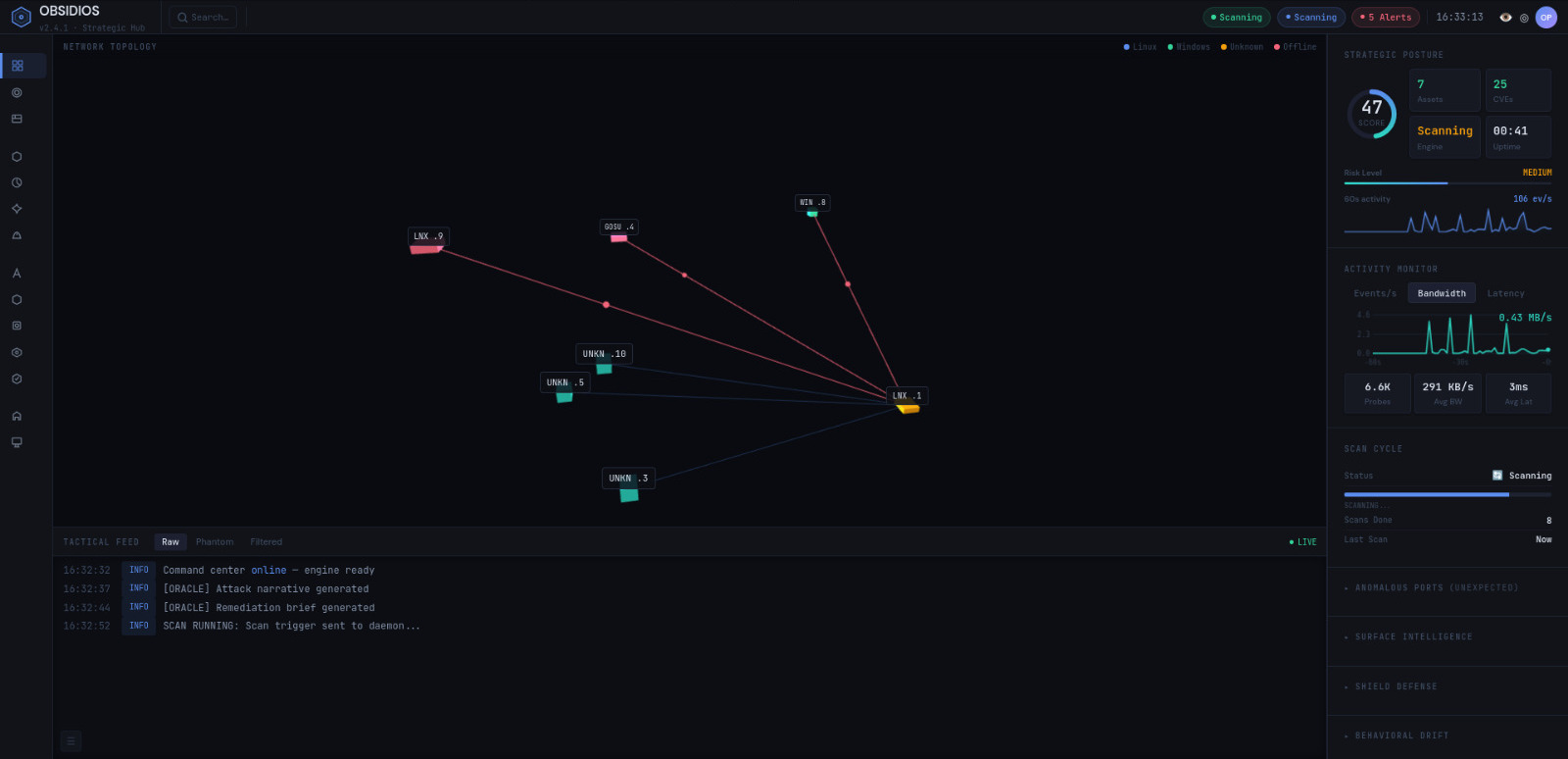
Three.js-based 3D network topology with gravity-bound nodes, attack-highlight edges, host color-by-risk. Real-time network activity chart (rx/tx/latency). Survives page navigation without losing chart state.
### 数据保留
可配置的保留期(1–365 天,默认 30 天)。在扫描周期结束时自动清理。持久化设置存储在数据库中,可通过仪表盘 UI 进行配置。
## 工作流
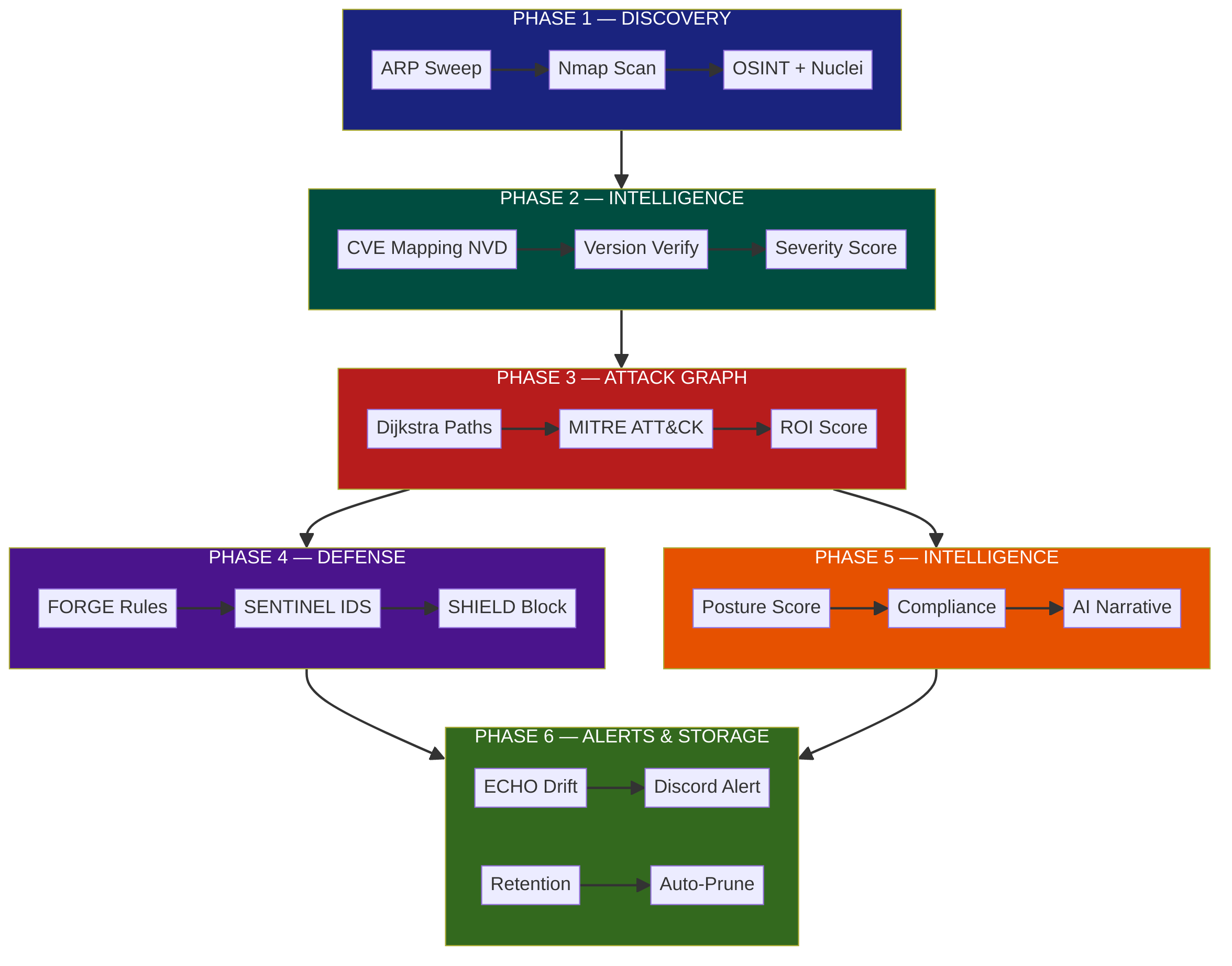
## 故障排除
### 容器问题
| 问题 | 可能原因 | 解决方案 |
|---------|-------------|-----|
| 容器立即退出 | 缺少 `--privileged` 或 `--network host` | 确保 `docker-compose.yml` 中为 daemon/sentinel 设置了 `privileged: true` 和 `network_mode: host` |
| `obsidios-dash` 无法启动 | 8080 端口已被占用 | `lsof -ti:8080 \| xargs kill` 或在 `.env` 中更改端口 |
| 在 `/proc/net/dev` 上权限被拒绝 | 容器缺少 `--network host` | 将 `network_mode: host` 添加到 dashboard 服务 |
### 扫描问题
| 问题 | 可能原因 | 解决方案 |
|---------|-------------|-----|
| 未发现主机 | 网络接口或目标错误 | 转到 **网络配置** → 点击 **检测** 以自动检测你的子网 |
| ARP 扫描发现 0 台主机 | 接口不在目标子网中 | 使用 `ip addr` 验证;绑定挂载正确的接口 |
| Nmap 扫描卡住 | 防火墙阻止了探测 | 使用 `STEALTH` 配置文件(`-T2 -f -D RND:10`)或在防火墙中将 OBSIDIOS 加入白名单 |
| 无线扫描无显示 | 无无线接口 | 在主机上运行 `iw dev` 进行验证;如果接口存在,OBSIDIOS 会自动检测 |
| 扫描无法启动 | 扫描器以 **暂停** 模式启动 | 在仪表盘中点击 **开始扫描**,或运行 `python3 obsidios.py config set-scanner on` |
### CVE / 情报问题
| 问题 | 可能原因 | 解决方案 |
|---------|-------------|-----|
| 未找到 CVE | 触发了 NVD 速率限制 | 无 API 密钥时 NVD 限制为 5 req/30s;请等待或在 `.env` 中添加 `NVD_API_KEY` |
| 显示了 CVE 但未映射到特定产品 | 通用协议端口(http/80、https/443、tcp/udp) | 当未检测到产品时,CVE 映射器会跳过通用协议 — 这是预期行为 |
| AI 简报显示兜底文本 | 所有 AI 提供商均失败 | 检查 API 密钥:`NVIDIA_API_KEY`、`OPENROUTER_API_KEY` 或 `ANTHROPIC_API_KEY` |
| AI 简报提示“No completed scan data” | 尚无扫描完成 | 先运行一次扫描;AI 简报仅在扫描完成后生成 |
### 警报 / 通知问题
| 问题 | 可能原因 | 解决方案 |
|---------|-------------|-----|
| 无 Discord 警报 | 缺少 webhook URL | 在 `.env` 中设置 `OBSIDIOS_DISCORD_WEBHOOK` 并重启 |
| 重复的 Discord 警报 | 冷却时间未生效 | 检查 `alerts/notifier.py` — sentinel 警报对每个 src→dst 有 60 秒的冷却时间 |
| Discord 受到速率限制 | 短时间内警报过多 | 警报在每个扫描周期整合为约 6 个 embed;如果仍受限制,请增加 `notifier.py` 中的 `MAX_FIELDS_PER_EMBED` |
### 仪表盘 / UI 问题
| 问题 | 可能原因 | 解决方案 |
|---------|-------------|-----|
| 仪表盘显示“No data” | 扫描器尚未完成一个周期 | 等待扫描完成,或直接检查 `GET /api/v2/stats` |
| 3D 图表为空 | 未发现主机 | 从 **网络配置** 页面运行 ARP 检测 |
| 网络活动图表显示为平线 | 网关延迟检查失败 | 将 `OBSIDIOS_GATEWAY` 环境变量设置为你的实际网关 IP;验证网关在端口 80 上有响应 |
| API 调用时提示“401 Unauthorized” | JWT token 过期或无效 | 在仪表盘重新登录,或清除浏览器 cookie |
| 页面导航导致图表崩溃 | 已修复 — `pollNetworkStats()` 现在会在切换页面时重新初始化 | 确保你运行的是最新的仪表盘代码;重启容器 |
### Sentinel / SHIELD 问题
| 问题 | 可能原因 | 解决方案 |
|---------|-------------|-----|
| Suricata 无法启动 | 缺少 `--privileged` 或 `--network host` | 向 sentinel 服务添加 `privileged: true` 和 `network_mode: host` |
| SHIELD 无法拦截 IP | 缺少 `NET_ADMIN` capability 或未安装 iptables | 添加 `cap_add: [NET_ADMIN, NET_RAW]` 并在容器中安装 `iptables` |
| Suricata 正在运行但没有 sentinel 警报 | Suricata 未配置 FORGE 规则 | 检查 `/etc/suricata/rules/` — FORGE 会在图谱生成后部署规则 |
### 数据库问题
| 问题 | 可能原因 | 解决方案 |
|---------|-------------|-----|
| `database is locked` 错误 | 多个并发写入 | 重启 daemon 容器;确保单一写入者 |
| 重启后数据未持久化 | 未挂载卷 | 确保 `chronicle/obsidios.db` 位于绑定挂载或 Docker volume 上 |
| 外键约束错误 | 数据完整性问题 | 应自动处理 — 运行全新扫描以重建相关记录 |
### 常规
| 问题 | 可能原因 | 解决方案 |
|---------|-------------|-----|
| 容器日志显示 Python 错误 | 缺少依赖或版本冲突 | 重新构建:`docker compose build` 然后 `docker compose up -d` |
| 主机没有无线硬件 | 对于台式机/虚拟机是预期的 | OBSIDIOS 会优雅处理 — 显示“No wireless threats detected”及提示 |
| OBSIDIOS_SECRET 未设置警告 | 未配置密钥 | 在生产环境使用时,在 `.env` 中将 `OBSIDIOS_SECRET` 设置为随机字符串 |
- OBSIDIOS 需要 **特权** Docker 容器才能进行 ARP 扫描和 iptables 管理
- 始终部署在隔离的网络段中
- 在生产环境中更改默认的仪表盘凭据(`admin` / `obsidios123`)
- 在生产环境中将 `OBSIDIOS_SECRET` 设置为强随机值
- 如果使用 Metasploit RPC,请将 `MSF_PASSWORD` 设置为强密码
- API 密钥(`NVIDIA_API_KEY`、`OPENROUTER_API_KEY`、`SHODAN_API_KEY`)应定期轮换
- CVE 数据从 NVD 检索(无 API 密钥时速率限制为 5 req/30s)
- `.env` 文件包含敏感信息 — 确保其永远不会被提交(已包含在 `.gitignore` 中)
- 生成的文件(`reports/output/*`、`forge/rules/*`)可能包含本地 IP — 已从版本控制中排除
## 许可证
[MIT](LICENSE)
出于研究和防御性安全目的而构建。请负责任地使用。
标签:CTI, IDS规则, Metaprompt, Web报告查看器, 动态调试, 可视化面板, 插件系统, 版权保护, 网络安全, 自动化防御, 请求拦截, 隐私保护



