Pandeyycodes/phonelens
GitHub: Pandeyycodes/phonelens
一个超简约的电话号码验证、威胁分析与风险评分仪表板,聚合多个外部 API 提供综合风险评估。
Stars: 0 | Forks: 0
# PhoneLens
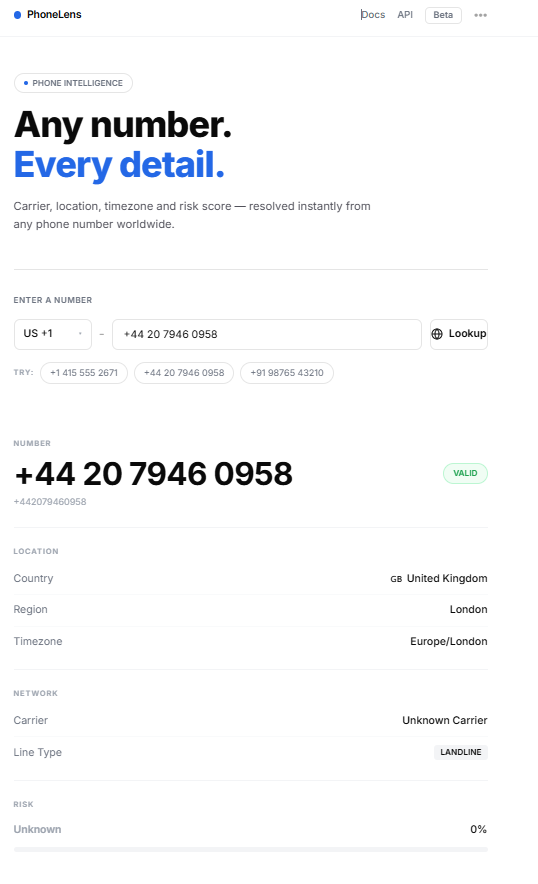
PhoneLens 是一个极具杂志风格、超简约的电话号码验证、威胁分析和风险评分仪表板。
## 🖼️ 仪表板展示
## 概述
PhoneLens 允许用户解析国际电话号码、提取国家/地区旗帜、时区、运营商信息,并通过并发聚合来自 NumVerify 和 AbstractAPI 的情报来计算综合风险评分。其界面经过精心设计,以排版、留白和高端的浅色主题极简美学为核心。
## 技术栈
- **后端**:FastAPI (Python 3.11+)、Uvicorn、SQLAlchemy 2.0(带有 aiosqlite 异步 SQLite 驱动)、Pydantic v2 和 phonenumbers 库。
- **前端**:React 18、Vite、Tailwind CSS、Axios 和自定义 CSS cubic-bezier 过渡效果。
- **容器化**:Docker & Docker Compose。
## 前置条件
- **Python**:`3.11+`
- **Node.js**:`18+`
- **Poetry**:用于 Python 包管理
- **Docker & Docker Compose**:可选,用于容器化部署
## 获取 API 密钥
PhoneLens 会并行查询外部 API 以进行威胁风险聚合。您可以通过以下链接获取免费密钥:
1. **NumVerify 密钥**:在 [numverify.com](https://numverify.com/) 注册以获取您的免费访问密钥。
2. **AbstractAPI 电话验证密钥**:在 [abstractapi.com/api/phone-validation-validation](https://www.abstractapi.com/api/phone-validation-validation) 注册一个免费账户。
获取后,将 `backend/.env.example` 重命名为 `backend/.env` 并粘贴您的凭证:
```
NUMVERIFY_KEY=your_numverify_key_here
ABSTRACT_KEY=your_abstractapi_key_here
```
*注意:如果将密钥留空,应用程序将平滑回退到本地威胁评估,并返回安全的标准评分 (0, `unknown`),且不会崩溃。*
## 项目结构
```
phonelens/
├── backend/
│ ├── app/
│ │ ├── main.py # FastAPI application & endpoints
│ │ ├── lookup.py # Core parsing & country data resolution
│ │ ├── sources.py # Parallel third-party API aggregations
│ │ ├── models.py # SQLAlchemy SQLite models
│ │ └── schemas.py # Pydantic v2 data models
│ ├── tests/
│ │ └── test_lookup.py # Pytest automated testing suite
│ ├── Dockerfile # Backend container instructions
│ ├── pyproject.toml # Poetry dependency manifest
│ └── .env.example # Environment keys template
├── frontend/
│ ├── src/
│ │ ├── components/
│ │ │ ├── SearchBar.jsx # Minimalist search, select & pulse loader
│ │ │ ├── ResultSection.jsx # Staggered reveal data partitions
│ │ │ ├── RiskBar.jsx # Mount-animated color-coded threat bar
│ │ │ └── HistorySection.jsx # Search logs table with lookup quicklinks
│ │ ├── api/
│ │ │ └── lookup.js # Frontend Axios client
│ │ ├── App.jsx # State coordinator & keyframes style
│ │ ├── index.css # Custom global css animations
│ │ └── main.jsx # React main DOM hook
│ ├── Dockerfile # Frontend container instructions
│ ├── index.html # HTML core importing Google Font Inter
│ ├── tailwind.config.js # Editorial typography & theme overrides
│ ├── postcss.config.js # PostCSS configs
│ ├── vite.config.js # Vite proxy configurations
│ └── package.json # Frontend package manifests
├── docker-compose.yml # Orchestrated multi-service local builds
└── README.md # General user documentation
```
## 设置说明
### 方案 A:Docker 设置(推荐)
使用单条命令在隔离的容器中启动整个系统:
1. 确保您的 `.env` 密钥已在 `backend/.env` 文件中更新。
2. 构建并启动这两个服务:
docker-compose up --build
3. 打开浏览器并访问:
- **前端**:[http://localhost:5173](http://localhost:5173)
- **交互式 API 文档**:[http://localhost:8000/docs](http://localhost:8000/docs)
### 方案 B:手动安装
#### 1. 后端服务
1. 导航到 backend 目录:
cd backend
2. 通过 Poetry 安装 Python 依赖项:
poetry install
3. 复制环境配置并输入密钥:
cp .env.example .env
4. 通过 Uvicorn 启动 FastAPI 服务器:
poetry run uvicorn app.main:app --reload
*后端将在 [http://localhost:8000](http://localhost:8000) 启动。*
#### 2. 前端应用
1. 打开一个新终端并导航到 frontend 目录:
cd frontend
2. 安装 npm 包:
npm install
3. 启动 Vite 开发服务器:
npm run dev
*前端将在 [http://localhost:5173](http://localhost:5173) 启动。*
## 自动化验证测试
您可以在 backend 目录中运行自动化 pytests,以检查是否符合标准合规性:
```
cd backend
poetry run pytest -v
```
## API Curl 命令示例
### 1. 执行查询
```
curl -X GET "http://localhost:8000/lookup/%2B14155552671" -H "accept: application/json"
```
### 2. 获取查询日志
```
curl -X GET "http://localhost:8000/history" -H "accept: application/json"
```
### 3. 清空查询数据库
```
curl -X DELETE "http://localhost:8000/history" -H "accept: application/json"
```
标签:AV绕过, FastAPI, React, SQLite, Syscalls, Vite, 威胁分析, 电话号码分析, 自动化侦查工具, 自定义脚本, 请求拦截, 逆向工具, 风险评分