Pickachu19/ThreadSleuth
GitHub: Pickachu19/ThreadSleuth
一款基于 C++ 多线程架构的高性能数字取证分析工具,通过线程池并发处理磁盘映像并配合 Streamlit 仪表板实现实时可视化。
Stars: 2 | Forks: 0
```
████████╗██╗ ██╗██████╗ ███████╗ █████╗ ██████╗ ███████╗██╗ ███████╗██╗ ██╗████████╗██╗ ██╗
╚══██╔══╝██║ ██║██╔══██╗██╔════╝██╔══██╗██╔══██╗ ██╔════╝██║ ██╔════╝██║ ██║╚══██╔══╝██║ ██║
██║ ███████║██████╔╝█████╗ ███████║██║ ██║ ███████╗██║ █████╗ ██║ ██║ ██║ ███████║
██║ ██╔══██║██╔══██╗██╔══╝ ██╔══██║██║ ██║ ╚════██║██║ ██╔══╝ ██║ ██║ ██║ ██╔══██║
██║ ██║ ██║██║ ██║███████╗██║ ██║██████╔╝ ███████║███████╗███████╗╚██████╔╝ ██║ ██║ ██║
╚═╝ ╚═╝ ╚═╝╚═╝ ╚═╝╚══════╝╚═╝ ╚═╝╚═════╝ ╚══════╝╚══════╝╚══════╝ ╚═════╝ ╚═╝ ╚═╝ ╚═╝
>_ DIGITAL FORENSIC ANALYZER_<
```
```
High-Performance Parallel Digital Forensic Analyzer
```
## 概述
**ThreadSleuth** 是一款高速数字取证分析工具,旨在高效处理海量磁盘映像。通过利用 **C++ 主从多线程架构**,与传统的顺序处理工具相比,它极大地缩短了分析时间。该系统配备了一个使用 **Streamlit (Python)** 构建的现代化、交互式仪表板,用于实时进度跟踪和报告生成。
ThreadSleuth 并非逐个比特地处理数据,而是将工作负载划分为固定大小的数据块,并使用同步的线程池并发处理这些数据块,从而确保 100% 的 CPU 利用率和系统稳定性。
## 系统架构
该系统遵循**生产者-消费者**模型,以确保线程安全和可扩展性:
1. **主线程(生产者):** 读取原始磁盘映像并将其切分为易于管理的“数据块”。
2. **任务队列:** 一个同步的、线程安全的队列,用于存放等待分析的数据块。
3. **工作线程(消费者):** 一个持久的**线程池**,负责从队列中获取数据块并进行并行处理(哈希计算、关键字搜索等)。
4. **结果聚合器:** 使用 **Mutex 锁**将多个工作线程的结果安全地合并为最终报告,避免出现竞态条件。
## 核心功能
* **高性能:** 后端采用 **C++** 编写,实现底层内存管理和高速运行。
* **并发处理:** 实现自定义**线程池**,避免了频繁创建/销毁线程的开销。
* **线程安全:** 使用 **Mutex** 和条件变量来防止数据损坏(竞态条件)。
* **现代化 UI:** **Streamlit** 前端提供了一个简洁的、基于 Web 的仪表板,可即时可视化结果。
* **自动化报告:** 分析完成后自动生成详细的取证报告。
## 技术栈
| 组件 | 技术 | 作用 |
| --- | --- | --- |
| **后端逻辑** | C++ (std::thread) | 核心处理引擎,内存管理 |
| **前端 UI** | Python (Streamlit) | 用户界面,文件上传,可视化 |
| **同步机制** | Mutex,条件变量 | 确保线程安全和数据完整性 |
| **进程间通信** | Subprocess/文件 I/O | 连接 Python UI 与 C++ 引擎 |
## 安装与使用
### 前置条件
* **C++ 编译器:** MinGW (Windows) 或 G++ (Linux)
* **Python 3.x**
* **Visual Studio**(可选,推荐 Windows 用户使用)
### 第一步:克隆仓库
```
git clone https://github.com/Pickachu19/ThreadSleuth.git
cd ThreadSleuth
```
### 第二步:编译后端 (C++)
**在 Windows 上:**
```
# 如果使用 MinGW
g++ main.cpp -o backend.exe -pthread
# 或者如果使用 Visual Studio
# 在 VS 中打开项目,Build Solution,并将 .exe 移动到此文件夹。
```
**在 Linux/Mac 上:**
```
g++ main.cpp -o backend -pthread
```
### 第三步:运行仪表板 (Python)
安装所需的库并启动应用:
```
pip install streamlit
streamlit run app.py
```
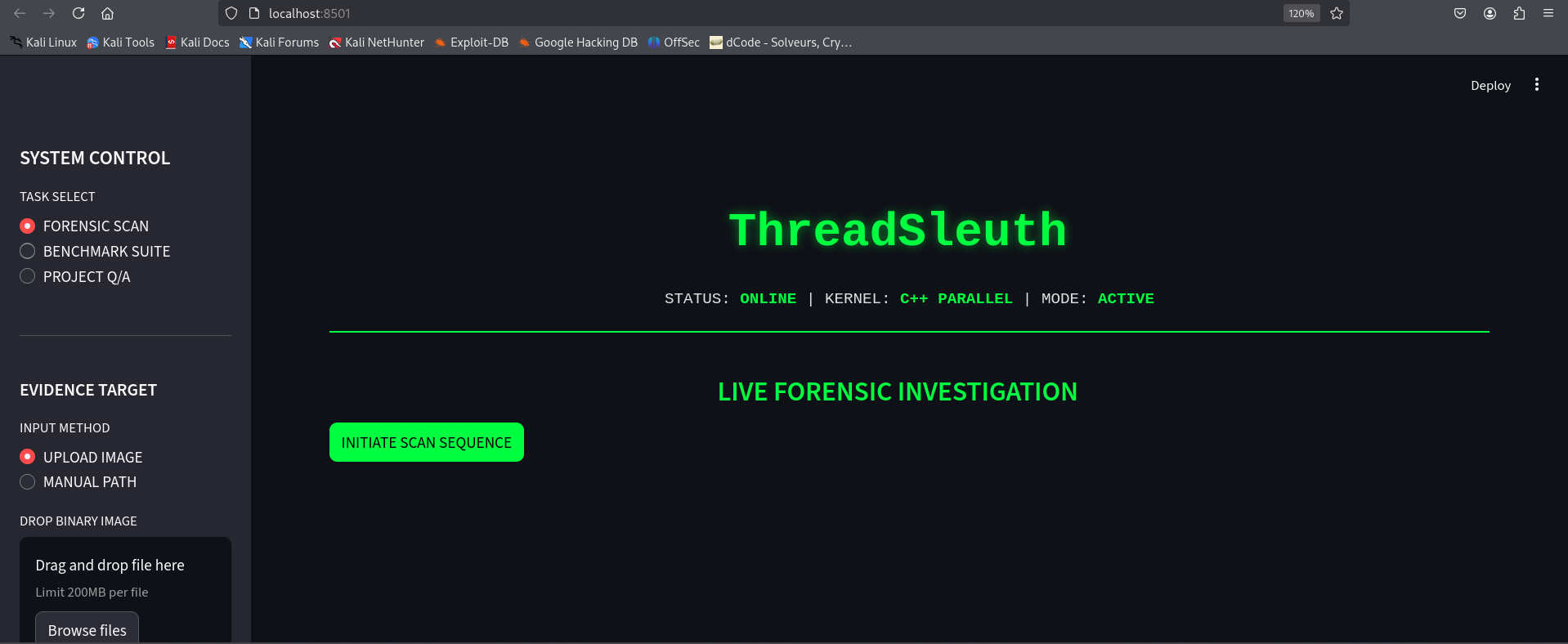
应用程序将自动在您的浏览器中打开,访问地址为 `http://localhost:8501`。
## 截图
 ## 许可证
基于 **MIT License** 分发。更多信息请参阅 `LICENSE`。
## 贡献者
本项目由一支专注的开发者团队构建:
* **[Sumaiya Arshad](https://github.com/pickachu19)**
* **[Affaf Ahmad](https://github.com/Affafahmad)**
## 许可证
基于 **MIT License** 分发。更多信息请参阅 `LICENSE`。
## 贡献者
本项目由一支专注的开发者团队构建:
* **[Sumaiya Arshad](https://github.com/pickachu19)**
* **[Affaf Ahmad](https://github.com/Affafahmad)**