MVulcansTrace/VulcansTrace_Linux_Edition
GitHub: MVulcansTrace/VulcansTrace_Linux_Edition
一款离线 Linux 防火墙日志取证分析器,解析 iptables/nftables 日志并检测多类威胁行为,导出签名证据包用于事件调查。
Stars: 0 | Forks: 0
# VulcansTrace Linux 版
[](https://github.com/MVulcansTrace/VulcansTrace_Linux_Edition/actions/workflows/ci.yml?query=branch%3Amain)
[](LICENSE)






VulcansTrace Linux Edition 是一款用于 Linux 防火墙日志的离线桌面取证分析器。它能够解析 iptables 和 nftables 日志文本,将其标准化为共享的事件 schema,运行多层威胁检测器,关联相关发现,并导出经过签名的证据包,以便进行调查和交接。
离线策略:该应用程序不会将日志、遥测数据、分析结果或发现发送到任何地方。日志均在本地内存中处理,证据包仅写入用户指定的文件。
## 演示预览
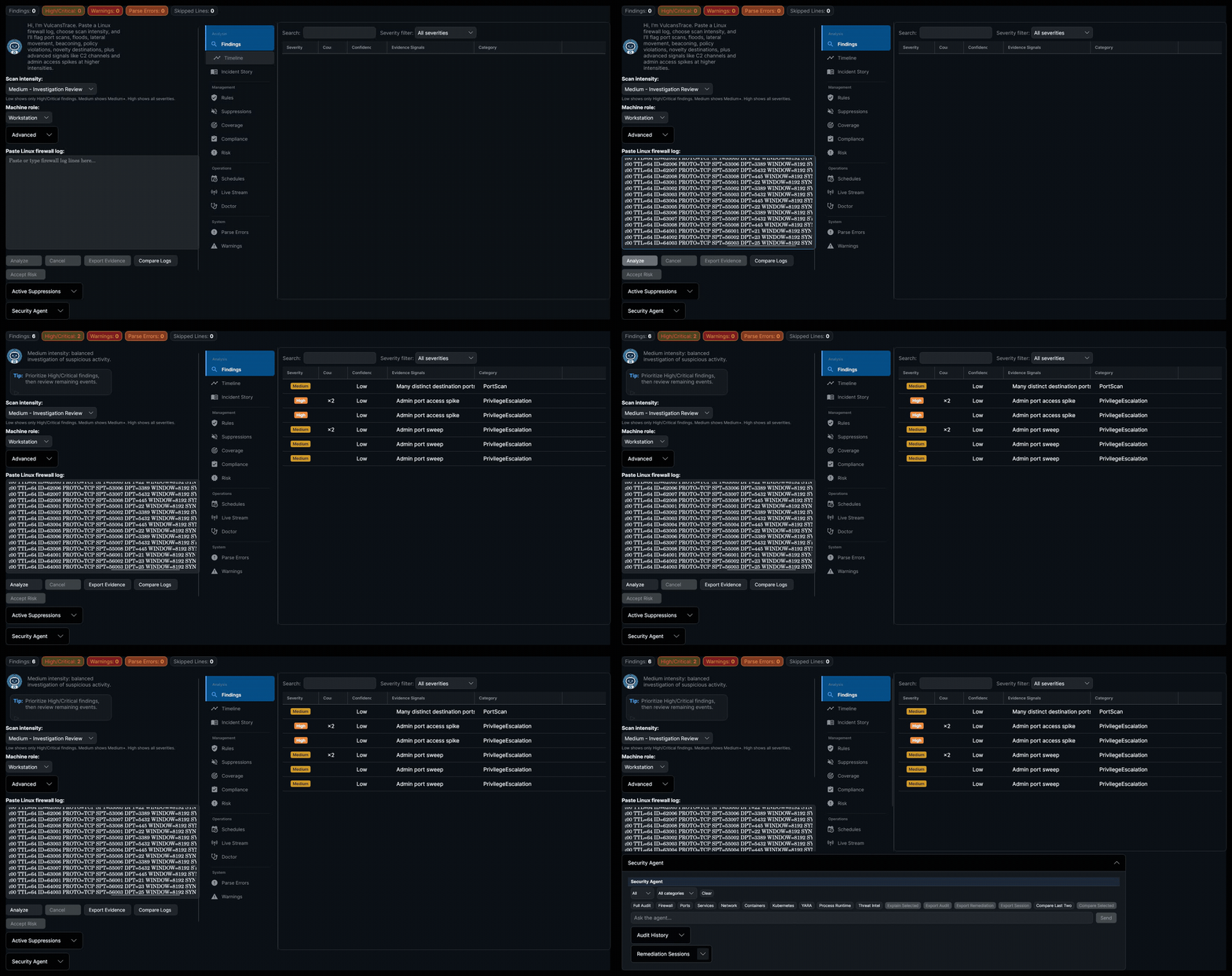
**完整检测 pipeline:** 粘贴日志、分析、追踪攻击链、获取修复步骤。

**分析深度:** 跨越 6 个威胁类别的 9 项发现,包含覆盖率、合规性和风险计分卡。

**全面控制:** 为每个检测器提供可调整的检测阈值,外加用于实时监控的实时流。

**AI 驱动的调查:** 具备审计类别、修复导出和交互式分析功能的 Security Agent。
## 目录
- [演示预览](#demo-preview)
- [功能说明](#what-it-does)
- [检测覆盖范围](#detection-coverage)
- [快速开始](#quick-start)
- [证据包](#evidence-bundles)
- [项目结构](#project-layout)
- [文档指南](#documentation-guide)
- [深度案例解析](#portfolio-deep-dives)
- [开发说明](#development)
- [安全说明](#security-notes)
- [许可证](#license)
## 功能说明
VulcansTrace 专为本地调查 Linux 防火墙遥测数据而设计:
- 接收 iptables 内核日志和 nftables `nf_tables:` 条目。
- 通过对每一行进行单独分类,处理混合格式的日志输入。
- 将原始日志行转换为包含共享字段和 Linux 特定元数据的 `UnifiedEvent` 记录。
- 运行基准、Linux 特定和高级威胁检测器。
- 当在同一源主机上出现相关行为时,提升严重级别。
- 保留解析错误、跳过的行、警告和检测器输出,供分析师审查。
- 导出 CSV、JSON、STIX 2.1、HTML、Markdown 和签名清单格式的报告 —— 每次导出都包含针对发现和规则的 MITRE ATT&CK 技术映射。
- 提供本地 Security Agent,它使用实时主机扫描器、确定性规则、感知角色的本地策略、双层 CIS Benchmark 映射(CIS Controls v8 + CIS Ubuntu 24.04 LTS 技术控制)以及用于审计合规性追溯的 **MITRE ATT&CK 技术映射**来回答纯英文的安全态势问题 —— 包括针对单项发现的交互式、逐步引导的修复,包含安全分类命令、显示预期更改的紧凑影响预览、回滚路径、验证命令、执行前后风险、命令数量、回滚可用性、重启影响及每次应用步骤前的锁定风险、回滚可见性、带有证据链接的会话备注,以及用于无头修复的带预演预览的批量自动修复。
- 文件权限审计 —— 检查 `/etc/shadow`、`/etc/passwd`、SSH 主机私钥、用户及 root 的 SSH 目录、cron 目录以及 `/etc/crontab` 是否存在权限过于宽松或所有权不正确的问题。
- 文件系统审计 —— 广泛搜寻预期路径之外的全局可写文件、意外的 SUID/SGID 二进制文件、无主文件、没有 sticky bit 的全局可写目录,以及 `/tmp` 挂载强化(`noexec`、`nosuid`、`nodev`)。
- 用户与账户审计 —— 检查 root 之外 UID 为 0 的账户、空密码哈希、源自 `/etc/login.defs` 和 shadow 条目的密码时效、PAM 密码复杂性、非活动账户、重复的 UID、缺失的主目录、PAM faillock / 账户锁定配置、详细的密码质量要求(`minlen`、`minclass`、credits)以及 PAM auth stack 排序(`required` 位于 `sufficient` 之前)。
- Cron 作业审计 —— 检查 cron 条目中是否存在可疑命令(反弹 shell、网络下载器、临时路径)、全局可写或设置了 setuid/setgid 的 cron 脚本,以及引用非 root 用户目录的 root 作业。
- 容器安全审计 —— 检查正在运行的容器是否处于特权模式、是否使用了 `latest` 镜像 tag、Docker socket 暴露/挂载情况、已知有风险的基础镜像提示,以及 containerd namespace 隔离。
- Kubernetes 安全审计 —— 检查 Kubernetes pod 的安全态势,包括特权容器、hostNetwork/hostPID/hostIPC 共享、root 容器以及缺失的安全上下文(特权提升、readOnlyRootFilesystem、丢弃 capabilities、受限的 seccomp)。
- 配置基线与漂移检测 —— 快照“已知良好”的基线,并持续监控配置漂移。
- **定期审计调度** —— 通过标准的 Linux `cron` 配置自动定期审计(每日、每周等)。仅当出现**新**的关键发现时,才会通过对以往审计历史记录进行感知指纹的比对来发送通知。
- **自主漂移响应** —— 计划任务审计可以自动检测基线漂移,并通过桌面、电子邮件或 webhook 渠道发送经 HMAC-SHA256 签名的警报。警报内容丰富,绑定了调度身份、每条警报的 nonce、漂移发现、攻击链、主动回归警报,以及经人工批准的修复方案。
- **人工批准的计划修复** —— 漂移警报可包含修复计划,但只有在操作员通过 CLI(`vulcanstrace schedule remediate`)或 Avalonia UI 明确确认后才会执行命令。规则前缀范围限制确保范围限定为 `FW` 的调度不会触及 `SSH`、`KERN` 或其他规则族。
- **无头 CLI** —— 从命令行运行审计和管理调度,无需启动桌面 UI。
- **CIS 合规性计分卡** —— 每个控制族的正式通过/失败/警告、总体百分比得分和随时间变化的趋势,管理人员和审计员可在 10 秒内读取。包含在 Avalonia UI 和证据导出中。
- **风险计分卡** —— 根据所有与风险相关的发现推导出的汇总字母等级(A–F)和数字得分(0–100),并按严重程度和 CIS 控制重要性进行加权。按扣分显示主要风险类别,并包含在 Avalonia UI、Agent 聊天和证据导出中。
- **Security Agent 叙述生成** —— 确定性的 NLG 引擎,将审计发现、跨类别的安全态势关联、有关联支撑的 kill-chain 攻击路径、主动回归警报、系统轨迹、修复智慧和每条规则的记忆交织成多段分析师风格的行文。每一个论断都可追溯到某条规则、关联或记忆条目;未使用任何外部 LLM。
- **跨类别安全态势关联** —— 声明式 pattern 引擎,用于标记危险的发现组合(例如,防火墙允许来自任意位置的 SSH + 启用了 PasswordAuthentication),并将其在叙述和建议中展示出来。
- **每条规则的记忆与连续性** —— Agent 会跟踪每条规则的严重性历史记录、首次/最后一次出现的时间戳、修复尝试、验证修复的时间戳,以及跨越重启的完整修复周期(尝试 → 验证修复 → 再次出现),从而能够实现诸如“FW-001 在两周前首次发现,目前仍然存在”的跟进,并在验证过的修复发生回归时发出主动警报。
- **自适应解释深度** —— 单一规则的解释会根据规则的历史记录而加深。首次发现保持简洁的结构化解释;重复出现的规则会附加特定类别的根本原因指导;情况恶化的规则会添加严重性时间轴和“发生了什么变化”的措辞。无需 LLM 推理 —— 深度是历史记录长度、已关闭的修复周期和趋势的确定性函数。
- **自适应步骤结果报告** —— 在引导式修复会话期间,用平实的英文(`step 1 worked`、`step 2 failed with permission denied`、`it didn't work`)报告每个手动步骤的结果。Agent 会更新会话时间轴,对失败类别进行分类,并返回具有确定性的、感知命令的指导,例如使用 `sudo` 重试、安装缺失的依赖项,或者检查是否有配置管理工具在不断重新应用不安全的设置。无需 LLM。
- **按需溯源** —— 输入 `prove FW-002`、`show evidence for it` 或 `what triggered FW-002?` 即可获取任何已缓存发现的确定性证据链:扫描器源/命令、原始证据信号、跨扫描器验证、规则依据、CIS/MITRE 映射、攻击链成员身份和每条规则的历史记录。如果已知的规则 ID 未被缓存,Agent 可以运行该单条规则以刷新证据。无需 LLM。
- **审计历史记录瘦身** —— 默认持久化最近 50 次审计快照,保留最新的 5 次完整详细信息,并将较旧的条目替换为保留计数、发现、指纹和计分卡的精简摘要。保持 `audit-history.json` 大小有界,同时保留差异对比和合规性趋势图表。
- **基于 Frame 的 NLU** —— 在关键词解析之上进行确定性实体提取:从松散的自然语言输入中提取规则 ID、类别、会话 ID、严重性过滤器、时间窗口和修复动词。
- **主动、状态触发的建议** —— 跟进标签建议一起修复相关联的问题对,优先处理陈旧/恶化的发现,并在验证后处理相关的发现。
- **长跨度类别覆盖追踪** —— Agent 会记住跨会话已检查的 17 个审计类别中有哪些已被检查,在部分审计后以叙述性覆盖说明揭示盲点,并提供诸如“检查文件系统安全”等一键式标签以完成审查。覆盖范围在重启后依然存在,并通过漂移检查、验证重新审计和类别过滤回退予以保留。
- **Trace Map / 事件图** —— 在时间轴画布上的交互式攻击链可视化。相关的发现通过有向边连接(升级、时间顺序、同主机关联)。点击任何发现即可突出显示其连接的链条,并阅读叙述性攻击故事。支持基于类别或基于主机的分组。当检测到超过 100 条边时,性能防护机制会抑制渲染。
- **自动化事件响应剧本** —— 当 `TraceMapCorrelator` 检测到关键攻击链(同一主机上的 Beaconing → LateralMovement → PrivilegeEscalation)时,系统会自动生成主动防御措施:使用 `iptables`/`ip6tables` DROP 规则阻断攻击者的 C2 IP,并生成带有 tag 的 `auditd` 连接遥测数据供分析师关联。防御措施首先经过预演预览,然后需要分析师明确确认后才能进行实时部署。无效的攻击者 IP 将被拒绝,重复项将被去重,验证使用精确规则匹配。
- **多渠道通知** —— 用于关键发现警报的桌面(`notify-send`)、电子邮件(SMTP)和 Webhook(HTTP POST)渠道。
- **日志差异模式** —— 比较两份防火墙日志文件(基线与事件)以检测新增、已移除或已更改的连接模式和发现。事件通过流量模式 key(源 IP、目的 IP、目的端口、协议;源 IP 使用通配符)进行匹配,并计算计数差异和主要动作变化。发现通过稳定的指纹进行匹配。生成叙述性摘要、模式对应的差异状态(`Unchanged`、`Added`、`Removed`、`Changed`)以及 Avalonia UI 中的颜色编码 DataGrid 可视化。CLI diff 结果可导出为 JSON/HTML,或包含在带有 Markdown 和 HTML 报告的签名证据包中。
- **实时流 / 实时内核遥测** —— 通过带有经典 BPF socket 过滤的 `AF_PACKET` 或 `AF_NETLINK` NFLOG 从内核捕获实时网络事件,将它们缓存在滚动窗口中,并使用专用的 `SentryAnalyzer` 实例实时运行检测 pipeline。完成的分析结果通过有界的 `DropOldest` channel 发布,确保 UI 绝不会因陈旧的更新而停顿。包含用于零权限测试的合成演示源。桌面 UI 显示实时指标,并在检测到增量发现时将其显示出来;发现结果被接入共享发现网格中。
- **Doctor — 数据源自诊断** —— 快速探测每一个本地 Security Agent 扫描器,并报告哪些数据源可用、不可用、受权限限制或未检查。可通过 CLI(`vulcanstrace doctor`)和 Avalonia UI 中专用的 **Doctor** 选项卡进行操作。结果包含与审计期间使用的相同的确定性能力报告,外加针对扫描器权限或命令失败的警告横幅。
- **有针对性的审计扫描器选择** —— Agent 审计从每条规则的实际数据依赖项(`IRule.RequiredDataFields`)推导所需的扫描器集合,因此像 `/threatintel` 或 `/network` 这样的定向检查不会在不知不觉中缺乏数据支持。完整审计仍会运行每个扫描器。
- **重新设计的 Agent UI** —— Security Agent 现在是一个一流的 Avalonia 视图,带有 `/` 斜杠命令面板、快捷操作标签、Markdown 渲染的消息、可复制的命令行以及集中的 `VtDesignTokens.axaml` 设计系统。
桌面应用程序使用 Avalonia 实现,目标框架为 .NET 9.0。
## 检测覆盖范围
基准网络检测器:
- 端口扫描检测
- Flood / 拒绝服务突发检测
- 横向移动检测
- Beaconing 检测
- 策略违规检测
- 异常新颖性检测
Linux 深度检测器:
- TCP 标志异常检测
- MAC 欺骗检测
- 内核模块 / 防火墙能力指标
- 接口跳变检测
- 异常数据包大小检测
高级检测器和关联:
- C2 通道检测
- 源于可疑管理端口访问的权限提升指标
- 针对相关发现的风险升级,例如 Beaconing + LateralMovement、FlagAnomaly + PortScan 和 MacSpoofing + InterfaceHopping
- Trace Map 关联引擎基于主机分组、时间临近性和已知的 kill-chain 对,发现跨发现的定向攻击链
## 快速开始
前置条件:
- .NET 9.0 SDK
- 用于运行 Avalonia UI 的 Linux 桌面环境
构建解决方案:
```
dotnet build
```
运行桌面应用:
```
dotnet run --project VulcansTrace.Linux.Avalonia
```
运行测试套件:
```
dotnet test
```
针对示例日志运行可选的 CLI 分析工具:
```
dotnet run --project tools/TestAnalysis -- VulcansTrace.Linux.Tests/Data/Real/Samples/iptables-attack.log
```
运行性能工具:
```
dotnet run --project VulcansTrace.Linux.PerformanceConsole
dotnet run --project VulcansTrace.Linux.PerformanceConsole -- profile
```
通过 CLI 运行无头审计:
```
dotnet run --project VulcansTrace.Linux.Cli -- audit --intent FullAudit --role Server
```
在修复后验证特定发现:
```
dotnet run --project VulcansTrace.Linux.Cli -- verify-finding FW-001
```
导出 MITRE ATT&CK Navigator 层以进行可视化覆盖分析:
```
dotnet run --project VulcansTrace.Linux.Cli -- audit --intent FullAudit --role Server --output-mitre mitre-layer.json
```
预览并应用审计后的自动修复:
```
# 试运行:查看将要进行的更改而不实际执行
dotnet run --project VulcansTrace.Linux.Cli -- audit --intent FullAudit --auto-fix --dry-run
# 应用安全修复并确认
dotnet run --project VulcansTrace.Linux.Cli -- audit --intent FullAudit --auto-fix --yes
# 同时允许服务重启和包操作
dotnet run --project VulcansTrace.Linux.Cli -- audit --intent FullAudit --auto-fix --yes --allow-restart --allow-packages
```
通过 CLI 管理周期性调度:
```
dotnet run --project VulcansTrace.Linux.Cli -- schedule list
dotnet run --project VulcansTrace.Linux.Cli -- schedule add --name "Daily Full Audit" --intent FullAudit --cron "0 6 * * *" --role Server --notify-on-critical --channel Desktop
# 添加一个计划,包含自主漂移响应、签名警报,以及限定于防火墙规则且经人工批准的修复
dotnet run --project VulcansTrace.Linux.Cli -- schedule add --name "Firewall Drift Check" --intent FirewallCheck --cron "0 7 * * *" \
--role Server --channel Webhook --autonomous-drift-response --autonomous-drift-threshold High \
--require-signed-alerts --allow-remediate --remediation-prefixes FW
# 审查并执行某个计划的修复(需要人工批准)
dotnet run --project VulcansTrace.Linux.Cli -- schedule remediate --id --dry-run
dotnet run --project VulcansTrace.Linux.Cli -- schedule remediate --id --yes
```
运行 Doctor 自诊断以验证扫描器数据源可见性:
```
dotnet run --project VulcansTrace.Linux.Cli -- doctor
```
将 Doctor 结果导出为 JSON 以供检查或 CI 检查:
```
dotnet run --project VulcansTrace.Linux.Cli -- doctor --output-json /tmp/vt-doctor.json
```
构建自包含的 CLI 二进制文件:
```
./scripts/publish-cli.sh
```
通过 CLI 比较两份防火墙日志以检测差异:
```
dotnet run --project VulcansTrace.Linux.Cli -- diff --baseline baseline.log --incident incident.log --intensity Medium --output-evidence diff-evidence.zip
```
在桌面 UI 中启动实时流捕获(内核源需要 root 权限;合成演示无需权限即可运行):
```
dotnet run --project VulcansTrace.Linux.Avalonia
# 选择“Live Stream”标签页,选择一个源(Synthetic Demo、Packet Capture 或 NFLOG),然后点击 Start。
```
有关引导式的产品演练,请参阅 [docs/DEMO.md](docs/DEMO.md)。
有关实时流架构和错误修复详情,请参阅 [docs/LIVE_STREAM.md](docs/LIVE_STREAM.md)。
## 证据包
签名的 ZIP 证据包可包含:
| 文件 | 用途 |
| --- | --- |
| `findings.csv` | 适合电子表格的发现列表 |
| `findings.json` | 用于工具处理和审查的结构化 JSON 输出 |
| `findings.stix.json` | 包含观察到的数据和备注的 STIX 2.1 包 |
| `report.html` | 人类可读的 HTML 报告 |
| `summary.md` | Markdown 调查摘要 |
| `log.txt` | 原始日志文本 |
| `suppressions.csv` | 激活的已接受风险抑制项(如果存在) |
| `manifest.json` | 文件哈希、解析元数据、跳过的行和证据包元数据 |
| `manifest.hmac` | 针对 manifest 的 HMAC-SHA256 签名 |
| `compliance-scorecard.html` | 面向管理人员的 HTML 合规性计分卡(每个 CIS 系列的 Pass/Warn/Fail、总体得分、趋势) |
| `compliance-scorecard.md` | 用于基于 Git 的工作流的 Markdown 合规性计分卡 |
| `risk-scorecard.html` | 面向管理人员的 HTML 风险计分卡(等级徽章、数字得分、按类别细分的明细) |
| `risk-scorecard.md` | 用于基于 Git 的工作流的 Markdown 风险计分卡 |
| `incident-story.md` | 流畅的事件叙述,包含时间轴节点、可能的链条摘要,以及存在发现时的推荐响应措施 |
| `trace-map.md` | 检测到相关发现时的技术边列表 Markdown |
| `trace-map.json` | 兼容 Cytoscape.js 的 JSON 图,包含发现和关联边 |
| `mitre-navigator-layer.json` | 显示技术覆盖范围和发现密度的 MITRE ATT&CK Navigator 层(JSON) |
| `log-diff.md` | 使用日志差异模式时的 Markdown 差异报告(基线与事件对比) |
| `log-diff.html` | 使用日志差异模式时的深色主题 HTML 差异报告 |
签名密钥在每次完成分析会话时生成,并默认在 UI 中进行掩码显示。重新运行分析会创建一个新密钥;对同一结果重复导出会重用会话密钥。如果以后需要验证,请将复制的密钥与案件记录放在一起保存。
对于 CLI `diff --output-evidence`,请提供 `--signing-key ` 或保存命令打印出的生成密钥。
可选的 CLI 运行器可以使用该密钥验证导出的证据包:
```
dotnet run --project tools/TestAnalysis -- --verify evidence.zip --key <64-character-hex-key>
```
证据文档:
- [HMAC 证据签名密钥流程](docs/HMAC_EVIDENCE.md)
- [证据打包案例集](docs/portfolio/09-Evidence-Packaging/README.md)
- [安全和离线策略](docs/SECURITY.md)
## 项目结构
| 路径 | 描述 |
| --- | --- |
| `VulcansTrace.Linux.Core` | 领域模型、`UnifiedEvent`、日志标准化、iptables/nftables 解析器和日志抽象 |
| `VulcansTrace.Linux.Engine` | 检测器实现、强度配置文件、`SentryAnalyzer` 和风险升级 |
| `VulcansTrace.Linux.Evidence` | 证据包生成以及 CSV、JSON、STIX、HTML 和 Markdown 格式化程序 |
| `VulcansTrace.Linux.Agent` | 本地 Security Agent、扫描器、安全态势规则、感知角色的策略、解释和 Agent 报告适配器 |
| `VulcansTrace.Linux.Avalonia` | 桌面 UI、ViewModel、命令和对话框服务 |
| `VulcansTrace.Linux.Cli` | 用于审计、调度管理和 cron 集成的无头 CLI |
| `VulcansTrace.Linux.Tests` | xUnit 单元、集成、检测器、证据、UI 和性能测试 |
| `VulcansTrace.Linux.Performance` | 基准测试和分析辅助工具 |
| `VulcansTrace.Linux.PerformanceConsole` | 用于基准测试和分析工作流的控制台运行器 |
| `tools/TestAnalysis` | 用于直接进行日志文件分析和证据导出检查的可选 CLI 运行器 |
| `docs` | 架构、使用、安全、开发、演示和案例集文档 |
| `scripts` | 开发者和内部构建支持脚本 |
## 文档指南
根据您的需求从这里开始:
| 文档 | 用途 |
| --- | --- |
| [docs/USAGE.md](docs/USAGE.md) | 如何运行应用程序、分析日志、审查发现和导出证据 |
| [docs/DEMO.md](docs/DEMO.md) | 使用示例防火墙日志的引导式演练 |
| [docs/ARCHITECTURE.md](docs/ARCHITECTURE.md) | 系统层、数据流、检测器组和领域类型 |
| [docs/DEVELOPMENT.md](docs/DEVELOPMENT.md) | 构建/测试工作流、项目结构、检测器扩展步骤和构建策略 |
| [docs/SECURITY.md](docs/SECURITY.md) | 离线策略、本地数据处理、证据完整性和防御性解析 |
| [docs/SECURITY_AGENT.md](docs/SECURITY_AGENT.md) | 本地 Security Agent 功能、扫描器 pipeline、规则、限制和路线图 |
| [docs/HMAC_EVIDENCE.md](docs/HMAC_EVIDENCE.md) | 会话签名密钥如何生成、复制和用于验证 |
| [docs/CHANGES_AND_PROFILES.md](docs/CHANGES_AND_PROFILES.md) | 实施更改摘要和 Low/Medium/High 配置文件功能 |
| [docs/LIVE_STREAM.md](docs/LIVE_STREAM.md) | 实时内核遥测:架构、来源、错误修复和强化 |
| [docs/portfolio/README.md](docs/portfolio/README.md) | 面向 GitHub 的完整技术案例集索引 |
推荐审查路径:
- 用法:[用法](docs/USAGE.md) -> [演示](docs/DEMO.md) -> [证据签名](docs/HMAC_EVIDENCE.md)
- 架构:[架构](docs/ARCHITECTURE.md) -> [日志标准化](docs/portfolio/01-Log-Normalization/README.md) -> [强度配置文件](docs/portfolio/10-Intensity-Profiles/README.md)
- 检测工程:[端口扫描检测](docs/portfolio/02-Port-Scan-Detection/README.md) -> [Beaconing 检测](docs/portfolio/03-Beaconing-Detection/README.md) -> [C2 通道检测](docs/portfolio/13-C2-Channel-Detection/README.md)
- 威胁框架覆盖:[证据打包](docs/portfolio/09-Evidence-Packaging/README.md) -> [Security Agent](docs/portfolio/16-Security-Agent/README.md) -> [自动化测试](docs/portfolio/11-Automated-Tests/README.md)
- 调查工作流:[风险升级](docs/portfolio/08-Risk-Escalation/README.md) -> [证据打包](docs/portfolio/09-Evidence-Packaging/README.md) -> [Avalonia UI](docs/portfolio/12-Avalonia-UI/README.md)
- 本地助手工作流:[Security Agent](docs/SECURITY_AGENT.md) -> [Security Agent 案例集](docs/portfolio/16-Security-Agent/README.md) -> [Avalonia UI](docs/portfolio/12-Avalonia-UI/README.md)
- 调度和自动化:[用法](docs/USAGE.md) -> [变更](docs/CHANGES_AND_PROFILES.md) -> [安全](docs/SECURITY.md)
- 实时内核遥测:[实时流](docs/LIVE_STREAM.md) -> [实时流案例集](docs/portfolio/17-Live-Stream/README.md) -> [架构](docs/ARCHITECTURE.md)
- 验证:[自动化测试](docs/portfolio/11-Automated-Tests/README.md) -> [开发](docs/DEVELOPMENT.md) -> [安全](docs/SECURITY.md)
## 深度案例解析
`docs/portfolio` 文件夹包含 16 个以实现为核心的案例研究。每个主题都包含一个 `README.md`、简洁的摘要材料,以及更深入的技术笔记,如算法、设计决策、规避限制、相关的 MITRE ATT&CK 映射和代码模式演练。
| 主题 | 描述 |
| --- | --- |
| [01 - 日志标准化](docs/portfolio/01-Log-Normalization/README.md) | iptables/nftables 解析、时间戳处理、schema 标准化和日志管理权衡 |
| [02 - 端口扫描检测](docs/portfolio/02-Port-Scan-Detection/README.md) | 不同端口扫描检测、阈值、分组和检测器行为 |
| [03 - Beaconing 检测](docs/portfolio/03-Beaconing-Detection/README.md) | 周期性通信分析和基于间隔的信号检测 |
| [04 - 横向移动检测](docs/portfolio/04-Lateral-Movement-Detection/README.md) | 跨主机和端口的内部移动模式 |
| [05 - Flood 检测](docs/portfolio/05-Flood-Detection/README.md) | 针对 flood 和 DoS 类行为的高容量突发检测 |
| [06 - 策略违规检测](docs/portfolio/06-Policy-Violation-Detection/README.md) | 不允许的服务和策略边界检测 |
| [07 - 异常新颖性检测](docs/portfolio/07-Novelty-Detection/README.md) | 罕见或意外的连接模式检测 |
| [08 - 风险升级](docs/portfolio/08-Risk-Escalation/README.md) | 当相关发现同时出现时提升严重级别的关联规则 |
| [09 - 证据打包](docs/portfolio/09-Evidence-Packaging/README.md) | 签名包、报告格式、清单哈希和完整性工作流 |
| [10 - 强度配置文件](docs/portfolio/10-Intensity-Profiles/README.md) | Low、Medium 和 High 配置文件阈值、检测器启用和调整权衡 |
| [11 - 自动化测试](docs/portfolio/11-Automated-Tests/README.md) | 单元、集成、夹具、取消、性能和证据验证覆盖率 |
| [12 - Avalonia UI](docs/portfolio/12-Avalonia-UI/README.md) | 桌面分析师工作流、ViewModel 结构、命令、选项卡和导出用户体验 |
| [13 - C2 通道检测](docs/portfolio/13-C2-Channel-Detection/README.md) | 周期性命令与控制通道检测和分组行为 |
| [14 - 权限提升检测](docs/portfolio/14-Privilege-Escalation-Detection/README.md) | 作为权限提升指标的管理端口激增和扫描 |
| [15 - Linux 深度检测](docs/portfolio/15-Linux-Deep-Inspection/README.md) | 包含标志、MAC、内核模块、接口和数据包大小的 Linux 特定信号 |
| [16 - Security Agent](docs/portfolio/16-Security-Agent/README.md) | 用于实时 Linux 安全态势问题的本地基于规则的助手、感知角色的策略、扫描器编排、解释、按需溯源、审计历史记录瘦身、交互式修复以及配置基线 / 漂移检测 |
## 开发说明
常用命令:
```
dotnet restore VulcansTrace.Linux.sln
dotnet build VulcansTrace.Linux.sln --configuration Release
dotnet test VulcansTrace.Linux.sln --configuration Release
```
GitHub Actions 会运行 restore、Release 构建和确定性测试集(2 143 项测试)。标记为 `Category=Performance` 或 `Category=Timing` 的测试被排除在托管 CI 之外,因为基准阈值和毫秒级的取消竞争对运行器环境很敏感;在验证性能更改时,请在本地运行完整的测试套件。
要添加检测器,请实现 `IDetector`,在 analyzer composition root 注册它,添加集中的检测器测试,如果需要,更新配置文件阈值,并在相关案例部分记录其行为。有关详细的清单,请参阅 [docs/DEVELOPMENT.md](docs/DEVELOPMENT.md)。
## 安全说明
- 该应用程序没有用于日志分析、遥测或报告的内置网络调用。
- `nuget.config` 指向公共的 nuget.org 源以进行 restore。
- 日志输入上限为 100,000,000 个字符。
- 保留的解析错误设有上限,以确保分析输出大小有界。
- 证据文件受 SHA-256 哈希和 HMAC-SHA256 清单签名保护。
有关完整的安全模型,请参阅 [docs/SECURITY.md](docs/SECURITY.md)。
## 许可证
本仓库根据 [LICENSE](LICENSE) 中的条款进行许可。额外的归属和声明信息可在 [NOTICE](NOTICE) 中获取。
标签:AMSI绕过, IP 地址批量处理, PE 加载器, Web报告查看器, 威胁检测, 插件系统, 数字取证, 网络安全, 自动化脚本, 隐私保护