lrafa3l/soc-environment-simulation
GitHub: lrafa3l/soc-environment-simulation
一个基于 React 构建的模拟安全运营中心仪表板,通过合成 SIEM 日志和威胁告警为事件响应培训提供沉浸式演练环境。
Stars: 1 | Forks: 0
# SOC 环境模拟
一个模拟的**安全运营中心 (Security Operations Center)** 仪表板,用于日志分析、威胁检测和事件响应培训。
使用 React + Vite 构建。可通过 Docker 在任何地方运行。
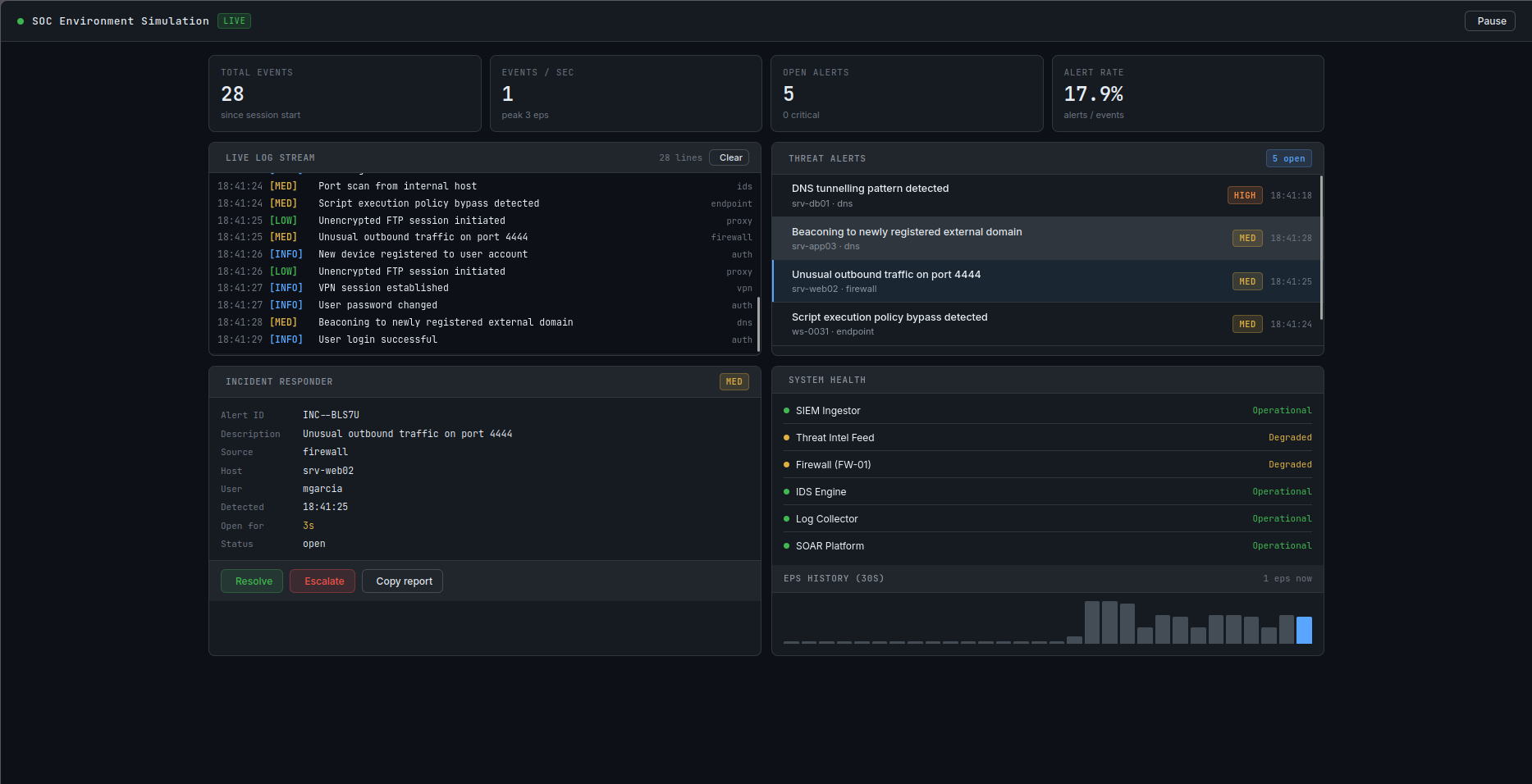
## 功能
- **实时日志流** — 以真实的间隔发出合成的 SIEM 事件,按严重程度进行颜色编码 (CRIT / HIGH / MED / LOW / INFO)
- **威胁告警队列** — 高严重性事件会自动提升为告警,并按优先级排序
- **事件响应处理** — 点击任意告警以检查主机、用户、来源和打开时间;一键解决或升级;将格式化的事件报告复制到剪贴板
- **系统健康状况看板** — 模拟 SIEM、IDS、防火墙、日志收集器和 SOAR 平台的状态
- **EPS 曲线图** — 滚动的 30 秒每秒事件数历史图表
- **暂停 / 恢复** — 随时冻结流以进行培训演习
## 项目结构
```
soc-environment-simulation/
├── src/
│ ├── components/
│ │ ├── Header.jsx # Top bar with live indicator and controls
│ │ ├── StatCards.jsx # KPI metric cards
│ │ ├── LogFeed.jsx # Scrollable live log panel
│ │ ├── AlertList.jsx # Sorted threat alert queue
│ │ ├── IncidentPanel.jsx # Incident responder detail view
│ │ └── SystemHealth.jsx # System status + EPS sparkline
│ ├── hooks/
│ │ ├── useLogEngine.js # Drives synthetic log emission
│ │ ├── useAlerts.js # Alert lifecycle and MTTD tracking
│ │ └── useSystemHealth.js # Randomised system health states
│ ├── data/
│ │ └── events.js # Event catalogue and generators
│ ├── utils/
│ │ └── severity.js # Severity helpers, formatters
│ ├── App.jsx # Root component, wires engines together
│ ├── main.jsx # React entry point
│ └── index.css # Global dark-terminal stylesheet
├── Dockerfile # Multi-stage build (builder + nginx)
├── docker-compose.yml # Production + dev profiles
├── nginx.conf # SPA routing + gzip config
├── vite.config.js
├── package.json
└── README.md
```
## 快速开始
### 选项 1 — Docker(推荐)
无需 Node.js。只需 Docker。
```
# 克隆
git clone https://github.com/YOUR_USERNAME/soc-environment-simulation.git
cd soc-environment-simulation
# 构建并运行(生产构建由 nginx 在端口 8080 上提供服务)
docker compose up --build
# 在浏览器中打开
open http://localhost:8080
```
停止运行:
```
docker compose down
```
### 选项 2 — Docker 开发服务器(支持热重载)
```
docker compose --profile dev up soc-sim-dev
```
这会将您的本地源代码挂载到容器中,因此编辑后的内容会在 `http://localhost:5173` 立即重载。
### 选项 3 — 本地 Node.js
需要 Node.js ≥ 18。
```
npm install
npm run dev # Dev server at http://localhost:5173
npm run build # Production build → dist/
npm run preview # Preview production build at http://localhost:4173
```
## Docker 参考
| 命令 | 描述 |
|---|---|
| `docker compose up --build` | 构建镜像并启动生产服务器 |
| `docker compose up -d` | 在后台运行 (detached) |
| `docker compose down` | 停止并移除容器 |
| `docker compose --profile dev up soc-sim-dev` | 启动带有热重载的开发服务器 |
| `docker build -t soc-sim .` | 手动构建镜像 |
| `docker run -p 8080:80 soc-sim` | 手动在 8080 端口运行 |
### 端口
| 端口 | 服务 |
|---|---|
| `8080` | 生产构建 (nginx) |
| `5173` | 开发服务器(仅限 dev profile 的热重载) |
## 配置
所有模拟参数均为常量 — 无需环境变量。要调整行为,请编辑以下文件:
| 文件 | 修改内容 |
|---|---|
| `src/hooks/useLogEngine.js` | `EMIT_MIN_MS` / `EMIT_MAX_MS` — 事件发射速度 |
| `src/data/events.js` | `pickSeverity()` 阈值 — CRIT/HIGH/MED/LOW/INFO 分布 |
| `src/data/events.js` | `EVENT_CATALOGUE` — 添加自定义日志消息和来源 |
| `src/data/events.js` | `HOSTS` / `USERS` — 您环境中模拟的资产 |
| `src/hooks/useSystemHealth.js` | `P_ERROR` / `P_WARN` — 系统性能下降的概率 |
## 技术栈
| 层级 | 技术 |
|---|---|
| UI 框架 | React 18 |
| 构建工具 | Vite 5 |
| 图标 | Tabler Icons (webfont) |
| 字体 | JetBrains Mono + Inter (Google Fonts) |
| 容器运行时 | Docker + nginx alpine |
## 路线图构想
- [ ] 每种告警类型的 Playbook 步骤演练
- [ ] 可配置的场景模式(勒索软件爆发、内部威胁等)
- [ ] 将事件日志导出为 JSON/CSV
- [ ] 在告警上添加 MITRE ATT&CK 战术标签
- [ ] 通过 localStorage 持久化会话统计信息
## 许可证
MIT — 可自由使用、修改和分享。
标签:React, Syscalls, Vite, 告警监控, 安全培训, 安全教育, 安全运营中心, 网络映射, 自定义脚本, 请求拦截