MohitDabas/malshark
GitHub: MohitDabas/malshark
一个基于 MCP 协议的 AI 驱动恶意软件流量分析服务器,封装 tshark 并通过自然语言自动完成 pcap 文件的 IOC 提取、C2 信标检测和网络取证分析。
Stars: 18 | Forks: 5
# MalShark
一个生产级的 [MCP](https://modelcontextprotocol.io/) 服务器,它封装了 `tshark`(Wireshark 的 CLI),并直接在 Cursor(或任何兼容 MCP 的 AI 客户端)中提供了一套恶意软件分析工具。用纯英文让您的 AI 分析 pcap —— 它会运行正确的工具,关联结果,并自动报告 IOC、C2 信标、凭证泄露和数据窃取候选目标。
## 独特之处
大多数 pcap 工具要求分析师清楚地知道要查找什么。本服务器弥补了这一空白:
- **MCP 原生** —— 工具由 AI 调用,而不是由人工编写 tshark 过滤器。AI 会根据其发现的内容智能地串联调用。
- **完全异步和并行** —— 每个工具都使用 `asyncio.gather` 并发运行多个 `tshark` 进程。一次 `extract_iocs` 调用会同时扇出 6 个并行的 tshark 进程,因此通常顺序执行需要数分钟的分析在几秒钟内即可完成。
- **感知恶意软件的启发式算法** —— 每个检测规则都是针对来自 [malware-traffic-analysis.net](https://www.malware-traffic-analysis.net) 的**真实恶意软件样本**编写和调优的,而非合成测试用例。
- **注重降低误报** —— 精心挑选的良性域名白名单(CDN、Apple、Google、Microsoft、Windows Update)将噪声保持在较低水平。每次添加白名单都需要在两个或多个独立的恶意软件样本中提供正当理由。
- **经过基准测试** —— 每个工具版本都会根据公开恶意软件报告中的真实 IOC 文件进行评分。基准测试文件位于 `benchmarks/` 中。
## 工具
| 工具 | 功能 |
|---|---|
| `pcap_summary` | 高级概览:持续时间、数据包、受害者 IP、按字节数排名的顶级 IP、协议分布、危险信号 |
| `extract_iocs` | 6 次并行 tshark 扫描 → DNS 查询、TLS SNI、HTTP 请求/响应、**C2-on-443**(端口 443 上的非 TLS 流量)、**不可达 C2**(仅 SYN)、可疑的 User Agent |
| `find_downloads` | 检测文件下载(HTTP)和大型外发上传;对 ≥ 1 MB 的加密载荷进行 HTTPS 大流量传输估算 |
| `c2_beaconing` | 对特定 IP 进行突发集群时序分析 —— 计算平均/中位数间隔、抖动系数,并给出置信度结论 |
| `extract_credentials` | 明文凭证(Basic 认证、表单 POST、FTP、SMTP、Telnet)+ 发送到裸 IP C2 的特定恶意软件自定义认证头(例如 `user:`、`BuildID:`) |
| `http_sessions` | 完整的 HTTP 请求/响应对,具备云 C2 模式检测(Telegram Bot API、Discord/Slack webhooks,对白名单云域的可疑 UA) |
| `detect_dns_tunneling` | 熵分析、查询长度分布、标签计数 —— 对潜在的 DNS 隧道通道进行评分 |
| `capture_packets` | 从网络接口进行实时数据包捕获 |
| `list_interfaces` | 列出可用的捕获接口 |
## 推荐分析工作流
按顺序执行以下步骤。每一步都会缩小下一步的范围。
```
1. pcap_summary ← always start here
↓ victim IP + red flags
2. extract_iocs ← IOC sweep: DNS, TLS, C2-443, unreachable C2
↓ suspicious IPs identified
3. c2_beaconing ← run on each suspicious IP from step 2
↓ beacon interval + confidence
4. find_downloads ← what did the victim download / send out?
↓ file names, sizes, content types
5. http_sessions ← full request/response detail, cloud C2 patterns
↓ plaintext HTTP sessions, exfil URIs
6. extract_credentials ← any auth material in the clear?
7. detect_dns_tunneling ← if DNS looked odd in step 2
```
使用任何兼容 MCP 的 AI(Cursor、Claude Desktop、Windsurf、Continue 等),用自然语言描述您的需求:
AI 会按正确的顺序串联工具,并将发现综合成一份报告。
## 安装
**要求:** Python ≥ 3.11,已安装 `tshark`(Wireshark CLI)并添加到 `PATH`。
```
# 安装 tshark
sudo apt install tshark # Debian/Ubuntu
brew install wireshark # macOS
# 克隆并安装
git clone https://github.com/your-username/malshark
cd malshark
pip install uv
uv sync
```
### 添加到 Cursor
在 Cursor → Settings → MCP → Add server 中:
```
{
"mcpServers": {
"malshark": {
"command": "uv",
"args": [
"--directory",
"/absolute/path/to/malshark",
"run",
"wireshark-mcp"
]
}
}
}
```
重启 Cursor。工具将在 Agent 模式下自动出现。
## 快速开始
将您的捕获文件放入 `put_pcap_here/` 文件夹,然后向您的 AI 提问:
```
Analyze put_pcap_here/capture.pcap — give me the victim IP, all IOCs, and
check if there's any beaconing or file downloads.
```
或运行特定工具:
```
Run extract_iocs on put_pcap_here/capture.pcap
```
### 直接运行工具(不使用 Cursor)
```
import asyncio
from src.wireshark_mcp_server.tools.summary import pcap_summary
from src.wireshark_mcp_server.tools.iocs import extract_iocs
async def main():
print(await pcap_summary("/path/to/capture.pcap"))
print(await extract_iocs("/path/to/capture.pcap"))
asyncio.run(main())
```
## 基准测试 —— 已针对真实恶意软件进行测试
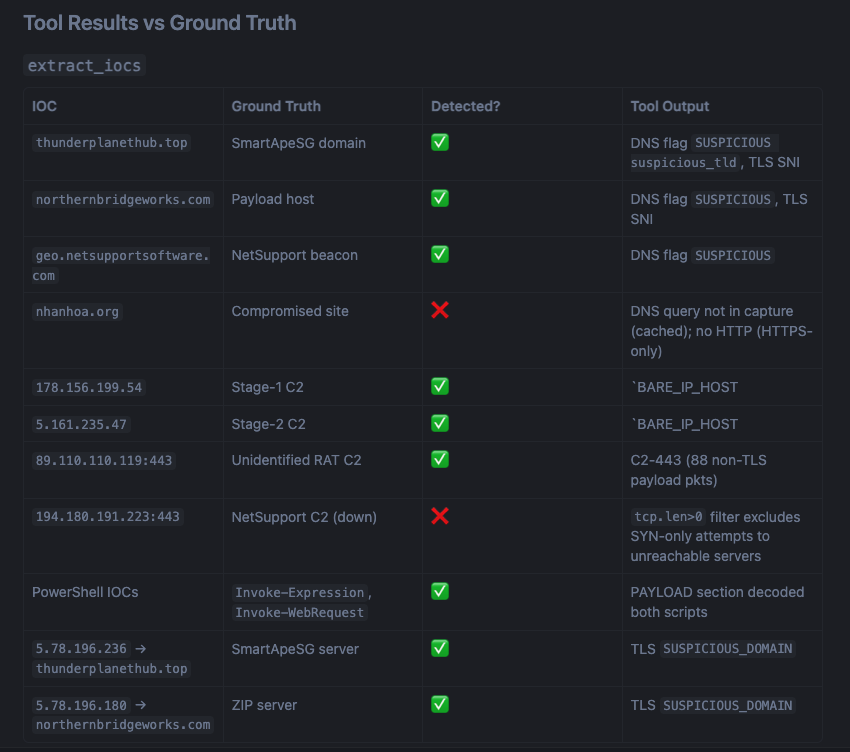
每个工具都已根据 [malware-traffic-analysis.net](https://www.malware-traffic-analysis.net) 的真实恶意软件捕获文件进行了验证。基准测试流程如下:
1. **盲测工具** —— 工具在事先不了解 IOC 的情况下对 pcap 运行
2. **加载真实情况** —— 读取官方报告 ZIP 包中的 IOC 文件和恶意软件制品
3. **为每个工具评分** —— 记录真阳性、误报和遗漏
4. **应用合理的修复** —— 仅提交通过试金石测试的更改(“这在干净的捕获文件上有帮助吗?它具有普适性吗?”)
5. **记录所有内容** —— 将发现、差距和局限性记录在 `benchmarks/` 中
### 结果
| 日期 | 恶意软件 | 检测率 | 基准测试 |
|---|---|---|---|
| 2026-05-08 | **macOS Shub Stealer**(ClickFix → 伪造破解软件) | 6/6 网络可观测 IOC · 2 次误报(来自诱饵页面的广告追踪器) | [benchmarks/2026-05-08-ShubStealer.md](benchmarks/2026-05-08-ShubStealer.md) |
| 2026-05-11 | **macOS ClickFix Infostealer + RAT**(Google 广告诱饵) | ~90% | 内联在 project_knowledge.md 中 |
| 2026-05-22 | **SmartApeSG ClickFix → NetSupport RAT** | 87% | [benchmarks/2026-05-22-SmartApeSG.md](benchmarks/2026-05-22-SmartApeSG.md) |
## 项目结构
```
malshark/
├── put_pcap_here/ ← drop your .pcap / .pcapng files here
├── src/wireshark_mcp_server/
│ ├── core.py # tshark runner, benign-domain list, shared helpers
│ ├── server.py # FastMCP instance
│ ├── main.py # entrypoint
│ └── tools/
│ ├── summary.py # pcap_summary
│ ├── iocs.py # extract_iocs
│ ├── beaconing.py # c2_beaconing
│ ├── downloads.py # find_downloads
│ ├── credentials.py # extract_credentials
│ ├── http_sessions.py # http_sessions
│ ├── dns_tunneling.py # detect_dns_tunneling
│ └── capture.py # capture_packets, list_interfaces
├── benchmarks/
│ ├── 2026-05-08-ShubStealer.md
│ └── 2026-05-22-SmartApeSG.md
└── pyproject.toml
```
## 依赖项
- [FastMCP](https://github.com/jlowin/fastmcp) — MCP 服务器框架
- [tshark](https://www.wireshark.org/docs/man-pages/tshark.html) — Wireshark CLI(必须单独安装)
## 许可证
MIT
标签:AI辅助分析, DAST, IP 地址批量处理, MCP, tshark, 威胁情报, 开发者工具, 恶意软件分析, 网络流量分析, 计算机取证, 逆向工具