McSloats/RuleRadar
GitHub: McSloats/RuleRadar
自动监控和索引多个主流安全检测规则仓库的变更,提供可搜索、可过滤的 Web 浏览界面与 Discord 通知。
Stars: 0 | Forks: 0

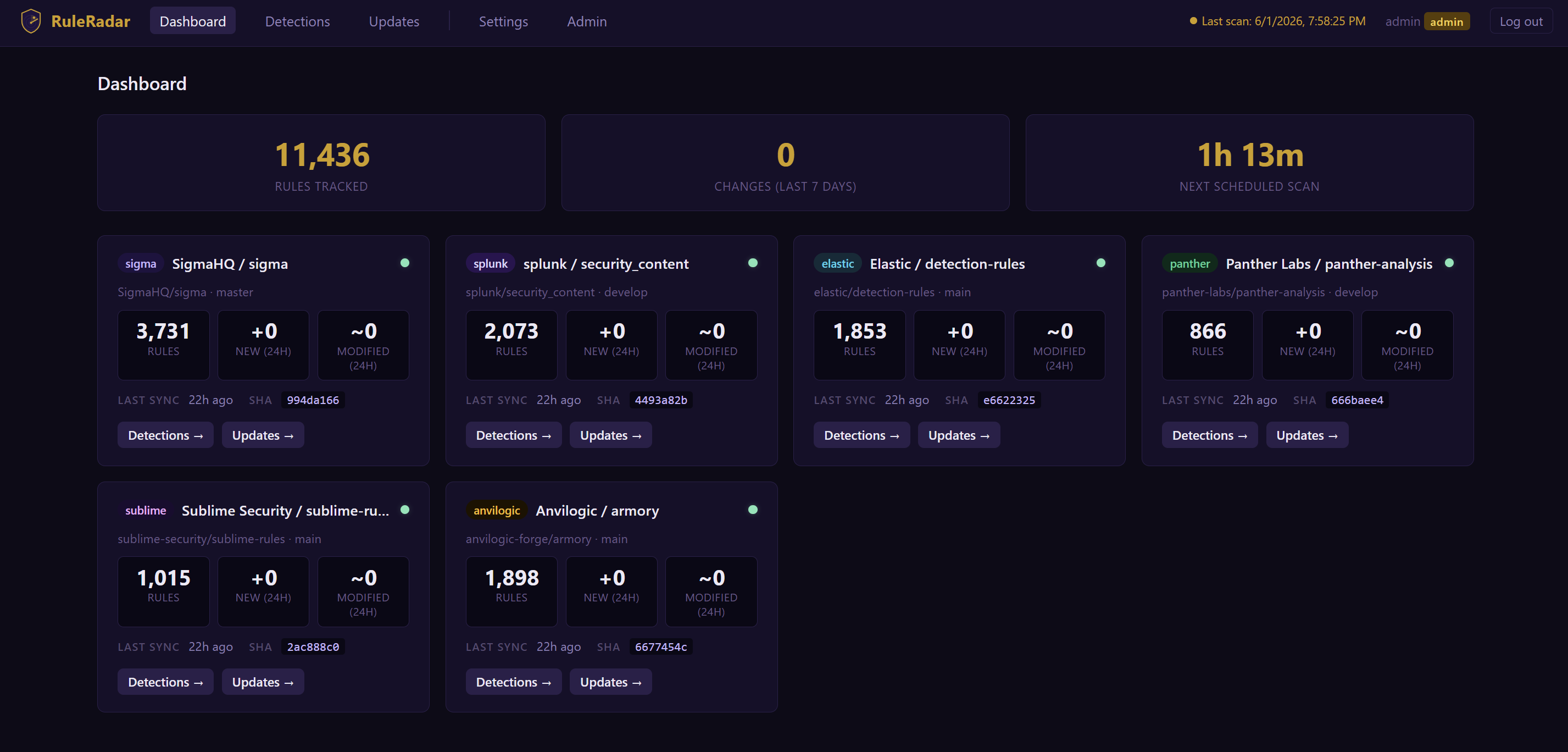
监控检测规则仓库的新增、修改、删除和重命名规则。开箱即支持 [SigmaHQ/sigma](https://github.com/SigmaHQ/sigma)、[splunk/security_content](https://github.com/splunk/security_content)、[elastic/detection-rules](https://github.com/elastic/detection-rules)、[panther-labs/panther-analysis](https://github.com/panther-labs/panther-analysis)、[sublime-security/sublime-rules](https://github.com/sublime-security/sublime-rules) 和 [anvilogic-forge/armory](https://github.com/anvilogic-forge/armory) —— 同时支持添加自定义仓库。所有数据均存储在本地 SQLite 数据库中,并可通过内置的 Web 界面进行浏览。无需配置文件 —— 所有配置都通过 Web UI 完成。
## 功能简介
每两小时 RuleRadar 会执行以下操作:
1. 通过 `git fetch` 拉取所有已配置仓库的变更,并与上次已知的 commit 进行 diff 对比
2. 解析新增和修改的规则文件(大多数仓库为 `.yml`/`.yaml`;Elastic 为 `.toml`)
3. 根据各自的源格式提取标题、描述、MITRE ATT&CK 映射和检测逻辑
4. 将所有检测和变更事件持久化存储到 SQLite
5. 向每个配置了个人 Discord webhook 的用户发送摘要
Web 界面提供以下功能:
- **Detections** —— 按标题、描述、来源、MITRE TTP 和时间窗口进行过滤;跨检测逻辑、作者和引用进行关键词搜索;保存过滤预设
- **Updates** —— 按时间顺序排列的新增、修改、删除和重命名规则的信息流,可按来源、变更类型和时间窗口进行过滤
- **Settings** —— 用户专属的 Discord webhook、保存的过滤预设、密码修改
- **Admin** —— 添加/删除用户、重置密码、授予/撤销管理员权限、管理受监控的仓库
## 部署说明
请从以下三种方法中选择一种。所有方法均会将 Web 界面暴露在 **http://localhost:5000**。
首次访问时,系统会提示您创建管理员账号。登录后,前往 **Admin → Monitored Repositories** 以启用您想要监控的仓库。初始克隆每个仓库大约需要 2-5 分钟。
### 方法 1 — 本地安装
**前置条件:** Python 3.10+,`git`
#### 安装
```
git clone https://github.com/McSloats/RuleRadar.git
cd RuleRadar
python3 -m venv .venv
source .venv/bin/activate # Windows: .venv\Scripts\activate
pip install -r requirements.txt
python3 start.py
```
`start.py` 会在同一个进程中启动 Flask Web 服务器(端口 5000)和每两小时执行一次的调度器。传入 `--run-now` 参数可在启动时立即触发一次扫描。
如有需要,可以单独运行各个组件:
| 命令 | 作用 |
|---------|-------------|
| `python3 webapp/app.py` | 仅启动 Web 界面(端口 5000) |
| `python3 core/scheduler.py` | 仅启动每两小时执行一次的调度器 |
| `python3 core/ruleradar.py` | 立即执行一次扫描周期 |
#### 更新
```
source .venv/bin/activate # Windows: .venv\Scripts\activate
git pull
pip install -r requirements.txt
python3 start.py
```
#### 卸载 / 清理
```
# 停止运行中的进程(使用 Ctrl+C 或 kill 掉 PID),然后:
deactivate
cd ..
rm -rf RuleRadar # Windows: Remove-Item -Recurse -Force RuleRadar
```
这将删除代码、虚拟环境、SQLite 数据库 (`ruleradar.db`) 以及存储在 `data/` 下的所有克隆仓库。
### 方法 2 — Docker Compose
**前置条件:** 带有 Compose 插件 (v2) 的 Docker。预构建的镜像会自动从 Docker Hub ([`tsloats/ruleradar`](https://hub.docker.com/r/tsloats/ruleradar)) 拉取 —— 无需在本地构建。
#### 安装
```
# 下载 Compose 文件
curl -O https://raw.githubusercontent.com/McSloats/RuleRadar/main/docker-compose.yml
# 在后台启动两个服务(web + scheduler)
docker compose up -d
```
所有数据 —— SQLite 数据库、克隆的仓库和密钥 —— 都存储在名为 `ruleradar-db` 的命名卷中,并在重启后依然存在。
运行时的常用命令:
```
docker compose logs -f # stream live logs from both services
docker compose ps # check container status and health
```
#### 更新
```
docker compose pull # fetch the latest image from Docker Hub
docker compose up -d # recreate containers with the updated image
```
您的数据卷将被保留;在更新过程中不会丢失任何数据。
#### 停止 / 清理
```
# 停止容器(数据会被保留)
docker compose down
# 停止容器并删除所有数据
docker compose down -v
```
`down -v` 会删除 `ruleradar-db` 卷 —— 这将永久删除数据库、所有克隆的仓库和密钥。
### 方法 3 — Docker Pull(手动,不使用 Compose)
**前置条件:** Docker Engine。如果您希望直接管理容器而不使用 Compose 文件,请使用此方法。
#### 安装
```
# 拉取 image
docker pull tsloats/ruleradar:latest
# 为持久化数据创建一个 named volume
docker volume create ruleradar-db
# 启动 web 容器
docker run -d \
--name ruleradar-web \
-p 5000:5000 \
-v ruleradar-db:/app/data \
-e RULERADAR_DB=/app/data/ruleradar.db \
-e PYTHONUNBUFFERED=1 \
--restart unless-stopped \
tsloats/ruleradar:latest
# 启动 scheduler 容器(等待 web 启动完成)
docker run -d \
--name ruleradar-scheduler \
-v ruleradar-db:/app/data \
-e RULERADAR_DB=/app/data/ruleradar.db \
-e PYTHONUNBUFFERED=1 \
--restart unless-stopped \
tsloats/ruleradar:latest \
python3 core/scheduler.py
```
运行时的常用命令:
```
docker logs -f ruleradar-web # stream web logs
docker logs -f ruleradar-scheduler # stream scheduler logs
docker ps # check running containers
```
#### 更新
```
# 拉取新的 image
docker pull tsloats/ruleradar:latest
# 重新创建容器(data volume 会被保留)
docker stop ruleradar-web ruleradar-scheduler
docker rm ruleradar-web ruleradar-scheduler
docker run -d \
--name ruleradar-web \
-p 5000:5000 \
-v ruleradar-db:/app/data \
-e RULERADAR_DB=/app/data/ruleradar.db \
-e PYTHONUNBUFFERED=1 \
--restart unless-stopped \
tsloats/ruleradar:latest
docker run -d \
--name ruleradar-scheduler \
-v ruleradar-db:/app/data \
-e RULERADAR_DB=/app/data/ruleradar.db \
-e PYTHONUNBUFFERED=1 \
--restart unless-stopped \
tsloats/ruleradar:latest \
python3 core/scheduler.py
```
#### 停止 / 清理
```
# 停止并移除容器(data volume 会被保留)
docker stop ruleradar-web ruleradar-scheduler
docker rm ruleradar-web ruleradar-scheduler
# 同时移除 data volume(永久删除所有数据)
docker volume rm ruleradar-db
# 可选地移除 image
docker rmi tsloats/ruleradar:latest
```
## 配置说明(全部通过 Web UI 完成 —— 无需文件)
| 设置项 | 位置 | 描述 |
|---------|-------|-------------|
| 受监控的仓库 | Admin → Monitored Repositories | 启用六个内置仓库(Sigma、Splunk、Elastic、Panther、Sublime、Anvilogic)中的任意一个,或添加您自己的自定义仓库。仓库通过 git 在本地克隆 —— 无需 API token。 |
| Discord webhook | Settings → Discord Notifications | 用于接收扫描摘要的用户专属 webhook。在 Discord 中创建:Server Settings → Integrations → Webhooks。 |
| 保存的过滤器 | Settings → Saved Filters | 命名预设(来源、变更类型、标题、MITRE TTP、时间窗口),在 Detections 和 Updates 页面上显示为快捷访问按钮。 |
| 用户 | Admin → Users | 添加用户、重置密码、授予/撤销管理员权限、删除用户。 |
## 架构
| 组件 | 描述 |
|-----------|-------------|
| `web` | Flask Web 界面 —— 登录、浏览、搜索、管理设置 |
| `scheduler` | 通过 APScheduler 每两小时触发一次扫描(00:00, 02:00 … 22:00 UTC) |
两个组件共享同一个 SQLite 数据库(WAL 模式)。在 Docker 中,它们共享 `ruleradar-db` 卷。首次设置时,由管理员启用仓库;RuleRadar 对每个仓库执行浅克隆 (`git clone --depth=1`),并对所有匹配的规则文件进行索引。随后的扫描使用 `git fetch`,仅处理自上次索引的 commit 以来发生变更的文件。
标签:AMSI绕过, 威胁检测, 安全运营, 扫描框架, 网络安全研究, 规则监控, 请求拦截, 逆向工具