ErSilh0x/bitrixprobe
GitHub: ErSilh0x/bitrixprobe
一款专为 1C-Bitrix/Bitrix24 CMS 设计的开源漏洞评估工具,支持外部渗透测试扫描和经 SSH 认证的本地服务器深度审计。
Stars: 10 | Forks: 3
**English** | [Русский](README_ru.md)
# BitrixProbe
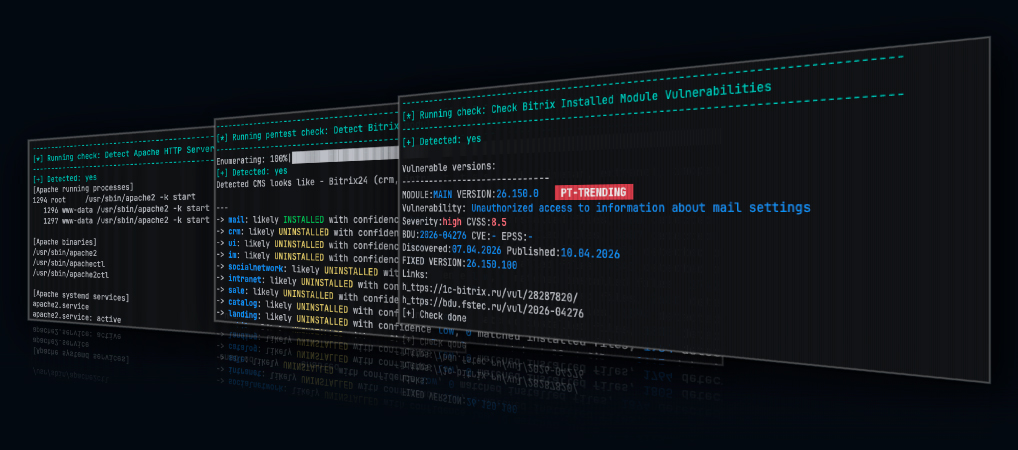
BitrixProbe 是一款用于 CMS 1C-Bitrix/Bitrix24 安装环境的漏洞评估工具。它使用 Python 编写。
它围绕两种独立的评估模式进行设计:
- `pentest`:针对目标 URL 执行外部 HTTP/HTTPS 扫描。
- `audit`:通过 SSH 进行经过身份验证的本地服务器扫描。
### 法律免责声明与负责任的使用
BitrixProbe 仅旨在用于授权的安全测试、内部审计、研究和防御性评估。
请参阅 [免责声明](./DISCLAIMER.md) 以获取完整的法律免责声明。
## 为什么开发 BitrixProbe
在面临漏洞扫描和修复审批中反复出现的问题后,我启动了 BitrixProbe 项目。
基于 Bitrix 的系统通常会被 Web 开发人员和集成商大量修改。这些自定义更改可能会使得修复变得缓慢、充满风险或难以获得批准,特别是在业务逻辑依赖于遗留代码和自定义模块的企业环境中。
因此,易受攻击的代码会在生产环境中存在很长时间。在许多情况下,安全团队对哪些 Bitrix 组件处于暴露状态、安装了哪些模块,或者哪些问题需要紧急处理缺乏足够的可见性。
BitrixProbe 背后的最初想法很简单:构建一个小型 Python 工具,将外部 Web 检查与经过身份验证的服务器端检查分开,收集有用的证据,并生成在实际安全评估中具有实用价值的报告。
BitrixProbe 仍在不断发展中。一些检查侧重于指纹识别和暴露检测,而另一些则被设计为针对特定漏洞的探测或本地审计检查。
## 功能
- 支持 CVE、BDU、EPSS、CVSS、Positive Technologies Trending 信号
- 枚举模块以支持渗透测试和审计评估。
- 通过 HTTP 和 HTTPS 进行外部 Bitrix 扫描。
- 通过 SSH 进行经过身份验证的本地服务器审计扫描。
- 每个模块采用标准化的结果格式。
- 生成纯文本报告。
- 本地漏洞数据库每日更新。
## 测试环境
BitrixProbe 是在受控的实验室环境中开发和测试的。
| 目标操作系统 | PHP 版本 | Web 服务器 | Bitrix 版本 / 版型 |
|--------------------------------------------------------------------| --- | --- |--------------------------|
| Ubuntu 24.04.4 LTS / 6.8.0-117-generic aarch64 Linux | PHP 8.3.6 | Apache/2.4.58 | 1C-Bitrix/Bitrix24 26.150.0 |
| VMBitrix 9.0.9 CentOS Stream 9 / 5.14.0-710.el9.x86_64 Linux | PHP 8.2.31 | Apache/2.4.62
nginx/1.30.2 | Bitrix24 26.150.0 | | VMBitrix 9.0.9 AlmaLinux 9.7 / 5.14.0-611.26.1.el9_7.x86_64 Linux | PHP 8.2.30 | Apache/2.4.62
nginx/1.28.1 | Bitrix24 26.150.0 | | VMBitrix 9.0.9 Rocky Linux 9.7 / 5.14.0-611.24.1.el9_7.x86_64 Linux | PHP 8.2.30 | Apache/2.4.62
nginx/1.28.1 | Bitrix24 26.150.0 | | RED OS 8.0.2 / 6.12.92-1.red80.x86_64 Linux | PHP 8.4.19 | nginx/1.30.2 | Bitrix24 26.150.0 | ## 模式 | 模式 | 协议 | 描述 | 身份验证 | 典型用例 | | --- |----------------| --- | --- | --- | | `pentest` | TCP HTTP/HTTPS | 针对目标 URL 执行外部 HTTP/HTTPS 扫描。 | 不需要 | 公开暴露检查、指纹识别、无需身份验证的探测。 | | `audit` | TCP SSH, SFTP | 通过 SSH 进行本地服务器扫描。 | 需要 | 已安装模块检查、本地配置审查、版本比对。 | ## 扫描示例 BitrixProbe 会在扫描运行时打印每个模块的结果,并将同样易读的证据保存在报告中。以下示例说明了 pentest 和 audit 扫描所生成的信息。 ### Pentest 扫描 Pentest 模块在不需要访问目标服务器的情况下执行外部 HTTP/HTTPS 检查。例如,`restore.php` 暴露检查可以识别出可公开访问的 Bitrix 备份恢复脚本。 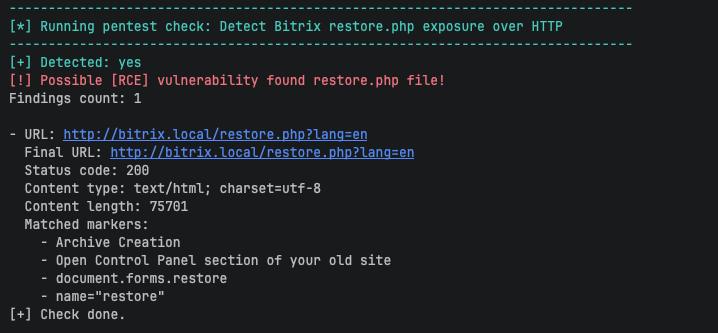 该模块会报告测试的 URL、HTTP 响应元数据,以及确认了该发现的 Bitrix 标记。 `Detected: yes` 的肯定结果意味着该模块找到了匹配的证据。 侦察和枚举在任何攻击中都是关键。考虑到这一点,为了安全起见,了解哪些配置和组件已被部署并且攻击者可以访问是非常重要的。 Bitrix 拥有许多偶尔包含漏洞的模块。 尝试识别 Bitrix 中安装了哪些模块是一个好习惯。 为此,我制作了一个枚举检查,它将 Web 服务器上可访问的现有静态文件与字典进行比对。其结果可能会提供有关文件系统上存在并安装了哪些默认模块的线索。 通过识别插件,可以确定它是 1C-Bitrix 还是 Bitrix24 版本的 CMS。 在下面,我们可以看到可能安装了 landing 模块,并且该 CMS 似乎是 1C-Bitrix CMS。 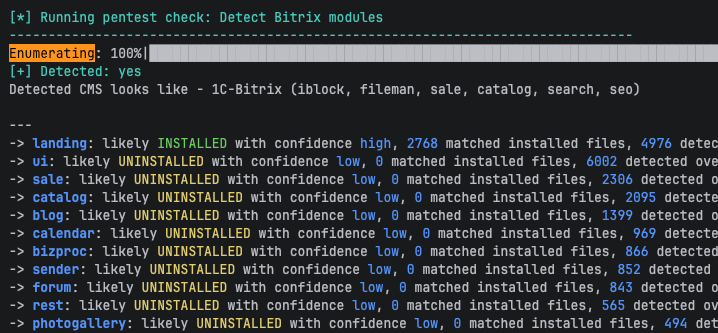 ### Audit 扫描 Audit 模块通过 SSH 运行经过身份验证的服务器端检查。例如,审计检查可以将已安装的 Bitrix 模块版本与本地漏洞数据库进行比较。以下是一些现有和已安装模块以及过时版本的结果。 数据库中可能会缺少某些模块信息,因为供应商并未在其网站上共享所有数据。 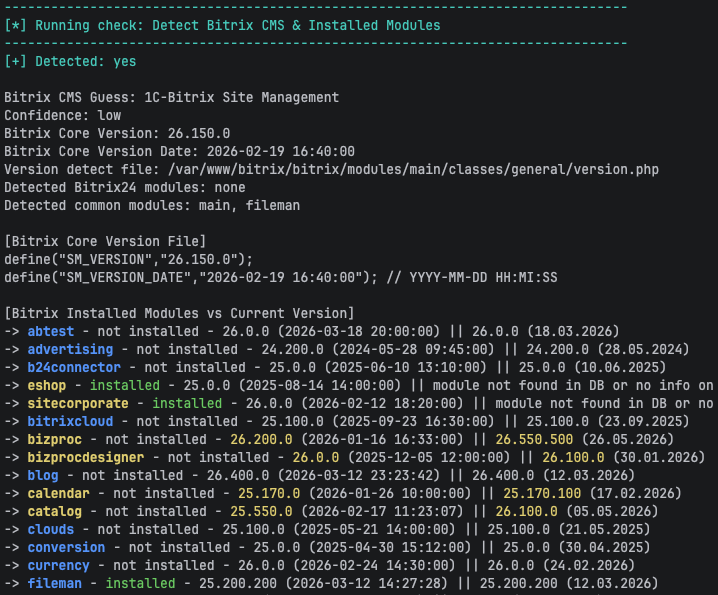 下面的结果显示了已安装的模块版本、漏洞标识符、严重程度以及包含修复程序的版本。例如,它显示了 PT-Trending 红旗信号,这表明该漏洞正在 CIS 地区被积极利用。它类似于美国的 CISA KEV。 此外还有 EPSS 指标,但该指标仅在存在 CVE 时可用。 许多漏洞没有 CVE,而是拥有 BDU。 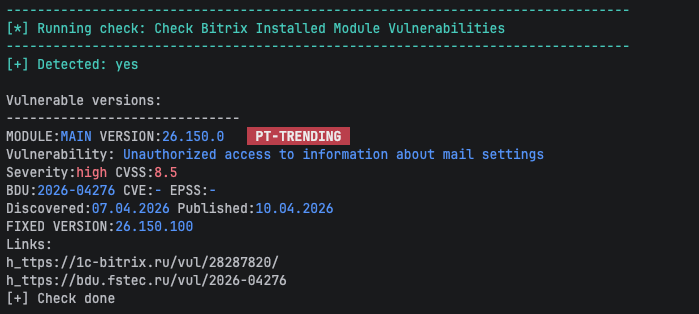 ### 结果状态 | 输出 | 含义 | | --- | --- | | `Detected: yes` | 模块已完成并找到了匹配的证据。 | | `Detected: no` | 模块成功完成,但未发现该条件。 | | `Check skipped` | 所需的依赖项不可用或未检测到。 | | `Failed` | 技术错误导致模块无法正常完成。 | ## 安装 克隆存储库并从项目根目录安装 Python 依赖项: ``` git clone https://github.com/ErSilh0x/bitrixprobe.git cd bitrixprobe python3 -m venv .venv source .venv/bin/activate #### pip install -r requirements.txt Run BitrixProbe from the repository root: ```bash #### python -m bitrixprobe --help ## 用法 Run external pentest scans: ```bash #### python -m bitrixprobe pentest --url https://example.com Run authenticated server-side audit scans over SSH: ```bash python -m bitrixprobe audit \ --host 192.168.56.10 \ --port 22 \ --user ubuntu \ #### --webroot /var/www/bitrix Reports are saved to the `reports/` directory by default. ### 环境文件 BitrixProbe can read SSH audit connection settings from a `.env` file. This is useful for audit mode because the SSH password is not accepted as a command-line argument. Create a `.env` file in the project root: ```env BP_SSH_HOST=192.168.56.10 BP_SSH_PORT=22 BP_SSH_USER=ubuntu #### BP_SSH_PASSWORD=change-me Set strict file permissions before running audit mode: ```bash #### chmod 640 .env BitrixProbe checks the `.env` file permissions before loading it. The file must not be a symlink, and the expected permission mode is `640`. If the file has different permissions, BitrixProbe stops and prints the required `chmod` command. Use the default `.env` file: ```bash #### python -m bitrixprobe audit --webroot /var/www/bitrix Use a custom environment file: ```bash python -m bitrixprobe audit \ --env-file ./lab.env \ #### --webroot /var/www/bitrix CLI values override `.env` values for SSH host, port, and username: ```bash python -m bitrixprobe audit \ --host 192.168.56.20 \ --port 2222 \ --user bitrix \ --env-file .env \ #### --webroot /var/www/bitrix If host, port, username, or password are still missing after reading CLI options and the `.env` file, BitrixProbe asks for them interactively. ### 选项 Show the main help: ```bash #### python -m bitrixprobe --help Show pentest mode help: ```bash #### python -m bitrixprobe pentest --help | Option | Required | Description | | --- | --- | --- | | `--url` | Yes | Target URL, for example `https://example.com` or `https://192.168.56.10:8080`. If no scheme is provided, BitrixProbe uses `https://`. | Show audit mode help: ```bash #### python -m bitrixprobe audit --help | Option | Required | Description | | --- | --- | --- | | `-H`, `--host` | No | SSH server address. Overrides `BP_SSH_HOST` from the `.env` file. | | `-p`, `--port` | No | SSH server port. Overrides `BP_SSH_PORT`; defaults to `22` if not provided. | | `-u`, `--user` | No | SSH username. Overrides `BP_SSH_USER` from the `.env` file. | | `--env-file` | No | Path to the environment file. Defaults to `.env`. | | `--webroot` | No | Remote Bitrix webroot directory. Defaults to `/var/www/html`. | | `--output-dir` | No | Local directory for report files. Defaults to `reports`. | ## 使用 Docker 运行 BitrixProbe Build the Docker image from the BitrixProbe project root. The build context must contain both `Dockerfile` and `requirements.txt`: ```bash #### docker build --no-cache -t bitrixprobe:local . Run BitrixProbe from Docker with the current host directory mounted as `/app`. This keeps the local `.env` file outside the image and saves reports to `$(pwd)/reports` on the host: ```bash docker run --rm -it \ -v "$(pwd):/app" \ #### bitrixprobe:local --help Run external web scans with a URL: ```bash docker run --rm -it \ -v "$(pwd):/app" \ #### bitrixprobe:local pentest --url http://bitrix.local If the target uses a local hostname, map it to the target IP for the container: ```bash docker run --rm -it \ --add-host bitrix.local:10.111.111.137 \ -v "$(pwd):/app" \ #### bitrixprobe:local pentest --url http://bitrix.local Run SSH audit mode with a host/IP and port. Do not pass an HTTP URL to `audit --host`: ```bash docker run --rm -it \ -v "$(pwd):/app" \ bitrixprobe:local audit \ --host 10.111.111.137 \ --port 22 \ --user ubuntu \ #### --webroot /var/www/bitrix For audit mode with a local `.env` file, keep `.env` in the current directory and mount the directory into the container: ```bash chmod 640 .env docker run --rm -it \ -v "$(pwd):/app" \ #### bitrixprobe:local audit --webroot /var/www/bitrix ### Docker 和 VM 目标 If the target Bitrix installation is inside a VM, the container may not be able to resolve or route to the VM even when the host machine can. A DNS error such as `Name does not resolve` means the container cannot resolve the hostname. Use `--add-host` or pass the target IP directly. If the target IP also does not connect from inside the container, the issue is network reachability. On Linux Docker Engine, try host networking: ```bash docker run --rm -it \ --net=host \ -v "$(pwd):/app" \ bitrixprobe:local audit \ --host 10.111.111.137 \ --port 22 \ --user ubuntu \ #### --webroot /var/www/bitrix On Docker Desktop for macOS or Windows, `--net=host` usually does not provide direct access to host-only VM networks. Use one of these approaches instead: - Change the VM network adapter to bridged mode. - Configure VM NAT port forwarding for SSH and HTTP/HTTPS. - Use an SSH tunnel from the host and connect to `host.docker.internal` from the container. Example SSH tunnel from the host for audit scans: ```bash #### ssh -N -L 127.0.0.1:2222:10.111.111.137:22 ubuntu@10.111.111.137 Then run the container against the forwarded SSH port: ```bash docker run --rm -it \ -v "$(pwd):/app" \ bitrixprobe:local audit \ --host host.docker.internal \ --port 2222 \ --user ubuntu \ #### --webroot /var/www/bitrix For `pentest --url`, forward the VM web port through SSH from the host. This is useful when the host can reach the VM, but the Docker container cannot route to the VM network directly. Forward HTTP from the VM to local port `8080`: ```bash #### ssh -N -L 127.0.0.1:8080:127.0.0.1:80 ubuntu@10.111.111.137 Then scan the forwarded URL from Docker: ```bash docker run --rm -it \ -v "$(pwd):/app" \ #### bitrixprobe:local pentest --url http://host.docker.internal:8080 For HTTPS, forward VM port `443` to local port `8443`: ```bash #### ssh -N -L 127.0.0.1:8443:127.0.0.1:443 ubuntu@10.111.111.137 Then scan: ```bash docker run --rm -it \ -v "$(pwd):/app" \ #### bitrixprobe:local pentest --url https://host.docker.internal:8443 Very often web server and Bitrix site will require a specific domain name, because there might be virtual domain configuration on web server. Keep the tunnel and add a host mapping for the container. On macOS/Linux Docker Engine: ```bash docker run --rm -it \ --add-host bitrix.local:host-gateway \ -v "$(pwd):/app" \ #### bitrixprobe:local pentest --url http://bitrix.local:8080 Also, there are some commands to test network access from inside the container: ```bash python -c "import socket; print(socket.gethostbyname('bitrix.local'))" #### python -c "import socket; socket.create_connection(('10.111.111.137', 22), 5); print('ok')" >*`https://bitrix.local` - a target url ## 漏洞列表 ### 检测状态图例 -  — detection is supported. -  — HTTP pentest scan works only if vulnerability can be exploited without authentication in non-default CMS installations. By default, **requires** authenticated access. -  — exploitation **requires** authenticated access in default CMS installations. -  — vulnerability is a Denial of Service Attack -  — detection is not implemented yet. ### 检测状态 | Detected | Title | Module | Severity | Vuln ID | SSH Audit | Pentest Scan
HTTP/S | |:----------:|------------------------------------------------------------------------------------------------------------------------------------------------------------------------------------------------|:-------------------:|:--------:|:-----------------------------:|:-----------------------------------------------------------------------------------:|:----------------------------------------------------------------------------------------:| | X | Exposed Bitrix restore.php backup restore script detection | X | 10 | |  |  | | X | Exposed Bitrix bitrixsetup.php installer script detection | X | Exposure | |  |  | | 08.01.2026 | Local file inclusion when editing a landing page | landing | 9.8 | BDU:2026-05965 | |  | | 07.04.2026 | Unauthorized access to information about mail settings | main | 8.5 | BDU:2026-04276 | |  | | 30.08.2025 | By filling out a crm form, an attacker can add extraneous content
to the text of linked email newsletters | crm | 3.1 | BDU:2025-15620 | |  | | 21.04.2025 | Local File Inclusion when changing infoblock properties | iblock | 8 | BDU:2025-08666 | |  | | 21.04.2025 | Reading arbitrary files when importing xml info block | iblock | 6.9 | BDU:2025-08665 | |  | | 21.04.2025 | Reading arbitrary files when importing an info block | iblock | 6.9 | BDU:2025-08664 | |  | | 17.04.2025 | Exceeding privileges when editing mail templates | main | 7.1 | BDU:2025-08663 | |  | | 17.04.2025 | Exceeding the limits when copying files | fileman | 7.1 | BDU:2025-08662 | |  | | 05.08.2024 | In a virtual machine, it is possible to elevate bitrix->root privileges | vmbitrix | 8 | BDU:2025-04604 |  |  | | 16.12.2024 | In a virtual machine, it is possible to elevate bitrix->root privileges | vmbitrix | 8 | BDU:2025-04539 |  |  | | 03.12.2024 | Stored XSS bypassing proactive protection in forum functionality | ui | 8 | BDU:2025-00765 | |  | | 24.04.2024 | (Authenticated) The system administrator can retrieve the previously set password to the proxy server | dav | 6,8 | BDU:2024-08613
CVE-2024-34883 | |  | | 24.04.2024 | (Authenticated) The system administrator can retrieve a previously set SMTP password | main | 6,8 | BDU:2024-08612
CVE-2024-34882 | |  | | 24.04.2024 | (Authenticated) The system administrator can retrieve a previously set Exchange password | dav | 6,8 | BDU:2024-08611
CVE-2024-34891 | |  | | 24.04.2024 | (Authenticated) The system administrator can retrieve a previously set SMTP password | main | 6,8 | BDU:2024-08610
CVE-2024-34885 | |  | | 24.04.2024 | (Authenticated) The system administrator can retrieve a previously set Active Directory password | ldap | 6,8 | BDU:2024-08600
CVE-2024-34887 | |  | | 02.07.2024 | (Rejected CVE) If attackers use the virtual machine installer before the administrator does,
they can gain control of the server. | vmbitrix Ver. 7.5.5 | | BDU:2024-05252
CVE-2022-29268 |  |  | | 07.12.2023 | The bitrixsetup.php installation script did not escape an error message containing user input.
Due to the lack of input parameter validation, it is possible to read files in the operating system. | bitrixsetup.php | 3 | BDU:2024-01501 |  |  | | 30.03.2023 | (Authenticated) [RCE] Bitrix24 vulnerability related to errors in the data import mechanism.
Exploitation of this vulnerability allows an internal attacker to increase his privileges in the system. | crm | 8.8 | BDU:2023-07464
CVE-2023-1713 | |  | | 30.03.2023 | (Authenticated) Stored Cross-Site Scripting [XSS] Bitrix24 vulnerability via Improper Input Neutralization on Invoice Edit Page.
Chained with 2023-1716 | crm | 9 | BDU:2023-07463
CVE-2023-1715 | |  | | 30.03.2023 | Cross-Site Scripting [XSS] The 1C-Bitrix / Bitrix24 Proactive Protection flaw was missing a certain byte sequence
that could be part of an XSS attack.
Chained with CVE-2023-1715 | security | 9 | BDU:2023-07462
CVE-2023-1716 | |  | | 30.03.2023 | Cross-Site Scripting [XSS] via Client-side Prototype Pollution in
bitrix/templates/bitrix24/components/bitrix/menu/left_vertical/script.js | main | 9.6 | BDU:2023-07461
CVE-2023-1717 | |  | | 30.03.2023 | (Unauthenticated) [DOS] Denial of Service Vulnerability of 1C-Bitrix web project management system | main | 7.5 | BDU:2023-07460
CVE-2023-1718 | |  | | 30.03.2023 | (Unauthenticated) Insecure direct object reference [IDOR] - Bitrix24 Insecure Global Variable Extraction in bitrix/modules/main/tools.php | intranet | 7.5 | BDU:2023-07459
CVE-2023-1719 | |  | | 10.04.2023 | (Unauthenticated) Stored Cross-Site Scripting [XSS] via uploading a crafted HTML file through `/desktop_app/file.ajax.php?action=uploadfile` (Bitrix24 22.0.300) | main | 9.3 | BDU:2023-07458
CVE-2023-1720 | |  | | 30.03.2023 | (Authenticated) [RCE] Bitrix24 vulnerability related to errors in the data import mechanism.
Exploitation of this vulnerability allows an internal attacker to increase his privileges in the system. | main | 8.8 | BDU:2023-07457
CVE-2023-1714 | |  | | 30.03.2023 | (Authenticated) [RCE] Bitrix24 vulnerability related to an error in input data processing.
Exploitation of this vulnerability allows an internal attacker to execute
arbitrary code on systems of certain configurations and php version | crm | 8.8 | BDU:2023-07457
CVE-2023-1714 | |  | | 13.09.2023 | [RCE] Site content management system (CMS) landing module vulnerability | landing | 10 | BDU:2023-05857 | |  | | 28.10.2022 | Site content management system (CMS) vulnerability | sale | 9.8 | BDU:2023-05566 | |  | | 24.10.2022 | Site content management system (CMS) vulnerability | fileman | 9.6 | BDU:2023-05565 | |  | | 05.12.2019 | [RCE] Vulnerability in the embedded code editor of the website content management system (CMS) | main | 9.8 | BDU:2023-02793 | |  | | 28.10.2022 | (Authenticated) Vulnerability in the AD/LDAP server of Bitrix24 business management service
that allows an intruder to gain unauthorized access to protected information. | ldap | 4.4 | BDU:2023-01604
CVE-2022-43959 | |  | | 04.03.2022 | (Unauthenticated) [RCE] Vulnerability in the "vote" module of the website content management system (CMS) | vote | 9.8 | BDU:2022-01141
CVE-2022-27228 | |  |  | | 12.10.2020 | Reflected Cross-Site Scripting [XSS] Vulnerability of arParams`[API_KEY]` parameter of map.google component of Bitrix24
business management service allowing an attacker to execute arbitrary JavaScript code. | fileman | 9.8 | BDU:2021-03055 |  |  | | | Vulnerability of 1C-Bitrix web project management system | main | 4.6 | BDU:2014-00404 | - | - | | | Vulnerability of 1C-Bitrix web project management system | main | 10 | BDU:2014-00403 | - | - | ## 项目架构 Keeping vulnerability data up to date manually can be time-consuming and error-prone. To solve this, I built a simple review-based vulnerability data pipeline that collects data from vulnerability sources, normalizes new records, and sends them for manual review before they are approved and pushed to GitHub. 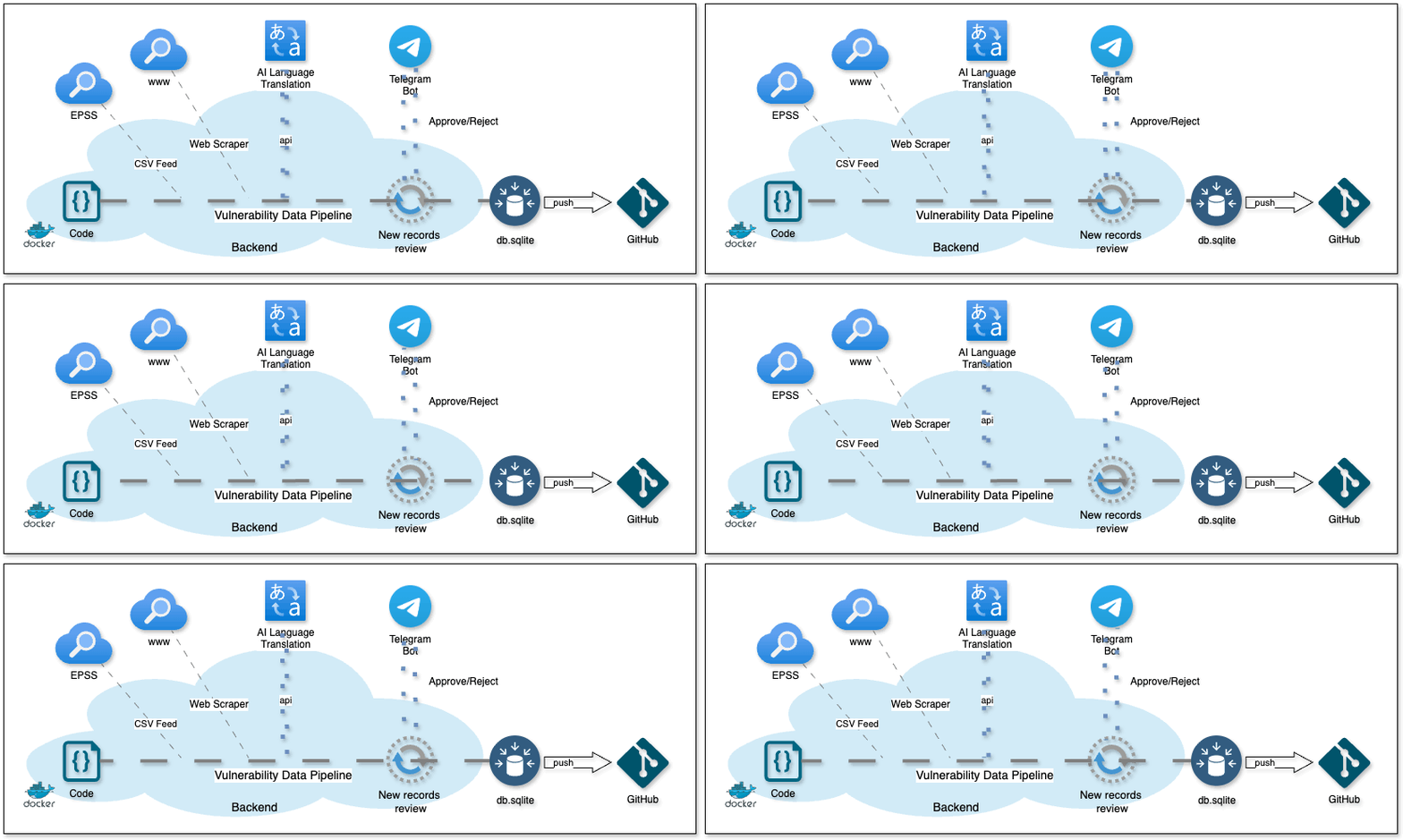 ## 项目结构 Each security assessment module, registered in the matching `__init__.py` file so the runner can execute it. ```text BitrixProbe/ bitrixprobe/ Main Python package and scanner code cli.py Main CLI entry point config.py CLI and runtime configuration db/ Local SQLite vulnerability database modes/ Pentest and audit scan runners pentest.py External HTTP/HTTPS scan runner audit.py SSH audit runner modules/ Shared clients, report helpers, and checks pentest_checks/ External HTTP/HTTPS Bitrix checks audit_checks/ Authenticated SSH server-side checks www_client.py Shared HTTP helper functions ssh_client.py Shared SSH helper functions out_report.py Report output helpers db_connect.py Helper functions for connecting to SQLite vulnerability database wordlists/ Wordlists for endpoints, modules, and sensitive files #### reports/ 生成的扫描报告 ```
nginx/1.30.2 | Bitrix24 26.150.0 | | VMBitrix 9.0.9 AlmaLinux 9.7 / 5.14.0-611.26.1.el9_7.x86_64 Linux | PHP 8.2.30 | Apache/2.4.62
nginx/1.28.1 | Bitrix24 26.150.0 | | VMBitrix 9.0.9 Rocky Linux 9.7 / 5.14.0-611.24.1.el9_7.x86_64 Linux | PHP 8.2.30 | Apache/2.4.62
nginx/1.28.1 | Bitrix24 26.150.0 | | RED OS 8.0.2 / 6.12.92-1.red80.x86_64 Linux | PHP 8.4.19 | nginx/1.30.2 | Bitrix24 26.150.0 | ## 模式 | 模式 | 协议 | 描述 | 身份验证 | 典型用例 | | --- |----------------| --- | --- | --- | | `pentest` | TCP HTTP/HTTPS | 针对目标 URL 执行外部 HTTP/HTTPS 扫描。 | 不需要 | 公开暴露检查、指纹识别、无需身份验证的探测。 | | `audit` | TCP SSH, SFTP | 通过 SSH 进行本地服务器扫描。 | 需要 | 已安装模块检查、本地配置审查、版本比对。 | ## 扫描示例 BitrixProbe 会在扫描运行时打印每个模块的结果,并将同样易读的证据保存在报告中。以下示例说明了 pentest 和 audit 扫描所生成的信息。 ### Pentest 扫描 Pentest 模块在不需要访问目标服务器的情况下执行外部 HTTP/HTTPS 检查。例如,`restore.php` 暴露检查可以识别出可公开访问的 Bitrix 备份恢复脚本。  该模块会报告测试的 URL、HTTP 响应元数据,以及确认了该发现的 Bitrix 标记。 `Detected: yes` 的肯定结果意味着该模块找到了匹配的证据。 侦察和枚举在任何攻击中都是关键。考虑到这一点,为了安全起见,了解哪些配置和组件已被部署并且攻击者可以访问是非常重要的。 Bitrix 拥有许多偶尔包含漏洞的模块。 尝试识别 Bitrix 中安装了哪些模块是一个好习惯。 为此,我制作了一个枚举检查,它将 Web 服务器上可访问的现有静态文件与字典进行比对。其结果可能会提供有关文件系统上存在并安装了哪些默认模块的线索。 通过识别插件,可以确定它是 1C-Bitrix 还是 Bitrix24 版本的 CMS。 在下面,我们可以看到可能安装了 landing 模块,并且该 CMS 似乎是 1C-Bitrix CMS。  ### Audit 扫描 Audit 模块通过 SSH 运行经过身份验证的服务器端检查。例如,审计检查可以将已安装的 Bitrix 模块版本与本地漏洞数据库进行比较。以下是一些现有和已安装模块以及过时版本的结果。 数据库中可能会缺少某些模块信息,因为供应商并未在其网站上共享所有数据。  下面的结果显示了已安装的模块版本、漏洞标识符、严重程度以及包含修复程序的版本。例如,它显示了 PT-Trending 红旗信号,这表明该漏洞正在 CIS 地区被积极利用。它类似于美国的 CISA KEV。 此外还有 EPSS 指标,但该指标仅在存在 CVE 时可用。 许多漏洞没有 CVE,而是拥有 BDU。  ### 结果状态 | 输出 | 含义 | | --- | --- | | `Detected: yes` | 模块已完成并找到了匹配的证据。 | | `Detected: no` | 模块成功完成,但未发现该条件。 | | `Check skipped` | 所需的依赖项不可用或未检测到。 | | `Failed` | 技术错误导致模块无法正常完成。 | ## 安装 克隆存储库并从项目根目录安装 Python 依赖项: ``` git clone https://github.com/ErSilh0x/bitrixprobe.git cd bitrixprobe python3 -m venv .venv source .venv/bin/activate #### pip install -r requirements.txt Run BitrixProbe from the repository root: ```bash #### python -m bitrixprobe --help ## 用法 Run external pentest scans: ```bash #### python -m bitrixprobe pentest --url https://example.com Run authenticated server-side audit scans over SSH: ```bash python -m bitrixprobe audit \ --host 192.168.56.10 \ --port 22 \ --user ubuntu \ #### --webroot /var/www/bitrix Reports are saved to the `reports/` directory by default. ### 环境文件 BitrixProbe can read SSH audit connection settings from a `.env` file. This is useful for audit mode because the SSH password is not accepted as a command-line argument. Create a `.env` file in the project root: ```env BP_SSH_HOST=192.168.56.10 BP_SSH_PORT=22 BP_SSH_USER=ubuntu #### BP_SSH_PASSWORD=change-me Set strict file permissions before running audit mode: ```bash #### chmod 640 .env BitrixProbe checks the `.env` file permissions before loading it. The file must not be a symlink, and the expected permission mode is `640`. If the file has different permissions, BitrixProbe stops and prints the required `chmod` command. Use the default `.env` file: ```bash #### python -m bitrixprobe audit --webroot /var/www/bitrix Use a custom environment file: ```bash python -m bitrixprobe audit \ --env-file ./lab.env \ #### --webroot /var/www/bitrix CLI values override `.env` values for SSH host, port, and username: ```bash python -m bitrixprobe audit \ --host 192.168.56.20 \ --port 2222 \ --user bitrix \ --env-file .env \ #### --webroot /var/www/bitrix If host, port, username, or password are still missing after reading CLI options and the `.env` file, BitrixProbe asks for them interactively. ### 选项 Show the main help: ```bash #### python -m bitrixprobe --help Show pentest mode help: ```bash #### python -m bitrixprobe pentest --help | Option | Required | Description | | --- | --- | --- | | `--url` | Yes | Target URL, for example `https://example.com` or `https://192.168.56.10:8080`. If no scheme is provided, BitrixProbe uses `https://`. | Show audit mode help: ```bash #### python -m bitrixprobe audit --help | Option | Required | Description | | --- | --- | --- | | `-H`, `--host` | No | SSH server address. Overrides `BP_SSH_HOST` from the `.env` file. | | `-p`, `--port` | No | SSH server port. Overrides `BP_SSH_PORT`; defaults to `22` if not provided. | | `-u`, `--user` | No | SSH username. Overrides `BP_SSH_USER` from the `.env` file. | | `--env-file` | No | Path to the environment file. Defaults to `.env`. | | `--webroot` | No | Remote Bitrix webroot directory. Defaults to `/var/www/html`. | | `--output-dir` | No | Local directory for report files. Defaults to `reports`. | ## 使用 Docker 运行 BitrixProbe Build the Docker image from the BitrixProbe project root. The build context must contain both `Dockerfile` and `requirements.txt`: ```bash #### docker build --no-cache -t bitrixprobe:local . Run BitrixProbe from Docker with the current host directory mounted as `/app`. This keeps the local `.env` file outside the image and saves reports to `$(pwd)/reports` on the host: ```bash docker run --rm -it \ -v "$(pwd):/app" \ #### bitrixprobe:local --help Run external web scans with a URL: ```bash docker run --rm -it \ -v "$(pwd):/app" \ #### bitrixprobe:local pentest --url http://bitrix.local If the target uses a local hostname, map it to the target IP for the container: ```bash docker run --rm -it \ --add-host bitrix.local:10.111.111.137 \ -v "$(pwd):/app" \ #### bitrixprobe:local pentest --url http://bitrix.local Run SSH audit mode with a host/IP and port. Do not pass an HTTP URL to `audit --host`: ```bash docker run --rm -it \ -v "$(pwd):/app" \ bitrixprobe:local audit \ --host 10.111.111.137 \ --port 22 \ --user ubuntu \ #### --webroot /var/www/bitrix For audit mode with a local `.env` file, keep `.env` in the current directory and mount the directory into the container: ```bash chmod 640 .env docker run --rm -it \ -v "$(pwd):/app" \ #### bitrixprobe:local audit --webroot /var/www/bitrix ### Docker 和 VM 目标 If the target Bitrix installation is inside a VM, the container may not be able to resolve or route to the VM even when the host machine can. A DNS error such as `Name does not resolve` means the container cannot resolve the hostname. Use `--add-host` or pass the target IP directly. If the target IP also does not connect from inside the container, the issue is network reachability. On Linux Docker Engine, try host networking: ```bash docker run --rm -it \ --net=host \ -v "$(pwd):/app" \ bitrixprobe:local audit \ --host 10.111.111.137 \ --port 22 \ --user ubuntu \ #### --webroot /var/www/bitrix On Docker Desktop for macOS or Windows, `--net=host` usually does not provide direct access to host-only VM networks. Use one of these approaches instead: - Change the VM network adapter to bridged mode. - Configure VM NAT port forwarding for SSH and HTTP/HTTPS. - Use an SSH tunnel from the host and connect to `host.docker.internal` from the container. Example SSH tunnel from the host for audit scans: ```bash #### ssh -N -L 127.0.0.1:2222:10.111.111.137:22 ubuntu@10.111.111.137 Then run the container against the forwarded SSH port: ```bash docker run --rm -it \ -v "$(pwd):/app" \ bitrixprobe:local audit \ --host host.docker.internal \ --port 2222 \ --user ubuntu \ #### --webroot /var/www/bitrix For `pentest --url`, forward the VM web port through SSH from the host. This is useful when the host can reach the VM, but the Docker container cannot route to the VM network directly. Forward HTTP from the VM to local port `8080`: ```bash #### ssh -N -L 127.0.0.1:8080:127.0.0.1:80 ubuntu@10.111.111.137 Then scan the forwarded URL from Docker: ```bash docker run --rm -it \ -v "$(pwd):/app" \ #### bitrixprobe:local pentest --url http://host.docker.internal:8080 For HTTPS, forward VM port `443` to local port `8443`: ```bash #### ssh -N -L 127.0.0.1:8443:127.0.0.1:443 ubuntu@10.111.111.137 Then scan: ```bash docker run --rm -it \ -v "$(pwd):/app" \ #### bitrixprobe:local pentest --url https://host.docker.internal:8443 Very often web server and Bitrix site will require a specific domain name, because there might be virtual domain configuration on web server. Keep the tunnel and add a host mapping for the container. On macOS/Linux Docker Engine: ```bash docker run --rm -it \ --add-host bitrix.local:host-gateway \ -v "$(pwd):/app" \ #### bitrixprobe:local pentest --url http://bitrix.local:8080 Also, there are some commands to test network access from inside the container: ```bash python -c "import socket; print(socket.gethostbyname('bitrix.local'))" #### python -c "import socket; socket.create_connection(('10.111.111.137', 22), 5); print('ok')" >*`https://bitrix.local` - a target url ## 漏洞列表 ### 检测状态图例 -  — detection is supported. -  — HTTP pentest scan works only if vulnerability can be exploited without authentication in non-default CMS installations. By default, **requires** authenticated access. -  — exploitation **requires** authenticated access in default CMS installations. -  — vulnerability is a Denial of Service Attack -  — detection is not implemented yet. ### 检测状态 | Detected | Title | Module | Severity | Vuln ID | SSH Audit | Pentest Scan
HTTP/S | |:----------:|------------------------------------------------------------------------------------------------------------------------------------------------------------------------------------------------|:-------------------:|:--------:|:-----------------------------:|:-----------------------------------------------------------------------------------:|:----------------------------------------------------------------------------------------:| | X | Exposed Bitrix restore.php backup restore script detection | X | 10 | |  |  | | X | Exposed Bitrix bitrixsetup.php installer script detection | X | Exposure | |  |  | | 08.01.2026 | Local file inclusion when editing a landing page | landing | 9.8 | BDU:2026-05965 | |  | | 07.04.2026 | Unauthorized access to information about mail settings | main | 8.5 | BDU:2026-04276 | |  | | 30.08.2025 | By filling out a crm form, an attacker can add extraneous content
to the text of linked email newsletters | crm | 3.1 | BDU:2025-15620 | |  | | 21.04.2025 | Local File Inclusion when changing infoblock properties | iblock | 8 | BDU:2025-08666 | |  | | 21.04.2025 | Reading arbitrary files when importing xml info block | iblock | 6.9 | BDU:2025-08665 | |  | | 21.04.2025 | Reading arbitrary files when importing an info block | iblock | 6.9 | BDU:2025-08664 | |  | | 17.04.2025 | Exceeding privileges when editing mail templates | main | 7.1 | BDU:2025-08663 | |  | | 17.04.2025 | Exceeding the limits when copying files | fileman | 7.1 | BDU:2025-08662 | |  | | 05.08.2024 | In a virtual machine, it is possible to elevate bitrix->root privileges | vmbitrix | 8 | BDU:2025-04604 |  |  | | 16.12.2024 | In a virtual machine, it is possible to elevate bitrix->root privileges | vmbitrix | 8 | BDU:2025-04539 |  |  | | 03.12.2024 | Stored XSS bypassing proactive protection in forum functionality | ui | 8 | BDU:2025-00765 | |  | | 24.04.2024 | (Authenticated) The system administrator can retrieve the previously set password to the proxy server | dav | 6,8 | BDU:2024-08613
CVE-2024-34883 | |  | | 24.04.2024 | (Authenticated) The system administrator can retrieve a previously set SMTP password | main | 6,8 | BDU:2024-08612
CVE-2024-34882 | |  | | 24.04.2024 | (Authenticated) The system administrator can retrieve a previously set Exchange password | dav | 6,8 | BDU:2024-08611
CVE-2024-34891 | |  | | 24.04.2024 | (Authenticated) The system administrator can retrieve a previously set SMTP password | main | 6,8 | BDU:2024-08610
CVE-2024-34885 | |  | | 24.04.2024 | (Authenticated) The system administrator can retrieve a previously set Active Directory password | ldap | 6,8 | BDU:2024-08600
CVE-2024-34887 | |  | | 02.07.2024 | (Rejected CVE) If attackers use the virtual machine installer before the administrator does,
they can gain control of the server. | vmbitrix Ver. 7.5.5 | | BDU:2024-05252
CVE-2022-29268 |  |  | | 07.12.2023 | The bitrixsetup.php installation script did not escape an error message containing user input.
Due to the lack of input parameter validation, it is possible to read files in the operating system. | bitrixsetup.php | 3 | BDU:2024-01501 |  |  | | 30.03.2023 | (Authenticated) [RCE] Bitrix24 vulnerability related to errors in the data import mechanism.
Exploitation of this vulnerability allows an internal attacker to increase his privileges in the system. | crm | 8.8 | BDU:2023-07464
CVE-2023-1713 | |  | | 30.03.2023 | (Authenticated) Stored Cross-Site Scripting [XSS] Bitrix24 vulnerability via Improper Input Neutralization on Invoice Edit Page.
Chained with 2023-1716 | crm | 9 | BDU:2023-07463
CVE-2023-1715 | |  | | 30.03.2023 | Cross-Site Scripting [XSS] The 1C-Bitrix / Bitrix24 Proactive Protection flaw was missing a certain byte sequence
that could be part of an XSS attack.
Chained with CVE-2023-1715 | security | 9 | BDU:2023-07462
CVE-2023-1716 | |  | | 30.03.2023 | Cross-Site Scripting [XSS] via Client-side Prototype Pollution in
bitrix/templates/bitrix24/components/bitrix/menu/left_vertical/script.js | main | 9.6 | BDU:2023-07461
CVE-2023-1717 | |  | | 30.03.2023 | (Unauthenticated) [DOS] Denial of Service Vulnerability of 1C-Bitrix web project management system | main | 7.5 | BDU:2023-07460
CVE-2023-1718 | |  | | 30.03.2023 | (Unauthenticated) Insecure direct object reference [IDOR] - Bitrix24 Insecure Global Variable Extraction in bitrix/modules/main/tools.php | intranet | 7.5 | BDU:2023-07459
CVE-2023-1719 | |  | | 10.04.2023 | (Unauthenticated) Stored Cross-Site Scripting [XSS] via uploading a crafted HTML file through `/desktop_app/file.ajax.php?action=uploadfile` (Bitrix24 22.0.300) | main | 9.3 | BDU:2023-07458
CVE-2023-1720 | |  | | 30.03.2023 | (Authenticated) [RCE] Bitrix24 vulnerability related to errors in the data import mechanism.
Exploitation of this vulnerability allows an internal attacker to increase his privileges in the system. | main | 8.8 | BDU:2023-07457
CVE-2023-1714 | |  | | 30.03.2023 | (Authenticated) [RCE] Bitrix24 vulnerability related to an error in input data processing.
Exploitation of this vulnerability allows an internal attacker to execute
arbitrary code on systems of certain configurations and php version | crm | 8.8 | BDU:2023-07457
CVE-2023-1714 | |  | | 13.09.2023 | [RCE] Site content management system (CMS) landing module vulnerability | landing | 10 | BDU:2023-05857 | |  | | 28.10.2022 | Site content management system (CMS) vulnerability | sale | 9.8 | BDU:2023-05566 | |  | | 24.10.2022 | Site content management system (CMS) vulnerability | fileman | 9.6 | BDU:2023-05565 | |  | | 05.12.2019 | [RCE] Vulnerability in the embedded code editor of the website content management system (CMS) | main | 9.8 | BDU:2023-02793 | |  | | 28.10.2022 | (Authenticated) Vulnerability in the AD/LDAP server of Bitrix24 business management service
that allows an intruder to gain unauthorized access to protected information. | ldap | 4.4 | BDU:2023-01604
CVE-2022-43959 | |  | | 04.03.2022 | (Unauthenticated) [RCE] Vulnerability in the "vote" module of the website content management system (CMS) | vote | 9.8 | BDU:2022-01141
CVE-2022-27228 | |  |  | | 12.10.2020 | Reflected Cross-Site Scripting [XSS] Vulnerability of arParams`[API_KEY]` parameter of map.google component of Bitrix24
business management service allowing an attacker to execute arbitrary JavaScript code. | fileman | 9.8 | BDU:2021-03055 |  |  | | | Vulnerability of 1C-Bitrix web project management system | main | 4.6 | BDU:2014-00404 | - | - | | | Vulnerability of 1C-Bitrix web project management system | main | 10 | BDU:2014-00403 | - | - | ## 项目架构 Keeping vulnerability data up to date manually can be time-consuming and error-prone. To solve this, I built a simple review-based vulnerability data pipeline that collects data from vulnerability sources, normalizes new records, and sends them for manual review before they are approved and pushed to GitHub.  ## 项目结构 Each security assessment module, registered in the matching `__init__.py` file so the runner can execute it. ```text BitrixProbe/ bitrixprobe/ Main Python package and scanner code cli.py Main CLI entry point config.py CLI and runtime configuration db/ Local SQLite vulnerability database modes/ Pentest and audit scan runners pentest.py External HTTP/HTTPS scan runner audit.py SSH audit runner modules/ Shared clients, report helpers, and checks pentest_checks/ External HTTP/HTTPS Bitrix checks audit_checks/ Authenticated SSH server-side checks www_client.py Shared HTTP helper functions ssh_client.py Shared SSH helper functions out_report.py Report output helpers db_connect.py Helper functions for connecting to SQLite vulnerability database wordlists/ Wordlists for endpoints, modules, and sensitive files #### reports/ 生成的扫描报告 ```
标签:1C-Bitrix, AES-256, CMS审计, Python, 内存分配, 实时处理, 密码管理, 数据泄露, 无后门, 漏洞评估, 请求拦截, 逆向工具