ericaghdz/threat-hunting-scenario-publicly-exposed-vm
GitHub: ericaghdz/threat-hunting-scenario-publicly-exposed-vm
一个基于 Azure 和 Defender for Endpoint 的威胁狩猎实战场景,演示如何通过 KQL 查询追踪和分析针对公开暴露虚拟机的暴力破解尝试。
Stars: 0 | Forks: 0
# 官方 [Cyber Range](http://joshmadakor.tech/cyber-range) 项目
# 威胁狩猎场景 #1:搜寻对公开暴露虚拟机的暴力破解尝试
在这个项目中,我们模拟了一个场景,旨在寻找运行在 Microsoft Azure 平台上可能被错误暴露在公共互联网上的虚拟机。作为一名安全分析师,我的任务是识别出这些机器(如果有的话)中哪些是暴露的。一旦识别出来,我就会在各种日志中搜索成功遭受暴力破解攻击的迹象。
# 采用的技术
- Microsoft Defender for Endpoint | Endpoint Detection & Response (EDR) 平台
- Kusto Query Language (KQL) | 日志查询与分析
- Microsoft Azure Virtual Machines (VM)
# 网络安全框架
- MITRE ATT&CK 框架 | 映射到相关的战术、技术和程序 (TTPs)
## 目录
* [步骤 1:确认目标设备的互联网暴露情况](#step-1-confirm-internet-exposure-of-target-device)
* [步骤 2:识别与失败登录尝试相关的主要源 IP](#step-2-identify-top-source-ips-associated-with-failed-logon-attempts)
* [步骤 3:确定发生大量失败尝试的 IP 是否成功通过了身份验证](#step-3-determine-whether-top-failed-ips-successfully-authenticated)
* [步骤 4:验证对合法用户账户的成功登录](#step-4-validate-successful-logons-to-legitimate-user-account)
* [步骤 5:审查成功的身份验证活动](#step-5-review-successful-authentication-activity)
* [结论](#conclusion)
* [相关的 MITRE ATT&CK 技术](#relevant-mitre-attck-techniques)
* [响应和缓解措施](#response-and-mitigation-actions)
* [威胁狩猎流程改进](#threat-hunt-process-improvements)
## 步骤 1:确认目标设备的互联网暴露情况
执行了一项查询以确定目标系统是否已公开暴露在互联网上。
### KQL 查询
```
// Confirm whether target device has been internet-facing
let honeypot = "windows-target-";
DeviceInfo
| where DeviceName == honeypot
| where IsInternetFacing == true
| order by Timestamp desc
```
### 发现
确认 `windows-target-1` 虚拟机连续几天面向互联网,增加了遭受未经请求的外部身份验证尝试和潜在恶意活动的风险。
**最后观察到面向互联网的时间戳:**
- 2026年5月26日 下午 6:59:51
**大致调查时间:**
- 2026年5月26日 下午 7:03:55
## 步骤 2:识别与失败登录尝试相关的主要源 IP
执行了一项查询,以识别在过去七天内对 `windows-target-1` 虚拟机进行失败身份验证尝试最多的外部 IP 地址。
### KQL 查询
```
// Retrieve top 10 IPs involved in failed logon attempts to windows-target-1
let honeypot = "windows-target-";
DeviceLogonEvents
| where DeviceName == honeypot
| where LogonType has_any ("Network", "Interactive", "RemoteInteractive", "Unlock")
| where ActionType == "LogonFailed"
| summarize Attempts = count() by ActionType, RemoteIP, DeviceName
| order by Attempts desc
| take 10
```
### 发现
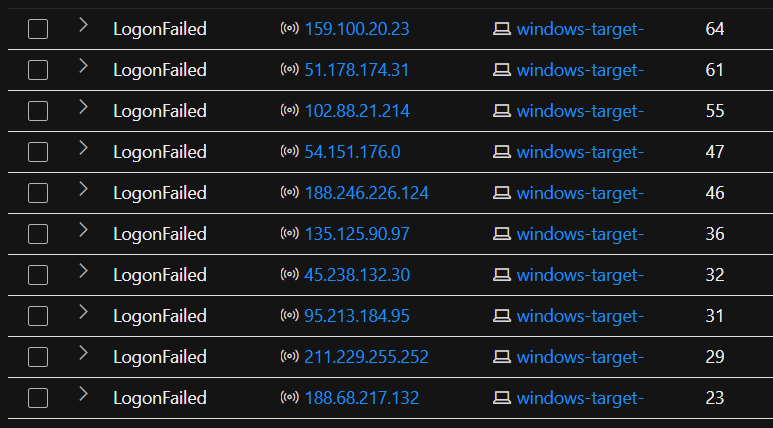 以下 IP 地址在过去七天内产生的失败身份验证尝试次数最多:
| 远程 IP | 失败尝试次数 |
|------------|----------------|
| `159.100.20.23` | 64 |
| `51.178.174.31` | 61 |
| `102.88.21.214` | 55 |
| `54.151.176.0` | 47 |
| `188.246.226.124` | 46 |
| `135.125.90.97` | 36 |
| `45.238.132.30` | 32 |
| `95.213.184.95` | 31 |
| `211.229.255.252` | 29 |
| `188.68.217.132` | 23 |
来自多个外部 IP 地址的反复失败登录尝试,与针对暴露系统进行的**暴力密码喷洒或凭据猜测活动**相吻合。
## 步骤 3:确定发生大量失败尝试的 IP 是否成功通过了身份验证
执行了后续查询,以确定那些产生大量失败尝试的 IP 地址是否成功对目标系统进行了身份验证。
### KQL 查询
```
// Investigate whether top failed IPs later succeeded in authentication
let RemoteIPs = dynamic([
"159.100.20.23",
"51.178.174.31",
"102.88.21.214",
"54.151.176.0",
"188.246.226.124",
"135.125.90.97",
"45.238.132.30",
"95.213.184.95",
"211.229.255.252",
"188.68.217.132"
]);
DeviceLogonEvents
| where LogonType has_any ("Network", "Interactive", "RemoteInteractive", "Unlock")
| where ActionType == "LogonSuccess"
| where RemoteIP has_any(RemoteIPs)
```
### 发现
以下 IP 地址在过去七天内产生的失败身份验证尝试次数最多:
| 远程 IP | 失败尝试次数 |
|------------|----------------|
| `159.100.20.23` | 64 |
| `51.178.174.31` | 61 |
| `102.88.21.214` | 55 |
| `54.151.176.0` | 47 |
| `188.246.226.124` | 46 |
| `135.125.90.97` | 36 |
| `45.238.132.30` | 32 |
| `95.213.184.95` | 31 |
| `211.229.255.252` | 29 |
| `188.68.217.132` | 23 |
来自多个外部 IP 地址的反复失败登录尝试,与针对暴露系统进行的**暴力密码喷洒或凭据猜测活动**相吻合。
## 步骤 3:确定发生大量失败尝试的 IP 是否成功通过了身份验证
执行了后续查询,以确定那些产生大量失败尝试的 IP 地址是否成功对目标系统进行了身份验证。
### KQL 查询
```
// Investigate whether top failed IPs later succeeded in authentication
let RemoteIPs = dynamic([
"159.100.20.23",
"51.178.174.31",
"102.88.21.214",
"54.151.176.0",
"188.246.226.124",
"135.125.90.97",
"45.238.132.30",
"95.213.184.95",
"211.229.255.252",
"188.68.217.132"
]);
DeviceLogonEvents
| where LogonType has_any ("Network", "Interactive", "RemoteInteractive", "Unlock")
| where ActionType == "LogonSuccess"
| where RemoteIP has_any(RemoteIPs)
```
### 发现
 查询结果中没有返回任何成功的身份验证尝试。
这表明**负责失败登录活动的前 10 个外部 IP 地址均未成功对系统进行身份验证**,从而降低了这些源成功发起暴力破解入侵的可能性。
## 步骤 4:验证对合法用户账户的成功登录
调查转向验证与合法用户账户 `labuser0` 相关的所有成功网络登录。
### KQL 查询 — 成功登录
```
// Determine successful logon attempts to labuser0
DeviceLogonEvents
| where LogonType == "Network"
| where ActionType == "LogonSuccess"
| where DeviceName == "windows-target-"
| where AccountName == "labuser0"
| summarize count()
```
### 发现
在过去 30 天内,识别出共有 **3 次成功登录**到 `windows-target-1` 上的 `labuser0` 账户。
### KQL 查询 — 失败登录
```
// Determine failed logon attempts to labuser0
DeviceLogonEvents
| where LogonType == "Network"
| where ActionType == "LogonFailed"
| where DeviceName == "windows-target-"
| where AccountName == "labuser0"
| summarize count()
```
### 发现
在过去 30 天内,观察到针对 `labuser0` 账户共有 **0 次失败的身份验证尝试**。
这极大地降低了该合法账户成为暴力破解活动目标或因此被入侵的可能性。
## 步骤 5:审查成功的身份验证活动
对与 `labuser0` 账户相关的成功身份验证事件进行了最终审查,以确定是否存在任何可疑特征。
### KQL 查询
```
// Investigate successful logons to labuser0
DeviceLogonEvents
| where LogonType == "Network"
| where ActionType == "LogonSuccess"
| where DeviceName == "windows-target-"
| where AccountName == "labuser0"
| summarize LogonCount = count() by DeviceName, ActionType, AccountName, RemoteIP
```
### 发现
对与 `labuser0` 相关的所有三次成功登录事件的手动审查显示了正常且符合预期的活动。未发现任何可疑行为、异常访问模式或未经授权使用的迹象。
## 结论
尽管 `windows-target-1` 被公开暴露在互联网上,并经历了表明暴力破解行为的反复失败的身份验证尝试,但目前**没有证据表明存在成功的未经授权访问**。
主要结论包括:
- 该虚拟机连续多天面向互联网,增加了攻击面暴露。
- 多个外部 IP 地址尝试了反复的失败身份验证,这与暴力破解或凭据猜测活动相吻合。
- 尝试次数最多的违规 IP 地址均未成功通过身份验证。
- 合法账户 `labuser0` 仅经历了成功的、符合预期的登录,且没有相关的失败尝试。
- 在审查已验证的会话期间,未发现任何可疑活动。
根据现有的遥测数据,这些活动似乎代表的是**针对暴露系统的未成功暴力破解尝试,而非已确认的入侵**。
## 相关的 MITRE ATT&CK 技术
| 技术 ID | 技术 | 相关性 |
|--------------|-----------|------------|
| **T1190** | 利用面向公众的应用程序 (Exploit Public-Facing Application) | 目标系统面向互联网并被外部暴露 |
| **T1110** | 暴力破解 (Brute Force) | 来自多个 IP 地址的反复失败的身份验证尝试 |
| **T1078** | 有效账户 (Valid Accounts) | 观察到来自合法 `labuser0` 账户的成功登录 |
## 响应和缓解措施
尽管未发现成功的系统入侵,但仍实施了多项强化措施以降低未来的风险暴露:
- 使用 Azure Network Security Group (NSG) 限制了入站 Remote Desktop Protocol (RDP) 访问,仅允许授权连接。
- 实施了账户锁定策略,以限制反复的身份验证失败并缓解暴力破解尝试。
- 通过限制不必要的互联网暴露和加强访问控制,减少了虚拟机的外部攻击面。
## 威胁狩猎流程改进
在对威胁狩猎过程进行审查后,在 `步骤 3:确定发生大量失败尝试的 IP 是否成功通过了身份验证` 中发现了一个 KQL 语法可以改进的地方。
回想一下,步骤 3 中使用的 KQL 查询是为了调查失败登录尝试次数最多的 10 个 IP 列表。
```
// Investigate whether top failed IPs later succeeded in authentication
let RemoteIPs = dynamic([
"159.100.20.23",
"51.178.174.31",
"102.88.21.214",
"54.151.176.0",
"188.246.226.124",
"135.125.90.97",
"45.238.132.30",
"95.213.184.95",
"211.229.255.252",
"188.68.217.132"
]);
DeviceLogonEvents
| where LogonType has_any ("Network", "Interactive", "RemoteInteractive", "Unlock")
| where ActionType == "LogonSuccess"
| where RemoteIP has_any(RemoteIPs)
```
尽管此查询足以满足本次威胁狩猎的目的,但 `| where RemoteIP has_any(RemoteIPs)` 这一行应该改为 `| where RemoteIP in (RemoteIPs)`。
为什么?
- `has_any` 通常用于在多值字段或文本块中进行搜索
- `in` 更适用于针对列表进行显式值匹配
这种语法上的细微改动将纳入未来的威胁狩猎中,以实现更清晰、语义更明确的查询。
查询结果中没有返回任何成功的身份验证尝试。
这表明**负责失败登录活动的前 10 个外部 IP 地址均未成功对系统进行身份验证**,从而降低了这些源成功发起暴力破解入侵的可能性。
## 步骤 4:验证对合法用户账户的成功登录
调查转向验证与合法用户账户 `labuser0` 相关的所有成功网络登录。
### KQL 查询 — 成功登录
```
// Determine successful logon attempts to labuser0
DeviceLogonEvents
| where LogonType == "Network"
| where ActionType == "LogonSuccess"
| where DeviceName == "windows-target-"
| where AccountName == "labuser0"
| summarize count()
```
### 发现
在过去 30 天内,识别出共有 **3 次成功登录**到 `windows-target-1` 上的 `labuser0` 账户。
### KQL 查询 — 失败登录
```
// Determine failed logon attempts to labuser0
DeviceLogonEvents
| where LogonType == "Network"
| where ActionType == "LogonFailed"
| where DeviceName == "windows-target-"
| where AccountName == "labuser0"
| summarize count()
```
### 发现
在过去 30 天内,观察到针对 `labuser0` 账户共有 **0 次失败的身份验证尝试**。
这极大地降低了该合法账户成为暴力破解活动目标或因此被入侵的可能性。
## 步骤 5:审查成功的身份验证活动
对与 `labuser0` 账户相关的成功身份验证事件进行了最终审查,以确定是否存在任何可疑特征。
### KQL 查询
```
// Investigate successful logons to labuser0
DeviceLogonEvents
| where LogonType == "Network"
| where ActionType == "LogonSuccess"
| where DeviceName == "windows-target-"
| where AccountName == "labuser0"
| summarize LogonCount = count() by DeviceName, ActionType, AccountName, RemoteIP
```
### 发现
对与 `labuser0` 相关的所有三次成功登录事件的手动审查显示了正常且符合预期的活动。未发现任何可疑行为、异常访问模式或未经授权使用的迹象。
## 结论
尽管 `windows-target-1` 被公开暴露在互联网上,并经历了表明暴力破解行为的反复失败的身份验证尝试,但目前**没有证据表明存在成功的未经授权访问**。
主要结论包括:
- 该虚拟机连续多天面向互联网,增加了攻击面暴露。
- 多个外部 IP 地址尝试了反复的失败身份验证,这与暴力破解或凭据猜测活动相吻合。
- 尝试次数最多的违规 IP 地址均未成功通过身份验证。
- 合法账户 `labuser0` 仅经历了成功的、符合预期的登录,且没有相关的失败尝试。
- 在审查已验证的会话期间,未发现任何可疑活动。
根据现有的遥测数据,这些活动似乎代表的是**针对暴露系统的未成功暴力破解尝试,而非已确认的入侵**。
## 相关的 MITRE ATT&CK 技术
| 技术 ID | 技术 | 相关性 |
|--------------|-----------|------------|
| **T1190** | 利用面向公众的应用程序 (Exploit Public-Facing Application) | 目标系统面向互联网并被外部暴露 |
| **T1110** | 暴力破解 (Brute Force) | 来自多个 IP 地址的反复失败的身份验证尝试 |
| **T1078** | 有效账户 (Valid Accounts) | 观察到来自合法 `labuser0` 账户的成功登录 |
## 响应和缓解措施
尽管未发现成功的系统入侵,但仍实施了多项强化措施以降低未来的风险暴露:
- 使用 Azure Network Security Group (NSG) 限制了入站 Remote Desktop Protocol (RDP) 访问,仅允许授权连接。
- 实施了账户锁定策略,以限制反复的身份验证失败并缓解暴力破解尝试。
- 通过限制不必要的互联网暴露和加强访问控制,减少了虚拟机的外部攻击面。
## 威胁狩猎流程改进
在对威胁狩猎过程进行审查后,在 `步骤 3:确定发生大量失败尝试的 IP 是否成功通过了身份验证` 中发现了一个 KQL 语法可以改进的地方。
回想一下,步骤 3 中使用的 KQL 查询是为了调查失败登录尝试次数最多的 10 个 IP 列表。
```
// Investigate whether top failed IPs later succeeded in authentication
let RemoteIPs = dynamic([
"159.100.20.23",
"51.178.174.31",
"102.88.21.214",
"54.151.176.0",
"188.246.226.124",
"135.125.90.97",
"45.238.132.30",
"95.213.184.95",
"211.229.255.252",
"188.68.217.132"
]);
DeviceLogonEvents
| where LogonType has_any ("Network", "Interactive", "RemoteInteractive", "Unlock")
| where ActionType == "LogonSuccess"
| where RemoteIP has_any(RemoteIPs)
```
尽管此查询足以满足本次威胁狩猎的目的,但 `| where RemoteIP has_any(RemoteIPs)` 这一行应该改为 `| where RemoteIP in (RemoteIPs)`。
为什么?
- `has_any` 通常用于在多值字段或文本块中进行搜索
- `in` 更适用于针对列表进行显式值匹配
这种语法上的细微改动将纳入未来的威胁狩猎中,以实现更清晰、语义更明确的查询。
以下 IP 地址在过去七天内产生的失败身份验证尝试次数最多:
| 远程 IP | 失败尝试次数 |
|------------|----------------|
| `159.100.20.23` | 64 |
| `51.178.174.31` | 61 |
| `102.88.21.214` | 55 |
| `54.151.176.0` | 47 |
| `188.246.226.124` | 46 |
| `135.125.90.97` | 36 |
| `45.238.132.30` | 32 |
| `95.213.184.95` | 31 |
| `211.229.255.252` | 29 |
| `188.68.217.132` | 23 |
来自多个外部 IP 地址的反复失败登录尝试,与针对暴露系统进行的**暴力密码喷洒或凭据猜测活动**相吻合。
## 步骤 3:确定发生大量失败尝试的 IP 是否成功通过了身份验证
执行了后续查询,以确定那些产生大量失败尝试的 IP 地址是否成功对目标系统进行了身份验证。
### KQL 查询
```
// Investigate whether top failed IPs later succeeded in authentication
let RemoteIPs = dynamic([
"159.100.20.23",
"51.178.174.31",
"102.88.21.214",
"54.151.176.0",
"188.246.226.124",
"135.125.90.97",
"45.238.132.30",
"95.213.184.95",
"211.229.255.252",
"188.68.217.132"
]);
DeviceLogonEvents
| where LogonType has_any ("Network", "Interactive", "RemoteInteractive", "Unlock")
| where ActionType == "LogonSuccess"
| where RemoteIP has_any(RemoteIPs)
```
### 发现
查询结果中没有返回任何成功的身份验证尝试。
这表明**负责失败登录活动的前 10 个外部 IP 地址均未成功对系统进行身份验证**,从而降低了这些源成功发起暴力破解入侵的可能性。
## 步骤 4:验证对合法用户账户的成功登录
调查转向验证与合法用户账户 `labuser0` 相关的所有成功网络登录。
### KQL 查询 — 成功登录
```
// Determine successful logon attempts to labuser0
DeviceLogonEvents
| where LogonType == "Network"
| where ActionType == "LogonSuccess"
| where DeviceName == "windows-target-"
| where AccountName == "labuser0"
| summarize count()
```
### 发现
在过去 30 天内,识别出共有 **3 次成功登录**到 `windows-target-1` 上的 `labuser0` 账户。
### KQL 查询 — 失败登录
```
// Determine failed logon attempts to labuser0
DeviceLogonEvents
| where LogonType == "Network"
| where ActionType == "LogonFailed"
| where DeviceName == "windows-target-"
| where AccountName == "labuser0"
| summarize count()
```
### 发现
在过去 30 天内,观察到针对 `labuser0` 账户共有 **0 次失败的身份验证尝试**。
这极大地降低了该合法账户成为暴力破解活动目标或因此被入侵的可能性。
## 步骤 5:审查成功的身份验证活动
对与 `labuser0` 账户相关的成功身份验证事件进行了最终审查,以确定是否存在任何可疑特征。
### KQL 查询
```
// Investigate successful logons to labuser0
DeviceLogonEvents
| where LogonType == "Network"
| where ActionType == "LogonSuccess"
| where DeviceName == "windows-target-"
| where AccountName == "labuser0"
| summarize LogonCount = count() by DeviceName, ActionType, AccountName, RemoteIP
```
### 发现
对与 `labuser0` 相关的所有三次成功登录事件的手动审查显示了正常且符合预期的活动。未发现任何可疑行为、异常访问模式或未经授权使用的迹象。
## 结论
尽管 `windows-target-1` 被公开暴露在互联网上,并经历了表明暴力破解行为的反复失败的身份验证尝试,但目前**没有证据表明存在成功的未经授权访问**。
主要结论包括:
- 该虚拟机连续多天面向互联网,增加了攻击面暴露。
- 多个外部 IP 地址尝试了反复的失败身份验证,这与暴力破解或凭据猜测活动相吻合。
- 尝试次数最多的违规 IP 地址均未成功通过身份验证。
- 合法账户 `labuser0` 仅经历了成功的、符合预期的登录,且没有相关的失败尝试。
- 在审查已验证的会话期间,未发现任何可疑活动。
根据现有的遥测数据,这些活动似乎代表的是**针对暴露系统的未成功暴力破解尝试,而非已确认的入侵**。
## 相关的 MITRE ATT&CK 技术
| 技术 ID | 技术 | 相关性 |
|--------------|-----------|------------|
| **T1190** | 利用面向公众的应用程序 (Exploit Public-Facing Application) | 目标系统面向互联网并被外部暴露 |
| **T1110** | 暴力破解 (Brute Force) | 来自多个 IP 地址的反复失败的身份验证尝试 |
| **T1078** | 有效账户 (Valid Accounts) | 观察到来自合法 `labuser0` 账户的成功登录 |
## 响应和缓解措施
尽管未发现成功的系统入侵,但仍实施了多项强化措施以降低未来的风险暴露:
- 使用 Azure Network Security Group (NSG) 限制了入站 Remote Desktop Protocol (RDP) 访问,仅允许授权连接。
- 实施了账户锁定策略,以限制反复的身份验证失败并缓解暴力破解尝试。
- 通过限制不必要的互联网暴露和加强访问控制,减少了虚拟机的外部攻击面。
## 威胁狩猎流程改进
在对威胁狩猎过程进行审查后,在 `步骤 3:确定发生大量失败尝试的 IP 是否成功通过了身份验证` 中发现了一个 KQL 语法可以改进的地方。
回想一下,步骤 3 中使用的 KQL 查询是为了调查失败登录尝试次数最多的 10 个 IP 列表。
```
// Investigate whether top failed IPs later succeeded in authentication
let RemoteIPs = dynamic([
"159.100.20.23",
"51.178.174.31",
"102.88.21.214",
"54.151.176.0",
"188.246.226.124",
"135.125.90.97",
"45.238.132.30",
"95.213.184.95",
"211.229.255.252",
"188.68.217.132"
]);
DeviceLogonEvents
| where LogonType has_any ("Network", "Interactive", "RemoteInteractive", "Unlock")
| where ActionType == "LogonSuccess"
| where RemoteIP has_any(RemoteIPs)
```
尽管此查询足以满足本次威胁狩猎的目的,但 `| where RemoteIP has_any(RemoteIPs)` 这一行应该改为 `| where RemoteIP in (RemoteIPs)`。
为什么?
- `has_any` 通常用于在多值字段或文本块中进行搜索
- `in` 更适用于针对列表进行显式值匹配
这种语法上的细微改动将纳入未来的威胁狩猎中,以实现更清晰、语义更明确的查询。标签:KQL, Microsoft Azure, Microsoft Defender for Endpoint, 免杀技术, 暴力破解检测, 红队行动, 网络安全, 隐私保护